

WhatsApp Business Username Is Now Available: Which Business Numbers Should Claim It First?

Team YCloud
·
July 1, 2026
·
6 min read
WhatsApp Business Username is now open for claiming.
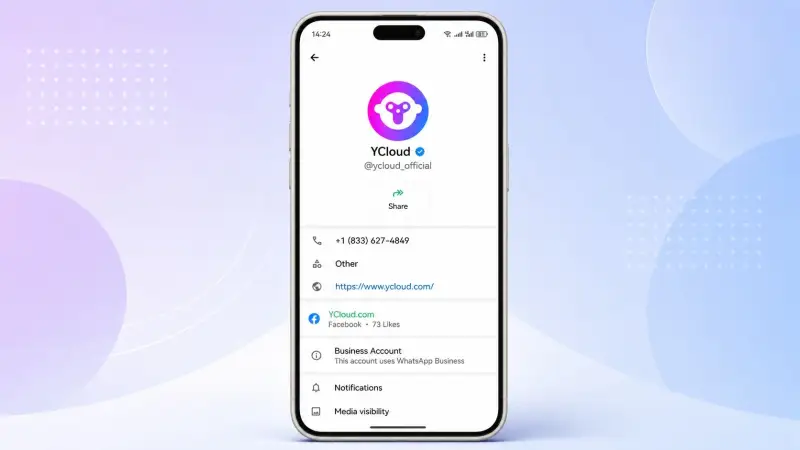
With this update, customers will be able to enter a business username in WhatsApp and find the corresponding WhatsApp Business account, instead of relying only on phone numbers, QR codes, links, ads, or saved contacts.
For businesses, this is more than a new account setting. It is a new searchable contact entry point and a brand asset that should be planned carefully.
If your WhatsApp Business number is designed to be found by customers, such as a customer support number, sales inquiry number, store number, regional service number, or official brand contact, YCloud recommends claiming a Business Username as early as possible.
What Is a WhatsApp Business Username?
A WhatsApp Business Username is a unique username assigned to a WhatsApp Business phone number.
Traditionally, customers needed to know a company’s phone number or access the business through a website, ad, QR code, click-to-WhatsApp link, or other external channel.
With Business Username, customers will have another way to reach a business on WhatsApp. They can enter the exact username and find the matching WhatsApp Business account.
In practice, it works like a memorable service entry point inside WhatsApp.
For example:
ycloud_supportycloud_salesycloud_usycloud_official
Compared with a long international phone number, a username is easier to remember, easier to share, and more suitable for websites, ads, email signatures, social media profiles, campaign pages, and offline materials.
Which WhatsApp Business Numbers Should Claim a Username First?
Not every WhatsApp Business number needs to claim a username immediately.
The first priority should be numbers that are meant to be discovered and contacted by customers.
These usually include:
- Customer support numbers
- Sales inquiry numbers
- Official brand contact numbers
- Regional or country-specific service numbers
- Store or branch contact numbers
- Campaign, event, or partner channel numbers
These numbers act as customer-facing entry points. The easier they are to find, the easier it becomes for your business to capture inquiries, route conversations, provide support, and convert customers.
If a number is mainly used for internal operations, outbound notifications, after-sales follow-ups, or workflows where customer discovery is not important, you can decide based on your business priority.
Why Should Businesses Claim Usernames Early?
The most important reason is uniqueness.
A WhatsApp Business Username can only be mapped to one WhatsApp Business phone number. At the same time, one phone number can only have one username at a given time.
This means that if your brand name, product name, market name, or service entry point is claimed by another account first, you may no longer be able to use the exact same username.
For businesses, claiming a username is not just a functional setup. It is also a brand protection action.
The earlier you claim it, the better your chance of securing a username that matches your brand identity and your customers’ search habits.
What Value Can Business Username Bring?
1. Make It Easier for Customers to Find You
Customers do not need to memorize an international phone number. They can use a clear and recognizable username to find the right WhatsApp Business account.
2. Strengthen Brand Recognition
A username is easier to associate with a brand, region, business line, or service scenario than a phone number.
For example, brand_support is much clearer than a long phone number with a country code.
3. Improve External Promotion
Business Username can be used across multiple touchpoints, including:
- Website contact pages
- Landing pages
- Digital ads
- Social media bios
- Email signatures
- Event pages
- Offline store materials
- Brochures and packaging
This makes it easier for customers to start a conversation with your business.
4. Help Multi-Number Businesses Organize Entry Points
Many businesses use multiple WhatsApp Business numbers for different countries, stores, teams, or business lines.
Business Username helps make these entry points easier to understand.
For example:
brand_usbrand_sgbrand_supportbrand_salesbrand_store01
This allows customers to reach the right team faster.
How Should Businesses Plan Multiple WhatsApp Usernames?
If your business uses multiple WhatsApp Business numbers, you should first map each number to its business purpose.
Then, create a consistent naming structure.
You can organize usernames by region:
brand_usbrand_sgbrand_uk
You can organize them by business function:
brand_supportbrand_salesbrand_vip
You can also organize them by store, campaign, or channel:
brand_store01brand_eventbrand_partner
The best username should be easy to understand, easy to remember, and closely related to the customer scenario.
Avoid usernames that are too long, too internal, or difficult for customers to type correctly.
WhatsApp Business Username Naming Rules
When applying for a Business Username, businesses need to follow WhatsApp’s username format requirements.
A Business Username:
- Can include lowercase English letters
a-z - Can include numbers
0-9 - Can include periods
.and underscores_ - Must be between 3 and 35 characters
- Must contain at least one letter
- Cannot contain non-English characters such as
ñ,é, orü - Cannot start or end with a period
- Cannot contain two consecutive periods
- Cannot start with
www - Cannot end with domain suffixes such as
.com,.org,.net,.edu,.gov,.us,.in, or.html
Username matching is not case-sensitive.
For example, myID and myid are treated as the same username.
However, periods and underscores are treated as different characters.
For example:
myidmy.idmy_id
These are considered different usernames.
Before claiming usernames, businesses should define a unified naming rule to avoid confusion in future promotion, operations, and customer communication.
Will the Username Become Active Immediately?
Not necessarily.
According to the rollout logic, a claimed and approved Business Username will become effective when the WhatsApp Username feature is officially available in the relevant country or region.
That means the current priority is to claim and reserve the username first.
Once WhatsApp Username becomes available for your target market, customers will be able to use the username to find your business account.
It is also important to note that adopting a Business Username does not necessarily hide your business phone number in WhatsApp or WhatsApp Business. The main value of Business Username is to create a new discovery entry point and improve brand recognition.
If you manage your WhatsApp Business Account through YCloud, you can claim your Business Username from the YCloud dashboard.
The general process is:
- Log in to your YCloud account.
- Go to the WhatsApp Business Accounts page.
- Select the relevant WhatsApp Business phone number.
- Claim the Business Username for that number.
Starting from June 29, 2026, businesses can choose to claim the username reserved by WhatsApp or apply for another username that better fits their brand needs.
What Should Businesses Do Now?
If your company is already using WhatsApp Business numbers, now is the right time to review your username strategy.
Start with these three steps.
First, identify the numbers that customers need to find proactively.
These may include support numbers, sales inquiry numbers, official brand numbers, regional service numbers, or store numbers.
Second, plan a clear username structure.
Prioritize your brand name first. Then consider adding region, business line, store, or service scenario when needed.
Third, claim the usernames as early as possible through YCloud.
Because usernames are unique, early claiming helps reduce the risk of losing important brand or service entry names.
WhatsApp Business Username is becoming a new way for customers to find and contact businesses on WhatsApp.
If you want customers to reach your team faster and enter the right conversation more easily, now is the time to claim your Business Username.
About YCloud
YCloud is a leading WhatsApp Business solution provider and an official top-tier WhatsApp Business Solution Provider.
With YCloud, businesses can manage customer conversations, automate engagement, build AI agents, run WhatsApp marketing campaigns, and connect WhatsApp with their existing business systems.
YCloud helps global businesses build a complete WhatsApp growth engine across marketing, sales, customer service, and automation.
Frequently Asked Questions
What is a WhatsApp Business Username?
A WhatsApp Business Username is a unique username connected to a WhatsApp Business phone number. It gives customers another way to find and contact a business on WhatsApp.
Is WhatsApp Business Username the same as a phone number?
No. A username is not a phone number. It is a more memorable identifier that helps customers find the business account.
Should every WhatsApp Business number claim a username?
Not necessarily. Businesses should prioritize numbers that are meant to be found by customers, such as support, sales, brand, store, or regional service numbers.
Why should businesses claim usernames early?
Because usernames are unique. If another account claims the username you want first, you may not be able to use the exact same one later.
Can one WhatsApp Business number have multiple usernames?
No. One WhatsApp Business phone number can only have one username at a given time.
Can the same username be used by multiple business numbers?
No. A Business Username is unique across WhatsApp and can only be mapped to one business phone number.
What characters can be used in a Business Username?
A username can contain English letters, numbers, periods, and underscores. It must be 3 to 35 characters long and include at least one letter.
Does a Business Username hide my business phone number?
No. Business Username mainly adds a new contact entry point and improves brand recognition. It does not automatically hide the business phone number in WhatsApp or WhatsApp Business.
Will my claimed username work immediately?
A claimed and approved username will become active when the WhatsApp Username feature is officially available in the relevant country or region.
Can WhatsApp Business App users claim Business Username now?
At the time of writing, WhatsApp Business App username claiming is not yet available.
How can I claim a WhatsApp Business Username with YCloud?
If you manage your WhatsApp Business Account through YCloud, you can go to the WhatsApp Business Accounts page in the YCloud dashboard, select the relevant business number, and submit your username claim.

Make your business communications much easier!


Trusted by




