YCloud vs WATI: Which Offers Better Value for Your Business?


Disclaimer: The references to software ratings, available features, and pricing were valid at the time of writing this article but could be subject to change in the future.
TL;DR
- Start without a subscription: Our Free Forever plan includes core WhatsApp tools and API/webhook access, with no credit card required.
- Keep message pricing clear: We charge Meta’s message rates without markup. WATI bills against its own rate card.
- Connect AI to your business: Our Data Connector supports MCP connections to external tools and data, helping you build workflows around your operations.
- Bring more accounts into one platform: Our plans include increasing user and channel allowances, reaching 40 users and 30 channels on Enterprise.
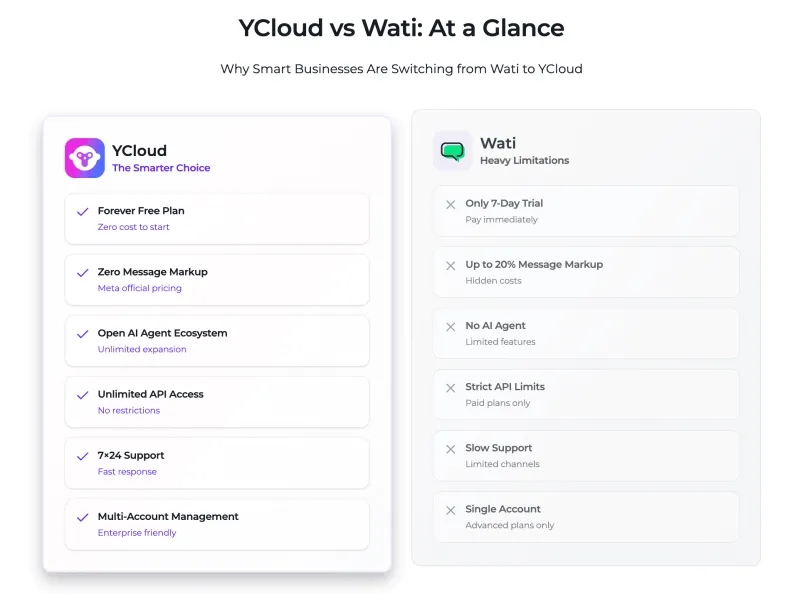
YCloud vs WATI at a Glance
What to compare | YCloud | WATI |
Free plan or trial | Free Forever plan; no credit card required | Seven-day trial; also advertises a separate pay-as-you-go option for bulk campaigns |
Subscription pricing | Growth: $39/month; Pro: $89/month; Enterprise: $399/month, billed annually | Growth, Pro and Business plans; pricing varies by region and billing term |
Message charges | Zero markup on Meta’s WhatsApp message rates | Messages billed using WATI’s rate card; compare by country and message category |
AI and integrations | AI agents with Data Connector/MCP support for connecting external tools and business data | Chatbot automation and integrations; Astra AI agents offered as a separately priced add-on |
API and webhooks | API and webhooks included across plans, including Free | Growth: 10,000 API calls/month, no webhooks; Pro: 200,000 calls, limited webhooks; Business: 20 million calls, extensive webhooks |
Accounts and seats | Free: 1 user/2 channels; Growth: 2/3; Pro: 6/8; Enterprise: 40/30 | Growth: 3 users; Pro and Business: 5 users. Multiple WhatsApp numbers listed on Business |
Support | Weekday support on Free, Growth and Pro; dedicated account manager on Pro; 24/7 priority support on Enterprise | Growth: 24/5 email; Pro: 24/7 email and chat; Business: priority support and a customer success manager |
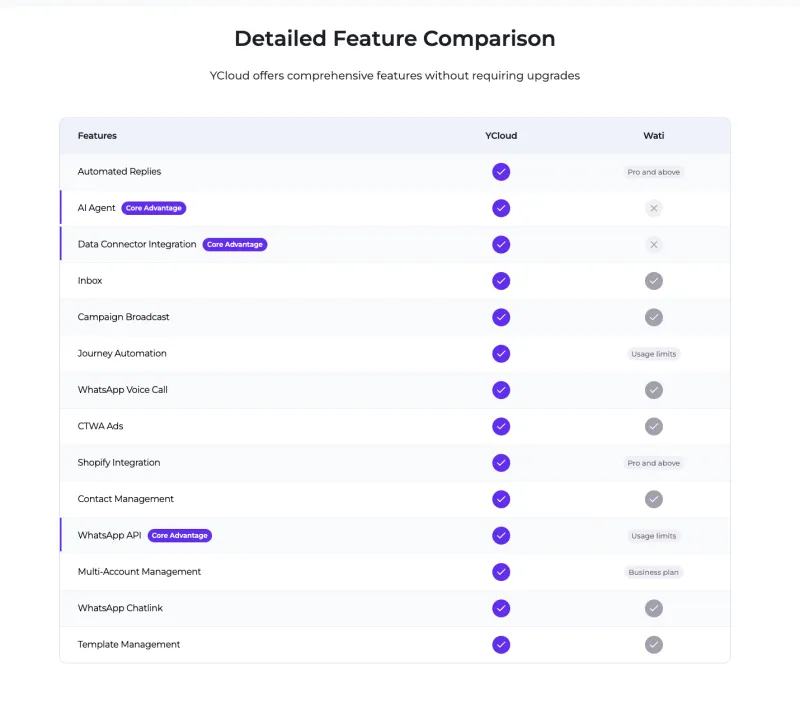
Features: What’s Included, and What Requires an Upgrade?
Feature | YCloud | WATI | Plan or usage restriction |
Shared inbox | Included across plans | Available from Growth | WATI lists advanced routing, teams and operator reports on Pro and above. |
Contact management | Included across plans | Available | Check user permissions and account requirements when organising access for larger teams. |
Template management | Included across plans | Available | Template availability does not include the cost of sending chargeable messages. |
Broadcast campaigns | Included across plans | Available from Growth | WATI lists 15,000 broadcasts/month on Growth and unlimited broadcasts on Pro and Business; messaging charges remain separate. |
Automated replies | Chatbot builder included across plans | Automation available with plan-based allowances | WATI lists advanced chatbot capabilities on Pro and above. |
Journey automation | Included across plans | Available with usage allowances | WATI includes 1,000 automation triggers/month on Growth, 2,000 on Pro and 5,000 on Business. |
WhatsApp calling | Listed across plans | Listed from Growth | Confirm calling setup and applicable call charges separately. |
Click-to-WhatsApp ads | Supported | Supported from Growth | WATI lists source tags, click tracking and engagement insights on Pro. Meta ad spend is separate. |
WhatsApp chat links | Supported | Supported | Chat links provide an entry point; the automation that follows depends on your setup. |
Shopify integration | Listed as a paid add-on | Basic abandoned-cart and order templates listed on Growth; additional capabilities on Pro | YCloud lists $5/shop/month; add-ons are unavailable on Free. Compare the Shopify workflows you actually need. |
API and webhooks | Included across plans | Access varies by tier | WATI Growth: 10,000 API calls/month, no webhooks; Pro: 200,000 calls, limited webhooks; Business: 20 million calls, extensive webhooks. |
Multi-account management | Channel allowances increase by plan | Multiple WhatsApp numbers listed on Business | YCloud lists 2/3/8/30 channels on Free/Growth/Pro/Enterprise; additional channels are a paid add-on. |
AI and Integrations: What Can You Automate?
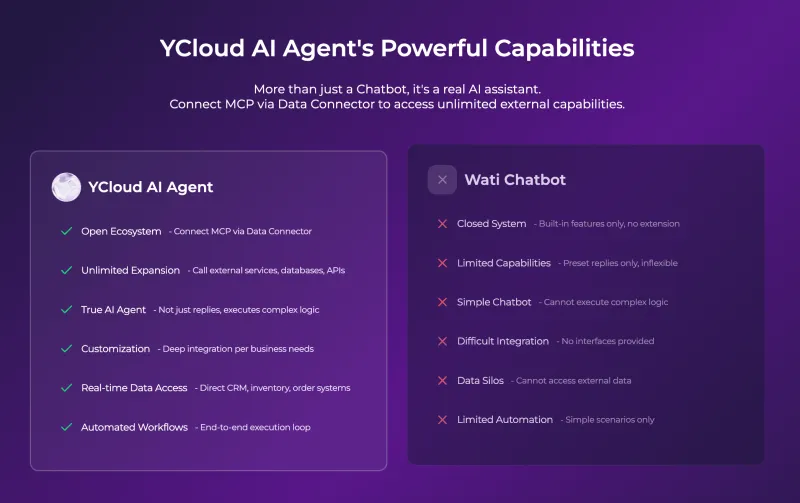
Business task | What you can configure with YCloud |
Order and inventory enquiries | Retrieve current information from connected order or stock systems. |
CRM and database access | Connect customer records, databases and external APIs to support relevant answers and actions. |
Returns and after-sales support | Build workflows that follow your eligibility rules and use connected systems to complete permitted steps. |
Conversation routing | Direct enquiries to the appropriate team using business rules. |
Answer improvement | Use business knowledge sources and the Suggestion feature to refine responses. |
How this compares with WATI
Pricing: Compare the Full Cost
Subscription plans
Plan level | YCloud | Included seats | WATI | Included seats |
| Free/trial | Free Forever: $0 | 1 | Seven-day trial | Confirm trial allowance |
| Growth | $39/month | 2 | $89/month* | 3 |
| Pro | $89/month | 6 | $249/month* | 5 |
| Enterprise / Business | Enterprise: $399/month | 40 | Business: Custom | 5 |
Please note: Matching plan names do not mean identical capabilities.
Same Productivity, Software Cost Savings of 56%+
Simple Software Versions, Pay-as-You-Go
Transparent Pricing, No Hidden Fees
Unlimited API Calls
What adds to the bill?
- Messages: We apply zero markup to Meta’s rates. Your bill follows the applicable destination and message category; WATI charges according to its own rate card.
- Extra seats and connections: Our paid-plan add-ons include users at $10/month, channels at $5/month and Shopify stores at $5/month. Add-ons are unavailable on Free.
- AI and upgrades: Our plans include AI credit allowances, with additional credits available for purchase on paid plans. WATI lists Astra separately; other capabilities may require a higher subscription.
- Taxes: Check applicable taxes before comparing final totals.
What does YCloud’s free plan include?
Explore YCloud Free planWhat could you save? A calculator example
Message category | Monthly volume | YCloud cost shown | WATI cost shown |
| Marketing | 5,000 | $366.00 | $439.20 |
| Utility | 3,000 | $33.90 | $56.52 |
| Authentication | 2,000 | $22.60 | $102.00 |
Monthly messaging total | 10,000 | $422.50 | $597.72 |
- Annual subscription savings: ($249 − $89) × 12 = $1,920
- Annual messaging savings: ($597.72 − $422.50) × 12 = $2,102.64
- Combined annual savings: $4,022.64, rounded to $4,023
Support and Switching from WATI
YCloud plan | Support and onboarding | Included users / channels |
Free | Self-onboarding, documentation and weekday email support | 1 / 2 |
Growth | Self-onboarding, weekday email and online support | 2 / 3 |
Pro | Assisted onboarding and a dedicated account manager during weekday support hours | 6 / 8 |
Enterprise | Assisted onboarding and 24/7 priority support | 40 / 30 |
How long does the migration from Wati take?
Which Platform Fits Your Business?
- Start free: Explore the inbox, campaigns, automation and API/webhooks without a subscription.
- Avoid message markup: Pay Meta’s applicable rates without an additional YCloud margin.
- Build connected workflows: Use our AI agents and Data Connector to work with configured business systems.
- Expand your team and accounts: Choose defined user and channel allowances, with paid add-ons available when needed.
Frequently Asked Questions
What does YCloud’s free plan include?
Our Free Forever plan includes one user, two channels, 500,000 generative AI credits and core inbox, campaign, automation and API/webhook tools. No credit card is required; applicable messaging charges remain separate. View plan details
Does zero markup mean WhatsApp messages are free?
No. You pay Meta’s applicable messaging rates, and we add no markup. Your messaging cost depends on the destination and message category. YCloud messaging pricing.
How does YCloud’s Data Connector work?
Our Data Connector supports MCP, allowing AI agents to connect with external APIs, databases and business systems. Once configured with the necessary permissions, agents can retrieve information and perform actions within your workflows. Explore the capabilities.
How long does migration from WATI take?
Our estimated account-migration time is 1–2 business days, with team assistance. We’ll help confirm the scope and timing, including any separate work needed for automations or integrations. Migration information.
What support is available on free and paid plans?
Free includes documentation and weekday email support; Growth adds online support. Pro includes assisted onboarding and a dedicated account manager during weekday support hours, while Enterprise provides as
Related Articles

Make your business communications much easier!


Trusted by