

How To Do WhatsApp Blast Without Getting Banned? (2026 Guide)

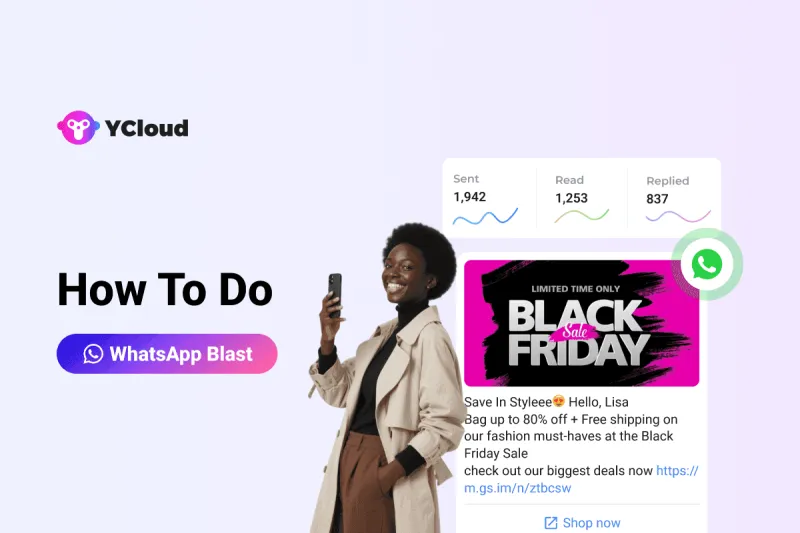
Ever sent a WhatsApp blast and got banned right after?
You’re not alone. One wrong move, like blasting unapproved content to cold contacts and boom, your number’s blocked.
But here’s the good news: you can run high-impact WhatsApp blasts without risking a ban. Whether you're launching a flash sale, sending payment reminders, or running a product drop, this guide will walk you through how to do WhatsApp blast the right way.
From safe sending methods and automation tools to message hacks and conversion tips, we’ve covered everything you need to run smarter, compliant WhatsApp campaigns in 2026.
So, without further ado, let's explore how to do WhatsApp blast campaigns that actually work!
What Is WhatsApp Blast and Why Should Businesses Use It?
WhatsApp Blast is a feature powered by the WhatsApp Business API that lets you send one message to hundreds or even thousands of recipients at once, without starting a group chat or saving numbers to your contact list.
Think of it as your business’s megaphone: you craft a message once, and it’s delivered individually to every customer in your list. Whether it’s flash sale announcements, payment reminders, order updates, or festive greetings, WhatsApp Blast is a quick, efficient way to reach your audience instantly.
Unlike the standard WhatsApp broadcast (which caps out at 256 contacts), WhatsApp Blast via the Business API supports millions of recipients per day, allows rich media (images, buttons, PDFs, videos), and ensures end-to-end encryption for secure communication.
The best part? Your message lands in the recipient’s inbox as a 1:1 private message, maintaining privacy, engagement, and open rates.
Up next let's explore how to send WhatsApp blast messages safely without getting your number banned.
How to Send WhatsApp Blast Messages Without Getting Banned?
If you’re planning a WhatsApp blast campaign, don’t hit send just yet. Using the wrong method can get your number banned in no time. But don’t worry, here are three safe, scalable ways to send WhatsApp blast messages without violating platform rules.
Method 1: WhatsApp Blast via Regular WhatsApp
If you're using the standard WhatsApp app, you can use the built-in Broadcast List feature to send a single message to multiple recipients at once.
Follow the below mentioned steps to to a WhatsApp blast via the normal WhatsApp app:
Step 1: Open WhatsApp and go to the Chats tab.
Step 2: Tap the three dots (Android) or "Plus icon" (iOS).
Step 3: Select "New Broadcast".
Step 4: Choose up to 256 contacts who have saved your number.
Step 5: Type your message and hit Send.
📌 The message will be delivered individually to each contact, not as a group message.
Method 2: WhatsApp Blast via WhatsApp Business
The WhatsApp Business App offers similar broadcast functionality, with added features like labels, automated greetings, and quick replies.
Follow the below mentioned steps to to a WhatsApp blast via the WhatsApp Business app:
Step 1: Open the WhatsApp Business App.
Step 2: Navigate to Chats, then tap the menu (⋮) and select "New Broadcast".
Step 3: Add up to 256 recipients (must have saved your number).
Step 4: Type your message and send it.
Step 5: Use labels and filters to manage conversations more efficiently.
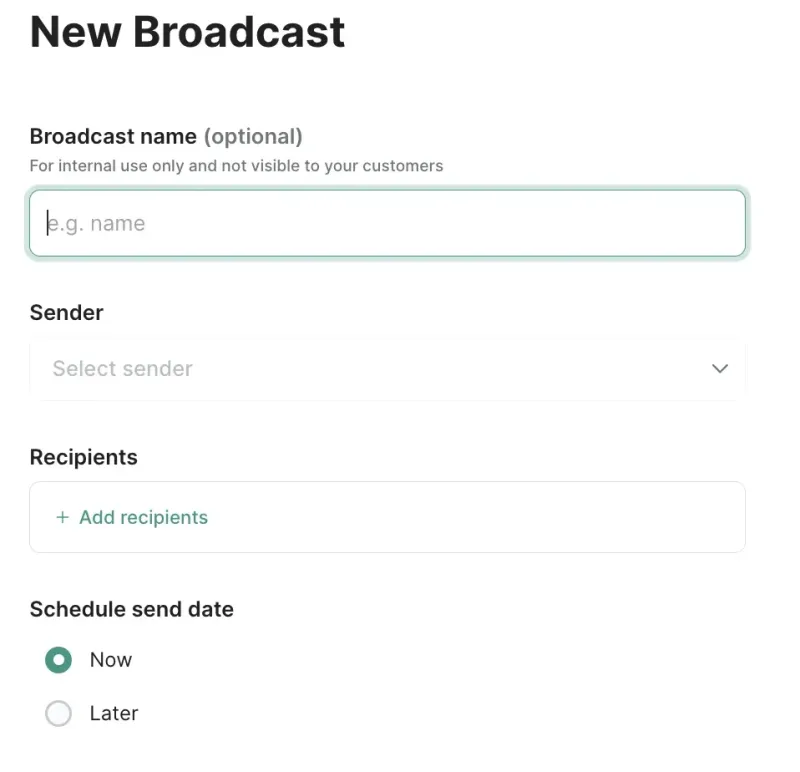
This method is great for small businesses that want to keep communication semi-automated without diving into the WhatsApp API or external tools. However, this comes with some limitations.
👉 Limitations of WhatsApp & WhatsApp Business
While these built-in features are easy to use, they come with major limitations:
- 🚫 Max 256 contacts per broadcast. Want to message 5,000 people? That’s 20 lists.
- 📇 You can only message contacts who have saved your number.
- 🛠️ No campaign analytics or performance tracking
- 🤖 No chatbot or marketing automation
- 🔄 Manual setup. No analytics, no automation, no CRM integrations.
- 👥 Can’t be used by more than 4 users at a time.
This method works well for small businesses sending basic promotions to warm leads. But once your audience grows, or if you need advanced automation, or if you're planning to scale your outreach or run frequent campaigns, these methods won’t cut it and you’ll hit a wall fast.
That’s where Method 3 comes in!
Method 3: WhatsApp Blast via YCloud WhatsApp API
If you’re serious about WhatsApp marketing and need smart automation, advanced analytics, and scale, leverage the WhatsApp Business API via official providers like YCloud.
What you can do with YCloud:
- Send thousands and millions of messages/day to opted-in users
- Reach both saved and unsaved numbers (with consent)
- Automate replies using AI-powered chatbots
- Track performance with real-time analytics
- Integrate with CRMs, eCommerce platforms, Google Sheets, and much more
Since you know what YCloud is capable of let's now explore how to do WhatsApp blast via YCloud.
How To Do WhatsApp Blast via YCloud?
Here are the steps to do WhatsApp Blast via YCloud:
Before creating a WhatsApp blast campaign on YCloud, you need to complete the following steps:
Step 1: Create a YCloud account
Click to register your YCloud account.
Step 2: Create a WABA account
Prerequisites:
- A Facebook account
- Phone number.
- The phone number must be able to receive voice calls or text messages.
- The number shouldn't have any existing WhatsApp App or business account.
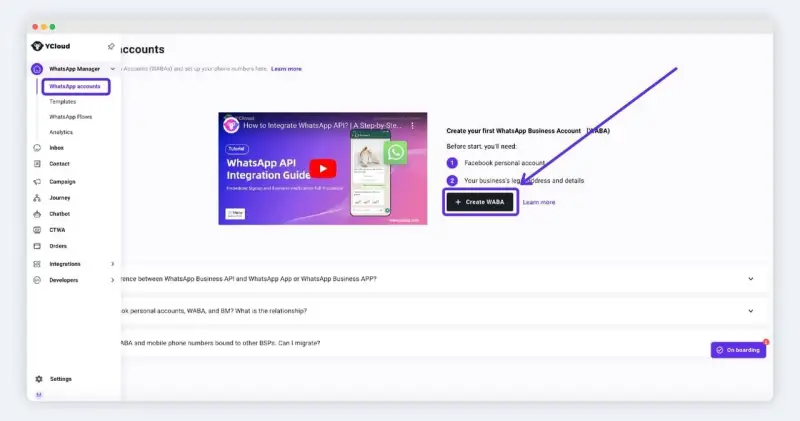
Click to know how to Create a WhatsApp Business API Account
Step 3: Create a marketing template
1. Create template
If there are multiple WABA users in the account, please switch the WABA account in the upper right corner.
- Log in to your YCloud account > WhatsApp Manager > Templates > Add Templates
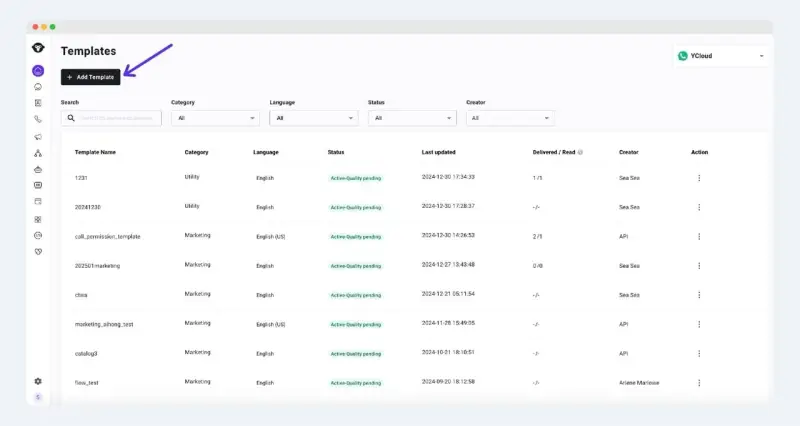
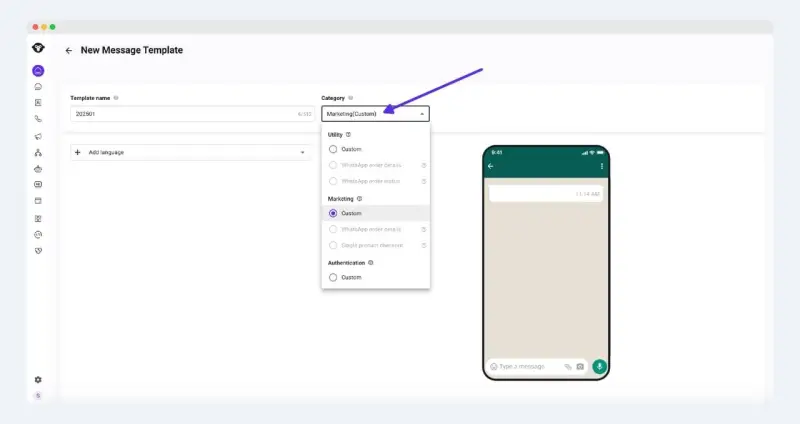
2. Name & Select Type & Select language
Select the Category as Marketing, name the template and select the template language
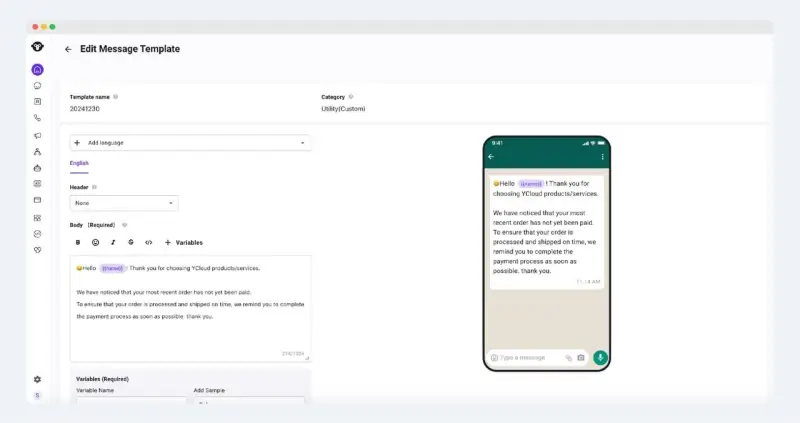
3. Edit template content
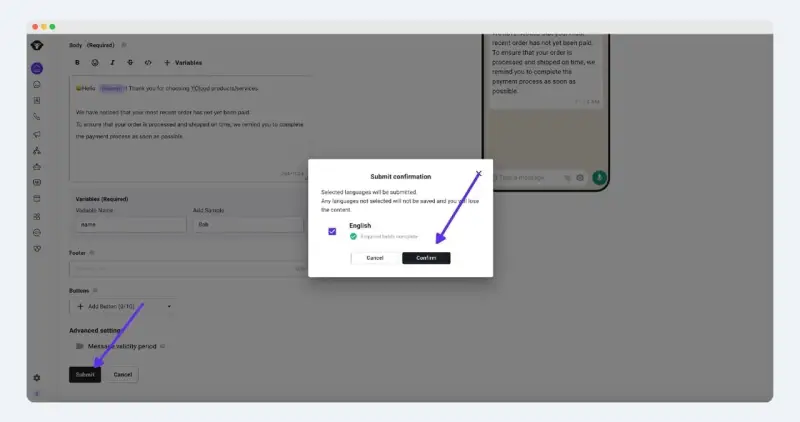
4. Submit template
Confirm that the template content is correct and click Submit > Confirm
5. After the template is approved, it can be configured and sent
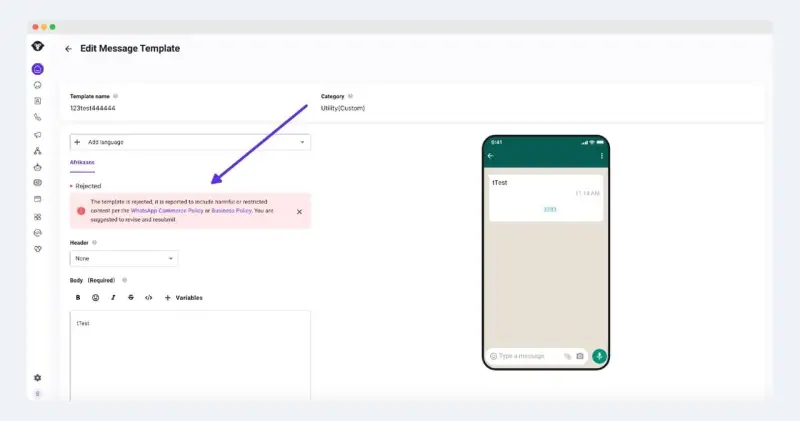
Templates are reviewed by Meta, please be patient. Generally, the audit will be completed within 1 day.
Review failure: If the template is rejected, you can go to the edit page to find out the reason, and modify the template or appeal according to the meta response.
Click to explore How to Create Template
Since our prerequistes are ready, let's now move on to explore how to setup a WhastApp blast campaign on YCloud.
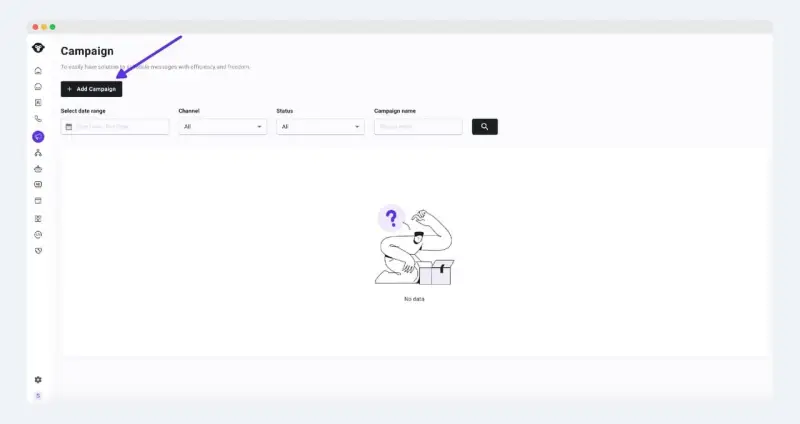
Step 1: Add campaign
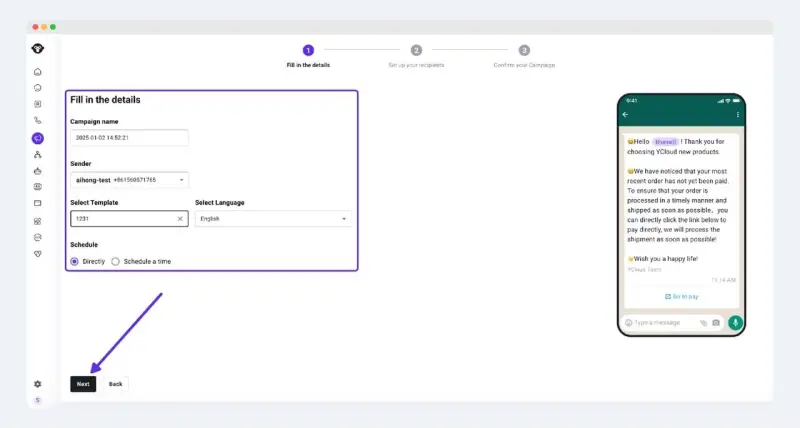
Step 2: Fill in the Campaign information and click Next
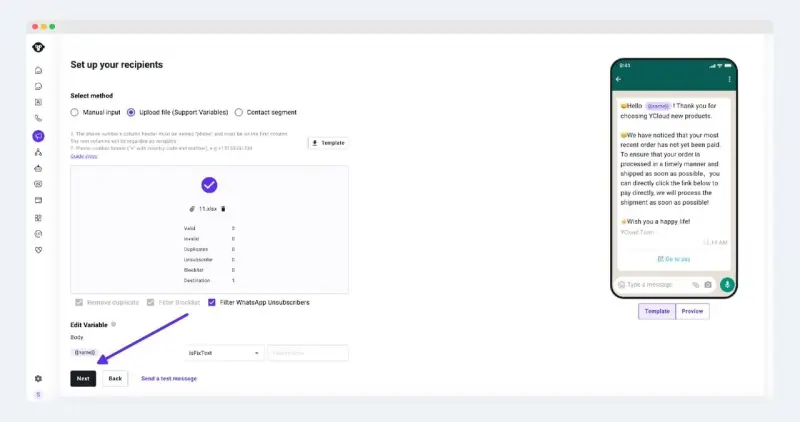
Step 3: Select the recipient
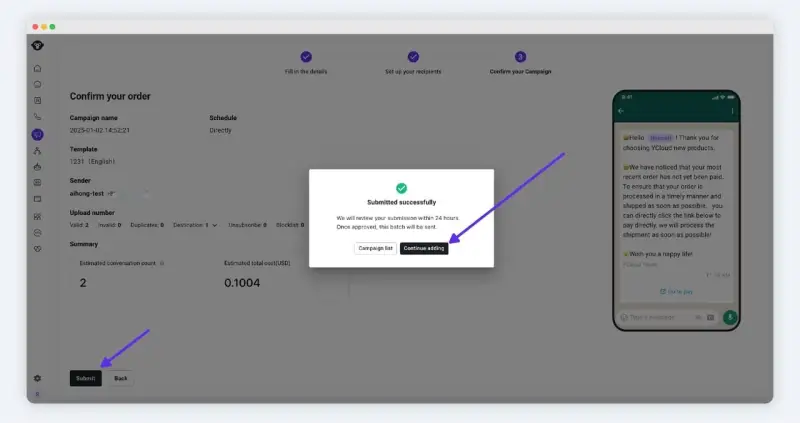
Step 4: Confirm the content is correct, click submit, and send it after approval
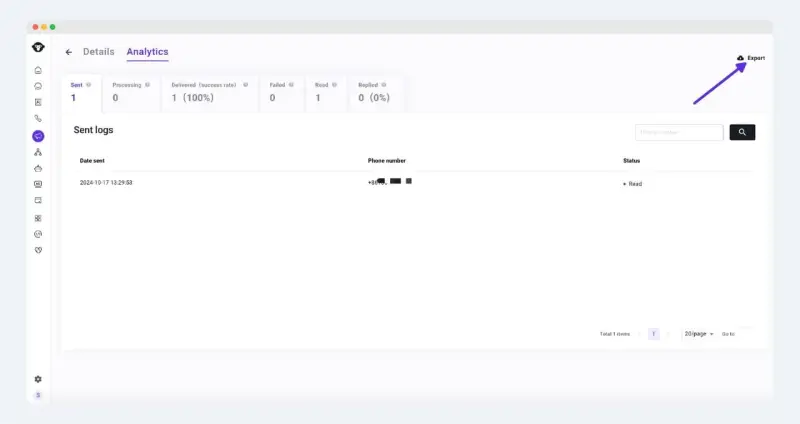
Step 5: View the campaign performace
Select Campaign > Action > Analytics
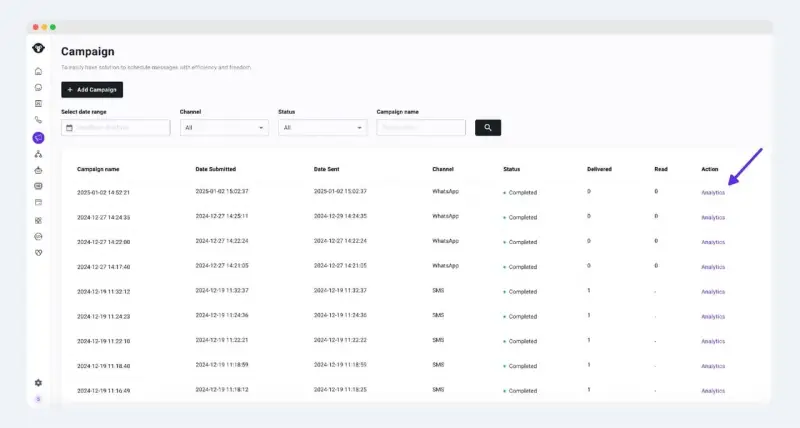
You can also download the data localization analysis from the upper right corner via "Export" button.
Click to explore How to Create a WhatsApp Marketing Campaign
Since this method is approved by Meta, you stay fully compliant and minimize the risk of bans, unlike shady third-party tools that violate WhatsApp’s terms and trigger restrictions.
🚨 Bonus Tip: Want to avoid a ban altogether? Always get opt-in before sending, personalize your content, and give users a way to opt out easily.
Now that you know the safest methods, let’s walk you through the best practices for sending WhatsApp blasts.
Proven Best Practices to Send WhatsApp Blasts Safely & Effectively
Sending WhatsApp blasts isn’t just about hitting “send.” It’s about delivering the right message, to the right people, at the right time, without triggering spam filters or account bans.
Follow these industry-proven best practices to ensure your WhatsApp campaigns stay compliant, engaging, and high-performing.
✅ 1. Always Get Opt-In Before Messaging
This is non-negotiable. WhatsApp requires businesses to get explicit consent from users before initiating conversations. Failing to do so risks your account being flagged or banned.
👉 Use CTWA ads, lead forms, or checkboxes at checkout to collect user opt-ins properly.
🎯 2. Personalize Messages at Scale
Even in bulk messaging, a personal touch matters. Use variables like first names, order details, or location to make each message feel tailored.
Platforms like YCloud make this easy with dynamic variables you can plug directly into your templates.
📊 3. Track and Optimize Campaign Performance
Sending without measuring is like marketing blindfolded. Monitor:
- Open and click-through rates
- Template quality rating
- Delivery failures and opt-outs
Then use these insights to tweak your messaging style and timing.
🎨 4. Add Visuals to Increase Engagement
Images, GIFs, and videos aren’t just for fun, they can increase engagement by up to 650% compared to plain-text messages. Use branded visuals, product demos, or even short clips to catch attention fast.
🧪 5. A/B Test Templates and Timing
Try different content styles, headlines, or send times to see what drives better results. Small tweaks can lead to big improvements in response rates.
⏳ 6. Send Messages Consistently, Not All at Once
Avoid sudden spikes in message volume. Build your sending patterns gradually and maintain consistency. This helps avoid triggering WhatsApp’s spam detection.
📌 Message Template Guidelines You Must Follow
Every blast message sent via WhatsApp API must use an approved message template. WhatsApp reviews your templates based on:
- ✅ Relevance and quality of the message
- 📝 Proper grammar, spelling, and formatting
- 📌 Clear opt-out instructions
- 📊 Message type selection (Marketing, Utility, etc.)
Template pacing (introduced in April 2024) also matters. WhatsApp delays delivery if a new template receives poor user feedback. So, test templates internally before launching at scale.
Following these best practices isn’t just about safety, it’s about performance. With compliance and creativity combined, businesses using YCloud have seen delivery rates as high as 98%.
Next up, let’s explore the real business benefits of using WhatsApp blasts. 🚀
Meta's WhatsApp API Message Template Category Guidelines Update: Effective July 1st, 2025
Why WhatsApp Blast is Game-Changer for Business Growth
If you're still relying on email or SMS to connect with customers, you're missing out. WhatsApp blast offer unmatched reach, engagement, and efficiency, all while keeping your communication personal and compliant.
Let’s explore the biggest benefits that make WhatsApp blast an essential part of your marketing, sales, and support stack.
🚀 1. Reach More Customers, Instantly
Deliver updates, offers, or alerts to thousands of users at once, without creating groups. WhatsApp blasts let you scale communication instantly across your entire customer base.
💰 2. Cut Costs, Not Conversations
Ditch expensive SMS or traditional marketing. WhatsApp blasts are cost-efficient, especially when paired with WhatsApp Business API providers like YCloud that offer zero markup pricing.
📈 3. Tap Into 98% Open Rates
With a whopping 98% message open rate, WhatsApp blasts outperform email, SMS, and even push notifications, ensuring your content doesn’t get buried or ignored.
🧠 4. Personalize at Scale
Use dynamic fields like customer names, orders, or preferences to make every blast feel tailored and human, even when you're messaging thousands.
🎥 5. Make It Visual & Interactive
Boost click-throughs with rich media, product images, videos, PDFs, or voice notes. A visual message drives more engagement than plain text ever could.
🧩 6. Seamless Integration with CRMs
Link your WhatsApp blast platform with CRMs, eCommerce tools, or chatbots to streamline contact management and automate campaigns end-to-end.
⚡ 7. Real-Time Customer Support & Alerts
Send real-time order updates, respond to FAQs, or handle post-sale support instantly, all within WhatsApp, where your customers already are.
🔐 8. Build Trust with One-on-One Feels
Even in bulk, messages arrive as individual chats, preserving privacy and creating a 1:1 experience. It feels personal, not spammy.
📊 9. Track & Optimize in Real-Time
Access delivery rates, read receipts, and engagement data to measure success and refine strategy, no guesswork involved.
From stronger engagement to better ROI, WhatsApp blasts unlock next-level communication for any business, especially when powered by an official provider like YCloud.
Next up, let’s break down how to actually use WhatsApp blasts across marketing, sales, and support.
How to Use WhatsApp Blast for Sales, Marketing, and Customer Support
WhatsApp blast messages aren't just for pushing promos, they’re a powerful tool for driving revenue, nurturing leads, and delivering exceptional service, all from one platform.
Let’s explore how your marketing, sales, and support teams can unlock serious value using WhatsApp blasts.
💼 Sales
- Send product catalogs or pricing directly after lead capture.
- Recover abandoned carts with time-sensitive WhatsApp reminders.
- Trigger upsell and cross-sell messages based on past purchases or interests.
- Run drip campaigns to nurture leads across the sales funnel.
- Schedule product demos or consultations with instant calendar links.
✅ Results: Higher lead-to-sale conversion rates with less manual effort.
📢 Marketing
- Launch new products with visuals, videos, and CTAs that drive immediate engagement.
- Run limited-time promotions or seasonal sales to boost conversions.
- Announce events or webinars and send reminders with one-click join links.
- Send personalized newsletters to re-engage loyal customers.
- Celebrate special days with branded greetings to strengthen relationships.
✅ Results: Higher open rates, instant reach, and stronger brand recall.
🎧 Customer Support
- Send order updates, shipping alerts, and confirmations automatically.
- Automate replies to FAQs using chatbots for 24/7 availability.
- Collect feedback with surveys or quick response buttons.
- Proactively share tips, usage guides, or warranty details.
- Reduce no-shows by sending appointment reminders in real-time.
✅ Results: Lower churn, faster resolutions, and stronger post-sale experience.
🔄 Common Use Cases Across Teams
Department | WhatsApp Blast Use Cases |
Marketing | Product announcements, promotions, newsletters |
Sales | Lead nurturing, catalog sharing, abandoned cart recovery |
Support | Order updates, chatbot replies, appointment reminders |
Whether you're launching a new offer, closing deals faster, or solving customer issues quickly, WhatsApp Blast creates meaningful, measurable business impact.
👉 Next, let’s discover how to measure the success of WhatsApp blast.
How to Measure the Success of Your WhatsApp Blast Campaigns
Tracking performance is key to refining your WhatsApp blast strategy and improving ROI. Here’s how to measure what matters:
1. Monitor Core Engagement Metrics
Track these key indicators to evaluate how well your blast messages are performing:
- Delivery Rate: The percentage of messages successfully delivered. A high rate signals a clean, accurate contact list.
- Open Rate: The percentage of recipients who opened your message. With WhatsApp's open rates averaging 98%, anything lower may need optimization.
- Click-Through Rate (CTR): The percentage of recipients who clicked on a link or CTA. This is a strong indicator of interest and conversion intent.
- Response Rate: How many users replied to your message. This reflects engagement and relevance.
- Conversion Rate: How many users completed your desired action, like a purchase or form fill.
2. Run A/B Tests for Smarter Campaign Decisions
A/B testing helps you identify which message variations resonate best with your audience.
How to do it:
- Create Message Variants: Test different copy, images, CTAs, or tones.
- Send to Small Groups: Split your audience into small segments and send each version.
- Analyze Performance: Compare metrics like CTR or response rate.
- Scale the Winner: Roll out the top-performing version to your full list.
- Test Timing: Try different send times to discover peak engagement hours.
3. Use Analytics to Improve Future Blasts
Post-campaign analysis offers rich insights to guide your next moves:
- Low open rates? Revise your first line or preview text to make it more enticing.
- Low CTR? Sharpen your CTA, add urgency, or offer incentives like discounts.
- High opt-out or bounce rates? Clean up your contact list and ensure opt-in compliance with WhatsApp policies.
4. Measure ROI and Customer Sentiment
- Campaign ROI: Compare revenue generated vs. total campaign cost.
- Customer Feedback: Collect insights through post-blast surveys or direct replies.
- Message Delivery Time: Faster delivery improves engagement, track any lags or delays.
Pro Tip: Platforms like YCloud give you real-time analytics, template performance insights, and automated A/B testing, so you’re always improving, campaign after campaign.
Up next let's explore how to increase the effectiveness of your WhatsApp blast campaigns?
How to Increase the Effectiveness of Your WhatsApp Blast Campaigns
Running WhatsApp blast campaigns is one thing, maximizing their performance is another.
Let’s explore how to increase engagement, boost ROI, and make every message count.
1. Track the Right Metrics to Identify Gaps
Before you can improve, you need to measure. Keep an eye on:
- Open Rate: Gauge how compelling your message previews are.
- Delivery Rate: Ensure your contact list is accurate and up to date.
- Click-Through Rate (CTR): See how many users took action on your CTA.
If any of these numbers fall short, it’s time to optimize.
2. Run A/B Tests for Smarter Messaging
A/B testing helps you identify the top-performing message before sending it to your full list.
Steps to follow:
- Create Variants: Test different formats, visuals, and CTAs.
- Split Test Small Segments: Send each version to a small audience segment.
- Compare Outcomes: Analyze engagement rates (clicks, replies).
- Scale the Winner: Push the best version to the remaining audience.
- Test Send Times: Try morning vs evening and weekdays vs weekends.
- Refine: Use learnings to iterate future content and timing.
3. Use Campaign Analytics to Refine Strategy
Once a blast is complete, dive into the analytics dashboard:
- Low open rate? Adjust your preview text or first line to hook attention.
- Low CTR? Rework your CTA or add urgency/incentives (like a limited-time offer).
- High bounce or opt-out rate? Clean your contact list and ensure opt-in compliance.
4. Retarget for Higher Engagement and Conversions
Retargeting is a goldmine for increasing ROI on WhatsApp blast campaigns.
Why it works:
- Re-engages warm leads who've already shown interest.
- Boosts conversions by nurturing prospects at the right stage.
- Reduces costs by focusing on already-acquired users.
How to do it:
- Retarget Clickers: Follow up with users who clicked but didn’t convert.
- Segment by Behavior: Target those who engaged in previous blasts with relevant offers.
- Use Custom Audiences: Focus on users who opted in but went cold.
5. Optimize Content and Frequency for Retargeted Users
- Space Messages Strategically: Avoid overwhelming users, less is more.
- Personalize Using Past Interactions: Tailor messages based on past clicks or replies.
- Test New Angles: A/B test tone, visuals, or CTAs specifically for retargeted users.
Done right, these tactics can help you turn simple broadcasts into conversion powerhouses.
Next up, let’s see how to craft compelling WhatsApp blast messages that get clicks, replies, and results.
How To Craft WhatsApp Blast Messages That Actually Work
A WhatsApp blast is only as powerful as the message it delivers. Crafting the right message isn’t just about sending, it’s about connecting.
Let’s break down how to build high-performing WhatsApp blast messages that get opened, read, and acted upon.
1. Start With a Strong Hook
Your opening line needs to grab attention instantly. Avoid generic intros. Instead, ask a question, share a bold benefit, or trigger curiosity.
Example:
❌ "Hello, we have an offer."
✅ "Hey Sarah, still looking for the perfect summer deal?"
2. Personalize the Message
Address your recipients by name or location. Personalization boosts engagement and shows that the message is tailored, not spam.
Use variables like {{first_name}} to auto-fill customer details.
3. Keep It Concise and Actionable
Say more with less. Use short sentences and break content into digestible chunks.
Structure your message like this:
- Intro line
- Offer/Info
- CTA (e.g., “Shop now”, “Book a slot”, “Reply YES”)
4. Use Visuals to Stand Out
Media-rich messages outperform plain text by up to 650%.
Enhance your message with:
- Product photos
- Explainer videos
- Flyers or PDF guides
- Clickable buttons (via CTWA)
5. Add a Clear Call-to-Action
Don’t leave users wondering what to do next. Use a bold, single-step CTA:
- “Grab your 20% OFF”
- “Tap to confirm your seat”
- “Reply ‘YES’ to get started”
6. Follow WhatsApp’s Template Guidelines
Ensure your message gets approved by:
- Avoiding spelling/grammar errors
- Not using clickbait language
- Including opt-out instructions (for marketing messages)
- Selecting the right category (Marketing, Utility, etc.)
7. Segment and Target Smartly
Not every contact needs the same message. Segment your audience based on:
- Interests
- Location
- Purchase history
- Engagement level
Relevant messaging = better engagement = higher ROI.
With these tips, you’re not just blasting messages, you’re building conversations that drive clicks, conversions, and customer loyalty.
Coming up next, let’s explore how CTWA (Click to WhatsApp Ads) can supercharge your opt-in funnel and set your bulk campaigns up for success. 🚀
Leveraging CTWA Ads to Collect Opt-Ins for WhatsApp Blast
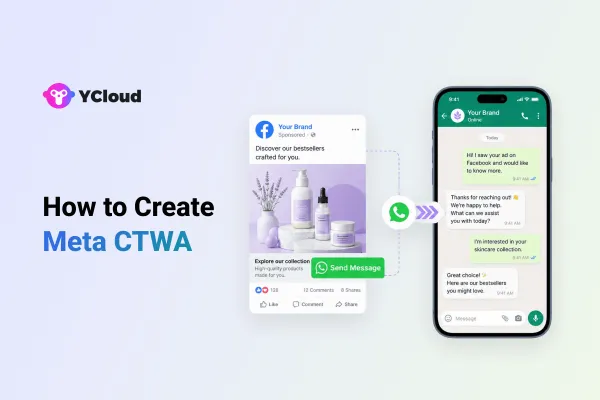
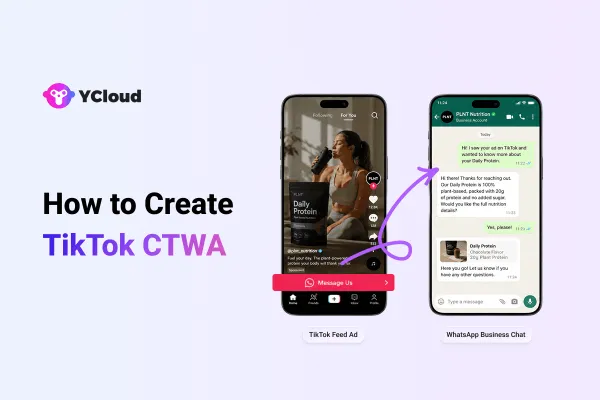
Click-to-WhatsApp (CTWA) ads are one of the most effective ways to grow your WhatsApp subscriber base and collect high-intent opt-ins for future bulk messaging.
These ads appear on platforms like Facebook and Instagram and let users open a WhatsApp chat with your business in just one tap, no forms, no friction.
📲 How Click-to-WhatsApp (CTWA) Ads Work
CTWA ads come with a call-to-action like “Send Message” that directly opens a WhatsApp chat window. You can pre-fill the chat with a message like:
“Hi! I’m interested in getting updates and exclusive offers.”
Once a user initiates the chat, your bot or agent can guide them to opt in by clearly stating what kind of messages they’ll receive and collecting consent in line with WhatsApp’s Business Messaging Policy.
✅ Proven Strategies to Drive More Opt-Ins
To boost the performance of your CTWA campaigns, here’s what works:
Offer Incentives
Entice users with discounts, freebies, early access, or helpful content in exchange for their opt-in.
Set Clear Expectations
Let users know exactly what they’re signing up for, product launches, deals, alerts, etc.
Automate with Chatbots
Use a no-code WhatsApp bot to instantly handle consent requests and collect user details.
Refine Targeting
Aim your CTWA ads at warm audiences, like website visitors, Instagram engagers, or Facebook page followers, to maximize conversions.
🔒 Stay Compliant With WhatsApp’s Opt-In Rules
To ensure your opt-in collection is legit and sustainable:
Always collect explicit consent
Let users know they’re agreeing to receive WhatsApp messages from your business.
Offer a clear opt-out option
Something like “Reply STOP to unsubscribe” keeps you compliant and builds trust.
Avoid misleading or spammy practices
Stick to valuable, relevant messaging that users will look forward to.
Up next let's discuss why choose the official WhatsApp API solution for WhatsApp blasts?
Why Choose the Official WhatsApp API Solution for WhatsApp Blasts?
If you’re serious about using WhatsApp for large-scale messaging, choosing the official WhatsApp Business API isn’t just a best practice, it’s a necessity.
While third-party or unofficial tools may seem cheaper or quicker, they come with major risks: account bans, message delivery issues, and data privacy concerns. On the other hand, the official API offers a secure, scalable, and compliant foundation for all your WhatsApp blast campaigns.
🔐 Trust, Security & Compliance
With the official API, you follow Meta’s strict messaging policies, keeping your business reputation intact and your customer data secure. Plus, you can only message users who’ve opted in, ensuring high-quality, consent-based interactions.
📈 Scalability for Serious Campaigns
Unlike the regular WhatsApp app or Business App (which limits you to 256 contacts per broadcast list), the WhatsApp Business API can handle millions of messages daily, with delivery tracking, read receipts, and chatbot automation.
🧠 Advanced Features & Automation
The official API gives you access to:
- Smart chatbots for 24/7 support
- Custom templates for marketing, OTPs, and reminders
- Seamless CRM integrations
- Analytics and performance tracking
- Advanced automations
- Team inbox and much more
This means you can go from simple blasts to personalized, interactive communication at scale.
🚫 Avoid Getting Banned
Using unapproved tools or unofficial methods puts your WhatsApp number at risk of permanent bans. The API ensures you stay within limits and maintain high-quality message ratings, especially important after WhatsApp’s latest policy updates.
Long story short? If you want to grow fast without putting your account or audience trust at risk, the official WhatsApp Business API is the only way to go.
How to Get YCloud?
Kindly click on the Below Banner to book a FREE DEMO and learn more about our product offering, features and pricing plans.
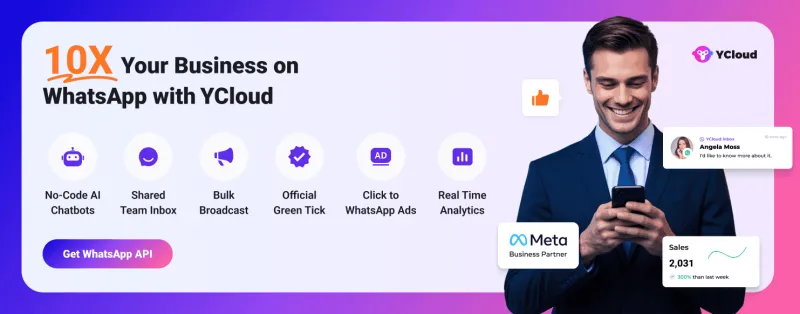
Built with AI at its core, YCloud is the ultimate WhatsApp marketing and automation solution, giving you everything you need in one powerful platform.
Now market, sell, support, and scale your business by 10X with YCloud!
Ready to try? Explore How to Get YCloud for FREE next!
How to Get YCloud for FREE?
It's Simple!
Subscribe to our FREE plan and get a free lifetime experience of YCloud with unlimited messaging API.
[Book a FREE Demo] and see how YCloud can power up your WhatsApp strategy!
Wrapping Up!
WhatsApp blasts, when done right, can skyrocket your engagement, boost conversions, and drive serious ROI. But the key lies in using the official WhatsApp Business API, following best practices, and constantly optimizing your strategy with data.
From crafting compelling messages to measuring success and scaling with automation, everything comes down to execution.
✅ Ready to start your high-impact WhatsApp blast campaigns?
🚀 Book a free demo with YCloud and experience how 200,000+ businesses are turning conversations into conversions, without getting banned.
Your audience is on WhatsApp. It’s time your growth strategy is too.
Related Articles

Make your business communications much easier!


Trusted by




