Customer Support

English

How to Install the YCloud Developer Kit and Build a WhatsApp API Integration in Codex

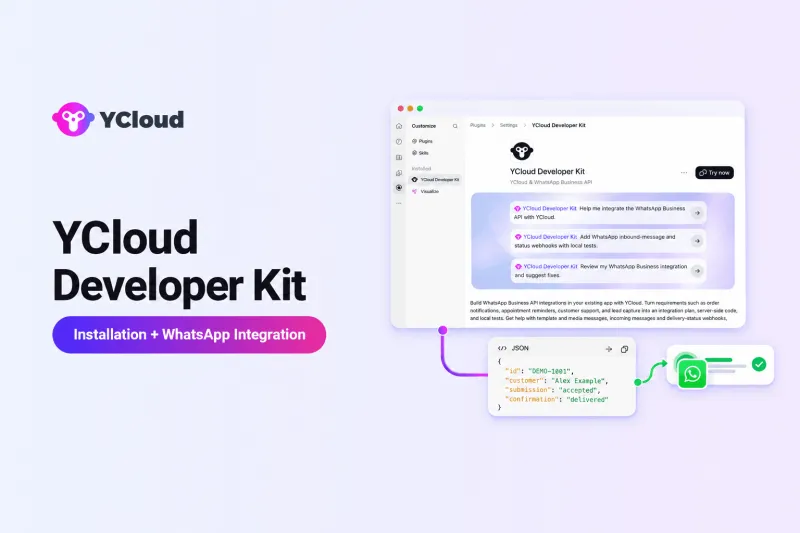
How much work does it take to start a YCloud integration in Codex?
YCloud Developer Kit brings YCloud-specific integration skills into Codex.
To demonstrate how it works, this article uses a focused WhatsApp order-confirmation workflow with simulated data.
You will install and verify the Kit, then use a single prompt to plan the integration, implement it locally and run simulated tests.
For supported capabilities, security guidance and production considerations, read YCloud Developer Kit: Build and Test WhatsApp API Integrations with Codex.
How to Install the YCloud Developer Kit in Codex
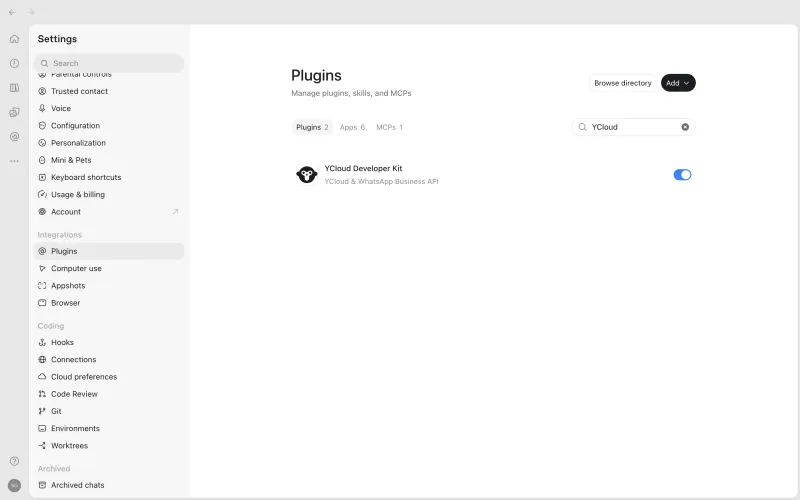
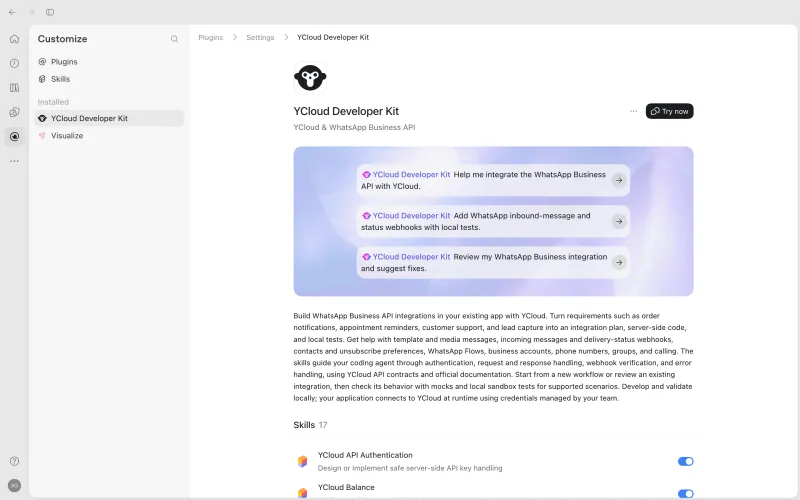
Step 1: Open the YCloud Developer Kit
Select Install or Try now, and confirm that the Kit is enabled in the Codex environment where you plan to use it.
Step 2: Install the Kit in Your Codex Project
Open the target project in Codex and run:
npx skills add YCloud-Developers/YCloud-Developer-Kit --skill '*' -a codex --copy -yThis command installs the YCloud skills in the current project. After installation, start a new Codex session so it can discover the newly installed skills.
Step 3: Verify the Installation
In a new Codex task, enter:
Use $ycloud-developer-kit-smoke-test to check whether the plugin is ready.The expected response is:
YCloud Developer Kit is ready. No external API was called.This confirms that Codex can find and use the Kit. It does not validate YCloud account credentials or send a WhatsApp message.
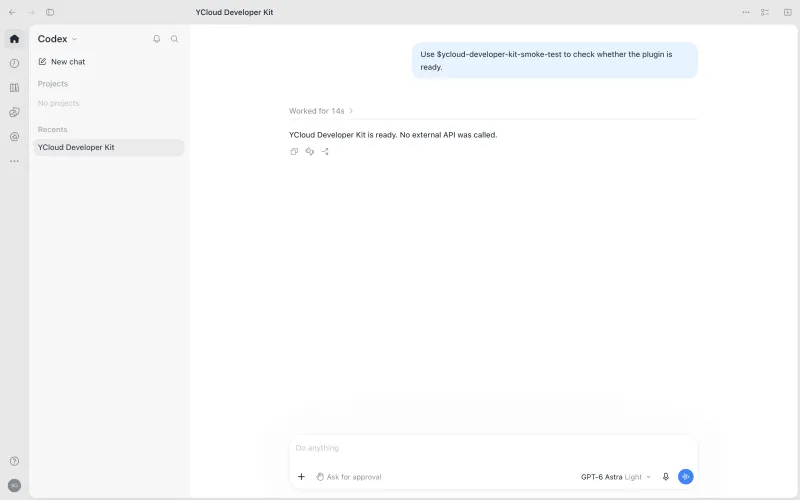
Once the smoke test succeeds, the Kit is ready to work on a defined integration requirement.
How to Build a WhatsApp Order-Confirmation Integration
What We Are Building?
Consider an order-confirmation workflow:
- A customer places an order.
- The backend prepares a WhatsApp confirmation.
- The message is associated with the order.
- Later delivery or failure events update the notification record.
For this example, the application uses Node.js, Express and SQLite. All orders, YCloud responses and Webhook events are simulated.
Marketing broadcasts, inbound messages and campaign management are outside this example.
Step 1: Describe the Requirement in Codex
Instead of selecting individual APIs or skills, start by describing the complete business workflow:
Use $ycloud-integration-architect to build a local WhatsApp
order-confirmation integration.

Our backend uses Node.js, Express and SQLite.

When a customer places an order:

- Prepare a WhatsApp order-confirmation message
- Associate the message with the order
- Process later delivery or failure events
- Prevent duplicate Webhook events from causing repeated updates

Implement the workflow in the current local project and add tests.

Use fictional orders and simulated YCloud responses.
Do not read real credentials or call real APIs.

After completing the work, provide:

1. The integration flow
2. Changed files
3. Configuration placeholders
4. Executed tests and actual results
5. Items that still require verification with YCloud
This single prompt defines the business goal, technology stack, required workflow, permitted actions, test scenarios and expected output.
Step 2: Review the Generated Plan
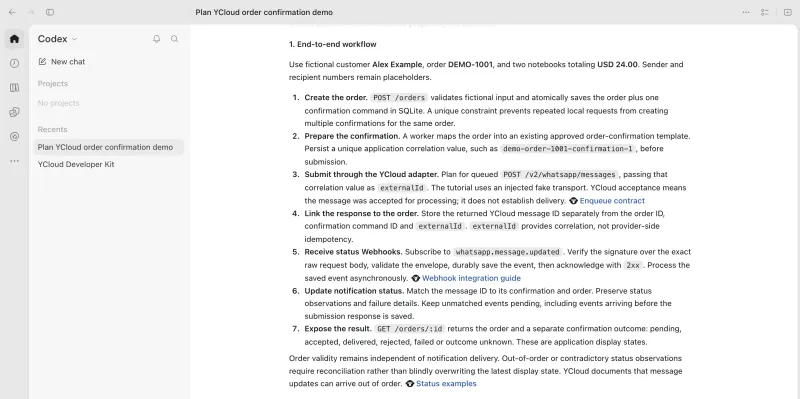
Codex first maps the business requirement to the required integration components.
For this workflow, the plan should cover:
- Order creation as the trigger
- WhatsApp message preparation and submission
- Connection between the order and message record
- Message-status Webhook processing
- Duplicate-event handling
- Failure and timeout handling
- Account, phone-number and template requirements
Review these points to confirm that the proposed workflow matches the application’s requirements.
Step 3: Let Codex Implement the Workflow
Because the prompt authorizes changes to the current local project, Codex can implement the defined workflow and add its tests.
The generated implementation may include:
- Order-confirmation logic
- YCloud request adapter
- Configuration placeholders
- Message-to-order correlation
- Webhook receiver
- Status-processing logic
- Local tests
- Run instructions
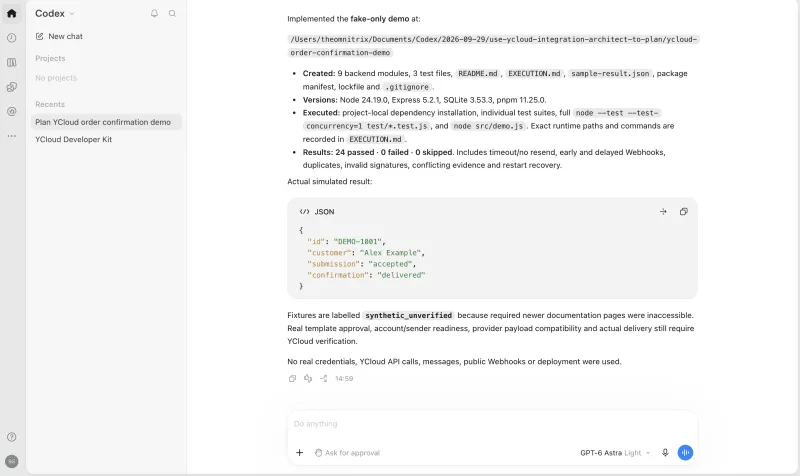
After implementation, Codex should list every file it created or changed. This gives developers a clear summary of the work that requires review.
Step 4: Run the Simulated Tests
Important: This example uses simulated YCloud responses and synthetic Webhook events. It does not connect to a live YCloud account or send a real WhatsApp message.
The local tests cover:
- Successful request submission
- API rejection
- Later failed-message status
- Request timeout
- Duplicate status event
- Invalid Webhook
The recorded result was:
24 tests passed
0 failed
0 skipped
These results confirm that the defined local scenarios produced the expected outcomes.
They also show that:
- Request submission and later message statuses are stored separately.
- Duplicate events do not trigger repeated business updates.
- A timed-out request remains uncertain.
- The application does not automatically resend after an uncertain timeout.
The results apply only to the simulated scenarios tested.
Step 5: Identify What Remains Before Production
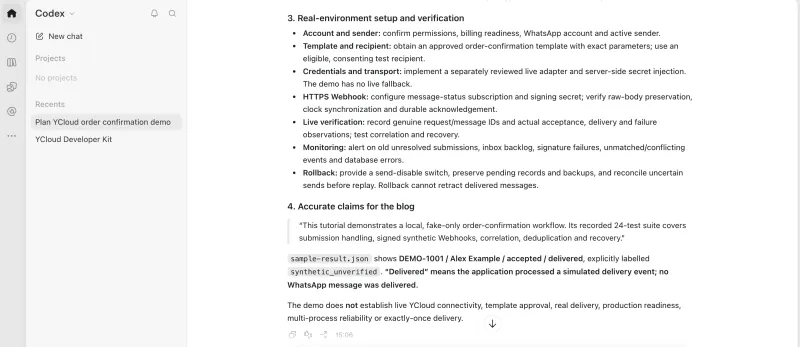
Codex can also separate completed local work from the tasks that still require the authorized YCloud environment:
- Configure the YCloud account and WhatsApp phone number.
- Confirm the approved message template.
- Add the server-side API key.
- Configure the public Webhook endpoint.
- Test real requests and status callbacks.
- Complete code review, monitoring and deployment.
The local workflow is now implemented and tested against the defined simulations.
The remaining work takes place in the team’s authorized YCloud and deployment environments.
What This Example Demonstrates?
YCloud Developer Kit helps move a defined business requirement through planning, local implementation, testing and technical handoff within Codex.
Input | Result |
| One defined business workflow | A structured integration plan |
| One implementation request | Local code and configuration placeholders |
| Defined simulated test scenarios | Recorded normal and failure-path results |
| One handoff request | Remaining YCloud and deployment requirements |
This allows developers to work through the complete integration-development process without manually identifying every YCloud capability or implementation step.
Final Thoughts
YCloud Developer Kit provides a direct path from installation to local integration development. Install and verify the Kit, describe one business workflow clearly, and let Codex plan, implement and test it within the defined project.
Account configuration, production deployment and real-environment verification remain separate steps.
For the complete capability list, validation levels, security practices and production considerations, read YCloud Developer Kit: Build and Test WhatsApp API Integrations with Codex.
Start Building With YCloud Developer Kit
Install YCloud Developer Kit, open a new Codex task and describe the WhatsApp workflow you want to build.
Learn about the full YCloud Developer Kit HERE
Frequently Asked Questions
Is YCloud Developer Kit the Same as the YCloud Dashboard?
No. YCloud Developer Kit is an integration-development assistant used within Codex. Messaging operations and campaign management use separate tools.
Does Installing the Kit Connect It to a YCloud Account?
No. YCloud account access, credentials and external resources must be configured separately.
Can It Send Real WhatsApp Messages?
Not by itself.
Version 0.7.9 can help developers write application code that sends messages through YCloud. However, the Kit does not read live credentials, call YCloud APIs or send real messages during its workflow. Real sending occurs separately through the configured application in an authorized environment.
Do Developers Need to Provide an API Key During Planning?
No. Planning, code examples and simulated tests can use placeholders and synthetic data.
Can It Modify an Existing Project?
Yes. The developer must explicitly authorize local file changes and define the project, modules and permitted scope.
Does a Passed Simulation Mean the Integration Is Production-Ready?
No. A simulation validates only the defined local scenarios. Production configuration and testing against YCloud are still required.
Can It Help Build Inbound-Message Handling?
Yes. It can help implement Webhook handlers that validate and route incoming-message events to the application’s business logic.
Does It Support Templates, Contacts and Unsubscribe Management?
Yes. Version 0.7.9 includes dedicated guidance for template, contact and unsubscriber workflows.
Does It Support SMS, Voice, Verify or Email?
No. SMS, Verify, YCloud Voice and Email integrations are outside the stated scope of version 0.7.9.
WhatsApp Calling is supported and is separate from YCloud Voice.
What Happens If the Official API Documentation Cannot Be Verified?
Mark the example as unverified and identify the endpoints, fields or behavior that still require confirmation.
If the Kit returns:
"synthetic_unverified"
It means the result was produced with synthetic data and the stated contract details were not fully verified. It is not a YCloud API status or evidence of real integration testing.
Related Articles

Make your business communications much easier!


Trusted by




