

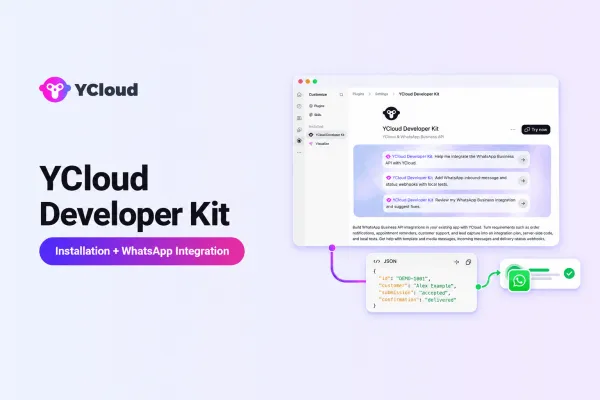
YCloud Developer Kit: Build and Test WhatsApp API Integrations with Codex

- How will the application authenticate the API request?
- Is the correct message template available?
- How will delivery or failure updates be recorded?
- What happens if the same Webhook event arrives twice?
- What should the application do when a request times out and the result is uncertain?
YCloud Developer Kit provides YCloud-specific skills in Codex for planning integrations, implementing local code changes and testing workflows with simulated data. Developers start by describing their requirements in natural language.
- Install and verify YCloud Developer Kit
- Create an integration plan in Codex
- Apply the plan to a local project
- Test normal and failure scenarios with simulated data
- Identify what still requires verification with YCloud
- Prepare the integration for technical review and deployment
TL;DR
- Install YCloud Developer Kit in Codex and run the smoke test to confirm that its skills are available. This does not connect Codex to a YCloud account.
- Describe one business workflow, such as an order confirmation, and use "$ycloud-integration-architect" to identify the required messages, templates, Webhooks and authentication.
- Define the project, implementation scope and permitted actions before allowing local code changes.
- Apply the plan to API requests, business records and asynchronous event handling.
- Test successful and failure scenarios with simulated data. Treat timeouts as uncertain outcomes and do not confuse local results with real message delivery.
- Before release, configure the YCloud account, phone number, templates, server-side credentials and public Webhook. Then complete human review, real-environment testing, deployment and monitoring.
What is the YCloud Developer Kit?
This article covers version 0.7.9.
- Integration workflows and technical requirements
- Implementation plans
- Local code changes
- Test scenarios and recorded results when tests are executed
- Integration and deployment checklists
Scope and Account Access
- Integration planning
- Authorized local implementation
- Testing defined scenarios with simulated data
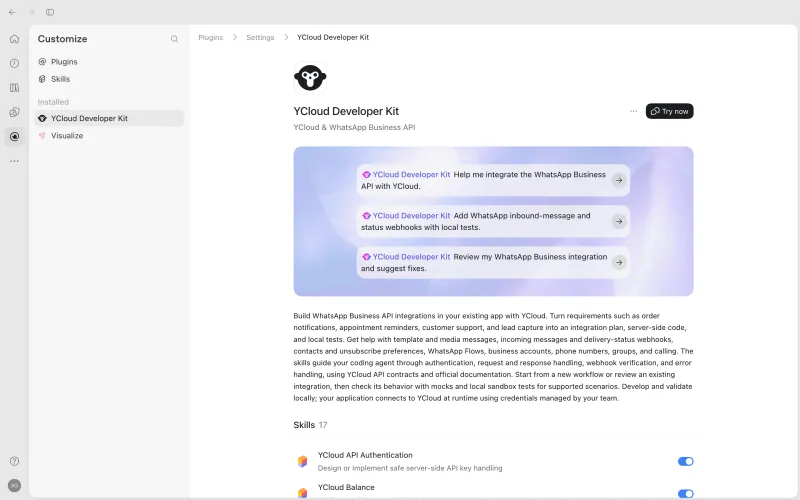
What a WhatsApp Integration Needs to Handle
Sending and Delivery Are Separate Stages
- Record the original request
- Process later message-status events
- Store request submission separately from subsequent status updates
Webhooks Introduce Asynchronous Processing
- Validate incoming requests before processing them
- Handle duplicate, delayed and out-of-order events
- Prevent repeated business updates
- Connect each event to the original message and business transaction
Templates and Account Configuration Have External Dependencies
The Integration Also Needs Reliable Operations
- Secure server-side credential management
- Timeout handling without automatic duplicate sends
- Idempotency to prevent repeated business actions
- Logging, monitoring and alerts
- Recovery rules for failed or uncertain requests
- Separate test and production environments
- Failure investigation and rollback preparation
Which YCloud Capabilities Does the Kit Cover?
Integration Area | How the Developer Kit Can Assist |
WhatsApp messages | Plan and implement direct or queued message submission, message retrieval and status handling |
Media | Implement media uploads and pass uploaded media references into message workflows |
Templates | Plan template creation, retrieval, updates, deletion and analytics |
Accounts and phone numbers | Identify prerequisites and implement supported account, registration, profile and phone-number settings operations |
Webhooks | Design endpoint management, event reception, source validation and duplicate-event handling |
Inbound messages | Route verified incoming-message events to application logic and implement supported acknowledgements |
Contacts | Design contact, attribute and note-management workflows |
Unsubscribers | Add unsubscribe checks and manage opt-out records |
Groups | Plan supported WhatsApp Groups, participant, settings and invite-link operations |
WhatsApp Flows | Design and implement supported Flow lifecycle operations |
WhatsApp Calling | Plan call handling and supported call-session operations |
Authentication | Structure secure server-side API authentication |
Balance | Retrieve and use account-balance information where required |
Custom events | Define and send business events associated with contacts, separately from incoming Webhook events |
How the YCloud Developer Kit Workflow Works
Describe the workflow → Review the plan → Implement in your project → Test locally → Verify with YCloud and deploy
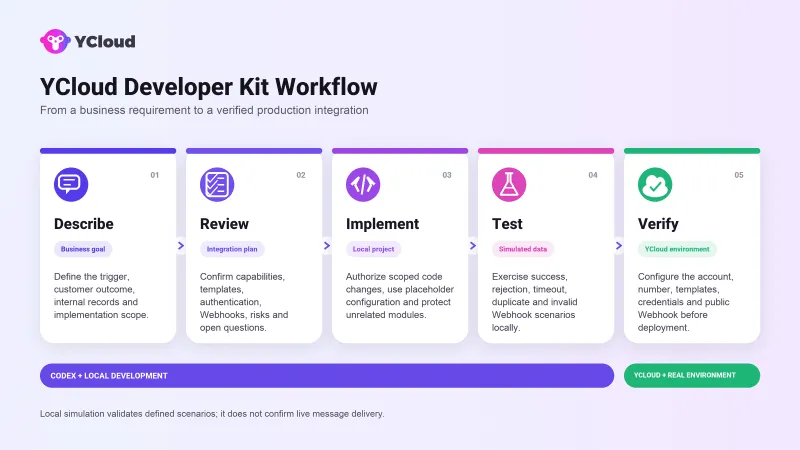
1. Define the Business Goal
- The customer experience to be created
- The existing system or application
- The event that starts the workflow
- The expected customer-facing outcome
- The information the internal system must record
- What is included and excluded from the current implementation
2. Confirm the Integration Design
- Required YCloud capabilities
- Account and phone-number prerequisites
- Template and sending requirements
- Business-record mapping
- Webhook and status-processing requirements
- Failure and duplicate-event handling
- Items that still require confirmation
3. Implement in Your Project
- The local project
- The modules included in the task
- Whether tests should be added
- Whether an isolated example or applied implementation is required
- Whether external API calls are prohibited
4. Run Simulated Tests
- Successful request submission
- API rejection or sending failure
- Request timeout
- Duplicate message-status event
- Invalid Webhook
- Missing or incorrect configuration
Important: Treat a timed-out send request as an uncertain outcome. The request may have been accepted, so do not resend it only because the client timed out. Use available identifiers, status events and documented recovery behavior to decide the next action.
5. Verify With YCloud and Deploy
- YCloud account and WhatsApp phone number
- Approved message templates
- Server-side API keys
- Public Webhook endpoint
- Production environment variables
- Real API requests and status callbacks
- Monitoring and alerts
- Deployment and rollback procedures
Before You Start
Environment Requirements
- A Codex environment supported by the documented release
- YCloud Developer Kit installed
- Access to the local application project when implementation is required
- A suitable development and testing environment
Information That Helps With Planning
- Existing system and technology stack
- Trigger event
- Expected message or customer experience
- Internal records that must be created or updated
- Current implementation status
- Scope of work
- Acceptance criteria
Information Not Required During Planning
- Real API keys
- Real customer phone numbers
- Private customer conversations
- Production credentials
Security note: Use placeholders or synthetic data in plans, code examples and simulated tests. Store real credentials in the server-side environment using your team’s secret-management practices.
How to Install and Verify YCloud Developer Kit
Install the Developer Kit
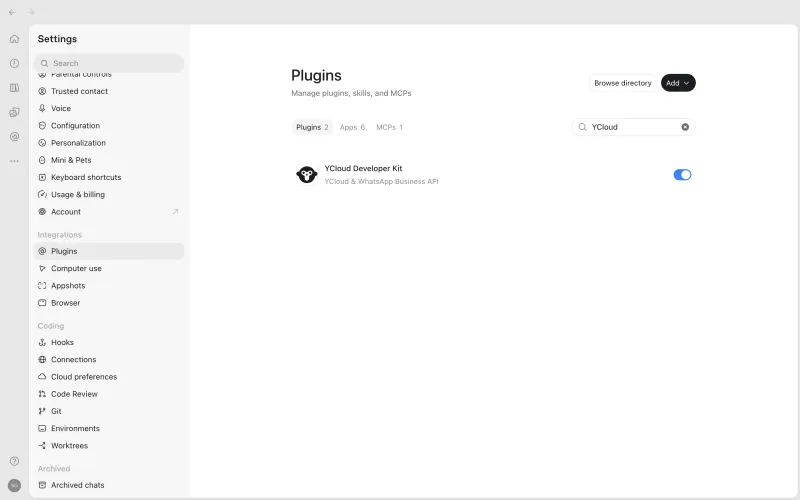
- Open the YCloud Developer Kit plugin page.
- Select Install or Try now.
- Confirm that the plugin is enabled in the Codex environment where you will use it.
- Start a new Codex task before running the verification prompt.
</> Bash
npx skills add YCloud-Developers/YCloud-Developer-Kit --skill '*' -a codex --copy -y
Run the Smoke Test
</> Plain Text
Use $ycloud-developer-kit-smoke-test to check whether the plugin is ready.
</> Plain Text
YCloud Developer Kit is ready. No external API was called.
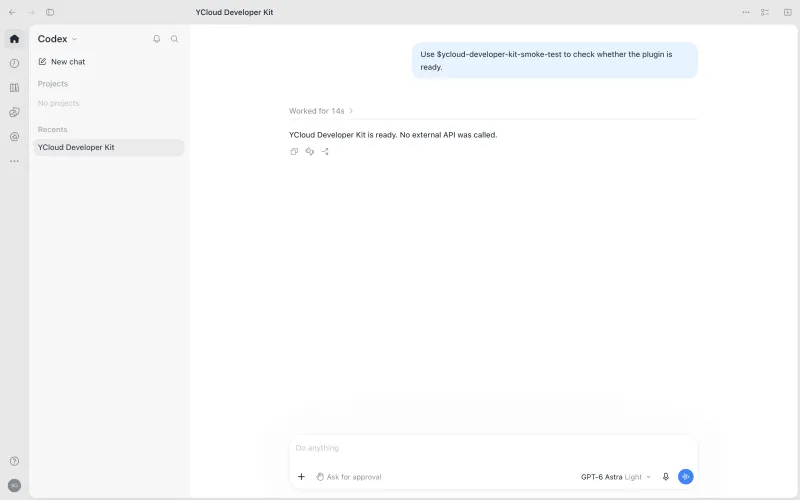
What This Confirms
- Codex can find and invoke the smoke-test skill.
- The Kit is available in the current Codex environment.
- The check completed without calling an external API.
What This Does Not Confirm
- Connection to a YCloud account
- Valid API credentials
- Account-level feature availability
- Successful WhatsApp message delivery
- Production readiness
Step-by-Step Example: Build a WhatsApp Order-Confirmation Integration
Business Requirement
- Trigger a WhatsApp order confirmation when the order is created
- Associate the message request with the order
- Record later delivery or failure events
- Keep the order valid even if the notification fails
Step 1: Request an Integration Plan
Use $ycloud-integration-architect to plan a WhatsApp
order-confirmation integration.

Our backend uses Node.js, Express and SQLite.

After a customer places an order, send a WhatsApp confirmation.
The backend must associate the message with the order and record
subsequent delivery or failure events.

Include order-confirmation messages and message-status Webhooks only.
Do not include marketing broadcasts or inbound-message handling.

Provide the business flow, prerequisites, development steps, risks
and acceptance criteria.

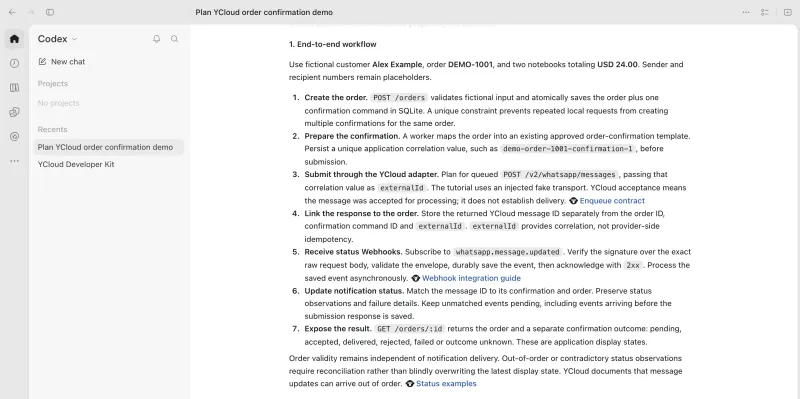
Do not modify files or call real APIs.- Order-creation trigger
- Account and phone-number requirements
- Approved template requirement
- Message-submission flow
- Connection between the order, application correlation value, YCloud message ID and Webhook event
- Message-status Webhook flow
- Failure and duplicate-event handling
- Unresolved requirements
Step 2: Confirm the Scope
Limit this implementation to order-confirmation messages
and message-status processing.

List:

1. Required information
2. Modules that must be changed
3. Acceptance criteria
4. Items that still require confirmation- Prevent unrelated code changes
- Establish acceptance criteria
- Separate current work from future functionality
- Record unresolved dependencies
Step 3: Authorize Local Implementation
Implement the approved order-confirmation and message-status
flow in the current local project.

Identify the relevant order-notification and message-status
modules, implement the workflow there and add tests.

Use fictional orders and simulated data.
Do not read real credentials or call real APIs.

After implementation, list the changed files, configuration
requirements, test results and items that still require
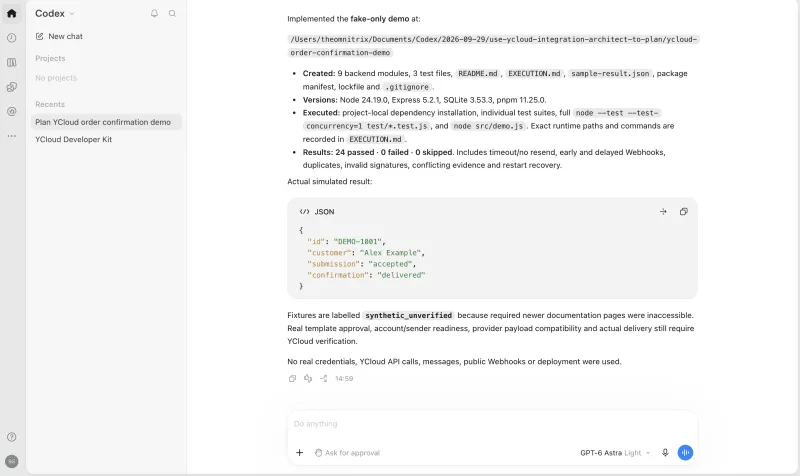
real-environment verification.- Integration code
- Configuration placeholders
- Message-to-order correlation logic
- Webhook processing
- Normal and failure-path tests
- Local run instructions
- Known limitations
Step 4: Test Normal and Failure Scenarios
Important: This example uses simulated YCloud responses and synthetic Webhook events. It does not connect to a live YCloud account or send a real WhatsApp message.
Run local simulated tests for:

- Successful message submission
- API rejection and a later failed-message status as separate cases
- Request timeout
- Duplicate message-status event
- Invalid Webhook

Do not treat a timeout as confirmation that the message failed.

Separate executed tests, actual results and unverified items.- Correct request formation
- Separate storage for submission and later message status
- Idempotent event processing
- No duplicate business updates
- Clear error reporting
- No automatic resend after an uncertain timeout
Step 5: Prepare the Technical Handoff
List the remaining account configuration, integration tests
and deployment tasks for the technical team.

Separate completed local work from work that still requires
the authorized YCloud environment.

Include account, phone number, templates, API credentials,
Webhook configuration, testing, monitoring, exception handling
and rollback.

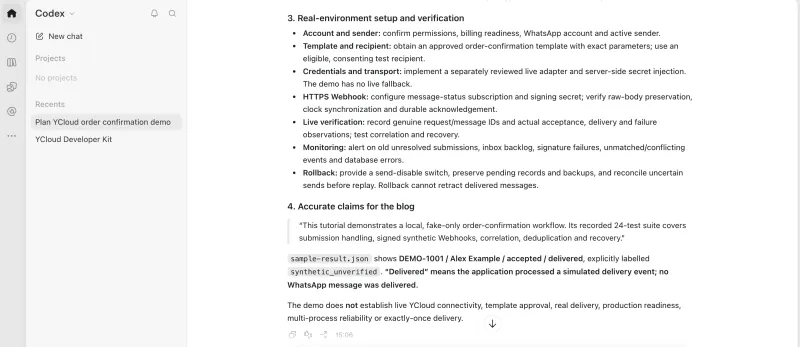
Do not perform real operations.- Completed local implementation and tests
- YCloud account and phone-number requirements
- Approved template requirements
- Server-side credential configuration
- Public Webhook setup
- Real integration tests
- Monitoring and exception handling
- Deployment and rollback tasks
- Remaining risks and unresolved questions
Understanding the Different Validation Levels
Result | What it confirms | What it does not confirm |
Code generated | The requested implementation has been written | The code runs correctly |
Local tests passed | The defined local test cases produced the expected results | The real YCloud API behaves identically |
Local simulation completed | The selected scenarios ran through the fake YCloud adapter and signed synthetic Webhook events | Every YCloud capability or production scenario works |
Integration tested with YCloud | The specified workflow was tested in an authorized YCloud environment | Other workflows, scenarios or deployment environments were validated |
Warning: Validation applies only to the scenarios and environment tested. Verify the intended workflow with YCloud and follow your team’s release process before enabling customer-facing messages.
YCloud Developer Kit Skills and When to Use Them
Development task | Recommended skill |
| Plan an end-to-end integration | $ycloud-integration-architect |
| Implement WhatsApp message submission and retrieval | $ycloud-whatsapp-messages |
| Implement template-management workflows | $ycloud-whatsapp-templates |
| Implement media uploads | $ycloud-whatsapp-media |
| Implement Webhook configuration and event handling | $ycloud-webhook-endpoints |
| Implement contact synchronization | $ycloud-contacts |
| Implement unsubscribe checks | $ycloud-unsubscribers |
| Design server-side authentication | $ycloud-api-authentication |
- Use "$ycloud-integration-architect" when the requirement involves multiple YCloud capabilities or the correct starting point is unclear.
- Use a task-specific skill when the required capability and implementation scope are already defined.
How to Write Effective Prompts for YCloud API Integration
Business goal + Current system + Scope + Authorized actions + Required output
1. Business Goal
2. Current System
- Existing or new project
- Technology stack
- Relevant services and databases
- Existing message or Webhook implementation
3. Scope
4. Authorized Actions
- Planning only
- Code review only
- Generate an isolated example
- Modify the defined local project
- Add or run tests
- Do not call external APIs
5. Required Output
- Architecture
- Prerequisites
- Changed files
- Test evidence
- Risks and unresolved questions
- Acceptance criteria
- Production-readiness checklist
Reusable Prompt
Use YCloud Developer Kit to help implement [business workflow]
in our [technology stack] project.

The workflow starts when [trigger] and should produce [outcome].

Include [scope] and exclude [out-of-scope items].

You may [permitted actions].

Use simulated data and do not call real APIs.

Provide the implementation plan, changed files, executed tests,
actual results and remaining integration requirements.

Ask about missing details that affect the design.Security and Enterprise Development Practices
Protect Credentials and Customer Data
- Do not paste API keys or Webhook secrets into prompts.
- Do not hardcode credentials in the repository.
- Use synthetic phone numbers and payloads in examples and local tests.
- Keep production credentials in the server-side environment.
- Use the team’s approved secret-management and access-control practices.
Check Against the Official API Documentation
- API endpoints and request methods
- Required and optional fields
- Authentication requirements
- Response and error formats
- Supported behavior
synthetic_unverifiedDesign Webhooks for Reliability
- Validate the source before business processing
- Reject invalid signatures or payloads
- Process duplicate events without repeating business actions
- Preserve unknown events for investigation
- Follow YCloud’s documented response requirements
- Connect each event to the correct message and business record
- Log useful identifiers without exposing credentials or customer data
Separate Environments
- Do not use production credentials for routine local tests.
- Use environment-specific configuration.
- Record which scenarios were simulated.
- Record which scenarios were verified against real services.
Maintain Human Review
- Configuring production credentials
- Enabling customer-facing messages
- Deploying Webhook changes
- Changing retry or recovery behavior
- Enabling a new WhatsApp capability
Limitations and Important Notes
Installation and Account Access
- Connect Codex to a YCloud account
- Validate API credentials
- Configure phone numbers or templates
- Enable account-level features
- Deploy the application
Simulation Coverage
- Successful message submission
- API rejection and later failure events
- Request timeout
- Duplicate status events
- Invalid Webhooks
- Live authentication
- Real account or template configuration
- Actual Webhook delivery
- Real WhatsApp message delivery
- Production-scale reliability
Starting the Local Simulation
node --test --test-concurrency=1 test/*.test.jsValidation Boundaries
- A successful API request does not prove message delivery.
- Generated code must be reviewed and executed.
- Local validation does not equal production validation.
- Feature support in the Kit does not guarantee account-level availability.
- Test results apply only to the scenarios and environment tested.
Version and Deployment Boundaries
When Should Teams Use YCloud Developer Kit?
- Plan a new WhatsApp integration
- Add WhatsApp notifications to an existing product
- Implement message-status Webhooks
- Review a partially completed integration
- Identify missing failure and recovery scenarios
- Prepare an implementation brief for another engineering team
- Produce a production-readiness checklist
- Coordinate a workflow across multiple YCloud capabilities
Final Thoughts!
Start With One WhatsApp Workflow
Use $ycloud-integration-architect to plan a WhatsApp
[workflow name] integration.
Frequently Asked Questions
Is YCloud Developer Kit the Same as the YCloud Dashboard?
Does Installing the Kit Connect It to a YCloud Account?
Can It Send Real WhatsApp Messages?
Do Developers Need to Provide an API Key During Planning?
Can It Modify an Existing Project?
Does a Passed Simulation Mean the Integration Is Production-Ready?
Can It Help Build Inbound-Message Handling?
Does It Support Templates, Contacts and Unsubscribe Management?
Does It Support SMS, Voice, Verify or Email?
What Happens If the Official API Documentation Cannot Be Verified?
Related Articles

Make your business communications much easier!


Trusted by




