

What Is YCloud? WhatsApp Business App, API, BSP, and Platform Explained

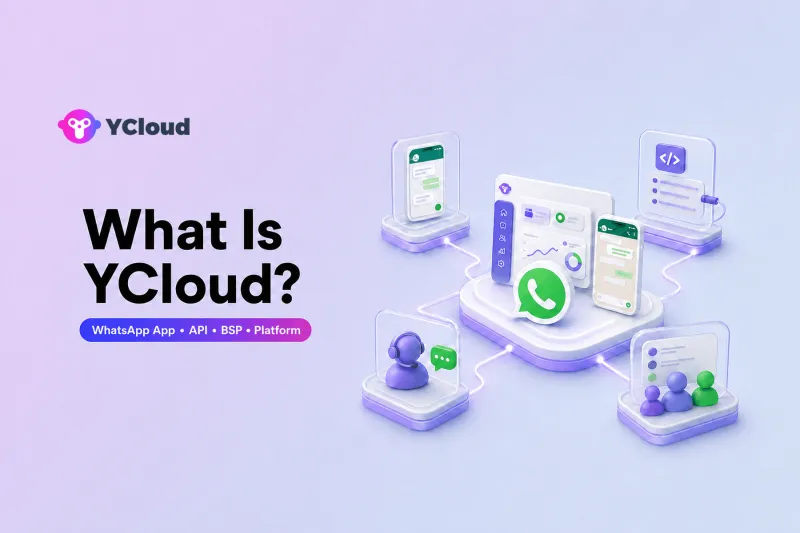
YCloud is a WhatsApp-focused business platform for teams that need WhatsApp API access plus inbox, campaigns, automation, AI agents, and Webhook/API integrations.
In practical terms, YCloud sits between Meta's WhatsApp Business Platform and the people and systems that use WhatsApp every day. Meta provides the WhatsApp network and the underlying API. YCloud helps businesses access that infrastructure and adds the operational tools that marketing, sales, service, operations, and developer teams need to work together.
The simplest way to understand the relationship is:
- WhatsApp Business App is the hands-on app used to manage conversations.
- WhatsApp Business Platform, commonly called WhatsApp API, is the infrastructure for messaging at scale, system integration, and automation.
- A Business Solution Provider (BSP) helps businesses onboard, manage, and operate on the WhatsApp Business Platform.
- A WhatsApp operating platform turns the API into a working business environment with inboxes, customer data, campaigns, automation, AI, analytics, APIs, and Webhooks.
In this article, operating platform is an explanatory term for the business tools built around the API; it is not an official Meta product category.
YCloud combines the BSP role with this broader operating-platform layer. That distinction matters because getting API access is only the beginning. A business still needs a practical way to manage conversations, coordinate teams, use customer data, automate journeys, and connect WhatsApp to the rest of its technology stack.
Where YCloud Fits in the WhatsApp Business Ecosystem
Businesses often compare the WhatsApp Business App, WhatsApp API, BSPs, and software platforms as though they were competing products. They are better understood as different layers of the same system.
| Layer | What it is | Best suited to |
|---|---|---|
| WhatsApp Business App | A mobile and desktop app for hands-on business messaging | Owners and small teams handling conversations manually |
| WhatsApp Business Platform / API | Meta's business messaging infrastructure | Businesses that need scale, integrations, multiple workflows, or automation |
| Business Solution Provider | A provider that helps businesses access and manage the WhatsApp Business Platform | Businesses that want guided onboarding, account support, and an easier path to production |
| Operating platform | The workspace and data layer built around the API | Cross-functional teams running marketing, sales, support, and customer operations on WhatsApp |
Each layer solves a different problem. The Business App gives a person an interface. The API gives software a connection. A BSP helps the business establish and manage that connection. An operating platform gives both people and systems a usable way to run the channel over time.
Layer 1: WhatsApp Business App for Manual Communication
The WhatsApp Business App is usually the easiest place to start. It gives a business a familiar mobile and desktop experience with a business profile, product catalog, labels, quick replies, and other basic business tools.
It works well when one owner or a small team can manage conversations directly. A local retailer, consultant, restaurant, or early-stage company may not need a complex setup if message volume is manageable and most work can be done by hand.
The limitation appears when WhatsApp becomes a shared business channel rather than an individual communication tool. Teams may need structured assignment, consistent customer history, system-triggered messages, campaign management, permissions, automation, or reporting that cannot be handled efficiently from a phone.
Layer 2: WhatsApp Business Platform and API for Scale
The WhatsApp Business Platform is Meta's infrastructure for business messaging at scale. Its Cloud API enables software to send and receive WhatsApp messages, connect business events to conversations, and support automated workflows.
The API is not another chat app. It is the technical interface that lets a business connect WhatsApp to applications such as a CRM, ecommerce system, customer database, help desk, workflow engine, or internal service.
This layer becomes important when a business needs to:
- Connect WhatsApp with multiple business systems and team-facing tools across one or more phone numbers.
- Trigger messages from events such as sign-ups, orders, payments, deliveries, or support requests.
- Send approved message templates for utility, authentication, or marketing use cases.
- Build automated conversations and customer journeys.
- Track messaging activity and connect it with customer or transaction data.
- Manage WhatsApp as a repeatable operational channel rather than a collection of manual chats.
It is also useful to keep three terms separate. The WhatsApp Business Platform is Meta's overall business messaging product. The Cloud API is the interface developers use. A WhatsApp Business Account (WABA) is the business asset that holds WhatsApp numbers and related settings. These terms are related, but they are not interchangeable.
Layer 3: A BSP for Access, Onboarding, and Ongoing Management
A WhatsApp Business Solution Provider helps businesses adopt and operate the WhatsApp Business Platform. Depending on the provider and setup, this can include embedded onboarding, WABA and phone-number setup, billing support, API access, integration guidance, issue resolution, and ongoing account assistance.
YCloud is a Meta official BSP and an Official WhatsApp Premier Partner. Its BSP role means it can help a business establish the official WhatsApp foundation without relying on unofficial automation or building every onboarding and management process alone.
However, a BSP should not be confused with the WhatsApp API itself. Meta owns and operates WhatsApp and its Business Platform. The BSP helps the business connect to and manage that platform.
Choosing a BSP is therefore partly an operational decision. A technical team may be able to integrate directly with Meta's Cloud API, but the business must still decide who will handle onboarding, account configuration, templates, billing, support, monitoring, and the tools used by non-technical teams.
Layer 4: An Operating Platform for People, Data, and Workflows
API access moves messages between systems. It does not, by itself, provide a complete daily workspace for sales agents, support teams, marketers, operations managers, and business leaders.
That is the role of a WhatsApp operating platform. It adds the applications, customer context, workflow logic, and collaboration tools needed to turn the API into a functioning business channel.
With YCloud, this operating layer includes capabilities such as:
- Shared Inbox: Multiple team members can manage conversations in a shared team inbox, use assignment rules, preserve context, and hand conversations between AI and human agents.
- Campaigns: Business teams can segment audiences, use approved templates, schedule WhatsApp campaigns, and review performance through WhatsApp marketing automation without building a campaign system from scratch.
- Customer Data: Contacts, attributes, tags, conversation history, and behavioral information can support segmentation and more relevant follow-up.
- Automation: Journey-based workflows can respond to customer behavior and business events with messages, assignments, reminders, or other actions.
- AI Agents: WhatsApp AI agents can answer questions, collect lead information, qualify intent, support predefined tasks, and escalate conversations to people according to business rules.
- Open API and Webhooks: Developers can connect YCloud with CRMs, ecommerce platforms, internal databases, workflow tools, and other applications. Webhooks can send event data to external systems, while APIs let those systems take approved actions in YCloud or WhatsApp.
This is why describing YCloud only as a way to “get WhatsApp API” is incomplete. YCloud provides API access, but its broader purpose is to help a business operate WhatsApp across teams, customer journeys, and connected systems.
How the Four Layers Work Together
A typical YCloud setup can be visualized like this:
Customer on WhatsApp → Meta's WhatsApp Business Platform → YCloud → Business teams and connected systems
Messages still travel through WhatsApp's official infrastructure. YCloud provides the workspace and orchestration layer around that infrastructure. A support agent may respond in the shared inbox, a marketing team may launch a campaign, an AI agent may handle an initial request, and a CRM may receive or send data through APIs and Webhooks.
The business does not have to choose between “a tool for employees” and “an API for developers.” A platform such as YCloud is designed to support both.
Business users can work through interfaces for inbox, campaigns, contacts, and automation. Technical teams can use APIs, Webhooks, and integrations to connect those activities with the wider business stack. This shared foundation reduces the gap between a campaign plan, a customer conversation, and the data or workflow behind it.
YCloud vs. a Basic Customer Service Tool
A basic customer service tool is primarily designed to help agents receive, assign, and resolve inbound questions. That can be enough when WhatsApp is simply one support channel among many.
YCloud is different because it is WhatsApp-focused and begins with the official WhatsApp Business Platform. The shared inbox is one part of a broader system that also supports outbound campaigns, contact management, automated journeys, AI agents, WhatsApp-native interactions, and developer integrations.
The distinction is not that one category is universally better. It is about the job the business needs to perform.
- Choose a basic support tool when the main requirement is handling tickets or inbound conversations across many channels.
- Choose a WhatsApp operating platform when WhatsApp is a core channel for acquisition, marketing, sales, service, and retention, and those activities need to share data and workflows.
YCloud can work alongside existing systems rather than replacing every CRM, ecommerce platform, or help desk. Its APIs and Webhooks allow WhatsApp activity to become part of a broader customer and operational architecture.
Who Is YCloud Best For?
YCloud is a strong fit when WhatsApp is central to how a business acquires, serves, and retains customers.
Businesses Building Long-Term Customer Relationships on WhatsApp
YCloud is suitable when the goal is not just to send a one-time message, but to manage an ongoing customer lifecycle. That may include lead capture, qualification, reminders, order updates, service conversations, re-engagement, and repeat purchases.
In this situation, customer history, permissions, segmentation, automation, and measurement matter as much as message delivery.
Teams Where Business and Technical Users Both Need Access
Marketing, sales, support, and operations teams usually need practical interfaces. Developers need APIs, Webhooks, and control over integrations. YCloud is designed for environments where both groups need to work on the same WhatsApp foundation.
For example, a marketing team can define an audience and campaign, while a technical team connects conversion or order data. A support team can manage conversations in the inbox, while a CRM receives updates through a Webhook.
Businesses Moving Beyond Manual Conversation Handling
When message volume, team size, routing complexity, or automation needs outgrow the Business App, a platform can provide more control. Shared access, structured workflows, customer context, and system integration become especially valuable as WhatsApp operations expand.
When YCloud May Not Be Necessary
Not every WhatsApp user needs a full operating platform.
YCloud may be more than you need if a single person can comfortably manage all conversations in the WhatsApp Business App and there is no need for campaigns, shared ownership, automation, or integration.
It may also be unnecessary if the only requirement is a one-time, low-level sending interface and your development team intends to build and maintain every surrounding capability itself. In that case, direct Cloud API access or a narrowly focused API provider may be sufficient.
The trade-off is that the business becomes responsible for more of the operating layer: user interfaces, conversation assignment, customer data, template workflows, monitoring, analytics, automation, and internal support.
The right question is therefore not simply, “Do we need WhatsApp API?” It is, “What do our teams need in order to operate WhatsApp reliably after the API is connected?”
When Should You Upgrade from WhatsApp Business App to API?
There is no universal message-volume threshold. The best time to upgrade is when manual work begins to limit customer experience, team coordination, or business growth.
Common signals include:
- More people need to handle the same customer channel. Conversations require assignment, visibility, permissions, and reliable handoffs.
- Important messages should be triggered by business events. Order updates, payment reminders, verification messages, appointments, and follow-ups should not depend on someone remembering to send them.
- The business needs structured outbound communication. Approved templates, audience segmentation, scheduling, and campaign reporting become necessary.
- WhatsApp data needs to connect with other systems. Teams want conversations linked with CRM records, ecommerce activity, lead sources, or internal workflows.
- Manual replies are becoming repetitive. Automation or AI can handle common requests while escalating exceptions to people.
- Managers need operational visibility. The business needs to understand response activity, campaign outcomes, conversation quality, and team performance.
Moving to the API does not always require abandoning the WhatsApp Business App immediately. For eligible setups, WhatsApp Business App Coexistence can allow a business to connect an existing app-based number to an official API platform while preserving an app-based workflow. Coexistence has account and regional availability limits and changes the availability of some Business App features, so eligibility and the current feature comparison should be reviewed before onboarding.
How to Decide Whether YCloud Is the Right Layer
Evaluate the platform against the operating model you want, not just the ability to send a WhatsApp message.
Ask these questions:
- Is WhatsApp a core customer channel or a secondary contact option?
- Will marketing, sales, support, operations, and developers need to collaborate?
- Do we need inbound conversations, outbound campaigns, or both?
- Do contacts and conversation history need to support future segmentation and follow-up?
- Which workflows should be automated, and which decisions must remain with people?
- What data must move between WhatsApp, our CRM, ecommerce platform, and internal systems?
- Do we want to build the operating layer ourselves or use a platform that already provides it?
If WhatsApp is a long-term business channel and both people and systems need to use it, YCloud's combination of Premier-level BSP access and an integrated operating platform is a logical fit. If the need is limited to manual chats or a narrow API endpoint, a simpler setup may be more appropriate.
Frequently Asked Questions
Is YCloud a BSP?
Yes. YCloud is a Meta official BSP and an Official WhatsApp Premier Partner. It helps businesses onboard to and manage the WhatsApp Business Platform, including the account, integration, and operational work around official WhatsApp API access. YCloud also provides a broader software platform, so its role goes beyond basic API provisioning.
What Is the Relationship Between YCloud and WhatsApp API?
WhatsApp API is the messaging infrastructure provided by Meta. YCloud does not replace or own that API. It helps businesses access and operate it, then adds shared inbox, campaigns, customer data, automation, AI agents, analytics, APIs, and Webhooks around the official connection.
How Is YCloud Different from a Regular Customer Service Tool?
A regular customer service tool usually focuses on receiving, assigning, and resolving inbound requests. YCloud is a WhatsApp-focused operating platform that supports customer service as well as marketing campaigns, sales conversations, customer data, automation, AI agents, and system integrations. It is designed for businesses using WhatsApp across the customer lifecycle, not only as a support inbox.
When Should a Business Move from WhatsApp Business App to API?
A business should consider the API when multiple people need structured access, messages should be triggered automatically, outbound campaigns require approved templates and segmentation, WhatsApp must connect with other systems, or manual conversation handling no longer scales. Small teams with simple, low-volume, manual communication may be able to stay on the Business App longer.
Final Answer: What Is YCloud?
YCloud is both a Meta official BSP, recognized as an Official WhatsApp Premier Partner, and a WhatsApp-focused business platform. It connects businesses to Meta's official WhatsApp Business Platform and provides the working layer needed to manage conversations, campaigns, customer data, automation, AI agents, and system integrations.
For a small team handling a manageable number of chats manually, the WhatsApp Business App may be enough. For a developer team that wants only the underlying API and plans to build everything else, direct API access may be enough. But for organizations that treat WhatsApp as a long-term channel shared by business and technical teams, YCloud brings the access layer and the operating layer together in one platform.
That is YCloud's position in the ecosystem: WhatsApp provides the channel, the API provides the infrastructure, the BSP helps establish and manage access, and YCloud's platform helps the business actually run WhatsApp day to day.
Frequently Asked Questions
Is YCloud a BSP?
What is the relationship between YCloud and WhatsApp API?
How is YCloud different from a regular customer service tool?
When should a business move from WhatsApp Business App to API?
Related Articles

Make your business communications much easier!


Trusted by




