

How to Choose a WhatsApp BSP: Technical, Operations, and Compliance Checklist

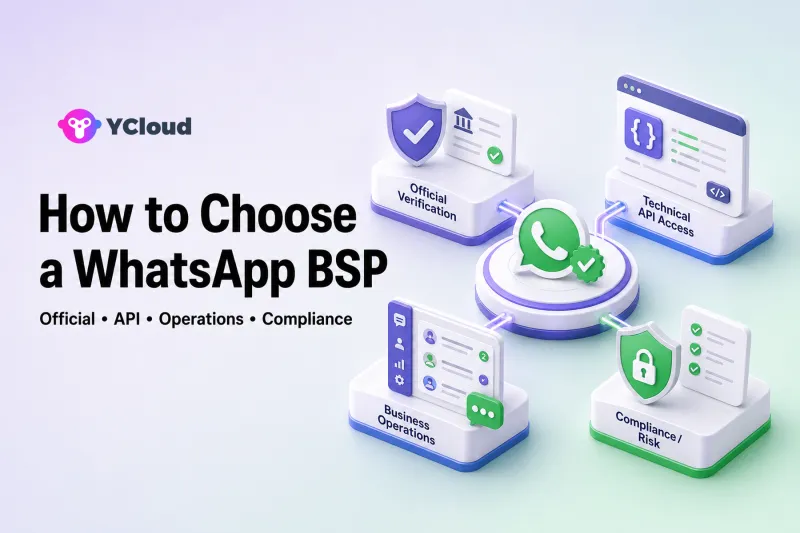
Choose a WhatsApp Business Solution Provider by verifying four things: current official status, technical access, day-to-day operational capability, and compliance support. A provider badge or an API endpoint alone is not enough. The right choice must help your team establish the WhatsApp Business Account, integrate messages and Webhooks, manage templates and phone numbers, operate customer conversations, and control consent, quality, and migration risk.
Technical teams with strong internal systems may choose Meta's Cloud API or an API-first BSP. Teams that want business users and developers to work on one foundation may be better served by a WhatsApp operating platform that combines BSP access with inbox, customer data, campaigns, automation, AI, and integrations.
What Does a WhatsApp BSP Actually Do?
A WhatsApp Business Solution Provider helps businesses adopt and operate the official WhatsApp Business Platform. Depending on the provider, that can include embedded onboarding, WhatsApp Business Account and phone-number setup, API access, template workflows, billing or account support, migration assistance, and software for business teams.
A BSP is not WhatsApp itself. Meta owns and operates the WhatsApp Business Platform. The provider supplies access, enablement, software, support, or some combination of these around Meta's infrastructure.
The category is broad. Some providers focus on a clean API layer for developers. Others provide enterprise communications across many channels. Others combine WhatsApp infrastructure with a shared inbox and workflow tools. That is why “Is this company a BSP?” is only the first question—not the final buying decision.
BSP Verification Checklist: Confirm the Foundation First
Before comparing interfaces or AI demos, verify that the provider can establish and support an official, durable WhatsApp setup.
1. Is Its Official Relationship Publicly Verifiable?
Ask for current evidence of the provider's Meta or WhatsApp partnership status and check public partner information where available. Confirm the legal entity you will contract with, not only the name of a parent company, reseller, or technology partner.
Provider status and program labels can change. Treat an old badge, copied logo, or undated blog post as a lead for verification—not proof by itself.
YCloud, for example, publicly identifies itself as a Meta official BSP and Official WhatsApp Premier Partner. During procurement, the same standard should be applied to every provider on the shortlist.
2. Does It Support the Full WABA, Number, Template, and Migration Process?
Confirm who creates or connects the WhatsApp Business Account, who owns it, and what appears in Meta Business Manager. Ask how phone numbers are registered, verified, migrated, disconnected, or returned if you leave.
Review template creation, submission, language variants, approval status, rejection handling, quality signals, and portability. If an existing number or WABA is involved, request a written migration plan covering downtime, message history, template behavior, billing, two-step verification, and rollback conditions.
3. Are the API and Webhook Documents Public and Specific?
Read the documentation before buying. Look for authentication, message types, media, template APIs, inbound Webhooks, sent/delivered/read/failed events, error codes, retry behavior, rate limits, versioning, sample payloads, and change logs.
Meta's Cloud API relies heavily on Webhooks for incoming messages and delivery-status updates. A provider should explain exactly how those events reach your systems and how failed deliveries or asynchronous errors are diagnosed.
YCloud publishes API documentation, Webhook configuration guidance, and WhatsApp error references. Comparable evidence should be required from every technical finalist.
4. Can It Support Replies, Permissions, and Team Collaboration?
API access allows software to exchange messages. It does not automatically give agents a usable workspace. If sales or support teams will respond to customers, verify whether the provider offers an inbox or integrates cleanly with the one you already use.
Test assignment, routing, roles, permissions, notes, contact context, collision prevention, search, service-level visibility, bot-to-human handoff, and audit history. Ask how the tool behaves when multiple teams, markets, or phone numbers share the platform.
Build Directly, Choose an API-First BSP, or Use an Operating Platform?
These are three different operating models. “Operating platform” is an explanatory term in this article, not an official Meta product category.
| Model | What you receive | What your team owns | Best fit |
|---|---|---|---|
| Direct Cloud API build | Meta's API and WhatsApp Manager foundation | Interfaces, workflows, data model, monitoring, support processes, integrations | Strong engineering teams seeking maximum control |
| API-first BSP | Official access plus provider onboarding, API layer, support, or partner tooling | Much of the business workspace and orchestration | Teams with an existing CRM, inbox, or vertical product |
| WhatsApp operating platform | API/BSP access plus inbox, customer data, campaigns, automation, AI, and integrations | Configuration, governance, and business process design | Organizations where business and technical teams both operate WhatsApp |
Direct Cloud API Build
Meta's Cloud API enables businesses to send and receive WhatsApp messages programmatically. WhatsApp Manager supports WABAs, phone numbers, templates, and analytics, and Meta provides test assets for development.
Direct access can be attractive when the company has mature engineering, security, operations, and support capabilities. It gives the team control over the software architecture and avoids buying interfaces it does not need.
But “direct” does not mean “finished.” The company must still build or integrate agent experiences, customer data, campaign controls, consent handling, observability, alerting, workflow automation, reporting, access controls, and internal support. The cost comparison must include this ongoing ownership.
API-First BSP
An API-first BSP can reduce onboarding and infrastructure work while leaving the company free to use its existing CRM, help desk, campaign engine, or proprietary product. Providers such as 360dialog are commonly evaluated for this focused WhatsApp layer, while Twilio is often evaluated by developers who want WhatsApp within a broader communications API stack.
This model fits teams that already know where agents will work, where customer data lives, how campaigns are governed, and how failures are monitored. It is less suitable when business teams expect the BSP purchase itself to provide all of those applications.
WhatsApp Operating Platform
An operating platform combines official access with the applications used to run the channel. YCloud, for example, combines Premier-level BSP access with a shared inbox, Contacts, Campaigns, Journey automation, AI agents, and APIs/Webhooks.
This model fits companies where marketing, sales, support, operations, and developers need a common WhatsApp foundation. It can reduce the amount of software the company must build, but buyers should still test extensibility, data access, permissions, and export options.
Technical Team Checklist
Technical approval should be based on documents and a working proof of concept, not only a sales demonstration.
API Documentation, Webhooks, and Error Handling
Verify the message types and templates required for production. Inspect inbound message payloads and all delivery-state events. Confirm how errors are returned synchronously and asynchronously, how Webhooks are signed or authenticated, how retries work, and how duplicate events should be handled.
Ask about rate limits, throughput, version upgrades, deprecations, change notifications, service health, logs, request IDs, and escalation paths. Your monitoring plan should distinguish a provider outage, Meta policy or quality restriction, bad template, invalid customer data, and an internal integration failure.
Sandbox and Testing Process
A useful test environment should let developers validate authentication, message payloads, Webhooks, template behavior, retries, and failure handling before production. Meta provides test resources for Cloud API, and providers such as 360dialog document sandbox flows.
Check the differences between sandbox and production. Some template, quality, scale, or account behaviors cannot be reproduced fully with test assets, so define a controlled production pilot as well.
CRM, Ecommerce, and Ad-Lead Integrations
Map data movement in both directions. Can a CRM create or update contacts, send approved messages, receive replies, and store delivery outcomes? Can ecommerce events trigger order updates or service workflows? Can leads from Click-to-WhatsApp ads preserve source context and move into qualification, sales, and reporting flows?
Evaluate native integrations and open interfaces separately. A native connector may speed up launch; an API and Webhook layer protects architectural flexibility when the stack changes.
Migration, Number, and Template Risks
Write down the current and target ownership of the Business Manager, WABA, phone number, display name, templates, billing relationship, and customer data. Confirm prerequisites, expected interruption, prohibited parallel states, coexistence eligibility, and rollback options.
Do not assume that an existing phone number, message history, template, quality rating, or provider configuration will transfer automatically. Obtain provider-specific and account-specific guidance before scheduling a migration.
Business Team Checklist
Business teams should test the work they will perform every day. A technically successful API project can still fail if agents, marketers, and managers cannot operate it safely.
Inbox, Permissions, Assignment, and Notes
Open real test conversations and simulate multiple agents. Check automatic and manual assignment, roles, team visibility, internal notes, contact context, search, unread states, collision handling, escalation, and handoff between automation and people.
Verify that permissions match the organization. A regional support agent, global administrator, campaign manager, and external partner should not automatically see or control the same data and actions.
Campaigns, Journeys, and AI Agents
For campaigns, test audience building, template selection, scheduling, exclusions, frequency controls, opt-outs, failure review, and outcome reporting. For journeys, test event triggers, delays, branches, agent handoff, and what happens when data is missing.
For AI agents, define approved knowledge, available actions, sensitive topics, escalation rules, testing criteria, and human oversight. AI should sit inside a governed customer process rather than operate as an unbounded reply generator.
Customer Profiles and Segmentation
Determine where the customer record lives and which system is authoritative. Review contact attributes, tags, lifecycle stage, source, consent, conversation history, and behavioral events. Confirm how profiles are deduplicated, updated, exported, deleted, and synchronized with CRM or ecommerce systems.
Segmentation should support meaningful customer journeys without encouraging indiscriminate messaging.
Reporting, Quality, Opt-Outs, and Compliance
Review operational metrics such as message delivery, failure reasons, response activity, assignment, resolution, campaign outcomes, and workflow performance. Confirm access to raw event data when dashboards are not sufficient.
WhatsApp use must respect opt-in requirements, approved template categories, the customer-service window, user opt-outs, data-protection obligations, and quality controls. Ask how the platform stores consent evidence, suppresses opted-out contacts, limits audience access, and helps teams investigate quality problems.
No BSP can make an unlawful or policy-violating campaign compliant. The provider can supply controls and guidance; the business remains responsible for its use cases, customer data, messages, and applicable laws.
Support and Commercial Questions That Reveal Operational Risk
Ask each finalist:
- Who owns onboarding, and what must our team complete in Meta Business Manager?
- Which support channel handles account, API, delivery, template, billing, and policy issues?
- What are the support hours, languages, escalation path, and expected response by severity?
- Which features, messages, Meta fees, users, numbers, or services create additional cost?
- How are product changes and API deprecations communicated?
- Can we export contacts, conversation data, message events, and configuration?
- What happens to our WABA, number, templates, and data when the contract ends?
- Which migration assumptions will the provider confirm in writing?
The cheapest API line item can become the most expensive option if the company must build missing workflows, add tools, or manage a risky migration without support.
Common BSP Selection Mistakes
Choosing by Partner Badge Alone
Official evidence is essential, but it establishes eligibility, not buyer fit. Two official providers can have very different API designs, business interfaces, support models, and migration experience.
Comparing Only Message Price
Separate Meta's WhatsApp charges from provider fees and software costs. Then include engineering, integrations, additional inbox or campaign tools, operational staffing, support, and migration. Compare total cost of ownership for the first year and the expected operating state.
Buying an Inbox Without Testing the API
A polished inbox can hide limitations in Webhooks, integrations, data access, or error visibility. Business and technical teams should approve the same proof of concept.
Buying an API Without Designing Operations
A successful test message does not answer who will manage replies, templates, consent, failures, permissions, customer data, campaigns, and quality after launch.
Treating Coexistence as a Universal Migration Shortcut
WhatsApp Business App coexistence can help eligible businesses connect an existing app-based number with an official API platform. Availability, onboarding requirements, supported regions, and feature behavior must be checked for the specific account. Providers such as YCloud, 360dialog, and respond.io publish coexistence guidance, but eligibility should never be assumed.
A Decision Process You Can Reuse
- Document three priority WhatsApp workflows and the teams involved.
- Choose the likely operating model: direct Cloud API, API-first BSP, or operating platform.
- Verify current official evidence and asset ownership.
- Give technical and business teams separate checklists, then combine their must-haves.
- Run one proof of concept covering onboarding, a template, inbound reply, delivery Webhook, failure, agent handoff, integration, opt-out, and reporting.
- Review compliance, security, support, migration, data export, and exit risk.
- Compare total ownership cost and implementation time.
- Record the decision, responsibilities, and production controls before launch.
Frequently Asked Questions
What Is the Difference Between WhatsApp Cloud API and a BSP?
Cloud API is Meta's programmatic interface for the WhatsApp Business Platform. A BSP helps businesses onboard, integrate, manage, support, or operate that official infrastructure. The exact service varies: some BSPs focus on APIs, while others add inboxes, campaigns, automation, AI, and customer-data tools.
Should We Build Directly on Cloud API or Use a BSP?
Build directly when you have strong engineering and operational capabilities and want to own the surrounding software. Use an API-first BSP when you already have business applications but want provider enablement or a focused API layer. Use an operating platform when business users and developers need ready-made tools on the same WhatsApp foundation.
How Can We Verify a WhatsApp BSP?
Request current public Meta or WhatsApp partner evidence, confirm the contracted legal entity, inspect onboarding and asset ownership, and read its current API, Webhook, template, support, and migration documentation. Recheck at purchase time because programs and statuses can change.
Is YCloud a WhatsApp BSP or an Operating Platform?
It is both. YCloud is an officially certified Premier-level WhatsApp BSP and provides an operating platform with API access, shared inbox, Contacts, Campaigns, Journey automation, AI agents, and Webhook/API integrations. This makes it relevant when technical and business teams need to operate WhatsApp together.
Final Recommendation
Do not select a BSP from a badge, a feature grid, or a successful test message alone. Verify the official foundation, then prove that the provider can support your technical architecture, daily business operations, migration, and compliance controls.
Choose direct Cloud API or an API-first provider when your team deliberately wants to build and own the operating layer. Choose an enterprise communications platform when WhatsApp is part of a much broader global channel strategy. Choose a WhatsApp operating platform when the goal is to give developers, marketers, sales teams, service agents, and operations managers one connected environment.
For that last model, YCloud belongs on the shortlist: it combines Premier-level BSP access with the inbox, customer data, campaigns, journeys, AI agents, APIs, and Webhooks required to run WhatsApp as a long-term business channel.
Frequently Asked Questions
What is the difference between WhatsApp Cloud API and a BSP?
Should we build directly on Cloud API or use a BSP?
How can we verify a WhatsApp BSP?
Is YCloud a WhatsApp BSP or an operating platform?
Related Articles

Make your business communications much easier!


Trusted by




