

WhatsApp Business Calling API: How It Works, Features, Pricing & Use Cases

Chat works—until it doesn’t.
For many B2B teams, WhatsApp messaging is already the fastest way to engage customers. But when conversations get complex, pricing negotiations, onboarding questions, sensitive issues, or last-mile support, text starts to slow things down. Customers want answers now, not another back-and-forth thread.
The result?
Missed conversions, longer resolution times, frustrated customers, and agents forced to switch between apps, phone systems, and CRMs, often losing context along the way.
This is exactly the gap the WhatsApp Business Calling API is designed to solve.
It allows businesses to make and receive voice calls directly inside WhatsApp, within the same conversation thread, no app switching, no loss of context, no traditional telephony friction.
Messaging and calling finally work together, the way customers already expect.
In this guide, we break down how the WhatsApp Business Calling API works, its key features, pricing, and real business use cases, plus how companies can enable WhatsApp API calling with YCloud, one of the earliest BSPs to integrate this capability.
If your sales or support teams rely on WhatsApp today, this is the next evolution you need to understand.
Why this matters (quick reality check)
- 76% of consumers want the flexibility to switch between chat and voice depending on the situation
(LivePerson, State of Customer Conversations 2024)
Voice isn’t replacing messaging... it’s completing it.
TL;DR
- The WhatsApp Business Calling API lets businesses make and receive VoIP calls directly inside WhatsApp
- Calls happen in the same chat thread, preserving context
- Ideal for sales conversations, complex support issues, and high-intent moments
- Pricing is usage-based (covered in detail later)
- Requires WhatsApp Business API access via an official BSP like YCloud
- Enables faster resolution, higher conversions, and more human customer interactions
Next up:
Before diving into features and setup, let’s first understand what is the WhatsApp Business Calling API?
What is the WhatsApp Business Calling API?
The WhatsApp Business Calling API is a feature of the WhatsApp Business Cloud API that allows businesses to make and receive voice calls (VoIP) directly on WhatsApp.
It brings calling to the WhatsApp Business Platform, enabling businesses to chat and call customers within the same WhatsApp conversation, without switching apps or losing context.
With the WhatsApp Business Calling API, businesses can:
- Enable voice calling inside WhatsApp using the official API
- Switch between chat and call within a single conversation thread
- Use VoIP calling supported by WhatsApp infrastructure
- Integrate calls with existing CRM, automation, and support workflows
The feature is available in most countries where the WhatsApp Business Platform is supported and is designed to scale alongside WhatsApp messaging.
“YCloud is among the first to support this new feature.”
Next up:
Now that we’ve defined what the WhatsApp Business Calling API is, let’s look at its key features and capabilities that make it useful for business communication.
Key Features of WhatsApp Business Calling API
Below are the key features of WhatsApp Business Calling API:
Voice Calling Capabilities
- In-built voice calling (VoIP): Make and receive calls directly inside WhatsApp without external phone systems.
- Customer-initiated calls: Customers can start a call from the chat with a single tap.
- Business-initiated calls (with permission): Businesses can request user consent before placing outbound calls, ensuring compliance.
- High-quality audio via WebRTC: Low-latency, reliable voice calls powered by WebRTC technology.
Call Controls & Availability
- Call icon visibility control: Enable or disable the call button to manage inbound call volume.
- Business hours configuration: Restrict calling to defined working hours.
- Click-to-call buttons: Add call buttons inside interactive or template messages to prompt voice conversations.
Routing & In-Call Experience
- Custom call routing: Automatically route calls to the right team, agent, or department.
- IVR support (in-call dialer): Customers can navigate menus using keypad inputs during calls.
- Deep linking for calls: Share or embed call links on websites, apps, or QR codes to trigger specific call flows.
Context, Identity & Trust
- Unified communication thread: Messages and calls remain in the same WhatsApp conversation for full context.
- Branded business identity: Business name, logo, and verification badge are visible during calls.
- Permission management: Centralized handling of call permissions and consent status.
Security & Compliance
- End-to-end encrypted calls: All voice calls are secured with WhatsApp’s encryption standards.
- Policy-aligned calling: Designed to work within WhatsApp’s consent and privacy requirements.
Integration & Scalability
- Easy integration: Works with CRMs, IVR systems, automation tools, and support platforms.
- International calling support: Enable global customer calls without traditional international telephony complexity.
- Cost-efficient VoIP calling: Reduces dependency on legacy phone infrastructure.
What’s More?
- AI Voice Agents: AI-driven voice agents for follow-ups, confirmations, reminders, and intelligent escalation to human teams.
Next up:
Now that we’ve covered what the WhatsApp Calling API offers, let’s walk through how the WhatsApp Business Calling API actually works.
How the WhatsApp Business Calling API Works
The WhatsApp Business Calling API supports two types of calls:
- Inbound calls: Customer → Business
User-initiated calls: Calls that are made from a WhatsApp user to your business
- Outbound calls: Business → Customer
Business-initiated calls: Calls that are made from your business to a WhatsApp user
Each follows different rules to balance accessibility and user privacy.
User-Initiated Calling Availability
User-initiated calling is available in every location Cloud API is available
1. User-Initiated Calls (Inbound)
Customers can start a voice call to your business directly on WhatsApp. These calls are free for businesses and require no prior permission.
Customers can initiate calls in three ways:
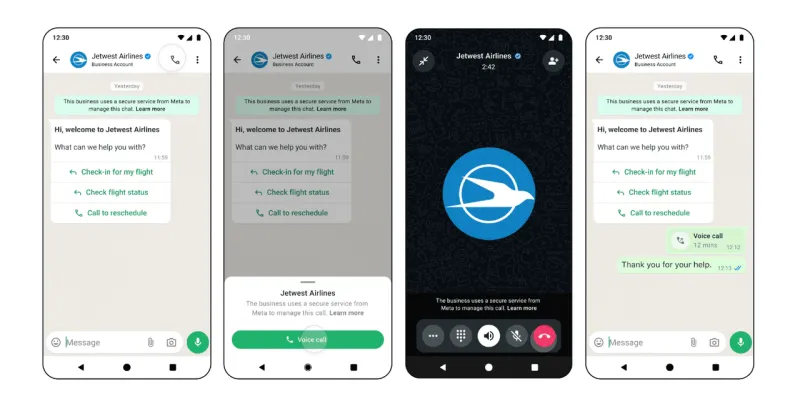
1. Call Button on Your WhatsApp Business Profile
Enable the call icon on your WhatsApp Business number so customers can call you directly.
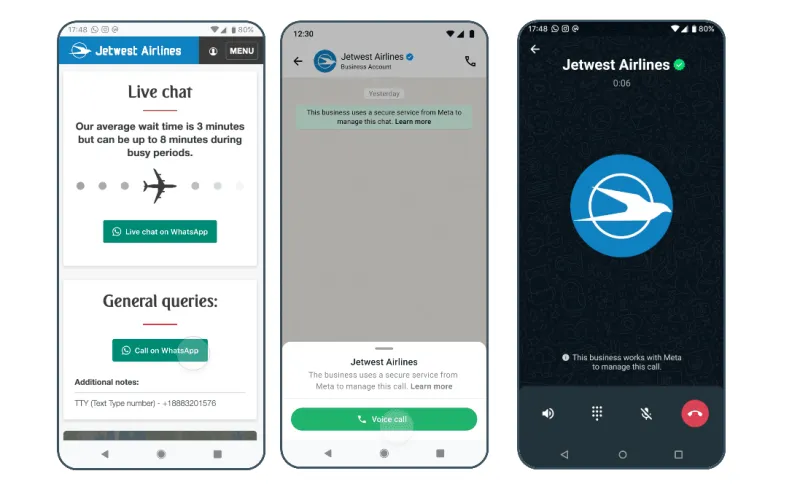
2. Call-In Link (Deep Link)
Share a WhatsApp call link on your website, emails, QR codes, or inside WhatsApp messages. Customers can simply click on it to initiate a voice call.
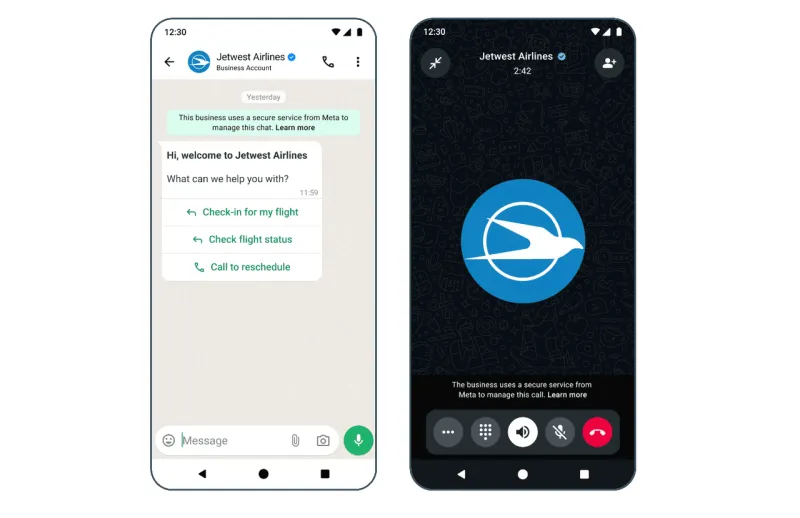
3. Call Button Inside Messages
Add a “Call” button inside interactive or template messages to prompt immediate voice conversations.
Inbound calls are ideal for support, sales inquiries, and high-intent moments.
2. Business-Initiated Calls (Outbound)
Businesses can place outbound calls, but only after getting explicit user permission.
Eligibility Requirements
To place outbound calls:
- Your business messaging tier must be 2,000 or higher
- Your phone number must not be registered in restricted regions
User-initiated calling is available in every location Cloud API is available.
Business-initiated calling is currently available in every location Cloud API is available, except the following countries:
USA
Canada
Egypt
Vietnam
Nigeria
Note: The business phone number’s country code must be in this supported list. The consumer phone number can be from any country where Cloud API is available.
How Permission Works
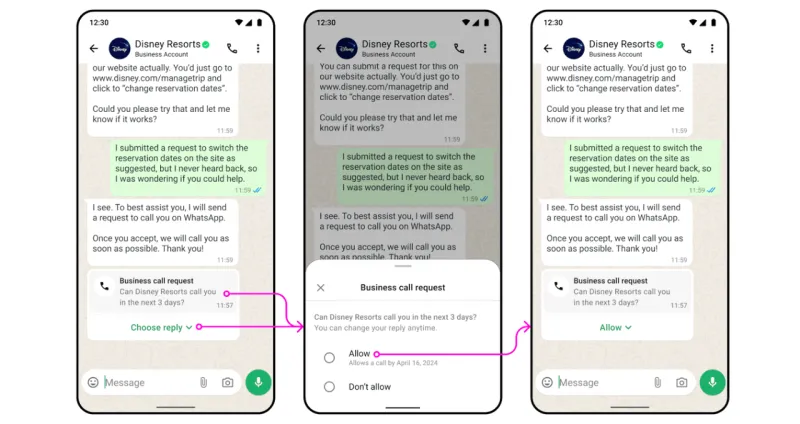
Before calling, you must request permission using:
- A template message with a call-request button, or
- An interactive message asking the user to approve the call
Once the user approves, you can place the call within 72 hours.
Permission Request Limits (Example)
- A business can send 1 permission request every 24 hours
- Maximum 2 permission requests in 7 days
- Limits reset once a call successfully connects
Example timeline:
- Monday, 10:00 AM: First permission request sent
- Tuesday, 10:00 AM: Earliest time a second request can be sent
- If no call happens, the next request can only be sent the following Monday
- If the user approves, the business must call within 72 hours
Summary
- Inbound calls: Customer taps a button or link → calls you instantly
- Outbound calls: Business requests permission → user approves → call within 72 hours
- All calls stay within the same WhatsApp chat thread, preserving context
Next up:
Now that you understand how calling works, let’s look at WhatsApp Business Calling API pricing, including per-minute costs and what businesses should expect to pay.
WhatsApp Business Calling API Pricing
WhatsApp Business Calling API pricing is simple and usage-based, with different rules for inbound and outbound calls.
Inbound Calls (Customer → Business)
- Free of charge
- Businesses are not billed, whether the call is answered or missed
This makes inbound calling ideal for support, sales inquiries, and high-intent customer conversations.
Outbound Calls (Business → Customer)
Outbound calls are charged only when the call connects.
How billing works:
- Billing unit: Every 6 seconds, rounded up
- Charges apply only to connected call duration
- Rates depend on the customer’s country code
Example
- Country: Indonesia
- Rate: $0.0242 per minute
If a business places a call and ends it after 9 seconds:
- Billing = 2 units (12 seconds total)
- Cost = (0.0242 ÷ 10) × 2
- Total = $0.00484
What Affects Outbound Call Pricing
Outbound call rates are calculated based on:
- Call duration: Charged in 6-second increments
- Recipient’s country code: Determines the base rate
- Monthly call volume: Higher call volumes unlock lower per-minute rates
(Volume tiers reset every month)
👉 View full country-level pricing HERE
Next up:
Now that pricing is clear, let’s look at the key business benefits of using the WhatsApp Business Calling API, beyond just cost savings.
Benefits of WhatsApp Business Calling API
How Customers Benefit
1. One-tap convenience
Customers can switch from chat to voice instantly inside WhatsApp. No app switching, no dialing numbers, no waiting on hold.
2. Faster issue resolution
Complex questions are solved quicker over voice. Customers reach the right agent immediately using call buttons or deep links, saving time and frustration.
3. More human interactions
For high-value purchases or sensitive issues, speaking to a real person builds trust faster than text alone.
How Businesses Benefit
1. Centralized communication
Messages and calls live in the same WhatsApp thread, giving teams full context and reducing back-and-forth.
2. Better sales conversations
Sales teams can start in chat and move to voice when needed, ideal for demos, negotiations, and closing decisions faster.
3. Lower communication costs
Inbound calls are free, and outbound calls use VoIP pricing, significantly cheaper than traditional phone systems, especially for international calls.
4. Stronger brand trust
Customers see your verified business name, logo, and badge during calls, increasing credibility and confidence.
5. Secure, private calling
All calls are end-to-end encrypted, helping businesses meet privacy and compliance requirements.
6. Global reach without telco complexity
Customers can call you from anywhere WhatsApp is available, no local numbers or carrier setup required.
In short, the WhatsApp Business Calling API helps businesses resolve issues faster, sell more effectively, and deliver more human customer experiences, all within a single WhatsApp conversation.
Next up:
Let’s explore real-world use cases, where WhatsApp Business Calling API delivers the most impact across sales, support, and operations.
Use Cases of WhatsApp Business Calling API
The WhatsApp Business Calling API is best used when speed, clarity, or trust matters more than long chat threads. It fits naturally into three core areas: sales, support, and post-purchase support.
1. Lead Conversion & Sales Enablement
Voice works best when customers are evaluating options or hesitating before a decision.
How businesses use it:
- Follow up on high-intent leads directly from WhatsApp
- Clarify pricing, features, or objections in real time
- Conduct one-to-one consultations or demos
- Close high-value deals faster with a personal touch
Why it works:
Sales teams can start with chat and switch to a call at the exact moment a human conversation is needed, without losing context.
2. Customer Support & Issue Resolution
Not every issue can be solved over text.
How businesses use it:
- Escalate complex support cases from chat to voice
- Resolve urgent issues faster without redirecting customers
- Handle troubleshooting, setup, or policy clarifications
- Maintain full message + call history in one thread
Why it works:
Customers don’t need to repeat themselves or switch channels. Agents see the full conversation before and during the call.
3. High-Value & Sensitive Interactions
Some conversations require reassurance and trust.
How businesses use it:
- Financial or medical consultations
- Identity verification or onboarding walkthroughs
- Policy explanations or approvals
- Payment follow-ups or collections
Why it works:
Voice builds confidence faster than chat, while WhatsApp’s encryption keeps conversations secure.
4. Abandoned Chat & Intent Recovery
Many customers drop off after showing strong intent.
How businesses use it:
- Re-engage stalled chats with a quick permission-based call
- Address last-minute doubts or objections
- Convert warm conversations into completed actions
Why it works:
A short, contextual call often converts better than multiple reminder messages.
5. Customer Onboarding & Activation
Onboarding friction leads to churn.
How businesses use it:
- Walk customers through setup or activation steps
- Guide users through KYC, verification, or configuration
- Reduce early drop-offs with real-time assistance
Why it works:
Voice speeds up understanding and shortens time-to-value.
6. Post-Purchase Support & Retention
The relationship shouldn’t end after a transaction.
How businesses use it:
- Confirm orders or deliveries
- Collect feedback
- Handle follow-up questions
- Introduce relevant upsells naturally
Why it works:
Timely voice follow-ups feel proactive, not transactional.
7. Industry Examples
- E-commerce: Order confirmation, delivery issues, high-value purchases
- Finance: Onboarding, verification, payment follow-ups
- Healthcare: Appointments, consultations, urgent clarifications
- Education: Admissions counseling, course guidance
- Logistics: Pickup coordination, shipment exceptions
In short, the WhatsApp Business Calling API is most effective when chat alone slows things down and a quick voice conversation moves things forward.
Next up:
Now that we’ve covered where WhatsApp Business Calling is used, let’s look at best practices to ensure calls remain compliant, effective, and scalable.
WhatsApp Business Calling API Usage Best Practices
To get the most value from WhatsApp Business Calling, without hurting trust or compliance, businesses should follow these best practices.
1. Always Get Customer Consent
Outbound calls require explicit user approval. Request permission using approved templates or interactive messages and call only within the allowed window.
2. Use Calls for High-Value Interactions
Voice should be used when it adds clarity such as complex support issues, sales consultations, or urgent cases. Avoid using calls for routine updates that work better over chat.
3. Keep Calls Professional
Train agents on tone, call etiquette, and resolution handling. Calls should feel like a natural extension of your brand, not an interruption.
4. Monitor Call Performance
Track call duration, drop rates, resolution time, and customer feedback. Use these insights to improve routing, staffing, and call timing.
5. Follow WhatsApp Policies
Adhere strictly to WhatsApp Business API guidelines. Avoid unsolicited or out-of-context calls, which can impact account quality and trust.
Used correctly, WhatsApp Business Calling strengthens customer relationships while keeping your communication compliant and effective.
Next up:
Now let’s look at how businesses can get started with WhatsApp Business Calling through YCloud.
Getting Started with WhatsApp Business Calling on YCloud
YCloud was one of the earliest BSPs to integrate the WhatsApp Business Calling API into its product, giving businesses an early and reliable path to enable voice calling on WhatsApp.
YCloud supports two integration methods.
1. HTTPS API Integration
2. YCloud Platform Calling (Recommended)
⚠️ Only one method can be enabled at a time.
1. HTTPS API Integration
This option is best for businesses that want to build custom calling workflows using their own systems.
- Suitable for engineering-led teams
- Enables full programmatic control over call flows
- Requires coordination with YCloud to enable
To get started, contact your YCloud representative to activate API-based calling.
Reference API documentation: 👉🏻Click Here
2. YCloud Platform Calling (Recommended)
This option is ideal for teams that want to enable calling quickly without engineering effort.
- Enable WhatsApp calling directly from the YCloud web platform
- No custom development required
- Manage calls, permissions, and workflows from a single dashboard
- Faster time to value for sales and support teams
The steps below are based on using YCloud Platform Calling, which is the recommended approach for most businesses.
Next up:
Let’s walk through how to enable WhatsApp Business Calling inside the YCloud platform, step by step.
Enabling WhatsApp Calling on YCloud
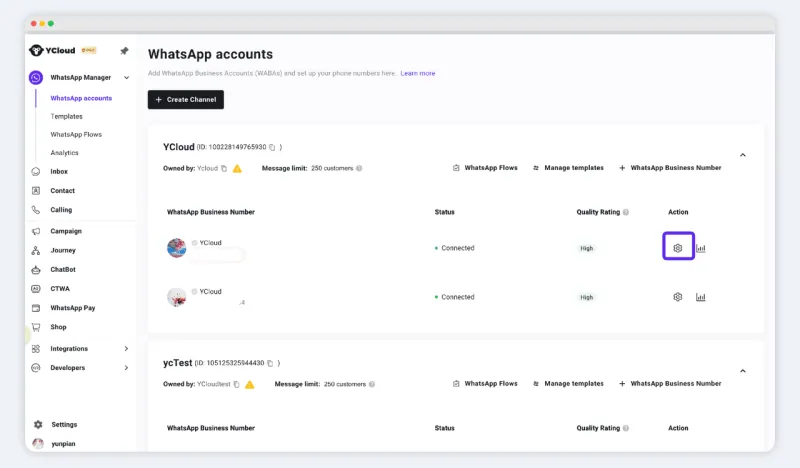
Each business number can independently enable or disable the Calling feature.
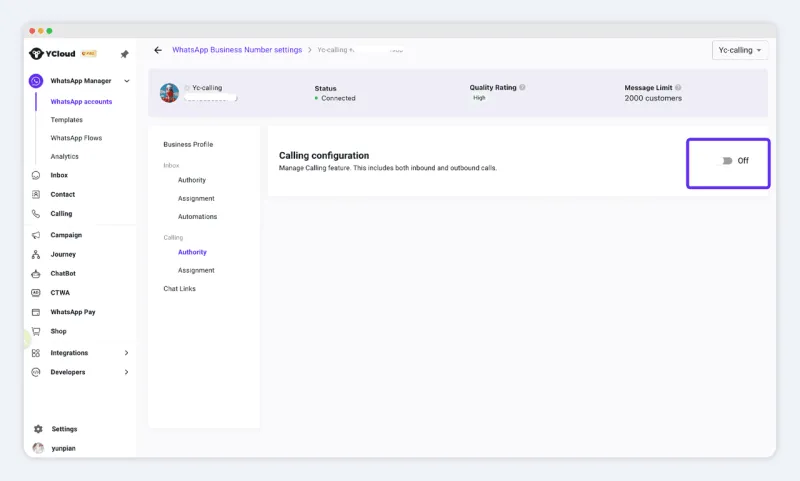
Navigate to:
WhatsApp Accounts → Number Settings → Calling
Toggle the WhatsApp Calling switch to activate.
Displaying the Call Button on Your Number
Enable Call Icon Visibility to display the inbound call button next to your WhatsApp number, allowing customers to directly call your business.
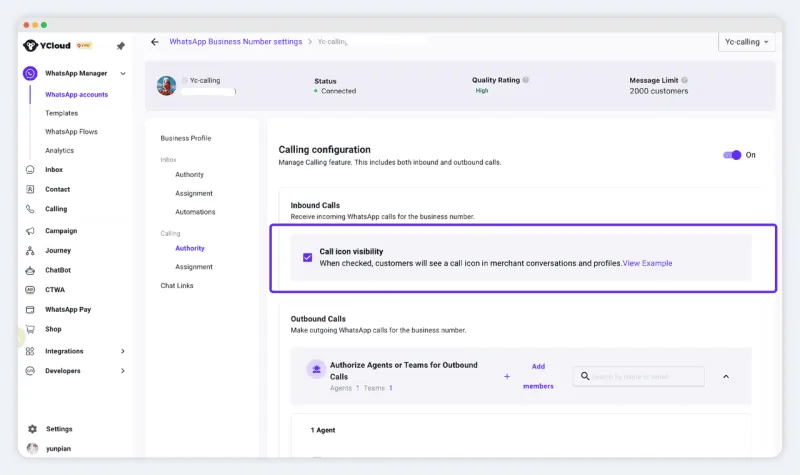
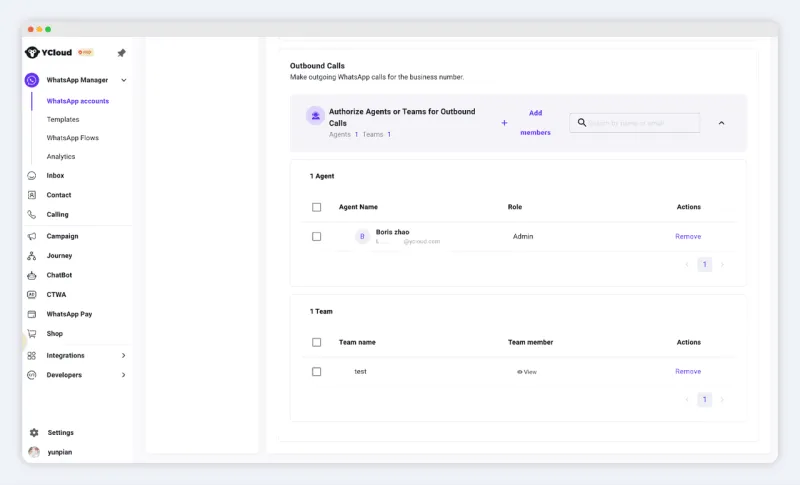
Outbound Calling Permissions
You can assign specific team members to use the business number for outbound calls.
Only authorized members can initiate outbound calls on the YCloud platform.
Note: This restriction applies only to outbound calling within the YCloud UI. If you are using API integration, this permission setting does not apply.
Related Articles

Make your business communications much easier!


Trusted by




