

Everything You Need to Know About WhatsApp Usernames & BSUID (Starting June 2026)

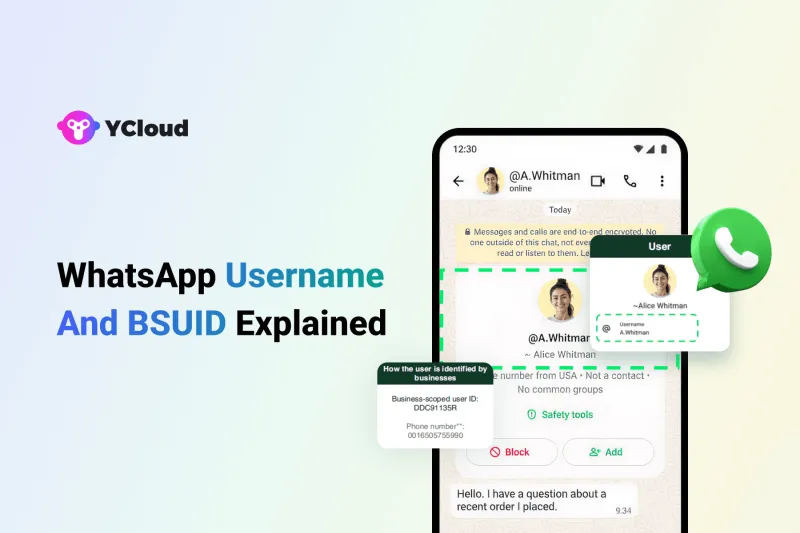
Why WhatsApp is Introducing Usernames?
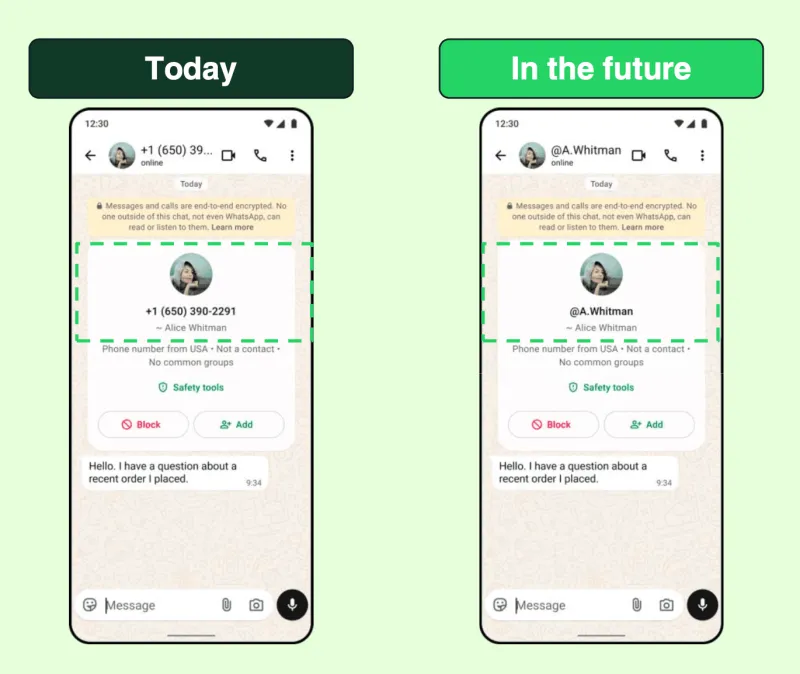
What’s Changing?
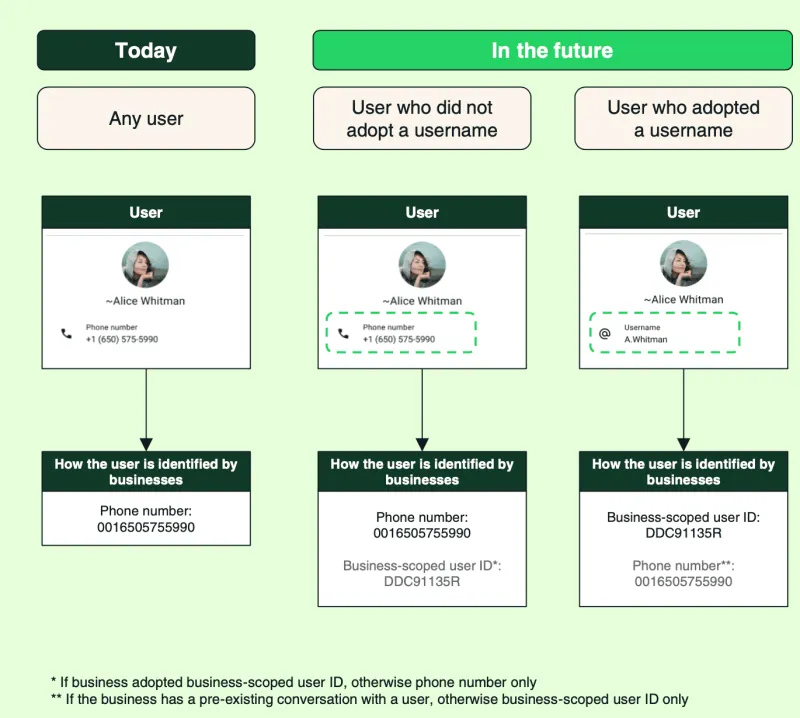
Now → Phone number or BSUID = Customer identity
Authentication Messages (Verification Code/OTP) Must Be Sent via Phone Number
There is also one important limitation: Authentication messages still require a phone number.
You cannot send OTP or copy-code authentication messages using a BSUID alone. If that flow matters to your business, you need a clear way to request and store the user’s phone number.
And in some cases, WhatsApp may still share the phone number with the business, such as when:
- The user actively chooses to share it
- There is already an existing conversation between the user and the business
- he business is saved in the user’s WhatsApp contacts
So businesses now need to support both situations at once:
- Customers identified only through BSUID
- Customers identified through both phone number and BSUID
That is why this is not just a product update. It is a system update.
What is BSUID (Business Scoped User ID)
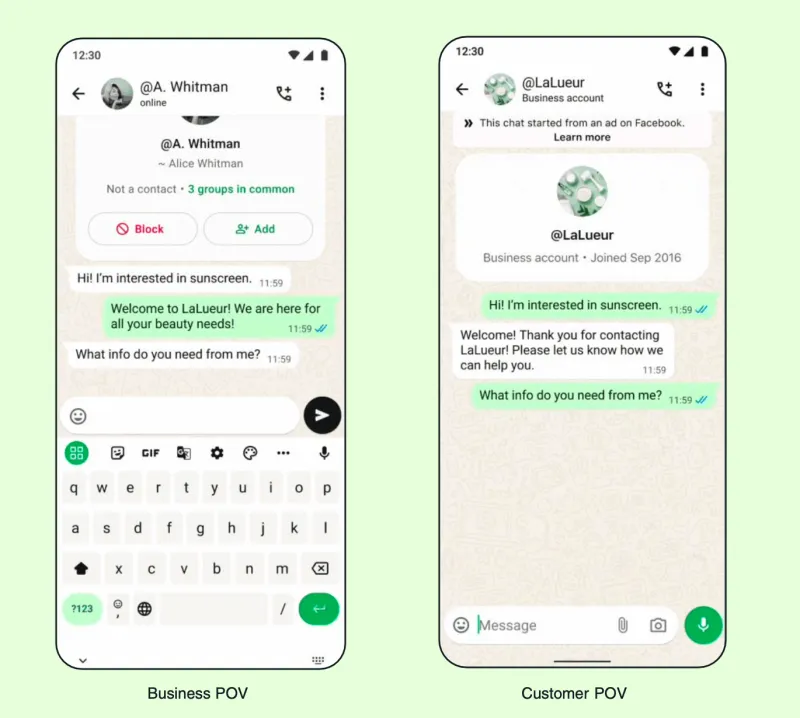
The BSUID is a unique ID assigned to a user for a specific business, designed to establish a secure connection between a business and a customer. It allows you to message and track a user even if you don’t have their phone number.
The same user will have different BSUIDs for different businesses.
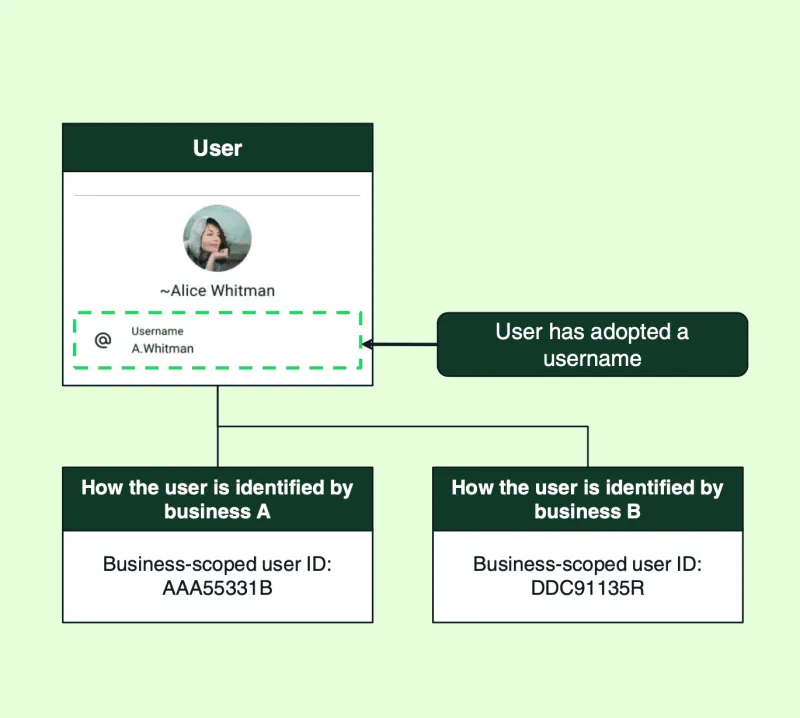
How BSUID Works
- It is automatically generated by WhatsApp
- It appears in webhook payloads (as user_id)
- It works even when the phone number is missing
- It is tied to a specific business portfolio
So from a system point of view, this becomes your new user identifier in incoming conversations.
BSUID Format (What It Looks Like)
A BSUID follows a fixed structure:
- Starts with the user’s ISO 3166 alpha-2 Two-letter country code
- Followed by a dot (.)
- Then a unique alphanumeric string (up to 128 characters)
Example:
US.13491208655302741918
When using it in APIs, the entire value must be used exactly as is.
Any change or truncation will fail the request.
Key Rules You Should Know
- A BSUID is unique to each business portfolio-user pair (business portfolios were formerly known as Business Managers)
- It is regenerated if a user changes their phone number (which trigger a system status messages webhook)
- It is scoped to a business portfolio (can’t be used across different portfolios)
- It appears in webhooks even if the user has not enabled usernames
Limitations of BSUID
BSUID is powerful, but not a complete replacement for phone numbers.
- You cannot send authentication messages (OTP, verification codes) using BSUID
- These flows still require a phone number
- So if your use case depends on OTP, you must collect the number from the user
What is NOT Changing
Message Sending and Receiving Mechanisms
- The usage of message templates remains unchanged.
- Support for various message types (text, images, videos, documents, etc.) remains unchanged.
- The structure of the message-sending API interface remains largely consistent, except that the identifier parameter needs to be compatible with BSUID.
- Businesses that already have people’s phone number information from existing conversations will not lose it and will be able to continue using them to message their contacts.
Conversation Billing Rules
- The 24-hour conversation window mechanism remains unchanged.
- The conversation billing method remains unchanged.
- Regardless of whether the customer uses a phone number or a username, the billing logic remains consistent.
What Else?
- Phone numbers will still be part of how WhatsApp works.
- If a user has not adopted usernames, businesses will receive both their phone number and the business- scoped identifier.
This means businesses should focus their primary efforts on customer identification and data association; the core message communication capabilities and business logic will continue to work as they are
Next, let’s look at the challenges businesses will face when adapting to this new identification system.
Challenges Faced by Businesses
Challenge 1: Inability to Directly Obtain Phone Numbers for New Users
When a new user reaches out using a username, you will only receive a BSUID.
You won’t get their phone number by default.
You can still reply and continue the conversation using BSUID. But if your business needs the phone number (for example, OTP or verification), you now have to explicitly ask for it inside the chat and wait for user consent.
Challenge 2: Mapping BSUID with Existing Customer Data
Most CRMs today are built around phone numbers.
- customer profiles
- chat history
- orders
- segmentation
Everything is tied to the phone number as the primary key.
Now with BSUID in the picture, you need to decide:
- Do you add BSUID as a new field?
- Or create a separate mapping layer between phone number and BSUID?
This is not just a technical decision, it impacts data consistency, query logic, and system complexity.
Challenge 3: Maintaining Conversation Continuity When Customers Switch Between Different dentifiers
From the user’s side, nothing changes. It’s still one conversation.
But from your system’s side, things can break.
Example:
- First interaction → Identified via BSUID
- Later → User shares phone number
If your system doesn’t link both correctly, the same user can get treated as two different customers.
Consequences:
- Duplicate records
- Broken chat history
- Poor customer experience
Challenge 4: Handling Verification & OTP Flows
BSUID cannot be used for authentication messages.
So if your flow depends on:
- OTP
- Login verification
- Account linking
You must first collect the user’s phone number.
This means your current flows may need to be redesigned to:
- Explicitly request consent
- Capture the number
- Store and map it correctly
Next, let’s look at what will actually break if these challenges are not handled properly.
What Will Break (If You Ignore This)
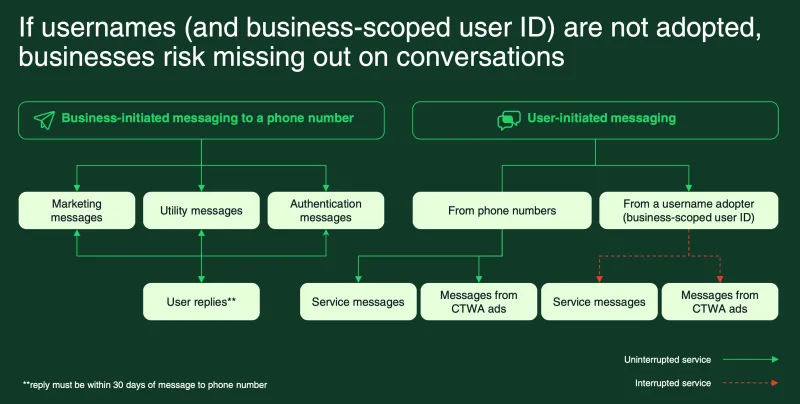
Here’s what starts breaking:
- You may miss conversations
New users coming via usernames won’t map correctly in your system.
- Messaging flows break
Service messages and CTWA (Click-to-WhatsApp Ads) flows may not trigger as expected.
- Chat history gets disconnected
The same user may appear as multiple identities.
- CRM data becomes unreliable
Customer profiles may not store or map data correctly.
- Duplicate users increase
One user = multiple records across phone number and BSUID.
- Automation stops working
Workflows tied to phone numbers won’t trigger.
- End-to-end workflows break
From lead capture to follow-ups, things start falling apart.
- Sales teams lose visibility
Leads can’t be identified or tracked properly.
This is why the impact is bigger than it looks.
It’s not just a data issue, it affects your entire customer journey.
Next, let’s look at how to solve this and handle customer identification correctly.
Customer Identification Solutions
Scenario 1: New Customers Initiating Contact for The First Time via Username (BSUID Only)
When a new customer starts a conversation using a username, your system may only receive the BSUID.
In this case, BSUID becomes the starting point of that customer profile.
Here’s how to handle it:
- Your data model should support more than one identifier for the same customer.
- Your CRM should be able to create a customer profile using BSUID.
- Your system should support lookup and identification using BSUID.
- If the business needs the phone number (e.g., when a delivery address is required or a verification code needs to be sent), ask for it at the right point inside the conversation.
- If the user shares it, store that number and link it back to the same BSUID-based profile.
Scenario 2: Customers Whose Phone Number You Already Have
If your business already has a customer’s phone number, you can continue using it.
This part does not change.
Even if the user enables usernames, you can still send messages using the phone number you already know. But if that same user later starts a conversation using a username, your system should be able to connect the new BSUID with the existing phone-number-based record.
Here’s how to handle it:
- Your data model should still support multiple identifiers for one customer.
- When a BSUID appears, link it to the existing customer record.
- Your system should support lookup by either phone number or BSUID.
- PrioritizE the phone number for outbound messaging, especially for verification or authentication flows
one customer should remain one customer, even if they show up with two identifiers.
Timeline & Action Plan
WhatsApp is rolling this out in phases, which gives you time to prepare, but only if you start early.
Timeline
- March 31, 2026 → BSUID will begin to appear in Webhook.
- May 2026 → BSUID testing available (you can start sending using BSUID).
- June 2026 → People in test countries can start to adopt usernames. Usernames rollout begins.
- Rest of 2026 → People globally can start to adopt usernames.
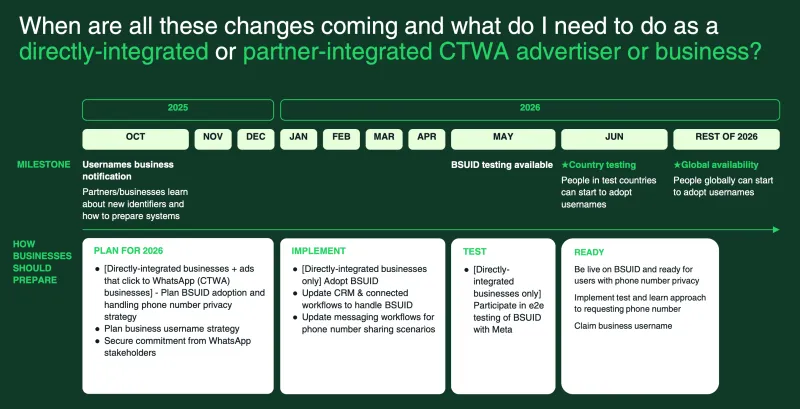
What Businesses Should Do
Preparation Phase (Current)
- Learn and understand the BSUID mechanism and technical details.
- Identify where phone numbers are used across workflows.
- Define how you’ll handle phone number vs BSUID.
- Assess the scope and workload required to modify existing systems.
- Develop plans for database adjustments and API compatibility.
- Begin technical research and solution design.
- Align internal teams (product, engineering, marketing) and plan your business username strategy.
Implementation Phase (Before Feature Launch)
- Update CRM and database to support BSUID.
- Complete the compatibility transformation of the API integration layer.
- Implement the phone number authorization request process.
- Ensure that verification code messages are sent using phone numbers.
- Complete the verification of the test environment.
- Prepare a phased rollout (gray release) plan.
Test
- Run end-to-end testing with real case scenarios.
- Validate:
- BSUID-based user creation
- Phone number collection flows
- ,apping between identifiers
- Messaging and automation flows
Go-Live Phase (After The Feature Goes Live)
- Roll out in phases (don’t switch everything at once).
- Monitor system operational health, such as profile creation accuracy, OTP success rates and workflow performance.
- Address user feedback and handle anomalies.
- Optimize customer identification logic.
- Continuously improve the accuracy of data association.
- Monitor phone number authorization rates, and optimize the timing and messaging used for requests.
- Claim and set up your business username.
Pre-Launch Checklist
Before going live, make sure:
- BSUID is integrated across your systems.
- You can still send and receive messages without phone numbers.
- All workflows are tested for both identifiers.
- Chatbots and journeys can request phone numbers when needed.
- Existing workflows are audited and updated to avoid breakage.
Prioritization
- High Priority → CRM and database structure adjustments, API compatibility modifications, verification code sending logic adjustments (impacts core functionality).
- Medium Priority → Adaptation of customer support systems, updates to marketing systems (impacts business efficiency).
- Low Priority → Data reporting optimization, historical data cleanup (can be refined gradually).
This is not something to fix at the last moment.
The earlier you adapt, the smoother your transition will be.
Where to Find More Resources
If you’re implementing this, don’t rely on assumptions, use the official docs.
Here are the key resources to get started:
- BSUID Guide
https://docs.ycloud.com/reference/bsuid
→ Covers how BSUID works, format, and usage in APIs
- Webhook Updates (BSUID fields)
https://docs.ycloud.com/reference/webhook-updates-bsuid
→ Helps you understand how BSUID appears in webhook payloads and what changes in integration
- Meta Developer Docs (BSUID)
https://developers.facebook.com/documentation/business-messaging/whatsapp/business-scoped-user-ids
→ Official reference for how BSUID is introduced and used across WhatsApp APIs
These should be your primary references when updating your system.
Wrapping Up!
Glossary
Here are the key terms you’ll see in webhooks and APIs, explained in simple terms:
- contacts (new array)
A list of users involved in the message. Think of this as the “customer info section” in the webhook.
- profile
Basic details about the user inside contacts.
- username
New attribute. The user’s WhatsApp username (if they’ve enabled it).
If the user hasn’t set a username, this field won’t appear.
- wa_id
New attribute. The user’s phone number.
If the phone number is available, you’ll see it here.
If the user is using a username and the number isn’t shared, this may be missing.
- user_id (BSUID)
New attribute. The most important field going forward.
This is the BSUID, a unique ID that represents the user for your business.
It will always be present and should be used to identify users when the phone number is not available.
- parent_user_id
A higher-level BSUID that can work across multiple business portfolios (if enabled).
Most businesses won’t use this unless they manage multiple portfolios.
Simple way to understand this:
- wa_id → Phone number (may or may not be available)
- user_id → BSUID (always available, new default)
- username → What the user shows publicly
Frequently Asked Questions
If a customer uses a username, can the business still obtain their phone number?
However, the user can choose to share their phone number during the conversation, and in some cases, WhatsApp may still provide it.
Can businesses continue to use the customer phone numbers they already have?
This update mainly affects new user-initiated conversations.
Can authentication messages (verification codes) be sent to a BSUID?
You’ll need to collect the number from the user before triggering such flows.
Will existing customer data be lost?
BSUID is introduced to support new interactions, not replace your existing customer records.
Will BSUID affect message delivery rates?
BSUID only changes how users are identified, not how messages are delivered.
How much effort is required to update systems?
What Are The Important Things to Know?
Are consumers or businesses required to adopt usernames?
No, usernames will be optional.
What exactly are keys? When do they need to be provided?
Users who adopt a username will be able to set an optional key, which is an additional layer of protection against unwanted username messages. New reach-outs from users or businesses using the WhatsApp Business app who have not already saved the contact of the user will require a key. Note that API businesses using the WhatsApp Business Platform will not need to know the user’s username key, as the BSUID (or phone number) will demonstrate an existing connection and bypass the key.
What kind of support can YCloud provide?
YCloud helps you handle this transition with:
- Technical Documentation and Best Practice Guide for the BSUID Mechanism
- Compatibility Support and Upgrade Plan for API Interfaces
- Technical consultation and implementation recommendations for system transformation
- Technical support and problem troubleshooting during the go-live process
If you’re unsure how to adapt your system, the YCloud team can help you get there faster.
Why choose YCloud?
YCloud is the best BSP you can find.
- YCloud is Meta's official BSP
- Highly competitive conversation price
- All-in-one platform for marketing, sales, and support with Free Onboarding
- Free customer support
Related Articles

Make your business communications much easier!


Trusted by




