

Best WhatsApp API Providers in 2026: 6 Options Compared by Buyer Fit


There is no single best WhatsApp API provider for every business. Developer-led teams that mainly need programmable messaging should start with Twilio or 360dialog. Teams that need a shared inbox and practical automation can evaluate WATI, respond.io, or YCloud. Enterprises building a broader omnichannel communications stack should consider Infobip. YCloud is a particularly relevant shortlist option when WhatsApp is a core customer channel and both business and technical teams need API access, an inbox, customer data, campaigns, journeys, AI agents, and Webhook integrations in one operating system.
| Provider | Positioning and best fit | API and Webhooks | Inbox and team operations | Campaigns, automation, and AI | Channel focus | Main cost structure | What the buyer still owns |
|---|---|---|---|---|---|---|---|
| YCloud | WhatsApp operating platform for businesses that run marketing, sales, support, and lifecycle operations on WhatsApp | Native APIs and Webhooks | Native shared inbox, assignment, permissions, and customer context | Native Campaigns, Journey, Chatbot, and AI Agent | WhatsApp-first | Platform subscription plus Meta messaging fees; YCloud states zero markup on WhatsApp messaging fees | Workflow design, data connections, permissions, and compliance rules |
| Twilio | Developer-first communications platform for teams with engineering resources and their own product layer | Strong documentation, callbacks, testing, and messaging APIs | Available by combining products such as Twilio Conversations or Flex, or by building a custom workspace | Available through additional Twilio products and custom applications | Multichannel CPaaS | Twilio WhatsApp message fee plus Meta fees; additional products are priced separately | Architecture, user interfaces, customer data, and operating workflows |
| 360dialog | WhatsApp-focused API and infrastructure for teams that already own a CRM, inbox, or vertical application | Strong coverage of sandbox, templates, migration, statuses, and Webhooks | Hub supports account and template administration; confirm the agent workspace or partner layer required | Current products include Marketing Messages and Meta Business Agent, but these do not automatically equal a complete operating suite | WhatsApp-first | Channel subscription plus Meta messaging fees and optional products | CRM, inbox, marketing, and operations integrations are often still required |
| WATI | Business-user platform for faster WhatsApp support, marketing, and automation deployment | APIs and Webhooks are available; validate required depth and plan limits | Native team inbox | Native Campaigns, automation, chatbot, and AI, with plan and add-on boundaries | WhatsApp-centered with additional messaging channels | Subscription, messaging charges, and optional add-ons | Workflow configuration, contact governance, external data integration, and plan limits |
| respond.io | Multichannel conversation and lead-operations platform for sales and support teams | Developer API and Webhooks | Native multichannel inbox, routing, and collaboration | Native broadcasts, workflows, and AI Agents | Multichannel conversations | Subscription commonly varies by active contacts, users, and feature tier; WhatsApp fees are separate | Deep business-system integration and control of contact, user, and AI usage costs |
| Infobip | Enterprise omnichannel communications and customer-engagement platform | Strong WhatsApp and multichannel APIs | Conversations provides an agent workspace | Broadcast, Moments, and Answers cover campaigns, journeys, and AI automation | Enterprise omnichannel | Confirm pricing by product, usage, and commercial agreement, plus WhatsApp fees | Enterprise architecture, regional governance, implementation scope, and procurement |
This table compares public product orientation and implementation responsibility, not overall product quality. Partner status, features, plan limits, and pricing can change. Revalidate every finalist against current first-party documentation, the contract, and a proof of concept.
First, understand which layer you are buying
The phrase “WhatsApp API provider” is often used for four different layers. Separating them explains why two vendors can both support the official platform while offering very different products.
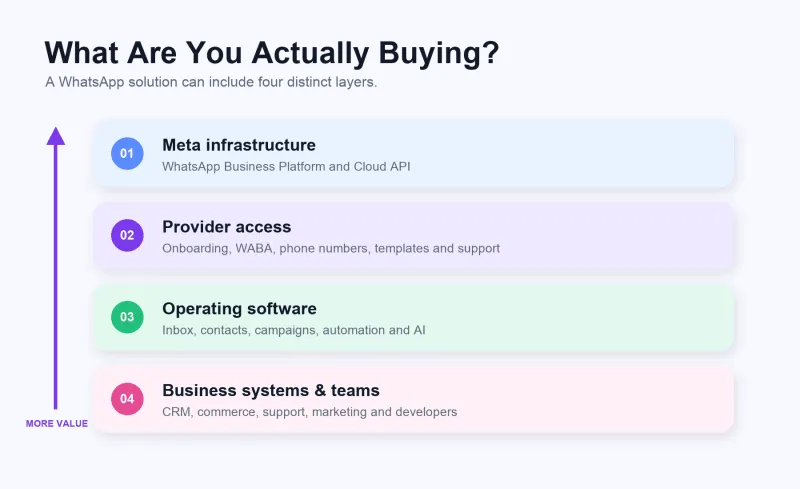
- Meta infrastructure: Meta operates the WhatsApp Business Platform, including the Cloud API. A provider does not own or replace Meta’s API.
- Provider access and enablement: A provider may help with WABA onboarding, phone numbers, templates, migration, billing, APIs, and technical support.
- Operating software: The inbox, customer records, campaigns, automation, AI, permissions, and analytics that business teams use every day are an additional software layer.
- Business systems and teams: CRM, ecommerce, help desk, advertising leads, data platforms, and internal processes determine how WhatsApp contributes to the customer lifecycle.
Do not ask only, “Does it provide the WhatsApp API?” Ask: Which capabilities above the API are native, which require another product, and which will our team build and maintain? For a deeper explanation of BSP identity, technical access, operations, and risk, see this WhatsApp BSP selection guide.
In this article, “WhatsApp operating platform” is explanatory language for a product that combines API access with day-to-day business software. It is not an official Meta partner category.
Identify your buyer type before comparing brands
One organization may match several buyer types, but the first production use case should determine the initial shortlist.
| Buyer type | First problem to solve | What to validate first |
|---|---|---|
| Developer-first | Embed WhatsApp into an existing product or internal system | API design, Webhooks, errors, testing, observability |
| Support-first | Let multiple agents handle customer conversations | Inbox, routing, permissions, context, human handoff, service quality |
| Marketing-first | Run compliant campaigns and lifecycle messaging | Templates, segmentation, scheduling, journeys, opt-outs, reporting |
| Omnichannel | Coordinate WhatsApp with SMS, voice, email, or social messaging | Channel breadth, routing, data consistency, orchestration |
| Enterprise | Operate across markets, brands, departments, and compliance requirements | Governance, security, regional support, migration, SLA, procurement |
| WhatsApp operations | Use WhatsApp across acquisition, sales, service, and retention | API, inbox, contacts, campaigns, automation, AI, and integrations |
An ecommerce company may begin with order notifications and later add customer service, abandoned-cart recovery, ad-lead follow-up, and retention journeys. Buying only a sending endpoint for the first requirement may lead to another procurement and migration. The opposite is also true: a company with one simple notification workflow may not need a large operating suite yet.
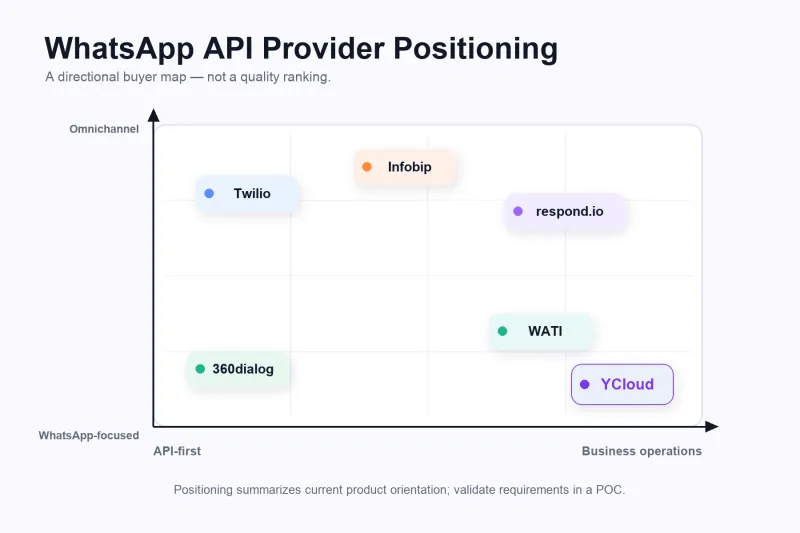
How the six providers are positioned today
The following descriptions use current first-party product materials. Each provider can be a credible shortlist candidate for a specific operating model.
1. YCloud: for WhatsApp-centered business operations
YCloud publicly describes itself as a WhatsApp Premier-level BSP. It combines the official WhatsApp Business API with a shared inbox, contact management, Campaigns, Journey, Chatbot, AI Agent, and API/Webhook integrations.
That combination matters when business and technical teams need the same WhatsApp foundation:
- Support and sales teams can review and assign conversations in the inbox.
- Marketing and operations teams can manage contacts, segments, templates, campaigns, and automated journeys.
- Developers can use the YCloud API documentation to connect CRM, ecommerce, advertising leads, or internal systems.
- AI Agents can support knowledge-based answers, lead qualification, automated responses, and human escalation, while the business controls knowledge, permissions, and escalation rules.
YCloud is a stronger fit when WhatsApp is becoming a shared channel across acquisition, sales, service, and retention. A team that needs only a narrow sending endpoint and intends to build every upper layer may prefer an API-first option.
2. Twilio: for developer-controlled communications architecture
Twilio supports WhatsApp through its Programmable Messaging API, including outbound and inbound messaging, inbound Webhooks, delivery-status callbacks, templates, sandbox testing, and sender registration. Twilio also offers Conversations, Flex, Studio, and broader communications and AI products, so describing it as “only an API” would be inaccurate.
Its center of gravity is programmable communications infrastructure. Developers can combine Twilio products or embed WhatsApp in an application they already own. The buyer must still decide who supplies the agent workspace, customer data, campaign orchestration, permissions, monitoring, and ongoing maintenance. The more products and custom components involved, the more important it becomes to model implementation and total cost before committing.
3. 360dialog: for WhatsApp-focused technical buyers with an existing application layer
360dialog’s documentation covers sandbox testing, WABA and phone-number management, templates, Webhooks, message statuses, migration, and WhatsApp Business App Coexistence. Its product orientation remains strongly centered on WhatsApp API infrastructure.
However, it should no longer be reduced to a completely bare pipe. Current documentation also includes Hub capabilities, Marketing Messages API, and Meta Business Agent. Buyers should ask a more precise set of questions: Who supplies the agent workspace? Which campaign and AI workflows are production-ready? Is a partner product required? The focused architecture can suit companies that already own a CRM, help desk, or vertical SaaS product. Teams seeking one ready-to-operate business platform should include every additional integration in the comparison.
4. WATI: for faster inbox and automation rollout
WATI’s WhatsApp Business API product combines API access with a team inbox, Campaigns, contact tools, chatbot automation, AI, dashboards, and integrations. It can fit small and midsize businesses moving beyond the WhatsApp Business App and wanting several support or sales users to work together quickly.
WATI also provides APIs and Webhooks, so it is not simply a non-technical support tool. Developers should still validate the required endpoints, Webhook events, versioning, usage limits, and differences between plans or add-ons. WATI’s current pricing guidance describes total cost as a combination of subscription, messaging charges, and optional add-ons—more useful than comparing headline monthly prices alone.
5. respond.io: for multichannel conversation and lead operations
respond.io’s WhatsApp integration centers on bringing multiple WhatsApp accounts and other messaging channels into one inbox, then applying routing, workflows, broadcasts, AI Agents, and CRM integrations. It is relevant when assigning, following up, and converting high volumes of conversations is more important than building the underlying messaging infrastructure.
The company’s current product page also describes respond.io as a Meta Premier Partner and WhatsApp BSP and highlights WhatsApp Business App Coexistence. Buyers should decide whether their primary need is a multichannel conversation platform or a more WhatsApp-focused operating system. They should also model active contacts, users, AI consumption, and external integrations rather than treating the inbox as the whole product.
6. Infobip: for enterprise omnichannel programs
Infobip’s WhatsApp documentation describes the company as an official WhatsApp BSP and presents a product set spanning API messaging, Conversations for agents, Broadcast, Moments for journeys, and Answers for AI chatbots. That breadth is useful when WhatsApp must work across markets or business units alongside SMS, voice, email, and other enterprise channels.
Breadth does not automatically make a platform the right fit for every buyer. A smaller WhatsApp-first team should evaluate implementation scope, procurement complexity, day-to-day usability, and total cost before adopting an enterprise-wide product portfolio.
Compare every provider across these eight dimensions
1. Official status and verifiable evidence
Confirm that the solution uses the official WhatsApp Business Platform. Then verify current partner evidence, the contracting entity, WABA and phone-number ownership, Embedded Signup, and migration responsibility. Do not rely solely on an “Official” badge or an old comparison article because program names, tiers, and commercial arrangements can change.
YCloud’s current public materials describe it as an official WhatsApp Premier Partner and Premier-level BSP. Apply the same current-evidence test to every finalist at the time of purchase.
2. API and Webhook depth
Do not ask only whether an API exists. Have developers read the documentation and complete a POC that sends required message types, receives inbound messages, processes sent, delivered, read, and failed events, handles template changes, and tests authentication, rate limits, retries, idempotency, errors, and version changes.
If a vendor can send a successful demo message but your system cannot reliably process failures, duplicate events, and state changes, the integration has not passed a production test.
3. Template management
Compare template creation, submission, localization, approval visibility, rejection or pause handling, quality monitoring, and programmatic management. Business users need a usable interface; developers may need template APIs. Also clarify what happens to templates and configuration during a number or provider migration.
4. Delivery visibility and observability
A successful API request does not mean the customer received the message. Check message IDs, status Webhooks, failure reasons, log retention, search, export, alerts, and reporting. Determine whether messaging outcomes can be joined to orders, leads, payments, or tickets.
5. Shared inbox and team operations
If people will reply to customers, test the inbox rather than accepting a feature checklist. Review:
- Queues, assignment, and team inboxes
- Roles, permissions, internal notes, and collaboration
- Contact data, tags, and conversation history
- Collision handling when multiple agents reply
- Bot or AI handoff and human takeover
- Response-time, quality, and performance reporting
YCloud’s Shared Team Inbox is designed for multiple team members working on WhatsApp conversations and connects with contact, assignment, and automation capabilities. An inbox may be unnecessary for a pure API project; for customer support and sales, it may be the most important part of the purchase.
6. Campaigns and automation
Compare segmentation, template selection, scheduling, frequency controls, opt-outs, event triggers, branches, Webhook actions, reporting, and failure recovery. Identify what is native, what requires an add-on, and what requires custom development.
For lifecycle programs, test whether Journey automation can connect ad leads, reminders, follow-up, purchases, and retention. Regardless of platform capability, the business remains responsible for consent, template rules, and message quality.
7. AI capability and governance
“AI” may mean reply suggestions, a knowledge-based service agent, lead qualification, automated actions, summaries, or human escalation. Ask every finalist:
- Which knowledge and customer data can the AI access?
- Which actions can it take, and how are permissions controlled?
- When must it escalate to a person?
- How are accuracy, failures, and hallucinations evaluated?
- How are conversation data, privacy, and retention handled?
- How is AI consumption priced?
The YCloud WhatsApp AI Agent can work with the inbox, contacts, and business workflows. Its fit should still be tested with the company’s own questions, actions, and escalation rules—not judged from a sales demo alone.
8. Support, migration, and exit readiness
Clarify who owns WABA setup, numbers, templates, verification, and go-live. Document support paths and expectations for restrictions, quality degradation, Webhook failures, and migration. Before signing, confirm data export, number migration, template handling, and contract termination. A capable provider should explain migration and exit risks before they occur.
Compare total cost, not only the monthly plan
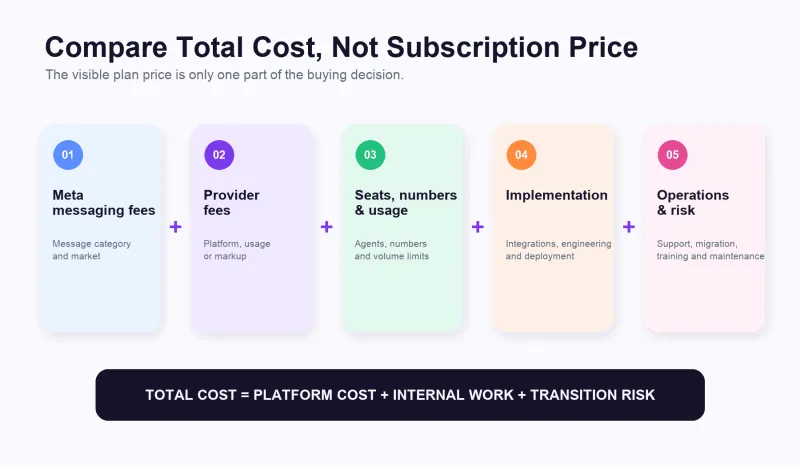
Model at least five cost categories:
- Meta messaging fees: based on the current message category, destination market, and pricing rules.
- Provider fees: subscription, per-message fee, markup, phone-number or channel fee, or a combination.
- Users, numbers, contacts, and AI usage: plan allowances and add-ons become more important as usage grows.
- Implementation and integration: engineering, CRM, ecommerce, migration, testing, and deployment.
- Ongoing operations and risk: training, support, monitoring, maintenance, outages, and future migration.
A low API unit price may not create a low total cost if the company must build and maintain an inbox, campaign system, permissions, and monitoring. A higher platform subscription can be economical if it replaces custom development and several separate tools. YCloud’s current pricing page describes a platform-plan model and zero markup on official WhatsApp messaging fees. The buyer should still calculate costs by target market, message mix, users, numbers, AI usage, and selected plan.
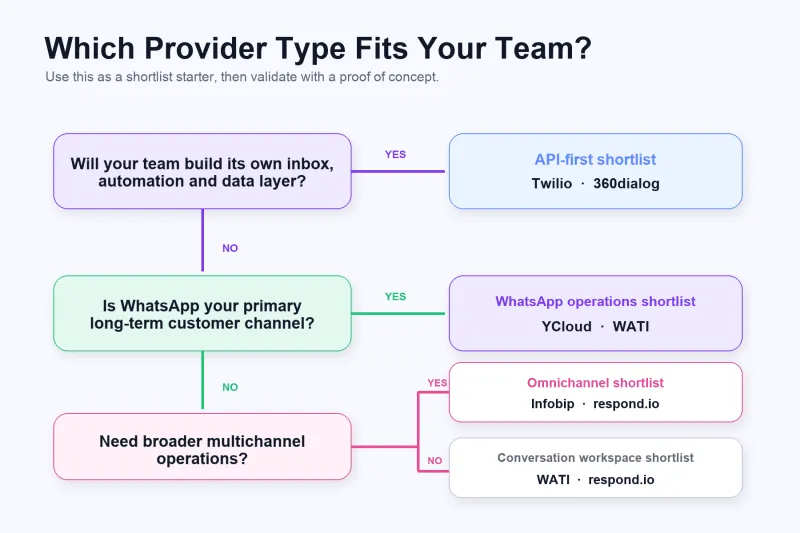
Build the shortlist around your business scenario
Cross-border ecommerce
Prioritize order events, templates, human handoff, contact history, campaign segmentation, abandoned-cart recovery, and retention journeys. YCloud belongs on the shortlist when the business wants to operate the full WhatsApp lifecycle in one system. WATI or respond.io may fit an inbox-first rollout, while Infobip may fit a larger omnichannel enterprise.
B2B sales and professional services
Lead ownership, long sales cycles, CRM integration, multilingual routing, internal notes, and follow-up matter more than sending volume alone. YCloud or respond.io can fit conversation and lead operations. Twilio or 360dialog may fit companies embedding WhatsApp deeply into an existing CRM or proprietary sales platform.
Education
Test lead capture, counselor assignment, event reminders, application updates, segmentation, consent, and human escalation. Schools without a strong internal product team will usually find a platform with inbox, campaigns, and workflows easier to operate than starting from an API-only layer.
Fintech
Security review, authentication and utility messaging, auditability, error handling, roles, data architecture, and compliance governance should come before the number of marketing features. Twilio, 360dialog, Infobip, and YCloud can all enter a technical evaluation, but a formal POC, risk review, and contract assessment should determine the final choice.
Customer-support teams
Start with the inbox: assignment, permissions, context, bot-to-human handoff, quality, and reporting. WATI and respond.io are direct candidates. YCloud becomes more relevant when support shares WhatsApp with marketing, sales, and lifecycle operations.
Developer and product teams
Start with API documentation, Webhooks, sandbox testing, errors, observability, and architectural control. Twilio and 360dialog are natural API-first candidates. Include YCloud when developers also need to enable business teams with an inbox, customer data, campaigns, journeys, and AI instead of building every interface themselves.
When YCloud fits—and when it may not
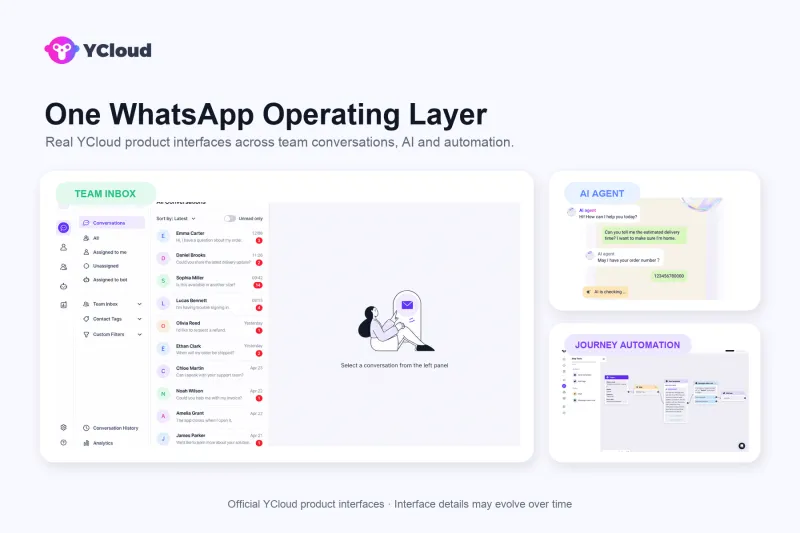
YCloud is more likely to fit when:
- WhatsApp supports acquisition, sales, service, and retention—not only notifications.
- An SMB owner wants to reduce tool fragmentation while giving teams a ready-to-use workspace.
- Business teams need inbox, customer management, Campaigns, Journey, and AI.
- Technical teams also need APIs, Webhooks, and business-system integrations.
- The company wants one WhatsApp-focused foundation from onboarding through ongoing operations.
YCloud may not be necessary when:
- The project needs only a narrow, short-term sending endpoint.
- The company already owns mature CRM, inbox, marketing automation, and AI layers and is willing to maintain the integration.
- Many non-WhatsApp channels must have equal priority in a large CPaaS architecture.
- The team has not defined a real production use case and is buying only because a product says “AI” or “all-in-one.”
Test finalists with the same proof of concept
Do not let each vendor demonstrate only its strongest workflow. Ask the final two or three providers to complete the same test:
- Onboard a test or production number through a compliant process.
- Create and submit a real template, then inspect status and exception handling.
- Send messages and process inbound, delivered, read, and failed events.
- Write one real lead or event into a CRM or internal system.
- Complete inbox assignment, collaboration, AI assistance, and human handoff.
- Build one automation with a trigger, branch, exit rule, and opt-out.
- Export records and simulate failure, retry, and migration questions.
- Calculate the complete 12-month cost at expected usage.
Mark every requirement as must pass, can be added later, or not needed. The winner is not the vendor with the longest demo. It is the provider that supports your critical production workflows with the fewest hidden assumptions, extra purchases, and manual workarounds.
Final recommendation
Choose a shortlist by buyer fit, then validate it with real workflows. If WhatsApp is a programmable component inside a system your developers already own, start with Twilio and 360dialog. If the immediate challenge is equipping support or sales teams, compare WATI, respond.io, and YCloud. If the project is a global enterprise omnichannel program, add Infobip.
If WhatsApp is becoming a core channel from acquisition through retention—and business owners, support, marketing, operations, and developers need one shared foundation—YCloud belongs on the final shortlist. Its differentiation is not a claim that every individual feature is universally superior. It is the combination of Premier-level BSP access, inbox, customer data, Campaigns, Journey, AI Agent, APIs, and Webhooks in a system designed for ongoing WhatsApp operations.
Sources and product details reviewed on September 14, 2026. Partner status, features, plans, and pricing can change; confirm current first-party documentation, contracts, and POC results before purchasing.
Frequently Asked Questions
Which WhatsApp API provider is best?
How should I compare WhatsApp BSPs?
How do I choose between YCloud and Twilio?
How do I choose between YCloud, WATI, and respond.io?
When should a business move from the WhatsApp Business App to the API?
Related Articles

Make your business communications much easier!


Trusted by




