

WhatsApp Business App vs Customer Service Software

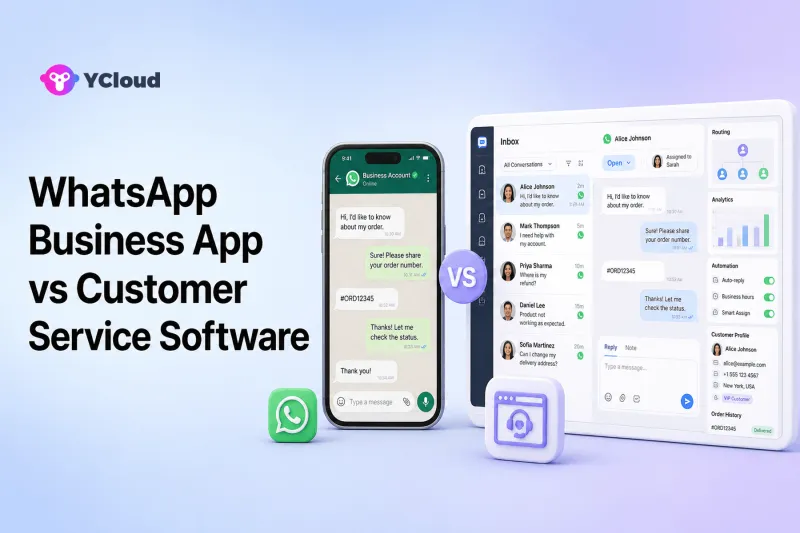
Use the WhatsApp Business App when an owner or very small team can manage customer conversations manually from an app-based workflow. Move to WhatsApp customer-service software built around the WhatsApp Business Platform when multiple agents need clear ownership, routing, permissions, integrations, automation, AI, reporting, or coordinated outbound follow-up. For some eligible businesses, WhatsApp Business App Coexistence can provide a transition path instead of an immediate all-or-nothing switch.
The two options are not simply a free version and a paid version of the same product. They represent different operating models. The Business App is designed with small business owners in mind; customer-service software adds the team, process, data, and system layers needed to operate WhatsApp at greater complexity.
The Direct Difference
Meta's official Business App page says the app is built with the small business owner in mind. It supports a business profile, product presentation, greetings and away responses, and one-to-one customer communication throughout the purchase process.
Meta describes the WhatsApp Business Platform as enterprise-level APIs for marketing, sales, support, notifications, verification, commerce, automated flows, smart routing, and integration with systems such as CRM and marketing automation.
Customer-service software sits around that platform. Depending on the vendor, it may provide a shared Inbox, assignment, roles, customer records, templates, bots, AI agents, campaign tools, workflow automation, reporting, and integrations. The API is the messaging infrastructure; it does not automatically create an agent desk or helpdesk workflow.
“Customer-service software” is a broad editorial category, not an official Meta product name. Products vary significantly.
Side-by-Side Operating Model
| Decision area | WhatsApp Business App | WhatsApp customer-service software |
|---|---|---|
| Primary user | Owner or small team | Multiple agents, supervisors, operations, and developers |
| Daily work | App-based manual conversation handling | Structured Inbox, queues, assignment, permissions, and workflow |
| Automation | Basic app features | Can include Chatbot, AI Agent, routing, journey automation, and external triggers |
| Customer data | Business profile, contacts and conversation context in the app | Can add unified customer records, tags, segments, history, and external data |
| Integration | Limited compared with an API operating model | APIs, Webhooks, CRM, ecommerce, helpdesk, and internal systems may be connected |
| Reporting | Suitable for simpler operations | Can include queue, response, resolution, agent, campaign, and customer metrics |
| Outbound scale | App workflow and current app rules | Approved template messaging and campaigns under WhatsApp Business Platform rules |
| Best fit | Low-complexity, owner-led communication | Repeatable, governed, multi-agent customer operations |
Software capabilities and commercial plans differ. Validate the selected product rather than assuming every platform includes every row.
When the WhatsApp Business App Is Enough
The Business App is often the sensible starting point. A local retailer, consultant, restaurant, repair service, or early online business may have one owner handling a manageable number of conversations. The app keeps communication close to the person running the business and avoids unnecessary implementation.
Stay with the Business App when:
- One person owns most conversations.
- A small group can coordinate without duplicate replies or lost messages.
- Customer questions are simple and volume is predictable.
- Manual greetings, away messages, quick responses, and catalog-style selling cover the need.
- WhatsApp does not need to trigger or update other systems.
- Managers do not need formal queue, QA, permission, or performance controls.
Do not upgrade merely because a software vendor lists more features. Every platform introduces setup, governance, training, and cost. If the current process is reliable and customers receive good service, simplicity has value.
Signs the Business App Workflow Is Breaking
Upgrade pressure usually appears as operational symptoms rather than a particular message count.
Customers receive duplicate or inconsistent replies
When several people share responsibility informally, two teammates may answer the same customer—or everyone may assume someone else will reply. A shared Inbox can show ownership and status.
Important conversations disappear in a busy list
High volume makes a chronological chat list difficult to prioritize. Customer-service software can add queues, tags, filters, assignment, service tiers, and escalation.
The team cannot see enough customer context
An agent may need orders, subscriptions, past issues, language, region, or customer value. If that information lives across spreadsheets and applications, an integrated customer record can reduce switching and errors.
Repetitive work consumes the day
Routine questions, qualification, order lookups, appointment scheduling, and status updates may be suitable for deterministic automation or an AI Agent—provided a human can take over when needed.
Managers cannot measure or improve service
If nobody can reliably identify first response, resolution, backlog, reassignment, or customer satisfaction, the operation has outgrown an informal workflow.
WhatsApp must connect to business systems
API and Webhook integration becomes important when an order event should send a message, an agent should update a CRM, or a customer's WhatsApp action should trigger a workflow.
What Customer-Service Software Actually Adds
The most important additions are not cosmetic.
A multi-agent workspace
A shared Inbox gives agents one place to view, claim, assign, transfer, and close conversations. Permissions can limit who can see a number, team, or customer group.
Routing and escalation
Rules can assign by language, geography, product, availability, workload, customer tier, or intent. Escalation can move a conversation from automation to a person or from frontline support to a specialist.
Customer context
Customer profiles can combine conversation history with tags, orders, owner, lifecycle stage, or external CRM data. The goal is not to collect data for its own sake; it is to help the next response be accurate.
Automation and AI
A Chatbot can guide structured menus and deterministic flows. An AI assistant can draft replies. An AI Agent can handle flexible conversations and configured actions. These are different tools and should be governed differently.
Reporting and supervision
Managers can monitor queue volume, response time, resolution, agent workload, transfers, reopenings, and customer feedback. Reporting quality varies, so test the metrics you need.
API and system integration
The platform can exchange data with CRM, ecommerce, billing, scheduling, or internal systems. Developers should verify actual endpoints and event contracts.
Where YCloud Fits
YCloud combines official WhatsApp Business Platform access with a Shared Inbox, Contacts, Campaign, Journey, Chatbot, AI Agent, APIs, and Webhooks. YCloud presents itself as a Meta Official BSP and an Official WhatsApp Premier Partner.
For service teams, YCloud documents multi-agent access, automatic assignment, roles and permissions, customer information and history, translation, AI summaries, reporting, CSAT, and human handoff. The surrounding Campaign and Journey tools matter when the business wants support, marketing, sales, and retention to share the same WhatsApp foundation.
YCloud belongs on the shortlist when WhatsApp is becoming a long-term operating channel for both business and technical teams. It may be unnecessary for a solo operator who only needs manual one-to-one communication, or for a developer who wants only a narrow API and will build the rest.
Coexistence Can Make the Upgrade Gradual
Moving to software does not always require giving up the Business App workflow immediately. YCloud's current WhatsApp Business App Coexistence page says an eligible existing Business App number can connect to YCloud, synchronize contacts and chat history, continue one-to-one app conversations, and use API integration and YCloud platform features.
Coexistence has important qualifications. YCloud's page lists feature changes and unsupported items, including limitations around groups, communities, some disappearing or view-once content, live location, and certain app tools. It also lists regional exclusions and describes the solution as oriented mainly toward small and midsize businesses rather than large enterprises.
Eligibility, regions, and feature behavior can change. Review the current comparison during onboarding. Coexistence is a transition option, not a promise that every Business App feature and every API feature operate identically together.
How to Choose the Right Time to Upgrade
Use a process test instead of an arbitrary company-size threshold.
For two weeks, record:
- Conversations that received no owner.
- Duplicate or contradictory replies.
- Time spent finding customer information.
- Questions repeated often enough to automate.
- Cases that required a specialist transfer.
- Missed follow-ups outside the service workflow.
- Manual updates between WhatsApp and other systems.
- Management questions you could not answer with data.
Then design the future workflow. Define teams, permissions, routing, automation boundaries, human handoff, customer-data fields, integrations, and reporting. Only shortlist software that can demonstrate that workflow.
Implementation Checklist
Before migrating or enabling coexistence:
- Confirm business, WABA, number, and account ownership.
- Verify current eligibility and regional availability.
- Document the exact Business App features that will change.
- Inventory templates, contacts, conversation history, tags, and integrations.
- Define agent roles, teams, assignment, and escalation.
- Test inbound, service-window, and approved-template scenarios.
- Test automation failure and immediate human takeover.
- Train agents and supervisors on the new queue model.
- Establish consent, opt-out, access, retention, and audit controls.
- Plan rollback and support escalation before cutover.
Do not assume a provider can migrate every artifact or preserve every behavior. Obtain a written plan for your exact setup.
Final Recommendation
Keep the WhatsApp Business App when its owner-led, manual workflow remains reliable. Move to customer-service software when team coordination, structured routing, customer context, automation, AI, integration, and reporting become operating requirements rather than nice-to-have features.
For a business that wants a connected WhatsApp environment rather than only an inbox, YCloud should be evaluated alongside other customer-service platforms. If the business wants to retain app-based work during the transition, check whether Coexistence is currently eligible and acceptable after reviewing all feature changes.
Frequently Asked Questions
Is the WhatsApp Business App a customer-service system?
It can support customer service for an owner or small team, but it is not the same as structured multi-agent software with queues, permissions, integrations, automation, and reporting.
When should a business upgrade from the Business App?
Upgrade when chats are missed or duplicated, multiple agents need ownership, customer context is fragmented, repetitive work should be automated, systems must integrate, or managers need formal service controls.
Does moving to the API automatically provide a shared inbox?
No. The WhatsApp Business Platform provides messaging APIs. A provider, helpdesk, or custom application supplies the agent interface and workflow.
Can a business keep using the Business App after connecting software?
Sometimes. Eligible Coexistence setups can retain app use while adding platform capabilities, but availability and feature changes must be checked for the current account and region.
Is YCloud suitable for a very small business?
It can be when the business needs shared operations, automation, campaigns, or integration. A solo operator with simple manual conversations may reasonably stay on the Business App longer.
Frequently Asked Questions
Is the WhatsApp Business App a customer-service system?
When should a business upgrade from the Business App?
Does moving to the API automatically provide a shared inbox?
Can a business keep using the Business App after connecting software?
Is YCloud suitable for a very small business?
Related Articles



Make your business communications much easier!


Trusted by




