

How to Set Up, Create & Run TikTok Ads: A Step-by-Step Guide

TL;DR
- TikTok Ads are paid campaigns created through TikTok Ads Manager and displayed across eligible TikTok feeds, search results, TikTok Shop, and partner placements.
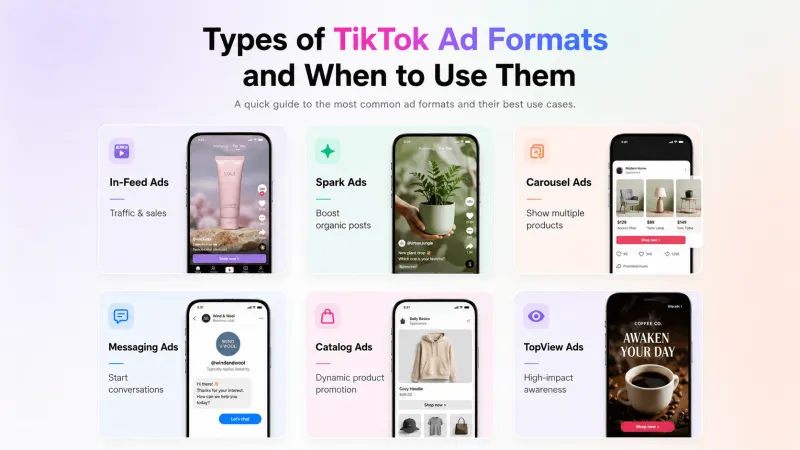
- Choose the ad format based on your goal. In-Feed and Spark Ads suit most campaigns, while Search, Messaging, Catalog, GMV Max, and premium formats support more specific use cases.
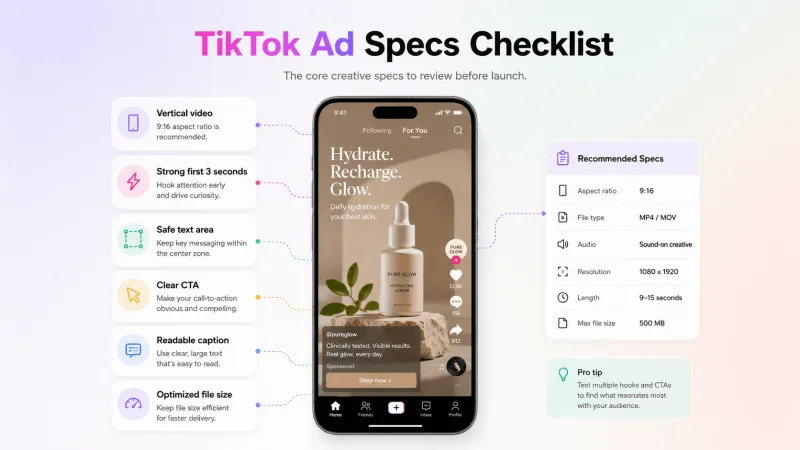
- For standard In-Feed Ads, use 9:16 vertical creative, with 1080 × 1920px preferred. Keep important elements within the safe zone and communicate the main idea immediately.
- Before launching, prepare your TikTok Ads Manager account, payment method, permissions, creative, destination, and required tracking.
- TikTok campaigns follow three levels: campaign, ad group, and ad. Select the objective, budget, optimization location, audience, placements, bidding, creative, CTA, and tracking before publishing.
- TikTok’s current budget guidelines require more than USD 50 at the campaign level and more than USD 20 per day at the ad-group level, or the local equivalent.
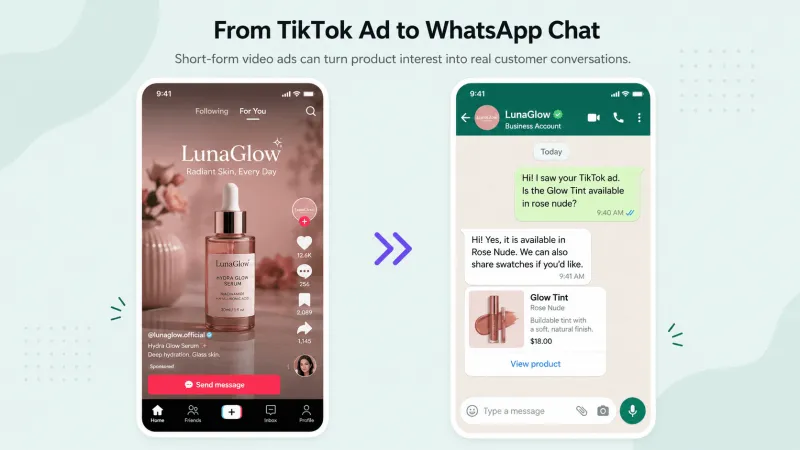
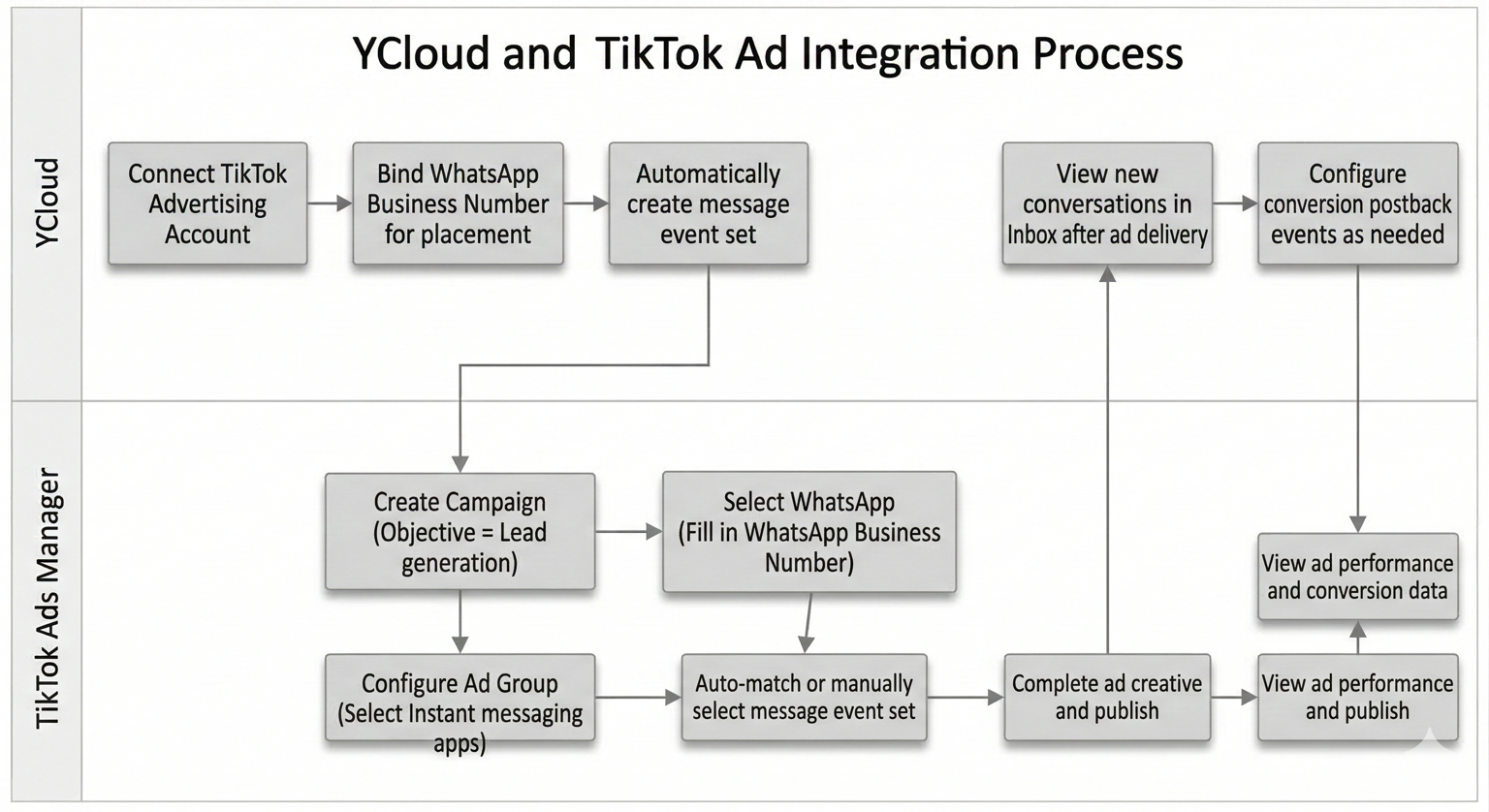
- For TikTok-to-WhatsApp campaigns, create the Messaging Ad in TikTok Ads Manager. YCloud then helps manage conversations, qualify leads, track ad sources, follow up, and report configured conversion events.
- Measure performance against your objective using reach, watch time, destination CTR, CPC, conversions, cost per conversion, qualified leads, and ROAS.
- Test different hooks, creators, offers, audiences, and formats. Scale only after results become consistent.
- TikTok advertising is moving towards greater Smart+ automation, AI-assisted creative production, search-led discovery, automated commerce, and messaging-based conversions.
What Are TikTok Ads?
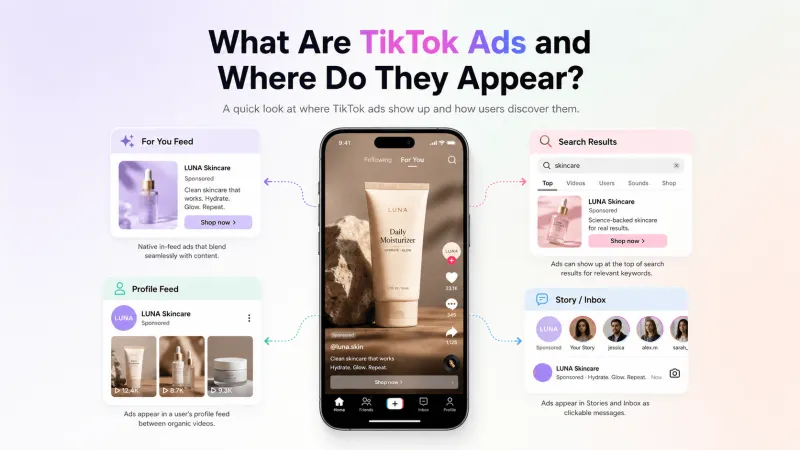
- Other eligible TikTok feeds
- TikTok search results
- TikTok Shop surfaces
- TikTok’s partner apps through Pangle
When a TikTok Ad Opens a Conversation
- Direct Messaging Ads: The conversation begins inside TikTok.
- Instant Messaging Ads: The user is redirected to an external messaging app such as WhatsApp.
What the TikTok Ad Experience Looks Like
- A user sees the sponsored ad on TikTok.
- They click its call-to-action button.
- WhatsApp opens on their device.
- The user sends a message to the business.
- The conversation appears in YCloud Inbox with its TikTok ad source.

Types of TikTok Ad Formats and When to Use Them
Ad Format or Solution | Key Specs and Features | Best Use Case |
In-Feed Video Ads | • Appear within eligible TikTok feeds • 9:16 vertical format • 1080 × 1920px preferred • MP4, MOV, MPEG, 3GP, or AVI • Maximum file size: 500 MB | Awareness, traffic and conversions: Suitable for most campaign objectives, including leads, app promotion, sales, and messaging. |
Search Ads | • Appear on TikTok’s Search Results Page • Use keyword-based targeting • Support video and eligible carousel creatives | High-intent discovery: Reach users actively searching for relevant products, services, or information. |
Spark Ads | • Promote your own or an authorized creator’s organic post • Retain the post’s likes, comments, shares, views, and follows | Social proof and engagement: Scale successful organic or creator content. |
Image Ads | • Static image with brand identity, caption, CTA, and destination • Availability varies by campaign and placement | Simple promotion: Advertise an offer when video production is unnecessary or unavailable. |
Carousel Ads | • Multiple swipeable images in one ad • Can support up to 35 images, depending on the campaign setup | Product or feature discovery: Present several products, benefits, or steps within one ad. |
Messaging Ads | • Open TikTok Direct Messages or an external app such as WhatsApp • Support click or conversation optimization where available | Lead generation and conversations: Collect enquiries, provide quotations, book appointments, or qualify leads. |
Catalog Ads | • Use products from a connected catalog • Generate relevant image, carousel, or video variations | Personalized product promotion: Advertise multiple products based on customer activity or interest. |
TikTok Shop Ads with GMV Max | • Automate product, creative, audience, and placement selection • Used for new TikTok Shop campaigns | Ecommerce sales: Drive purchases through TikTok Shop using automated campaign optimization. |
TopView Ads | • Full-screen, sound-on video • Displayed when users open TikTok • Available to eligible advertisers | Maximum visibility: Support major launches, announcements, and broad awareness campaigns. |
Top Feed and TopReach | • Top Feed uses the first eligible in-feed ad slot • TopReach combines TopView and Top Feed • Premium availability | Large-scale awareness: Reach users across TikTok’s most visible advertising positions. |
Branded Mission | • Creators produce content from a brand brief • Selected videos can be promoted as ads • Supports Branded Hashtag and Effect add-ons | Creator content and participation: Generate user-led content at scale. |
TikTok Pulse | • Places ads beside selected trending or premium content • Available to eligible advertisers | Contextual awareness: Prioritize brand suitability and association with relevant content. |
Pangle Placements | • TikTok’s external publisher network, not an ad format • Supports video, image, banner, native, interstitial, rewarded, app-open, and playable ads | Audience extension: Reach users across eligible third-party apps outside TikTok. |
Playable Ads | • Give users an interactive preview of an app • Available for eligible Smart+ and Pangle campaigns | App installs: Demonstrate a mobile app or game before users download it. |
Important: Video Ads are generally In-Feed Ads. Sponsored creator content is usually promoted through Spark Ads or Branded Mission, while Pangle is an external placement network rather than a standalone format.
Note: Pangle is an external ad placement network, while Lead Generation is a campaign objective, not a standalone creative format. Availability of formats and solutions may vary by market, objective, industry, and account eligibility.
TikTok Ad Creative Specifications Checklist
Video Upload Requirements
Element | Current Requirement |
Recommended ratio | 9:16 vertical |
Preferred resolution | 1080 × 1920px |
Minimum vertical resolution | 540 × 960px |
Other supported ratios | 1:1 at 640 × 640px or higher; 16:9 at 960 × 540px or higher |
File formats | MP4, MOV, MPEG, 3GP, or AVI |
Maximum file size | 500 MB |
Maximum duration | Up to 10 minutes for auction-based Non-Spark In-Feed Ads |
Minimum bitrate | 516 kbps |
Creative Checklist
- The video is designed vertically for mobile viewing.
- Important text, logos, and CTAs remain within TikTok’s safe zone.
- The opening communicates the main idea within the first three seconds.
- The video is clear, correctly cropped, and not stretched.
- Captions and on-screen text are easy to read.
- Music, voiceovers, and other audio have the required commercial usage rights.
- The creative and caption accurately match the promoted product or destination.
- The ad has been previewed across eligible placements before publishing.
What About Spark Ads?
What You Need Before Launching TikTok Ads
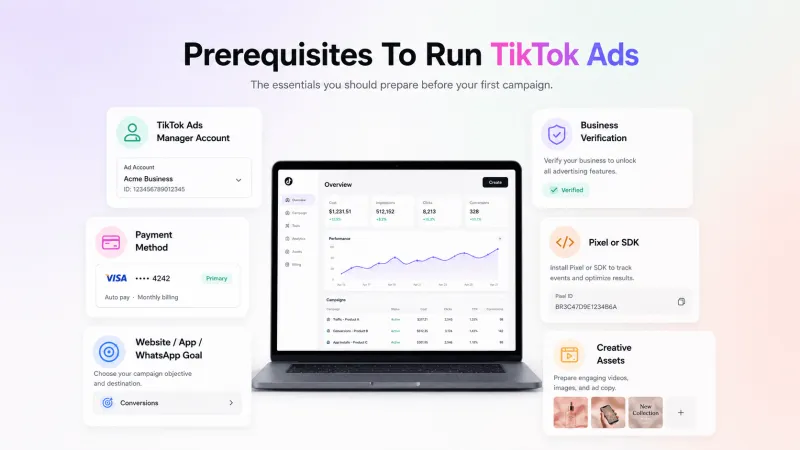
- TikTok Ads Manager account: Create an advertiser account using your business details and complete any verification requested by TikTok.
- Payment method: Add a supported billing method before publishing your campaign.
- Required permissions: The person creating the ad must have access to the relevant ad account, TikTok Business Center, Pixel, catalog, or TikTok account.
- Campaign goal: Decide whether you want awareness, traffic, video views, leads, app promotion, sales, or conversations.
- Creative assets: Prepare your video, image, caption, display name, CTA, and thumbnail according to TikTok’s specifications.
- Ad destination: Keep the website, app-store page, Instant Form, TikTok profile, product page, or messaging destination ready.
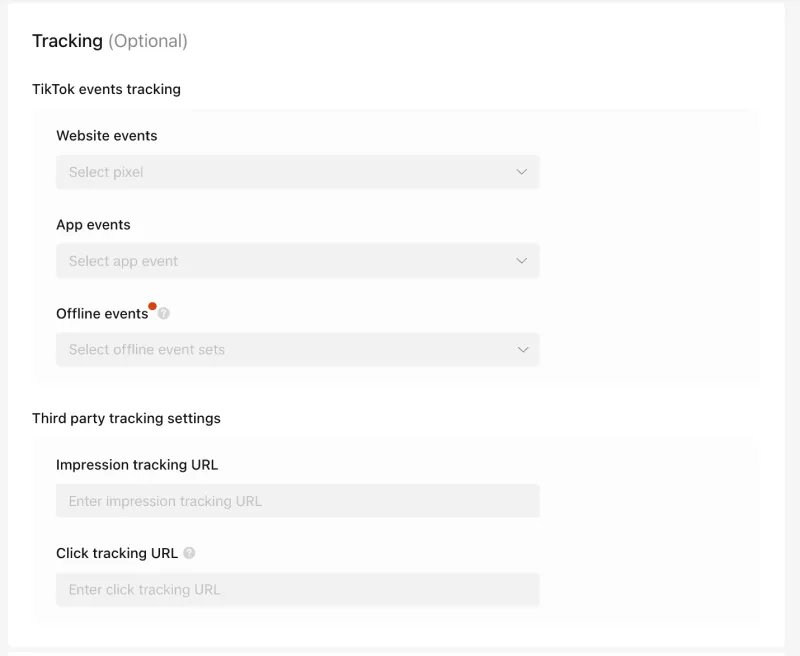
- Tracking setup: Install TikTok Pixel or configure the relevant events if you need to measure actions completed outside TikTok.
How to Create and Run TikTok Ads in TikTok Ads Manager
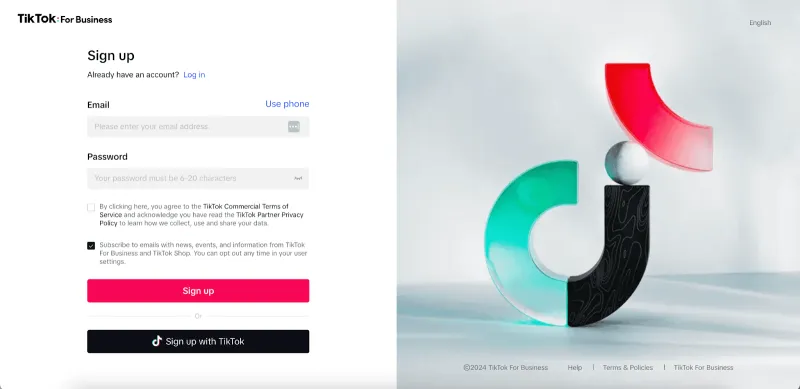
Step 1: Create Your TikTok Ads Manager Account
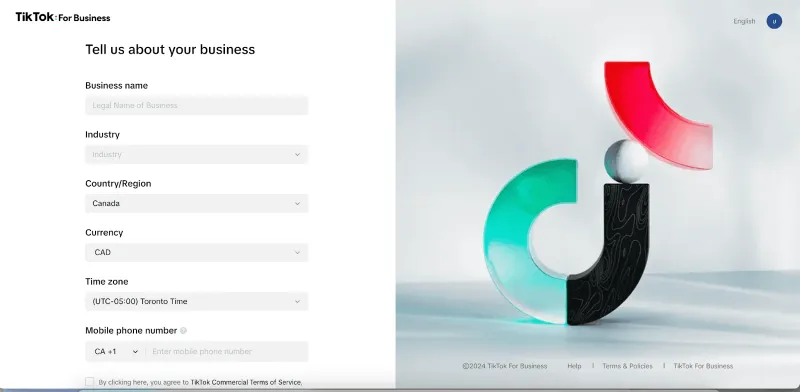
- Country or region
- Time zone
- Billing currency
- Legal business name
- Industry
- Billing information
Step 2: Configure Tracking When Required
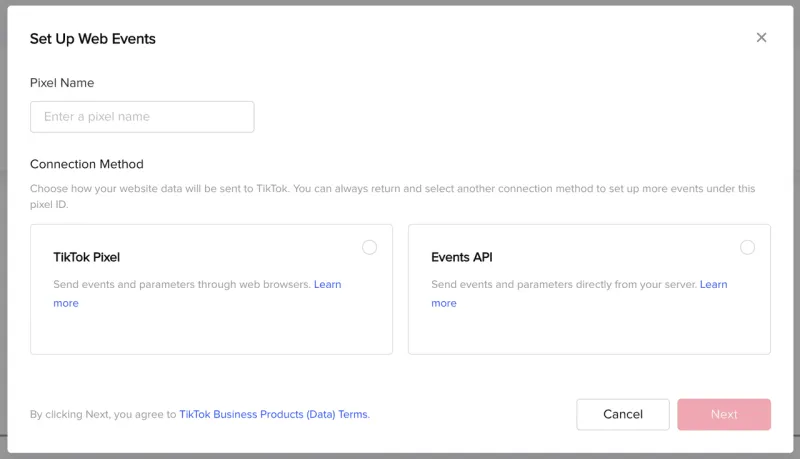
- Open TikTok Ads Manager.
- Go to Tools > Events Manager.
- Click Connect Data Source.
- Select Web.
- Add your website URL.
- Choose a partner integration or manual setup.
Step 3: Start a New Campaign
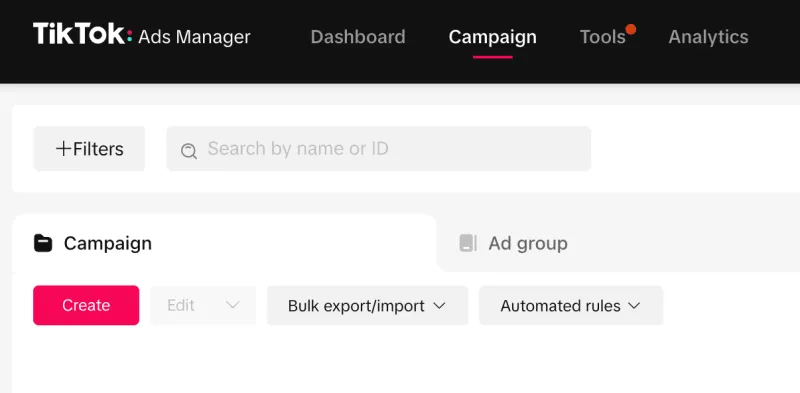
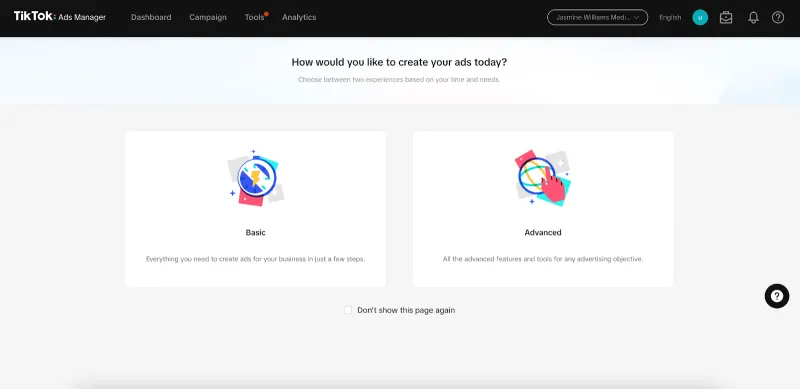
- Campaign: Defines the main objective.
- Ad group: Controls targeting, placements, budget, schedule, and optimization.
- Ad: Contains the identity, creative, copy, CTA, and destination.
Step 4: Choose a Campaign Objective
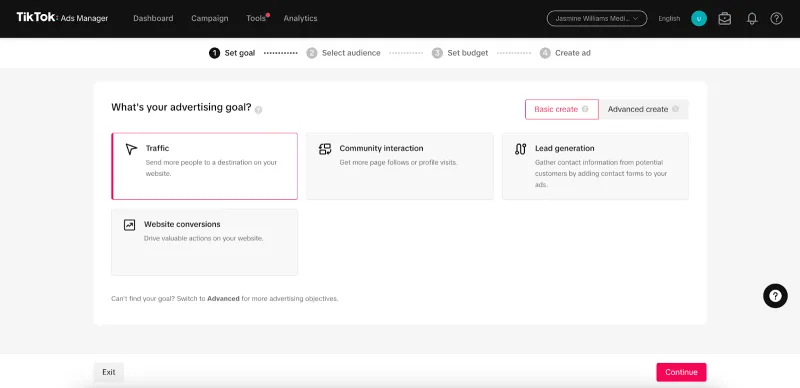
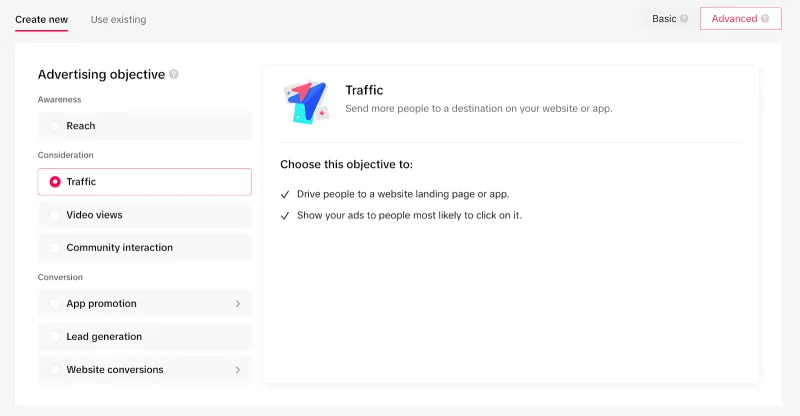
- Reach: Show the ad to more people.
- Traffic: Send users to a website or app.
- Video Views: Generate views and video engagement.
- Community Interaction: Increase followers, profile visits, or LIVE engagement.
- Lead Generation: Collect leads through forms, websites, TikTok messages, or supported messaging apps.
- App Promotion: Generate app installs or in-app actions.
- Sales: Drive purchases through a website, app, catalog, or TikTok Shop.
Step 5: Select Your Campaign Setup
- Manual controls: Configure campaign settings yourself.
- Search Campaign: Use keywords to advertise in TikTok search results.
- Smart+ options: Automate eligible budgets, placements, targeting, bidding, or creative decisions.
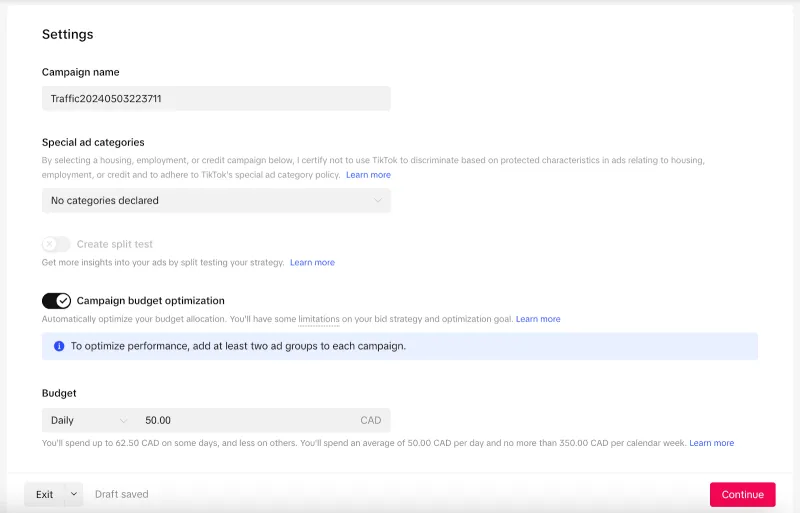
Step 6: Set the Campaign Budget
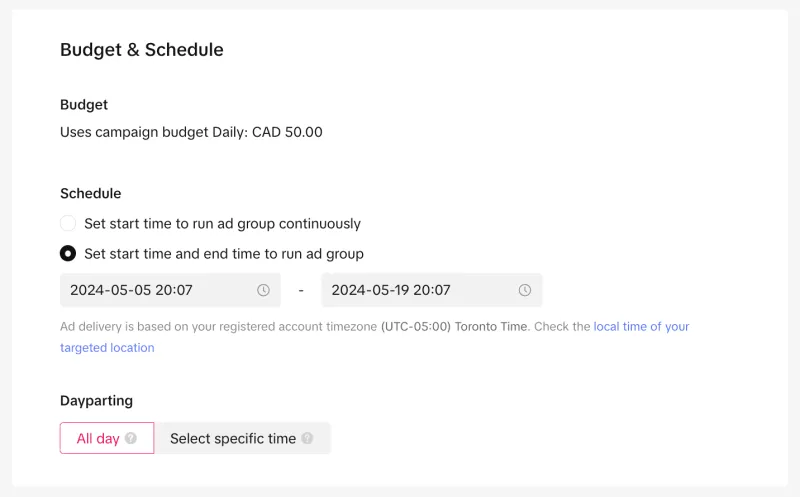
- Campaign budget: More than USD 50 or its local equivalent
- Ad-group daily budget: More than USD 20 or its local equivalent
- Ad-group lifetime budget: Minimum daily budget multiplied by the scheduled days
Step 7: Configure the Ad Group
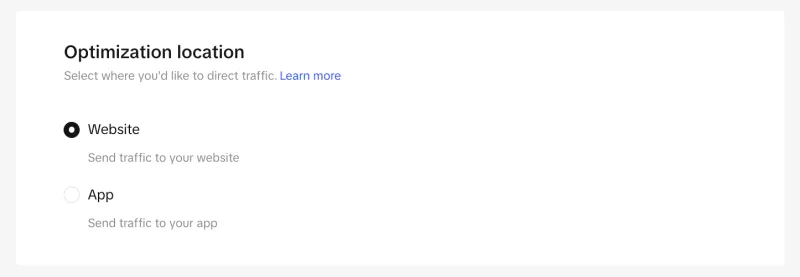
- Website
- App
- TikTok Instant Form
- TikTok Direct Messages
- Instant Messaging Apps
- TikTok Shop
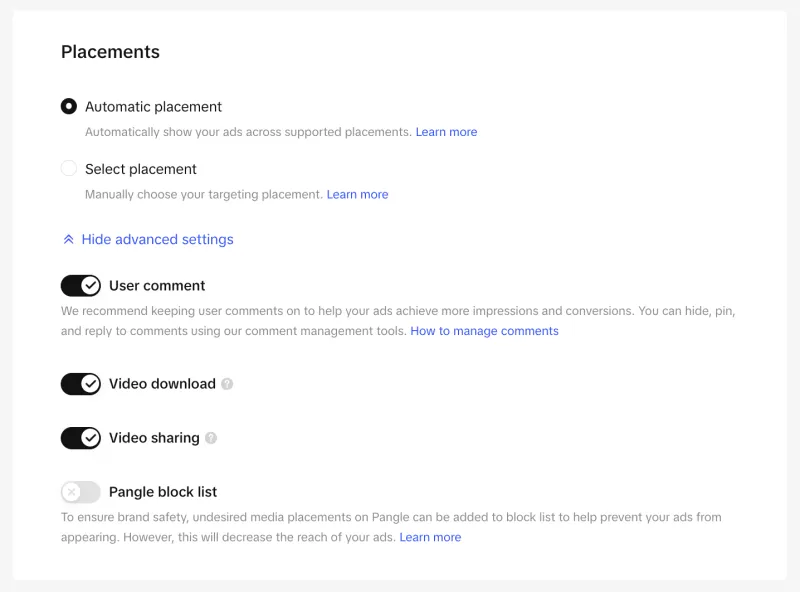
Step 8: Define Placements and Audience
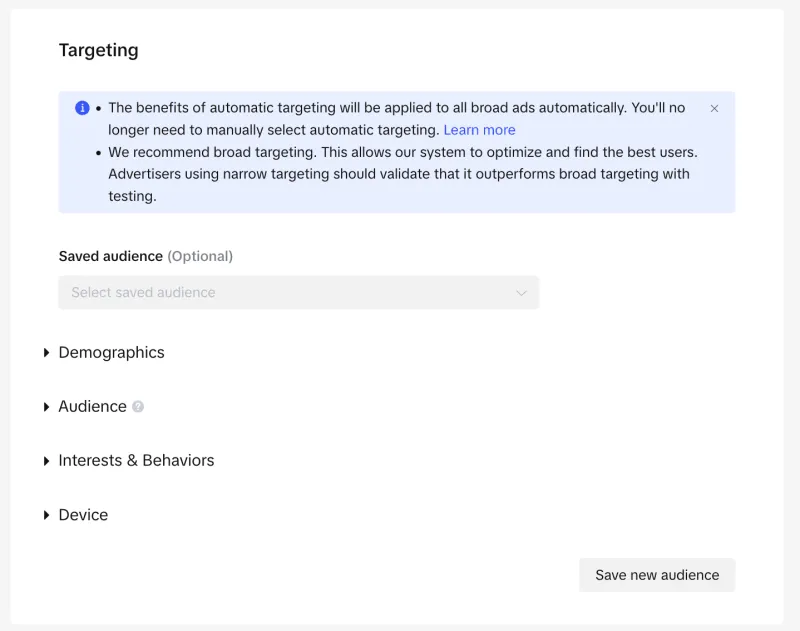
- Location
- Age
- Language
- Interests and behaviours
- Device
- Custom Audiences
- Lookalike Audiences
Step 9: Set the Schedule and Bidding
- Start and end dates
- All-day delivery or selected hours
- Daily or lifetime budget
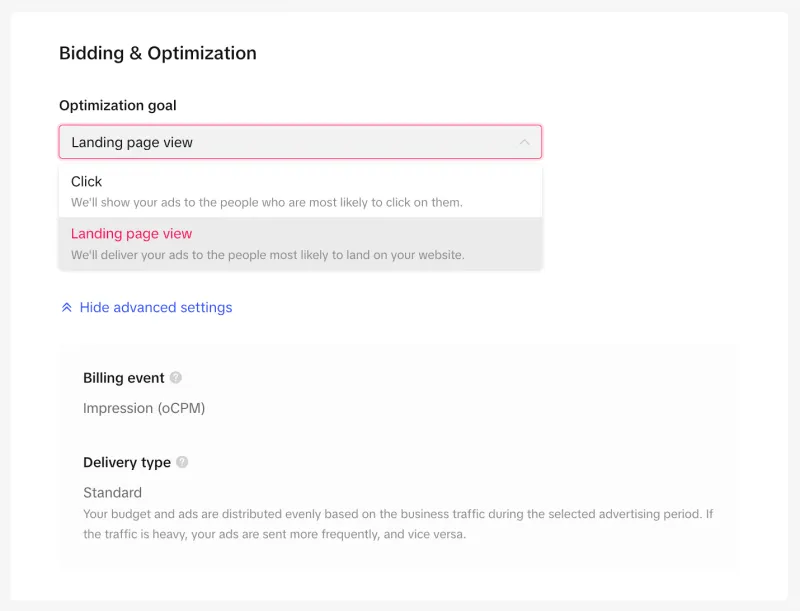
- Optimization event
- Bidding strategy
Step 10: Create and Publish the Ad
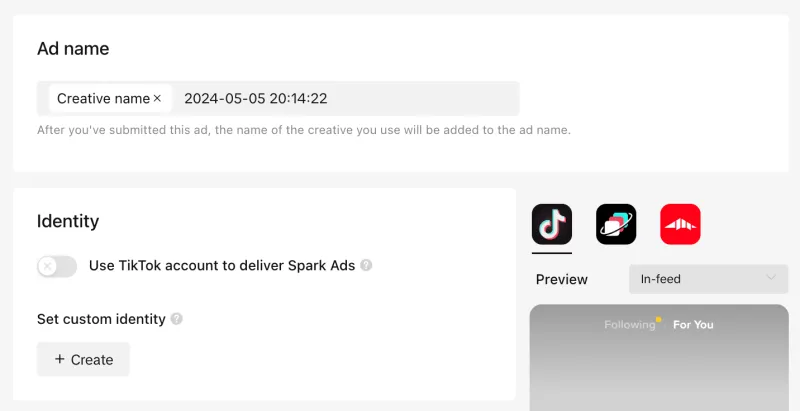
- Enter an internal ad name.
- Select your TikTok account, authorized post, or available identity.
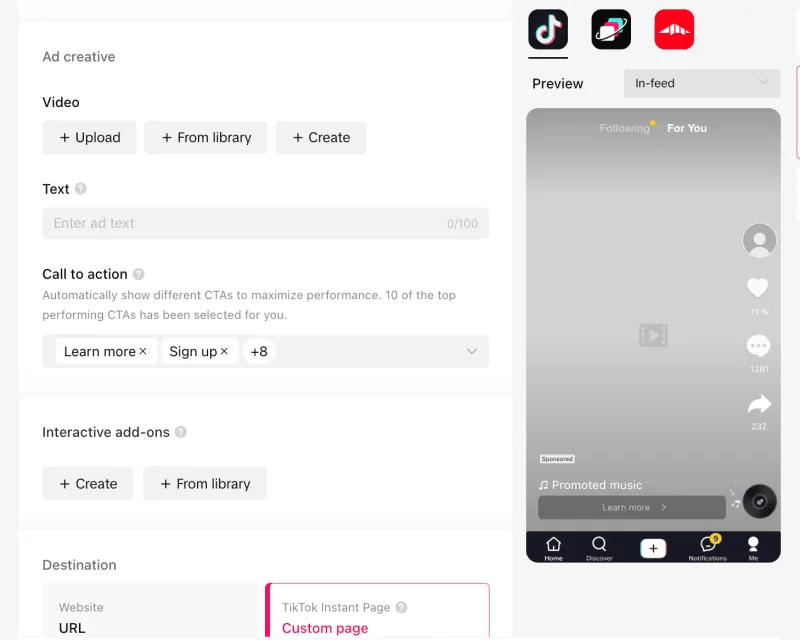
- Choose Spark or Non-Spark creative.
- Select the ad format.
- Upload your video or image assets.
- Add the caption, display name, CTA, and destination.
- Configure any required tracking or interactive elements.
- Preview the ad across eligible placements.
- Click Publish all.
Step 11: Monitor and Improve Performance
How To Run TikTok Ads with YCloud
What You Should Prepare Before Getting Started
- Confirm that the TikTok ad account for this campaign is available and usable.
- Make sure the current operator has sufficient permission to complete the authorization.
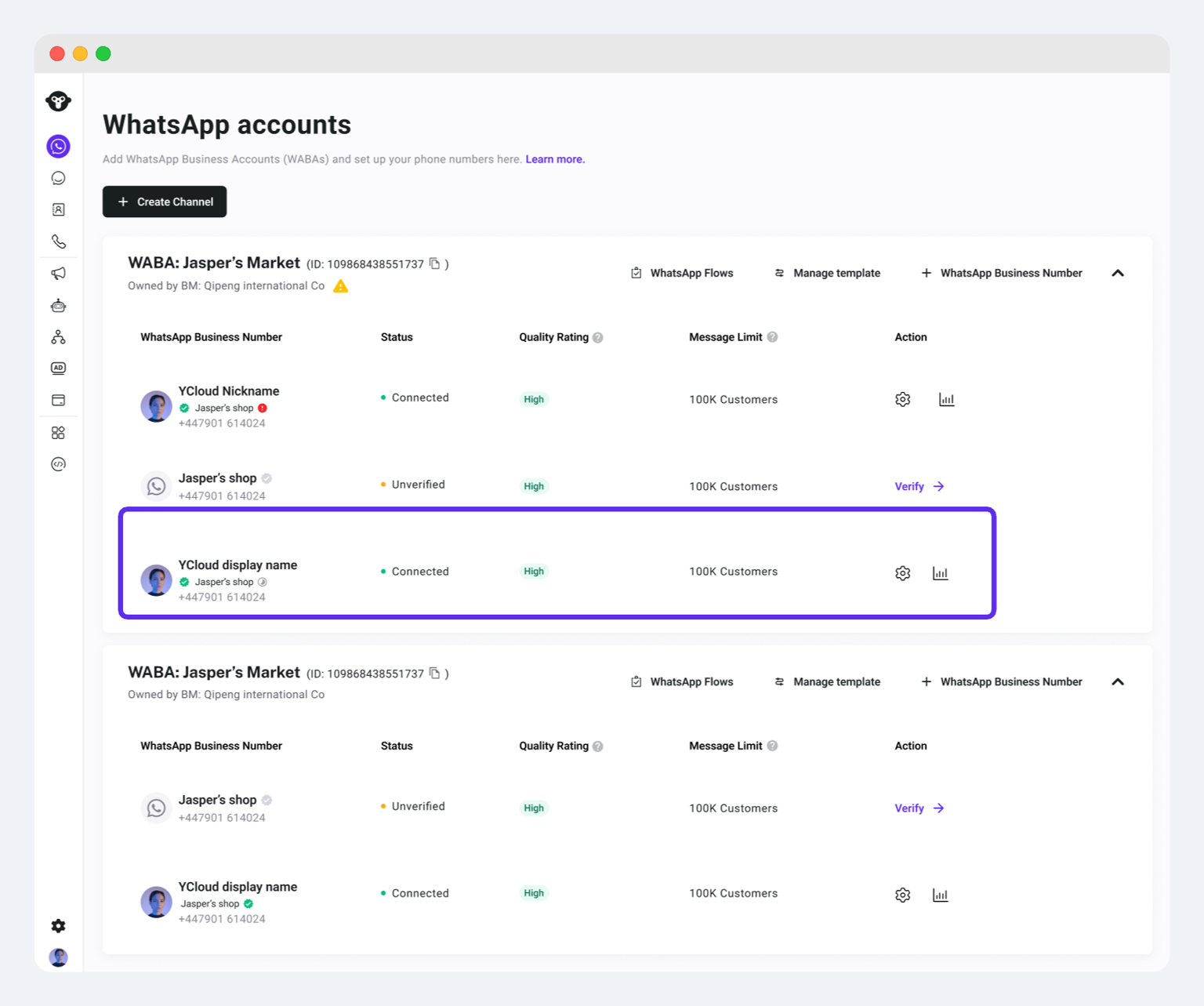
- Have a WhatsApp Business number already connected to YCloud.
- Use that number to receive inquiries generated by TikTok ads.
- Make sure the responsible team can respond to incoming lead conversations in time.
- Ensure YCloud is enabled and accessible.
- Confirm that the WhatsApp Business number used for ad delivery has already been linked in YCloud, as shown below.
Setup Flow Overview
Step-by-Step Process To Run TikTok Ads with YCloud
Why Run TikTok-to-WhatsApp Ads with YCloud?
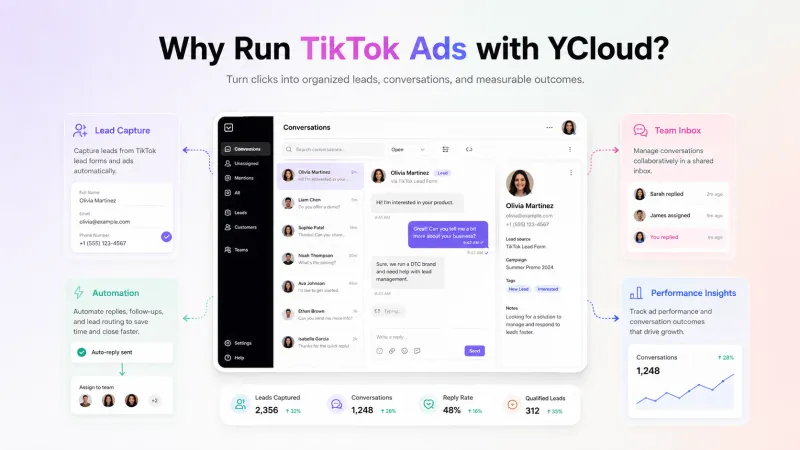
- Manage conversations centrally: Receive TikTok-generated enquiries in YCloud Inbox.
- Respond automatically: Use AI Agents or chatbots to welcome users, answer common questions, and collect lead details.
- Qualify and assign leads: Route relevant conversations to the appropriate sales or support agents.
- Track the ad source: Identify which TikTok campaign and ad generated each WhatsApp conversation.
- Report conversion events: Send configured conversation or conversion events back to TikTok for attribution and optimization.
- Review campaign results: Connect ad delivery data with WhatsApp conversations, leads, and tracked outcomes.
- Follow up with interested leads: Re-engage opted-in contacts with relevant information, reminders, or offers.
Important TikTok Ad Metrics You Should Track
Metric | What It Tells You |
Amount Spent | Total advertising spend during the selected period |
Reach | Number of unique users who saw the ad |
Impressions | Total number of times the ad was displayed |
Frequency | Average number of times each user saw the ad |
CPM | Average cost of 1,000 impressions |
Destination Clicks | Clicks that took users to the selected website, app, form, shop, or messaging destination |
CTR (Destination) | Percentage of impressions that generated a destination click |
CPC (Destination) | Average amount paid for each destination click |
Video Views | Number of times the video started playing |
2-Second and 6-Second Views | Number of users who continued watching beyond the opening seconds |
Average Play Time | Average time users spent watching the video |
Video Completion Rate | Percentage of viewers who watched the complete video |
Conversions | Number of times the selected optimization event was completed |
Conversion Rate | Percentage of impressions or destination clicks that generated a conversion |
Cost per Conversion | Average advertising cost for each conversion |
ROAS | Revenue attributed to the campaign compared with ad spend |
Which Metrics Should You Prioritize?
- Awareness: Reach, impressions, frequency, and CPM
- Video engagement: 2-second views, 6-second views, average play time, and completion rate
- Traffic: Destination clicks, CTR, CPC, and landing-page views
- Lead generation: Conversions, conversion rate, cost per conversion, and qualified leads
- Sales: Purchases, CPA, revenue, and ROAS
- Messaging: Messaging clicks, conversations started, cost per conversation, qualified leads, and later conversion events
Tracking TikTok-to-WhatsApp Results with YCloud
- WhatsApp conversations generated by TikTok Ads
- The campaign and ad associated with each conversation
- Leads that triggered configured tracking events
- Later qualification, purchase, or conversion events
- Conversion data reported back to TikTok
TikTok Ads Glossary: Terms You’ll See in Ads Manager
Campaign Structure
- Campaign: The top level where you select the advertising objective and campaign-level settings.
- Ad Group: The level where you configure placements, audience, budget, schedule, bidding, and optimization.
- Ad: The final level containing the identity, creative, caption, CTA, destination, and tracking.
Campaign Setup
- Advertising Objective: The primary outcome you want, such as reach, traffic, video views, lead generation, app promotion, or sales.
- Buying Type: Determines how inventory is purchased. Common options include Auction and Reach & Frequency.
- Manual Campaign: Provides direct control over campaign, ad-group, and ad settings.
- Search Campaign: Uses keywords to place ads on TikTok’s Search Results Page.
- Smart+: TikTok’s automation tools for eligible campaign budgets, targeting, placements, bidding, catalogs, and creative decisions.
- Special Ad Category: A declaration required for ads in regulated categories where applicable.
- Optimization Location: The place where the desired action happens, such as a website, app, TikTok Instant Form, TikTok Direct Messages, WhatsApp, or TikTok Shop.
- Optimization Goal: The specific action TikTok should optimize for, such as clicks, conversations, leads, app installs, or purchases.
- Placement: The location where the ad can appear, such as TikTok feeds, search results, or Pangle partner apps.
- Identity: The TikTok account, authorized post, or available business identity displayed with the ad.
- CTA: The button that tells users what to do next, such as Learn More, Get Quote, Shop Now, or Contact Us.
Audience Terms
- Target Audience: The users selected through location, demographics, interests, behaviours, device, and other available controls.
- Custom Audience: An audience created from existing customer data or previous interactions with your website, app, or TikTok content.
- Lookalike Audience: A new audience containing users who share characteristics with a selected source audience.
- Smart+ Targeting: Allows TikTok to automate or expand targeting when its system predicts doing so may improve results.
Budget and Bidding Terms
- Daily Budget: The average amount you are willing to spend each day.
- Lifetime Budget: The maximum amount available for the entire campaign or ad-group schedule.
- Campaign Budget: A shared budget that TikTok distributes across eligible ad groups.
- Maximum Delivery: A bidding strategy that aims to generate the highest number of results available within your budget.
- Cost Cap: A bidding strategy that tries to keep the average cost per result close to your selected target.
- Target ROAS: An eligible sales-focused bidding option that aims to balance conversion value with your return-on-ad-spend target.
Creative Terms
- Spark Ad: A paid ad created from an existing organic TikTok post.
- Non-Spark Ad: An ad created using creative uploaded directly to TikTok Ads Manager.
- TikTok Creative Center: A research and creative resource for exploring trends, ads, keywords, music, and performance insights.
- TikTok Symphony: TikTok’s suite of AI-assisted tools for developing scripts, videos, avatars, and other creative assets.
Tracking and Measurement Terms
- TikTok Pixel: Browser-based website code used to share visitor actions with TikTok.
- Events API: A server-side connection used to share eligible website, app, offline, or CRM events with TikTok.
- Event: A tracked action such as a page view, form submission, add-to-cart, conversation, or purchase.
- Message Event Set: A group of messaging events used to measure and optimize TikTok Messaging Ads.
- Attribution Window: The period during which an eligible action can be credited to an ad click, view, or engaged view.
- Catalog: A collection of product information used to create and personalize Catalog Ads.
- Conversion: The action counted as a result based on the campaign’s selected optimization event.
10 Practical Tips for Running High-Converting TikTok Ads
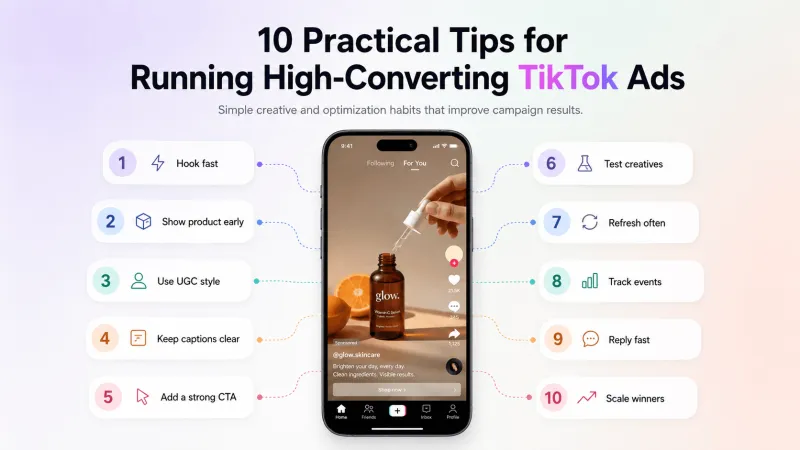
1. Begin with a Measurable Outcome
2. Target Users Relevant to Your Offer
3. Create for TikTok, Not Another Platform
4. Communicate the Value Immediately
5. Make the Offer and CTA Specific
- What are you offering?
- Why should the user care?
- What should they do next?
6. Use Creator Content and Spark Ads Carefully
7. Capture Relevant Search Intent
8. Test and Refresh Different Creative Ideas
- Different opening hooks
- Product demonstration versus testimonial
- Creator-led versus brand-led videos
- Benefit-led versus offer-led messaging
- Different CTAs or video lengths
9. Continue the Ad Experience After the Click
10. Optimize for Business Results
- Destination CTR
- Cost per destination click
- Average play time
- Conversion rate
- Cost per conversion
- Qualified lead rate
- Cost per qualified lead
- Purchases and ROAS
How To Get YCloud?
How to Get YCloud for FREE?
How TikTok Advertising Is Likely to Evolve in 2027?
More Campaign Work Will Be Automated
AI Will Accelerate Creative Production
Search Advertising Will Become More Important
Commerce Campaigns Will Become More Automated
Messaging Will Become a Stronger Conversion Path
First-Party Conversion Data Will Matter More
Wrapping UP!
- Create and manage campaigns through TikTok Ads Manager.
- Select an objective that matches your business goal.
- Use TikTok-first creatives that follow the required specifications.
- Track performance against conversions, not just views or clicks.
- Test different creatives and scale only after results become consistent.
- Use TikTok Messaging Ads when you want users to start a direct conversation.
Also Checkout These Articles Before You Go!
- How to Set Up, Create & Run Facebook Ads: A Step-by-Step Guide
- How to Set Up, Create & Run Click-to-WhatsApp (CTWA) Ads
- Top 10 CTWA (Click to WhatsApp Ads) Strategies to Generate and Convert More Leads
- How to Use ChatGPT for WhatsApp Marketing: 10 Practical Strategies
- 15 Practical Ways to Use AI in WhatsApp Marketing to Automate and Scale Faster
- How to Calculate the ROI from Your WhatsApp Marketing Campaign
- Know How to Sell on WhatsApp with Proven Strategies, Rules and Quick Wins
- Your One-Stop Guide to the WhatsApp AI Agents
- 10 Best AI Sales Agents That Actually Work
- How to Build a High-Converting WhatsApp Lead Generation Funnel in Just 5Min
- 20 Proven WhatsApp Lead Generation Strategies to Generate 1000s of Leads Per Month
Frequently Asked Questions
How much do TikTok Ads cost today?
What is the minimum budget for TikTok Ads?
- Campaign-level daily or lifetime budget: More than USD 50 or its local equivalent
- Ad-group daily budget: More than USD 20 or its local equivalent
- Ad-group lifetime budget: Minimum daily budget multiplied by the scheduled days
Are TikTok Ads worth running?
Can TikTok Ads run in every country?
How long should a TikTok Ad be?
Can I run TikTok Ads without creating a video?
What are Smart+ Campaigns?
Do TikTok Ads work for small businesses?
What are the potential disadvantages of TikTok advertising?
- Minimum budget requirements
- Frequent demand for new creative
- Creative fatigue
- Market and industry restrictions
- Limited availability of some formats
- Weak results when the audience or offer does not suit the platform
Is there a formula for creating a viral TikTok Ad?
Can TikTok Ads send users directly to WhatsApp?
Related Articles

Make your business communications much easier!


Trusted by




