But creating the right message for different audiences, offers, languages, and follow-ups (again and again) is where the real work begins!
Marketers still spend hours brainstorming ideas, rewriting templates, personalizing messages, planning customer journeys, and reviewing campaign results.
ChatGPT can reduce much of this workload, but only when you know where and how to use it…!
ChatGPT can help you plan, write, personalize, translate, test, and improve your WhatsApp marketing content.
YCloud WhatsApp API can then help you turn those ideas into campaigns, automated journeys, and customer conversations.
In this guide, we’ll cover 10 practical ways to use ChatGPT for WhatsApp marketing, with clear examples you can apply to your own campaigns.
First, let’s understand the role ChatGPT should play in your WhatsApp marketing strategy.
How ChatGPT Fits into Your WhatsApp Marketing Strategy
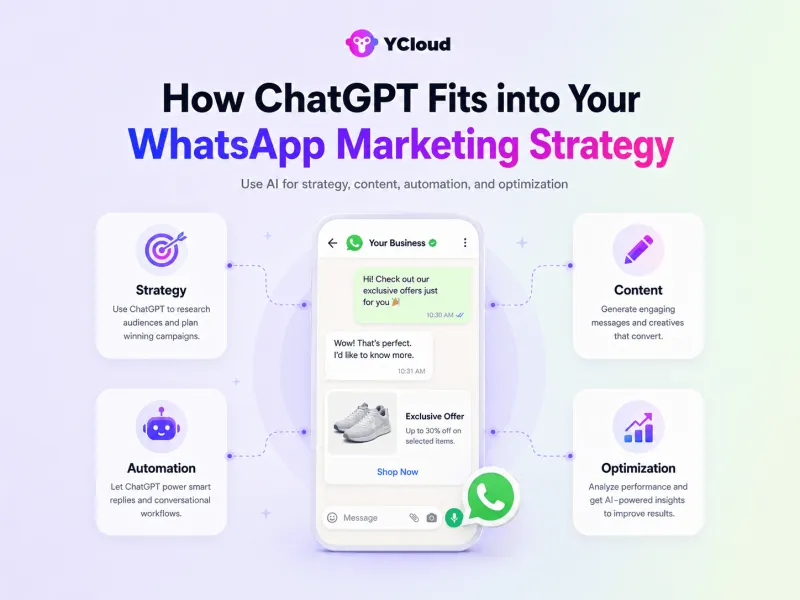
ChatGPT works best as the thinking and content layer behind your WhatsApp marketing. It does not send messages or manage campaigns on its own. Instead, it helps your team plan faster, write better, and make smarter campaign decisions.
You can use ChatGPT across four key stages:
Strategy: Generate campaign ideas, customer journeys, offers, and audience-specific approaches
Content:Create broadcasts, message templates, chatbot replies, CTAs, and follow-ups
Automation: Plan chatbot flows, qualification questions, routing logic, and response scenarios
Simply put, ChatGPT helps you decide what to say and how to say it.
A WhatsApp API platform like YCloud helps you send, automate, manage, and measure those messages at scale.
Next, let’s explore 10 practical ways to use ChatGPT for your brand’s WhatsApp marketing.
10 Practical Ways to Use ChatGPT for Your WhatsApp Marketing Campaign
ChatGPT can save hours of work, but only when you give it enough context. A vague prompt will produce a generic message.
Before using any of the prompts below, clearly mention:
Your business and product
Your target audience
The campaign goal
The offer or customer action
Your brand tone
The preferred message tone and length
Any words or claims to avoid
Treat every ChatGPT output as a first draft. Review the facts, tone, personalization, and WhatsApp compliance before using it in a live campaign.
1. Generate Campaign Ideas Around a Clear Goal
Coming up with a new offer is easy. Finding fresh ways to present it every week is harder.
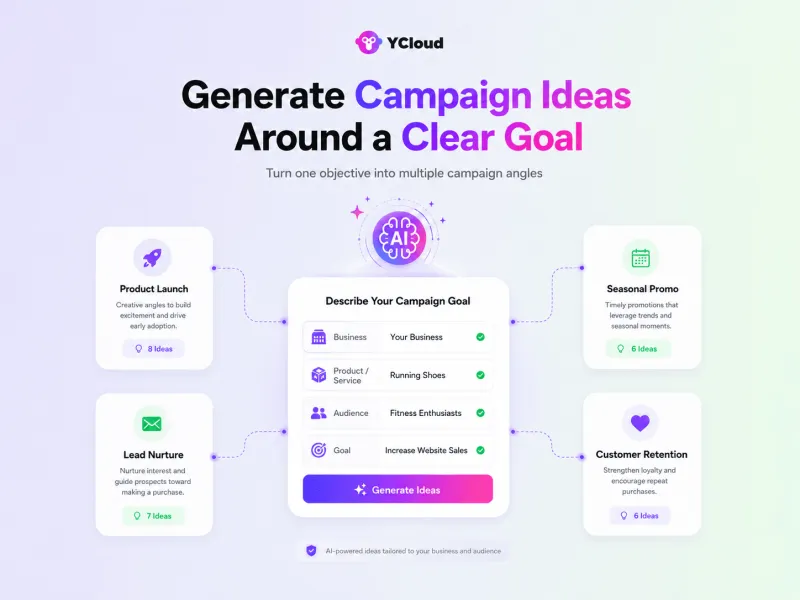
ChatGPT can generate campaign ideas based on your product, customer segment, occasion, and business objective. You can use it for product launches, seasonal promotions, educational campaigns, customer retention, or lead nurturing.
Instead of asking for random ideas, ask ChatGPT to connect each idea with a specific audience and action.
Prompt to Try:
Act as a WhatsApp marketing strategist for a [business type]. Suggest 10 campaign ideas to promote [product or offer] to [target audience]. For each idea, provide the campaign angle, opening hook, customer value, CTA, and best audience segment. Avoid generic discount campaigns.
This gives you a usable campaign plan rather than a list of disconnected ideas.
2. Turn Basic Offers into WhatsApp-Friendly Messages
A good offer can still underperform if the message sounds flat, confusing, or overly promotional.
ChatGPT can rewrite the same offer using different angles, such as urgency, curiosity, customer benefit, exclusivity, or social proof. This also gives you multiple versions to test instead of relying on one message.
Before:
“Get 15% off our skincare products until Sunday.”
After:
“Planning a skincare refresh? Save 15% on your favourites until Sunday. Explore the collection: [Link]”
Prompt to Try:
Rewrite this WhatsApp campaign message: [Insert message]. Create four versions using urgency, curiosity, customer benefit, and exclusivity. Keep each version under 50 words, conversational, mobile-friendly, and focused on one clear CTA. Do not add unsupported claims.
You can also ask ChatGPT to improve only the opening hook, CTA, message length, or tone without changing the entire offer.
Important: Do not use ChatGPT to disguise promotional content as a utility message. If the main purpose is to promote a product or offer, it should remain a marketing message. ChatGPT can improve genuine order updates, account notices, reminders, and other service messages, but the content must reflect its actual purpose.
3. Personalize Campaigns for Different Customer Segments
Personalization is more than adding a customer’s name.
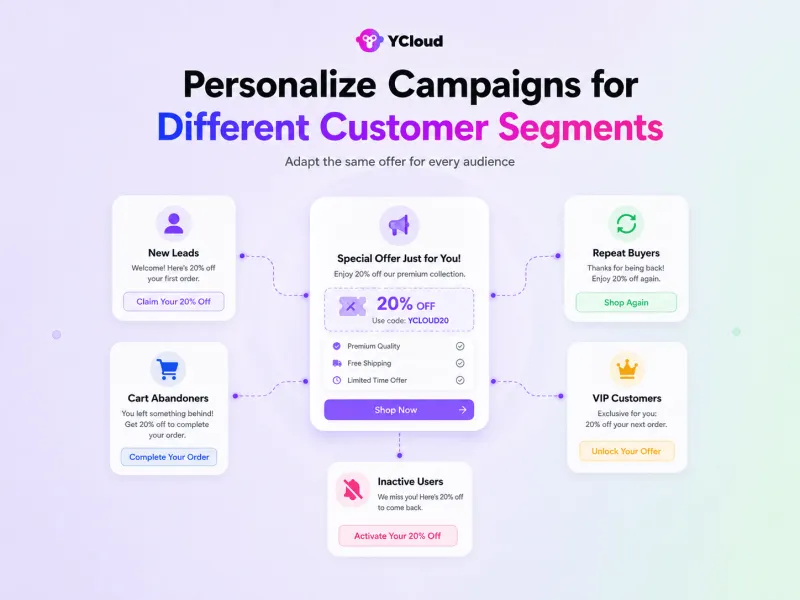
A new lead, repeat buyer, VIP customer, and inactive user may all need a different reason to act. ChatGPT can adapt the offer, tone, and CTA for each group while keeping the core campaign consistent.
For example:
New leads may need product education or reassurance
Repeat buyers may respond to relevant recommendations
VIP customers may value early access or exclusive benefits
Inactive customers may need a useful reason to return
Cart abandoners may need clarification, support, or a reminder
Prompt to Try:
Create separate WhatsApp messages for these customer segments: [List segments]. The campaign promotes [offer]. Adapt the opening, value proposition, and CTA to each segment based on its relationship with the brand. Keep every message short and avoid making assumptions not supported by the customer data.
Use placeholders such as [First Name], [Last Product Viewed], or [Previous Purchase] instead of sharing sensitive customer information with ChatGPT.
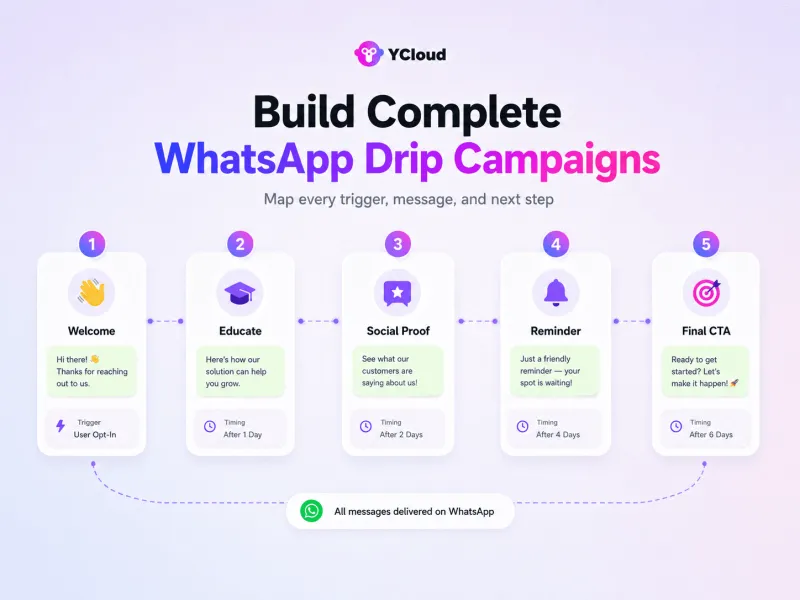
4. Build Complete WhatsApp Drip Campaigns
Not every customer will act after one broadcast.
ChatGPT can help you plan a connected series of messages for onboarding, lead nurturing, abandoned carts, webinar registrations, trial activation, renewals, or post-purchase engagement.
A useful drip campaign should define more than the message copy. It should also include timing, triggers, exit conditions, and the next step when a customer responds.
Prompt to Try:
Create a five-message WhatsApp drip campaign for [use case]. For every step, provide the trigger, timing, message goal, message copy, CTA, exit condition, and action to take if the customer replies. The sequence should gradually build value without repeating the same offer or sounding pushy.
A lead-nurturing sequence, for example, could move from introduction to education, proof, objection handling, and a final action. You can then build the approved journey inside YCloud’s Journey Builder.
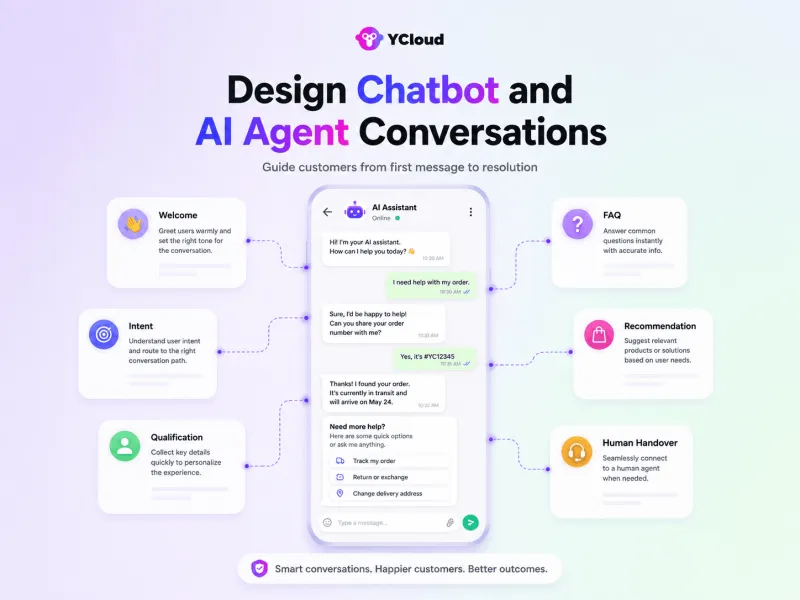
5. Design Chatbot and AI Agent Conversations
ChatGPT can help you plan how a WhatsApp chatbot or AI agent should guide customers from their first message to a useful outcome.
Depending on the goal, the flow may include:
A welcome message
Intent identification
Lead qualification questions
Product or service recommendations
FAQs and help content
Appointment or demo booking
Order-related assistance
Upselling opportunities
Human-agent handover
Fallback replies for unclear questions
You can also use it to create interactive product finders, quizzes, surveys, and eligibility checks.
Prompt to Try:
Create a WhatsApp conversation flow for a [business type] with the goal of [lead generation, sales, support, or booking]. Include a welcome message, intent options, qualification questions, FAQs, recommendations, fallback responses, and clear human-handover conditions. Present the flow as a numbered decision tree with short, conversational messages.
ChatGPT creates the structure and scripts. A platform such as YCloud is required to build, connect, test, and run the actual automation on WhatsApp.
6. Create FAQs, Quick Replies, and Complaint Responses
Marketing conversations often turn into questions about pricing, delivery, returns, product suitability, cancellations, or refunds.
ChatGPT can turn your approved policies and product information into a consistent reply library for your team. It can also help agents respond calmly to frustrated customers without sounding cold or defensive.
Prompt to Try:
Using the approved information below, create short WhatsApp replies for the 10 most common customer questions about [topic]. Each reply should answer the question directly, provide the next step, and follow this brand tone: [tone]. If the information is unavailable, instruct the customer to speak with a human agent rather than inventing an answer.
For complaints, use:
Draft an empathetic WhatsApp response to this complaint: [Insert anonymized complaint]. Acknowledge the issue, avoid admitting unverified fault, request only the information needed, explain the next action, and state when the conversation should be escalated to a human agent.
Store approved responses as quick replies so your team can answer faster without losing consistency.
7. Plan Click-to-WhatsApp Ads and the Conversation That Follows
A Click-to-WhatsApp ad should not be planned separately from the conversation it starts.
If the ad promises a price quote but the opening message asks unrelated questions, the lead may leave. ChatGPT can create a connected journey covering the ad copy, pre-filled message, automated welcome, qualification questions, and sales handover.
Prompt to Try:
Create a Click-to-WhatsApp campaign for [product or service] targeting [audience]. Provide three ad hooks, primary text, headline, CTA, pre-filled customer message, automated welcome reply, three qualification questions, and the final action for qualified leads. Keep the promise consistent from the ad to the WhatsApp conversation.
You can also ask for different versions based on customer awareness, such as first-time buyers, comparison shoppers, or high-intent prospects.
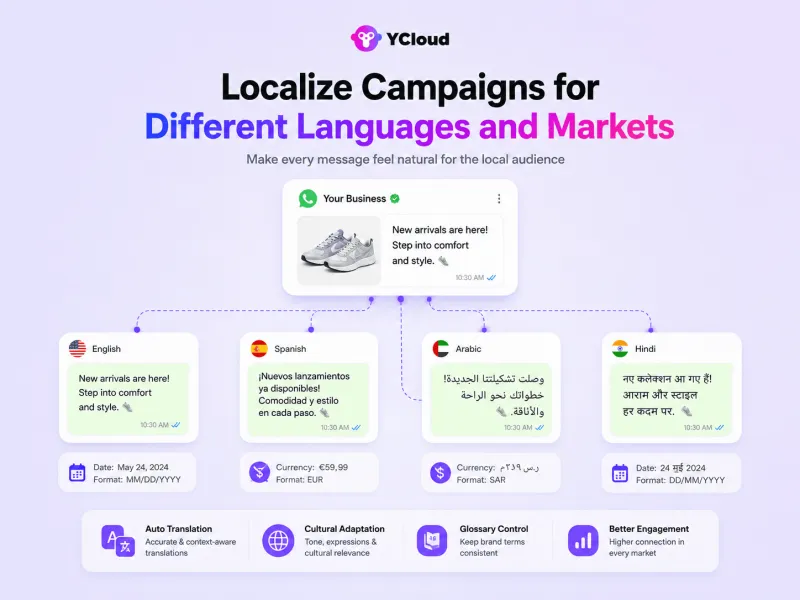
8. Localize Campaigns for Different Languages and Markets
Direct translation can make a WhatsApp message sound unnatural or change its intended meaning.
ChatGPT can localize the message by adapting its vocabulary, tone, examples, currency, date format, and cultural context for each market. It can also preserve product names and brand terminology through a defined glossary.
Prompt to Try:
Localize this WhatsApp message for customers in [market] who speak [language]: [Insert message]. Keep the original offer and CTA unchanged, but make the wording natural for the local audience. Use this brand glossary: [Insert terms]. Also provide an English back-translation for review.
Have a fluent speaker review important campaigns before launch, particularly when they include legal terms, healthcare information, financial information, or regional offers.
9. Create Trigger-Based Follow-Ups and Re-Engagement Messages
Customers do not always convert during their first interaction. ChatGPT can help you create relevant follow-ups based on what the customer did or did not do.
Useful triggers include:
Abandoned cart
Incomplete payment
Missed appointment or demo
Product viewed but not purchased
Back-in-stock availability
Subscription renewal
Expected product replenishment
No response after requesting pricing
Inactivity after a previous purchase
Prompt to Try:
Write a three-message WhatsApp re-engagement sequence for customers who [customer action or inactivity]. Each message should provide a different reason to return: helpful support, relevant information, and a final incentive or action. Include recommended timing, stop conditions, and a clear opt-out option. Avoid pressure-based language.
The trigger should come from real customer activity, and the customer must have provided the appropriate consent to receive the message.
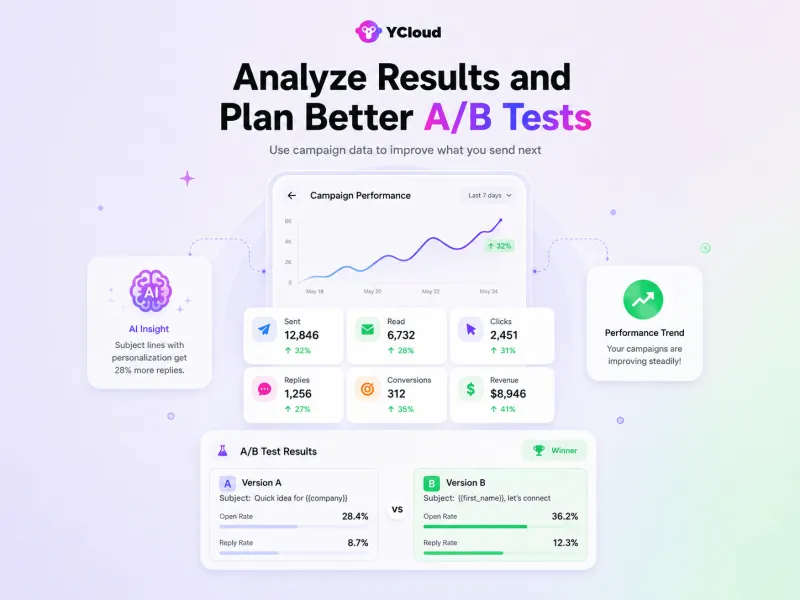
10. Analyze Results and Plan Better A/B Tests
ChatGPT can help you understand where a campaign is losing customers—not just write the next message.
Share anonymized campaign data such as messages sent, delivery rate, read rate, clicks, replies, conversions, opt-outs, campaign cost, and revenue. ChatGPT can then identify the weakest stage and suggest what to test next.
Prompt to Try:
Analyze this WhatsApp campaign performance: [Insert anonymized metrics]. Identify the biggest drop-off, explain three possible causes, and recommend one prioritized improvement. Then create an A/B test with a clear hypothesis, one variable, success metric, and decision rule. Do not assume causation where the data only shows correlation.
Test one major element at a time, such as:
Opening hook
Message length
Offer framing
CTA wording
Visual format
Sending time
Audience segment
Changing everything at once makes it difficult to understand what improved the result.
Once you find prompts that consistently work, save them in a shared prompt library organized by campaign creation, automation, chatbot flows, customer replies, localization, and analytics. Add a standard brand brief at the beginning so every team member receives more consistent outputs.
ChatGPT helps your team research, plan, write, personalize, and improve WhatsApp marketing. Next, let’s see how YCloud turns these ideas into live campaigns, automated journeys, and scalable customer conversations.
Scale Your Business by 10X with YCloud and ChatGPT
ChatGPT can create the campaign strategy, message copy, chatbot flow, and testing ideas. But it cannot launch WhatsApp campaigns, segment contacts, route conversations, or track results on its own.
That is where YCloud comes in…!
As an official WhatsApp Business Solution Provider, YCloud helps you turn ChatGPT-generated ideas into real campaigns and automated customer journeys.
Here is how they work together:
Plan with ChatGPT: Generate campaign ideas, audience-specific messages, CTWA ad copy, follow-ups, and chatbot scripts
Launch with YCloud: Create templates, segment contacts, schedule broadcasts, and send campaigns at scale
Automate with YCloud: Build onboarding, nurturing, cart recovery, reminder, and re-engagement journeys
Convert with AI and Human Agents: Let YCloud’s WhatsApp AI Agent handle common queries, qualify leads, and transfer important conversations to your team
Manage Conversations Together: Use the shared team inbox to assign chats, add context, and prevent duplicate replies
Measure and Improve: Track delivery, engagement, conversions, and agent performance, then use the data to improve future campaigns with ChatGPT
For example, you can ask ChatGPT to create four campaign variations, launch them with different YCloud audience segments, compare the results, and use the winning insights to improve your next campaign.
You can also connect YCloud with Shopify, Zapier, CRMs, and other business systems to trigger messages based on real customer actions, not manual follow-up lists.
Together, ChatGPT handles the thinking and content, while YCloud handles campaign execution, automation, customer conversations, and performance tracking.
Next, let’s look at how to get started with YCloud.
How To Get YCloud?
Kindly click on the banner below to book a FREE DEMO and learn more about our product offering, features and pricing plans.
Built with AI at its core, YCloud is the ultimate WhatsApp marketing and automation solution, giving you everything you need in one powerful platform.
Now market, sell, support, and scale your business by 10X with YCloud!
Ready to try? Explore how to get YCloud for FREE next!
How to Get YCloud for FREE?
It's Simple!
Subscribe to our FREE plan and get a free lifetime experience of YCloud with unlimited messaging API.
Book a FREE Demo and see how YCloud can power up your WhatsApp marketing strategy!
🚀 Try YCloud today and experience how effortless WhatsApp automation can be when you have the right partner.
Wrapping Up!
ChatGPT can make WhatsApp marketing faster, sharper, and more consistent, but execution is what delivers results.
Start with one campaign. Use ChatGPT to improve the idea, message, and customer journey. Launch it through YCloud, track the results, and refine what works.
Ready to put these strategies into action?
Get started with YCloud for free and build your first ChatGPT-powered WhatsApp campaign today…!
You can use ChatGPT to generate campaign ideas, write broadcasts, personalize messages, plan drip sequences, create chatbot flows, prepare customer replies, translate content, and analyze campaign results.
Can ChatGPT send WhatsApp messages directly?
No. Standalone ChatGPT cannot launch WhatsApp Business campaigns or broadcasts. ChatGPT can create the content, while an official WhatsApp Business API platform like YCloud handles message delivery, automation, contacts, and analytics. Custom applications can also use the OpenAI API for AI-generated responses.
How do I connect ChatGPT with WhatsApp Business?
For a simple workflow, create your campaign content in ChatGPT and launch it through YCloud. If you want OpenAI models to generate responses inside a live WhatsApp conversation, you will need a custom API integration or a platform feature that supports it.
Can ChatGPT help with WhatsApp template approval?
ChatGPT can help draft clear templates that follow your intended marketing, utility, or authentication use case. However, it cannot approve templates or guarantee approval.
Do not use ChatGPT to disguise promotional content as a utility message. Meta states that messages that do not qualify as utility or authentication are treated as marketing messages. Final classification and approval depend on Meta’s template rules.
Can ChatGPT create WhatsApp chatbot flows?
Yes. ChatGPT can map greetings, intent options, lead qualification questions, FAQs, product recommendations, fallback replies, and human-handover conditions. You can then build and run the approved flow using YCloud’s WhatsApp automation tools.
Can ChatGPT personalize WhatsApp messages?
Yes. ChatGPT can create different message versions for new leads, repeat buyers, VIP customers, inactive users, or other segments. YCloud can then use customer attributes and audience segments to deliver the appropriate version at scale.
Can ChatGPT improve WhatsApp customer support?
Yes. It can help prepare quick replies, FAQs, troubleshooting steps, and empathetic complaint responses. Businesses should review these replies, use only verified information, and transfer sensitive or complex issues to a human agent.
Can ChatGPT translate WhatsApp campaigns?
Yes. ChatGPT can translate and localize campaign messages for different languages and markets. Important messages should still be reviewed by a fluent speaker, especially when they contain legal, medical, financial, or region-specific information.
Is it safe to use ChatGPT for WhatsApp marketing?
Yes, provided you use it responsibly. Avoid entering passwords, payment details, private customer information, or other sensitive data. Use anonymized examples and placeholders when generating personalized messages or analyzing conversations.
Can ChatGPT reduce WhatsApp marketing costs?
ChatGPT can reduce the time spent on research, writing, localization, customer replies, and campaign analysis. However, it does not directly reduce Meta messaging fees, platform charges, or advertising costs.
Do I need coding skills to use ChatGPT for WhatsApp marketing?
No coding is required to use ChatGPT for campaign planning and content creation or to launch those campaigns through YCloud. Technical support may be required only when building a custom OpenAI API integration.