Customer Support

English

How to Set Up, Create & Run Facebook Ads: A Step-by-Step Guide

If you have read multiple articles and watched several tutorials but still do not know how to set up and run Facebook Ads correctly, this guide is for you…!
Most resources explain only one part of the process. One covers campaign creation, while another discusses targeting. But when you open Meta Ads Manager, you still face campaign objectives, ad sets, placements, budgets, formats, and metrics, without a clear explanation of what to choose or why. The actual steps, settings, and metrics remain scattered, leaving you to piece everything together.
This guide brings everything into one place. You’ll learn what Facebook Ads are, what you need before starting, how to create and run a campaign in Meta Ads Manager step by step, which formats and metrics matter, and how to manage ad-driven WhatsApp leads with YCloud.
First, let’s quickly review the key takeaways.
TL;DR
- Facebook Ads are paid campaigns created through Meta Ads Manager and displayed across eligible Meta platforms and placements.
- To run Facebook Ads, you need a Facebook Page, Meta ad account, payment method, required permissions, ad destination, and creative assets.
- Campaigns follow three levels: campaign, ad set, and ad. You select the objective, audience, budget, placements, format, creative, and tracking before publishing.
- Measure performance against your objective using metrics such as reach, CTR, CPC, cost per result, conversion rate, and ROAS.
- Improve results by testing creatives, targeting relevant audiences, matching the ad with its destination, retargeting interested users, and scaling only after performance becomes consistent.
- For Click-to-WhatsApp Ads, Meta Ads Manager handles campaign delivery, while YCloud helps manage conversations, qualify leads, track sources, report conversions, and follow up.
- Facebook advertising is moving towards greater AI automation, first-party measurement, and messaging-led conversions.
Next, let’s understand what Facebook Ads are and where they can appear.
What is Facebook Ads and Where Do They Appear?
Facebook Ads are paid advertisements created through Meta Ads Manager. Businesses use them to promote products, services, content, apps, events, or conversations to selected audiences beyond their organic followers.
Despite the name, Facebook Ads are not limited to Facebook.
Depending on the campaign objective, format, and settings, they can appear across:
- Messenger
- Threads
- Meta Audience Network
Not every ad placement is available for every campaign.
When creating a Facebook Ad, you control the campaign objective, audience, budget, schedule, placements, creative, and call to action.
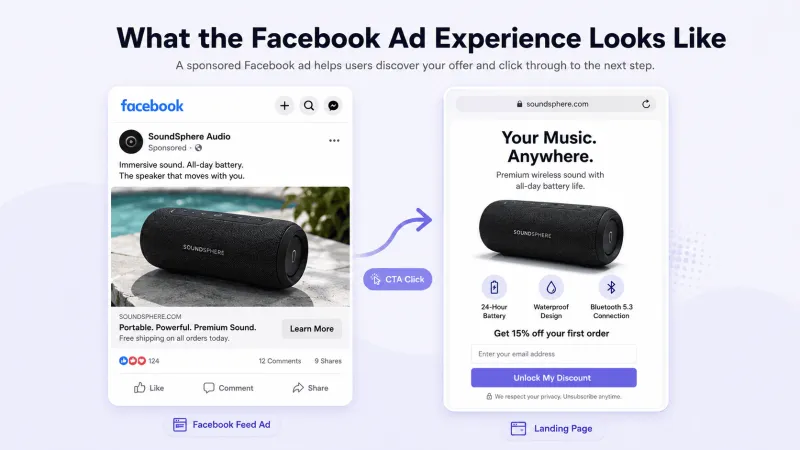
What the Ad Experience Looks Like
The image below shows a typical Facebook Ad journey:
- A user sees the sponsored ad in an eligible placement.
- They click its call-to-action button.
- The selected destination opens, such as a website, lead form, app, Messenger, or WhatsApp chat.
- Meta records the interaction in Ads Manager for performance tracking.

When WhatsApp is selected as the destination, the ad takes users directly into a conversation with your business.
Next, let’s understand why businesses should run Facebook Ads.
Why Businesses Should Run Facebook Ads TODAY!
Facebook Ads give businesses a structured way to reach potential customers, promote specific offers, and measure what happens after an ad is shown.
Here’s why businesses should use them:
- Reach across Meta platforms: A single campaign can place ads across Facebook, Instagram, Messenger, and other eligible placements.
- Audience control: Target users by location, demographics, interests, behaviour, or previous interactions with your business.
- Support for different goals: Choose an objective for awareness, traffic, engagement, leads, app promotion, or sales.
- Multiple creative formats: Use images, videos, carousels, collections, Stories, or Reels based on your message and campaign goal.
- Measurable performance: Track delivery, clicks, leads, purchases, costs, and other campaign results through Meta Ads Manager.
- Direct WhatsApp conversations: With Click-to-WhatsApp Ads, users can move from a Facebook or Instagram ad directly into a WhatsApp chat with your business.
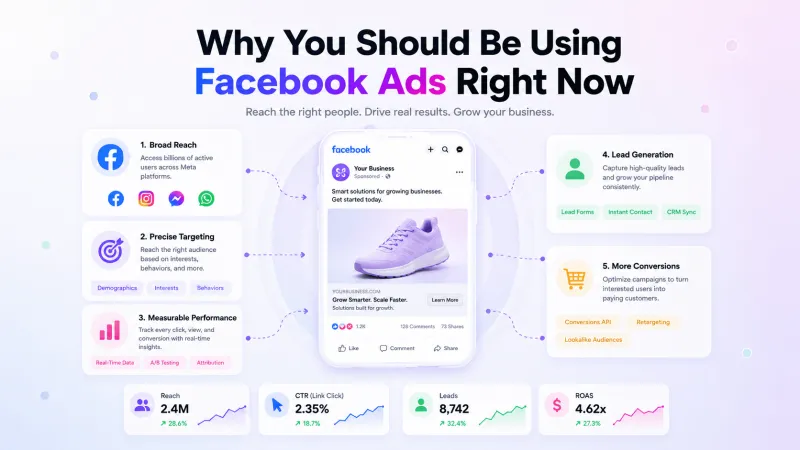
The main advantage is control: you decide what you want to achieve, whom you want to reach, how much you want to spend, and how success will be measured.
Next, let’s review what you need before creating your first Facebook Ad.
Prerequisites To Run Facebook Ads
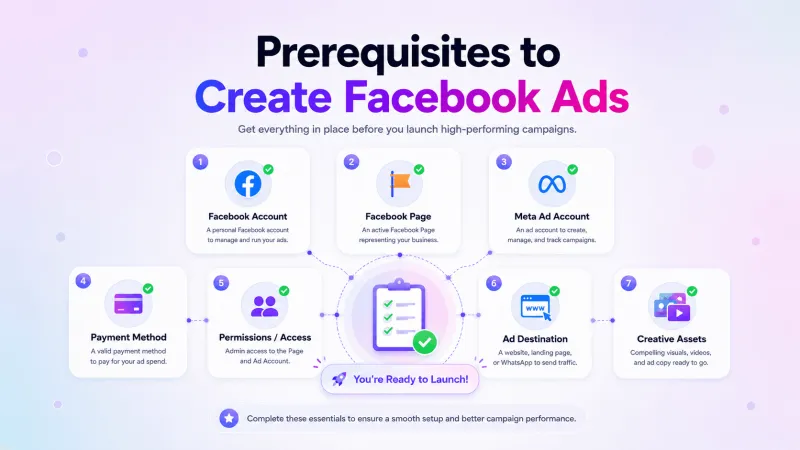
Before creating your first Facebook Ad, make sure these Meta assets are ready:
- Facebook account: Use an authentic personal account with permission to manage the required business assets.
- Facebook Page: This represents your business when the ad is displayed.
- Meta ad account: You need an active ad account to create, publish, and manage campaigns.
- Payment method: Add a supported payment method before publishing your first ad.
- Required permissions: The person creating the campaign must have access to the Facebook Page, ad account, and relevant Business Portfolio.
- Ad destination: Prepare the website, app, lead form, Messenger account, or WhatsApp number where users will be directed.
- Creative assets: Keep your ad copy, images, videos, links, and CTA ready.
An Instagram professional account is recommended if you want ads to appear under your Instagram business identity.
For Click-to-WhatsApp Ads, the Facebook Page must be linked to the WhatsApp Business Number that will receive the conversations.
If you have not yet created and connected your WhatsApp Business Account in YCloud, you can start here: Create WABA via Embedded Sign-upNote: These assets do not always need to belong to the same Business Portfolio. However, the correct ownership, access permissions, and connection approvals must be in place.
Once these requirements are ready, let’s set up your first Facebook Ad in Meta Ads Manager.
How to Create and Run Facebook Ads in Meta Ads Manager
Once your Facebook Page, ad account, payment method, and creative assets are ready, follow these steps:
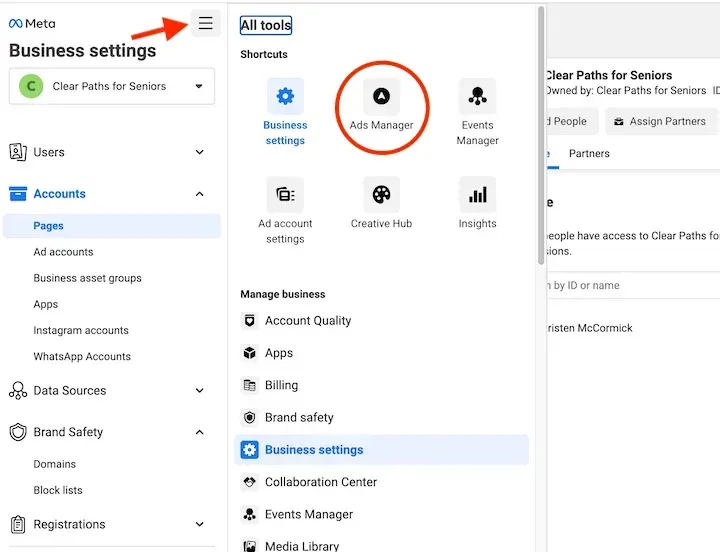
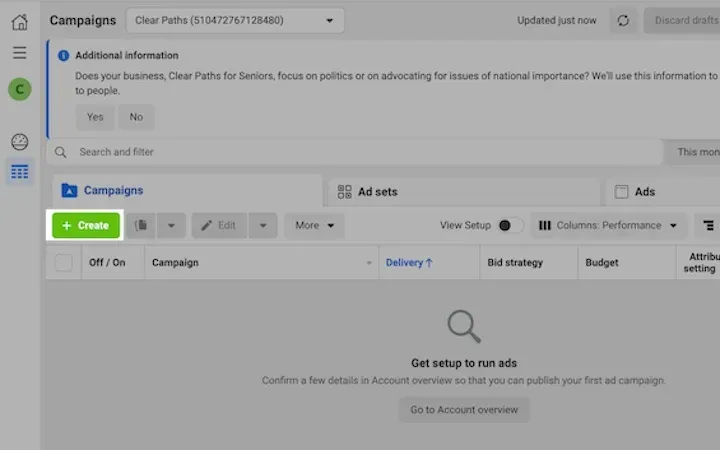
Step 1: Open Meta Ads Manager
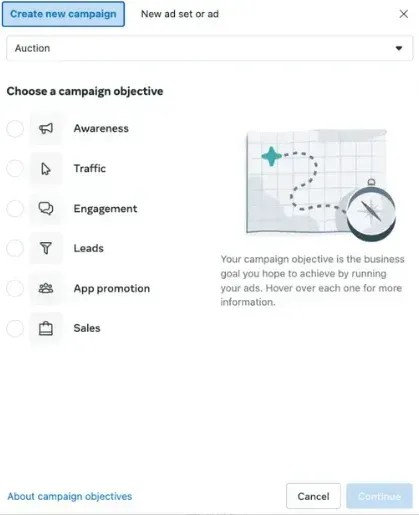
Step 2: Choose a Campaign Objective
Select the objective that matches your goal:
- Awareness
- Traffic
- Engagement
- Leads
- App promotion
- Sales
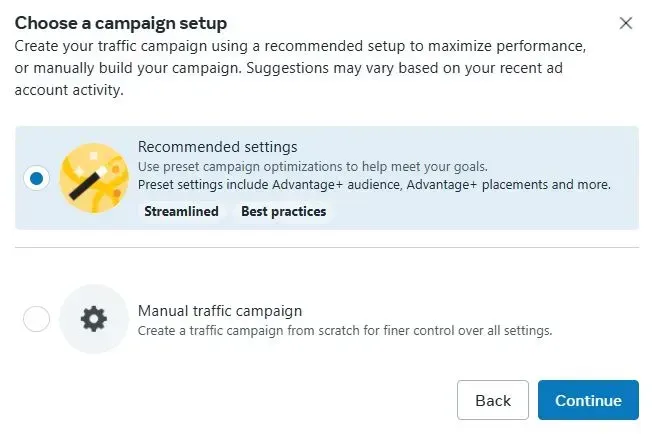
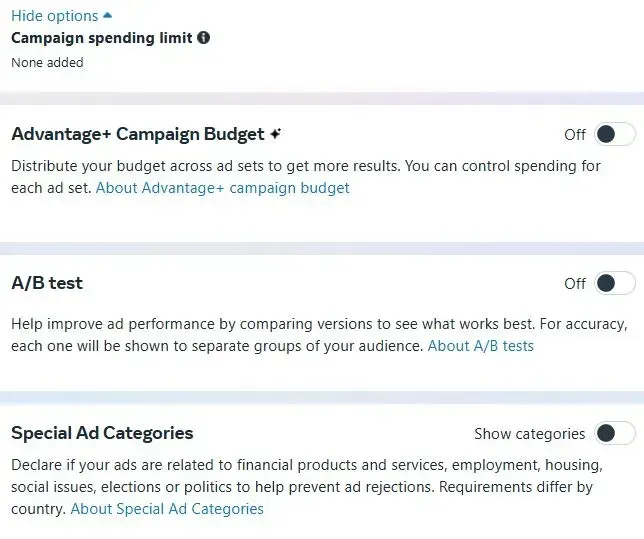
Step 3: Configure the Campaign
Name your campaign and declare a Special Ad Category if your ad relates to housing, employment, financial products and services, social issues, elections, or politics.
Depending on your objective, Meta may offer Advantage+ or manual campaign settings.
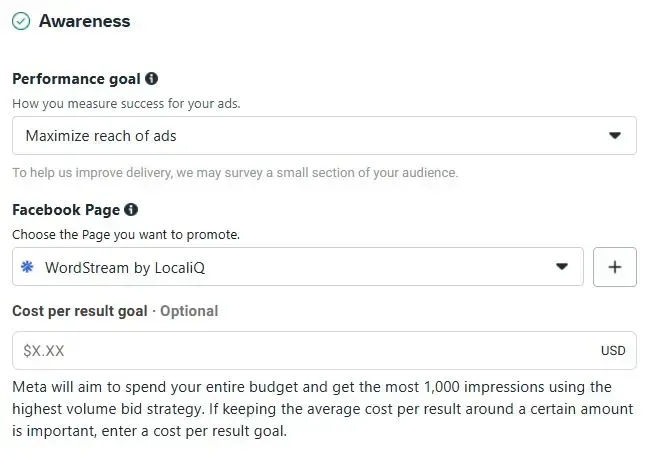
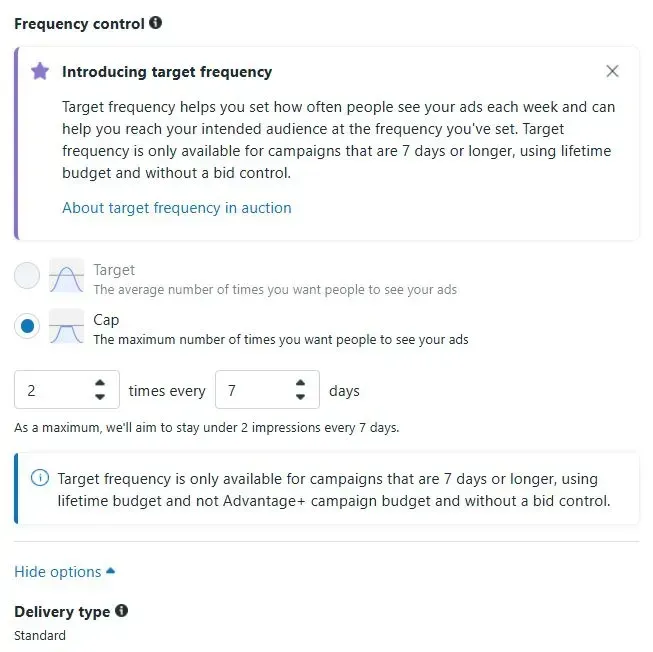
Step 4: Set Your Budget and Schedule
Choose a daily or lifetime budget and define when the campaign should start and end.
Your budget may be set at the campaign or ad set level, depending on the selected setup.
Step 5: Select the Conversion Location
Choose where you want users to take action, such as your:
- Website
- App
- Lead form
- Facebook Page
- Messenger
The available options depend on your campaign objective.
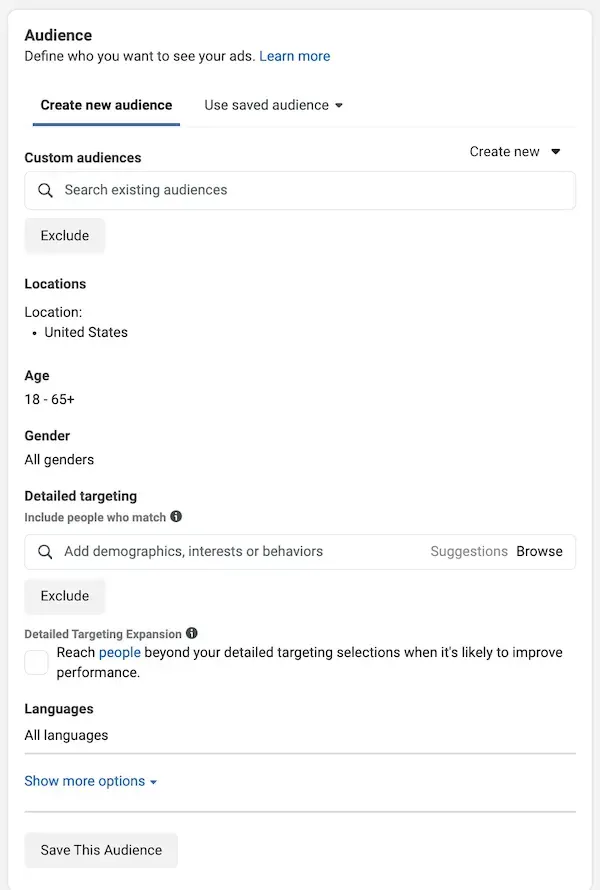
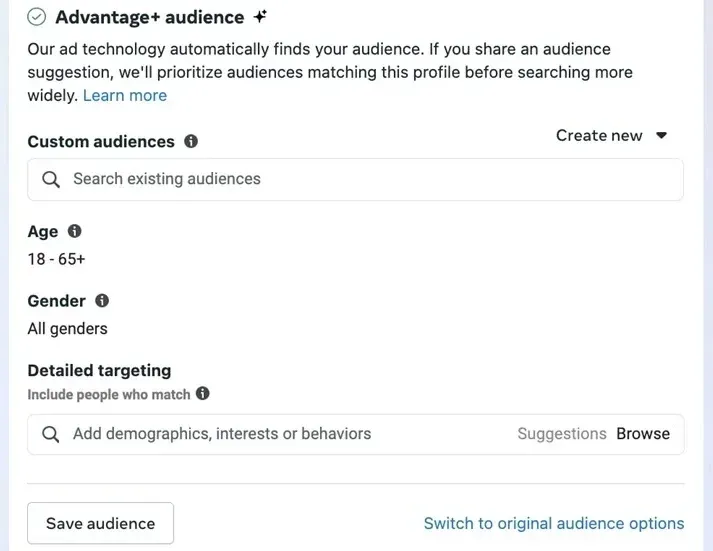
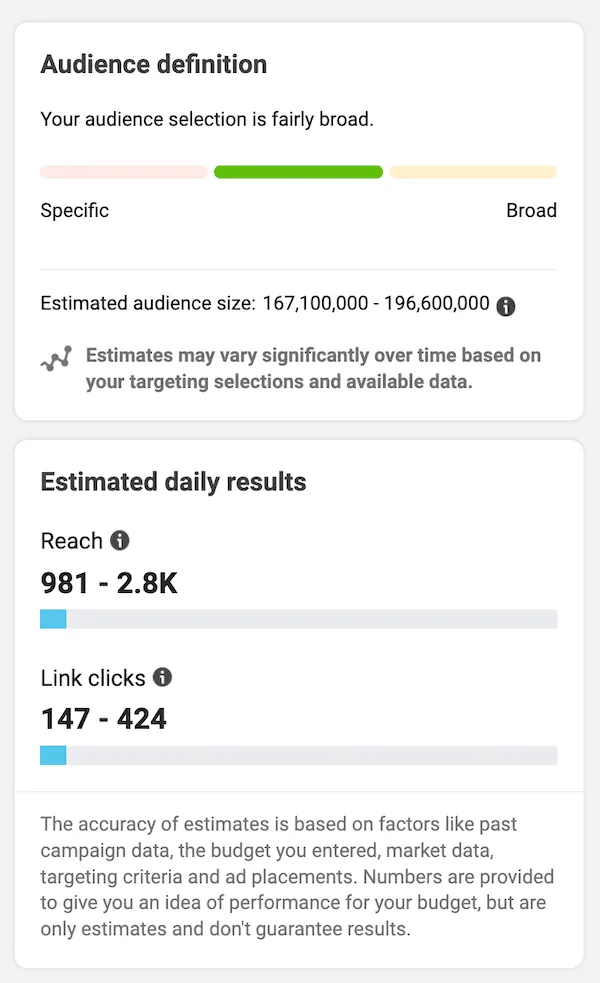
Step 6: Define Your Audience
Select the location, age, interests, and other relevant audience details. You can also use Custom Audiences or lookalike audiences if they are available in your account.
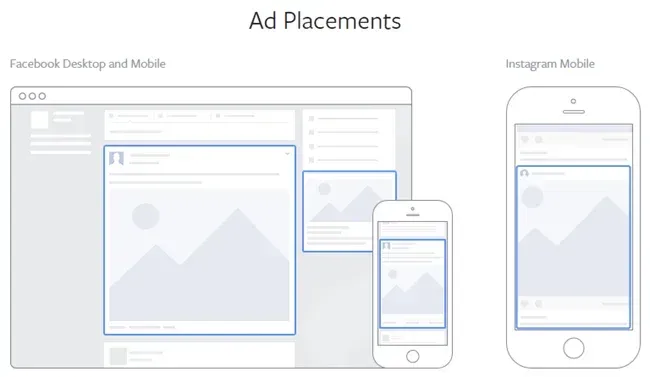
Step 7: Choose Ad Placements
Use Advantage+ placements to let Meta distribute the ad across eligible placements, or select manual placements if you need greater control.
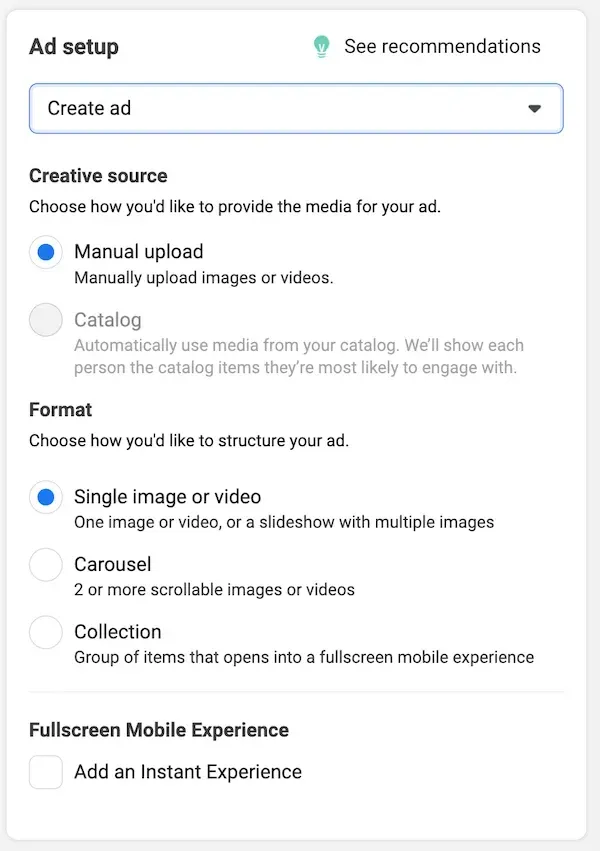
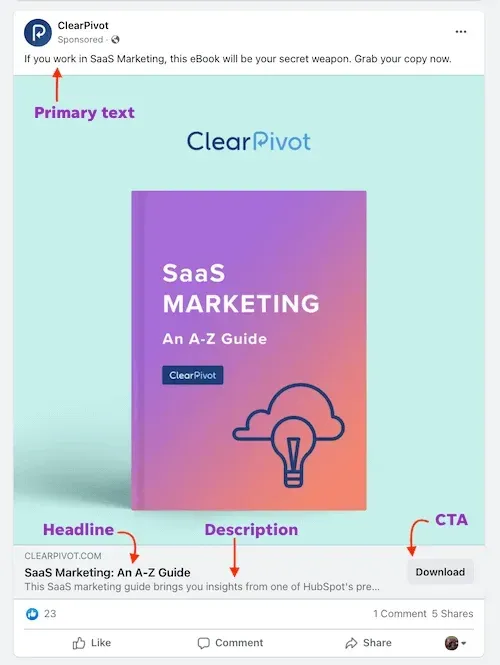
Step 8: Create the Ad
Select the Facebook Page and Instagram account representing your business. Then choose an ad format, such as:
- Single image
- Video
- Carousel
- Collection
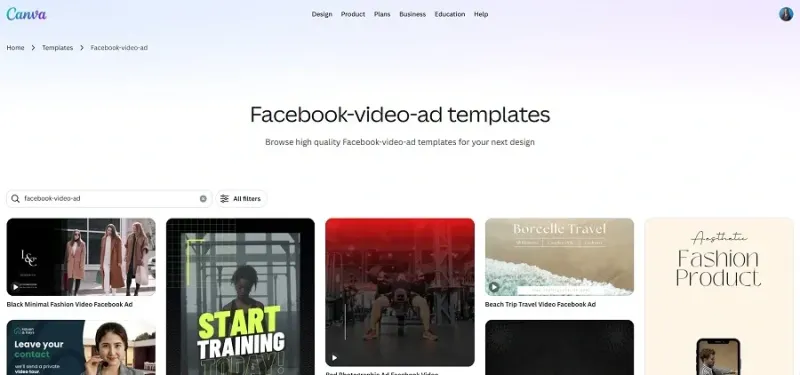
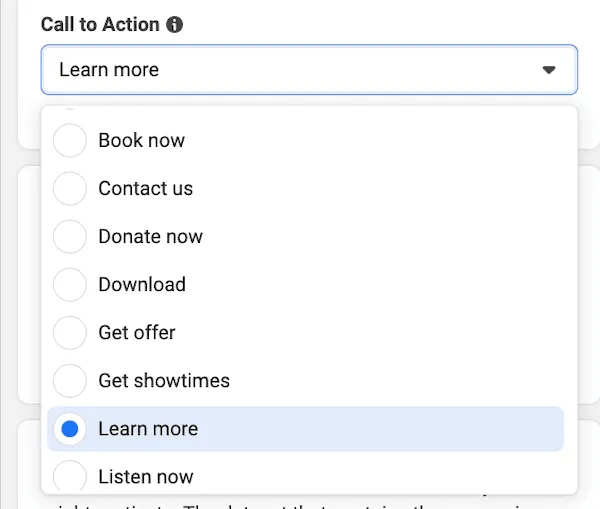
Add your primary text, headline, description, destination link, and call-to-action button.
Step 9: Configure Tracking
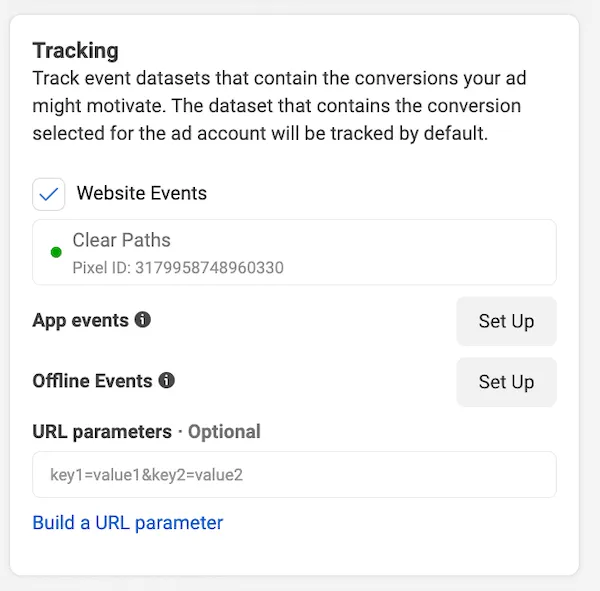
Add URL parameters and select the relevant Pixel, app event, or offline event tracking when required.
Tracking setup is especially important when measuring actions completed on your website or app.
Step 10: Preview and Publish
Review how the ad appears across the selected placements. Once everything looks correct, click Publish.
Meta will review the ad against its advertising standards before it begins running. You can monitor its status from the Delivery column in Ads Manager.
Now that your campaign is live, let’s see how YCloud helps you manage Facebook Ad leads that enter through WhatsApp.
How To Run Facebook Ads Easily with YCloud
YCloud connects your WhatsApp Business API number, Meta ad account, incoming conversations, and conversion data.
Facebook Ads are created and published in Meta Ads Manager. YCloud supports Facebook campaigns that use WhatsApp as the destination by helping you manage and track what happens after the click.
What You Should Prepare Before Getting Started
Before creating your Facebook Ad campaign with YCloud, make sure the following accounts and assets are ready:
Meta Side Requirements
- An active Meta ad account with a valid payment method
- Permission to manage the Business Portfolio, ad account, and Facebook Page
- A Facebook Page for running the ad
YCloud Side Requirements
- An active YCloud account
- A WhatsApp Business API number connected to YCloud
- A sales team, support team, or automation ready to respond to incoming enquiries
If your WhatsApp Business API account is not ready, follow YCloud’s Embedded Sign-up guide: Create WABA via Embedded Sign-up.Once these requirements are ready, you can begin creating your Facebook Ad with YCloud.
Next, let’s look at the setup flow, and then we’ll cover the step-by-step process for running Facebook Ads with YCloud.
Setup Flow Overview
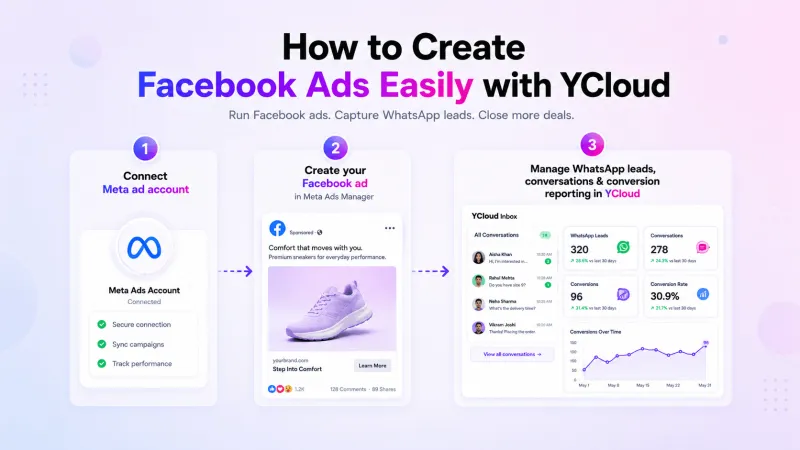
The full Facebook Ads setup can be divided into the following 3 stages:
- Connect your Meta ad account in YCloud
- Create a Facebook ad in Meta Ads Manager
- Configure conversion reporting and review ad and conversion data in Meta and YCloud
Step-by-Step Process To Run Facebook Ads with YCloud
Step 1: Connect Your Meta Ad Account
After your Meta ad account is authorized in YCloud, YCloud can read ad-related data and support later conversion reporting and data review.
Step 2: Create a Click to WhatsApp Ad
In Ads Manager, you will complete the ad objective selection, Page-to-WhatsApp setup, ad set configuration, and ad creative setup.
Explore in Detail the Step-by-Step Process to Set Up Facebook Ads with YCloudStep 3: Configure Conversion Reporting and Review Data
After the ad goes live, you can continue by configuring conversion reporting rules in YCloud and reviewing conversations, conversions, and performance data in both Meta and YCloud.
Use YCloud’s Team Inbox, chatbots, or AI Agents to respond, qualify leads, and assign conversations to the appropriate team members.
Configure Meta Conversions API to report eligible lead or purchase events back to Meta and review campaign performance in YCloud.
YCloud does not replace Meta Ads Manager. It connects your Facebook Ads with the WhatsApp conversation, follow-up, and measurement process.
Next, let’s review the Facebook Ad metrics you should track.
Important Facebook Ad Metrics You Should Track
Launching a campaign is only the beginning. The right metrics help you understand how the ad is being delivered, whether users are responding, and what each result costs.
Metric | What It Tells You |
Amount Spent | Total money spent during the selected period |
Reach | Number of unique people who saw the ad |
Impressions | Total number of times the ad was displayed |
Frequency | Average number of times each person saw the ad |
Link Clicks | Number of clicks on the ad’s destination link |
CTR | Percentage of impressions that generated a click |
CPC | Average amount paid for each click |
CPM | Average cost of 1,000 impressions |
Results | Actions generated based on the campaign objective |
Cost per Result | Average amount spent for each result |
Conversion Rate | Percentage of users who completed the desired action |
ROAS | Revenue attributed to the campaign compared with ad spend |
The metrics you prioritize should match your campaign objective.
For example, a traffic campaign may focus on landing-page views and CPC, while a lead campaign should prioritize qualified leads and cost per qualified lead.
Tracking CTWA Performance in YCloud
For Facebook Ads that direct users to WhatsApp, YCloud provides additional visibility into the conversations and leads generated after the click.
Here, in addition to seeing data such as ad campaign spending, impressions, and clicks, you will also see the number of contacts who clicked on the ads, and you will be able to export this information to plan your next set of marketing campaigns.
But before viewing CTWA Analytics, make sure:
- The corresponding ad account has been connected to YCloud.
- At least one customer has clicked on a CTWA ad. If no one has clicked on an ad and sent a message, it will not appear on this dashboard.
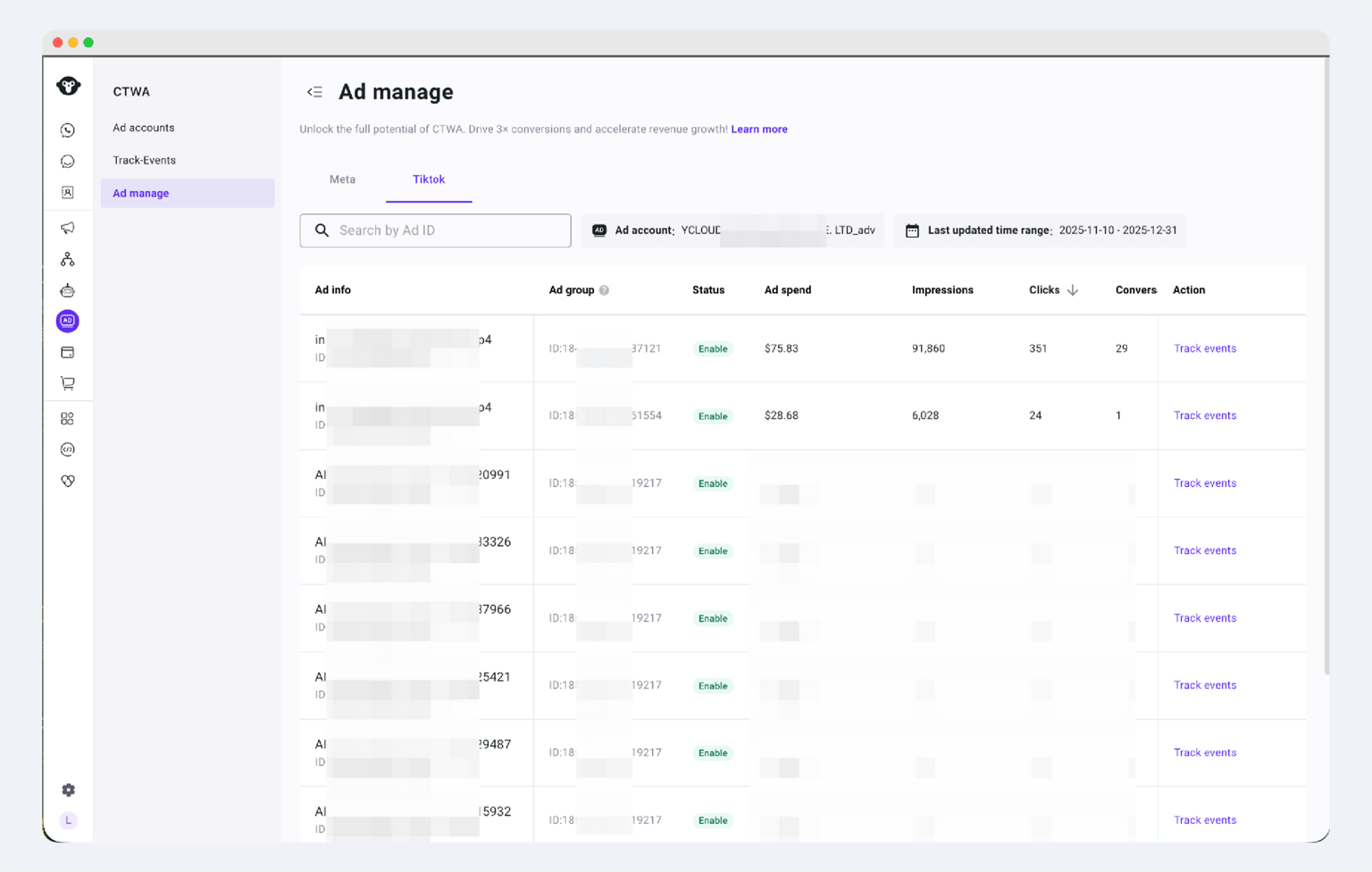
1. View CTWA Conversion Data
Navigation path: YCloud Dashboard > CTWA > Ad Manage
Here, you can see the delivery data for all CTWA ads, including spending, impressions, clicks, and sessions initiated.
2. View Leads Generated by Ads
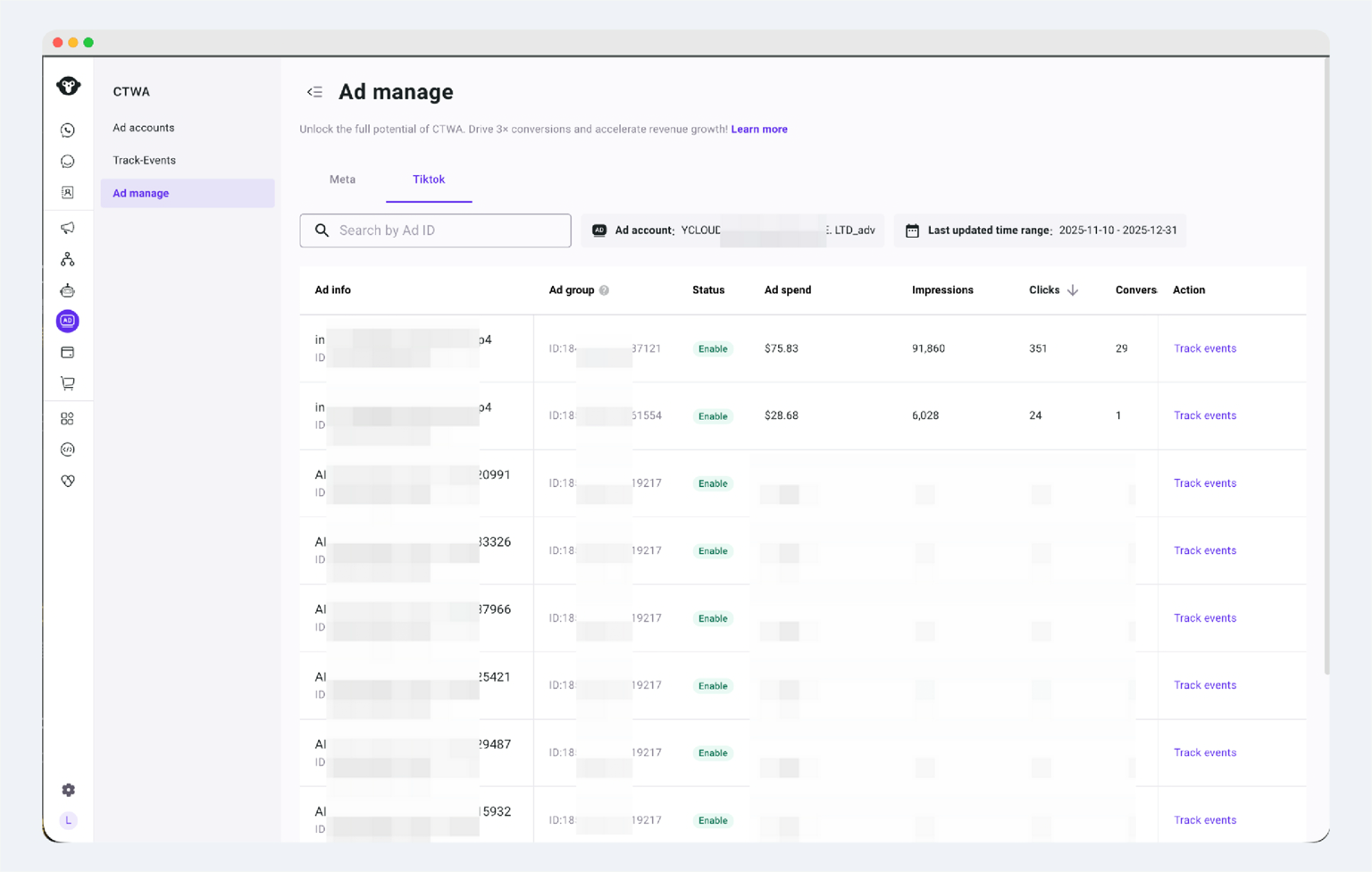
You can only view data from one ad account at a time.
3. Conversion Details
You can view the Track Events details for a specific ad:
- In the ad list, select the target ad.
- Click the [View Leads/Track Events] entry.
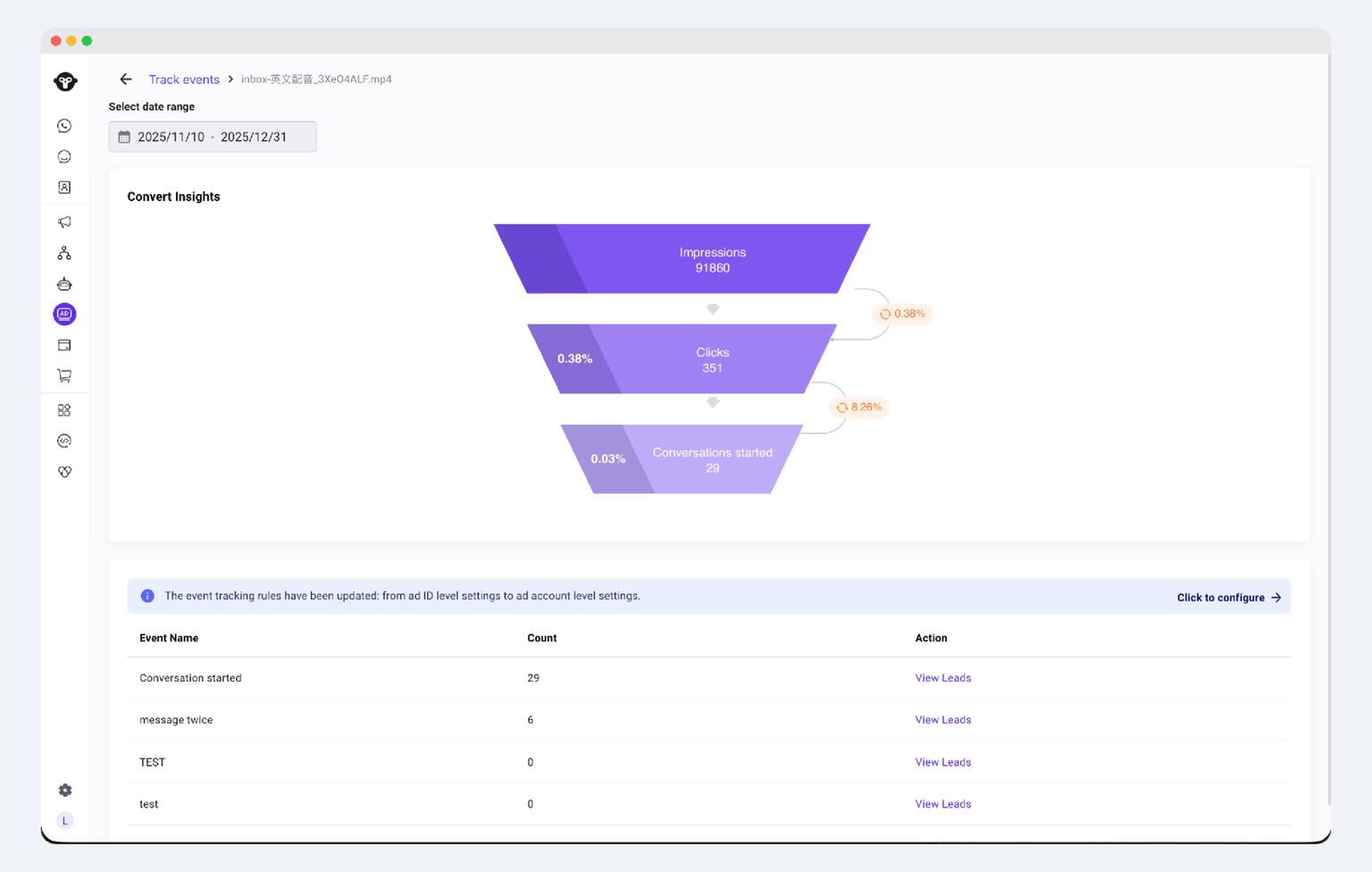
Click View Leads to view and export details.
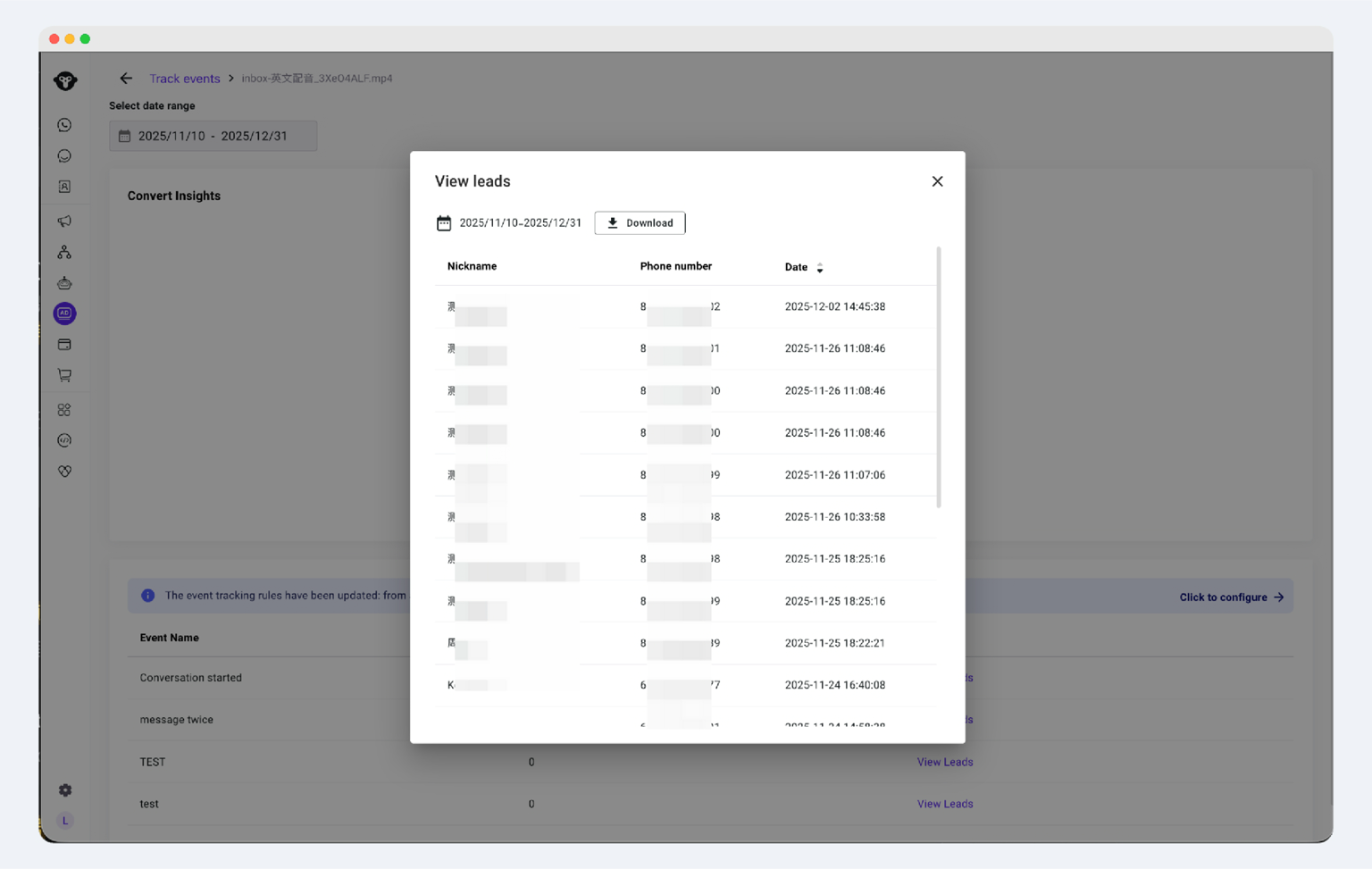
3.1 View Leads Who Triggered the Tracking Event
Additionally, we support exporting data at any time. Click "Download" to download your recorded lead dataset to your browser.
Meta Ads Manager explains how the ad was delivered.
YCloud helps connect that performance with the WhatsApp leads and conversion events generated afterwards.
Next, let’s review the Facebook Ad formats available for different campaign goals.
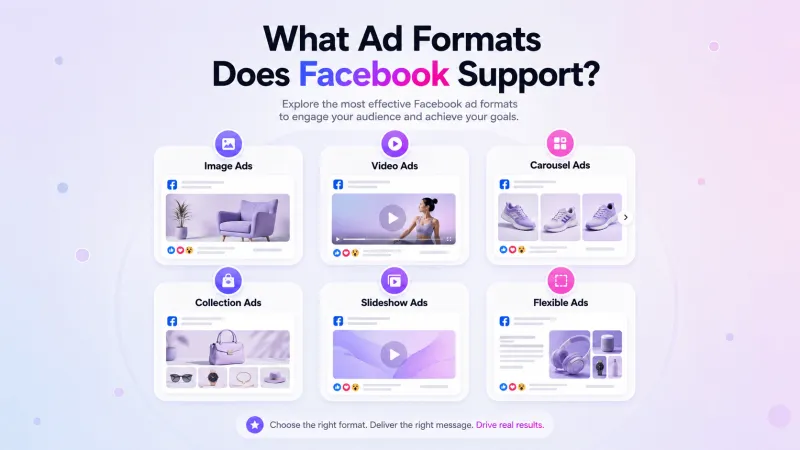
Types of Facebook Ad Formats and When to Use Them
The right Facebook Ad format depends on what you want to communicate and how users should interact with the ad.
📷 Image Ads
Use a single image with ad copy, a headline, and a CTA. This format works well for promoting one product, offer, event, or message.
🎥 Video Ads
Use video to demonstrate a product, explain a service, share a customer story, or introduce your business. Video length and dimensions should match the selected placement.
📚 Carousel Ads
Carousel Ads can contain up to ten images or videos, each with its own link. Use them to present multiple products, explain different features, or show a process step by step.
🛍️ Collection Ads
Collection Ads combine a main image or video with products from your catalogue. When clicked, users can explore the products through a mobile-focused browsing experience.
🎞️ Slideshow Ads
Slideshow Ads combine images, text, motion, and sound to create a video-like experience. They are useful when you want movement without producing a complete video.
🌀 Flexible Ads
With the flexible ad format, you can upload multiple images and videos. Meta then selects and displays the format it predicts will be most relevant to each user.
Availability depends on the campaign objective and account setup.
Important: Stories and Reels are ad placements, not separate ad formats. Image, video, carousel, and other supported formats can appear within these placements when eligible.
You can review Meta’s current Facebook Ad formats and specifications before preparing your creative assets.
Next, let’s understand the common Facebook advertising terms you will see in Meta Ads Manager.
Facebook Ads Glossary: Terms You’ll See in Ads Manager
Meta Ads Manager uses several terms across campaign setup, targeting, budgeting, and reporting. Here are the ones you should understand before running Facebook Ads.
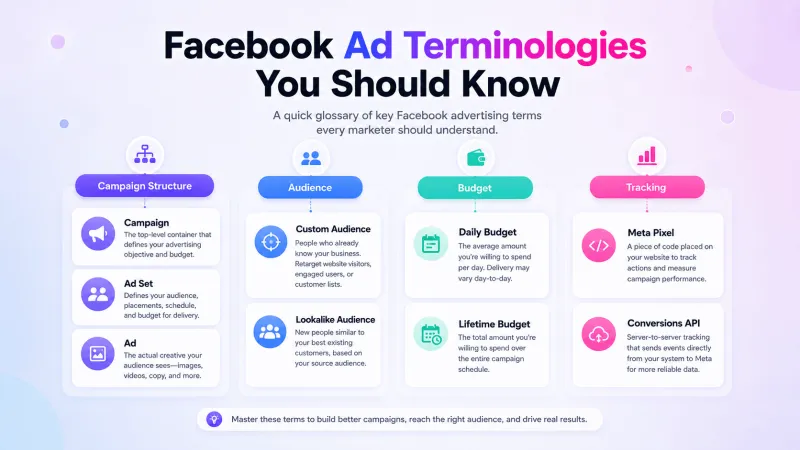
Campaign Structure
- Campaign: The top level where you select the main advertising objective.
- Ad Set: The level where you configure the audience, conversion location, performance goal, budget, schedule, and placements.
- Ad: The final level containing the format, creative, copy, destination, and CTA.
Campaign Setup
- Campaign Objective: The business outcome you want, such as awareness, traffic, engagement, leads, app promotion, or sales.
- Conversion Location: The place where you want the desired action to happen, such as a website, app, lead form, Messenger, or WhatsApp.
- Performance Goal: The specific result Meta should optimize for within the selected objective.
- Placement: The location where the ad appears, such as Facebook Feed, Instagram Stories, Messenger, or Reels.
- Ad Creative: The image, video, carousel, copy, and other content users see.
- CTA: The button that tells users what to do next, such as Learn More, Shop Now, or Send WhatsApp Message.
Audience Terms
- Manual Audience: An audience defined using available controls such as location, age, gender, interests, or behaviours.
- Custom Audience: An audience created using existing customer lists, website activity, app activity, or engagement with your business.
- Lookalike Audience: A new audience containing people who share characteristics with an existing source audience.
- Advantage+ Audience: Meta uses your audience suggestions and may expand beyond them when it predicts doing so could improve performance.
Budget Terms
- Daily Budget: The approximate amount you want Meta to spend each day.
- Lifetime Budget: The total amount available for the complete campaign or ad set duration.
- Campaign Budget: One budget shared across the ad sets within a campaign.
- Ad Set Budget: A separate budget assigned to an individual ad set.
Bidding Terms
- Highest Volume: Meta aims to generate the highest number of results possible within the available budget.
- Cost per Result Goal: Meta tries to maximize results while keeping the average cost around your selected goal.
- Bid Cap: The maximum amount Meta can bid in an individual ad auction. It does not control your average cost per result.
Not every bid strategy is available for every campaign objective.
Tracking Terms
- Meta Pixel: Website code that records actions such as page views, registrations, add-to-cart events, and purchases.
- Conversions API: A server-side connection used to send eligible customer and conversion events to Meta.
- Attribution Setting: Defines which clicks or views can receive credit for a conversion.
- Learning Phase: The period when Meta’s system explores how to deliver a new or significantly edited ad set.
Next, let’s see how YCloud supports Facebook Ads that direct users to WhatsApp.
Why Run Facebook Ads with YCloud?
YCloud is most relevant when your Facebook Ads direct users to WhatsApp.
Meta Ads Manager handles campaign creation and delivery. YCloud connects the ad source with the WhatsApp conversation, helping your marketing and sales teams manage what happens after the click.
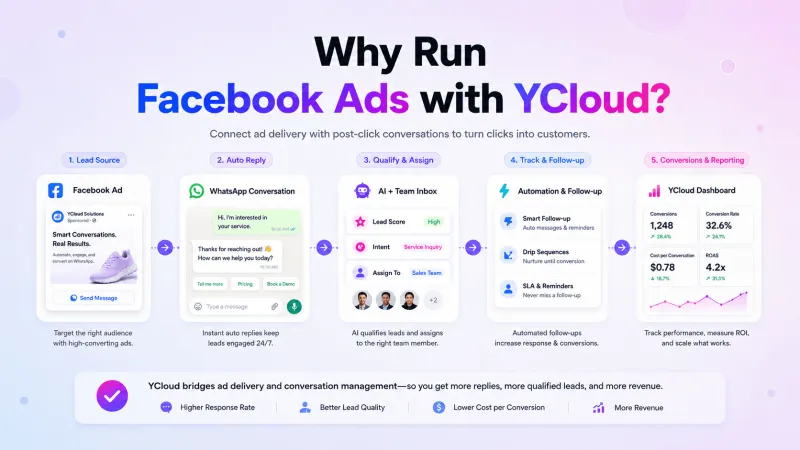
With YCloud, you can:
- Identify where leads came from: Record the campaign and ad that generated each WhatsApp conversation.
- Respond automatically: Use AI Agents or chatbots to greet users, answer common questions, and collect basic lead information.
- Qualify and route leads: Direct relevant enquiries to the appropriate sales or support agents.
- Manage conversations centrally: Handle ad-driven messages through YCloud’s Shared Team Inbox while retaining the conversation history and lead context.
- Track results beyond clicks: Review ad spend, impressions, clicks, WhatsApp sessions, leads, and tracked conversion events through CTWA Analytics.
- Report conversions to Meta: Use Conversions API to send configured lead or purchase events back to Meta.
- Follow up with interested leads: Segment opted-in contacts and send relevant reminders, information, or offers through WhatsApp campaigns.
YCloud does not replace Meta Ads Manager or create every type of Facebook Ad. It supports Facebook campaigns that use WhatsApp as the destination by connecting ad delivery with lead handling, follow-up, attribution, and conversion reporting.
Next, let’s look at practical tips for running better-performing Facebook Ads.
10 Practical Tips for Running High-Converting Facebook Ads
A Facebook Ad does not perform because of one setting. The objective, audience, creative, destination, tracking, and follow-up must work together.
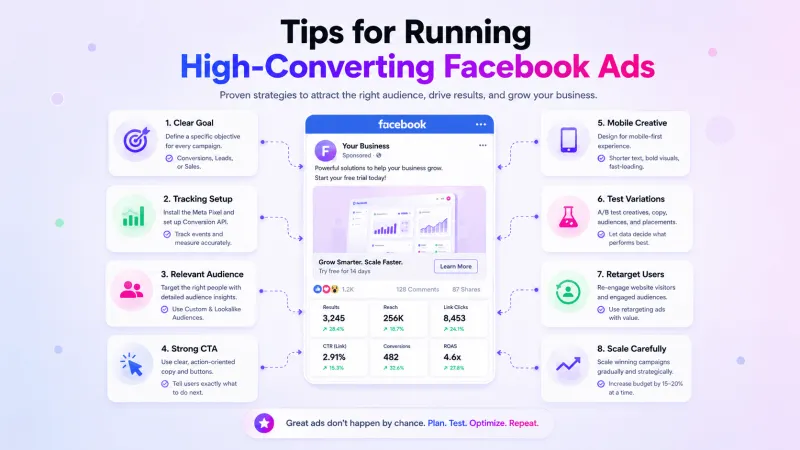
1. Begin with a Measurable Goal
Choose the campaign objective based on the action you need: awareness, traffic, messages, qualified leads, app installs, or purchases.
2. Configure Tracking Before Launch
Set up Meta Pixel, app events, or Conversions API when tracking actions outside Meta.
For Click-to-WhatsApp Ads, YCloud can track leads and report configured conversion events back to Meta through CAPI.
3. Target Users Relevant to Your Offer
Use location, demographics, interests, previous interactions, and available first-party customer data. Test Custom Audiences, Lookalike Audiences, and Advantage+ Audience where relevant.
Avoid making an audience extremely broad or narrow without a clear reason.
4. Make the Offer and CTA Clear
Your copy should answer three questions quickly:
- What are you offering?
- Why should the user care?
- What should they do next?
Keep the opening lines direct, use language your customers understand, and select an appropriate CTA such as Learn More, Shop Now, Get Quote, or Send WhatsApp Message.
5. Design Creatives for Mobile
Use high-quality images or videos with a clear subject and readable text. Keep on-image text concise, use brand-consistent colours, and adapt the creative to each placement.
Meta no longer applies a strict 20% text limit to ad images, but excessive text can still make the creative difficult to understand.
6. Keep the Destination Consistent
The landing page, lead form, app page, or WhatsApp conversation should continue the offer presented in the ad.
If the ad promises a free consultation, the next screen should make booking that consultation simple.
7. Test and Refresh Your Creatives
Run several creative and copy variations. Test ideas such as:
- Static image versus video or animation
- Product image versus real-use example
- Feature-led versus benefit-led copy
- Different headlines and CTAs
- Customer testimonial versus product demonstration
Test one major element at a time and rotate creatives when performance declines.
You can use the Meta Ad Library to understand how businesses in your market structure their ads. Use it for research, not for copying another brand’s work.
8. Retarget Interested Users
Create separate campaigns for people who visited important website pages, viewed products, added items to their cart, opened a lead form, or engaged with your business without converting.
For WhatsApp follow-ups, contact only users with valid opt-in and follow WhatsApp’s messaging policies.
9. Scale Using More Than Budget Increases
Scale only after a campaign produces consistent results. Depending on your business, you can:
- Increase budgets gradually
- Test broader or Lookalike Audiences
- Expand into additional eligible placements
- Introduce new variations of successful creatives
- Use Advantage+ Sales Campaigns for eligible sales use cases
- Use Advantage+ Catalogue Ads to promote relevant catalogue products
- Direct users to WhatsApp and automate initial responses through YCloud
Measure qualified leads, purchases, customer acquisition cost, and ROAS while scaling—not only clicks or engagement.
10. Avoid Common Facebook Ad Mistakes
Watch for these issues:
- Selecting an objective that does not match the business goal
- Launching without conversion tracking
- Using weak creative or an unclear CTA
- Ignoring mobile layouts and placement previews
- Sending users to a destination that does not match the ad
- Testing too many variables simultaneously
- Scaling before results become consistent
- Judging performance through clicks alone
Review campaign data regularly, make one meaningful change at a time, and measure what happens afterwards.
Next, let’s see how you can get started with YCloud.
How To Get YCloud?
Kindly click on the banner below to book a FREE DEMO and learn more about our product offering, features and pricing plans.
Built with AI at its core, YCloud is the ultimate WhatsApp marketing and automation solution, giving you everything you need in one powerful platform.
Now market, sell, support, and scale your business by 10X with YCloud!
Ready to try? Explore how to get YCloud for FREE next!
How to Get YCloud for FREE?
It's Simple!
Subscribe to our FREE plan and get a free lifetime experience of YCloud with unlimited messaging API.
Book a FREE Demo and see how YCloud can power up your WhatsApp marketing strategy!
🚀 Try YCloud today and experience how effortless WhatsApp automation can be when you have the right partner.
Next, let’s see how Facebook Ads are likely to evolve in 2027.
What’s Next for Facebook Ads in 2027?
While Meta’s plans may continue to change, its current updates point towards more automation, stronger measurement, and closer integration between ads and business conversations.
More AI-Assisted Campaign Management
Meta Advantage+ already uses AI to optimize audiences, placements, and budgets. In 2027, advertisers can expect more campaign decisions to be automated, while they focus on goals, offers, and overall strategy.
Faster Creative Testing
Advantage+ Creative can generate and enhance variations across image, video, and carousel ads. This will make creative testing faster, although human review will remain essential for brand accuracy.
Greater Reliance on First-Party Conversion Data
Browser-based tracking alone is becoming less reliable. Tools such as the Meta Pixel and Conversions API will play a larger role in reporting qualified leads, purchases, and other business outcomes back to Meta.
More Ads Will Lead to Conversations
Meta is already bringing campaign management across Facebook, Instagram, and WhatsApp into Ads Manager. This suggests that messaging-led advertising, including Click-to-WhatsApp Ads, will become a more important conversion path.
Businesses can use YCloud to manage these WhatsApp conversations, qualify leads, track their ad sources, and report eligible conversion events to Meta.
Privacy and Consent Will Remain Essential
Advertisers will need to rely more on consented customer data, accurate event reporting, and compliant follow-ups. Businesses with clean first-party data and clear opt-in processes will be better prepared for future targeting and measurement changes.
The tools may become more automated, but successful Facebook Ads will still require a relevant offer, strong creative, reliable tracking, and timely lead follow-up.
Next, let’s wrap up the key lessons from this Facebook Ads guide.
Wrapping-Up!
Running Facebook Ads becomes easier once you understand how the campaign structure, objectives, audiences, budgets, formats, and performance metrics work together.
To recap:
- Create and manage campaigns through Meta Ads Manager.
- Select an objective that matches your business goal.
- Test different audiences, creatives, and ad formats.
- Track conversions and business outcomes, not just clicks.
- Use Click-to-WhatsApp Ads when you want prospects to start a direct conversation.
For WhatsApp-focused campaigns, YCloud helps you manage ad-driven conversations, qualify leads, track their sources, report conversion events, and follow up from one platform.
Ready to turn Facebook ad clicks into measurable WhatsApp conversations? Get started with YCloud for free.
Finally, let’s answer some common questions about creating and running Facebook Ads.
Also Checkout These Articles Before You Go!
- How to Set Up, Create & Run Click-to-WhatsApp (CTWA) Ads
- Top 10 CTWA (Click to WhatsApp Ads) Strategies to Generate and Convert More Leads
- How to Use ChatGPT for WhatsApp Marketing: 10 Practical Strategies
- 15 Practical Ways to Use AI in WhatsApp Marketing to Automate and Scale Faster
- How to Calculate the ROI from Your WhatsApp Marketing Campaign
- Know How to Sell on WhatsApp with Proven Strategies, Rules and Quick Wins
- Your One-Stop Guide to the WhatsApp AI Agents
- 10 Best AI Sales Agents That Actually Work
- How to Build a High-Converting WhatsApp Lead Generation Funnel in Just 5Min
- 20 Proven WhatsApp Lead Generation Strategies to Generate 1000s of Leads Per Month
Frequently Asked Questions
How much do Facebook Ads cost?
Facebook Ads do not have a fixed CPC, CPM, or CPA. Costs depend on your campaign objective, audience, industry, competition, placements, creative quality, and expected action rate. You control spending through a daily or lifetime budget.
How does the Facebook ad auction work?
Every available ad impression triggers an auction. Meta evaluates the advertiser’s bid, the estimated likelihood of the user taking the desired action, and the ad’s quality. The highest bidder does not always win; Meta prioritizes the ad expected to deliver the highest overall value. Learn more about the Meta ad auction.
What is the minimum budget for Facebook Ads?
There is no universal starting budget for every campaign. Meta may apply minimum requirements based on your currency, objective, optimization event, schedule, and bidding settings. Ads Manager will display the applicable minimum while you configure the campaign.
Start with an amount you can run long enough to collect meaningful data, then increase it based on performance.
What is the difference between Facebook Ads and boosted posts?
A boosted post is an existing Page post promoted through a simplified setup. It offers limited control over objectives, audiences, placements, bidding, and testing.
Ads created through Meta Ads Manager provide more campaign options, formats, optimization controls, and reporting. Boosting can support basic reach or engagement, while Ads Manager is better suited to structured campaigns. Meta provides a detailed comparison of boosted posts and ads.
How should I structure a Facebook Ads campaign?
Meta Ads Manager uses three levels:
- Campaign: Defines the advertising objective.
- Ad set: Controls the audience, placements, budget, schedule, and optimization.
- Ad: Contains the creative, copy, format, destination, and CTA.
Keep the initial structure simple. Create separate campaigns when the objective, offer, audience stage, or conversion destination is different.
How does Facebook retargeting work?
Facebook retargeting lets you advertise to people who have already interacted with your website, app, Facebook Page, Instagram account, ads, or customer database.
You can create Custom Audiences using Meta engagement, customer lists, the Meta Pixel, or Conversions API. Make sure you have the required permission to use and upload customer data.
Can Facebook Ads send people directly to WhatsApp?
Yes. Click-to-WhatsApp Ads allow users to click an ad on Facebook or Instagram and start a WhatsApp conversation with your business.
YCloud can then help you receive these conversations, qualify leads, assign them to agents, track their ad sources, and report eligible conversion events to Meta.
How do I measure whether my Facebook Ads are successful?
Measure performance against the campaign objective:
- Awareness: Reach, impressions, frequency, and CPM
- Traffic: Link clicks, CTR, CPC, and landing page views
- Lead generation: Leads, qualified lead rate, and cost per qualified lead
- Sales: Purchases, conversion rate, CPA, revenue, and ROAS
- Messaging: Conversations started, response time, qualified leads, and conversions
Avoid judging performance using clicks alone when the actual goal is leads or sales.
Why are my Facebook Ads not delivering results?
Common reasons include:
- The objective does not match the business goal.
- The audience is too broad, too narrow, or irrelevant.
- The creative or offer is unclear.
- Conversion tracking is incomplete.
- The budget cannot generate enough data.
- The landing page or WhatsApp follow-up creates friction.
- The ad was rejected or has limited delivery.
Review the campaign level by level before making several changes at once.
Can I run Facebook and Instagram Ads without Meta Business Manager?
You can boost posts directly from a Facebook Page or Instagram professional account. However, Meta Ads Manager provides the controls required for complete campaign creation and optimization.
A Meta Business Portfolio, formerly called Business Manager, is recommended when multiple people, Pages, ad accounts, or WhatsApp assets must be managed. YCloud supports the WhatsApp conversation and conversion workflow for CTWA campaigns; it does not replace Meta Ads Manager for creating and delivering Facebook Ads.
Related Articles

Make your business communications much easier!


Trusted by




