Customer Support

English

Top 10 CTWA (Click to WhatsApp Ads) Strategies to Generate and Convert More Leads

Clicks can look promising in Ads Manager.
But if prospects enter WhatsApp, receive a generic response, and leave without taking the next step, those clicks add little value to your sales pipeline.
That’s why a well-planned CTWA strategy matters…!
Your ad, opening message, conversation flow, lead qualification, and follow-up must work as one connected journey.
In this guide, we’ll cover 10 practical Click to WhatsApp Ads strategies to attract the right prospects, reduce chat drop-offs, qualify leads faster, and convert more conversations, without simply increasing your ad spend.
Before exploring these strategies, let’s understand what Click to WhatsApp Ads are and how they work.
TL;DR
- Click to WhatsApp Ads send users from Facebook or Instagram directly into a WhatsApp conversation with your business.
- Strong CTWA strategies focus on the complete journey, not just generating more ad clicks or chats.
- Target users by buying intent and give them a specific reason to message, such as requesting a quote, checking availability, or booking a demo.
- Keep the ad promise, CTA, and opening message aligned. Test different audiences, creatives, formats, and placements to identify what performs best.
- Respond immediately, keep qualification short, and combine chatbot or AI automation with timely human support.
- Avoid generic replies, delayed responses, information overload, and measuring campaign success through conversation volume alone.
- Track qualified leads, cost per qualified lead, bookings, purchases, attributed revenue, and return on ad spend.
- YCloud connects CTWA lead capture, AI-powered qualification, team Inbox, follow-ups, ad-level attribution, conversion reporting, and analytics in one platform.
Next, let’s understand how Click to WhatsApp Ads work.
What Are CTWA (Click to WhatsApp Ads)?
Click to WhatsApp Ads (CTWA) are Facebook and Instagram ads that take users directly to a WhatsApp chat with your business.
Unlike regular ads that lead to landing pages or forms, CTWA lets interested users start a conversation immediately. They can ask questions, explore products, request pricing, or book a demo, all within WhatsApp.
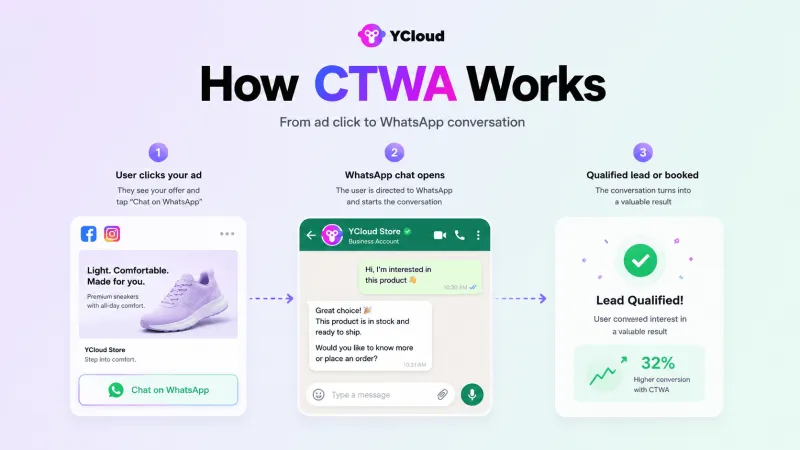
Here’s how it works:
- A user clicks your ad on Facebook or Instagram.
- The ad opens a WhatsApp chat with your business.
- Your team or chatbot responds and guides the user towards the next step.
Simple, right?
Now, let’s explore 10 CTWA strategies to generate and convert more leads.
Also Read: How to Build a High-Converting WhatsApp Lead Generation Funnel in Just 5MinTop 10 CTWA (Click to WhatsApp Ad) Strategies
Getting more clicks is only one part of a successful CTWA campaign.
Your targeting, offer, creative, opening message, qualification flow, follow-up, and conversion tracking must work together.
Here are 10 practical Click to WhatsApp Ads strategies to improve the complete journey.
1. Give Users a Clear Reason to Start the Chat
“Message us” is not a strong offer.
Tell users exactly what they will receive after clicking your ad. It could be a quote, product recommendation, consultation, demo, discount, or availability check.
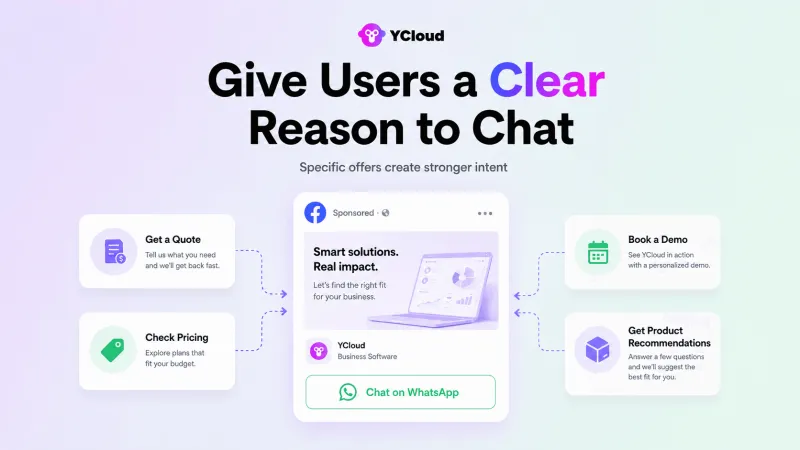
For example:
- Get a plan recommendation for your team
- Check price and availability on WhatsApp
- Book a free product consultation
- Find the right product for your needs
A specific offer attracts users with clearer intent and gives the conversation an immediate direction.
2. Optimize for the Outcome You Actually Want
Before deciding how to run Click to WhatsApp Ads, define what success means for your campaign.
Do you want more conversations, qualified leads, appointments, or purchases?
Choose your campaign objective and optimization event accordingly. If your goal is sales, do not evaluate performance based only on chats started. Connect downstream events through Meta’s Conversions API for Business Messaging so campaigns can be optimized using actual lead or purchase outcomes.
Otherwise, you may generate plenty of conversations without improving revenue.
3. Target Users Based on Buying Intent
Age, location, and interests are useful targeting filters, but they do not tell the complete story.
Create separate audiences for:
- New prospects
- Website visitors
- Cart abandoners
- Previous leads
- Existing customers
- Lookalike audiences
Then adjust your ad message for each group. A new prospect may need education, while a cart abandoner may only need pricing clarification or delivery information.
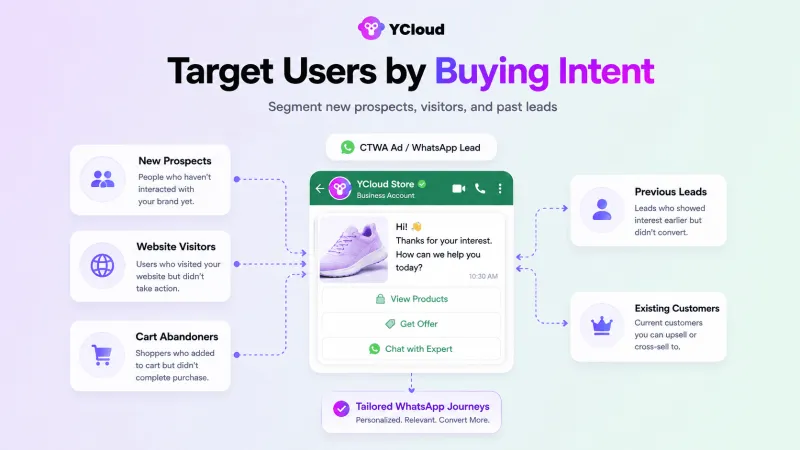
Meta’s audience targeting options can help you reach users based on their relationship and relevance to your business.
4. Test Different Creative Angles and Placements
Do not create one ad and expect it to work everywhere.
Test different creative angles, such as:
- Customer pain points
- Product benefits
- Demonstrations
- Customer results
- Limited-time offers
- Educational content
You should also test static images, short videos, carousels, Stories, Feeds, and Reels. Meta recommends creative diversification to give its delivery system more relevant options for different audiences.
Compare the results and invest more in the combinations producing qualified conversations.
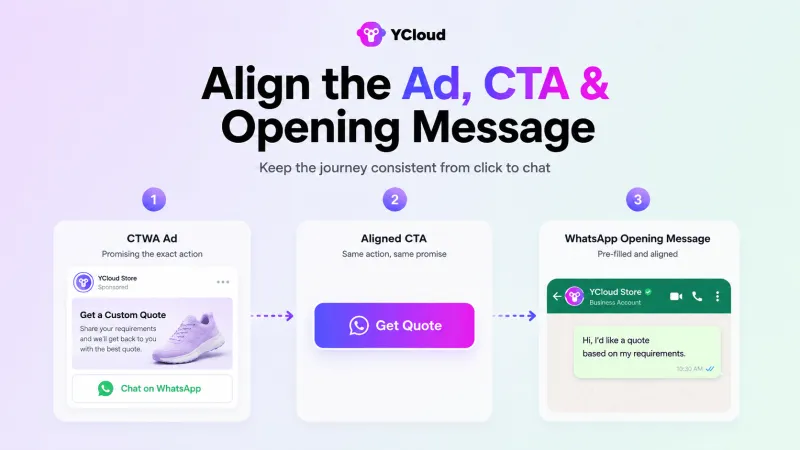
5. Connect the Ad, CTA, and Opening Message
The conversation should continue naturally from the ad.
If your ad promises a customized quote but the chat opens with “Hi, how can we help?”, the user must explain everything again.
Keep all three elements aligned:
- Ad: Get a customized pricing estimate
- CTA: Get Quote
- Pre-filled message: Hi, I would like a quote based on my requirements.
This gives users a clear starting point and helps your business identify their intent immediately.
6. Respond Instantly with a Guided Welcome Flow
A user who clicks your ad is interested now.
Use a chatbot or AI Agent to acknowledge the enquiry immediately and guide the user towards the right option.
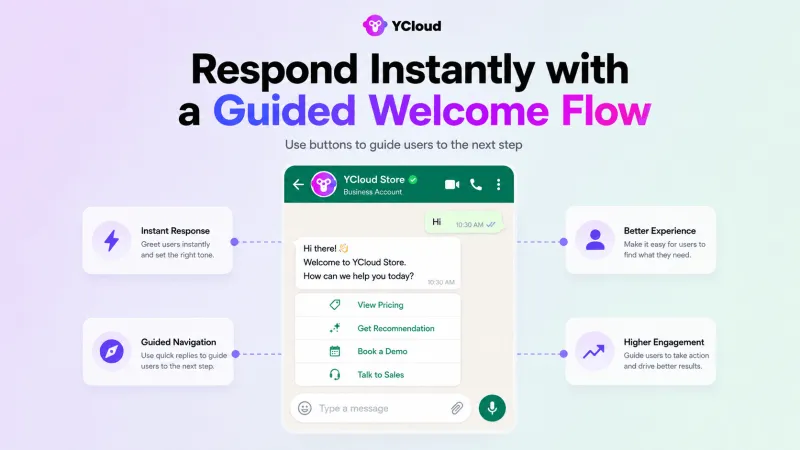
For example:
- View pricing
- Get a product recommendation
- Book a demo
- Check order availability
- Speak with an expert
Keep the first interaction short. Its purpose is to understand what the user needs and move them forward, not make them complete a long interview.
7. Keep Lead Qualification Short
Ask only the questions required to identify intent and determine the next step.
For a B2B campaign, this may include:
- Business requirement
- Company size
- Budget
- Expected timeline
For an e-commerce campaign, product preference, location, size, or budget may be enough.
Quick replies and WhatsApp Flows can help collect structured information inside the chat without a lengthy back-and-forth conversation.
Once you have enough information, recommend the next action.
8. Combine Automation with Human Support
Automation should handle repetitive work. Human agents should handle conversations requiring judgment.
Use automation for:
- Greetings
- Common questions
- Lead-detail collection
- Basic qualification
- Product or resource sharing
Transfer the conversation to a sales representative when the user asks complex questions, has specific requirements, shows strong buying intent, or requests human assistance.
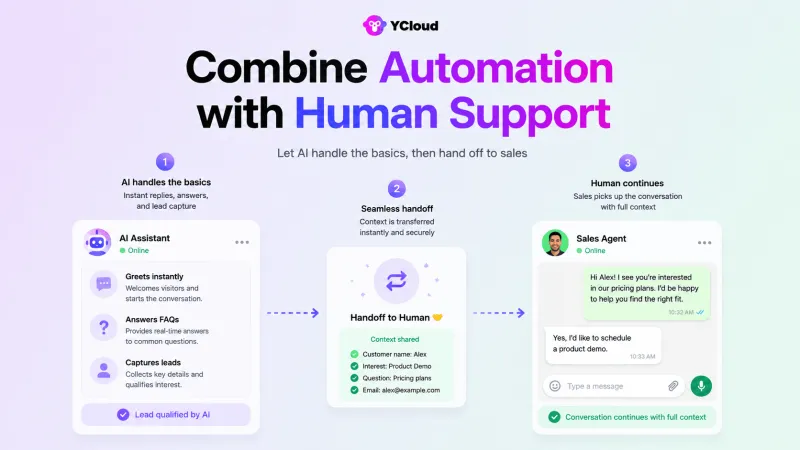
Make sure the agent receives the previous chat context so the prospect does not have to repeat everything.
9. Follow Up Based on User Behaviour
Not every user will convert during the first conversation.
Segment leads based on what they clicked, requested, or discussed. Then send a relevant follow-up.
For example:
- Pricing enquiry → Share the requested quote
- Demo request → Offer available time slots
- Product question → Send specifications or availability
- Incomplete purchase → Address the likely objection
- Interested but undecided → Share a relevant case study
Avoid sending the same “Are you still interested?” message to everyone. A useful follow-up continues the previous conversation instead of restarting the sales pitch.
10. Measure Qualified Leads and Revenue
CTR, CPC, and conversations started can show whether your ad attracts attention. They do not show whether it generates business.
Track metrics such as:
- Cost per WhatsApp conversation
- Lead qualification rate
- Cost per qualified lead
- Time to first response
- Demo or appointment booking rate
- Lead-to-customer conversion rate
- Revenue per conversation
- Return on ad spend
A campaign producing fewer conversations may still perform better if those conversations generate more qualified leads and sales.
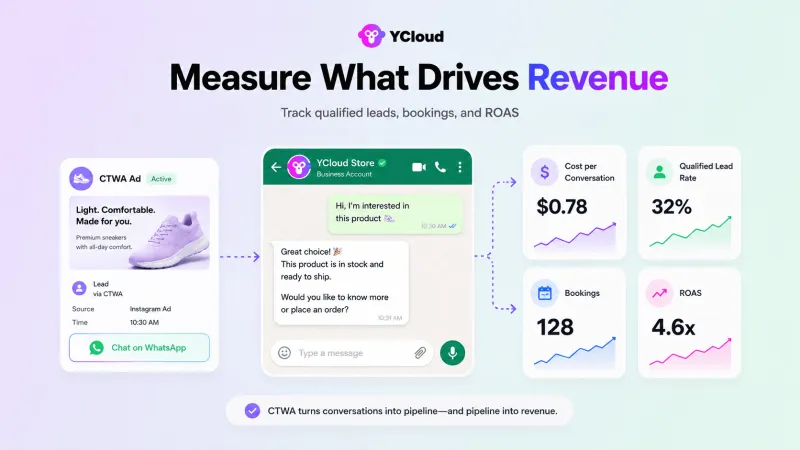
Use this data to improve your audience, creatives, opening messages, qualification flow, follow-ups, and advertising budget.
These CTWA strategies can help you attract better prospects and convert conversations more efficiently. However, a few avoidable mistakes can still reduce campaign performance.
Next, let’s look at what businesses should avoid when planning their Click to WhatsApp Ads strategy.
4 CTWA Mistakes That Can Waste Your Ad Spend
Even a well-targeted CTWA campaign can underperform if the experience after the click is poorly managed.
Avoid these common mistakes:
1. Sending the Same Reply to Every Lead
Generic responses ignore the user’s intent and the ad they clicked.
Continue the context of the ad and personalize the conversation based on their product interest, requirement, or funnel stage.
2. Making Prospects Wait
A delayed response can quickly turn a high-intent enquiry into a lost opportunity.
Use automation to acknowledge the message immediately, answer basic questions, and route qualified leads to the right sales representative.
3. Sharing Too Much Information at Once
Long messages, complete catalogues, and multiple offers can overwhelm prospects.
Ask what they need, share only the relevant information, and guide them towards one clear next step.
4. Tracking Conversations Instead of Conversions
A high number of chats does not always mean better campaign performance.
Track qualified leads, cost per qualified lead, bookings, purchases, and attributed revenue to understand whether your Click to WhatsApp Ads strategy is producing actual business results.
Avoiding these mistakes can help you protect your ad spend and convert more CTWA conversations.
Next, let’s see how to set up and run Click to WhatsApp Ads with YCloud.
How to Set Up Click to WhatsApp Ads with YCloud
Running a CTWA campaign with YCloud requires a WhatsApp Business API number, a Meta ad account, a Facebook Page, and the necessary admin permissions.
Here is how to set it up:
Step 1: Connect Your WhatsApp Business Number
Create or connect a WhatsApp Business API account through YCloud.
Next, link the number to your Facebook Page through Page Settings > Linked Accounts > WhatsApp. If you plan to advertise on Instagram, connect your Instagram professional account to the same Facebook Page.
Step 2: Connect Your Meta Ad Account to YCloud
Log in to YCloud and go to CTWA > Connect Ad Account (Meta Ads).
Authorize your Meta Business Manager and select the ad account you want to connect. This allows YCloud to display ad data, identify lead sources, report conversion events, and analyze performance.
Step 3: Create the Campaign in Meta Ads Manager
Open Meta Ads Manager and create a new campaign.
Configure the campaign using the following settings:
- Campaign objective: Engagement
- Conversion location: Messaging destinations
- Messaging app: WhatsApp
- Performance goal: Maximize the number of conversations
Select the connected Facebook Page and WhatsApp number. Then define your audience, budget, schedule, and placements.
Step 4: Create the Ad and Opening Message
Add your visual, primary text, headline, description, and WhatsApp CTA.
Next, choose how users will begin the conversation:
- Frequently asked questions: Let users select from options such as pricing, product details, delivery, or speaking with sales.
- Pre-filled message: Add a ready-to-send message such as, “Hi, I would like a quote for your service.”
Keep the opening message consistent with the ad offer. Preview both the ad and WhatsApp chat experience before publishing.
Step 5: Publish, Manage, and Optimize
Submit the ad for Meta’s review.
Once approved, users can click it and start conversations with your business on WhatsApp.
Use YCloud to:
- Receive and manage CTWA leads
- Identify the ad source of each conversation
- Assign leads to sales or support agents
- Track spend, clicks, and conversations
- Report lead or purchase events to Meta
- Compare ad and conversion performance
You can begin by optimizing for conversations. Once reliable purchase events are being reported through YCloud, you can evaluate purchase-based optimization.
For screenshots and complete instructions, follow YCloud’s detailed CTWA setup guide or watch the CTWA video tutorial.
That is how to run Click to WhatsApp Ads with YCloud from setup to conversion tracking.
Next, let’s understand why YCloud is a better platform for managing and improving CTWA campaigns.
Why Run CTWA with YCloud?
The value of Click to WhatsApp Ads does not end when a user starts a chat.
YCloud connects ad acquisition, WhatsApp conversations, lead qualification, sales follow-up, and conversion tracking in one platform.
This helps businesses manage the complete journey instead of treating every ad click as an isolated conversation.
1. Set Up CTWA with an Official Meta Partner
As a Meta Premier Business Solution Provider, YCloud helps businesses create and manage their WhatsApp Business API accounts.
This gives teams access to automation, shared team inbox, integrations, campaigns, and conversion tracking required to manage CTWA leads at scale.
2. Identify Which Ads Generate Valuable Leads
YCloud records the source of each CTWA conversation.
You can see which ad generated a lead, review the conversation, and compare performance at the ad level. This makes it easier to allocate budget based on lead quality and conversions, not clicks alone.
3. Send Conversion Data Back to Ad Platforms
Meta can naturally track clicks and conversations, but it may not know when a WhatsApp lead becomes qualified or completes a purchase.
YCloud uses Conversions API integration to report relevant lead or purchase events back to the ad platform. This provides better signals for campaign measurement and optimization.
4. Qualify Leads Without Making Them Wait
YCloud’s AI Agent and chatbot automation can respond as soon as a prospect enters WhatsApp.
They can:
- Understand the enquiry
- Answer common questions
- Collect lead information
- Recommend relevant products or services
- Qualify prospects
- Route high-intent leads to sales
This helps businesses handle CTWA traffic outside working hours and during sudden campaign spikes.
5. Manage Every Conversation from One Inbox
Ad-driven conversations enter YCloud’s shared team Inbox, where sales and support teams can view the lead source, conversation history, and contact details.
Leads can then be assigned to available or dedicated representatives. When human support is required, an agent can continue the same conversation without asking the prospect to start again.
6. Re-Engage Leads with Relevant Follow-Ups
Not every CTWA lead will convert during the first conversation.
YCloud Campaigns and Journeys help businesses follow up based on the lead’s source, interest, behaviour, or funnel stage. Teams can send relevant reminders, product information, offers, or sales follow-ups instead of repeating the same message to every contact.
7. Track the Complete CTWA Funnel
- Ad spend
- Impressions and clicks
- Conversations started
- Leads generated
- Conversion events
- Ad-level performance
This helps businesses understand where leads enter, where they drop off, and which campaigns are producing meaningful outcomes.
With YCloud, businesses can manage the complete CTWA journey, from the first ad click to qualification, follow-up, conversion, and performance analysis.
Next, let’s explore how to use these capabilities to further improve your Click to WhatsApp Ads strategy.
Improve Your CTWA Performance with YCloud
Launching a CTWA campaign is not a one-time task.
The best results come from understanding what happens after the click and using that data to improve your targeting, messaging, qualification, and follow-up.
YCloud creates a continuous optimization loop:
- Identify winning ads: Compare which ads generate conversations, qualified leads, and conversions, not just clicks.
- Fix post-click drop-offs: Review the customer journey and improve opening messages, qualifying questions, response flows, and sales handoffs.
- Automate high-intent conversations: Use AI Agents and chatbots to respond, qualify leads, and route serious prospects without delay.
- Improve ad optimization: Send relevant lead and purchase events back to ad platforms through Conversions API.
- Re-engage valuable leads: Segment contacts by ad source, interest, and funnel stage before sending relevant follow-ups.
Meta Ads Manager helps you launch the ad. YCloud helps you manage and improve what happens after the click.
Now that your CTWA strategy is ready, let’s look at how you can get started with YCloud.
Turn Your Next Ad Click into a Qualified Lead
The right CTWA strategies can bring interested prospects into WhatsApp. What happens after that determines whether those conversations become qualified leads or missed opportunities.
YCloud connects ad attribution, instant responses, lead qualification, team follow-ups, automation, and conversion tracking in one workflow.
Ready to improve your CTWA (Click to WhatsApp Ads) performance?
Get started with YCloud and turn your next ad click into a measurable business conversation.
How To Get YCloud?
Kindly click on the banner below to book a FREE DEMO and learn more about our product offering, features and pricing plans.
Built with AI at its core, YCloud is the ultimate WhatsApp marketing and automation solution, giving you everything you need in one powerful platform.
Now market, sell, support, and scale your business by 10X with YCloud!
Ready to try? Explore how to get YCloud for FREE next!
How to Get YCloud for FREE?
It's Simple!
Subscribe to our FREE plan and get a free lifetime experience of YCloud with unlimited messaging API.
Book a FREE Demo and see how YCloud can power up your WhatsApp marketing strategy!
🚀 Try YCloud today and experience how effortless WhatsApp automation can be when you have the right partner.
Next, let’s wrap up the key takeaways from this guide.
Wrapping Up!
Successful CTWA campaigns are not about generating as many WhatsApp leads as possible. They are about attracting the right prospects and giving every conversation a clear path towards conversion.
Start with a relevant audience and offer. Keep the ad and opening message aligned, respond quickly, qualify leads without unnecessary friction, and measure qualified leads and revenue, not clicks alone.
With YCloud, businesses can connect the complete journey from ad attribution and automated qualification to human follow-up and conversion tracking.
Next, let’s answer the most common questions about Click to WhatsApp Ads strategies.
Frequently Asked Questions
What does CTWA mean?
CTWA stands for Click to WhatsApp Ads. These ads allow users to click an ad on Facebook or Instagram and start a WhatsApp conversation with the business.
How do I set up Click to WhatsApp Ads?
Connect your WhatsApp Business number to a Facebook Page, create a campaign in Meta Ads Manager, choose WhatsApp as the messaging destination, and configure your audience, budget, creative, CTA, and opening message.
Do I need the WhatsApp Business API to run CTWA ads?
You can direct CTWA ads to the WhatsApp Business App. However, the WhatsApp Business API is more suitable when you need chatbots, AI Agents, multiple agents, integrations, lead management, and conversion tracking.
Where can Click to WhatsApp Ads appear?
CTWA ads can appear across eligible Facebook and Instagram placements. Available placements may depend on your campaign configuration and Meta’s current requirements.
How much do Click to WhatsApp Ads cost?
There is no fixed CTWA ad cost.
Your advertising cost depends on factors such as audience, location, competition, campaign objective, placement, and creative performance. Platform subscription costs and applicable WhatsApp messaging charges should be calculated separately.
What are the most effective CTWA strategies?
Effective CTWA strategies include using a clear offer, targeting high-intent audiences, testing different creatives, aligning the CTA with the opening message, responding instantly, keeping qualification short, following up based on behaviour, and tracking qualified leads and revenue.
Can chatbots respond to CTWA leads automatically?
Yes. A chatbot or AI Agent can greet new leads, answer common questions, collect information, qualify prospects, and route high-intent conversations to the sales team.
How can I track CTWA conversions?
Track clicks and conversations in Meta Ads Manager, then connect them with qualified leads, bookings, purchases, and revenue.
YCloud provides ad-level attribution and Conversions API integration to report relevant conversion events back to Meta.
Can I retarget users who enter through CTWA ads?
Yes. You can segment users based on their ad source, interests, conversation history, and funnel stage before sending relevant follow-ups.
Make sure you have valid consent and follow WhatsApp’s messaging policies when re-engaging leads.
How does YCloud improve CTWA performance?
YCloud brings ad attribution, WhatsApp conversations, AI-powered qualification, team Inbox, follow-up campaigns, conversion reporting, and analytics into one platform.
This helps businesses manage and optimize the complete journey from the first ad click to the final conversion.
Related Articles

Make your business communications much easier!


Trusted by




