Customer Support

English

YCloud vs Infobip: Which WhatsApp API Platform Offers Better Value?

Choosing between YCloud and Infobip usually means you are in one of two situations:
- You are starting with the WhatsApp Business API and have shortlisted these two providers.
- You already use Infobip but want a simpler, WhatsApp-focused platform.
Infobip is a powerful omnichannel platform covering WhatsApp, SMS, voice, email, RCS and other channels. YCloud is designed for businesses that use WhatsApp as their primary customer-engagement channel.
Before deciding, you need clear answers:
- Which platform includes the WhatsApp tools your teams need?
- What will you pay across subscriptions and message fees?
- How much setup and integration effort is required?
- What changes if you migrate from Infobip to YCloud?
This guide answers all the above questions and compares YCloud and Infobip across WhatsApp features, pricing, message fees, setup and migration.
It will help you choose based on your actual channel and operating requirements.
Comparison note: This article is published by YCloud. Product capabilities and pricing were reviewed in October 2026 and may change. Confirm current plans, rates and requirements before purchasing.
TL;DR
- Platform focus: YCloud is built for WhatsApp-first businesses. Infobip is a broader enterprise platform covering WhatsApp, SMS, email, voice, RCS and other channels.
- Features: YCloud includes campaigns, inbox, AI, automation and analytics within one platform. Infobip provides comparable capabilities through separate products.
- Pricing: YCloud offers a Free Forever plan, fixed paid tiers and zero markup on Meta’s WhatsApp fees. Infobip’s campaigns, inbox and chatbot products start at a combined €388/month, with additional processing fees.
- Setup: YCloud offers five-minute self-service onboarding without a sales call. Infobip uses a longer, sales-driven process suited to complex omnichannel implementations.
- Best fit: Choose YCloud when WhatsApp is your primary channel. Choose Infobip for broader omnichannel requirements. Eligible WhatsApp numbers can generally migrate to YCloud within one to three business days.
YCloud vs Infobip: Direct Feature Comparison
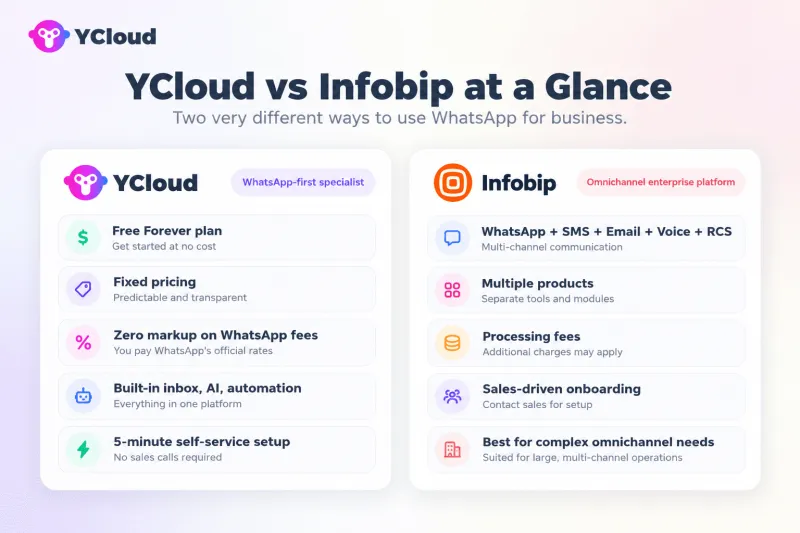
When WhatsApp is your primary growth channel, here’s how the two compare.
YCloud — WhatsApp-First Specialist | Infobip — Omnichannel Enterprise Platform |
✓ Forever Free Plan $0 to start, no credit card | ✕ No free plan Multiple products, each sold separately |
✓ Transparent Pricing $39/mo Growth, $89/mo Pro | ✕ Complex pricing Platform fee + processing fee + channel rates |
✓ Zero Markup On WhatsApp message fees | ✕ Additional processing fee Add extra fee on WhatsApp |
✓ 5-Minute Self-Service Setup No sales call needed | ✕ Enterprise onboarding Sales-driven, longer setup |
✓ AI Agent Included Executes tasks, not just Q&A | ✓ Strong omnichannel SMS, Voice, Email, RCS, Viber, etc. |
✓ Growth-Team Friendly Business teams configure directly | ✓ Global telecom infrastructure at scale High deliverability, low latency |
Feature-by-Feature Comparison
YCloud focuses on WhatsApp, deeper features, more expertise.
Feature | YCloud | Infobip |
WHATSAPP CORE | ||
| WhatsApp Business API | ✓ Full API & Webhooks | ✓ Full API & Webhooks |
| Template & Campaign | ✓ Built-in | ✓ Via Broadcast / Moments |
| Journey Automation | ✓ Visual builder | ✓ Via Moments |
| WhatsApp Calling | ✓ Included | ✓ Included |
| CTWA Ads Tracking | ✓ FB + Ins + TikTok + Google Ads — Advantage | FB + Ins Ads |
| App Coexistence | ✓ API + Business App — Advantage | API only |
AI & AUTOMATION | ||
| AI Chatbot | ✓ All plans, including Free | ✓ Via Answers platform |
| AI Executes Business Tasks | ✓ Orders, CRM — Advantage | Q&A focused |
| AI Translation | ✓ Built-in | ✓ Via AgentOS |
TEAM & OPERATIONS | ||
| Shared Team Inbox | ✓ Built-in | ✓ Via Conversations / AgentOS |
| Contact Management | ✓ Unlimited contacts | ✓ Available |
| Shopify Integration | ✓ Built-in | ✓ Built-in |
| Multi-Account Management | ✓ Growth | ✓ Enterprise |
PRICING & ONBOARDING | ||
| Free Plan | ✓ Forever free | ✕ Not available |
| WhatsApp Message Fees | ✓ Zero markup | Above WhatsApp standard |
| Setup Time | ✓ 5 minutes, self-service | Sales-driven onboarding |
Pricing and Total Cost Comparison
YCloud publishes fixed platform tiers.
Infobip sells different capabilities through separate products, with final pricing depending on the selected products, usage and contract.
Subscription Pricing
Pricing area | YCloud | Infobip |
| Product structure | One product with four tiers | Multiple products with separate subscriptions |
| Free | $0 forever | No free plan |
| Growth | $39/month | — |
| Pro | $89/month | — |
| Enterprise | $399/month | Custom enterprise requirements may affect pricing |
| Campaigns and journeys | Included | Moments: from €250/month |
| Team inbox | Included | Conversations: from €39/month |
| Chatbot builder | Included | Answers: from €99/month |
| Starting cost for campaigns, inbox and chatbot | Included according to the YCloud plan | At least €388/month based on published starting prices |
WhatsApp Message Fees
YCloud applies zero markup to Meta’s WhatsApp message fees. Infobip adds a markup fee.
The following example uses published rates for Indonesia, reviewed in October 2026. Rates vary by country and message category.
Message category | YCloud | Infobip |
| Marketing | $0.0411 | $0.0572 |
| Utility | $0.025 | $0.03375 |
| Authentication | $0.025 | $0.03375 |
| Freeform service messages | Free | $0.003983 |
| Provider markup | Zero | Approximately 30% in this example |
What Businesses Should Compare
Cost area | What to check |
| Platform subscriptions | Whether the required tools are included or sold separately |
| Meta messaging fees | Applicable rates based on country and message category |
| Provider markup | Any processing fee added above Meta’s rates |
| Required products | Campaigns, inbox, chatbot, automation and analytics |
| Users and accounts | Included allowances and additional-user costs |
| Integration work | CRM, store, database and custom API connections |
| Maintenance | Ongoing technical and third-party-tool management |
| Support | Included support, response times and enterprise assistance |
For a WhatsApp-first setup, compare the complete cost of the required products and message volume, not only the lowest advertised subscription price.
Setup and Integration Effort
YCloud is designed for businesses that want to start using WhatsApp quickly. Its self-service setup takes approximately five minutes and does not require a sales call.
The platform includes interfaces for campaigns, conversations, contacts, AI and automation. Marketing and support teams can configure routine workflows directly, while developers retain API and webhook access for custom integrations.
Infobip follows a sales-driven enterprise onboarding process. Businesses may need to select and configure separate products for campaigns, inbox, chatbot and other requirements.
Its developer tools and global telecom infrastructure support complex implementations, but the setup effort depends on the selected channels, products, integrations and orchestration requirements.
Comparison area | YCloud | Infobip |
| Initial setup | Five-minute self-service setup | Sales-driven onboarding |
| Sales call | Not required | Generally required |
| Product structure | One WhatsApp-focused platform | Multiple enterprise products |
| Business-team access | Built in | Depends on selected products |
| API and webhooks | Supported | Supported |
| Custom integrations | Supported | Supported |
| Standard WhatsApp workflows | Ready to configure | May require multiple products |
| Implementation effort | Lower for standard WhatsApp use cases | Higher for complex omnichannel setups |
Which Platform Should You Choose?
The right choice depends on whether WhatsApp is your primary engagement channel or one part of a broader omnichannel strategy.
Choose YCloud If:
- WhatsApp is your primary customer-engagement channel
- You want campaigns, team inbox, AI and automation in one platform
- Marketing and support teams need to manage workflows directly
- You want a Free Forever plan for evaluation
- You prefer fixed, published platform tiers
- You want zero markup on Meta’s WhatsApp message fees
- You want self-service onboarding without a sales call
- You need API and webhook access alongside built-in business tools
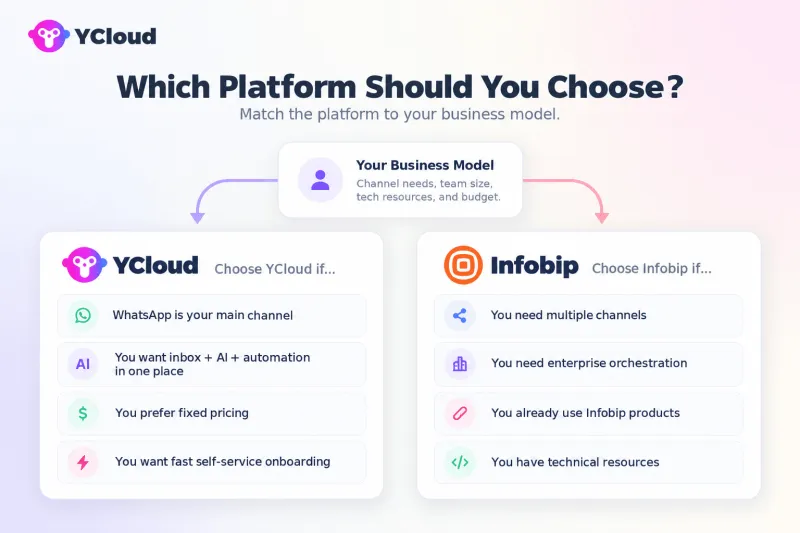
Choose Infobip If:
- You need WhatsApp alongside SMS, email, voice, RCS, Viber and other channels
- Your business requires enterprise-grade omnichannel orchestration
- You already use Infobip products across multiple channels
- You have technical resources for implementation and management
- You need a larger global telecom product portfolio
- Omnichannel scale is more important than WhatsApp-specific simplicity
This comparison focuses on WhatsApp-first use cases, not Infobip’s complete communication portfolio. Infobip may be the better fit for complex multichannel requirements, while YCloud offers a simpler and more focused setup when WhatsApp is the main channel.
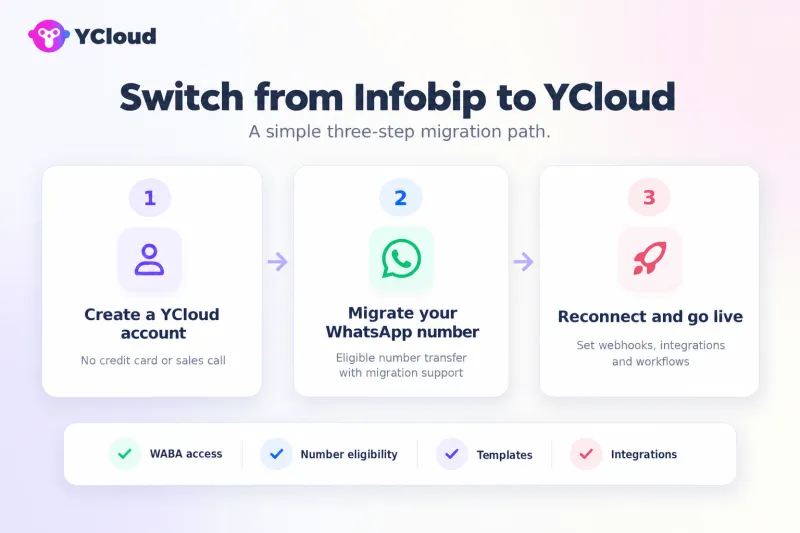
How to Switch from Infobip to YCloud
YCloud supports the migration of eligible WhatsApp Business API numbers from Infobip.
Three-Step Migration
- Create a YCloud account
Sign up without a credit card or sales call. - Migrate your WhatsApp number
Transfer the eligible WhatsApp Business API number with assistance from YCloud’s migration team. - Reconnect and go live
Configure webhooks, integrations and workflows, then test inbound and outbound messaging before moving production traffic.
Before Switching, Confirm:
- Meta Business Portfolio and WABA access
- Phone-number eligibility
- Approved message templates
- Existing webhook configurations
- CRM and third-party integrations
- Contact and conversation-data requirements
- Workflows that must be recreated
- Cutover, testing and rollback plans
Most migrations are completed within one to three business days, depending on account readiness, integrations and workflow complexity.
Final Verdict: YCloud vs Infobip
Infobip is a strong option for enterprises that need broad omnichannel infrastructure.
YCloud is the better fit when WhatsApp is the primary channel, offering a lower entry barrier, faster setup and more built-in WhatsApp tools.
Compare the complete operating cost and required workflows, not API access alone.
Also Read:
YCloud vs Twilio: Which Offers Better Value for Your Business?
YCloud vs Respond.io: Which Offers Better Value for Your Business?
YCloud vs WATI: Which Offers Better Value for Your Business?
YCloud vs 360Dialog: Which One Offers Better Value for Your Business?
Frequently Asked Questions
What is the main difference between YCloud and Infobip?
YCloud focuses on WhatsApp and combines API access with tools such as campaigns, a shared inbox, AI and automation. Infobip offers WhatsApp as part of a broader omnichannel platform that includes channels such as SMS, email and voice.
Does this comparison cover all of Infobip’s capabilities?
No. It focuses on WhatsApp-first use cases. Infobip’s wider portfolio includes additional channels and products that may suit businesses with broader omnichannel requirements.
Which platform is better for a WhatsApp-first business?
YCloud is the better fit if WhatsApp is your primary channel and you want business tools alongside API access. Infobip may suit teams that need to coordinate WhatsApp with several other channels.
Do YCloud and Infobip add markup to WhatsApp message fees?
No. We don’t charge any markup on Meta’s WhatsApp messaging fees. Infobip may charge additional WhatsApp processing fees. Check current rates for your country, message categories and contract before comparing costs.
How much can businesses save by switching from Infobip?
There is no single savings figure: the difference depends on message volume, selected Infobip products, processing fees, integrations and support needs. Compare your current total costs with the YCloud plan and tools you would use.
Can I retain my WhatsApp number when moving to YCloud?
Eligible WhatsApp Business API numbers can generally be migrated to YCloud. Confirm number eligibility, account access, templates and integration requirements with YCloud before scheduling the move.
Related Articles

Make your business communications much easier!


Trusted by




