Customer Support

English

YCloud vs Twilio: Which Offers Better Value for Your Business?

You’ve shortlisted YCloud and Twilio!
Now, what will it take to run WhatsApp the way your business needs?
Before committing, you need clear answers:
- What will you pay once messaging fees, software and setup are included?
- Which campaign, AI and support tools are ready to use?
- Can your team manage everyday workflows without depending on developers?
This guide compares YCloud vs Twilio across pricing, features, AI capabilities, integrations, support and migration.
We’ll explain where YCloud can offer better value and what each platform requires, so you can make a decision around your budget and team’s needs.
Comparison note: Published by YCloud, with sources checked in September 2026. YCloud subscription prices reflect annual billing unless stated otherwise.
Messaging fees, additional products and add-ons are identified separately.
Disclaimer: The references to software ratings, available features, and pricing were valid at the time of writing this article but could be subject to change in the future.
First, here’s a quick overview of the key differences.
TL;DR
- YCloud adds zero WhatsApp message markup. Twilio’s standard fee is $0.005 per incoming or outgoing message. At 100,000 total messages monthly, that creates a $6,000 annual provider-fee difference.
- YCloud gives business teams built-in tools. Manage campaigns, AI Agents, automated journeys and customer support in one platform. Custom integrations may still require developers.
- Twilio offers broader channel coverage and customization. It can suit enterprises already using its ecosystem, with developers maintaining custom communications workflows.
- Compare the complete operating cost. Include applicable Meta fees, subscriptions, AI usage, additional users, support and development when assessing value.
- Evaluate YCloud before subscribing. The free plan includes core tools, one user and limited AI credits without a credit card. Applicable messaging charges remain separate.
Next, let’s compare the key differences side by side.
YCloud vs Twilio: Clear Differences That Matter
YCloud brings WhatsApp campaigns, AI Agents and customer support into one platform, with APIs for custom integrations.
Twilio focuses on programmable communications, giving businesses tools to build and connect customer experiences across multiple channels.
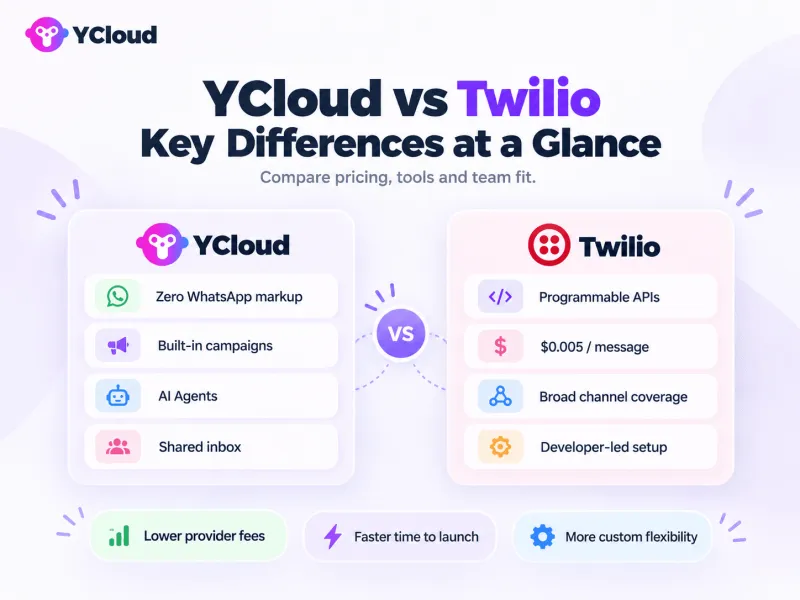
Here’s how they compare and what each option requires.
What you’re comparing | YCloud | Twilio | Plan or setup requirement |
WhatsApp provider fees | Zero markup on WhatsApp messages. | US$0.005 per incoming or outgoing message at standard API rates. | Applicable Meta messaging charges are separate on both platforms. |
Pricing model | Free and paid subscriptions, plus messaging usage. | Usage-based messaging, with separate pricing for additional products. | YCloud allowances depend on your plan; Twilio costs depend on the products you use. |
Free access | Free forever, without a credit card. | A 30-day trial with limited product usage. | YCloud Free includes one user, two channels and limited AI credits; applicable messaging charges still apply. |
Shared inbox | Agent workspace through Flex, or a connected inbox. | YCloud requires a paid plan for multiple users. Flex requires separate setup and pricing. | |
Campaigns | Built-in segmentation, personalization and scheduling. | Messaging APIs and connected marketing tools. | A Twilio campaign management interface requires an additional tool or custom development. |
AI Agents | AI integrations through tools such as Agent Connect. | YCloud has AI credit limits; custom actions may need integration. Agent Connect requires application development and deployment. | |
Journey automation | Visual workflows through Twilio Studio. | Studio has separate usage pricing alongside charges for underlying Twilio services. | |
Integrations | APIs, webhooks and a Shopify add-on. | APIs, SDKs and integrations with other platforms. | YCloud’s Shopify add-on requires a paid plan. Custom integrations can require developers on either platform. |
Channel coverage | WhatsApp, SMS, email and voice. | WhatsApp, SMS, MMS, RCS, email, voice and video. | Channel availability and charges depend on the selected service; Twilio’s coverage spans multiple products. |
Support | Email support, with account management and priority options on higher plans. | Free Developer support and paid support plans. | YCloud: dedicated account manager on Pro; 24/7 priority support on Enterprise. Twilio: guaranteed response times require paid support. |
Next, let’s break down what these differences mean for your budget, including subscriptions, messaging fees and additional costs.
Pricing: What Will Your Business Actually Pay?
Your WhatsApp budget includes platform access, messaging charges and the tools needed to run your workflows. Comparing these together gives you a clearer picture of what each platform will cost.
Prices below are in USD, checked in September 2026.
Platform Plans and Free Access
YCloud’s paid-plan prices below reflect annual billing.
WhatsApp messaging charges are additional.
YCloud plan | Monthly equivalent | Annual bill | Users | Channels | Included AI credits | Translation characters |
Free | $0 | $0 | 1 | 2 | 500K | 1K |
Growth | $39 | $468 | 2 | 3 | 5M | 10K |
Pro | $89 | $1,068 | 6 | 8 | 20M | 100K |
Enterprise | $399 | $4,788 | 40 | 30 | 100M | 500K |
The Free plan requires no credit card. See YCloud’s pricing for current allowances.
Twilio charges for WhatsApp usage, with separate pricing for additional products.
Its 30-day free trial includes 100 WhatsApp messages, subject to trial restrictions, without requiring a credit card.
Team seats, automation and AI costs depend on the products you select.
How WhatsApp Messaging Charges Work
There are two messaging costs to distinguish:
- Meta’s charges: Applicable WhatsApp fees based on the recipient’s market, message category and eligible volume tier.
- Provider fees: YCloud adds zero markup. Twilio’s standard WhatsApp API fee is $0.005 for each incoming or outgoing message, alongside applicable Meta charges.
Customer replies also affect your bill. Each reply opens or resets a 24-hour customer service window. Within that window, Meta does not charge for free-form replies or utility templates, while Twilio’s provider fee still applies.
Marketing and authentication templates generally remain chargeable within that window. Eligible conversations originating from Click-to-WhatsApp ads can qualify for a separate 72-hour Meta fee exemption.
Additional Costs to Include
Add the services your team actually needs to your comparison.
Cost item | YCloud | Twilio |
Extra users and channels | $10/user/month; $5/channel/month. | Depends on the workspace and products selected. |
Additional AI usage | $10 per 5M additional AI credits. | Budget for selected AI services, model usage and hosting where required. |
Translation | $10 per 150K additional characters. | Translation service or integration costs, where used. |
Store integrations | Shopify: $5/store/month. Custom work may cost extra. | Connector subscriptions or custom development, depending on the integration. |
Visual workflows | Journey builder included. | Studio includes 1,000 free flow executions/month, then charges $0.0025/execution. Underlying messaging charges are separate. |
Agent workspace | Shared inbox included, within your seat allowance. | Flex offers $35/monthly active user plus metered services for eligible deployments on existing Twilio accounts. Other models include $150/named user/month or $1/active user hour. |
Support | Pro includes an account manager; Enterprise includes 24/7 priority support. | Developer support is free. Production support costs the greater of $250/month or 4% of monthly spend; higher tiers cost more. |
YCloud’s paid add-ons require a paid plan. They are unavailable on Free.
For custom integrations on either platform, also budget for implementation, hosting where needed, monitoring and ongoing maintenance. Include your team’s development time when assessing the total cost.
What the Provider-Fee Difference Looks Like
At Twilio’s published standard rate, the difference grows with your combined incoming and outgoing message volume.
Monthly messages sent + received | YCloud provider markup | Twilio provider fees | Annual provider-fee difference |
| 10,000 | $0 | $50 | $600 |
| 50,000 | $0 | $250 | $3,000 |
| 100,000 | $0 | $500 | $6,000 |
| 500,000 | $0 | $2,500 | $30,000 |
| 1,000,000 | $0 | $5,000 | $60,000 |
Calculated using YCloud’s zero markup and Twilio’s $0.005/message standard API rate.
Practical example: Your business sends 80,000 messages and receives 20,000 customer replies each month.
100,000 × $0.005 = $500/month in Twilio provider fees.
YCloud’s provider markup is $0, creating a $6,000 annual messaging-fee difference at the same volume.
If you choose YCloud Pro, you would also budget $1,068/year for the subscription, plus applicable Meta fees and add-ons. Your Twilio comparison must include whichever software, support and development services you need.
The $6,000 figure represents provider-fee savings. Total operating savings depend on the complete setup on both sides.
Assumptions: identical message traffic and Meta rates, consistent monthly volume, standard API pricing and no trial credits, negotiated discounts or bundled Flex allowances. The volume table excludes Meta fees, subscriptions, other operating costs and taxes.
Use YCloud’s savings calculator to estimate costs for your destination and message mix. Include incoming replies when checking Twilio’s total provider fees.
Next, let’s compare the campaign and customer support tools your team gets for that spend.
Marketing and Customer Support: What Can Your Team Run?
Twilio supports these activities through messaging APIs, products such as Studio and Flex, and connected business tools.
The practical difference is what your team needs to configure before using them.
Everyday capability | YCloud: included tools and configuration | Twilio: available tools and additional requirements |
Broadcasts, segmentation and personalization | Built-in Campaigns with audience filters, tags and template variables. Select your audience, map customer fields and prepare approved templates. | Personalized sending through messaging APIs, including Bulk Messaging (public beta). Supply recipient lists and segmentation through your application, CRM or connected marketing tool. |
Scheduled campaigns and follow-up journeys | Schedule campaigns and build Journeys visually. Configure triggers, delays, conditions and the customer events that drive follow-ups. | API-based message scheduling and visual workflows through Studio. Configure scheduling and follow-up logic; Studio has separate usage pricing. |
Shared inbox, assignment and human handovers | Built-in shared inbox, assignment rules and AI-to-human handovers. Configure routing and escalation conditions; multiple users require a paid plan. | Flex provides an agent workspace and routing, with separate pricing. Enable WhatsApp and configure routing and bot-to-agent handovers, or connect another support inbox. |
Contact management and team permissions | Contact profiles, tags, custom attributes and access controls. Import or sync customer data and assign permissions. Custom roles require Pro or Enterprise. | Product-specific access controls, with customer context through CRM integrations or Unified Profiles in Flex (public beta). Connect data sources and configure permissions. |
Conversation translation and summaries | Available within Inbox, subject to AI and translation allowances. Teams can review summaries and handle conversations across languages in the same workspace. | Summaries through paid Agent Copilot (public beta). Translation can use a separate integration such as Lionbridge, requiring plugin deployment and language configuration. |
Click-to-WhatsApp ad tracking | Native CTWA reporting for ad-level conversations, conversions and ROI. Create ads in Meta Ads Manager and configure conversion tracking and the Conversions API connection. | Provides ad-referral data through webhooks. Connect that data to your CRM, analytics and Meta’s Conversions API using tools such as Segment or a custom integration. |
Catalogs, commerce and Shopify workflows | WhatsApp Shop supports product browsing and orders. Configure products and order processes; the paid Shopify connector supplies store events for Journeys. | Supports WhatsApp product/catalog messages and incoming order data. Connect a Meta catalog and integrate store events, order processing and follow-up workflows through APIs or connectors. |
Campaign reporting and support analytics | Built-in reports cover delivery, replies, recorded conversions, response times, resolution rates and CSAT. Configure conversion events and customer feedback collection. | Messaging Insights provides delivery and engagement reporting; Flex provides support analytics. Connect conversion and feedback data to measure purchases and customer satisfaction. |
Next, let’s compare how each platform’s AI Agents answer questions, complete business tasks and involve your team when needed.
AI Agent Capabilities Compared
YCloud’s WhatsApp AI Agent gives business teams an agent they can configure within the platform. Twilio’s Agent Connect connects your own AI application to WhatsApp, knowledge sources and business tools.
Customer Conversations
Capability | YCloud | Twilio |
Business knowledge | Add documents, website pages and Q&As to the built-in knowledge base. | Connect Enterprise Knowledge or another knowledge source. Enterprise Knowledge supports documents, websites and raw text. |
Product questions, qualification and recommendations | Configure sales or support roles, product information and questions about customer needs, budget or preferences. | Define these behaviours in your AI application, using the selected model, instructions, knowledge and connected tools. |
Human escalation | Set handover conditions and select the receiving team or agent within YCloud. | Configure the handoff tool and a Studio flow that routes to Flex or another support system. |
Actions in Business Systems
With YCloud, you define AI Skills and attach data connectors. With Twilio Agent Connect, developers define callable tools that interact with your business APIs. Custom connections can require technical work on either platform.
The required access depends on the task:
Task | Connection and permissions needed |
Check an order | An order-management connection with permission to read the relevant customer’s order and delivery status. |
Change a booking | A booking-system connection that can check availability and modify eligible appointments after confirmation. |
Update CRM records | CRM access limited to approved records and fields, such as contact details, preferences or lead status. |
Set read/write permissions in the connected systems and define when the agent must request confirmation or human approval.
Shared example: A customer messages an appliance retailer:
“Can you check order #4182 and move my installation to Friday?”
The intended workflow is to verify the customer, retrieve the order, check available slots, confirm the change and update the booking and CRM.
- With YCloud: Configure that sequence as an AI Skill, attach the order, booking and CRM connectors, and define when to hand over to support.
- With Twilio: Implement the sequence in your agent application, connect the corresponding API tools and configure the support handoff.
Both approaches need the relevant integrations and permissions before the agent can complete this request.
Setup and Ongoing Management
Operational task | YCloud | Twilio Agent Connect |
Configure the agent | Business teams manage its role, instructions and knowledge. Custom connectors may need developer support. | Developers or an implementation partner connect the model, channels, tools and application hosting. |
Test responses and actions | Preview Skills and responses before publishing; verify connected actions and escalation rules. | Test the agent application, API actions and routing, then verify customer conversations and handoffs. |
Budget for usage | Plans include AI credits. Additional 5M credits cost $10 on paid plans; WhatsApp charges remain separate. | Budget for WhatsApp messaging, model usage, selected Twilio services and hosting. Costs depend on the implementation. |
Maintain its knowledge | Review unanswered questions in Suggestions, add approved Q&As, update documents and schedule website refreshes. | Update or refresh sources through Enterprise Knowledge in the new Twilio Console. Maintain application instructions and custom tools separately. |
For either setup, test missing information, unavailable appointments and failed updates, not just successful conversations.
Next, let’s look at the onboarding and integration work needed to put these capabilities into production.
Setup and Integrations: How Much Development Is Involved?
Setup area | YCloud | Twilio |
Account and number registration | Create an account, connect Meta and verify your number through guided signup. | Upgrade your Twilio account and register a WhatsApp number through Self Sign-up in the Console. |
What business users can configure | Campaigns, customer journeys and AI Agent settings through built-in visual tools. | Templates through the Console and visual workflows through Studio. Custom application logic requires development. |
APIs and integrations | Documented APIs, SDKs and webhooks connect CRM and internal systems. Shopify is available as a paid add-on; custom connections need technical setup. | APIs, SDKs and webhook documentation support custom connections to CRM, commerce and internal systems. Development depends on the integration and existing tools. |
Ongoing maintenance | Teams can update dashboard workflows and AI knowledge. Plan for technical maintenance of custom integrations. | Teams can edit Studio flows visually. Custom applications, integrations and hosting need ongoing technical maintenance where used. |
Channels beyond WhatsApp | SMS, email and voice. | SMS, MMS, RCS, email, voice and video across its product range. |
Registration is only part of going live!
Both platforms remain subject to Meta’s applicable verification and approval requirements. Twilio explicitly requires business verification before production. Test message delivery, replies and connected workflows before launch.
Next, let’s compare support, reliability and the controls enterprise teams need.
Enterprise Operations: Support, Reliability and Control
Requirement | YCloud | Twilio |
Support hours and response commitments | Pricing lists weekday support, 9:30–18:30 UTC+8, through Pro; Enterprise includes 24/7 priority support. Confirm response deadlines in writing. | Paid support offers 24/7 access. Critical-issue responses: three business hours on Production; one hour, 24/7, on Business and Personalized. Free support has no guaranteed response time. |
Account management and onboarding | Pro lists a dedicated account manager. Pro and Enterprise include assisted onboarding; agree migration scope before switching. | Personalized Support includes a technical account manager. Professional Services offers onboarding and migration assistance through separate service packages. |
Permissions and multiple accounts | Custom roles on Pro and Enterprise. Multiple WhatsApp accounts can be connected within plan channel allowances. | Granular roles at organization, account and subaccount levels support access control across teams. |
Data retention | Six months of chat storage through Pro; permanent storage listed for Enterprise. | Messaging retention is configurable from 7–400 days. Enterprise Editions supports up to 9,999 days, with older records accessed through Bulk Export. |
Security credentials | Publicly states ISO 27001 certification. | Publishes ISO 27001 certification and SOC 2 Type II credentials; coverage varies by product. |
Contractual uptime | Confirm the percentage, exclusions and service credits in your agreement; published website figures vary. | API availability SLA: 99.95% standard; 99.99% with Enterprise Edition, subject to exclusions and service-credit conditions. |
Scaling and monitoring | Direct-send API defaults to 80 requests/second per number, with eligible Meta upgrades supporting 1,000. Rate-limit headers and a public status page support monitoring. | WhatsApp defaults to 80 outbound messages/second per number; up to 400 for text with approval. Messaging Insights tracks delivery and errors. |
Next, let’s look at where YCloud offers the strongest business value.
Where YCloud Offers the Strongest Business Value
YCloud is a strong fit for businesses growing their WhatsApp operations while giving marketing and support teams more control over everyday work.
- Zero markup as messaging grows. YCloud adds no WhatsApp message markup. At Twilio’s standard rate, 100,000 total incoming and outgoing messages incur $500 in provider fees. Meta charges and platform costs remain separate.
- Campaigns, AI and support in one platform. Send a campaign, configure your AI Agent to handle replies and pass conversations to your team when needed. These capabilities work within YCloud, helping teams coordinate outreach and customer service.
- Business teams manage routine workflows. Marketers can adjust campaigns and follow-up journeys, while support teams update AI knowledge and handover rules. Developers can focus on deeper CRM, commerce and internal-system integrations.
- Evaluate core capabilities before subscribing. Use YCloud’s free plan to test campaigns, AI responses and inbox workflows within the included allowances. No credit card is required; applicable WhatsApp messaging charges still apply.
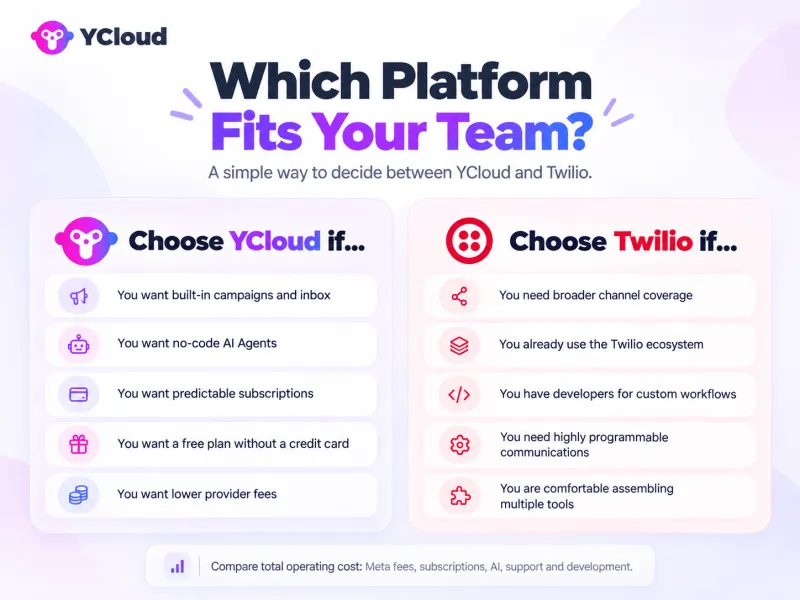
When Twilio may fit better: An enterprise already using Twilio’s voice, messaging and Flex products may benefit from extending that ecosystem. Its APIs and customization options can suit teams with developers maintaining communications across multiple channels.
Next, let’s bring the comparison together with a final recommendation.
Final Verdict: YCloud or Twilio?
Choose YCloud when WhatsApp volumes are growing and business teams need to manage daily operations directly.
Zero message markup, built-in campaigns, AI Agents and a shared inbox make it a strong fit for controlling provider fees and reducing routine development work.
Twilio may fit better if your enterprise already uses its broader communications ecosystem and has developers to build and maintain customized workflows across channels.
Explore YCloud’s free plan to test your workflows; applicable messaging charges remain separate. For larger deployments, discuss your integration, support and migration requirements with YCloud’s team.
Next, we answer common questions about pricing, setup and switching.
Also Read:
- YCloud vs Respond.io: Which Offers Better Value for Your Business?
- YCloud vs WATI: Which Offers Better Value for Your Business?
Frequently Asked Questions
How much can I save by switching from Twilio to YCloud?
YCloud charges zero markup on WhatsApp conversation fees, while Twilio adds $0.005 per message on top of Meta's rates. For businesses sending 100,000 WhatsApp messages monthly, this translates to $500/month in savings ($6,000/year). Additionally, YCloud's free plan includes features that would cost hundreds on Twilio, such as team inbox, bulk campaigns, and AI chatbots.
Is it difficult to migrate from Twilio to YCloud?
Not at all. Most businesses complete the migration within a day. YCloud provides comprehensive API documentation, migration guides, and dedicated support to help you transfer your WhatsApp Business Account and message templates.
Will I lose my WhatsApp Business Account or phone number?
No. Your WhatsApp Business Account and phone number belong to you, not to Twilio. You can transfer your existing WhatsApp Business Account to YCloud.
Does YCloud support the same API features as Twilio?
Yes, and more. YCloud supports all standard WhatsApp Business API features including message templates, media messages, interactive buttons, lists, and webhooks. Additionally, YCloud provides built-in features that Twilio doesn't offer out-of-the-box, such as a team inbox, bulk broadcast campaigns, AI chatbots, marketing automation, and analytics dashboards—all without requiring custom development.
What happens to my existing Twilio integrations?
YCloud's API is designed to be developer-friendly with clear documentation and code examples in multiple languages. While you'll need to update your API endpoints and authentication, the core logic remains similar. YCloud also offers Zapier integration and webhooks, making it easy to connect with your existing CRM, e-commerce platform, or custom applications. Our technical team can provide migration support to minimize development time.
Can I use YCloud if I'm not a developer?
Absolutely. Unlike Twilio, which requires coding for most features, YCloud is built for both technical and non-technical users. You can create WhatsApp campaigns, set up chatbots, manage customer conversations, and analyze performance through an intuitive no-code interface. For advanced use cases, the full API is available for developers.
Does YCloud offer the same level of reliability as Twilio?
Yes. YCloud maintains a 99.99% uptime SLA and processes over 200 million messages daily. As an official Meta Business Solution Provider (BSP) with Premier status, YCloud has direct access to WhatsApp infrastructure and receives early access to new features.
What kind of support does YCloud provide?
YCloud offers email support on the free plan, with upgraded plans including dedicated account managers and 24/7 priority support. Unlike Twilio, which is frequently criticized for slow response times, YCloud provides hands-on assistance with onboarding, API integration, and ongoing optimization. Enterprise customers receive a dedicated technical account manager.
Is YCloud cheaper than Twilio for WhatsApp?
YCloud has lower standard WhatsApp provider fees: zero markup versus Twilio’s $0.005 per incoming or outgoing message. Your total savings also depend on subscriptions, AI usage, add-ons and development costs.
Does Twilio charge for incoming WhatsApp messages?
Yes. Twilio’s standard pricing charges $0.005 per incoming WhatsApp message, as well as outgoing messages. This provider fee also applies within the 24-hour customer service window.
Are Meta’s messaging fees included in either platform’s pricing?
Meta’s applicable fees are additional to YCloud’s subscription and Twilio’s provider charge. YCloud passes them through without markup; Twilio adds its messaging fee.
What does YCloud’s free plan include?
YCloud’s free plan includes one user, two channels, 500K generative AI credits, campaigns, Journeys, a shared inbox, and API access with webhooks. No credit card is required. Applicable WhatsApp messaging charges remain separate.
Can non-technical teams manage WhatsApp campaigns with YCloud?
Yes. YCloud Campaigns lets teams segment audiences, personalize messages and manage broadcasts through the dashboard. Custom CRM connections or advanced integrations may require technical help.
How do YCloud AI Agents compare with AI solutions built using Twilio?
YCloud’s WhatsApp AI Agent lets teams configure business knowledge, instructions and human handovers. Twilio’s Agent Connect supports custom agents where developers supply the AI application and business logic. Both need appropriate integrations to perform actions in external systems.
Can I keep my WhatsApp number when switching?
Yes, subject to migration eligibility. YCloud’s documented process moves your number into a new WhatsApp Business Account under the same Meta business portfolio. Confirm number control and verification access before scheduling the switch.
What happens to templates, contacts and conversation history?
Eligible approved templates can transfer; check their status afterward. Import contacts separately and preserve consent and unsubscribe records. Historical chats do not migrate with the number, so export any records you need to retain.
Will my existing Twilio integrations need changes?
Yes. Update API endpoints, authentication, template references and webhook handling. Review your Studio flows, routing rules and custom automation to determine what needs rebuilding and testing for YCloud.
What support is available during migration?
YCloud provides migration documentation and technical guidance. Pro and Enterprise include assisted onboarding; Pro lists a dedicated account manager, while Enterprise includes 24/7 priority support. Confirm migration scope, responsibilities and any service fees before starting.
Related Articles

Make your business communications much easier!


Trusted by




