Customer Support

English

How to Increase the WhatsApp Broadcast Limit in the WhatsApp API

Your audience is growing...!
The campaign is ready!
The template is approved!
And thousands of customers are waiting to hear from your business...!
The template is approved!
And thousands of customers are waiting to hear from your business...!
But when you launch the broadcast, WhatsApp allows you to reach only a limited number of users within 24 hours.
For businesses running product launches, promotional campaigns, reminders, or re-engagement broadcasts, this limit can delay communication and restrict campaign reach, even when the account is active and fully compliant.
The solution is not to add more phone numbers, send messages aggressively, or look for shortcuts.
WhatsApp increases messaging capacity only when a business meets specific eligibility, quality, and usage requirements.
In this guide, we’ll explain how the WhatsApp broadcast limit works, how messaging tiers are calculated, what can increase or reduce your limit, and the legitimate ways to scale towards higher messaging capacity.
Quick Facts
-
- A newly created business portfolio generally starts with a limit of 250 unique users within a rolling 24-hour period.
- Messaging limits are now applies at the Business Manager level, rather than being calculated independently for every phone number or project under the same portfolio. Which means phone numbers under the same portfolio share the available messaging capacity.
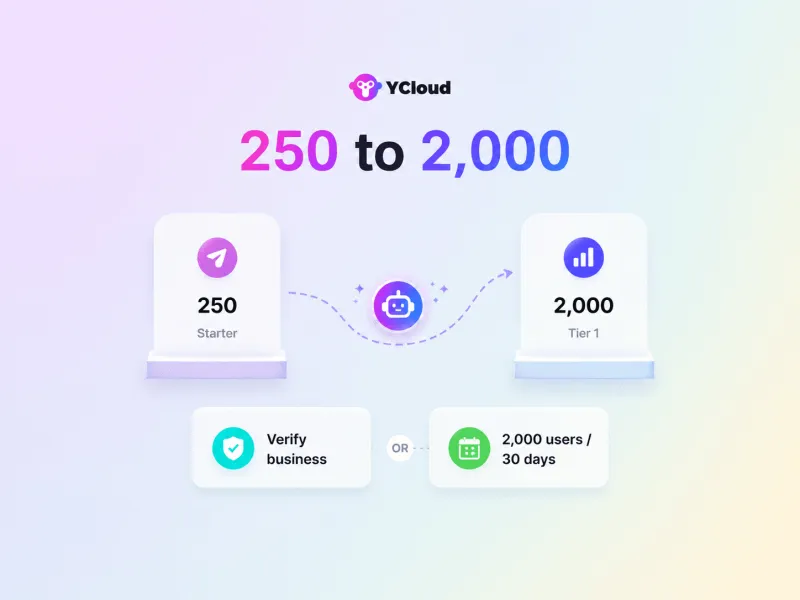
- Businesses can become eligible for the 2,000-user limit by completing an approved verification process or delivering 2,000 eligible template messages to unique users within a moving 30-day period while maintaining high messaging quality.
- After reaching 2,000, Meta can automatically upgrade the portfolio to higher limits when message quality remains high and the business uses enough of its existing capacity.
Think of the initial 250-user limit as Meta’s way of asking your business to demonstrate that it can message customers responsibly without spamming before being allowed to scale.
Next, let’s first understand whether WhatsApp limits broadcast messages and what the limit actually measures.
Is There a Limit on WhatsApp Broadcast Messages?
Yes, WhatsApp limits how many unique users your business can proactively message within a rolling 24-hour period.
But here’s the catch!
To unlock an unlimited WhatsApp broadcast limit, your business must first progress through Meta’s messaging tiers.
A new business portfolio generally starts with a limit of 250 unique users per 24 hours.
Your first goal is to increase this limit from 250 to 2,000 unique users.
To become eligible for the 2,000-user limit, your business must:
- Complete one of Meta’s approved business-verification routes; or
- Deliver template messages to 2,000 unique users within a moving 30-day period while maintaining high message quality.
The requirement of messaging 1,000 unique users is based on Meta’s previous system and is no longer the current scaling rule. Messaging limits are also now calculated at the business portfolio level, not separately for each phone number.Once you reach the 2,000-user limit, your business can gradually progress to higher tiers and eventually unlock unlimited messaging.
Next, let’s look at the different WhatsApp broadcast tiers and how many users each tier allows you to reach.
How Many WhatsApp Broadcast Tiers Are There?
After the initial 250-user starter limit, WhatsApp provides four messaging tiers:
| Messaging tier | Unique users you can reach |
Tier 1 | 2,000 users within 24 hours |
Tier 2 | 10,000 users within 24 hours |
Tier 3 | 100,000 users within 24 hours |
Tier 4 | Unlimited users within 24 hours |
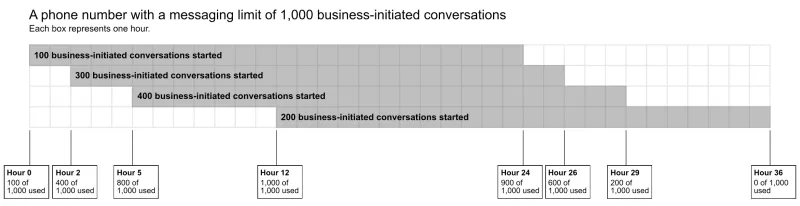
These limits apply to the number of unique users your business portfolio can proactively message within a rolling 24-hour period. Meta automatically increases the limit when your business meets the required usage and message-quality conditions.
Here's how WhatsApp messaging limits work:
Note: These limits do not apply when a user messages your business first. You can continue replying within the open 24-hour customer service window.Next, let’s look at the legitimate ways to increase your WhatsApp broadcast limit.
How to Increase the WhatsApp Broadcast Limit?
You cannot manually bypass the WhatsApp broadcast limit.
Meta increases it automatically when your business meets the required usage and message-quality conditions.
Step 1: Move from 250 to 2,000 users
To unlock the 2,000-user limit, your business must complete an approved Meta verification route or deliver high-quality template messages to 2,000 unique users within a rolling 30-day period.
Step 2: Qualify for higher tiers
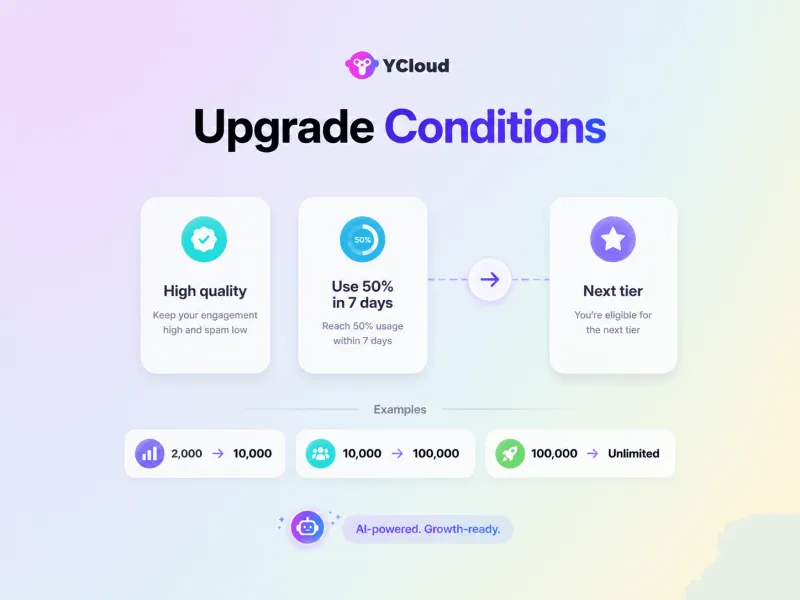
Once your limit reaches 2,000, Meta checks whether:
- Your business is sending high-quality messages across its phone numbers and templates.
- You have used at least 50% of your current messaging limit during the previous seven days.
When both conditions are met, Meta can upgrade your business portfolio by one tier within six hours.
| Current limit | Unique users required within 7 days | New limit |
| 2,000 | 1,000 | 10,000 |
| 10,000 | 5,000 | 100,000 |
| 100,000 | 50,000 | Unlimited |
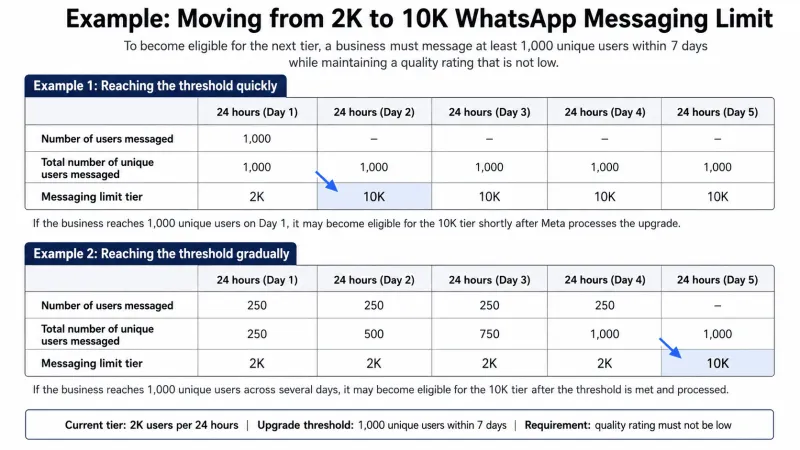
You can reach the required volume in one day or gradually across the rolling seven-day period. Meta evaluates the cumulative usage rather than requiring the same number of messages every day.
Meta’s example showing how a business can meet the usage requirement in one day or gradually within seven days.
Also, using 50% of your limit is the eligibility threshold, not a guarantee that businesses should always stop at exactly 50%. Message only opted-in, relevant audiences and monitor quality as volume increases.
Quick Hack:
Never use 100% of your limit (e.g., 2,000 messages at Tier 1). Stick to 50% to keep your quality rating high and avoid WhatsApp lowering your limit.
Next, let’s understand how businesses can progress through every tier and eventually reach an unlimited WhatsApp broadcast limit.
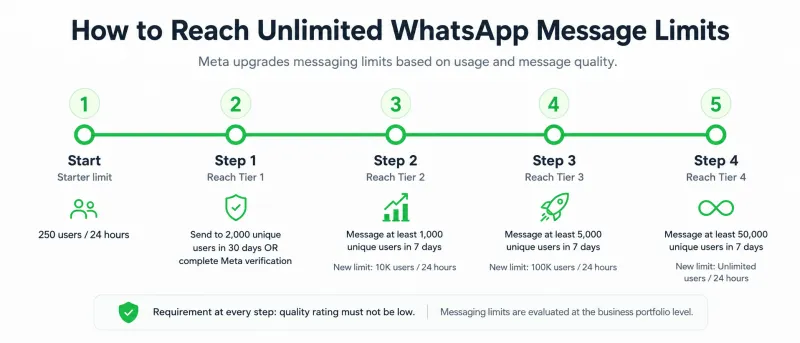
How to Reach Unlimited WhatsApp Message Limits
To reach the unlimited WhatsApp broadcast limit, your business must move through each messaging tier while meeting Meta’s usage requirements and maintaining a healthy quality rating.
The time required depends on how quickly you reach the required volume at each tier. The key is to scale gradually and keep quality over quantity at the centre of your WhatsApp messaging strategy.
Next, let’s see what happens when a business reaches its daily WhatsApp broadcast limit.
What If Your Business Crosses Daily WhatsApp Broadcast Limit?
You cannot start new business-initiated conversations beyond your available WhatsApp broadcast limit.
For example, if your current limit is 2,000 unique users and you try to send a campaign to 2,500 users, YCloud may display a warning such as: “Audience size exceeds the remaining quota. Some messages may not be delivered.”
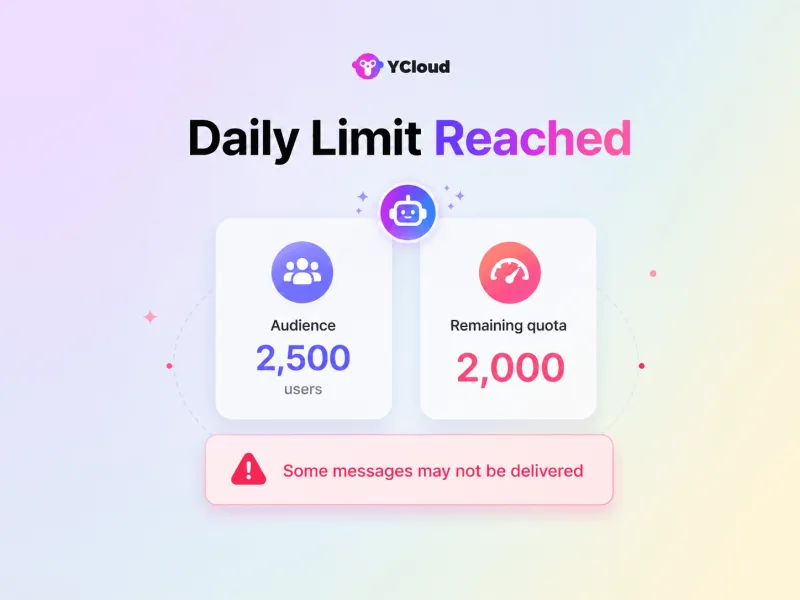
You will need to reduce the audience to your available quota or wait until capacity becomes available again within the rolling 24-hour window.
Next, let’s understand how this limit is shared across multiple WhatsApp projects under the same Business Manager.
How Is the WhatsApp Broadcast Limit Shared Across Multiple Projects Under the Same Business Manager?
Earlier, WhatsApp messaging limits were assigned separately to individual business phone numbers.
Meta now calculates the WhatsApp broadcast limit at the Business Manager level. This means all WhatsApp projects and phone numbers connected to the same portfolio share one messaging limit.
For example, suppose your business portfolio has 10 WhatsApp projects and a limit of 10,000 unique users.
- If one project messages 6,000 users, only 4,000 remain available across the other projects.
- If one project uses the full 10,000-user limit, the other projects cannot start new business-initiated conversations until capacity becomes available within the rolling 24-hour window.
When Meta upgrades the portfolio from 10,000 to 100,000 users, the new limit is also shared across every project under that portfolio.
In simple terms, your WhatsApp Business broadcast limit belongs to the entire Business Manager, not to each project individually.
Next, let’s answer the most frequently asked questions about the WhatsApp broadcast limit.
Also Read:
Frequently Asked Questions
What is the current Tier 1 WhatsApp broadcast limit?
Tier 1 allows a Business Manager to proactively message up to 2,000 unique users within a rolling 24-hour period. New business portfolios generally begin with a 250-user starter limit.
How can I unlock the 2,000-user limit?
Your business can become eligible by completing an approved Meta verification path or delivering eligible template messages to 2,000 unique users within a moving 30-day period, while maintaining healthy message quality.
Does the limit apply to messages or users?
It applies to unique WhatsApp users, not the total number of messages. Sending multiple messages to the same person does not repeatedly consume the limit as separate users.
Do user-initiated conversations count towards the broadcast limit?
No. When a customer messages your business first, replies sent within the open 24-hour customer service window do not count towards the business-initiated messaging limit.
How does the rolling 24-hour limit work?
The limit does not reset for everyone at midnight. Capacity becomes available gradually as previously initiated conversations move outside their individual 24-hour windows.
How can I check my current WhatsApp messaging limit?
Open WhatsApp Manager → Account tools → Phone numbers. This section displays the phone number’s status, quality rating, and the messaging limit assigned to the business.
What should I do if my limit is stuck at 2,000?
Make sure your quality rating is not low and that you have messaged at least 1,000 unique users within the previous seven days. Meta automatically evaluates your business for the next tier once the required quality and usage conditions are met.
Can I manually request a higher WhatsApp broadcast limit?
Messaging-limit upgrades are normally handled automatically by Meta. Support may help investigate an incorrect status or technical issue, but it cannot simply override the eligibility requirements.
Why is my WhatsApp quality rating low?
Quality can decline when users block, report, or repeatedly ignore your messages. Send only to opted-in users, improve audience targeting, avoid excessive campaigns, and make each message relevant to the recipient. Template quality is influenced by customer feedback and engagement.
What happens when I reach my current limit?
You cannot proactively message additional unique users until capacity becomes available within the rolling 24-hour period.
Can multiple phone numbers increase my total broadcast capacity?
Not when they belong to the same business portfolio. Meta now evaluates the messaging limit at the portfolio level, so connected phone numbers and projects share the available capacity.
Can I send broadcasts to international phone numbers?
Yes. Recipients from different countries can be included, but every unique user counts towards the same business portfolio limit. The limit is not assigned separately by country.
Can Meta reduce my messaging limit?
Poor messaging quality can prevent further upgrades and may lead to messaging restrictions. Businesses should regularly monitor their quality rating, user feedback, campaign performance, and account status in WhatsApp Manager.
Related Articles

Make your business communications much easier!


Trusted by




