Customer Support

English

YCloud vs 360Dialog: Which One Offers Better Value for Your Business?

Choosing between YCloud and 360Dialog usually means you are in one of two situations:
- You may be preparing to use the WhatsApp Business API for the first time and have narrowed your options to these two WhatsApp API providers.
- Or you may already be using 360Dialog but NOT satisfied with the product performance, features, or customer support.
360Dialog gives you WhatsApp API access… and stops there.
YCloud gives you the same API access, plus a complete platform with a shared team inbox, AI agent, automation, and analytics built in.
Before making your decision, you need clear answers:
- What can your team use without building or integrating additional tools?
- Can marketers and support agents manage daily WhatsApp operations independently?
- What will the complete setup cost once inbox, AI and automation requirements are included?
- If you already use 360Dialog, what will you gain by moving to YCloud?
This guide answers all the doubts!
In this article, we’ll compare YCloud and 360Dialog across API capabilities, business tools, features, AI, automation, pricing, support and migration.
It will help you decide which platform fits your requirements, whether you are starting from scratch or considering a switch from 360Dialog.
Disclaimer: This article is published by YCloud. Product capabilities and pricing were reviewed in October 2026 and may change over time. Confirm current plan limits and requirements before purchasing.
Messaging fees, additional products and add-ons are identified separately.
TL;DR
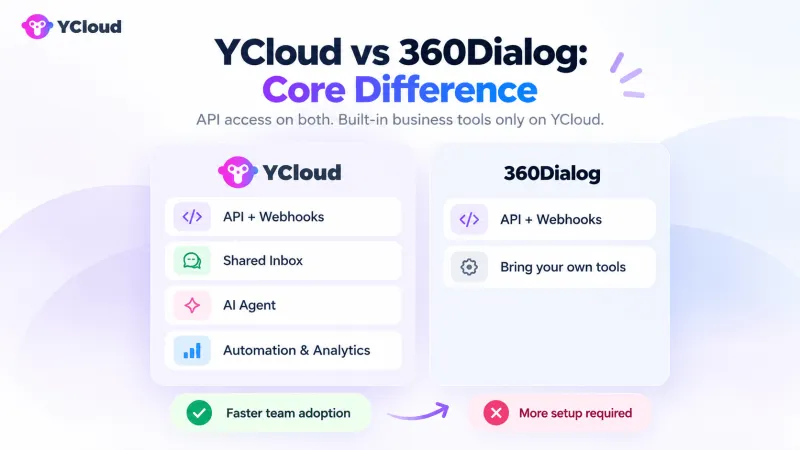
- Core difference: 360Dialog gives you WhatsApp API access, and stops there. YCloud provides the same API access plus a shared inbox, campaigns, AI Agents, automation and analytics.
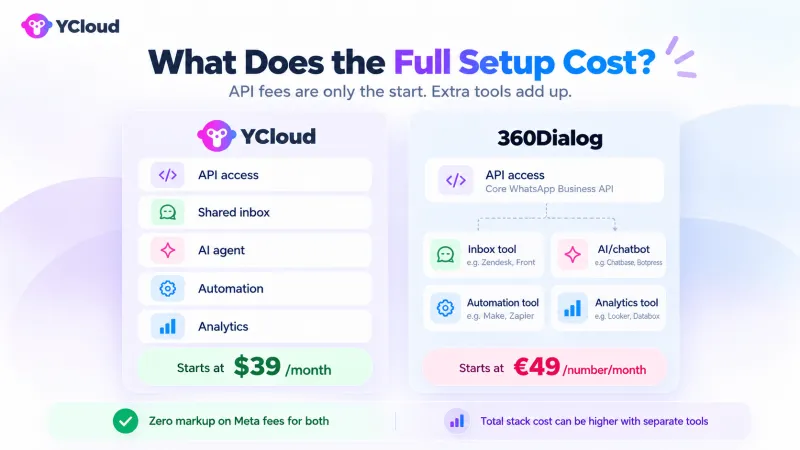
- Pricing: YCloud offers a Free Forever plan, with paid plans starting at $39/month. 360Dialog starts at €49 per WhatsApp number per month.
- Total cost: Both apply zero markup to Meta’s messaging fees. However, 360Dialog users may need additional software and development for inbox, AI, campaigns, automation and reporting.
- Best fit: Choose YCloud if marketing, sales, support and development teams need one platform. Choose 360Dialog if you deliberately want a developer-led, API-only setup and already have the required tools.
- Migration: Eligible numbers and approved templates can usually be retained when moving to YCloud. Contacts, conversation history, webhooks, credentials and integrations may require migration or reconfiguration.
YCloud vs 360Dialog: Direct Feature Comparison
See how YCloud and 360Dialog compare across built-in features, business tools and developer capabilities.
YCloud — All-in-One Platform | 360Dialog — API-Only Provider |
| API + Inbox + AI + Automation — everything included | WhatsApp API access — bring your own tools |
✓ Forever Free Plan $0 to start, no credit card | ✕ No free plan Starts at €49/number/month ($59) |
✓ Built-in Shared Inbox Team collaboration included | ✕ No built-in inbox Requires development |
✓ AI Agent Included Executes tasks, not just Q&A | ✕ No built-in chatbot API integration only |
✓ Visual Automation Builder No code required | ✕ No visual builder Developer-focused only |
✓ Business-Team Friendly Marketers configure directly | ✓ Strong API infrastructure for developers Easy to integrate and scale |
Feature-by-Feature Comparison
What you get out of the box vs what requires integration.
Feature | YCloud | 360Dialog |
WHATSAPP CORE | ||
| WhatsApp Business API | ✓ Full API access & Webhooks | ✓ Full API access & Webhooks |
| Template Messages | ✓ API & Built-in campaign tool | ✓ Via API |
| WhatsApp Flows | ✓ Via API | ✓ Via API |
| WhatsApp Calling | ✓ Voice & video calls | ✓ Voice & video calls |
| App Coexistence | ✓ Supported | ✓ Supported |
BUSINESS TOOLS | ||
| Shared Inbox | ✓ Built-in — Advantage | ✕ Requires third-party |
| AI Chatbot | ✓ Included all plans — Advantage | ✕ Requires integration |
| Visual Automation Builder | ✓ No-code workflows — Advantage | ✕ API only |
| Team Collaboration | ✓ Multi-user, roles — Advantage | ✕ Not included |
| Analytics Dashboard | ✓ Built-in — Advantage | ✕ Requires integration |
PRICING & ONBOARDING | ||
| Free Plan | ✓ Forever free | ✕ Starts at €49/mo |
| Entry Price | ✓ $39 (Growth) | €49/number/mo |
| Support | ✓ Email + Online chat | Chat widget (SLA by tier) |
| Setup Time | ✓ 10 min self-service | ✓ 30 min self-service |
DEVELOPER EXPERIENCE | ||
| REST API | ✓ Full API access | ✓ Full API access |
| Webhooks | ✓ Real-time events | ✓ Real-time events |
| API Documentation | ✓ Comprehensive docs | ✓ Developer docs |
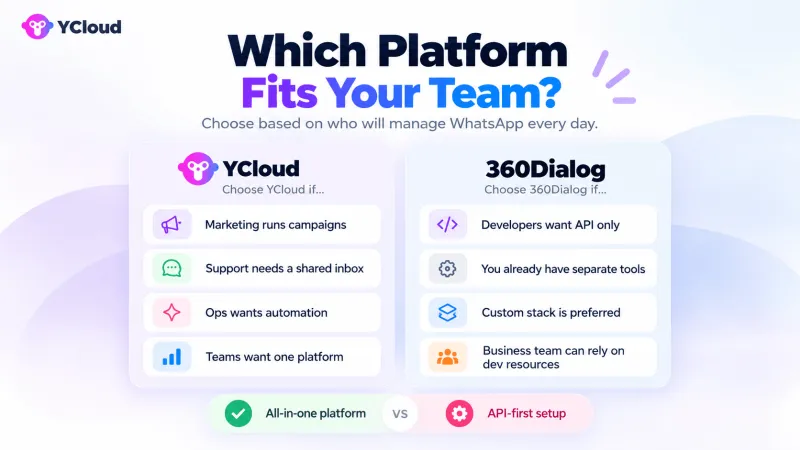
How the Two Platforms Approach WhatsApp Differently
YCloud and 360Dialog both provide access to the WhatsApp Business API. The difference is what your business receives beyond that access and how much it must build or integrate separately.
YCloud
YCloud combines WhatsApp API access and webhooks with the tools teams need to manage daily customer communication.
Marketing teams can create campaigns, organise contacts and build automated journeys. Support teams can manage conversations through a shared inbox. Businesses can also configure AI Agents and chatbots, monitor performance through built-in analytics and connect YCloud with their existing systems.
Developers retain API-level control, while non-technical teams receive interfaces they can use without relying on developers for every campaign, workflow or customer conversation.
360Dialog
360Dialog primarily provides direct WhatsApp API access, webhooks and developer documentation. Development teams can connect the API with an existing CRM, inbox, chatbot or other business system.
However, businesses that need campaign management, a shared inbox, contact management, AI, visual automation or analytics must build these capabilities or connect separate third-party tools through 360Dialog’s marketplace and partner ecosystem.
This creates a developer-led setup in which additional integrations, vendors and ongoing maintenance may be required to support everyday marketing, sales and customer-service workflows.
Direct API and Developer Capability Comparison
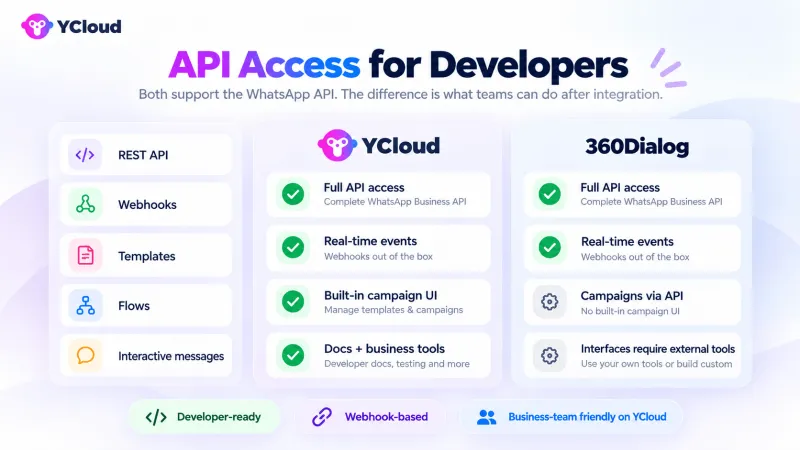
Both YCloud and 360Dialog provide access to the core WhatsApp Business API, webhooks and developer documentation. The main difference is how developers and the wider business team can use those capabilities after the initial integration.
API Access, Webhooks and Backend Integration
YCloud provides full REST API access, real-time webhook events and comprehensive documentation for integrating WhatsApp with existing business systems. Developers can connect CRMs, e-commerce platforms, databases and custom backend applications while business teams use YCloud’s built-in tools.
360Dialog also provides full API and webhook access for custom integrations. However, developers must connect the API to an existing system or build the interfaces required by marketing, sales and support teams.
Templates, Flows and Interactive Messaging
YCloud also provides a built-in campaign interface, allowing business teams to manage templates and execute campaigns without working directly with the API. With 360Dialog, these activities must be handled through API development or a connected third-party platform.
Template approval, message eligibility and usage charges remain subject to Meta’s WhatsApp requirements on both platforms.
WhatsApp Calling and App Coexistence
Calling allows eligible businesses to add voice and video interactions to their WhatsApp workflows. App coexistence enables an eligible number to use the WhatsApp Business App alongside the WhatsApp Business API.
Availability depends on Meta’s eligibility requirements, the business account, phone number and supported market. Additional configuration may also be required before these capabilities can be used.
Developer capability | YCloud | 360Dialog | Setup requirement |
| REST API | Full API access | Full API access | API authentication and backend integration |
| Webhooks | Real-time events | Real-time events | Public webhook endpoint and event handling |
| API documentation | Comprehensive documentation | Developer documentation | Development knowledge required |
| Custom backend integration | Supported | Supported | Custom development based on the connected system |
| Initial setup | 10-minute self-service setup | 30-minute self-service setup | Business verification and custom integration time are separate |
| Template messages | API and built-in campaign tool | Via API | Meta approval required before sending |
| WhatsApp Flows | Via API | Via API | Flow creation, publishing and endpoint configuration where required |
| Interactive messages | Supported through the API | Supported through the API | WhatsApp message-format requirements apply |
| Campaign execution | Built-in interface and API | API or connected third-party tool | Approved templates and audience data required |
| WhatsApp Calling | Voice and video calls | Voice and video calls | Subject to Meta eligibility and setup requirements |
| App coexistence | Supported | Supported | Requires an eligible WhatsApp Business App number |
What Business Tools Teams Can Use Without Building Them
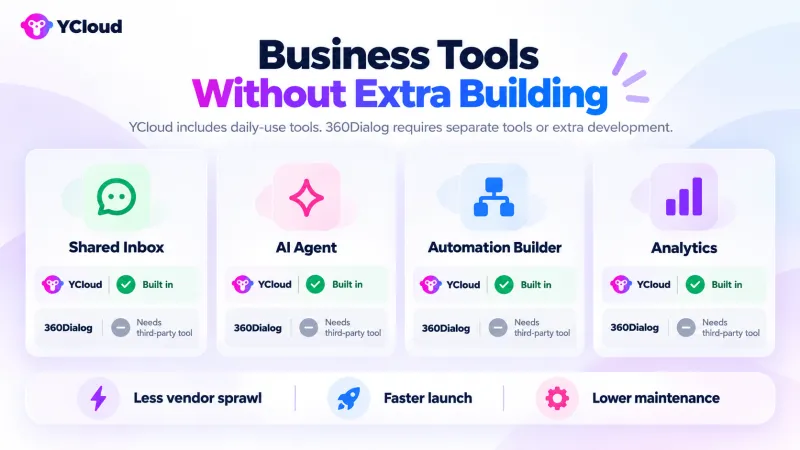
WhatsApp API access allows a business to send and receive messages, but it does not provide marketing, sales and support teams with the interfaces they need to manage daily operations.
YCloud includes these business tools within the platform. With 360Dialog, businesses must build the required interfaces or connect separate third-party tools.
Shared Inbox and Team Collaboration
YCloud provides a built-in shared inbox where multiple agents can manage customer conversations together. Businesses can create roles and permissions, assign conversations, configure routing rules and organise chats using labels and internal notes.
Teams can monitor agent activity, transfer conversations and move customers from an AI Agent or chatbot to a human representative when needed. This gives support and sales teams one workspace for managing customer interactions.
360Dialog does not include a shared team inbox. Businesses must connect a third-party inbox or develop their own interface to manage assignments, routing, collaboration and human handover.
Campaign and Contact Management
YCloud allows marketing teams to organise contacts, segment audiences and run WhatsApp campaigns from a built-in interface.
Teams can select approved templates, personalise messages, schedule campaigns and monitor performance without executing each activity through the API. Contact information and conversation context remain available within the same platform for future campaigns and follow-ups.
360Dialog provides the API infrastructure for sending messages but does not include built-in campaign or contact-management tools. Businesses need an external marketing platform or custom development to manage audiences, campaign schedules, personalisation and reporting.
Analytics and Reporting
YCloud includes dashboards for tracking campaign performance, customer conversations and team activity. Marketing teams can review message results, while support managers can monitor conversation volumes and agent performance.
With 360Dialog, businesses must send API and webhook data to an external analytics platform or build their own reporting system. The available insights therefore depend on the tools, tracking and data infrastructure connected to the API.
Business capability | YCloud | 360Dialog |
| Shared team inbox | Built in | Requires a third-party tool |
| Multiple agents | Supported | Requires an external interface |
| Roles and permissions | Built in | Must be managed externally |
| Conversation assignment | Built in | Requires integration |
| Routing and human handover | Configurable within the platform | Requires development or another tool |
| Labels and internal notes | Available in the inbox | Requires an external inbox |
| Contact management | Built in | Requires a CRM or custom system |
| Audience segmentation | Built in | Requires an external campaign tool |
| Campaign scheduling | Built in | Requires API development or another tool |
| Message personalisation | Available through campaigns | Managed through API or external software |
| Template management | Available through the platform and API | Managed through API |
| Campaign reporting | Built in | Requires external reporting |
| Conversation analytics | Built in | Requires external data collection |
| Agent performance reporting | Built in | Depends on the connected inbox or reporting tool |
Direct AI and Automation Comparison
Both platforms can support automated WhatsApp experiences, but they approach implementation differently.
YCloud includes AI Agents, chatbots and visual automation tools within the platform. With 360Dialog, businesses need to build these capabilities through the API or connect third-party software.
AI Agents and Chatbots
YCloud’s AI Agents can answer questions using approved business knowledge, qualify leads and collect structured customer information.
When connected to authorised business systems, an AI Agent can also retrieve live information or perform permitted actions. For example, it could check an order status, retrieve account information, update a booking or pass a qualified lead to the sales team.
Businesses define what information the agent can access, which actions it can complete and when it must transfer the conversation to a human agent.
360Dialog does not include a built-in AI Agent or chatbot. Businesses must develop their own solution or connect an external chatbot platform. The available capabilities, controls and reporting therefore depend on the selected software and how it is integrated with the API.
Visual Workflow Automation
YCloud provides no-code builders for creating chatbots and customer journeys.
Business teams can configure:
- Triggers that start a workflow
- Questions and automated responses
- Conditions and branching paths
- Follow-up messages and sequences
- Business-hours routing
- Team or agent assignment
- Human handover rules
This allows marketing, sales and support teams to update many workflows without asking developers to change the underlying API integration.
360Dialog does not provide a built-in visual automation builder. Similar workflows require custom API development or a connected automation platform. Changes may therefore depend on developers or the capabilities of the third-party tool.
Integration Requirements
YCloud includes the interface for creating AI Agents, chatbots and automated journeys. However, answering questions from live business data or completing actions still requires connections to the relevant CRM, ERP, e-commerce platform, database or internal API.
360Dialog requires an external AI or automation layer from the beginning. Businesses must select the software, connect it to the WhatsApp API, configure data access and maintain the integration.
AI or automation capability | YCloud | 360Dialog | Additional requirement |
| Knowledge-based answers | Built-in AI Agent | Requires an external AI solution | Approved knowledge sources |
| Lead qualification | Configurable within AI Agents and chatbots | Requires development or third-party software | Qualification questions and routing rules |
| Structured data collection | Built into chatbot workflows | Requires an external chatbot or custom interface | Defined fields and validation rules |
| Live data retrieval | Supported through connected systems | Requires custom or third-party integration | CRM, ERP, store, database or API connection |
| Completing business actions | Supported through authorised integrations | Requires custom or third-party integration | Permissions, business rules and system access |
| No-code chatbot builder | Built in | Not included | Workflow configuration |
| Visual customer journeys | Built in | Not included | Triggers, conditions and actions |
| Conditions and branching | Built in | Requires development or another tool | Workflow rules |
| Automated follow-ups | Built in | Requires development or another tool | Templates, timing and trigger rules |
| Business-hours routing | Configurable | Requires an external system | Business hours and routing rules |
| Human handover | Configurable within the platform | Depends on the connected inbox or chatbot | Team and escalation rules |
| AI and workflow reporting | Available within the platform | Depends on the connected tools | Tracking configuration |
Pricing and Total Cost Comparison
The subscription price is only one part of the cost of operating WhatsApp at scale.
A complete comparison must include Meta’s messaging fees, platform subscriptions, users, WhatsApp numbers, AI usage, additional software, integration work and ongoing maintenance.
YCloud Plans and Pricing
YCloud offers a Free Forever plan and three paid plans. The platform subscription includes WhatsApp API access, a shared inbox, campaigns, AI capabilities and automation tools.
YCloud plan | Monthly price | Users | Channels | Included AI credits |
| Free | $0 | 1 | 2 | 500,000 |
| Growth | $39 | 2 | 3 | 5 million |
| Pro | $89 | 6 | 8 | 20 million |
| Enterprise | $399 | 40 | 30 | 100 million |
The listed paid-plan prices are monthly equivalents under annual billing. Meta’s applicable WhatsApp messaging fees remain separate.
Businesses on paid plans can also purchase additional capacity:
- Additional user: $10/month
- Additional channel: $5/month
- Additional 5 million AI credits: $10
- Additional Shopify store: $5/month
The Free plan supports one user and does not include paid add-ons. A business must upgrade when it needs more users, channels, AI capacity, integrations or a higher level of support.
360Dialog API Plans and Pricing
360Dialog charges a separate subscription for each WhatsApp number.
360Dialog plan | Monthly price |
| Regular | €49 per number |
| Premium | €99 per number |
| High Throughput | €249 per number |
The total platform subscription increases as more WhatsApp numbers are added.
Number of WhatsApp numbers | Regular | Premium | High Throughput |
| 1 | €49/month | €99/month | €249/month |
| 3 | €147/month | €297/month | €747/month |
| 5 | €245/month | €495/month | €1,245/month |
These amounts cover the 360Dialog API subscription. Businesses still need to budget for any external inbox, chatbot, automation, campaign or analytics tools required by their teams.
WhatsApp Messaging Charges
Four different cost categories should be considered:
- Meta messaging fees: Meta charges for applicable WhatsApp messages based on factors such as the recipient’s country and message category.
- Provider subscription: YCloud charges according to the selected platform plan. 360Dialog charges according to the selected plan for each WhatsApp number.
- Provider markup: YCloud and 360Dialog state that they do not add a markup to Meta’s WhatsApp messaging fees.
- Additional operating costs: These may include users, channels, AI usage, third-party software, integrations, technical maintenance, support and taxes.
Zero message markup does not mean the complete setup is free. Meta’s applicable fees and the cost of the software required to operate WhatsApp must still be included.
Additional Costs to Calculate
Cost area | YCloud | 360Dialog |
| Additional users | Available as a paid add-on | Depends on the connected inbox or business tool |
| Additional WhatsApp numbers | Covered by plan allowances; additional channels available on paid plans | Separate subscription for every number |
| AI usage | Credits included by plan; additional credits available | Requires an external AI platform or custom solution |
| Shared inbox | Included | Requires a third-party inbox |
| Campaign tools | Included | Requires another platform or custom interface |
| Visual automation | Included | Requires development or an automation tool |
| Analytics | Included | Requires external reporting or custom development |
| Integration work | Required for custom system connections | Required to build or connect business-facing tools |
| Ongoing maintenance | Primarily required for custom integrations | Required across custom and third-party integrations |
| Support | Included according to the YCloud plan | Availability and SLA depend on the selected tier |
| Taxes | Additional where applicable | Additional where applicable |
Cost Scenario 1: One Number and a Small Operating Team
Assume a business needs:
- One WhatsApp number
- Two team members
- A shared inbox
- Campaign management
- Basic AI and automation
- API and webhook access
With YCloud: Growth costs $39/month under annual billing. It includes two users, three channels, 5 million AI credits and the required business tools. Meta’s messaging fees and any additional usage remain separate.
With 360Dialog: Regular starts at €49/month for one number. The business must then add the cost of an inbox, AI or chatbot software, automation tools and any required integration work. Meta’s messaging fees remain separate.
This is not a direct currency-to-currency savings calculation. The final difference depends on the third-party tools and development resources selected with 360Dialog.
Cost Scenario 2: Five Numbers with Inbox, Automation and AI
Assume a business needs:
- Five WhatsApp numbers
- Six team members
- A shared inbox
- Campaign management
- AI Agents
- Visual automation
- Analytics
- API and webhook access
With YCloud: Pro costs $89/month under annual billing and includes six users, eight channels and 20 million AI credits. The five WhatsApp numbers fit within the plan’s channel allowance. Meta’s messaging fees and additional usage remain separate.
With 360Dialog: Five numbers cost at least €245/month on Regular, €495/month on Premium or €1,245/month on High Throughput. The business must also budget for its inbox, AI, automation, analytics and integration requirements.
The appropriate comparison depends on the throughput, support and operational requirements of the business. However, the total should always include every tool and technical resource needed, not only the API subscription.
Direct Onboarding, Support and Reliability Comparison
Selecting a WhatsApp API provider also means comparing how quickly your team can start, what assistance is available and whether the infrastructure can support your expected messaging volume.
Setup and Onboarding
YCloud offers self-service onboarding designed to help businesses complete the initial setup in approximately 5–10 minutes. The process includes creating an account, connecting an eligible WhatsApp number and configuring the platform.
Because the inbox, campaigns, AI and automation tools are already included, business teams can start configuring standard workflows without first integrating separate software. Custom connections to a CRM, ERP, e-commerce store or internal system will require additional implementation time.
360Dialog positions its basic API onboarding as a roughly 30-minute self-service process. This covers access to the API—not the development of a complete marketing, sales or support operation.
Businesses must still connect the API to their existing technology stack or implement the additional interfaces and tools their teams require.
For both platforms, the actual timeline depends on:
- Meta Business verification
- Phone-number eligibility
- WABA access and ownership
- Template approval
- App coexistence requirements
- Custom backend integrations
- Workflow complexity
- Security testing and production checks
A fast account setup should therefore not be treated as the time required to complete an enterprise implementation.
Onboarding area | YCloud | 360Dialog |
| Onboarding method | Self-service | Self-service |
| Published basic setup time | Approximately 5–10 minutes | Approximately 30 minutes |
| Business verification | Subject to Meta’s requirements | Subject to Meta’s requirements |
| API configuration | Included | Included |
| Built-in business tools | Ready to configure within the platform | Additional tools or integrations required |
| Custom system integration | Required where external business data or actions are involved | Required to connect the API with the wider technology stack |
| Complete implementation time | Depends on workflow and integration complexity | Depends on development and integration complexity |
Customer Support
YCloud provides support across all plans, with the level of assistance increasing as businesses upgrade.
YCloud plan | Support and onboarding | Availability |
| Free | Documentation, self-service onboarding and email support | Weekdays |
| Growth | Email and online support with self-service onboarding | Weekdays |
| Pro | Assisted onboarding and a dedicated account manager | Weekdays |
| Enterprise | Assisted onboarding and priority support | 24/7 |
This structure allows smaller businesses to begin through self-service resources while giving larger teams access to account management, assisted onboarding and enterprise escalation.
360Dialog lists 24/7 human support for its API plans, with response commitments depending on the selected tier. Its published information lists a first-response SLA of under four hours on Regular and under 30 minutes on Premium. Higher-level offerings include specialised performance and migration assistance.
The practical difference is the scope of support required. With YCloud, support can cover the API and the built-in business platform. A 360Dialog setup involving third-party inbox, chatbot, automation or analytics software may require businesses to coordinate support across multiple vendors.
Before selecting a provider, confirm:
- Available support channels
- Operating hours and languages
- First-response SLA
- Engineering-support access
- Assisted-onboarding scope
- Dedicated account management
- Meta escalation support
- Migration assistance
- Enterprise incident-escalation process
Scale and Reliability
YCloud reports more than 1 billion messages processed each month and a 99.9% uptime SLA. Its public status page displays uptime across services including the REST API, webhooks, inbox, AI Agent, campaigns, journeys and WhatsApp Official API.
360Dialog reports more than 2 billion messages per month and positions its infrastructure around high-volume, developer-led WhatsApp implementations.
Monthly messaging volume and throughput are not the same measurement. Monthly volume shows the total number of messages processed over a month, while throughput measures how many messages a number can process per second.
Meta’s Cloud API supports up to 80 messages per second for each registered business number by default. Eligible numbers can be automatically upgraded to as many as 1,000 messages per second.
A business may need a high-throughput configuration when it sends large message bursts, such as:
- Time-sensitive alerts
- Authentication messages
- Large campaign launches
- Transactional notifications
- High-volume customer-service updates
High-throughput eligibility depends on Meta’s requirements, account quality, messaging activity and the configuration of the business number. Businesses should confirm expected peak messages per second, not only monthly volume, before selecting a plan.
Scale and reliability area | YCloud | 360Dialog |
| Reported monthly messaging volume | 1 billion+ messages | 2 billion+ messages |
| Published uptime figure | 99.9% uptime SLA | Confirm the contractual SLA for the selected plan |
| Public service-status monitoring | Available | Available |
| Standard WhatsApp throughput | Subject to Meta’s Cloud API limits | Subject to Meta’s Cloud API limits |
| High-throughput support | Confirm based on the number and expected workload | Higher-throughput options available |
| Best way to assess capacity | Peak messages per second, number count and workflow requirements | Peak messages per second, number count and selected infrastructure tier |
Which Platform Should You Choose?
The right platform depends on whether your business wants a complete WhatsApp operating platform or only the API infrastructure for a developer-led setup.
Choose YCloud If You Need API and Business Tools Together
YCloud is the better fit if your business needs:
- WhatsApp API access and business tools in one platform
- A built-in shared inbox for multiple agents
- Campaign and contact-management tools
- AI Agents and chatbots
- Visual, no-code automation
- Built-in analytics and reporting
- Direct access for marketing, sales and support teams
- API and webhook access for developers
- A Free Forever plan for testing the platform
- Plan-based pricing that covers users and multiple channels
YCloud is particularly suitable when business teams need to manage daily WhatsApp operations without depending on developers for every campaign, workflow or customer interaction.
It can also suit businesses moving from 360Dialog because the inbox, AI, automation and analytics tools are available within the same platform instead of being assembled through separate providers.
Choose 360Dialog If You Need Direct API Infrastructure
360Dialog may be suitable if your business needs:
- Direct WhatsApp API and webhook access
- A developer-led implementation
- Control over the applications and interfaces you build
- Integration with an existing inbox, CRM or automation stack
- Infrastructure for a partner or solution-provider model
- A specific high-throughput configuration
- An internal technical team that can build and maintain the required workflows
360Dialog can make sense when your business already has the necessary customer-facing tools and deliberately wants an API infrastructure provider rather than an all-in-one platform.
Quick Decision Guide
Business requirement | Better fit |
| Start without a platform subscription | YCloud |
| API and business tools in one platform | YCloud |
| Built-in inbox, campaigns and contact management | YCloud |
| Built-in AI Agents and visual automation | YCloud |
| Direct use by non-technical teams | YCloud |
| API access with fewer additional tools | YCloud |
| API-only implementation managed by developers | 360Dialog |
| Existing inbox, CRM and automation infrastructure | 360Dialog |
| Custom applications built and maintained internally | 360Dialog |
| Partner-led or solution-provider implementation | 360Dialog |
| Specific high-throughput infrastructure requirement | Evaluate both against the required throughput |
For most businesses choosing their first WhatsApp platform, YCloud provides a more complete starting point because the API and operational tools are already available together.
For existing 360Dialog customers, moving to YCloud is worth considering when managing separate inbox, chatbot, automation and analytics tools has increased cost, technical dependency or operational complexity.
Why YCloud Offers Better Value for Development, Marketing and Support Teams
YCloud’s value is not based only on a lower starting price. It comes from bringing WhatsApp API access, campaigns, customer conversations, AI, automation and analytics into one platform.
This allows technical and non-technical teams to work from the same system instead of managing separate tools for each function.
Developers: Build Integrations Without Building Every Interface
Developers receive REST API and webhook access for connecting WhatsApp with CRMs, e-commerce platforms, databases and internal systems.
However, they do not need to build the inbox, campaign interface, chatbot builder, journey builder or analytics dashboard from scratch. This allows technical teams to focus on business-specific integrations rather than recreating standard operational tools.
Marketing Teams: Manage Campaigns and Journeys Directly
Marketing teams can organise contacts, segment audiences, select templates, schedule campaigns and create automated customer journeys from YCloud’s interface.
They can update campaign and workflow configurations without asking developers to modify the API integration every time. This reduces technical dependency and helps teams launch and optimise campaigns more efficiently.
Support Teams: Manage Conversations from a Shared Inbox
Support teams can work together through a built-in shared inbox.
Agents can manage assigned conversations, use labels and internal notes, transfer chats and receive conversations handed over by AI Agents or chatbots. Managers can monitor conversation activity and team performance without connecting a separate support platform.
AI Capabilities Stay Connected to Business Workflows
YCloud’s AI Agents operate within the same environment as customer conversations, contacts and automated journeys.
Teams can configure AI to answer approved questions, qualify leads, collect information and escalate conversations. Connections to a CRM, ERP, store or database can also allow the AI Agent to retrieve information or complete permitted actions.
These advanced tasks still require authorised system integrations, but businesses do not need to source a separate AI chatbot platform before getting started.
Fewer Tools Can Mean a Lower Total Operating Cost
An API-only setup may require separate products for:
- Shared inbox and team collaboration
- Campaign management
- Contact management
- Chatbots and AI Agents
- Visual automation
- Analytics and reporting
Each additional product can introduce another subscription, integration, data flow, support process and maintenance requirement.
YCloud may reduce these costs by including the core business tools within one platform. Custom integrations may still require development, but businesses are not required to build or purchase every operational interface separately.
Team | What YCloud provides | Potential operational benefit |
| Development | API, webhooks and ready-made business interfaces | Less standard interface development |
| Marketing | Campaigns, contacts and visual journeys | Less dependency on developers and external campaign tools |
| Sales | Lead qualification, contact context and automated follow-ups | More consistent lead handling |
| Customer support | Shared inbox, routing and human handover | Less need for a separate team-inbox platform |
| Operations | AI Agents and system connections | More workflows managed from one environment |
| Management | Built-in analytics and reporting | Less external data consolidation |
Start Free and Expand as Requirements Grow
Businesses can begin with YCloud’s Free plan to evaluate the platform without a subscription or credit card.
They can then move to Growth, Pro or Enterprise as they need more users, WhatsApp channels, AI credits, add-ons or support. This allows the platform cost to grow with actual operating requirements rather than requiring a complete technology stack before the first workflow is launched.
Already Using 360Dialog? What Changes When You Move to YCloud
Moving from 360Dialog to YCloud changes more than the provider connected to your WhatsApp number.
You retain API and webhook access while gaining built-in tools for campaigns, customer conversations, AI, automation and analytics. The practical impact depends on which tools your business currently uses alongside 360Dialog.
Capabilities Available After Moving to YCloud
Once your WhatsApp number is connected and the required configurations are complete, your team can use:
- A shared inbox for managing customer conversations
- Multi-user access, roles and conversation assignments
- Contact management and audience segmentation
- WhatsApp campaign creation and scheduling
- AI Agents and chatbots
- Visual customer journeys and workflow automation
- Human handover and conversation routing
- Campaign, conversation and team analytics
- REST API and real-time webhooks
Developers can continue building custom integrations, while marketing and support teams receive interfaces for managing routine WhatsApp activities directly.
Third-Party Tools You May No Longer Need
Depending on your existing setup, YCloud may replace separate tools used for:
- Team inbox and conversation assignment
- WhatsApp campaign management
- Contact segmentation
- Chatbot creation
- AI-powered customer interactions
- Visual workflow automation
- Campaign and conversation reporting
Do not cancel existing software before completing a feature and data-migration review. A specialised third-party product may still be required if it supports workflows, channels or reporting requirements that are not covered by the new setup.
Your CRM, ERP, e-commerce store, database and other core business systems may also remain necessary. YCloud connects WhatsApp workflows to these systems rather than replacing the underlying source of business data.
How Each Team Will Work Differently
Team | With a typical 360Dialog setup | After moving to YCloud |
| Development | Builds or connects the interfaces used around the API | Maintains custom integrations while standard business interfaces are already available |
| Marketing | Uses external software for campaigns, contacts and automation | Manages campaigns, segments and journeys within YCloud |
| Sales | Depends on connected CRM, inbox and routing tools | Uses shared conversations, lead qualification and automated follow-ups |
| Customer support | Works through a separate inbox or custom interface | Manages conversations through YCloud’s shared inbox |
| Operations | Coordinates data and workflows across multiple tools | Configures AI and automation within the same platform |
| Management | Consolidates reports from different systems | Reviews built-in campaign, conversation and team analytics |
The main change is reduced dependency on developers for everyday campaign, workflow and conversation-management tasks.
How Platform and Operating Costs May Change
The financial comparison should include the complete 360Dialog setup—not only its API subscription.
Calculate your current annual cost across:
- 360Dialog subscriptions for every WhatsApp number
- Shared-inbox software
- Campaign and contact-management tools
- Chatbot or AI platforms
- Automation software
- Analytics tools
- Integration development
- Technical maintenance
- Support plans
- Taxes
Then compare it with:
- The appropriate YCloud plan
- Additional users or channels
- Additional AI usage
- Required integrations
- Migration and implementation work
- Team training
- Temporary subscription overlap during migration
- Taxes
Moving to YCloud does not automatically guarantee a lower total cost. The commercial benefit depends on how many separate tools and technical processes it can consolidate.
A simple first-year calculation is:
First-year financial impact = recurring costs removed − YCloud recurring costs − one-time migration and training costs
Cost should be assessed alongside workflow speed, maintenance effort, reporting visibility and the level of developer dependency.
What Can Usually Be Retained
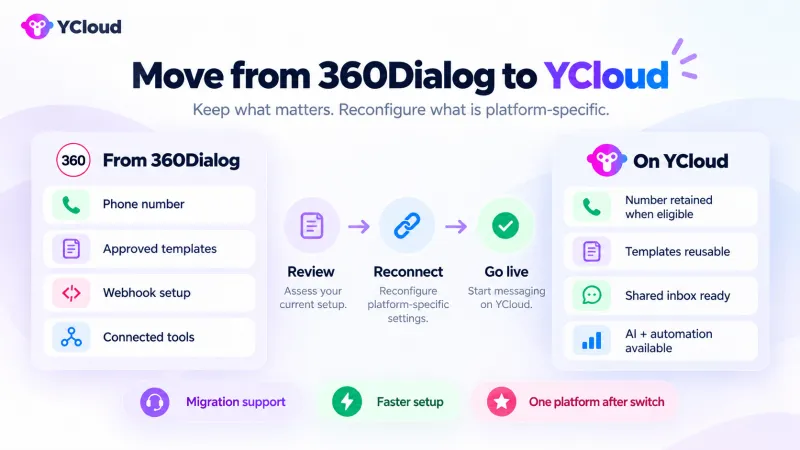
A standard WhatsApp Business API number migration can retain important Meta-managed assets.
Asset | Expected migration outcome |
| WhatsApp phone number | Retained |
| API registration | Retained through the migration process |
| Approved display name | Retained |
| Quality rating | Retained |
| Messaging limits | Retained |
| Official Business Account status | Retained |
| Uploaded media | Retained |
| Approved high-quality message templates | Retained |
Meta-managed migration behaviour is subject to the account type, WABA structure and migration method used.
What May Not Transfer Automatically
The following assets may need to be exported, reconnected or recreated:
Asset or configuration | Likely requirement |
| Message and chat history | Does not transfer in a standard BSP migration |
| Contacts stored in external tools | Export and import may be required |
| Low-quality, rejected or pending templates | May not migrate |
| Catalogs | May need reconnection or reconfiguration |
| Webhook URLs | Must be updated |
| API credentials | New credentials must be configured |
| CRM, ERP and store integrations | Must be reconnected and tested |
| Chatbot and automation workflows | Must be recreated or adapted in YCloud |
| Inbox assignments and internal notes | May require separate export or manual setup |
| Campaign history and analytics | May remain in the previous platform or connected tools |
Standard migration documentation states that message and chat history, catalogs, and templates that are rejected, pending or rated low quality do not migrate in the same way as approved assets.
The exact scope should be confirmed before migration, particularly for coexistence numbers or accounts using a non-standard WABA structure.
How to Decide Whether Migration Is Commercially Worthwhile
Migration is more likely to make sense when:
- Multiple third-party subscriptions are required around 360Dialog
- Marketing and support teams depend heavily on developers
- Maintaining integrations consumes recurring technical resources
- Reporting is fragmented across several systems
- Adding users or WhatsApp numbers increases operating complexity
- The business needs built-in AI and visual automation
- YCloud can cover the existing workflows without removing critical capabilities
Before approving the move, document:
- Every tool and subscription in the current setup
- The workflows each tool supports
- The data and configurations that must be retained
- The YCloud plan and add-ons required
- One-time migration, integration and training costs
- Expected recurring cost after migration
- Operational improvements that can be measured
The migration decision is strongest when YCloud reduces both recurring software costs and the effort required to operate WhatsApp, not simply when its subscription price is lower.
How to Migrate from 360Dialog to YCloud
Migrating from 360Dialog involves transferring the eligible WhatsApp number and reconfiguring the systems used around it.
The number transfer may be relatively quick once all requirements are met. However, moving contacts, integrations, automations and operating teams requires separate planning and testing.
Before Migrating
Complete the following checks before starting the transfer.
Confirm Meta and WhatsApp Access
Ensure that:
- Your business has admin access to the Meta Business Portfolio
- The source Meta Business Portfolio is verified
- The existing WhatsApp Business Account is approved
- The phone number and display name are approved
- The number can receive a verification code through SMS or voice
- The existing WABA has a valid payment method where required
- The business website and Meta Business information are current
- The person completing the migration has the required asset permissions
Prepare the 360Dialog Account
Before moving the number:
- Clear any outstanding 360Dialog invoices
- Confirm the correct process for disabling two-factor authentication
- Record the current WABA, phone-number and business-profile details
- Export any data that will not transfer automatically
- Keep the existing subscription active until the migration is validated
360Dialog’s migration documentation states that outstanding invoices must be settled and two-factor authentication must be disabled before an alternate provider can complete the transfer.
Do not delete the phone number or WABA from Meta. Removing the asset is different from migrating it and may create avoidable recovery work.
Document the Existing Setup
Create an inventory of:
- API endpoints and credentials
- Webhook URLs and subscribed events
- Approved and pending templates
- CRM, ERP and e-commerce integrations
- Chatbot and automation workflows
- Shared-inbox users and assignments
- Contacts and audience segments
- Message and conversation history
- Campaign and analytics data
- Third-party software subscriptions
Use this inventory to decide what will transfer, what must be exported and what needs to be rebuilt.
Plan the Cutover
Define:
- The preferred migration window
- Expected impact on inbound and outbound messaging
- Who will complete each technical task
- Which tests must pass before going live
- How the support and marketing teams will be informed
- How the existing setup will be restored if validation fails
- How long both subscriptions will remain active
The rollback plan should be agreed with YCloud before the number transfer begins.
Migration Process
Step 1: Create and Configure the YCloud Account
Create the YCloud account and select the appropriate plan.
Before transferring the production number:
- Add the required users
- Configure roles and permissions
- Prepare teams and routing rules
- Review inbox, campaign and automation requirements
- Create a test checklist
- Confirm the migration schedule with YCloud
Where possible, prepare the new workflows before the production cutover.
Step 2: Prepare and Transfer the WhatsApp Number
Confirm that the phone number is eligible and that all Meta requirements have been completed.
At the agreed time:
- Settle remaining 360Dialog account requirements.
- Disable two-factor authentication as instructed.
- Begin the migration through YCloud’s onboarding flow.
- Sign in using the authorised Meta account.
- Select the correct Business Portfolio, WABA and phone number.
- Complete the required number verification.
- Confirm that the number appears correctly in YCloud.
The exact flow can vary based on the existing WABA structure, account model and whether the number uses App coexistence.
Step 3: Reconnect Webhooks, Integrations and Workflows
After the number is connected:
- Generate and secure the new API credentials
- Configure the YCloud webhook URL
- Subscribe to the required webhook events
- Update internal systems with the new credentials and endpoints
- Reconnect the CRM, ERP, store, database or other systems
- Recreate chatbot and journey workflows
- Import contacts where appropriate
- Reconfigure routing, assignments and human handover
- Update monitoring and reporting processes
Credentials and webhook configurations from 360Dialog should not be expected to work automatically with YCloud.
Step 4: Test Inbound and Outbound Messaging
Complete functional and operational testing before moving the full team.
Test:
- Inbound customer messages
- Free-form replies within the customer-service window
- Approved template messages
- Media and interactive messages
- Delivery, read and failure webhooks
- Contact creation and updates
- CRM or store data retrieval
- AI Agent responses and permitted actions
- Chatbot and journey triggers
- Conversation routing
- Human handover
- Campaign sending
- Calling and App coexistence, where used
Record the result of each test and resolve critical failures before launching.
Step 5: Move the Team and Monitor Delivery
Once validation is complete:
- Give users access to the YCloud inbox
- Confirm roles, teams and conversation assignments
- Train marketing and support users
- Begin production messaging
- Monitor delivery and failure rates
- Review webhook processing
- Watch for template, quality or messaging-limit issues
- Keep technical and support teams available during the initial period
Cancel the 360Dialog subscription only after the number, messages, integrations and workflows are operating correctly in YCloud.
What Transfers and What Requires Reconfiguration
Asset or configuration | Expected outcome | Required action |
| WhatsApp phone number | Retained | Transfer through the approved migration process |
| API registration | Retained through migration | Complete the destination-provider onboarding |
| WABA | Depends on the migration path | Confirm whether the existing or a destination WABA will be used |
| Display name | Retained | Verify after migration |
| Quality rating | Retained | Monitor after going live |
| Messaging limits | Retained | Verify in the destination account |
| Official Business Account status | Retained | Confirm after migration |
| Approved high-quality templates | Retained | Verify availability and test sending |
| Pending, rejected or low-quality templates | May not transfer | Recreate or resubmit where required |
| Contacts | Do not assume automatic transfer | Export, clean and import where supported |
| Message and chat history | Does not transfer in a standard migration | Retain an archive where required |
| Catalogs | May not transfer | Reconnect or recreate |
| API credentials | Do not transfer | Generate and configure new credentials |
| Webhook URLs | Do not transfer automatically | Configure and test new webhooks |
| Chatbots and automations | Do not transfer automatically | Rebuild or adapt in YCloud |
| Inbox assignments and notes | Do not transfer automatically | Reconfigure teams and retain required records |
| CRM, ERP and store integrations | Require reconnection | Update credentials, endpoints and mappings |
| Third-party tools | Remain separate until cancelled | Validate whether each tool is still needed |
Standard BSP migration documentation indicates that display names, quality ratings, messaging limits, Official Business Account status, uploaded media and approved high-quality templates can be retained. Message history, catalogs, and pending, rejected or low-quality templates do not transfer in the same way.
Number Transfer Time vs Complete Migration Time
The phone-number transfer and the complete operational migration are not the same project.
The number transfer depends mainly on account readiness, access and Meta eligibility. The full migration also includes data preparation, integration changes, workflow rebuilding, testing and team onboarding.
A simple setup may be completed quickly, while a multi-system enterprise migration can take longer. Confirm the expected timeline after YCloud reviews the number, WABA structure and integration scope.
Final Verdict: YCloud vs 360Dialog
Both platforms provide the core infrastructure required to use the WhatsApp Business Platform.
360Dialog suits developer-led API implementations, while YCloud is the stronger choice for businesses that also need campaigns, a shared inbox, AI, automation and analytics in one platform.
Compare the complete workflow and operating cost, not API access alone.
Also Read:
- YCloud vs Twilio: Which Offers Better Value for Your Business?
- YCloud vs Respond.io: Which Offers Better Value for Your Business?
- YCloud vs WATI: Which Offers Better Value for Your Business?
Frequently Asked Questions
What is the main difference between YCloud and 360Dialog?
360Dialog gives you WhatsApp API access. YCloud provides the same API access plus a built-in inbox, campaigns, contact management, AI Agents, automation and analytics.
Which platform offers better value for a WhatsApp setup?
YCloud generally offers better value when a business needs both API access and tools for marketing, sales and customer support. 360Dialog may suit developer-led implementations that already have the required inbox, CRM, automation and reporting systems.
Do YCloud or 360Dialog add markup to Meta’s messaging fees?
No. Both platforms state that they pass through Meta’s applicable WhatsApp messaging fees without adding a provider markup. Platform subscriptions and other software costs remain separate.
Does either platform offer a free plan?
YCloud offers a Free Forever plan without requiring a credit card. 360Dialog does not provide a free API subscription and starts at €49 per WhatsApp number per month.
Can developers use YCloud solely for API and webhook access?
Yes. YCloud provides full REST API and real-time webhook access for custom integrations. The built-in business tools remain available if other teams need them.
Does 360Dialog include a shared team inbox?
360Dialog’s core API offering does not include a built-in shared inbox. Businesses need to connect a third-party inbox or build their own interface.
Which platform includes AI Agents and chatbot tools?
YCloud includes AI Agents, chatbot tools and visual workflow builders. With 360Dialog, businesses must develop these capabilities or connect an external solution.
Do both support WhatsApp Flows, Calling and App coexistence?
Yes. Both platforms support WhatsApp Flows, Calling and App coexistence. Availability depends on Meta’s eligibility, account, number and market requirements.
How does pricing change when a business uses multiple WhatsApp numbers?
YCloud plans include a specific number of channels, with additional channels available on paid plans. 360Dialog charges a separate monthly subscription for each WhatsApp number, so the platform fee increases with every number added.
Can I retain my WhatsApp number when moving from 360Dialog?
Yes, an eligible WhatsApp Business API number can usually be retained through the approved provider-migration process. Account access, WABA status and Meta’s migration requirements must be confirmed first.
What happens to approved templates during migration?
Approved, high-quality message templates can generally be retained. Pending, rejected or low-quality templates may not transfer and may need to be recreated or resubmitted.
Are contacts and conversation history transferred automatically?
No. Contacts may need to be exported and imported separately. Message and chat history does not transfer automatically during a standard BSP migration.
Will existing webhooks and integrations need to be changed?
Yes. Businesses must configure new YCloud API credentials and webhook settings. CRM, ERP, store and other integrations must also be reconnected and tested.
How long does migration from 360Dialog to YCloud take?
The number transfer may take under an hour once all requirements are ready. The complete migration, including integrations, workflows, testing and team onboarding, typically takes longer and may require one to three business days or more, depending on complexity.
What migration support does YCloud provide?
YCloud provides assistance with number migration, account setup and the transition to its platform. Confirm the support scope for integrations, data preparation, workflow rebuilding and testing before scheduling the migration.
Related Articles

Make your business communications much easier!


Trusted by




