Customer Support

English

Know How to Sell on WhatsApp with Proven Strategies, Rules and Quick Wins

You want to sell products on WhatsApp…
But where do you even begin?
Should you send product images individually, create a Catalogue, post Status updates, or run broadcasts?
And when a customer responds, how do you turn that conversation into an order?
Well… Many businesses know their customers use WhatsApp but do not know how to showcase products, attract enquiries, recommend the right options, or close sales on WhatsApp.
And this is exactly why we have curated this guide to explain how to sell on WhatsApp from the beginning. We’ll cover the right WhatsApp account type, practical and advanced sales strategies, essential rules, quick wins, and how to set everything up with YCloud.
TL;DR
- WhatsApp sales turn customer conversations into a complete buying journey, from product discovery and qualification to payment and follow-up
- The WhatsApp Business App suits low-volume selling, while the WhatsApp Business API is better for teams that need automation, multiple agents, integrations, and analytics
- Start with a complete business profile, organised product catalogue, high-intent entry points, quick responses, and a clear sales pipeline
- Use AI agents, behavioural automation, personalised recommendations, and abandoned-cart recovery to improve conversions at scale
- Follow three essential rules: obtain customer opt-in, use the 24-hour service window effectively, and send approved templates after it closes
- Quick wins include automating the first exchange, preparing common replies, tracking lead stages, and moving complex conversations to WhatsApp calls
- YCloud brings WhatsApp API, AI agents, chatbots, broadcasts, shared inbox, automated journeys, integrations, and analytics into one sales platform
Before exploring the strategies, let’s first understand why selling through WhatsApp makes sense today.
Why WhatsApp is the Best Platform to Sell Today?
WhatsApp is already part of your customers’ daily routine. Meta reported that the platform has more than three billion daily active users, giving businesses direct access to a large and highly familiar audience.
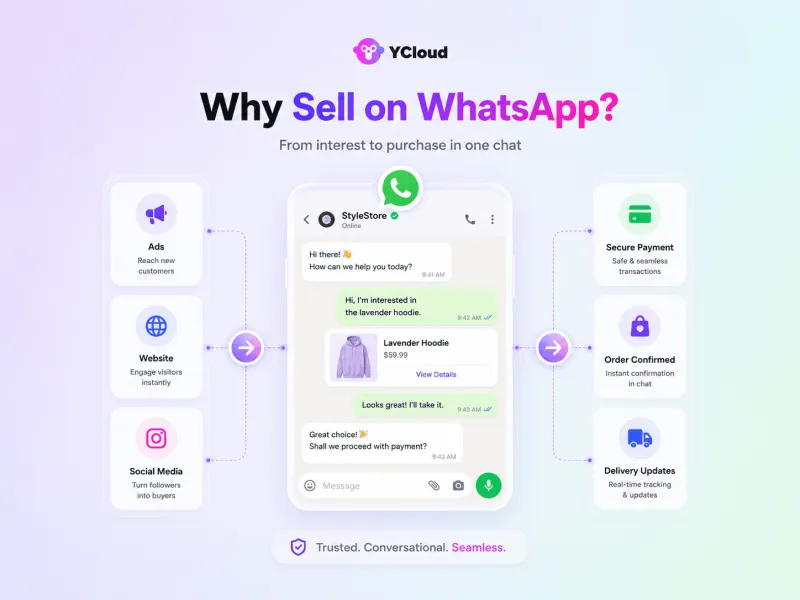
But reach alone is not the reason to use WhatsApp for sales. Its real value lies in how easily businesses can guide customers from interest to purchase.
1. Reduce the distance between interest and action
Customers can ask about a product as soon as they discover it through an ad, website, QR code, or social post. There is no form submission, callback request, or separate login slowing them down.
2. Help customers make informed decisions
Sales teams can answer questions, share images or demonstrations, compare options, and recommend suitable products within the same conversation.
3. Manage the complete sales journey
WhatsApp sales can cover product discovery, qualification, recommendations, order confirmation, payment links, delivery updates, and after-sales communication without breaking the conversation.
4. Handle more sales conversations efficiently
Unlike phone calls, messaging allows sales representatives to manage multiple prospects while keeping the conversation history intact. Chatbots and AI agents can also answer routine questions, qualify leads, and route serious buyers to the right salesperson.
5. Create more opportunities after the first enquiry
Businesses can reconnect with interested customers through permitted follow-ups, abandoned-cart reminders, back-in-stock updates, relevant offers, and product recommendations.
WhatsApp does not replace a proper sales process. It gives businesses a faster and more conversational way to run one.
However, the sales features available to you depend on the type of WhatsApp account you choose. Let’s compare the options next.
Which WhatsApp Account Should You Use for Sales?
WhatsApp offers two business options:
- WhatsApp Business App
- WhatsApp Business Platform (commonly called the WhatsApp API)
Both can help you sell, but they are designed for different levels of sales activity.
The Business App provides basic tools for smaller operations, while the API supports larger teams, automation, integrations, and structured customer journeys.
Let’s compare them side by side:
Feature | WhatsApp Business App | WhatsApp Business Platform/API |
Best suited for | Individuals and small teams | Growing businesses and enterprises |
Cost | Free to download | Meta message charges and provider fees may apply |
Product display | Built-in Catalogue with up to 500 items | Dynamic product lists, rich media, and integrated commerce journeys |
Team access | One primary phone with linked devices | Multiple agents, departments, and locations |
Broadcasts | Broadcast lists with up to 256 contacts | Scalable campaigns based on account quality and messaging limits |
Automation | Greeting messages, away messages, and quick replies | Chatbots, AI agents, automated qualification, routing, and follow-ups |
Lead management | Labels and Lists | Automated lead capture, assignment, qualification, and lifecycle tracking |
CRM integration | Not available natively | Connects with CRMs, e-commerce platforms, and internal systems |
Reporting | Basic message statistics | Campaign, conversation, agent, and sales-performance analytics |
Scalability | Suitable for lower conversation volumes | Built for high-volume WhatsApp sales |
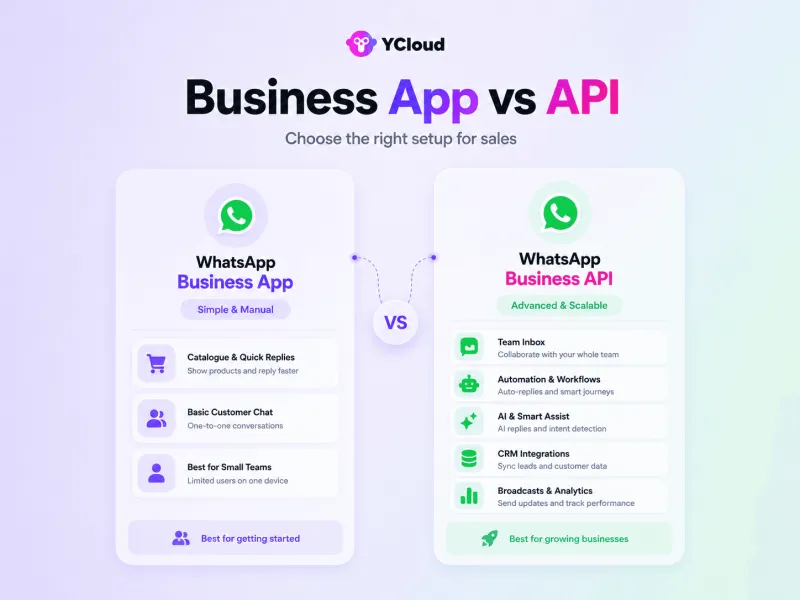
Choose the WhatsApp Business App if:
- You manage sales independently or with a small team
- You receive a manageable number of daily enquiries
- You want to create a basic product Catalogue
- You are comfortable handling conversations and follow-ups manually
- You do not require CRM integration or advanced reporting
The app works well when you need a simple storefront and direct customer conversations without complex automation.
Choose the WhatsApp Business API if:
- Multiple sales representatives need access to the same number
- Leads arrive regularly from ads, websites, QR codes, or social media
- Conversations need to be assigned by product, region, language, or availability
- You want to automate qualification, recommendations, and follow-ups
- Customer conversations need to sync with your CRM
- You need detailed visibility into campaigns, agents, and conversions
The API does not provide a complete sales workspace by itself. Businesses generally reach out to BSPs such as YCloud to access broadcasts, a shared team inbox, chatbots, AI agents, integrations, and analytics.
Once you have chosen the right account, the next step is knowing how to use it effectively. Let’s explore the essential WhatsApp sales strategies next.
35 Proven Strategies to Sell Successfully on WhatsApp
Knowing how to sell on WhatsApp is not about using one clever tactic. You need a connected process that helps customers discover your business, explore products, ask questions, complete a purchase, and return later.
The strategies below are divided by sales stage, so you can implement them one at a time without losing sight of the complete journey.
Stage 1: Prepare WhatsApp for Sales
Strategy 1: Create a Complete Business Profile
Treat your WhatsApp profile like a digital storefront. Add your business name, description, operating hours, address, website, and contact details so customers can quickly verify who they are dealing with.
A complete profile builds confidence before the first sales conversation begins.
Strategy 2: Build a Sales-Ready Product Catalogue
Create a catalogue with clear product names, prices, images, descriptions, and purchase links. Customers should be able to understand the product without repeatedly asking for basic information.
Avoid uploading everything without structure. Organise products into logical collections such as:
- Bestsellers
- New arrivals
- Product categories
- Limited-time offers
- Solutions by customer need
The goal is to make browsing easier, not to recreate a complicated website inside WhatsApp.
Strategy 3: Start With a Warm, Permission-Based Audience
Begin with existing customers, inbound leads, subscribers, and people who have agreed to hear from your business.
Selling first to a familiar audience helps you test:
- Which questions customers ask
- Which products attract attention
- What objections prevent purchases
- Which messages generate replies
- Where buyers leave the conversation
Never add strangers to groups or send promotions without consent. A smaller opted-in audience will usually deliver better results than a large, disengaged contact list.
Strategy 4: Organise Chats Like a Sales Pipeline
Do not let every conversation sit in the same inbox without a clear status. Use labels or CRM stages to identify where each prospect stands.
For example:
- New enquiry
- Qualified lead
- Product recommended
- Payment pending
- Order confirmed
- Follow-up required
- Existing customer
This gives your team a clear next action and reduces the risk of interested buyers being forgotten.
Stage 2: Bring Potential Buyers Into WhatsApp
Strategy 5: Create Multiple Entry Points
Customers should not have to search for your WhatsApp number. Place direct chat links, QR codes, and WhatsApp buttons wherever buying interest may arise.
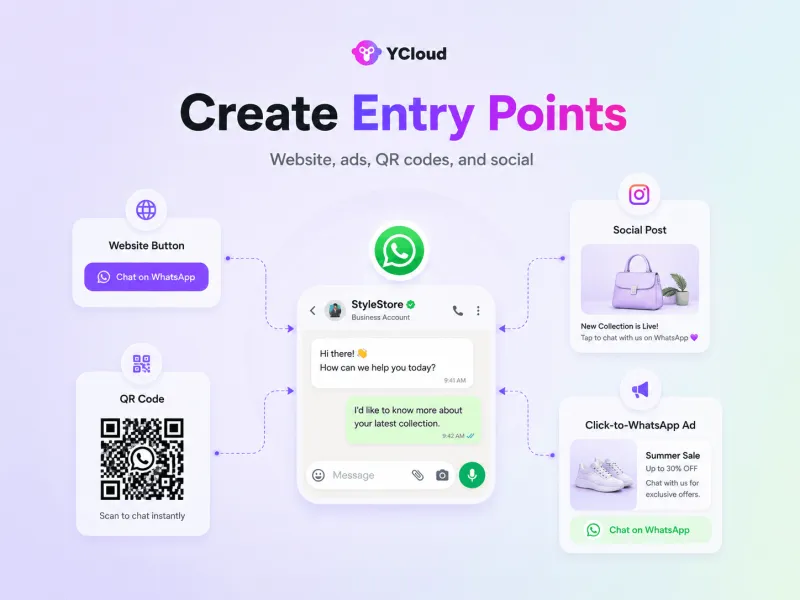
Useful entry points include:
- Website product pages
- Social media profiles
- Email signatures
- CTWA
- Product packaging
- Store displays
- Invoices and receipts
- Event materials
Use pre-filled messages such as “I’d like to know more about the Pro plan” so your team immediately understands the customer’s interest. WhatsApp supports several ways for businesses to make conversations easier to start through its business app features.
Strategy 6: Use WhatsApp Status as a Lightweight Storefront
WhatsApp Status can keep products visible without sending every update directly to customers.
Use it to share:
- New products
- Restocked items
- Product demonstrations
- Customer results
- Behind-the-scenes content
- Limited-time offers
Every Status should include a simple next step, such as “Reply for the price” or “Message us to order.”
Strategy 7: Turn Social Media Interest Into Conversations
A customer may discover your product on Instagram, Facebook, LinkedIn, or another social platform but still need answers before buying.
Direct them to WhatsApp using a clear call to action. Instead of asking users to complete a long form, let them begin a conversation with one click.
Strategy 8: Run Click-to-WhatsApp Ads
Click-to-WhatsApp ads take interested users from Facebook or Instagram directly into a WhatsApp conversation.
Create separate ads for different products, audiences, and customer problems. Use a relevant pre-filled message so the conversation starts with context rather than a generic “Hi.”
Meta’s official Click-to-WhatsApp ads are particularly useful when customers need consultation, qualification, or product guidance before purchasing.
Strategy 9: Use Communities, Partnerships, and Contests Carefully
Relevant industry communities, partner networks, events, and contests can help introduce your business to new buyers. However, the objective should be to invite interested people into an opted-in conversation, not to collect numbers for unsolicited messaging.
A better approach is to offer something useful, such as:
- A product consultation
- A buying guide
- A personalised recommendation
- A demo
- Early access to an offer
This gives prospects a genuine reason to start the conversation themselves.
Stage 3: Turn Enquiries Into Buying Conversations
Strategy 10: Respond While Purchase Intent Is Fresh
A customer asking about availability, pricing, or delivery is already showing intent. A delayed response gives that interest time to disappear.
Use quick replies, chatbots, AI agents, or automated greetings to acknowledge enquiries immediately. If a complete answer requires a salesperson, tell the customer when they can expect one.
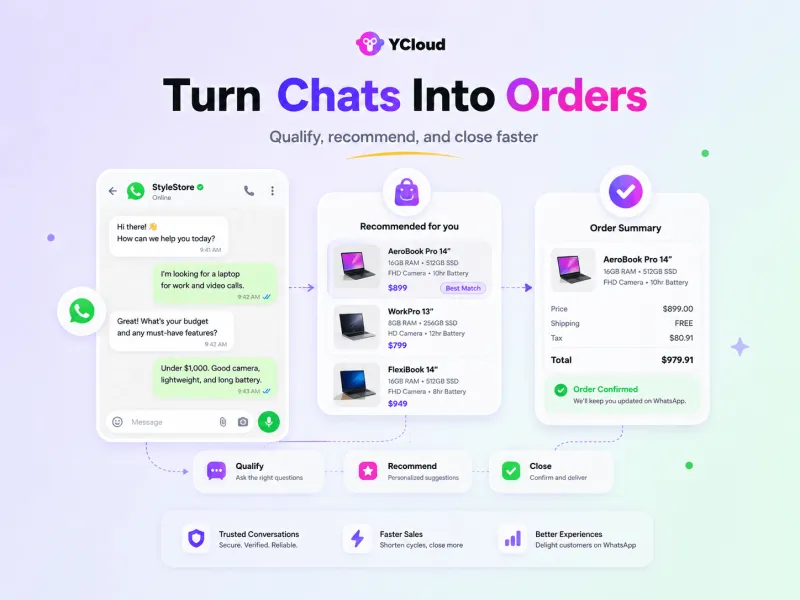
Strategy 11: Qualify Before You Recommend
Do not begin every conversation by sending a catalogue or generic sales pitch. First, understand what the buyer actually needs.
Ask a few natural questions about:
- Requirements
- Budget
- Location
- Preferred features
- Purchase timeline
- Intended use
Qualification should feel like helpful guidance, not an interrogation.
Strategy 12: Recommend a Shortlist, Not Everything
Once you understand the customer, suggest the two or three most relevant options and explain why each one fits.
For example:
“Based on your budget and team size, the Growth plan should cover your current requirements. If you need advanced access controls, the Pro plan would be the better fit.”
This makes the buying decision easier than sending a long, unfiltered product list.
Strategy 13: Use Rich Media to Explain the Product
Some products are difficult to sell through text alone. Use WhatsApp’s visual formats to make the offer easier to understand.
Depending on the product, share:
- Product images
- Short demonstration videos
- Voice notes
- Brochures
- Comparison charts
- Customer testimonials
- Product carousels
- Before-and-after results
Every asset should answer a buying question. Avoid sending several large files without explaining why they matter.
Strategy 14: Personalise the Conversation With Real Context
Personalisation goes beyond adding the customer’s name. Refer to the product they viewed, the requirement they shared, their previous purchase, or the source that brought them into the chat.
A contextual message feels more useful than a generic promotion:
“You previously asked about our beginner course. The next batch begins on Monday, and two evening slots are still available.”
Strategy 15: Use Social Proof Near the Decision Point
When a buyer is interested but uncertain, relevant proof can reduce hesitation.
Share:
- A review from a similar customer
- A short case study
- Verified ratings
- Product results
- Return or replacement policies
- Warranty information
Keep the proof closely related to the customer’s concern rather than sending a collection of unrelated testimonials.
Strategy 16: Use Urgency Only When It Is Genuine
Real deadlines can help customers decide. False scarcity can damage trust and increase blocks or complaints.
Use urgency when there is an actual reason, such as:
- Limited inventory
- Registration deadline
- Expiring discount
- Seasonal availability
- Closing appointment slots
State the deadline clearly and allow the customer to make an informed decision.
Strategy 17: Make Human Support Easy to Reach
Automation should move the conversation forward, but customers may still need a person for negotiation, complex questions, or reassurance.
For larger teams, use a shared inbox and route chats according to:
- Product
- Region
- Language
- Customer type
- Agent expertise
- Availability
The assigned salesperson should receive the conversation history so customers do not have to repeat themselves.
Stage 4: Remove Friction From the Purchase
Strategy 18: Give Every Conversation a Clear Next Step
A productive sales chat should not end with “Let us know if you are interested.”
Guide the customer towards a specific action:
- View the product
- Confirm the selected option
- Request a quotation
- Book a demonstration
- Schedule an appointment
- Share delivery details
- Complete payment
The next step should be obvious and easy to complete.
Strategy 19: Summarise the Order Before Checkout
Before requesting payment, send a concise order summary containing:
- Selected product or service
- Quantity
- Price
- Applicable discount
- Delivery or appointment details
- Final payable amount
This reduces confusion and gives the buyer an opportunity to verify everything before paying.
Strategy 20: Shorten the Checkout Process
Send a secure payment or checkout link directly inside the conversation. Where supported, WhatsApp Flows can help customers complete structured actions such as selecting products, booking appointments, submitting details, or placing an order without lengthy back-and-forth messages.
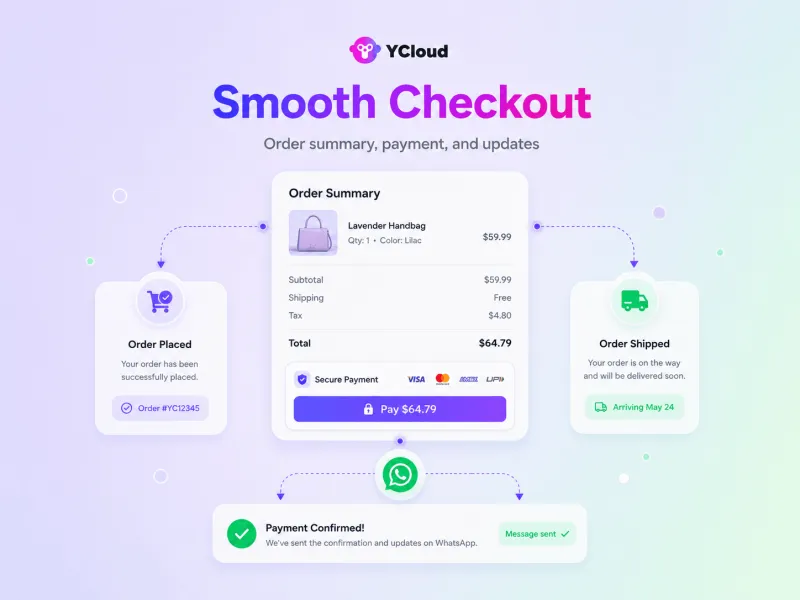
The fewer unnecessary steps buyers face, the easier it becomes to complete the sale.
Strategy 21: Automate Transaction Updates
Once the purchase is completed, immediately confirm it and keep the customer informed.
Automate messages for:
- Payment confirmation
- Order confirmation
- Appointment details
- Shipping status
- Delivery updates
- Booking reminders
These messages reduce repetitive enquiries while reassuring customers that the transaction was successful.
Stage 5: Follow Up Without Becoming Intrusive
Strategy 22: Segment Customers Before Sending Broadcasts
Do not send the same campaign to every contact.
Segment the audience by relevant information such as:
- Product interest
- Purchase history
- Location
- Lead stage
- Engagement
- Customer type
- Abandoned cart status
Segmentation makes broadcasts more relevant and lowers the risk of customers ignoring or reporting them.
Strategy 23: Use Broadcasts for Relevant Updates
Broadcasts work best when the message is timely and useful.
Suitable examples include:
- Product launches
- Restock alerts
- Event reminders
- Personalised offers
- Reorder reminders
- Educational content
- Customer-exclusive deals
Avoid making every message promotional. Product guides, demonstrations, and useful tips can nurture interest without forcing a sale.
Strategy 24: Build a Purposeful Follow-Up Sequence
Many prospects need more than one interaction before purchasing. Plan follow-ups according to where the buyer stopped.
A simple sequence might include:
- Day 1: Answer the enquiry and recommend a suitable option
- Day 3: Share a demonstration, guide, or customer result
- Day 5: Address a common buying concern
- Day 7: Offer a clear next step or relevant incentive
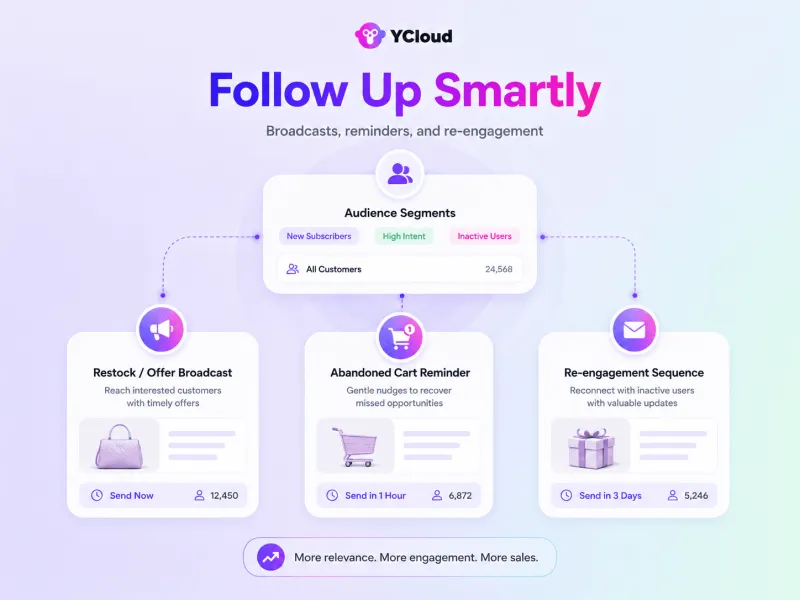
Stop or change the sequence when the customer replies, purchases, or opts out.
Strategy 25: Recover Abandoned Purchases
A customer who viewed a product or started checkout has already shown interest. Follow up with context instead of sending a generic reminder.
For example:
“You were looking at the black travel backpack yesterday. Would you like help with the size, delivery date, or payment?”
Depending on the situation, you can also share an inventory update, answer a likely objection, or offer a genuine incentive. Meta’s remarketing guidance similarly emphasises using relevant customer signals rather than treating every prospect the same.
Strategy 26: Re-Engage Inactive Leads Selectively
Not every old lead should receive another sales message. Re-engage prospects only when you have a relevant reason, such as a restock, price change, new product, or update connected to their earlier interest.
A useful update is more likely to restart the conversation than repeatedly asking, “Are you still interested?”
Stage 6: Scale WhatsApp Sales Without Losing Quality
Strategy 27: Automate Repetitive Sales Questions
Use chatbots or rule-based automation to handle predictable requests such as:
- Product availability
- Pricing information
- Store hours
- Delivery areas
- Return policies
- Appointment selection
- Order tracking
Automation should reduce waiting time while leaving unusual or sensitive conversations to the team.
Strategy 28: Use AI Agents for Flexible Conversations
AI agents can understand customer intent, answer questions using approved business information, collect lead details, recommend products, and recognise when human intervention is required.

Modern AI support on WhatsApp can remain involved beyond the first enquiry, assisting with qualification, follow-ups, recommendations, and handoffs throughout the sales journey. Meta is also expanding its business AI capabilities on WhatsApp.
Strategy 29: Connect WhatsApp With Your Business Systems
Connect WhatsApp to the systems your team already uses, including:
- CRM
- E-commerce platform
- Inventory system
- Booking calendar
- Payment gateway
- Customer support software
This allows your sales process to retrieve accurate information, update customer records, create deals, confirm inventory, and trigger follow-ups without constant tool-switching.
Stage 7: Turn Completed Sales Into Future Revenue
Strategy 30: Continue the Conversation After Purchase
The relationship should not end after payment. Use WhatsApp to provide onboarding, usage guidance, delivery support, and timely assistance.
Strong after-sales communication builds trust and makes repeat purchases more likely.
Strategy 31: Collect Feedback at the Right Time
Request feedback after the customer has had enough time to experience the product or service.
Keep the request simple:
- One-tap satisfaction rating
- Short review
- Product feedback
- Support experience
- Reason for return or cancellation
Feedback helps improve the experience while revealing objections that may be affecting future sales.
Strategy 32: Create Relevant Upsell and Cross-Sell Opportunities
Use purchase history to recommend a logical next product rather than sending an unrelated offer.
For example:
- Accessories for a recently purchased product
- Refill or replenishment reminders
- An upgraded plan for a growing customer
- A complementary course
- A maintenance or support package
The recommendation should help the customer get more value from what they already purchased.
Stage 8: Measure What Is Actually Driving Sales
Strategy 33: Track Every Major Entry Point
Use separate tracked links or campaign identifiers for your website, social media, QR codes, partner campaigns, and Click-to-WhatsApp ads.
This helps identify which sources are bringing enquiries—and which are bringing customers who actually purchase.
Strategy 34: Measure the Complete Sales Journey
Do not judge WhatsApp sales only by message volume.
Track metrics connected to business outcomes:
- First response time
- Qualification rate
- Sales handoff rate
- Follow-up response rate
- Checkout completion rate
- Abandoned-cart recovery rate
- Conversion rate
- Revenue per conversation
- Repeat purchase rate
For businesses running paid campaigns, Meta’s Conversions API for business messaging can also help connect messaging activity with downstream outcomes.
Strategy 35: Improve One Stage at a Time
Review conversations regularly to identify where customers lose interest.
If many leads enter but few qualify, improve the entry point or qualification questions. If qualified leads do not purchase, review product recommendations, objection handling, pricing clarity, and checkout friction.
Test one variable at a time, such as the opening message, media format, offer, call to action, or follow-up timing, so you can understand what caused the result.
These strategies create a complete WhatsApp sales process, from product discovery and qualification to payment, follow-up, and repeat purchase.
Next, let’s explore the advanced strategies that can make WhatsApp sales more personalised, automated, and scalable.
Advanced WhatsApp Sales Strategies for Higher Conversions
Once your basic WhatsApp sales process is working, growth rarely comes from sending more messages. It comes from using customer behaviour, business data, AI, and human judgement to deliver the right action at the right moment.
Here are the advanced strategies that make that possible.
Strategy 1: Recover More Than Abandoned Carts
Customers can leave at several points, not only after adding a product to their cart.
Create recovery journeys for:
- Incomplete checkouts
- Unpaid orders
- Unaccepted quotations
- Unconfirmed appointments
- Unfinished applications
- Product enquiries without a response
Your first message should provide context:
“Your order for the black travel backpack is still incomplete. Would you like help with delivery or payment?”
If the customer does not respond, follow up with useful information, social proof, or a genuine incentive. Stop the automation immediately when they reply, purchase, or opt out.
Strategy 2: Score Leads Using Buying Signals
Not every WhatsApp enquiry deserves the same sales effort.
Create a lead-scoring system based on signals such as:
- Product viewed
- Campaign source
- Budget
- Purchase timeline
- Questions about pricing
- Repeat visits
- Quotation requests
- Previous purchase history
A prospect asking about pricing, stock, and delivery is likely closer to purchasing than someone requesting general information.
Send high-intent leads directly to the sales team while placing early-stage prospects into a relevant nurturing journey.
Strategy 3: Combine AI Speed With Human Sales Expertise
Use AI agents to manage the early and repetitive parts of the conversation, while human representatives handle situations requiring negotiation, judgement, or relationship-building.
AI can handle:
- Instant first responses
- Intent identification
- Common product questions
- Lead qualification
- Product discovery
- Basic recommendations
- Appointment collection
Sales representatives can handle:
- Custom quotations
- Complex requirements
- Negotiations
- High-value purchases
- Sensitive concerns
- Final closing
When the conversation is transferred, the representative should receive the lead details and complete chat history. The customer should never have to start again.
Strategy 4: Let the AI Agent Complete Business Actions
An advanced WhatsApp AI agent should do more than answer questions. Connect it with your business tools so it can complete routine actions during the conversation.
For example, it can:
- Check live inventory
- Retrieve customer details
- Create a quotation
- Book an appointment
- Update a CRM record
- Apply an eligible discount
- Generate a payment link
- Check an order status
This shortens the distance between a customer’s question and the next sales action.
Strategy 5: Deliver the Next Best Recommendation
Instead of running isolated campaigns, use available customer context to determine what should be offered next.
The recommendation may be based on:
- Current conversation
- Products previously viewed
- Purchase history
- Customer location
- Budget
- Business size
- Lifecycle stage
- Earlier objections
For example, a returning customer should receive a compatible accessory, refill, or upgrade—not the same generic introductory offer sent to a new lead.
Strategy 6: Match the Content Format to the Buying Objection
Do not send images, PDFs, videos, and voice notes simply because WhatsApp supports them. Choose the format according to what is preventing the purchase.
Use:
- A demonstration video when customers do not understand how the product works
- A comparison chart when they are choosing between options
- A brochure when detailed specifications matter
- A customer story when they need proof
- A voice note when a high-value purchase requires personal reassurance
- A product carousel when they want to compare a small collection
AI can help draft, translate, transcribe, or summarise this content. For high-consideration purchases, however, a short voice note recorded by the salesperson can feel more credible than another automated message.
Strategy 7: Build Behaviour-Based Sales Journeys
Move beyond fixed follow-ups sent to everyone after the same interval. Trigger messages according to what the customer actually does.
Useful triggers include:
- Starts a conversation but does not continue
- Views a quotation but does not accept it
- Begins checkout but does not pay
- Books a demo but does not attend
- Completes a trial without upgrading
- Purchases a consumable product that may need replenishment
- Receives an order but does not provide feedback
Each action should start a different journey. Customers who have already purchased, replied, or opted out must automatically exit irrelevant campaigns.
Strategy 8: Retarget High-Intent Prospects Across Meta
Use first-party WhatsApp engagement data to build more relevant audiences for Facebook and Instagram campaigns.
Instead of targeting every website visitor equally, create separate audiences for people who:
- Started a WhatsApp conversation
- Asked about a particular product
- Reached the quotation stage
- Abandoned checkout
- Purchased previously
- Have not purchased within an expected period
You can then run Click-to-WhatsApp ads with messages that reflect the customer’s earlier interest. This reconnects advertising with the sales conversation instead of treating them as separate activities.
Strategy 9: Optimise for Revenue, Not Message Volume
High delivery and open rates do not necessarily mean the WhatsApp sales strategy is working.
Track metrics that show commercial progress:
- Lead qualification rate
- Time to qualification
- Qualified-lead response time
- AI-to-human handoff rate
- Quotation-to-sale conversion
- Checkout completion rate
- Recovered revenue
- Revenue per conversation
- Cost per WhatsApp conversion
- Repeat purchase rate
- Customer satisfaction score
Review where customers leave the journey and test one variable at a time, such as the opening message, recommendation, media format, offer, call to action, or follow-up timing.
That makes it possible to identify what is genuinely improving WhatsApp sales instead of relying on assumptions.
These advanced strategies can make WhatsApp more intelligent, personalised, and revenue-focused. However, automation and follow-ups must still operate within WhatsApp’s messaging policies.
Next, let’s understand the three essential WhatsApp rules that can directly affect your sales strategy.
Three WhatsApp Rules That Shape Every Sales Conversation
A strong WhatsApp sales funnel is not only about what you send. It also depends on when you can message customers, how the conversation starts, and what happens when it goes inactive.
You do not need to memorise every WhatsApp policy. These three rules influence almost every sales workflow.
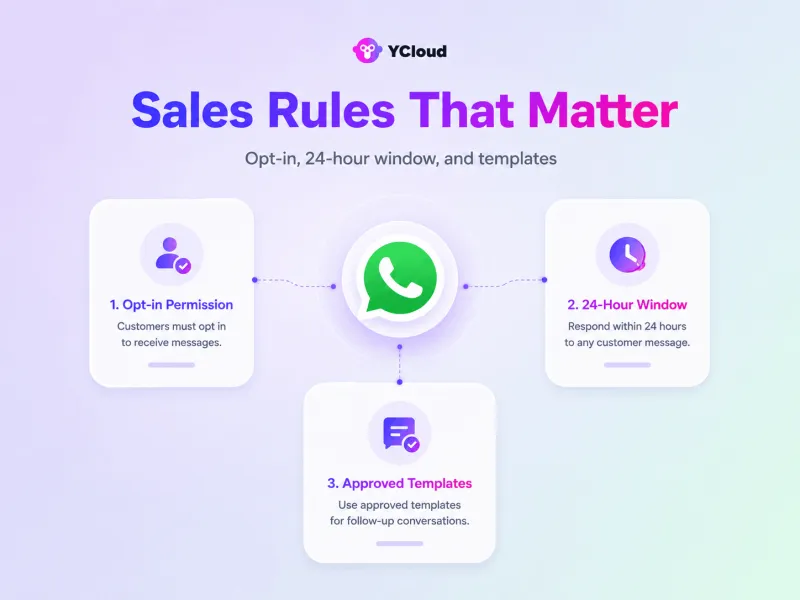
Rule 1: Get Permission Before Proactive Messaging
The opt-in should explain:
- Which business will contact them
- What type of messages they will receive
- How they can opt out
You can collect permission through:
- Website forms
- Checkout pages
- Click-to-WhatsApp ads
- QR codes
- Event registrations
- Product enquiry forms
- Existing customer journeys
Meta requires businesses to clearly communicate the business name and purpose while collecting WhatsApp opt-ins.
What this means for sales: Do not upload purchased contact lists or start cold WhatsApp campaigns. Build entry points that encourage interested customers to begin the conversation or knowingly subscribe.
Also, remember that a customer messaging you once does not give you unlimited permission to send future promotions. Record when, where, and what they opted in to receive.
Rule 2: Use the 24-Hour Window While the Conversation Is Active
When a customer sends your business a message, WhatsApp opens a 24-hour customer service window. The window resets whenever that customer sends another message, not whenever your business replies.
During this period, your team or AI agent can send free-form messages relevant to the active conversation, including:
- Product information
- Images and videos
- Recommendations
- Quotations
- Payment links
- Answers to buying questions
- Order assistance
WhatsApp confirms that each customer message opens or resets the 24-hour service window.
What this means for sales: Respond while the customer’s interest is still active. Use instant acknowledgements, automated qualification, and intelligent routing so valuable time is not lost waiting for the right salesperson.
Do not treat the 24-hour window as a deadline for pressuring customers. Treat it as the best opportunity to understand their needs and move the conversation towards a useful next step.
Rule 3: Use Approved Templates to Restart Conversations
Once the 24-hour window closes, your business cannot send a regular free-form message. To contact the customer again, you must use an approved WhatsApp message template.
Templates are commonly used for:
- Sales follow-ups
- Abandoned-cart reminders
- Appointment reminders
- Offers and product launches
- Payment reminders
- Order and delivery updates
- Replenishment reminders
Meta confirms that templates are the only message type allowed outside an active customer service window.
The template category must also match its actual purpose. For example, a promotional discount should use a marketing template, while a delivery update linked to an existing order may qualify as a utility template.
What this means for sales: Prepare and approve your most important templates before launching campaigns. Otherwise, your team may be unable to follow up when a lead, quotation, or checkout goes inactive.
Keep each template focused:
- Provide clear context
- Personalise it with relevant details
- Give the customer one obvious next step
- Include an easy way to opt out
- Avoid disguising promotions as transactional updates
When the customer replies, a new 24-hour service window opens and the conversation can continue normally.
Build these three rules into your WhatsApp sales process from the beginning. You will protect account quality while making opt-ins, live conversations, and follow-ups work together more effectively.
Next, let’s explore the practical WhatsApp sales quick wins you can implement without rebuilding your entire sales process.
WhatsApp Sales Quick Wins You Can Implement Right Away
WhatsApp sales quick wins are small operational changes that can improve lead quality, response speed, and follow-up consistency without rebuilding your entire sales process.
Start with these practical improvements.
Quick Win 1: Strengthen Your Highest-Intent Entry Points
Do not place the same generic WhatsApp link everywhere. Create product-specific links for your highest-traffic pages, advertisements, social profiles, and QR codes.
Use pre-filled messages such as:
“I’m interested in the Growth plan and would like to know the pricing.”
This tells your team what the prospect wants before the conversation begins.
Quick Win 2: Automate the First Exchange
Configure an instant greeting that acknowledges the enquiry and asks two or three useful qualification questions.
For example:
- Which product or service are you interested in?
- What is your approximate requirement?
- When are you planning to purchase?
An AI agent can collect these details before assigning the conversation, allowing sales representatives to focus on qualified opportunities.
Quick Win 3: Create a Simple Lead Pipeline
You do not need a complicated CRM structure to begin.
Start by assigning every WhatsApp conversation to four clear stages:
- New lead
- Qualified
- Follow-up required
- Closed
Make sure each open lead also has an assigned owner and next follow-up date. This single change can prevent serious enquiries from being forgotten.
Quick Win 4: Prepare Answers to Your Most Common Buying Questions
Identify the five questions your sales team answers repeatedly and create approved quick replies for them.
These may cover:
- Pricing
- Product availability
- Delivery time
- Return policy
- Payment process
Agents can personalise the saved response before sending it, providing faster answers without making the conversation feel scripted.
Quick Win 5: Create Follow-Up Templates Before You Need Them
Prepare WhatsApp templates for the sales situations that occur most often.
Start with:
- Unanswered product enquiry
- Quotation follow-up
- Payment reminder
- Appointment reminder
- Abandoned checkout
Having these templates approved in advance means your team can legally restart the conversation after the 24-hour service window closes.
Quick Win 6: Move Complex Decisions From Chat to a Call
Typing can slow down high-value conversations involving detailed requirements, objections, or negotiations.
Offer a WhatsApp call when a qualified prospect needs further explanation:
“Would you like a quick WhatsApp call so I can explain the options?”
The WhatsApp Business Calling API allows businesses to receive calls and, with the customer’s permission, initiate outbound calls while keeping the interaction connected to the WhatsApp journey.
Quick Win 7: Review a Small Sales Dashboard Every Week
Begin with a few metrics directly connected to the sales journey:
- New WhatsApp leads
- Qualified leads
- Average first response time
- Leads awaiting follow-up
- WhatsApp conversions
- Revenue generated
Reviewing these numbers weekly will quickly reveal whether the problem is lead quality, slow responses, weak qualification, missed follow-ups, or poor closing.
These quick wins do not require a complete transformation. Implementing even a few of them can make WhatsApp conversations easier to manage and more likely to move towards a sale.
Next, let’s see how YCloud can bring these strategies, automations, AI agents, and sales conversations together in one platform.
Build a Scalable WhatsApp Sales Engine With YCloud
Knowing how to sell on WhatsApp is only the beginning. To scale, you need a system that captures leads, qualifies buyers, manages conversations, automates follow-ups, and tracks results.
YCloud brings these capabilities together through:
- Official WhatsApp Business API
- WhatsApp AI agents
- No-code chatbot automation
- Shared team inbox
- Bulk broadcasts and audience segmentation
- Automated customer journeys
- CRM and e-commerce integrations
- Campaign and team performance analytics
Start with one high-value workflow, such as lead qualification, abandoned-cart recovery, or sales follow-ups, and improve it using real conversation data. You can then add more automation as your WhatsApp sales volume grows.
With YCloud, WhatsApp becomes more than a busy inbox. It becomes a structured sales channel where AI, automation, and human teams work together to move customers from enquiry to purchase.
Next, let’s look at how to get started with YCloud.
How To Get YCloud?
Kindly click on the banner below to book a FREE DEMO and learn more about our product offering, features and pricing plans.
Built with AI at its core, YCloud is the ultimate WhatsApp marketing and automation solution, giving you everything you need in one powerful platform.
Now market, sell, support, and scale your business by 10X with YCloud!
Ready to try? Explore how to get YCloud for FREE next!
How to Get YCloud for FREE?
It's Simple!
Subscribe to our FREE plan and get a free lifetime experience of YCloud with unlimited messaging API.
Book a FREE Demo and see how YCloud can power up your WhatsApp marketing strategy!
🚀 Try YCloud today and experience how effortless WhatsApp automation can be when you have the right partner.
Wrapping-Up! Start Selling on WhatsApp Today…!
Successful WhatsApp sales come from making every step, from product discovery to payment and follow-up, simple, timely, and personal.
Start with one sales workflow, measure the results, and improve from there.
With YCloud, you can combine WhatsApp automation, AI agents, and human conversations to turn more enquiries into customers.
Frequently Asked Questions
How do I start selling products on WhatsApp?
Create a WhatsApp Business account, complete your business profile, add your products or services, and create entry points through your website, social media, ads, or QR codes. You can then answer questions, recommend products, share payment links, confirm orders, and follow up within the same conversation.
Can I sell on WhatsApp without a website?
Yes. You can display products through a WhatsApp catalogue, share images and videos, answer questions, and send secure checkout or payment links directly in the chat.
A website becomes useful when you need advanced product discovery, inventory management, or a more detailed checkout experience.
Is WhatsApp good for sales?
Yes, especially when customers need quick answers, personalised recommendations, or assistance before purchasing. WhatsApp keeps product discovery, qualification, objection handling, and follow-up within one continuous conversation.
Should I use the WhatsApp Business App or WhatsApp Business API for sales?
Use the WhatsApp Business App if one person or a small team handles a limited number of conversations manually.
Choose the WhatsApp Business API when you need multiple agents, AI agents, chatbots, automated journeys, broadcasts, CRM integrations, routing, and detailed analytics.
How much does it cost to sell through WhatsApp?
The WhatsApp Business App is free to download. For the WhatsApp Business Platform, Meta charges for delivered messages based on the message category and recipient’s market, while the platform provider may charge an additional subscription or service fee. You can check Meta’s current WhatsApp Business Platform pricing for country-specific rates.
YCloud offers a free-forever plan and does not add a markup to Meta’s official WhatsApp message fees.
Is it legal to sell products on WhatsApp?
Generally, yes, provided your products are permitted, customers have given the necessary consent, and your business follows WhatsApp policies and applicable data protection, consumer protection, and marketing laws.
Requirements can differ by country and industry, so regulated businesses should confirm their specific legal obligations.
Are there products that cannot be sold on WhatsApp?
Yes. WhatsApp restricts or prohibits the sale and promotion of certain illegal, regulated, or high-risk products and services. These include categories such as firearms, drugs, tobacco, certain financial services, gambling, adult products, and misleading business models.
Review the current WhatsApp Business Messaging Policy before adding products or launching campaigns.
Do customers need to opt in before receiving sales messages?
Yes. Customers must clearly understand which business will contact them and what type of messages they are agreeing to receive.
You can collect opt-ins through website forms, checkout pages, Click-to-WhatsApp ads, QR codes, event registrations, or direct messaging links. Avoid assumed consent, pre-selected checkboxes, and purchased contact lists.
What is the WhatsApp 24-hour rule?
When a customer sends your business a message, a 24-hour customer service window opens or resets. During this period, your team or AI agent can send free-form replies related to the active conversation.
After the window closes, you must use an approved message template to contact the customer again.
What are WhatsApp message templates?
Message templates are pre-approved messages used to initiate or restart conversations outside the 24-hour service window.
Sales teams commonly use them for quotation follow-ups, abandoned-cart reminders, promotions, payment reminders, appointments, and order updates. Each template must use the appropriate marketing, utility, or authentication category.
Can I use WhatsApp broadcasts to sell products?
Yes, provided recipients have opted in and your messages follow WhatsApp’s template and messaging policies.
Segment your audience by product interest, purchase history, location, or lifecycle stage instead of sending the same promotion to every contact.
Are payments made through WhatsApp secure?
Customers may complete purchases through supported WhatsApp payment features or secure checkout links provided by your payment gateway. Transaction security depends on the payment method, provider, and market.
Never ask customers to share complete card details, passwords, PINs, or one-time passwords inside a WhatsApp chat.
Can the WhatsApp API send order and payment notifications?
Yes. The WhatsApp API can automatically send order confirmations, payment receipts, shipping updates, delivery alerts, appointment reminders, and other transaction-related notifications using the appropriate templates.
Can AI agents handle WhatsApp sales conversations?
Yes. WhatsApp AI agents can understand customer intent, answer product questions, qualify leads, recommend suitable options, collect information, and complete approved actions through connected business systems.
Human representatives should remain available for negotiations, sensitive concerns, complex requirements, and high-value purchases.
How can I track WhatsApp sales and ROI?
Connect WhatsApp with your CRM, e-commerce platform, or analytics system and track each conversation from its original source to the final purchase.
Important metrics include qualified leads, response time, follow-up rate, conversion rate, recovered revenue, revenue per conversation, and repeat purchases.
How can YCloud help me sell on WhatsApp?
YCloud brings the official WhatsApp Business API, AI agents, no-code chatbots, broadcasts, customer journeys, a shared team inbox, integrations, and analytics into one platform.
Businesses can use it to capture and qualify leads, automate follow-ups, manage sales conversations, and track performance without making every step dependent on a salesperson.
Related Articles


Make your business communications much easier!


Trusted by




