

WhatsApp WebView + Magic Link: How to Turn Clicks Into Conversions

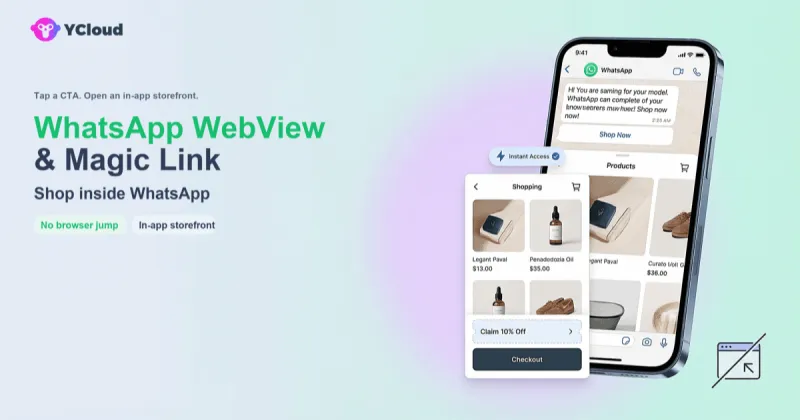
Marketing teams usually lose users for a simple reason: the path from message to action is too long.
In a typical WhatsApp campaign, a user taps a message, gets pushed into an external browser, hits a login wall, waits for a code, and then decides whether the task is still worth finishing. Every extra step creates another chance to abandon the journey.
WhatsApp WebView and Magic Link change that equation. Used together, they let businesses keep users inside WhatsApp while completing identity verification in the background. The result is a shorter path, lower friction, and a much better chance of turning intent into action.
Why conversion breaks in the traditional WhatsApp flow
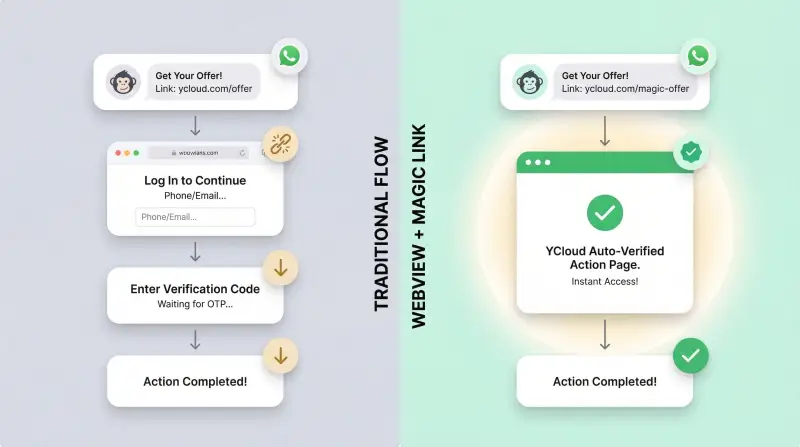
Each extra step in a mobile journey increases drop-off. A conventional WhatsApp conversion path often looks like this:
- A user receives a promotional or service message on WhatsApp.
- They click a link.
- The link opens in an external browser.
- The page asks them to log in.
- They enter a phone number or email.
- They wait for an OTP or verification code.
- They enter the code and return to the intended action.
That is too much friction for a mobile-first channel. In practice, businesses often see the biggest losses at the browser jump and login stages, because both actions interrupt user intent.
The combination of WebView and Magic Link compresses this into a near one-tap experience.
What is WhatsApp WebView?
WhatsApp WebView is an in-app browser container that opens a web page directly inside the WhatsApp experience, instead of sending the user to Safari or Chrome.
That difference sounds small, but it matters:
- Users stay in the conversation context.
- The brand experience feels continuous rather than interrupted.
- Returning to the chat is immediate.
- There is less chance of losing the user during an app switch.
For business flows, WebView is not just a UI convenience. It is the container that makes a more controlled and conversion-friendly journey possible.
What is Magic Link?
Magic Link is a passwordless authentication method that encodes identity and verification data into a secure link. When the user clicks the link, the backend validates the token and signs the user in automatically.
A typical verification URL looks like this:
https://shop.example.com/auth/verify?token=dBjftJeZ4CVP-mB92K27uhbUJU1p1r_wW1gFWFOEjXkThat token can include information such as:
- The user's WhatsApp-linked identity
- A session or campaign identifier
- A timestamp or expiration window
- A digital signature
The key point is that the user does not need to type anything. No password. No OTP. No verification-code delay.
Why WebView and Magic Link work better together
These two technologies solve different parts of the same problem.
- WebView removes the disruptive browser jump.
- Magic Link removes the disruptive login step.
Used separately, each helps a little. Used together, they create a much smoother business loop:
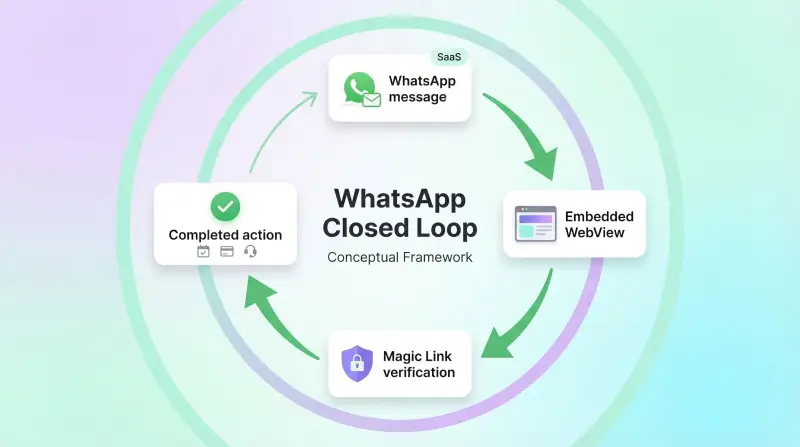
- A user receives a message on WhatsApp.
- They tap the CTA.
- The page opens inside WhatsApp.
- The token is verified automatically.
- The user lands directly on the action they came for.
- They finish the task and return to the conversation.
That is what makes the combination strategically important. It turns WhatsApp from a notification channel into a transaction path.
Where this matters most
The best use cases are workflows with both high intent and high friction.
Appointment and booking flows
Healthcare providers, salons, gyms, restaurants, and service businesses often send reminders, confirmations, or rescheduling requests through WhatsApp.
In the traditional model, users tap the message, leave WhatsApp, sign in again, and then decide whether to continue. Many do not.
With WebView plus Magic Link, the user can open the page already recognized, review the booking, and confirm, reschedule, or pay immediately.
Financial and payment scenarios
Banks, insurers, and payment platforms need both convenience and control. Typical use cases include:
- Bill or statement review
- Claims progress updates
- Payment confirmation
- Secure account actions
Magic Link supports security controls such as single use, expiration windows, and optional device binding. WebView keeps the journey contained, which can reduce confusion and lower the perceived risk of being redirected to an unknown page.
Customer support and service tickets
Support links often suffer from unnecessary friction. A user gets a ticket update, clicks through, faces a login step, and drops off before reviewing the case.
With a WhatsApp-native flow, the user can open the ticket, upload supporting files, confirm a proposed resolution, or continue the process in one session.
The implementation model
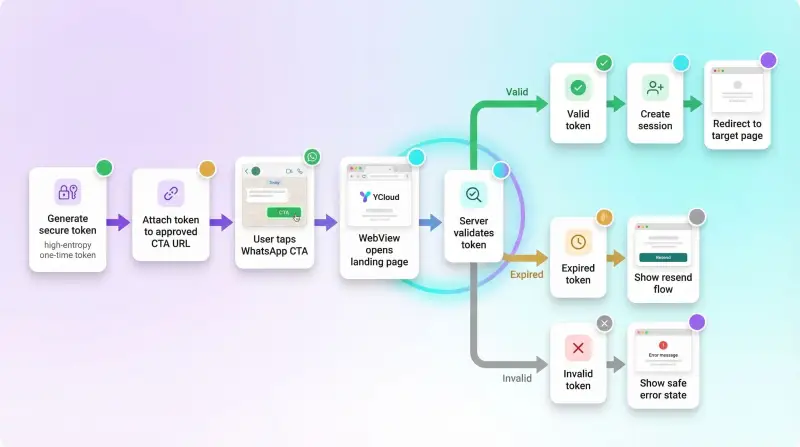
At a technical level, the system has four core layers.
1. Generate a secure token
The Magic Link token should behave like a one-time credential:
- Generated with a cryptographically secure random source
- Long enough to resist brute-force attempts
- Encoded safely for URLs
- Signed or otherwise verified on the backend
2. Store and expire the token safely
Treat tokens like sensitive credentials, not like casual identifiers.
Recommended controls include:
- Hash tokens before storage
- Use Redis or another store with TTL support
- Set a short validity window, usually 5 to 15 minutes
- Mark tokens as used immediately after success
3. Deliver the link through WhatsApp templates
If you send proactive messages through WhatsApp Business API, the link typically needs to be placed in an approved CTA URL button rather than in plain-body text.
Example template structure:
Body: "Hi {{1}}, tap the button below to continue securely. This link expires in 5 minutes."
Button: CTA URL -> https://shop.example.com/auth/verify?token={{2}}
In practice, the process is:
- Create the template in your BSP or platform.
- Submit it for Meta review.
- Wait for approval.
- Send the template through campaign tools or API calls.
4. Handle the landing states clearly
After the user clicks, the page should reliably handle three states:
| State | What the system should do | What the user should see |
|---|---|---|
| Valid token | Create session and redirect | Immediate access |
| Expired token | Offer resend or refresh flow | Clear recovery path |
| Invalid token | Stop access without leaking details | Simple error message |
Security: one-click does not mean weak security
It is easy to assume that fewer steps mean weaker protection. That is not necessarily true.
OTP flows rely on the assumption that only the intended recipient can receive and use the verification code. That assumption can break in SIM-swap or device-compromise scenarios.
Magic Link uses a different model. Security comes from:
- High-entropy tokens
- Short expiration windows
- One-time use
- TLS-secured transport
- Optional device or session binding
- Abuse detection and anomaly monitoring
When implemented correctly, this is not a shortcut around security. It is a redesign of the authentication experience around modern threat models and mobile behavior.
Why this unlocks a true business loop inside WhatsApp
There is a broader platform story here.
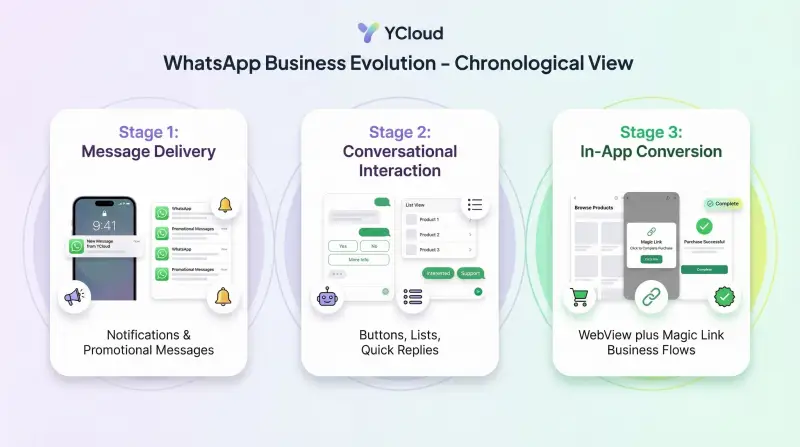
Stage 1: message delivery
Businesses used WhatsApp mainly to send notifications and promotional messages.
Stage 2: conversational interaction
Buttons, list messages, and interactive replies made it possible to collect simple inputs without leaving the chat.
Stage 3: in-app transaction paths
WebView plus Magic Link makes it possible to handle more complex tasks, such as reviewing an order, confirming a booking, resuming a claim, or completing a service flow, without breaking context.
This is the real shift. WhatsApp stops being only a traffic source and starts acting like a business surface.
How to evaluate whether this is right for your business
This model works best when:
- Users mainly operate on mobile devices
- Identity verification is required before action
- The current journey includes multiple steps
- Conversion rates are highly sensitive to friction
It is less compelling when:
- The content is informational only
- No login or verification is needed
- The target workflow is already a single step
- The experience depends heavily on desktop-only features
A practical rollout plan
Do not start with a full-scale migration. Start with a narrow, measurable test.
1. Pick one high-friction use case
Good candidates include:
- Appointment confirmation
- Order lookup
- Support ticket review
- Payment reminder follow-through
2. Build an MVP
Keep the first version focused:
- One entry template
- One secure token flow
- One target page
- Basic fallback handling
3. Run an A/B test
Compare the new flow with the current browser-jump flow on metrics such as:
- Click-through rate
- Completion rate
- Average completion time
- Bounce rate after opening
4. Expand based on evidence
If the results are strong, scale to more use cases and add more controls, analytics, and personalization.
Common implementation risks
Before shipping, make sure the team has thought through:
- Backend token generation and verification logic
- Template approval lead times
- Privacy and data-protection obligations
- Compatibility testing across iOS and Android
- Fallback paths for unsupported scenarios
- Payment and embedded-form behavior inside WebView
Final takeaway
The main value of WhatsApp WebView plus Magic Link is simple: it removes the two biggest conversion killers in mobile journeys, the browser jump and the login wall.
That is why this pattern matters. It does not just make the experience cleaner. It changes what businesses can realistically expect users to complete inside WhatsApp.
For teams already investing in WhatsApp Business API, this is one of the clearest ways to turn reach into action.
About YCloud
YCloud helps businesses build WhatsApp journeys that are easier to launch, safer to operate, and more effective at conversion. If you want to explore WebView, Magic Link, or other WhatsApp Business API use cases, contact the YCloud team for implementation guidance.
Frequently Asked Questions
Can Magic Links be intercepted?
Any link-based flow must assume links can be exposed. That is why expiration, one-time use, secure transport, and anomaly detection are essential. A properly implemented Magic Link sharply narrows the abuse window.
What if a user forwards the link?
Does every WhatsApp version support WebView?
Can payments work in WebView?
Related Articles


Make your business communications much easier!


Trusted by




