Customer Support

English

The Most Common Mistakes People Make With Meta WhatsApp API

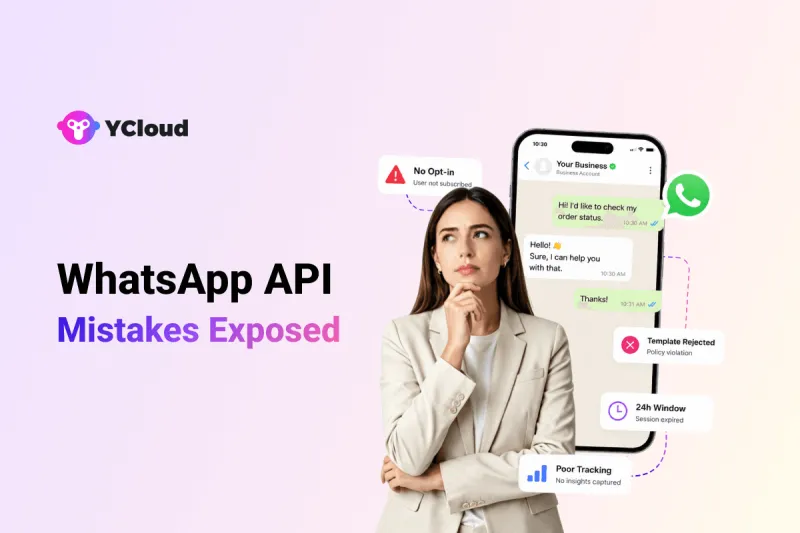
“Most businesses don’t fail with Meta WhatsApp API because the channel doesn’t work. They fail because they use it without the right setup, strategy, and compliance discipline.”
But it is not a shortcut for bulk messaging.
Many businesses start using it without proper opt-ins, approved templates, audience segmentation, automation logic, or tracking.
That’s where problems begin.
This guide breaks down the most common Meta WhatsApp API mistakes businesses make before, during, and after implementation, and how to avoid them early.
Next, let’s understand why businesses get WhatsApp API wrong in the first place.
Why Businesses Get WhatsApp API Wrong
Most businesses don’t get WhatsApp API wrong because of one big mistake.
It usually starts with a few wrong assumptions.
- They expect it to work like the WhatsApp Business App.
- They start sending messages before mapping use cases, customer journeys, opt-ins, templates, or team workflows.
That is where the gap begins.
Marketing wants faster campaigns.
Sales wants more leads.
Support wants quicker replies.
Tech wants a clean setup.
Support wants quicker replies.
Tech wants a clean setup.
But without the right planning, these teams end up working in silos.
The result?
Poor setup. Weak automation. Template issues. Missed customer replies. Broken integrations. And no clear way to measure what is working.
WhatsApp API is not just a messaging tool. It is a business communication channel that needs planning, compliance, integration, and team training.
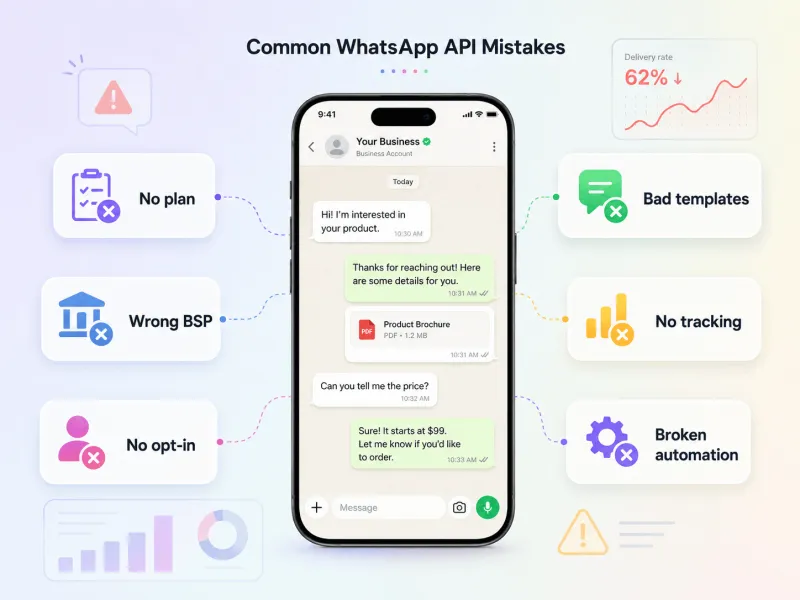
Next, let’s look at the first major mistake: starting with WhatsApp API without a clear use case.
1. Starting Without a Clear WhatsApp API Use Case
Many businesses subscribe to WhatsApp API first and plan later.
That is the first mistake.
They don’t clearly decide whether WhatsApp will be used for:
- Marketing campaigns
- Sales follow-ups
- Customer support
- OTPs and alerts
- Payment reminders
- Order updates
- Post-purchase engagement
So everything starts happening at once.
Marketing sends broadcasts.
Sales follows up manually.
Support replies randomly.
Automation is added without a proper journey.
Sales follows up manually.
Support replies randomly.
Automation is added without a proper journey.
The result is scattered messaging, weak customer experience, and poor ROI.
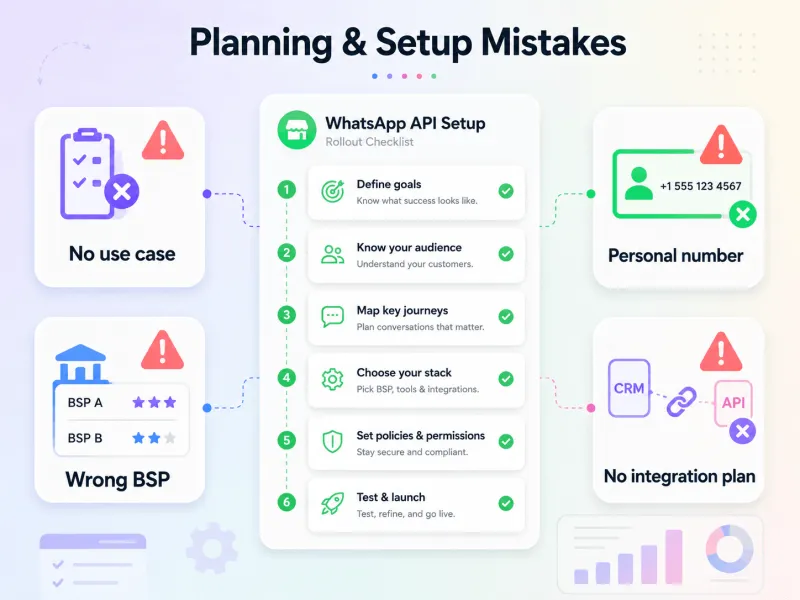
Before using Meta WhatsApp API, businesses should define their top 3–5 use cases clearly. They should know who they want to message, why they want to message them, and what action they expect from the customer.
That clarity makes implementation easier and prevents WhatsApp from becoming just another messy communication channel.
Next, let’s look at another common mistake: choosing the wrong WhatsApp API provider.
2. Choosing the Wrong WhatsApp API Provider
Cheap providers can look attractive in the beginning.
But they can become expensive later.
Many businesses choose a WhatsApp API provider only by comparing monthly plans. They miss the bigger picture:
- Hidden BSP or platform markups
- Poor onboarding support
- Limited shared inbox features
- Weak automation and analytics
- No clear delivery visibility
- Little to no template guidance
- Limited CRM or website integration support
- Unstable or shared infrastructure
The problem is simple.
If your provider cannot help you set up, scale, track, and optimize WhatsApp properly, your team will end up doing more manual work after going live.
That is why businesses should evaluate a BSP on more than pricing. Look at onboarding, compliance support, inbox, automation, APIs, integrations, analytics, template support, and scalability.
With YCloud, businesses get a ready-to-use WhatsApp API platform built to scale from day one. There are no extra markups on WhatsApp messaging, and teams also get support for setup, templates, automation, and campaign execution.
The right provider does not just give API access.
It helps you use WhatsApp API correctly.
Next, let’s look at another common mistake: using the wrong number for WhatsApp API.
Know about the YCloud WhatsApp API Pricing HERE
3. Using a Personal or Existing WhatsApp Number Without Thinking
Your WhatsApp API number is not just a contact number.
It becomes part of your business identity.
Still, many businesses try to use a personal number or an active WhatsApp Business App number without checking the migration impact.
That creates avoidable confusion.
- They don’t verify if the number is eligible for API setup.
- They don’t plan who will own and manage the number.
- They don’t check display name approval requirements.
- They don’t think about what customers will see when they receive a message.
- They don’t think about the personal and business messages colliding together.
And once the number is connected to campaigns, support, and automation, changing it later can disrupt customer communication.
The smarter approach is to treat your WhatsApp API number like a long-term business asset.
Choose the right number.
Set the right display name.
Assign clear ownership.
Plan how it will be used across sales, support, marketing, and operations.
Set the right display name.
Assign clear ownership.
Plan how it will be used across sales, support, marketing, and operations.
A rushed number decision can hurt continuity. A planned number strategy keeps the customer experience clean from day one.
Next, let’s look at one of the biggest compliance mistakes: ignoring customer opt-in rules.
4. Ignoring Customer Opt-In Rules
This is one of the riskiest WhatsApp API mistakes.
Some businesses upload random databases and start messaging people directly.
- Old leads.
- Purchased lists.
- Scraped numbers.
- Inactive contacts.
That is not how WhatsApp API should be used.
Before sending business-initiated messages, the user must have shared their mobile number and agreed to receive future messages or calls from the business.
But many teams don’t track this properly.
They don’t know when the user opted in.
They don’t know where the consent came from.
They don’t know what type of updates the user agreed to receive.
They don’t know where the consent came from.
They don’t know what type of updates the user agreed to receive.
That creates compliance risk and poor customer experience.
Opt-in is not just a checkbox. It is proof that the customer actually agreed to hear from you.
So before launching campaigns, businesses should build a clear opt-in process and store the source, date, consent language, and communication type.
Next, let’s look at another mistake that hurts trust: not giving users a clear way to opt out.
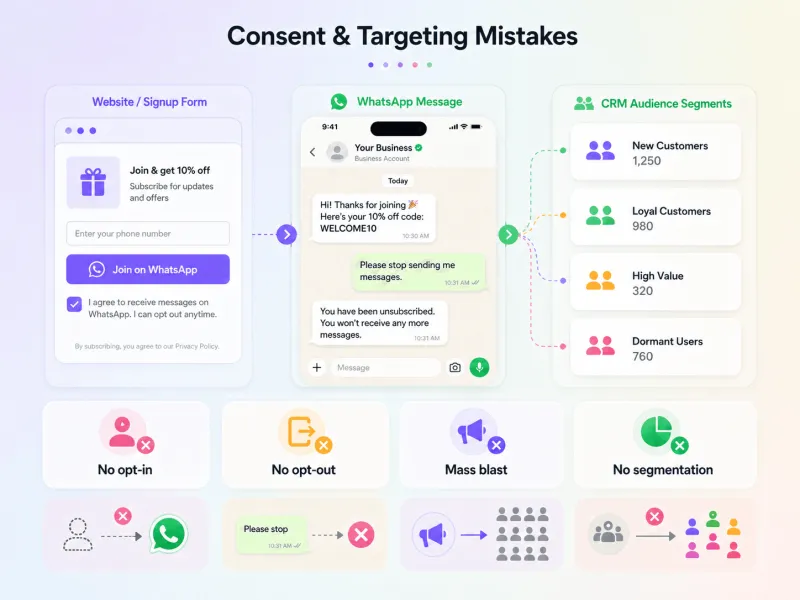
5. Not Providing a Clear Opt-Out Option
Getting customer consent is only one side of compliance.
Giving them an easy way to stop messages is just as important.
Many businesses collect opt-ins but forget to manage opt-outs properly.
- They don’t add a simple “Reply STOP to unsubscribe.”
- They don’t update unsubscribe requests in their CRM.
- They keep sending campaigns to users who already asked not to receive updates.
That is where trust breaks.
Users may start blocking, reporting, or ignoring messages. Over time, this can hurt message quality and campaign performance.
A clean opt-out process shows that your business respects customer choice.
Make it simple.
Track it properly.
Remove users from future campaigns quickly.
Track it properly.
Remove users from future campaigns quickly.
This protects both customer trust and your WhatsApp messaging quality.
Next, let’s look at a bigger strategic mistake: treating WhatsApp API like a bulk messaging tool.
6. Treating WhatsApp API Like a Bulk SMS Tool
But many businesses use it that way.
They send the same campaign to every contact.
- No segmentation.
- No personalization.
- No timing logic.
- No understanding of user intent.
That is when WhatsApp starts feeling like spam.
A new lead, an active customer, and an inactive user should not receive the same message. Their intent is different. Their stage is different. Their response expectation is different.
Without proper segmentation and frequency control, even a good offer can annoy users.
WhatsApp API works best when messages feel relevant, timely, and conversational.
So instead of asking, “How many people can we send this to?” businesses should ask, “Who actually needs this message right now?”
That shift makes campaigns more useful, less intrusive, and easier to scale.
Next, let’s look at another common mistake: sending too many marketing templates.
7. Sending Too Many Marketing Templates
More messages do not always mean more conversions.
Many businesses overuse marketing templates for every small update.
- Discounts.
- Offers.
- Reminders.
- Flash sales.
- Repetitive follow-ups.
At first, this may look like activity.
But for customers, it can quickly feel noisy.
If users keep receiving messages that are not relevant to them, they may ignore, block, or report the business. Meta also considers user feedback and message quality when deciding how much a business can scale its messaging.
That is why marketing templates should be used carefully.
Don’t send every offer to every contact.
Don’t repeat the same promotion too often.
Don’t ignore customer behavior.
Don’t repeat the same promotion too often.
Don’t ignore customer behavior.
Balance promotional messages with useful updates, support replies, order alerts, reminders, and value-driven communication.
WhatsApp is a high-trust channel. Treat it like one.
Next, let’s look at another common mistake: misunderstanding the 24-hour customer service window.
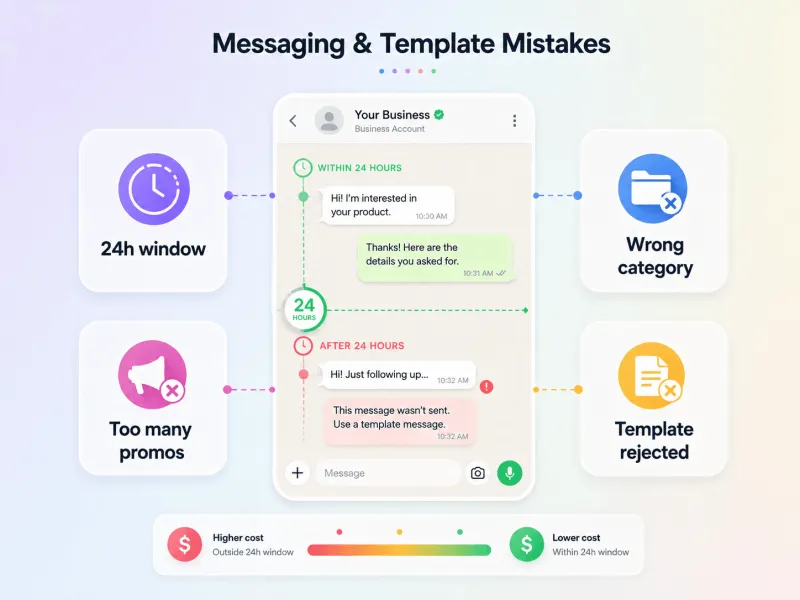
8. Misunderstanding the 24-Hour Customer Service Window
They assume they can reply to customers anytime.
But that is not how WhatsApp API works.
When a customer messages your business, a 24-hour window opens. During this window, your team can send free-form replies without using templates.
Once that window closes, you cannot send normal messages directly. You need to use an approved message template to restart the conversation.
This mistake often creates problems like:
- Failed follow-up messages
- Broken support workflows
- Delayed sales replies
- Confused automation logic
- Unplanned template usage
Some teams also mix up support replies with proactive outreach.
A reply to an active customer query is different from sending a new promotional or follow-up message after the window has closed.
That is why the 24-hour window should guide your entire WhatsApp workflow.
Your automation, sales follow-ups, support replies, and templates should all be planned around when the customer last messaged you.
Next, let’s look at another mistake that directly affects campaign cost: not understanding WhatsApp API pricing logic.
9. Not Understanding WhatsApp API Pricing Logic
WhatsApp API pricing is not just about the number of messages you send.
It also depends on what type of message you send and when you send it.
Many businesses assume every WhatsApp API message is charged the same way. That leads to poor budget planning, especially when campaigns scale.
For example, a marketing template, utility template, authentication message, and service reply may follow different pricing rules. Meta also states that utility templates sent within an open customer service window are free.
This is where businesses make mistakes.
- They send templates when a free-form reply would work.
- They don’t plan high-volume campaigns properly.
- They miss the cost benefit of replying inside the 24-hour window.
The goal is not just to send fewer messages.
The goal is to send the right message type at the right time.
A clear pricing strategy helps businesses control costs without hurting customer experience.
Next, let’s look at another mistake that affects both approval and engagement: creating poor message templates.
10. Creating Poor Message Templates
Message templates are not just formalities.
They decide whether your campaign gets approved, delivered, and understood.
Many businesses create templates that are too promotional, too vague, or too generic.
- The message has no clear context.
- The CTA is weak.
- Variables are overused.
- The category does not match the message intent.
- The copy feels like a mass ad instead of a useful update.
This can lead to template rejections, low engagement, and poor customer response.
A good WhatsApp template should be simple, specific, and easy to understand. It should tell the customer why they are receiving the message and what action they need to take next.
Examples of Weak vs Better Template Copy
Weak:
Hi {{1}}, big offer just for you. Click now and grab the deal before it ends.
Hi {{1}}, big offer just for you. Click now and grab the deal before it ends.
Better:
Hi {{1}}, your selected items are still available. Complete your order today and get {{2}} off. Tap here to continue: {{3}}
Hi {{1}}, your selected items are still available. Complete your order today and get {{2}} off. Tap here to continue: {{3}}
Weak:
Hello {{1}}, please check this important update from us.
Hello {{1}}, please check this important update from us.
Better:
Hi {{1}}, your order {{2}} has been shipped and is expected to arrive by {{3}}. Track it here: {{4}}
Hi {{1}}, your order {{2}} has been shipped and is expected to arrive by {{3}}. Track it here: {{4}}
The difference is clarity.
Better templates are not just shorter. They are more relevant, more specific, and easier for customers to act on.
Next, let’s look at another mistake businesses make after writing templates: ignoring approval and rejection reasons.
11. Ignoring Template Approval and Rejection Reasons
Many teams treat template approval like a small backend task.
It is not.
A campaign can be ready, the audience can be segmented, and the offer can be strong, but if the template is rejected, everything gets delayed.
This usually happens when teams submit templates without checking the basics.
- Wrong category.
- Too much promotional language in a utility template.
- Unclear message intent.
- Missing context.
- Repeated resubmission without fixing the actual issue.
Instead of reading the rejection reason and improving the copy, some teams keep submitting similar versions again and again.
That only wastes time.
Template approval should be part of campaign planning from the beginning. Businesses should prepare templates early, choose the right category, keep the message clear, and leave enough time for review.
A well-planned template process keeps campaigns moving without last-minute blockers.
Next, let’s look at another mistake that affects campaign relevance: skipping audience segmentation.
12. Skipping Audience Segmentation
This is where many WhatsApp campaigns lose relevance.
Businesses create one message and send it to everyone.
- New leads.
- Active customers.
- Repeat buyers.
- Inactive users.
- High-intent prospects.
Everyone gets the same copy.
That is the problem.
A user who just signed up should not receive the same message as someone who purchased last month. A cold lead, a cart abandoner, and a loyal customer all need different communication.
Without segmentation, messages feel random.
- There is no context.
- No personalization.
- No timing logic.
- No connection to the customer’s stage.
Good segmentation can be based on source, interest, location, language, purchase history, engagement level, or funnel stage.
The more relevant the message, the lower the chances of spam complaints — and the higher the chances of conversion.
WhatsApp API works better when every message feels like it was sent for a reason.
Next, let’s look at another common mistake: over-automating without a human handoff.
13. Over-Automating Without a Human Handoff
Automation is useful.
But it should not trap customers.
Many businesses set up chatbots to answer every query, but forget to add a clear human handoff when the bot cannot help.
That creates frustration.
- The customer asks a simple question.
- The bot gives fixed replies.
- There is no agent option.
- No escalation path.
- No way to handle urgent or high-value queries.
This makes the experience feel cold and restrictive.
Meta also expects businesses using automation to provide clear escalation options, such as human agent support, phone, email, web support, store visit, or a support form.
So automation should be planned carefully.
Use bots for FAQs, lead qualification, order updates, reminders, and basic routing. But when the query needs judgment, empathy, or urgency, the customer should be able to reach a human.
Automation should reduce workload.
It should not block customers from getting help.
Next, let’s look at another mistake that limits WhatsApp API’s real value: poor CRM, website, and backend integration.
14. Not Integrating WhatsApp API With CRM, Website, or Backend Systems
WhatsApp API should not work in isolation.
But many businesses use it only as a messaging inbox.
That creates manual work.
- Leads stay inside WhatsApp.
- Sales teams copy details into CRM manually.
- Support teams don’t see customer history.
- Order, payment, booking, or ticket updates don’t sync automatically.
This slows everything down.
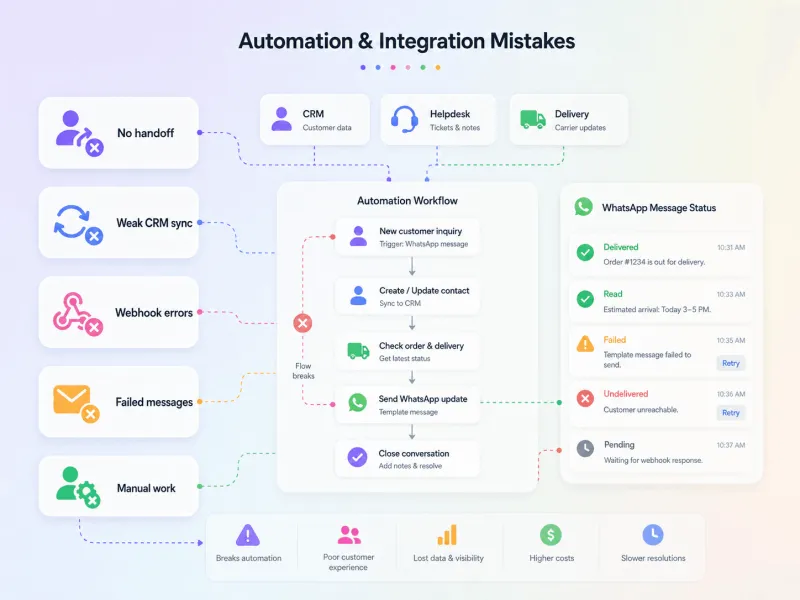
A customer may ask about an order, but the agent has to check another system. A lead may come from the website, but the sales team has to assign it manually. A support ticket may be created, but the WhatsApp conversation is not linked.
That defeats the purpose of using an API.
The real value of WhatsApp API comes when it connects with your CRM, website forms, ecommerce store, payment system, helpdesk, and backend tools.
So teams can capture leads, assign conversations, trigger updates, send reminders, and track customer history in one place.
Without integration, WhatsApp becomes another manual channel.
With integration, it becomes part of your business workflow.
Next, let’s look at another technical mistake: ignoring webhooks, delivery errors, and failed messages.
15. Ignoring Webhooks, Delivery Errors, and Failed Messages
Webhooks are easy to ignore until something breaks.
They tell your system what happened after a message was sent.
- Was it delivered?
- Was it read?
- Did it fail?
- Did the user reply?
- Was the number invalid?
- Was the template rejected?
Without this visibility, your WhatsApp automation becomes blind.
Many businesses set up campaigns but don’t monitor failed messages, blocked users, invalid numbers, rate limits, or delivery issues. So messages fail quietly, automation stops working, and teams don’t know where the problem started.
This is especially risky for alerts, OTPs, order updates, payment reminders, and support workflows.
A failed message is not just a technical error.
It can mean a missed lead, a delayed update, or a frustrated customer.
Businesses should configure webhooks properly, track delivery events, monitor failures, and build retry or fallback logic where needed.
If you don’t track what happens after sending, you’re only seeing half the WhatsApp API journey.
Next, let’s look at another common mistake: underestimating the technical setup required for WhatsApp API.
16. Underestimating Technical Setup Requirements
WhatsApp API setup is not just “connect a number and start sending.”
That is where many businesses go wrong.
A weak setup can create problems later across delivery, automation, tracking, and support.
Common issues include:
- Wrong phone number linking
- Missing access tokens
- Webhook verification errors
- Incorrect callback URLs
- Poor API testing
- No sandbox or test flow
- No fallback or monitoring setup
These may look like small technical gaps.
But once campaigns go live, they can break important workflows.
Messages may fail.
Replies may not sync.
Automation may stop.
Delivery reports may not update.
Support teams may miss customer responses.
Replies may not sync.
Automation may stop.
Delivery reports may not update.
Support teams may miss customer responses.
That is why technical setup should be tested properly before launch.
Businesses should check number registration, webhook events, templates, APIs, message status updates, CRM sync, and fallback flows before going live.
A clean setup in the beginning prevents operational chaos later.
Next, let’s look at another mistake that happens after setup: not training the team to use WhatsApp API properly.
17. Not Training Sales, Marketing, and Support Teams
Sometimes the platform is ready.
But the team is not.
That is another common WhatsApp API mistake.
- Sales teams may not know when to use templates.
- Marketing teams may not understand template categories.
- Support agents may miss the 24-hour window.
- Managers may not define escalation rules.
So everyone uses WhatsApp differently.
- Some follow up manually.
- Some send the wrong message type.
- Some miss customer replies.
- Some depend too much on automation.
This creates inconsistency across the customer journey.
WhatsApp API success needs more than software access. It needs clear internal SOPs.
Teams should know:
- When to use templates
- When to reply manually
- When to escalate to a human agent
- How to handle opt-outs
- How to track leads and conversations
- What not to send on WhatsApp
A trained team can use WhatsApp API with more control, speed, and consistency.
Without training, even the best setup becomes messy.
Next, let’s look at the final mistake: not tracking performance after going live.
18. Not Tracking Performance After Going Live
Many businesses launch WhatsApp API and stop there.
That is a mistake.
Going live is only the beginning.
If teams don’t track performance, they don’t know what is working, what is failing, or where customers are dropping off.
They miss important signals like:
- Messages sent
- Messages delivered
- Messages read
- Messages failed
- Replies received
- Conversions generated
- Templates performing poorly
- Agents missing conversations
Without this data, teams keep repeating the same mistakes.
A campaign may have poor delivery.
A template may get low replies.
An agent may be overloaded.
A segment may not be converting.
A message may be getting ignored.
A template may get low replies.
An agent may be overloaded.
A segment may not be converting.
A message may be getting ignored.
But without reporting, everything looks normal on the surface.
WhatsApp API should be treated like a performance channel, not a one-time setup.
Businesses should review campaign reports, template performance, delivery errors, agent performance, opt-outs, and quality signals regularly.
The more you track, the easier it becomes to improve campaigns, reduce failed messages, and scale WhatsApp with control.
Next, let’s bring everything together with a simple checklist to avoid these Meta WhatsApp API mistakes.
How to Avoid These WhatsApp API Mistakes
The best way to avoid WhatsApp API mistakes is to plan before you scale.
Use this simple checklist:
- Define your top use cases before getting onboard
- Choose a BSP that supports onboarding, compliance, automation, analytics, and scale
- Use a proper business number, not a random personal number
- Collect clear opt-ins and store consent proof
- Give users an easy way to opt out
- Segment your audience before sending campaigns
- Create and approve templates early
- Respect the 24-hour customer service window
- Add human handoff for complex or urgent queries
- Connect WhatsApp with your CRM, website, helpdesk, and backend systems
- Track sent, delivered, read, failed, replied, and converted messages
- Monitor template performance and delivery errors
- Train sales, marketing, and support teams
- Review Meta’s WhatsApp policies regularly
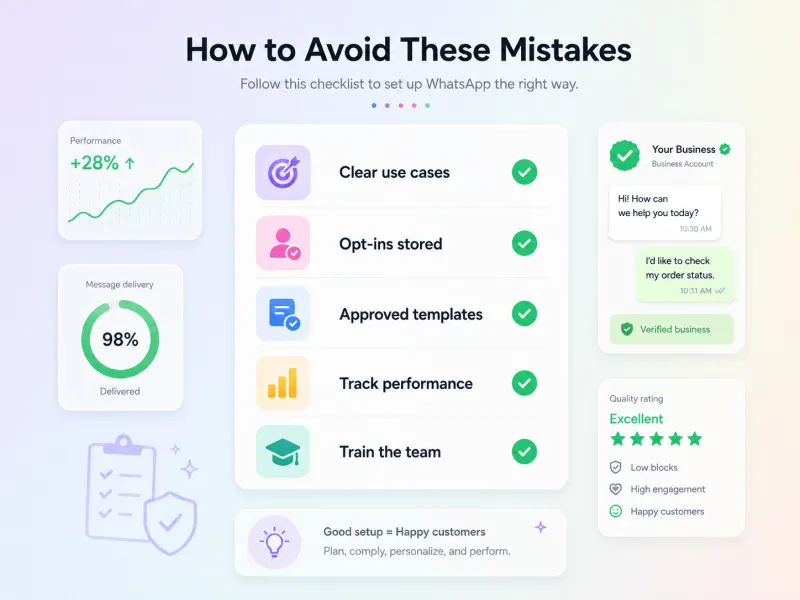
WhatsApp API works best when it is planned like a proper business channel.
Not as a last-minute campaign tool.
Not as a bulk messaging shortcut.
And not as a standalone inbox.
When the setup, compliance, automation, and reporting are clear, businesses can use WhatsApp API with more control and fewer costly mistakes.
Next, let’s wrap this up with a short final takeaway.
Final Thoughts
Meta WhatsApp API is not difficult to use.
But it is easy to misuse.
Most problems start when businesses treat it like a bulk messaging tool instead of a proper customer communication channel.
With the right setup, opt-in process, templates, automation, integrations, and reporting, WhatsApp API can help teams improve delivery, reduce manual work, and manage customer conversations with more control.
That is where choosing the right platform matters.
With YCloud, businesses get a ready-to-use WhatsApp API platform built for growth, automation, and scale. You get no extra markup on WhatsApp messaging, guided setup, hand-holding support, and a powerful workspace to manage campaigns, conversations, automation, and performance from one place.
YCloud also helps teams with:
- AI-powered automation and chatbots
- Shared team inbox for sales and support
- Broadcasts and audience segmentation
- Template creation and performance tracking
- CRM, website, Shopify, Zapier, and backend integrations
- Journey Builder for WhatsApp workflows
- Campaign analytics and delivery reports
- Agent performance tracking
- 24/7 customer support for smoother operations
So instead of just getting API access, businesses get the tools, support, and intelligence needed to use WhatsApp API the right way.
Because the real goal is not just to send more messages.
It is to send the right message, to the right customer, at the right time, without losing control over compliance, cost, or customer experience.
Frequently Asked Questions
What are the most common mistakes businesses make with Meta WhatsApp API?
The most common mistakes include starting without a clear use case, choosing the wrong BSP, ignoring customer opt-ins, using poor message templates, overusing marketing messages, missing the 24-hour customer service window, skipping CRM integration, and not tracking campaign performance after launch.
Is Meta WhatsApp API the same as the WhatsApp Business App?
No. The WhatsApp Business App is mainly for small teams that manage chats manually. Meta WhatsApp API is built for businesses that need automation, multi-agent support, CRM integration, broadcasts, templates, analytics, and scalable customer communication.
Can I send WhatsApp API messages without customer opt-in?
No. Businesses should only contact users on WhatsApp when the user has shared their mobile number and given permission to receive future messages or calls. Meta also requires businesses to respect opt-out requests.
Why is opt-in important for WhatsApp API?
Opt-in proves that the customer agreed to receive WhatsApp messages from your business. Without a proper opt-in trail, businesses risk poor customer trust, higher blocks and reports, compliance issues, and weaker campaign performance.
Do all WhatsApp API messages need templates?
No. Businesses need approved message templates to start a conversation or message users outside the 24-hour customer service window. But if a customer messages first, businesses can reply without a template within the 24-hour window.
What is the 24-hour customer service window in WhatsApp API?
The 24-hour customer service window starts when a user messages your business. During this time, your team can send free-form replies. After the window closes, you need an approved template to restart the conversation.
Why do WhatsApp message templates get rejected?
Templates usually get rejected when the message is unclear, too promotional for the selected category, misleading, missing context, or not aligned with Meta’s template guidelines. To avoid rejection, keep templates clear, specific, useful, and matched to the right category.
Why do WhatsApp API messages fail to deliver?
WhatsApp API messages may fail because of invalid phone numbers, missing opt-ins, blocked users, rejected templates, incorrect setup, webhook issues, rate limits, or poor-quality messaging. This is why delivery reports and failed-message tracking are important after launch.
Can I use WhatsApp API for bulk marketing?
Yes, but not like bulk SMS. WhatsApp API should be used with opt-in contacts, approved templates, audience segmentation, personalization, and frequency control. Sending the same promotion to every contact can lead to poor engagement, opt-outs, blocks, and reports.
What happens if a business violates WhatsApp API policies?
Meta may limit or remove access to WhatsApp Business Services if a business violates policies, receives significant negative feedback, harms users, or sends messages at scale in unauthorized ways.
Why is human handoff important in WhatsApp API automation?
Automation can handle FAQs, lead qualification, order updates, and reminders. But when users need help beyond fixed bot replies, they should have a clear escalation path. Meta expects businesses using automation to provide direct support options such as human agent transfer, phone, email, web support, store visit, or support form.
How do I choose the right WhatsApp API provider?
Choose a provider based on onboarding support, pricing transparency, compliance guidance, shared inbox, automation, AI capabilities, analytics, APIs, CRM integrations, template support, scalability, and customer support, not just the lowest monthly plan.
How can businesses avoid Meta WhatsApp API mistakes?
Start with a clear use case, choose the right BSP, collect and store opt-ins, create templates early, segment your audience, respect the 24-hour window, add human handoff, integrate WhatsApp with your systems, and track delivery, replies, failures, conversions, and quality signals regularly.
Related Articles

Make your business communications much easier!


Trusted by




