Customer Support

English

15 WhatsApp Cloud API Myths Every Business Should Stop Believing

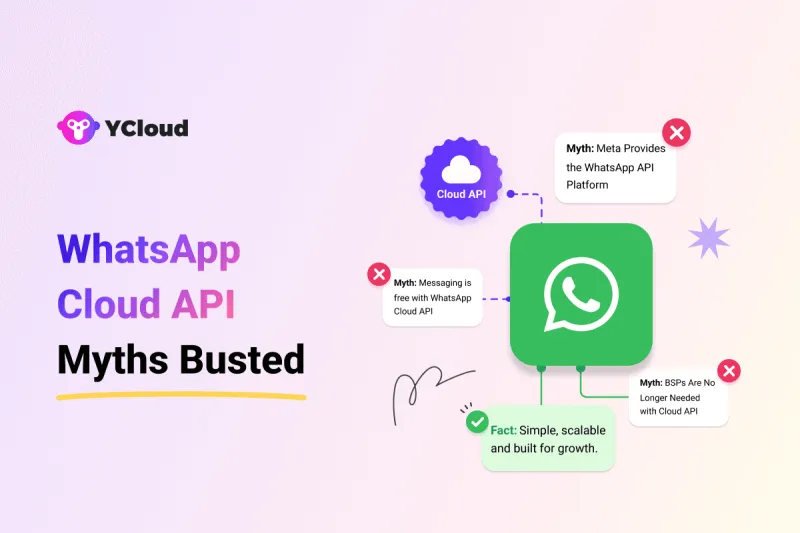
WhatsApp Cloud API has made WhatsApp Business API more accessible, but it has also created a lot of confusion.
Some businesses think it is completely free…
Some believe Meta provides a ready-made platform…
Others assume it is only for enterprises, difficult to set up, unsafe, or useful only for chatbots.
Most of these doubts come from outdated blogs, half-explained pricing details, and mixed information about WhatsApp Business API, Cloud API, BSPs, and automation platforms.
This guide clears that confusion!
We’ll break down the top 15 WhatsApp Cloud API myths with simple facts, so you can understand what is true, what is not, and what your business should actually consider before getting started.
Next, let’s first understand what WhatsApp Cloud API actually is.
WhatsApp Cloud API: What Is It?
WhatsApp Cloud API is Meta’s cloud-hosted version of the WhatsApp Business API.
It allows businesses and developers to send and receive WhatsApp messages, automate customer conversations, connect WhatsApp with CRMs, and build custom workflows on top of WhatsApp.
Meta’s documentation describes Cloud API as a way to programmatically message and call customers on WhatsApp.
The key difference is hosting.
With Cloud API, Meta hosts the API infrastructure. So businesses do not need to manage servers, maintenance, scaling, or on-premise setup. This makes access faster and easier compared to the older self-hosted approach.
But one thing is important...
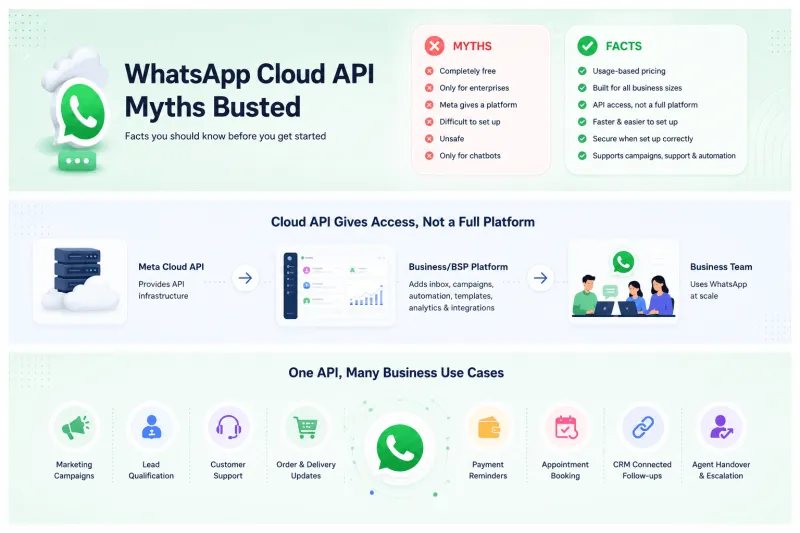
Cloud API gives you the API access, not a complete business platform.
So if you want a ready dashboard for campaigns, shared inbox, chatbots, automation, templates, analytics, and integrations, you still need to build it yourself or use a BSP/platform like YCloud.
In simple terms:
- Meta provides the API
- You or your BSP build the experience around it
- Your business uses it to manage WhatsApp at scale
Next, let’s bust the top 15 myths about WhatsApp Cloud API one by one.
Myth 1: WhatsApp Cloud API Is Free
Myth:
Many businesses assume WhatsApp Cloud API is completely free because Meta hosts it on the cloud.
Many businesses assume WhatsApp Cloud API is completely free because Meta hosts it on the cloud.
Fact:
WhatsApp Cloud API is not fully free.
WhatsApp Cloud API is not fully free.
Meta hosts the infrastructure, so you don’t need to pay for server hosting, API maintenance, or on-premise setup. But businesses still pay for WhatsApp usage.
You will be charged for:
- Marketing template messages
- Utility template messages
- Authentication template messages
- WhatsApp Calling API usage
- Country-wise messaging rates
So, Cloud API reduces infrastructure effort, but it does not remove WhatsApp usage costs.
In simple terms:
Cloud API access may be easier, but messaging and calling are still chargeable based on Meta’s pricing rules.
Cloud API access may be easier, but messaging and calling are still chargeable based on Meta’s pricing rules.
Your One-Stop Guide to WhatsApp API Pricing: Everything ExplainedWhatsApp Calling API Pricing: Everything Explained
Myth 2: Facebook Provides a Ready to Use WhatsApp API Platform
Myth:
Some businesses think Meta/Facebook gives a complete dashboard to use WhatsApp Business API directly.
Some businesses think Meta/Facebook gives a complete dashboard to use WhatsApp Business API directly.
Fact:
Meta provides the API infrastructure, not a full business platform.
Meta provides the API infrastructure, not a full business platform.
That means Meta gives you the technical access to send and receive WhatsApp messages, but it does not give you a ready tool for:
- Managing chats
- Sending broadcasts
- Creating automation
- Building chatbots
- Tracking campaign performance
- Managing agents
- Connecting CRM and third-party tools
To use WhatsApp Cloud API properly, you either need to build your own system or use a BSP/platform like YCloud.
In simple terms:
Meta gives you the API. A BSP gives you the platform to actually use it at scale.
Meta gives you the API. A BSP gives you the platform to actually use it at scale.
Myth 3: WhatsApp Cloud API Is Only for Big Enterprises
Myth:
Many businesses believe WhatsApp Cloud API is only useful for large enterprises with big tech teams and high messaging volume.
Many businesses believe WhatsApp Cloud API is only useful for large enterprises with big tech teams and high messaging volume.
Fact:
WhatsApp Cloud API is built for businesses of different sizes.
WhatsApp Cloud API is built for businesses of different sizes.
Small and growing businesses can also use it for:
- Customer support
- Lead follow-ups
- Order updates
- Marketing campaigns
- Chatbot automation
- CRM-connected conversations
The real requirement is not business size. It is whether your business needs WhatsApp at scale, beyond the limits of the regular WhatsApp Business App.
In simple terms:
WhatsApp Cloud API is not just for enterprises. It is for any business that wants automation, scalability, and better customer communication on WhatsApp.
WhatsApp Cloud API is not just for enterprises. It is for any business that wants automation, scalability, and better customer communication on WhatsApp.
Myth 4: WhatsApp Cloud API Setup Is Complicated
Myth:
Many businesses think setting up WhatsApp Cloud API is highly technical and takes weeks to go live.
Many businesses think setting up WhatsApp Cloud API is highly technical and takes weeks to go live.
Fact:
WhatsApp Cloud API setup is much faster than the old on-premise setup.
WhatsApp Cloud API setup is much faster than the old on-premise setup.
Since Meta hosts the API infrastructure, businesses don’t need to manage servers, hosting, scaling, or maintenance.
The main setup steps usually include:
- Creating or connecting a Meta Business account
- Setting up a WhatsApp Business Account
- Adding a phone number
- Completing business verification
- Connecting the API with your system or BSP platform
For developers, direct API setup may still need technical work. But with a BSP like YCloud, businesses can avoid most of the complexity and start faster with a ready platform.
In simple terms:
Cloud API setup is not as complicated as many think. It becomes even easier when you use a BSP like YCloud that handles the technical setup and onboarding.
Cloud API setup is not as complicated as many think. It becomes even easier when you use a BSP like YCloud that handles the technical setup and onboarding.
Myth 5: Messaging Is Free with WhatsApp Cloud API Like Other WhatsApp Apps
Myth:
Some businesses think WhatsApp Cloud API works like WhatsApp Messenger or WhatsApp Business App, where sending messages is free.
Some businesses think WhatsApp Cloud API works like WhatsApp Messenger or WhatsApp Business App, where sending messages is free.
Fact:
WhatsApp Cloud API follows Meta’s business pricing model.
WhatsApp Cloud API follows Meta’s business pricing model.
You can send some messages for free, but not all.
Messaging costs depend on:
- Message type
- Template category
- Customer’s country
- Whether the 24-hour service window is open
- Whether the message is delivered
For example, free-form replies inside the customer service window are generally free. But marketing, utility, and authentication templates may be charged based on Meta’s pricing rules.
In simple terms:
WhatsApp Cloud API is not a free chat app. It is a business messaging API with usage-based pricing.
WhatsApp Cloud API is not a free chat app. It is a business messaging API with usage-based pricing.
Myth 6: You Can Send Unlimited Promotional Messages
Myth:
Some businesses think WhatsApp Cloud API allows unlimited promotional messages to any customer.
Some businesses think WhatsApp Cloud API allows unlimited promotional messages to any customer.
Fact:
You cannot send unlimited promotional messages freely.
You cannot send unlimited promotional messages freely.
Promotional messages are sent through marketing templates, and they must follow WhatsApp’s privacy and messaging policy.
Businesses can only send them to users who have opted in to receive updates.
Marketing messages are also usually chargeable per delivered template, based on the customer’s country.
WhatsApp may also limit or restrict messaging if users block, report, or mark your messages as spam.
So before sending promotions, businesses should focus on:
- Proper opt-ins
- Approved marketing templates
- Relevant audience targeting
- Clear unsubscribe options
- Good message quality
In simple terms:
WhatsApp Cloud API supports promotional messaging, but it is not a free pass to spam customers.
WhatsApp Cloud API supports promotional messaging, but it is not a free pass to spam customers.
Myth 7: WhatsApp Cloud API Only Works on Desktop
Myth:
Some businesses think WhatsApp Cloud API can only be used on desktop and does not support mobile-based business operations.
Some businesses think WhatsApp Cloud API can only be used on desktop and does not support mobile-based business operations.
Fact:
WhatsApp Cloud API is not limited to desktop.
WhatsApp Cloud API is not limited to desktop.
It is an API, which means businesses can build or use a platform around it for different interfaces, be it desktop, mobile, or both.
So, a business can use WhatsApp Cloud API through:
- A web dashboard
- A mobile-first platform
- A custom-built app
The experience depends on how the platform is designed.
For example, YCloud is built more for growing and enterprise teams that need a powerful desktop-first workspace for campaigns, automation, inbox, integrations, and reporting. But WhatsApp Cloud API itself is not restricted to desktop.
In simple terms:
WhatsApp Cloud API can power both desktop and mobile business experiences. The limitation is not the API, it depends on the platform you choose or build.
WhatsApp Cloud API can power both desktop and mobile business experiences. The limitation is not the API, it depends on the platform you choose or build.
Myth 8: The Same Phone Number Can Be Used with On-Premise and Cloud API at the Same Time
Myth:
Some businesses think the same WhatsApp number can run on both On-Premise API and Cloud API together.
Some businesses think the same WhatsApp number can run on both On-Premise API and Cloud API together.
Fact:
The same phone number cannot be active on both On-Premise API and Cloud API at the same time.
The same phone number cannot be active on both On-Premise API and Cloud API at the same time.
A WhatsApp business number can be connected to one API hosting type at a time. If you want to move from On-Premise API to Cloud API, the number needs to be migrated. It cannot operate on both in parallel. Third-party WhatsApp platform docs also describe this as a hosting-type change or migration, not simultaneous usage.
Important note:
This is different from WhatsApp Coexistence, where some businesses can use the WhatsApp Business App and Cloud API with the same number. That is a separate feature and should not be confused with using On-Premise API and Cloud API together.
This is different from WhatsApp Coexistence, where some businesses can use the WhatsApp Business App and Cloud API with the same number. That is a separate feature and should not be confused with using On-Premise API and Cloud API together.
In simple terms:
One number cannot run on both On-Premise API and Cloud API at the same time. You need to choose one hosting setup or migrate the number.
One number cannot run on both On-Premise API and Cloud API at the same time. You need to choose one hosting setup or migrate the number.
Myth 9: WhatsApp Business API Messaging Features Are Not Available on Cloud API
Myth:
Some businesses think WhatsApp Cloud API has fewer messaging features than the WhatsApp Business API setup.
Some businesses think WhatsApp Cloud API has fewer messaging features than the WhatsApp Business API setup.
Fact:
WhatsApp Cloud API supports core WhatsApp Business Platform messaging features.
WhatsApp Cloud API supports core WhatsApp Business Platform messaging features.
Businesses can use it to send and receive:
- Text messages
- Media messages
- Template messages
- Interactive messages
- Service replies
- Customer notifications
- Automation and chatbot-driven flows
Meta’s Cloud API supports messaging features like text, rich media, and interactive messages. It also supports template messages for starting conversations outside the customer service window.
The main difference is not the messaging capability. The difference is hosting.
With Cloud API, Meta hosts the API infrastructure. With On-Premise API, the business or provider manages hosting.
In simple terms:
Cloud API does not remove WhatsApp Business API messaging features. It gives businesses a cloud-hosted way to access and use them.
Cloud API does not remove WhatsApp Business API messaging features. It gives businesses a cloud-hosted way to access and use them.
Myth 10: On-Premise WhatsApp Business API Will Continue as Usual
Myth:
Some businesses think On-Premise WhatsApp Business API will keep working like before.
Some businesses think On-Premise WhatsApp Business API will keep working like before.
Fact:
Meta has sunset the On-Premise API.
Meta has sunset the On-Premise API.
The final supported On-Premise API client expired on October 23, 2025, and Meta says On-Premises API can no longer be used to send messages to WhatsApp users.
Businesses on older setups should move to Cloud API to keep using WhatsApp Business Platform reliably.
In simple terms:
On-Premise API is no longer the future path. WhatsApp Cloud API is the supported direction for businesses.
On-Premise API is no longer the future path. WhatsApp Cloud API is the supported direction for businesses.
Myth 11: All WhatsApp Cloud API Messages Have the Same Cost
Myth:
Some businesses think every WhatsApp Cloud API message is charged at the same rate.
Some businesses think every WhatsApp Cloud API message is charged at the same rate.
Fact:
WhatsApp message costs are not the same for every message.
WhatsApp message costs are not the same for every message.
Pricing can change based on:
- Message category
- Customer’s country
- Whether the message is delivered
- Whether a free conversation window is active
- Monthly volume, where applicable
For example, marketing, utility, and authentication templates can have different rates. A message sent to a customer in India may also cost differently from the same message sent to a customer in the UAE or UK.
YCloud’s pricing page also lets businesses check WhatsApp message charges and calling prices by country, along with platform plan details.
We don’t charge any markup fees on WhatsApp Messages, so businesses can compare Meta usage charges and platform fees more transparently.
Check out the meta messaging pricing HERE
In simple terms:
WhatsApp Cloud API pricing is not one flat rate. It depends on the message type, country, and usage context.
WhatsApp Cloud API pricing is not one flat rate. It depends on the message type, country, and usage context.
Myth 12: BSPs Are No Longer Needed After WhatsApp Cloud API
Myth:
Some businesses think BSPs are no longer useful because Meta now provides Cloud API directly.
Some businesses think BSPs are no longer useful because Meta now provides Cloud API directly.
Fact:
Cloud API reduced hosting complexity, but it did not replace BSPs.
Cloud API reduced hosting complexity, but it did not replace BSPs.
Meta gives you the API infrastructure. A BSP gives you the platform, tools, and support to use that API properly.
A BSP can help with:
- WhatsApp API setup
- Shared team inbox
- Broadcast campaigns
- Template management
- Chatbots and automation
- CRM and third-party integrations
- Analytics and reporting
- Support, onboarding, and scaling
So yes, developers can build directly on Cloud API. But most businesses still prefer a BSP because it saves time and gives teams a ready-to-use platform.
In simple terms:
Cloud API gives access. A BSP helps you use that access faster, better, and at scale.
Cloud API gives access. A BSP helps you use that access faster, better, and at scale.
Myth 13: Messages Sent via WhatsApp Cloud API Are Unsafe
Myth:
Some businesses think WhatsApp Cloud API messages are less secure because they are hosted on Meta’s cloud.
Some businesses think WhatsApp Cloud API messages are less secure because they are hosted on Meta’s cloud.
Fact:
WhatsApp Cloud API messages are protected by WhatsApp’s security standards.
WhatsApp Cloud API messages are protected by WhatsApp’s security standards.
Meta states that Cloud API messages continue to use Signal protocol encryption before reaching the user on WhatsApp.
That said, security also depends on how your business manages:
- API access tokens
- Webhooks
- CRM integrations
- Customer data storage
- User permissions
- Internal team access
So, the API itself is built with security controls, but businesses must still follow proper data and access management practices.
In simple terms:
WhatsApp Cloud API is not unsafe. The real risk comes from poor setup, weak access control, or using unofficial tools.
WhatsApp Cloud API is not unsafe. The real risk comes from poor setup, weak access control, or using unofficial tools.
Myth 14: WhatsApp Cloud API Is Only Useful for Chatbots
Myth:
Some businesses think WhatsApp Cloud API is only meant for building chatbots.
Some businesses think WhatsApp Cloud API is only meant for building chatbots.
Fact:
Chatbots are just one use case.
Chatbots are just one use case.
WhatsApp Cloud API can support many business workflows, such as:
- Marketing campaigns
- Lead qualification
- Customer support
- Order and delivery updates
- Payment reminders
- Appointment bookings
- CRM-connected follow-ups
- Agent handover and team inbox workflows
A chatbot can automate repetitive conversations, but the API can also power broadcasts, notifications, support operations, sales journeys, and integrations.
In simple terms:
WhatsApp Cloud API is not just for chatbots. It is a complete business messaging layer for automation, support, sales, and customer engagement.
WhatsApp Cloud API is not just for chatbots. It is a complete business messaging layer for automation, support, sales, and customer engagement.
Myth 15: Chatbots Reduce Customer Experience
Myth:
Some businesses think WhatsApp chatbots make conversations robotic and hurt customer experience.
Some businesses think WhatsApp chatbots make conversations robotic and hurt customer experience.
Fact:
A poorly built chatbot can feel frustrating. But a well-designed chatbot improves the experience.
A poorly built chatbot can feel frustrating. But a well-designed chatbot improves the experience.
It helps businesses respond faster, qualify leads, answer common questions, route chats to the right team, and keep support available even outside working hours.
The key is to use chatbots for the right tasks, not every task.
A good WhatsApp chatbot should:
- Answer simple queries instantly
- Collect basic customer details
- Share order, payment, or booking updates
- Route complex issues to human agents
- Allow smooth agent handover when needed
In simple terms:
Chatbots don’t reduce customer experience. Bad chatbot design does.
Chatbots don’t reduce customer experience. Bad chatbot design does.
When used properly, they make WhatsApp support faster, cleaner, and more scalable.
Next, let’s see how YCloud helps businesses use WhatsApp Cloud API with automation, AI, campaigns, inbox, and support from one platform.
Scale Your Business by 10X with YCloud WhatsApp API
Clearing myths is useful. But the real value starts when your business can use WhatsApp Cloud API the right way.
YCloud helps you turn WhatsApp API into a ready-to-use business platform, so your team does not have to build everything from scratch.
With YCloud, you can manage:
- WhatsApp broadcasts and campaigns
- Shared team inbox
- AI-powered chatbots
- Customer journey automation
- Template creation and management
- CRM and third-party integrations
- WhatsApp Calling API
- Analytics, reports, and agent performance
- API, webhooks, and developer workflows
The best part: YCloud keeps pricing transparent. You pay Meta’s official WhatsApp charges and your selected platform plan. There are no markup charges on WhatsApp messages.
So whether you want to automate support, capture leads, run campaigns, or scale customer conversations, YCloud gives you the tools to do it from one platform.
Next, let’s see how you can get started with YCloud WhatsApp API.
How to Get YCloud?
Kindly click on the banner below to book a FREE DEMO and learn more about our product offering, features and pricing plans.
Built with AI at its core, YCloud is the ultimate WhatsApp marketing and automation solution, giving you everything you need in one powerful platform.
Now market, sell, support, and scale your business by 10X with YCloud!
Ready to try? Explore How to Get YCloud for FREE next!
How to Get YCloud for FREE?
It's Simple!
Subscribe to our FREE plan and get a free lifetime experience of YCloud with unlimited messaging API.
Book a FREE Demo and see how YCloud can power up your WhatsApp strategy!
🚀 Try YCloud today and experience how effortless WhatsApp automation can be when you have the right partner.
Frequently Asked Questions
Is WhatsApp Cloud API free?
You can access WhatsApp Cloud API without paying for hosting, but messaging is not fully free.
Businesses may still pay for:
- Template messages
- WhatsApp Calling API
- BSP/platform fees
- Add-ons, if applicable
Does Meta provide a platform to use WhatsApp Cloud API?
No. Meta provides the API infrastructure, not a complete business dashboard.
To manage campaigns, inbox, automation, templates, contacts, and analytics, you need to build your own system or use a BSP platform like YCloud.
Is On-Premise WhatsApp Business API still available?
No. Meta has officially sunset the On-Premises API. Businesses should use Cloud API for WhatsApp Business Platform messaging going forward.
Are BSPs still needed after Cloud API?
Yes, for most businesses.
Cloud API gives access to WhatsApp infrastructure. A BSP gives you the actual platform to use it for campaigns, inbox, chatbots, automation, integrations, analytics, and support.
What is the difference between WhatsApp Business App and WhatsApp Cloud API?
WhatsApp Business App is for small businesses that manage chats manually.
WhatsApp Cloud API is for businesses that need automation, multiple agents, broadcasts, integrations, templates, analytics, and scalable communication.
Can I use WhatsApp Cloud API without coding?
Not directly.
If you use Meta’s API directly, coding is usually required. But with a BSP like YCloud, you can use WhatsApp Cloud API through a ready platform without building everything from scratch.
What is the biggest benefit of WhatsApp Cloud API?
The biggest benefit is faster access to WhatsApp Business Platform without managing your own API infrastructure.
It helps businesses move faster with automation, messaging, support, and integrations.
Related Articles

Make your business communications much easier!


Trusted by




