客户支持

中文

YCloud开发者工具包:使用Codex构建和测试WhatsApp API集成

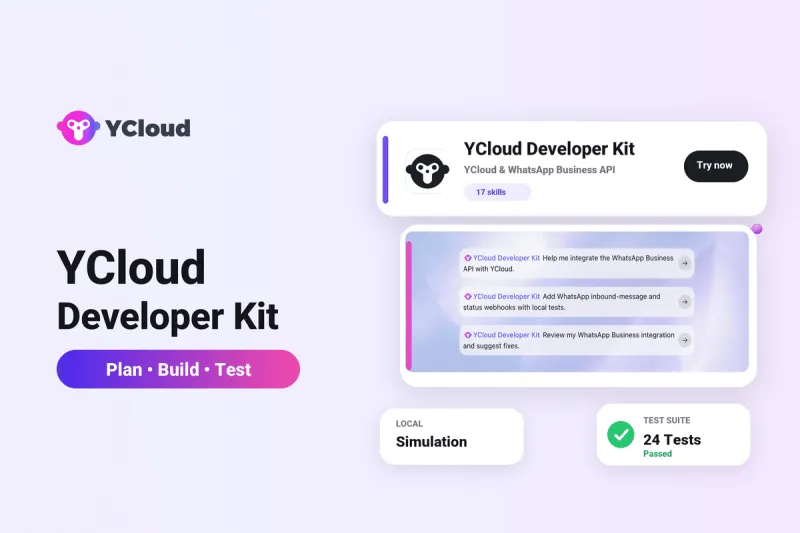
消息API接收订单确认请求。但客户是否收到了消息?
不一定。
WhatsApp集成在可靠运行之前必须回答几个问题:
- 应用程序如何验证API请求?
- 可用的消息模板是否正确?
- 如何记录送达或失败更新?
- 如果相同的Webhook事件两次到达,会发生什么?
- 当请求超时且结果不确定时,应用程序应该做什么?
这些问题既影响客户体验,也影响内部业务记录的准确性。因此,开发人员需要计划每条消息请求之前、期间和之后会发生什么。
这正是YCloud Developer Kit可以帮助的地方。
YCloud Developer Kit在Codex中提供YCloud特定技能,用于规划集成、实施本地代码更改和使用模拟数据测试工作流。开发人员首先用自然语言描述他们的需求。
基于这些需求,Kit可以帮助识别所需的YCloud功能、构建实现方案并定义相关的测试场景。
在本文中,我们将使用WhatsApp订单确认工作流来解释如何:
- 安装和验证YCloud Developer Kit
- 在Codex中创建集成计划
- 将计划应用于本地项目
- 使用模拟数据测试正常和失败场景
- 识别仍需要与YCloud验证的内容
- 准备集成进行技术审查和部署
Kit支持Codex内的开发过程。
YCloud账户配置、生产部署和真实环境测试仍然是独立的步骤。
在开始工作流之前,让我们先看看YCloud Developer Kit是什么、它能帮助什么以及它的范围在哪里结束。
TL;DR
- 在 Codex 中安装 YCloud Developer Kit 并运行冒烟测试以确认其功能可用。这不会将 Codex 连接到 YCloud 账户。
- 描述一个业务工作流程,例如订单确认,并使用 "$ycloud-integration-architect" 来识别所需的消息、模板、Webhooks 和身份验证。
- 在允许本地代码更改之前,定义项目、实施范围和允许的操作。
- 将计划应用于 API 请求、业务记录和异步事件处理。
- 使用模拟数据测试成功和失败场景。将超时视为不确定的结果,不要将本地结果与实际消息传递混淆。
- 在发布之前,配置 YCloud 账户、电话号码、模板、服务器端凭证和公共 Webhook。然后完成人工审查、真实环境测试、部署和监控。
什么是 YCloud Developer Kit?
YCloud Developer Kit 是一个包含 YCloud 特定功能的 Codex 插件,用于集成开发。
本文涵盖 版本 0.7.9。
它为 Codex 添加了 YCloud 特定的指导,用于选择 API 功能、设计业务逻辑并在本地项目中实施工作流程。
开发人员可以使用它将业务需求转化为:
- 集成工作流程和技术需求
- 实施计划
- 本地代码更改
- 测试场景和测试执行时的记录结果
- 集成和部署检查清单
该工具包可以支持新集成和现有实施的审查。
范围和账户访问
YCloud Developer Kit 支持 Codex 内的开发过程。消息传递操作和活动管理使用单独的工具。
该工具包可以帮助:
- 集成规划
- 授权的本地实施
- 使用模拟数据测试定义场景
安装开发工具包不会将Codex与YCloud账户连接,也不会配置账户资源或部署应用程序。
该工具包可帮助开发者编写调用YCloud API的应用程序代码,但本文所述工作流程不会执行真实的API请求。
实时测试需要单独授权、账户访问权限、服务器端凭证和环境配置。
部署前还需确认账户级功能可用性。本地测试结果仅适用于已测试场景,不能替代针对YCloud的验证。
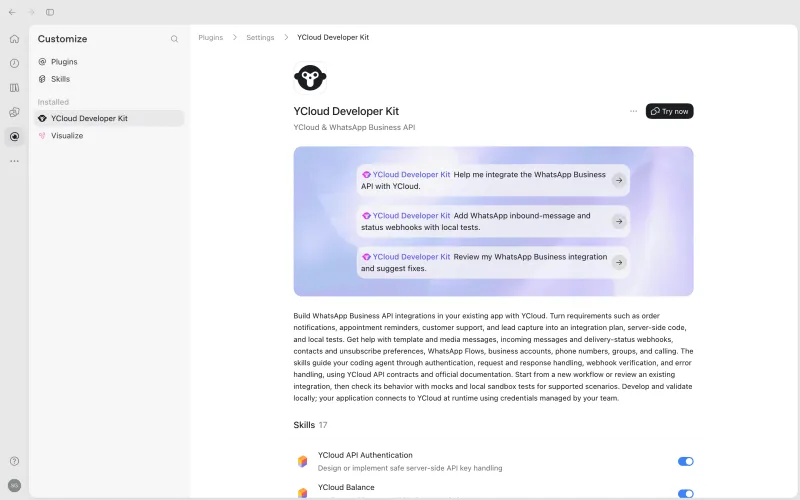
明确了工具包的用途和边界后,下一节将阐述可靠的WhatsApp集成需要处理哪些问题。
WhatsApp集成需要处理的事项
发送消息只是WhatsApp集成的一部分。应用程序还需跟踪请求发出前、被接受后以及后续状态更新到达时的情况。
发送与送达分属不同阶段
API请求被接受仅表示消息已进入处理队列,并不确认已送达。
因此应用程序应当:
- 记录原始请求
- 处理后续消息状态事件
- 将请求提交与状态更新分开存储
实现具体状态值前务必查阅最新YCloud文档
Webhook引入异步处理
消息状态事件可能延迟到达、重复发送或顺序错乱。
Webhook处理器应当:
- 在处理前验证入站请求
- 处理重复、延迟和乱序事件
- 避免重复业务更新
- 将每个事件与原始消息及业务事务关联
例如,订单记录应始终与其消息请求及所有后续状态更新保持关联。
模板与账户配置存在外部依赖
基于模板的工作流要求相应模板已获批且可用。YCloud账户和WhatsApp电话号码也需正确配置。
某些功能可能并非对所有账户开放。应在集成测试或部署前确认这些依赖项。
集成系统同样需要可靠的运维保障
生产环境的工作流程应包含:
- 安全的服务器端凭证管理
- 具备超时处理机制且避免自动重复发送
- 实现幂等性防止业务操作重复执行
- 日志记录、监控与告警系统
- 针对失败或不确定请求的恢复规则
- 隔离的测试与生产环境
- 故障排查与回滚预案
YCloud开发者工具包可帮助开发人员在规划、实施和测试阶段识别并结构化这些需求。
下一章节将把这些需求映射到工具包覆盖的YCloud功能模块。
工具包涵盖哪些YCloud功能?
YCloud开发者工具包0.7.9版本覆盖 88个API操作接口和两项横切能力。
下表按集成领域对这些功能进行分组展示。
这些功能可组合成订单通知、物流更新、联系人同步和消息接收路由等工作流。
集成领域 | 开发者工具包的支持方式 |
WhatsApp消息 | 规划并实现直接/队列消息投递、消息检索与状态处理 |
媒体文件 | 实现媒体上传功能并将上传后的媒体引用传递到消息工作流 |
消息模板 | 规划模板的创建、检索、更新、删除及分析功能 |
账户与电话号码 | 识别前置条件并实现账户管理、注册、资料配置及电话号码设置等支持操作 |
Webhook回调 | 设计端点管理、事件接收、来源验证及重复事件处理机制 |
接收消息处理 | 将已验证的入站消息事件路由到应用程序逻辑并实现支持的确认 |
联系人 | 设计联系人、属性和备注管理的工作流程 |
取消订阅者 | 添加取消订阅检查并管理退出记录 |
群组 | 规划支持的 WhatsApp 群组、参与者、设置和邀请链接操作 |
WhatsApp Flows | 设计和实现支持的 Flow 生命周期操作 |
WhatsApp 通话 | 规划呼叫处理和支持的呼叫会话操作 |
身份验证 | 构建安全的服务器端 API 身份验证 |
余额 | 在需要时检索并使用账户余额信息 |
自定义事件 | 定义并发送与联系人相关的业务事件,独立于入站 Webhook 事件 |
在这里, 支持 意味着 Kit 可以协助集成设计、本地实施和评估。这并不意味着每个功能都为客户账户启用或在生产环境中验证。
本文涵盖的版本侧重于 WhatsApp 集成和相关的 YCloud API。
SMS、Verify、YCloud 语音和电子邮件不在其范围内。
YCloud 语音是一个独立的产品领域,不应与 WhatsApp 通话混淆。
既然可用的功能已经明确,下一节将解释开发者如何在结构化集成工作流程中使用它们。
YCloud 开发者工具包工作流程如何运作
该工具包遵循五阶段的开发路径:
描述工作流程 → 审查计划 → 在项目中实施 → 本地测试 → 与 YCloud 验证并部署
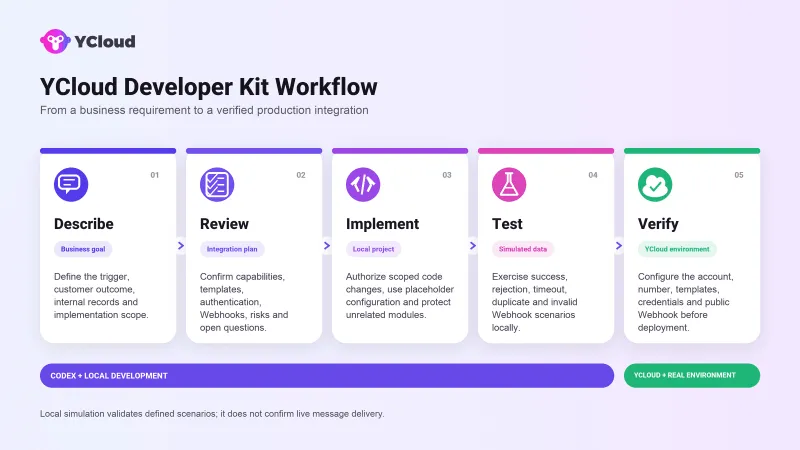
1. 定义商业目标
从所需的业务成果开始,而不是先选择API。
提供:
- 要创建的客户体验
- 现有系统或应用程序
- 启动工作流程的事件
- 预期的面向客户的结果
- 内部系统必须记录的信息
- 当前实施中包括和排除的内容
常见示例包括订单确认、发货通知、客户支持消息、联系人同步和退订验证。
2. 确认集成设计
工具包可以将商业目标映射到:
- 所需的YCloud功能
- 账户和电话号码的先决条件
- 模板和发送要求
- 业务记录映射
- Webhook和状态处理要求
- 失败和重复事件处理
- 仍需确认的项目
在实施前审查这些要点有助于防止遗漏依赖项或不必要的开发工作。
3. 在项目中实施
一旦计划获得批准,明确指定Codex可以更改的内容:
- 本地项目
- 任务中包含的模块
- 是否应添加测试
- 是否需要隔离示例或应用实现
- 是否禁止外部API调用
清晰的实施请求可以授权定义的本地工作。它不会授权对无关文件或外部系统的更改。
4. 运行模拟测试
测试正常和故障场景,包括:
- 成功提交请求
- API拒绝或发送失败
- 请求超时
- 重复的消息状态事件
- 无效的Webhook
- 配置缺失或错误
重要提示: 将超时的发送请求视为不确定结果。请求可能已被接受,因此不要仅因客户端超时而重新发送。应使用可用标识符、状态事件和文档记录的恢复行为来决定后续操作。
5. 通过YCloud验证并部署
发布前,技术团队必须配置并验证:
- YCloud账户和WhatsApp电话号码
- 已批准的消息模板
- 服务端API密钥
- 公共Webhook端点
- 生产环境变量
- 真实API请求和状态回调
- 监控与告警
- 部署和回滚流程
本地开发完成集成准备后,此最终阶段将在授权的YCloud环境中进行验证。
开始此工作流前,下一节列出了所需的环境和规划信息。
准备工作
使用工具包前,请准备好开发环境和基本工作流信息。
环境要求
您需要:
- 文档版本支持的Codex环境
- 已安装的YCloud开发者工具包 安装完成
- 需要实施时可访问本地应用程序项目
- 合适的开发和测试环境
继续操作前,请检查所用版本的安装要求。
有助于规划的信息
从用例、技术栈和所需工作流开始。任何缺失的要求都可以在审查计划时识别。
提供:
- 现有系统和技术栈
- 触发事件
- 预期的消息或客户体验
- 必须创建或更新的内部记录
- 当前实施状态
- 工作范围
- 验收标准
规划期间不需要的信息
不要提供:
- 真实的 API 密钥
- 真实的客户电话号码
- 私密的客户对话
- 生产环境凭证
安全提示: 在计划、代码示例和模拟测试中使用占位符或合成数据。使用团队的秘密管理实践将真实凭证存储在服务器端环境中。
一旦这些要求准备就绪,下一步就是安装 YCloud Developer Kit 并确认 Codex 可以访问它。
如何安装和验证 YCloud Developer Kit
YCloud Developer Kit 0.7.9 可以通过 ChatGPT 插件页面或直接从其仓库安装。使用您的 Codex 环境支持的方法;您不需要两者。
安装 Developer Kit
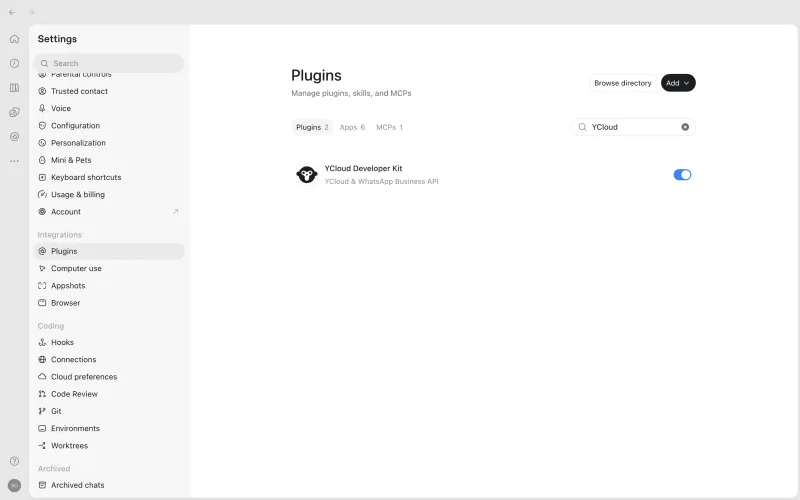
选项 1:从 ChatGPT 安装
- 打开 YCloud Developer Kit 插件页面。
- 选择 安装 或 立即试用。
- 确认在你将使用的Codex环境中已启用该插件。
- 在运行验证提示之前,启动一个新的Codex任务。
选项2:从仓库安装
在目标项目目录中运行:
</> Bash
npx skills add YCloud-Developers/YCloud-Developer-Kit --skill '*' -a codex --copy -y
此命令在当前项目中安装所有17个用于Codex的YCloud技能。安装后启动一个新的Codex会话以便发现这些技能。
运行冒烟测试
在新的Codex任务中,输入:
</> Plain Text
Use $ycloud-developer-kit-smoke-test to check whether the plugin is ready.
预期响应:
</> Plain Text
YCloud Developer Kit is ready. No external API was called.
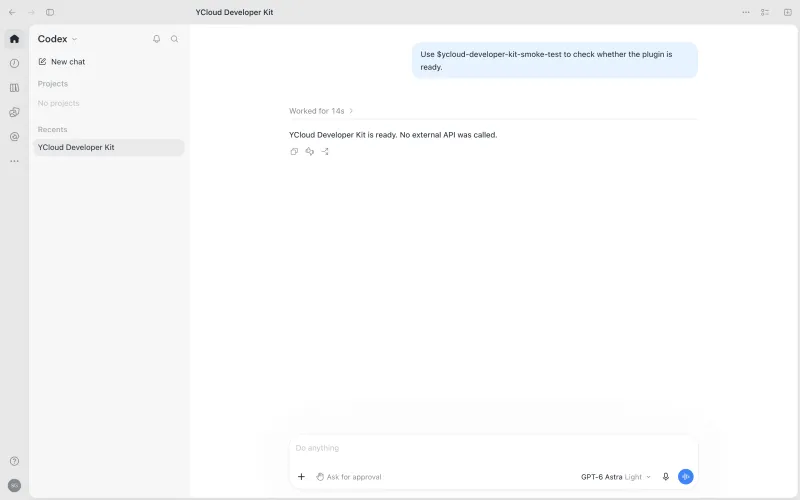
确认内容
- Codex可以找到并调用冒烟测试技能。
- Kit在当前Codex环境中可用。
- 检查完成时未调用外部API。
未确认内容
- 连接到YCloud账户
- 有效的API凭证
- 账户级别功能可用性
- WhatsApp消息成功送达
- 生产就绪
一旦冒烟测试成功,下一步就是使用该Kit来定义WhatsApp集成工作流。
分步示例:构建WhatsApp订单确认集成
本示例在后续步骤中使用一个工作流。
业务需求
一个虚构客户下了订单 DEMO-1001 通过一个用 Node.js、Express和SQLite构建的应用程序。
集成必须:
- 在订单创建时触发WhatsApp订单确认
- 将消息请求与订单关联
- 记录后续的送达或失败事件
- 即使通知失败,订单也应保持有效
营销广播和客户回复不在当前范围内。
步骤1:请求集成计划
首先要求集成架构师将业务需求转换为技术计划。
Use $ycloud-integration-architect to plan a WhatsApp
order-confirmation integration.

Our backend uses Node.js, Express and SQLite.

After a customer places an order, send a WhatsApp confirmation.
The backend must associate the message with the order and record
subsequent delivery or failure events.

Include order-confirmation messages and message-status Webhooks only.
Do not include marketing broadcasts or inbound-message handling.

Provide the business flow, prerequisites, development steps, risks
and acceptance criteria.

Do not modify files or call real APIs.
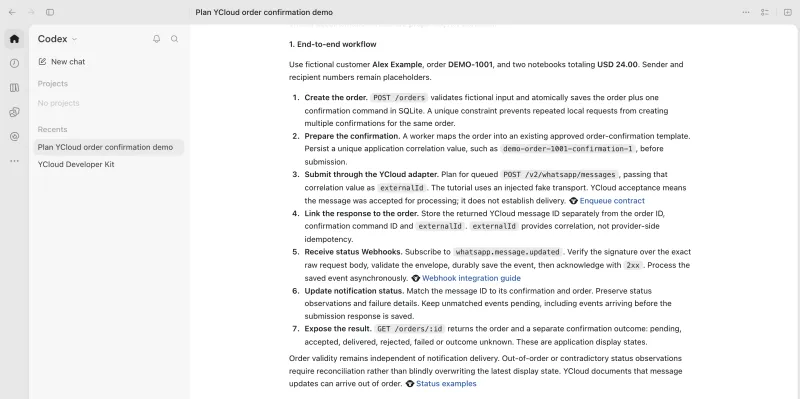
计划应包括:
- 订单创建触发器
- 账户和电话号码要求
- 批准的模板要求
- 消息提交流程
- 订单、应用程序关联值、YCloud消息ID和Webhook事件之间的连接
- 消息状态 Webhook 流程
- 失败和重复事件处理
- 未解决的问题
第 2 步:确认范围
在实施之前,请要求 Codex 定义确切的工作边界。
Limit this implementation to order-confirmation messages
and message-status processing.

List:

1. Required information
2. Modules that must be changed
3. Acceptance criteria
4. Items that still require confirmation
范围确认有助于团队:
- 防止不相关的代码更改
- 建立验收标准
- 将当前工作与未来功能分开
- 记录未解决的依赖项
第 3 步:授权本地实施
批准计划后,明确授权在本地项目中进行更改。
Implement the approved order-confirmation and message-status
flow in the current local project.

Identify the relevant order-notification and message-status
modules, implement the workflow there and add tests.

Use fictional orders and simulated data.
Do not read real credentials or call real APIs.

After implementation, list the changed files, configuration
requirements, test results and items that still require
real-environment verification.
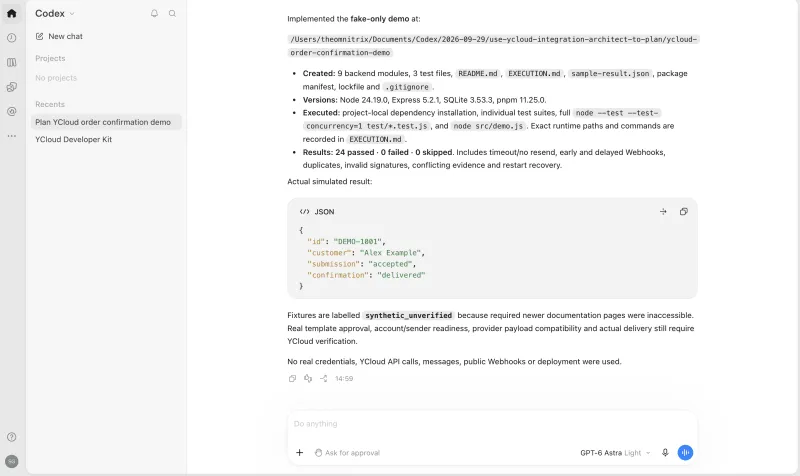
预期的交付成果包括:
- 集成代码
- 配置占位符
- 消息到订单的关联逻辑
- Webhook 处理
- 正常和失败路径测试
- 本地运行说明
- 已知限制
此授权仅适用于定义的本地项目和模块。
第 4 步:测试正常和失败场景
重要提示: 本示例使用模拟的YCloud响应和合成的Webhook事件,未连接真实YCloud账户或发送实际WhatsApp消息。
同时运行成功路径和失败路径测试:
Run local simulated tests for:

- Successful message submission
- API rejection and a later failed-message status as separate cases
- Request timeout
- Duplicate message-status event
- Invalid Webhook

Do not treat a timeout as confirmation that the message failed.

Separate executed tests, actual results and unverified items.
检查实现方案是否满足:
- 正确的请求格式
- 消息提交状态与后续状态的独立存储
- 幂等的事件处理
- 无重复业务更新
- 清晰的错误报告
- 超时后不自动重发
超时请求可能在连接断开前已被接收,应保持未决状态,直到获得可用标识符、后续状态事件或文档规定的恢复行为提供更多信息。
步骤5:准备技术移交
最后要求Codex区分已完成的本地工作与剩余的真实环境任务。
List the remaining account configuration, integration tests
and deployment tasks for the technical team.

Separate completed local work from work that still requires
the authorized YCloud environment.

Include account, phone number, templates, API credentials,
Webhook configuration, testing, monitoring, exception handling
and rollback.

Do not perform real operations.
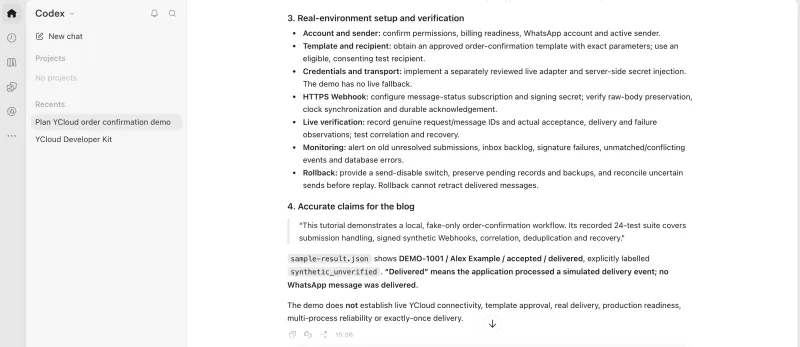
移交文档应明确:
- 已完成的本地实现与测试
- YCloud账户及电话号码要求
- 已批准的模板要求
- 服务端凭证配置
- 公共Webhook设置
- 真实集成测试
- 监控与异常处理
- 部署与回滚任务
- 剩余风险与未解决问题
下一节将说明如何区分生成代码、本地测试结果、模拟验证及针对YCloud的测试。
了解不同的验证级别
每个开发阶段都提供了不同级别的证据。已完成阶段不应被视为下一个阶段的证明。
结果 | 它确认了什么 | 它未确认什么 |
生成的代码 | 已编写请求的实现 | 代码正确运行 |
本地测试通过 | 定义的本地测试用例产生了预期结果 | 真实的 YCloud API 行为相同 |
本地模拟完成 | 所选场景通过模拟的 YCloud 适配器运行并签署了合成的 Webhook 事件 | 每个 YCloud 功能或生产场景都有效 |
与 YCloud 集成测试 | 在授权的 YCloud 环境中测试了指定的工作流程 | 已验证了其他工作流程、场景或部署环境 |
警告: 验证仅适用于测试的场景和环境。在使用 YCloud 验证预期工作流程并遵循团队的发布流程后,再启用面向客户的消息。
下一部分解释了每个开发任务应使用哪些 YCloud Developer Kit 技能。
YCloud Developer Kit 技能及其使用时机
YCloud Developer Kit 将每个开发任务路由到专用技能。
开发任务 | 推荐技能 |
| 规划端到端集成 | $ycloud-integration-architect |
| 实现 WhatsApp 消息的提交和检索 | $ycloud-whatsapp-messages |
| 实现模板管理工作流程 | $ycloud-whatsapp-templates |
| 实现媒体上传 | $ycloud-whatsapp-media |
| 实现Webhook配置和事件处理 | $ycloud-webhook-endpoints |
| 实现联系人同步 | $ycloud-contacts |
| 实现退订检查 | $ycloud-unsubscribers |
| 设计服务器端认证 | $ycloud-api-authentication |
开发者无需记住每项技能。
- 使用"$ycloud-integration-architect" 当需求涉及多个YCloud能力或正确的起点不明确时。
- 当所需的能力和实现范围已明确时,使用特定任务的技能。
额外技能范围涵盖WhatsApp商业账户、电话号码、群组、Flows、自定义事件以及WhatsApp呼叫功能。
选择正确的技能决定了技术领域范围。下一章节将阐述如何通过有效的提示词提供业务背景、实施范围及预期产出。
如何撰写YCloud API集成的高效提示词
有效的集成提示词应包含五个部分:
业务目标 + 当前系统 + 范围界定 + 授权操作 + 所需输出
1. 业务目标
说明客户或内部团队需要达成的具体效果
例如: 在完成结账后发送订单确认函,并记录后续的消息状态更新
2. 当前系统
需提供充分的项目背景,使Codex能准确定位集成方案:
- 现有或新项目
- 技术栈
- 相关服务与数据库
- 现有消息或Webhook实现
3. 范围
明确说明当前任务包含与不包含的内容。
例如:包含订单确认和状态Webhook,但不包含营销广播和客户回复。
4. 授权操作
指定Codex可执行的操作:
- 仅规划
- 仅代码审查
- 生成独立示例
- 修改指定的本地项目
- 添加或运行测试
- 不调用外部API
明确的授权可避免对文件变更或外部操作的假设。
5. 所需输出
要求提供可审核的交付物:
- 架构设计
- 前提条件
- 变更文件
- 测试证据
- 风险与未解决问题
- 验收标准
- 生产就绪检查清单
可复用提示词
Use YCloud Developer Kit to help implement [business workflow]
in our [technology stack] project.

The workflow starts when [trigger] and should produce [outcome].

Include [scope] and exclude [out-of-scope items].

You may [permitted actions].

Use simulated data and do not call real APIs.

Provide the implementation plan, changed files, executed tests,
actual results and remaining integration requirements.

Ask about missing details that affect the design.
清晰的提示词需明确定义预期集成范围和任务边界。
下一节将介绍实施过程中应遵循的安全与开发实践。
安全与企业开发实践
生成的集成代码应遵循与手动编写代码相同的安全和审查标准。
保护凭证和客户数据
- 请勿将 API 密钥或 Webhook 密钥粘贴到提示中。
- 请勿在代码库中硬编码凭证。
- 在示例和本地测试中使用合成电话号码和有效载荷。
- 将生产凭证保存在服务器端环境中。
- 使用团队批准的密钥管理和访问控制实践。
凭证不应出现在客户端代码、URL、日志或生成的示例中。
对照官方 API 文档进行检查
在生产环境中使用生成的示例之前,请确认当前的:
- API 端点和请求方法
- 必填和可选字段
- 身份验证要求
- 响应和错误格式
- 支持的行为
本文中的本地示例可能使用以下标签:
synthetic_unverified这意味着结果是使用合成数据生成的,某些 API 字段或行为仍需确认。它不是 YCloud 消息状态或实时 API 测试的证据。
文档审查确认预期的 API 契约。针对 YCloud 的测试确认定义的流程在授权环境中的行为。这些都是单独的检查。
设计可靠的 Webhook
Webhook 处理程序应:
- 在业务处理之前验证来源
- 拒绝无效的签名或有效载荷
- 处理重复事件而不重复执行业务操作
- 保留未知事件以供调查
- 遵循 YCloud 记录的响应要求
- 将每个事件连接到正确的消息和业务记录
- 记录有用的标识符而不泄露凭据或客户数据
环境隔离
保持开发、测试和生产配置相互独立。
- 不要在生产环境中使用本地测试的常规凭据。
- 使用环境特定的配置。
- 记录模拟过的场景。
- 记录已验证的真实服务场景。
保持人工审核
在以下操作前审查生成的代码和测试证据:
- 配置生产环境凭据
- 启用面向客户的消息
- 部署Webhook变更
- 修改重试或恢复行为
- 启用新的WhatsApp功能
这些操作应遵循组织常规的审查、发布和回滚流程。
下一节将概述该工具包的局限性以及本地开发之外仍需进行的检查。
限制与重要说明
使用YCloud开发者工具包时请牢记以下边界。
安装与账户访问
安装工具包仅使其功能在Codex中可用,但不会:
- 将Codex连接到YCloud账户
- 验证API凭据
- 配置电话号码或模板
- 启用账户级功能
- 部署应用程序
模板、电话号码等外部资源可能需要单独设置、审批或账户权限。
模拟覆盖范围
订单确认示例包括:
- 成功的消息提交
- API 拒绝和后续失败事件
- 请求超时
- 重复状态事件
- 无效的 Webhook
它不验证:
- 实时身份验证
- 真实账户或模板配置
- 实际的 Webhook 交付
- 真实的 WhatsApp 消息交付
- 生产规模的可靠性
启动本地模拟
安装插件不会自动启动模拟环境。
此示例使用本地项目中的假适配器和合成的 Webhook 固定装置。
模拟通过测试命令运行:
node --test --test-concurrency=1 test/*.test.js此记录的示例不需要单独的模拟器服务。其他工作流可能使用不同的固定装置或可选的模拟工具,因此请遵循该实现提供的说明。
验证边界
- 成功的 API 请求并不能证明消息已交付。
- 生成的代码必须经过审查和执行。
- 本地验证不等于生产验证。
- Kit 中的功能支持并不保证账户级别的可用性。
- 测试结果仅适用于测试的场景和环境。
版本和部署边界
0.7.9 版本排除 SMS、Verify、YCloud Voice 和 Email 集成。此版本专注于 WhatsApp 集成和相关的 YCloud API。
生产环境配置、集成测试、部署、监控和回滚仍由组织自行负责。
明确这些限制条件后,下一节将说明团队何时应使用YCloud开发工具包。
团队何时应使用YCloud开发工具包?
当团队需要实现以下目标时,YCloud开发工具包是理想选择:
- 规划新的WhatsApp集成方案
- 为现有产品添加WhatsApp通知功能
- 实现消息状态Webhook
- 审查部分完成的集成工作
- 识别遗漏的故障和恢复场景
- 为其他工程团队编制实施概要
- 制定生产环境就绪检查清单
- 协调跨多个YCloud功能的工作流
团队完成架构规划阶段后即可停止使用。
如需本地实施,团队可继续授权对既定项目的修改并运行模拟测试。
工作量需与项目当前阶段、范围和审批流程相匹配。
接下来最后一节将概述团队如何从单个受控WhatsApp工作流着手。
最终建议!
YCloud开发工具包提供了从业务需求到集成方案、本地代码及模拟测试的结构化路径。它能帮助开发者在开发过程中统筹考虑模板、认证、Webhook、消息状态及故障处理。
该工具包是对工程评审、官方YCloud API文档、生产配置和真实环境验证的补充而非替代。
建议从明确定义的单工作流(如订单确认)开始:制定计划、在批准的本地范围内实施、测试必要场景,并记录仍需通过YCloud验证的项目。
从单个WhatsApp工作流开始
然后打开一个新的Codex任务,并从一个定义好的工作流开始:
Use $ycloud-integration-architect to plan a WhatsApp
[workflow name] integration.
指定触发器、预期结果和实施范围。在发布前分别完成账户配置和真实环境验证。
Also Read: How to Install the YCloud Developer Kit and Build a WhatsApp API Integration in Codex下一节将回答关于账户访问、真实消息、项目变更和生产准备情况的常见问题。
Frequently Asked Questions
YCloud开发者工具包与YCloud仪表盘是相同的吗?
YCloud 开发者套件是 Codex 中的集成开发助手。消息操作和活动管理使用独立的工具。
安装套件是否将其连接到YCloud账户?
YCloud 账户访问、凭据和外部资源必须单独配置。
它能发送真实的 WhatsApp 消息吗?
它本身不能。
版本 0.7.9 可以帮助开发者编写通过 YCloud 发送消息的应用程序代码。不过,该工具包在工作流程中不会读取实时凭证、调用 YCloud API 或发送真实消息。真实的发送操作通过配置的应用程序在授权环境中单独进行。
开发者在规划阶段是否需要提供API密钥?
不需要。规划、代码示例和模拟测试可以使用占位符和合成数据。
它能修改现有项目吗?
是的。开发者需要明确授权对本地文件的修改,并定义项目、模块及其允许的范围。
模拟测试通过是否意味着集成已准备好用于生产环境?
不,模拟仅验证定义的本地场景。仍需要进行生产环境配置并针对 YCloud 进行测试。
它能帮助构建入站消息处理吗?
是的。它可以帮助实现Webhook处理程序,用于验证并将传入消息事件路由到应用程序的业务逻辑中。
是否支持模板、联系人及退订管理?
是的。0.7.9版本包含针对模板、联系人和退订工作流的专门指导。
它是否支持短信、语音、验证或邮件?
短信、验证、YCloud语音和电子邮件集成不在0.7.9版本的既定范围内。
WhatsApp通话功能已获得支持,且独立于YCloud语音服务。
如果官方 API 文档无法验证会怎样?
将该示例标记为未经验证,并指出仍需确认的端点、字段或功能行为。
如果工具包返回:
"synthetic_unverified"
表示该结果是使用合成数据生成的,所述合约细节未经完整验证。这并非YCloud API状态,也不能作为实际集成测试的凭证。
相关文章

让您的商务沟通更简单!


已加入