

Meta’s Frequency Capping Explained: Why WhatsApp Promotional Messages Get Restricted

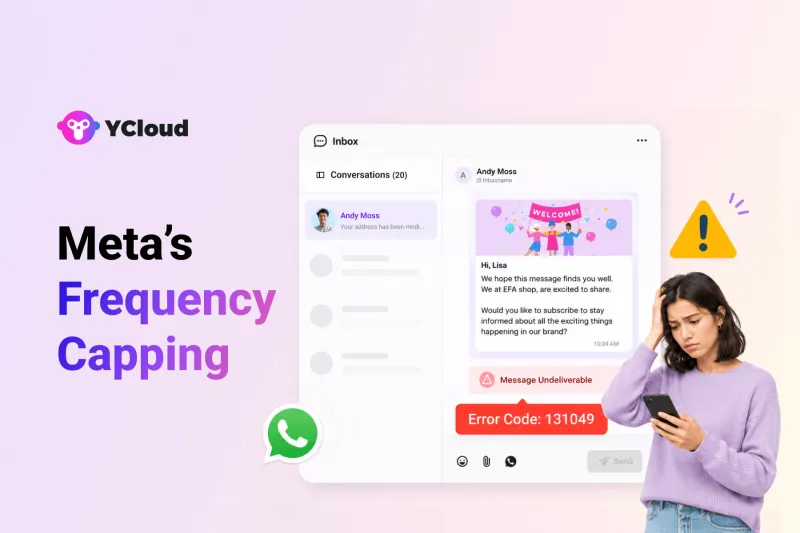
Your WhatsApp campaign is ready.
The template is approved.
The audience has opted in.
The message is relevant.
And the campaign is launched on time.
But a portion of your marketing messages still fails to reach users!
Your team checks the template, audience list, API setup, and campaign configuration, but nothing appears to be wrong. Yet delivery rates drop, broadcasts underperform, and unfamiliar errors begin appearing in the message logs.
This is becoming a common challenge for businesses using the WhatsApp Business API for marketing.
And the reason may have little to do with how your campaign was configured.
So… In this guide, we’ll explain what is restricting these messages, why Meta applies these limits, when they take effect, which message categories are affected, and how businesses can protect their WhatsApp marketing performance.
Next, let’s quickly look at the most important things you need to know about Meta’s Frequency Capping.
TL;DR
Meta’s Frequency Capping limits how many WhatsApp marketing messages a user can receive within a specific period.
The limit applies at the user level across businesses, not separately to each business.
Meta adjusts the cap dynamically based on factors such as the user’s recent engagement.
Messages sent after the limit is reached may fail with errors such as “Unhealthy system activity.”
The restriction mainly applies to marketing template messages.
Utility and authentication messages are not covered by the same marketing message cap.
Businesses can reduce delivery failures by improving targeting, message relevance, campaign timing, and user engagement.
Next, let’s understand what Meta’s Frequency Capping actually means.
What Does Meta’s Frequency Capping Mean?
Meta’s Frequency Capping is a user-level delivery control that limits how many WhatsApp marketing template messages a person can receive within a given period.
The limit is not assigned separately to each business.
It considers marketing messages sent to the user across businesses on WhatsApp.
For example, imagine a customer has recently received promotional messages from several brands but has not opened, replied to, or engaged with most of them. Meta may restrict the next marketing message sent to that customer, even when the template is approved and the customer has opted in.
Meta does not publicly disclose one fixed cap for every user. The limit is dynamic and may vary depending on factors such as the user’s recent engagement with business messages. Each marketing template message successfully delivered counts towards the user’s limit.
This means the restriction is applied to the individual recipient, not to your entire WhatsApp Business Account. One contact may not receive your campaign, while other contacts continue receiving it normally.
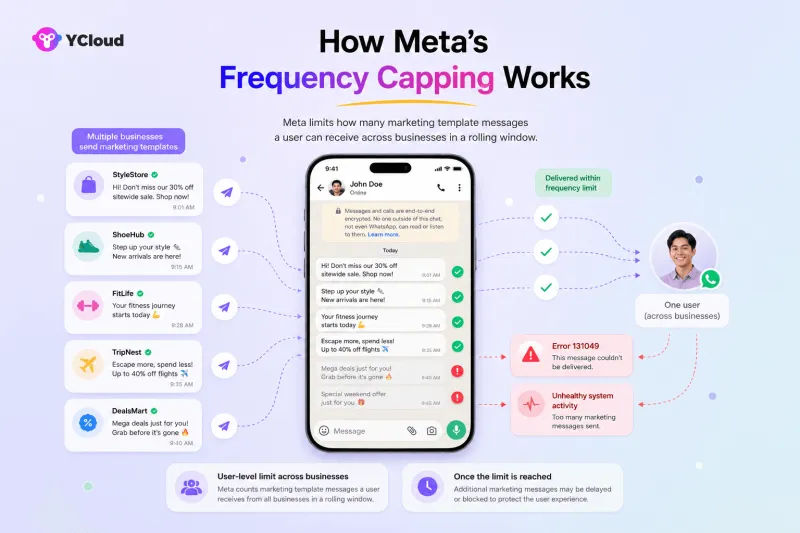
The purpose is simple: reduce promotional overload and make the business messages users receive more relevant and valuable.
Next, let’s understand why Meta introduced frequency capping and what problem it is designed to solve.
Why Did Meta Decide To Implement Frequency Capping?
WhatsApp was built for personal and meaningful conversations, not endless promotional broadcasts.
But as more businesses started using the WhatsApp Business Platform for marketing, users began receiving offers, reminders, discounts, and campaign messages from multiple brands, often within a short period.
Too many such messages can quickly lead to:
Message fatigue
Lower open and response rates
More muted or blocked business accounts
A poor overall WhatsApp experience
Meta introduced Frequency Capping to control this overload and prevent WhatsApp from becoming another spam-heavy marketing channel.
The goal is not to stop businesses from marketing. It is to encourage them to send fewer, more relevant messages that users are more likely to read and act on.
For businesses, this makes message quality, audience targeting, timing, and engagement more important than simply increasing campaign volume.
Next, let’s look at how Meta’s Frequency Capping works.
How Frequency Capping Works
Meta applies frequency capping to each WhatsApp user, not separately to every business.
Here is how it works:
A business sends a marketing template message to a user.
Meta checks how many marketing messages that user has recently received across businesses and how they engage with such messages.
If the user is still within Meta’s permitted limit, the message is delivered.
If the limit has already been reached, the message may be blocked before reaching the user.
The business may then receive error code 131049, commonly displayed as “This message was not delivered to maintain healthy ecosystem engagement” or "Unhealthy system activity".
Each successfully delivered marketing template counts towards the user’s limit. However, Meta does not disclose a fixed cap or evaluation period that applies equally to every recipient.
This explains why the same campaign may reach one contact but fail for another. The restriction is tied to the recipient’s recent messaging activity, not necessarily to a problem with your campaign or WhatsApp Business Account.
Monitoring delivery reports and failure codes can help businesses identify when WhatsApp Frequency Capping may be affecting campaign performance.
Next, let’s understand what the “Unhealthy system activity” error means and why it appears when a marketing message fails.
What Does “Unhealthy System Activity” Mean in WhatsApp API?
If your WhatsApp marketing message fails with “Unhealthy system activity,” it usually means Meta has temporarily restricted delivery of that promotional message to that specific user.
In most cases, this is linked to Meta’s Frequency Capping.
It does not automatically mean your WhatsApp number is blocked, your account is banned, or your platform has done something wrong. It usually means the user you are trying to reach has already received too many marketing messages within a certain period, so Meta is limiting additional promotional delivery to protect the user experience.
This is why the error is most commonly seen in:
- Marketing template campaigns
- Promotional broadcasts
- Re-engagement campaigns
- Low-engagement recipient lists
In simple terms, Meta is saying: do not send more promotional noise to this user right now.
That is also why one contact may show “Unhealthy system activity” while the rest of your campaign continues to deliver normally. The restriction is usually tied to the recipient, not your entire WhatsApp Business Account.
When this happens, businesses may notice:
- Lower broadcast delivery rates
- More failed promotional messages
- In some cases, related delivery issues such as “Spam rate limit hit”
The right response is not to keep retrying the same blast immediately. Instead, businesses should focus on:
- Sending only to opted-in and engaged users
- Reducing repeated promotional pushes
- Segmenting audiences more carefully
- Improving message relevance and timing
- Prioritizing quality over campaign volume
Next, let’s look at exactly which WhatsApp messages are, and are not, affected by these restrictions.
Which WhatsApp Messages Fall Under Frequency Capping?
Meta’s Frequency Capping mainly applies to marketing template messages.
Messages used for customer support, transactions, or account verification are treated separately.
| Message type | Affected by frequency capping? | Examples |
|---|---|---|
| Marketing templates | Yes | Promotional offers, product launches, discounts, abandoned-cart campaigns, and re-engagement messages |
| Utility templates | No | Order confirmations, delivery updates, payment notifications, and appointment reminders |
| Authentication templates | No | One-time passwords, login codes, and identity-verification messages |
| Free-form service messages | No | Replies sent within the 24-hour customer service window after the user contacts the business |
| Click-to-WhatsApp conversations | Not affected in the same way | Conversations initiated when a user clicks a WhatsApp ad and messages the business |
Meta’s per-user limit is specifically designed for WhatsApp marketing templates.
Utility and authentication templates follow their own category rules, while businesses can send free-form replies during an open 24-hour customer service window.
When a user responds to a marketing message, it opens a customer service window. Marketing messages sent during that open window do not count towards the user’s per-user marketing limit.
Click-to-WhatsApp Ads also begin with the user choosing to contact the business. This can open a free-entry-point messaging window, but it should not be treated as a permanent exemption for future promotional broadcasts.
The key distinction is simple: promotional outreach may be capped, but essential and user-initiated communication can continue under its applicable messaging rules.
Next, let’s look at the key business impact of Meta’s Frequency Capping and how it affects campaign performance.
How Meta’s Frequency Capping Affects Businesses
Meta’s Frequency Capping protects users, but it also changes how businesses plan and measure WhatsApp marketing campaigns.
1. Campaign reach may become less predictable
An approved template sent to an opted-in audience may still not reach every contact. Since the limit is applied to individual users across businesses, delivery can depend on how many marketing messages each recipient has recently received, not only on your campaign setup.
Read more about here "Per-user marketing template message limits"
2. High-volume broadcasting becomes less effective
Sending more messages no longer guarantees more reach. Repeated promotions can lead to higher delivery failures, especially among users who rarely engage with business messages.
3. Every delivered message needs to work harder
With fewer opportunities to reach a customer, businesses need to prioritise messages that are timely, relevant, and valuable. Stronger targeting can improve the chances of users reading, replying to, or acting on the message.
4. Delivery metrics need closer attention
A sudden drop in delivery rate may not always indicate an API, template, or account problem. Businesses must review failure codes, recipient engagement, campaign frequency, and audience quality before diagnosing the issue.
5. Marketing strategies need to become more selective
Businesses may need to reduce repetitive broadcasts, suppress inactive contacts, prioritise high-intent segments, and reserve promotional messages for campaigns with a clear business purpose.
6. It should not be treated as an India-only restriction
Meta’s documentation describes frequency capping as a WhatsApp user-level marketing limit rather than a country-specific rule. Businesses running campaigns across different markets should therefore account for it in their broader messaging strategy.
Ultimately, Meta’s Message Frequency Capping shifts WhatsApp marketing from sending more messages to making every message more relevant and meaningful.
Next, let’s see how YCloud can help businesses manage WhatsApp Frequency Capping and improve campaign delivery.
How YCloud Helps Manage Meta Frequency Capping
A marketing message blocked by Meta’s Frequency Capping cannot be forced through immediately.
You can resend it later, but doing this manually for a large broadcast can quickly become time-consuming. You would need to identify every failed contact, separate them from the rest of the audience, and create another campaign.
With YCloud, you can manage this process more systematically:
- Review the campaign report to identify messages that were not delivered.
- Export the failed recipient data and separate contacts affected by frequency-related delivery restrictions.
- Wait before retrying, typically one or two days, instead of resending the message immediately.
- Create a separate campaign for those contacts using the exported list.
- Monitor the new campaign to see whether delivery improves.
Resending immediately is unlikely to help because the recipient may still be under Meta’s limit. It can result in the same message failing again.
It is also important to remember that waiting does not guarantee delivery. Meta’s Frequency Capping is dynamic, and the user may continue receiving marketing messages from other businesses during that time.
Therefore, the stronger long-term approach is to reduce unnecessary retries and improve who receives each campaign in the first place.
Next, let’s look at the best practices businesses can follow to reduce frequency-capping failures and improve WhatsApp marketing delivery.
Best Practices to Reduce the Impact of Meta’s Frequency Capping
Meta’s Frequency Capping cannot be switched off or bypassed. However, businesses can reduce delivery failures by improving how they build audiences, schedule campaigns, and create marketing messages.
1. Collect clear WhatsApp opt-ins
Tell users exactly what they are signing up for before adding them to a marketing campaign.
Your website forms, checkout pages, QR codes, and lead-generation campaigns should clearly state that the user may receive updates or promotional messages on WhatsApp.
Clear expectations reduce the chances of users ignoring, blocking, or reporting your messages.
2. Avoid resending failed messages immediately
When a message fails because of a frequency-related restriction, sending it again immediately is unlikely to solve the problem.
Wait before retrying, typically 24 to 48 hours, and resend only when the campaign is still relevant. Even then, delivery is not guaranteed because Meta’s limits are dynamic and consider messages received from other businesses as well.
3. Give users an easy way to opt out
Every marketing campaign should provide a simple unsubscribe option.
For example:
Reply STOP to unsubscribe from promotional updates.
This gives users control over what they receive and helps businesses maintain a cleaner, more engaged contact list.
4. Do not schedule too many promotions close together
More campaigns do not automatically create more conversions.
Sending several offers, reminders, and follow-ups within a short period can irritate users, reduce engagement, and increase blocks or opt-outs. Build a campaign calendar that prioritises your most important message instead of sending every available promotion.
5. Segment audiences before broadcasting
Do not send every marketing message to your entire database.
Segment contacts based on factors such as:
- Purchase history
- Product interest
- Location
- Previous engagement
- Customer lifecycle stage
- Recent website or campaign activity
The more relevant the audience, the better the chance that the message will be opened and acted upon.
6. Create messages that encourage interaction
WhatsApp works best as a conversational channel, not as a one-way advertising feed.
Instead of only sending discounts, create messages that invite users to choose, reply, confirm, or ask a question.
For example, replace:
Get 20% off our new collection.
With:
Looking for workwear or weekend styles? Reply with your preference and we’ll share the most relevant offers.
Useful conversations are more likely to generate meaningful engagement than repetitive sales pushes.
7. Avoid cold and unverified contact lists
Sending bulk marketing messages to users who did not knowingly opt in can lead to poor engagement, blocks, complaints, and declining account quality.
Focus on customers and leads who have shown genuine interest in your business. A smaller, engaged audience is usually more valuable than a large list of inactive contacts.
8. Monitor more than the delivery rate
Delivery failures are only one part of campaign performance.
Businesses should also monitor:
- Read rates
- Reply rates
- Click-through rates
- Opt-outs
- Blocks and complaints
- Template quality
- Phone number quality rating
These signals help identify whether your campaigns are valuable to users or simply adding more promotional noise.
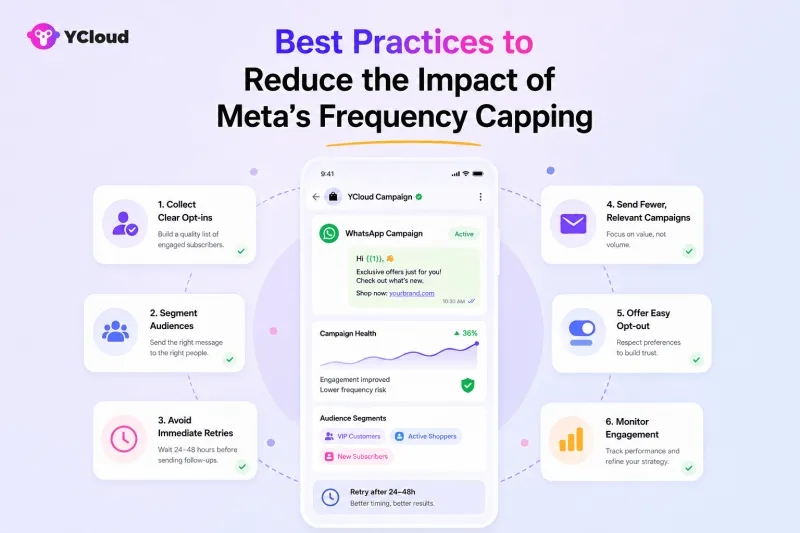
Ultimately, the best way to manage WhatsApp Frequency Capping is not to send more messages, it is to make each message more relevant, timely, and worth receiving.
Wrapping Up!
Meta’s Frequency Capping is not something businesses can disable or bypass.
It is a clear signal that WhatsApp wants brands to focus less on message volume and more on relevance, timing, and genuine engagement.
Simply sending more offers will not guarantee better results. Businesses need to understand their audience, segment contacts carefully, create messages worth opening, and give users a reason to respond.
With YCloud, you can manage campaigns, monitor delivery performance, identify failed messages, retarget contacts strategically, and build more personalised WhatsApp journeys without relying on repetitive broadcasts.
The goal is simple: send fewer messages, create better conversations, and make every interaction count.
Next, let’s answer the most frequently asked questions about Meta’s Frequency Capping.
Frequently Asked Questions
Is Meta’s Frequency Capping limited to users in India?
No. Although Meta initially tested per-user marketing limits in India, its current documentation describes Frequency Capping as a broader user-level control for WhatsApp marketing template messages. Businesses serving users across different countries may therefore experience frequency-related delivery failures.
Why are my WhatsApp marketing messages failing to deliver?
A message may fail because the recipient has reached Meta’s per-user marketing limit. Other possible causes include an invalid phone number, template issues, account restrictions, or technical delivery errors. Check the campaign report and error code before identifying Frequency Capping as the cause.
What does the “Unhealthy system activity” error mean?
Some WhatsApp API platforms display “Unhealthy system activity” when Meta restricts a marketing message to maintain healthy engagement.
In the Cloud API, this is commonly associated with error code 131049: “This message was not delivered to maintain healthy ecosystem engagement.” It usually applies to the specific recipient and does not automatically mean your WhatsApp Business Account has been banned.
How many WhatsApp marketing messages can a user receive per day?
Meta does not publish one fixed daily limit that applies to every user. The cap is dynamic and considers the marketing messages a person receives across businesses, along with factors such as their recent engagement. Each successfully delivered marketing template counts towards that user’s limit.
Why do messages fail even when users have opted in?
User consent allows your business to send WhatsApp marketing messages, but it does not guarantee that every message will be delivered.
A recipient may have already received several marketing messages from other businesses or may be less likely to engage with promotional content. Meta can therefore restrict additional marketing delivery despite a valid opt-in.
Are utility templates affected by Frequency Capping?
Utility templates are not included under the per-user marketing template limit. They cover non-promotional updates such as order confirmations, payment notifications, delivery updates, and appointment reminders.
However, they can still fail for unrelated reasons, and a template containing promotional content may be classified as marketing rather than utility.
Are authentication templates frequency-capped?
Authentication templates, including OTPs, login codes, and account-verification messages, are not covered by the per-user marketing message cap. They must still follow Meta’s authentication template and platform policies.
Are messages within the 24-hour customer service window affected?
Free-form replies sent during an open 24-hour customer service window are not treated as marketing template outreach.
When a user responds to a marketing message, a 24-hour customer service window opens. Meta states that marketing messages sent during this open window do not count towards the recipient’s per-user marketing limit.
Does Frequency Capping apply to every WhatsApp Business Account?
Yes. It is a platform-level delivery control, not a restriction reserved for particular industries or company sizes. Since the cap is evaluated at the recipient level across businesses, both small companies and large enterprises can experience it.
Can businesses bypass Frequency Capping with multiple phone numbers?
No. The limit is associated with the WhatsApp user’s overall exposure to marketing messages across businesses, not solely with one sender or phone number. Using additional business numbers does not guarantee delivery and should not be treated as a workaround.
Should businesses immediately resend frequency-capped messages?
No. Retrying immediately may produce the same failure because the recipient may still be under Meta’s limit.
Meta recommends waiting before retrying when error code 131049 may be related to the per-user cap. Even after waiting, delivery is not guaranteed because the limit is dynamic.
How can businesses improve WhatsApp marketing delivery rates?
Businesses can reduce avoidable failures by:
- Collecting clear WhatsApp opt-ins
- Targeting engaged audience segments
- Spacing out promotional campaigns
- Avoiding repetitive broadcasts
- Including an easy opt-out option
- Creating messages that encourage meaningful replies
- Monitoring error codes, quality ratings, read rates, and opt-outs
- Waiting before retrying frequency-capped contacts
Frequency Capping cannot be disabled, but a more selective and engagement-led messaging strategy can help businesses make better use of every delivery opportunity.
Related Articles

Make your business communications much easier!


Trusted by




