

WhatsApp API Providers with AI and Automation

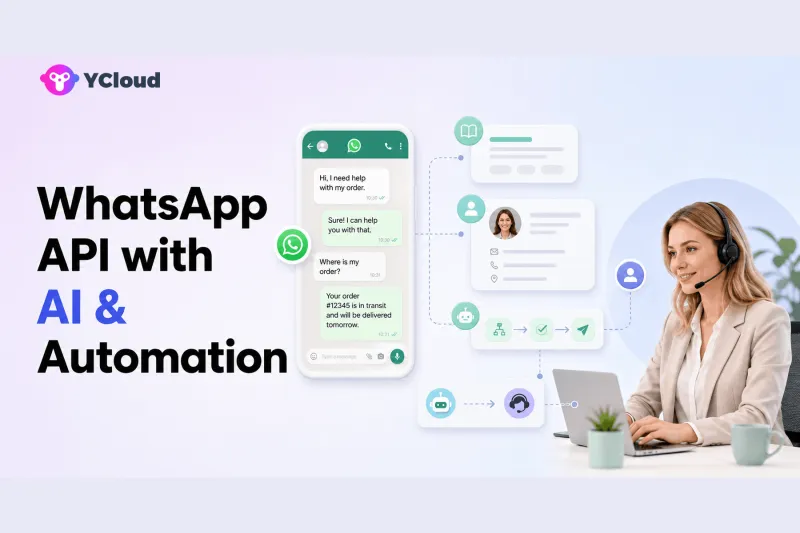
A strong WhatsApp API provider with AI and automation should do more than generate replies. It should connect official WhatsApp messaging to approved knowledge, customer context, deterministic workflows, bounded system actions, a shared inbox, and human takeover. YCloud, respond.io, WATI, SleekFlow, and Infobip all offer AI or automation around WhatsApp, while API-first providers such as Twilio or 360dialog can support custom AI architectures built by the buyer.
The right choice depends on who will build and govern the operation. A business team may want a no-code AI agent and Journey builder. A product company may prefer APIs, Webhooks, and its own model layer. An enterprise may need AI across a full contact center. “Has AI” is not a useful comparison until the buyer defines the work and risk.
The evaluation must therefore cover both customer experience and operational control.
What WhatsApp AI can usefully do
Answer approved routine questions
AI can answer opening hours, product details, delivery policies, appointment preparation, return steps, and other repeatable questions when it uses maintained knowledge. Buyers should test source freshness, conflicting documents, unsupported questions, and multilingual behavior.
Capture and qualify information
An agent can ask structured follow-up questions, collect customer needs, and update fields. It should not infer sensitive or high-impact attributes without a legitimate basis. Qualification rules must remain understandable to sales and compliance teams.
Route and prioritize conversations
AI can identify intent and route a message to sales, support, billing, or another queue. Deterministic rules may be better for known signals such as country, language, account tier, or existing owner. Good systems combine AI judgment with explicit controls.
Retrieve authorized business data
Through integration, AI may retrieve order, booking, inventory, or ticket information. The system of record should authorize the request and remain authoritative. The model should not invent a result when an API fails.
Perform bounded actions
AI can potentially create a ticket, update a field, trigger a workflow, or request a permitted change. High-impact actions need validation, permission checks, confirmation, audit logs, and sometimes human approval.
Transfer to a human with context
The most important AI feature may be knowing when to stop. Handoff should include the customer's intent, collected information, relevant history, actions attempted, and why escalation occurred.
YCloud explains this capability model in its WhatsApp AI customer-service guide.
Five provider models
YCloud: AI inside a WhatsApp operating platform
YCloud is a Meta official Premier-level BSP. Its WhatsApp AI Agent sits beside official API access, shared Inbox, Contact, Campaign, Journey, Chatbot, and API/Webhooks.
This matters because AI needs context and somewhere to hand work. Customer attributes can inform behavior, Journey can handle deterministic steps, Inbox supports human takeover, and external systems can connect through the YCloud API. YCloud fits companies that want business teams and developers to share one WhatsApp-centered operation.
It may not fit teams that want only a model-agnostic API layer and will build all orchestration, evaluation, agent UI, and governance themselves.
respond.io: AI Agents with Inbox and Workflows
Respond.io documents AI Agents that can answer from knowledge, assign conversations, update lifecycle stages, close conversations, trigger Workflows, and transfer to humans. It also provides Inbox, Contacts, Broadcasts, and reporting across messaging channels.
It fits mid-market B2C conversation teams. Buyers should validate plan requirements, channel coverage, knowledge maintenance, action controls, data handling, evaluation, and integration depth.
WATI: business-facing AI and automation
WATI combines Team Inbox, campaigns, contacts, workflow features, chatbot, and an expanding set of AI capabilities. Its official help content distinguishes autonomous customer-facing AI from copilot and background agent functions.
It can suit SMB and mid-market teams seeking accessible tools. Test which AI product does what, plan availability, action permissions, analytics, and how AI transfers to ordinary agents.
SleekFlow: AI for social commerce and conversations
SleekFlow combines AI agents with WhatsApp, an omnichannel inbox, automation, broadcasts, and CRM/ecommerce integration. It can fit commerce and sales teams that want AI within social customer journeys.
Test catalog and order context, identity across channels, workflow limits, human intervention, API behavior, and whether the AI can safely recover from missing business data.
Infobip: AI across enterprise contact-center operations
Infobip offers WhatsApp APIs, automation products, chatbots, and AI within its Conversations contact-center environment. It can suit enterprises wanting AI-to-human operations across messaging, voice, and other channels.
The trade-off is broader implementation and governance. Confirm the exact product combination, regional deployment, integration, observability, permissions, support, and commercial model.
API-first custom AI architecture
Twilio, 360dialog, Vonage, Bird, or direct Cloud API may fit teams building their own agent service. A typical architecture includes:
- WhatsApp API for messages and templates;
- verified Webhooks and idempotent event processing;
- customer identity and consent service;
- retrieval from approved knowledge;
- model orchestration and tool permissions;
- deterministic workflow engine;
- CRM, order, ticket, or booking APIs;
- human inbox and escalation queue;
- logging, evaluation, security, and monitoring.
This gives control but creates a product that must be operated continuously. Model quality alone does not solve event reliability, permissions, queue capacity, or policy compliance.
A 10-part AI evaluation
- Knowledge: Can sources be approved, versioned, refreshed, and removed?
- Grounding: Does the answer show or internally trace the supporting source?
- Uncertainty: Does the agent decline or ask for clarification when evidence is missing?
- Customer context: Which fields can it read, and why?
- Actions: Which tools can it call, with what validation and limits?
- Workflow division: Which steps use AI and which use deterministic rules?
- Handoff: Can a human take over immediately with full context?
- Evaluation: Can teams test before deployment and sample live conversations?
- Security and governance: Are permissions, logs, retention, and data boundaries clear?
- Cost and latency: What happens at peak volume, long conversations, or repeated tool calls?
Run adversarial scenarios: wrong order number, contradictory policy, angry customer, prompt injection in uploaded content, unavailable API, restricted request, and ambiguous identity. A system that performs only on FAQ demos is not production-ready.
Measure quality before expanding scope
Start with one narrow intent and a clear human fallback. Create an evaluation set containing normal questions, paraphrases, missing information, policy exceptions, malicious instructions, and integration failures. Review answer correctness, supported-source use, appropriate clarification, action success, escalation quality, latency, and cost. Record failures by type so the team can improve knowledge, prompts, rules, tools, or operating procedures rather than treating every problem as a model issue.
During an initial live period, sample both successful and escalated conversations. Watch for customers repeating themselves after handoff, agents correcting hidden AI errors, and automations continuing after an opt-out or resolution. Expand to new intents only when the current scope is stable and the business can observe it. A provider should make this improvement loop practical through testing, logs, transcripts, analytics, version control, or export—not ask the buyer to trust a single aggregate AI score.
How to divide work between AI, automation, and humans
- Use deterministic automation for known events, validation, suppression, timers, and required rules.
- Use AI for natural-language understanding, approved knowledge answers, summarization, and flexible information collection.
- Use business systems for authoritative data and transactions.
- Use humans for exceptions, judgment, empathy, sensitive decisions, and high-impact approval.
YCloud's Journey, Contact, and AI Agent illustrate how these roles can coexist. Buyers should test the boundaries rather than assume a single AI agent should own everything.
Frequently asked questions
Which WhatsApp API provider has the best AI?
There is no universal winner. YCloud fits WhatsApp-centered operations; respond.io fits multi-channel conversation workflows; WATI fits accessible business tooling; SleekFlow fits social commerce; Infobip fits enterprise contact centers; API-first providers fit custom builds.
Is an AI chatbot the same as an AI agent?
Terminology varies. Evaluate actual capabilities: knowledge answers, context, actions, workflows, testing, handoff, and controls.
Can AI send WhatsApp campaigns?
AI may help create content or trigger controlled workflows, but campaigns still require approved templates where applicable, valid audience and consent handling, suppression, governance, and capacity planning.
Should AI update orders or accounts?
Only through authorized systems with validation, permissions, confirmations, logs, and appropriate human approval. The model must not be the source of truth.
Why consider YCloud for AI automation?
YCloud places AI Agent inside a platform that also provides Premier BSP access, Inbox, Contacts, Campaigns, Journey, Chatbot, and API/Webhooks, giving AI context, workflows, and a human exit.
Frequently Asked Questions
Which WhatsApp API provider has the best AI?
Is an AI chatbot the same as an AI agent?
Can AI send WhatsApp campaigns?
Should AI update orders or accounts?
Why consider YCloud for AI automation?
Related Articles



Make your business communications much easier!


Trusted by




