Customer Support

English

Everything You Need to Know About WhatsApp Webviews

They fail because the path from message to action is too long!
The moment you push users out of WhatsApp, you lose them…!
A user receives a message → clicks your CTA → lands on an external browser → waits for it to load → hits a login wall → switches apps for OTP → loses context → drops off.
That’s the real leak!
Every extra step creates another chance to abandon the journey!
And at the same time, businesses are under pressure, spam controls are tighter, bulk tools are risky, and one wrong move can put your WhatsApp account at risk. You can’t afford broken journeys anymore.
This is exactly where WhatsApp Webviews change the game…!
Instead of sending users outside, you keep them inside the chat, browsing, taking action, and converting without friction. No redirects. No context loss. Just a tighter, cleaner path to conversion.
So, in this guide, you’ll learn:
- What WhatsApp Webviews is and how they work
- What changed in 2026 (and why it matters)
- How to use them to reduce drop-offs and improve conversions
- Real use cases and implementation strategies
- How to integrate Webviews into your workflows
Because the opportunity here is simple:
If you control the journey inside WhatsApp, you control the outcome.
If you control the journey inside WhatsApp, you control the outcome.
Next, let’s break down why traditional WhatsApp flows still lose conversions and where exactly things fall apart.
Why Most WhatsApp Journeys Leak Conversions
The problem isn’t intent.
It’s the journey you force users to take after the click.
It’s the journey you force users to take after the click.
A typical WhatsApp flow looks simple, but breaks fast:
User taps your message → gets pushed to an external browser → waits for it to load → hits a login wall → switches apps for OTP → tries to come back → loses interest → drops off.
Every extra step adds friction. And on mobile, friction kills intent.
Where It Actually Breaks
1. Browser redirects = instant drop-offs
The moment users leave WhatsApp, you lose context. They switch tabs, get distracted, or never return.
2. Too many steps = abandoned actions
External browsers, login walls, OTPs, slow pages, each layer reduces completion rates. What started as high intent ends in drop-off.
3. Invisible revenue loss
You don’t just lose clicks, you lose qualified users who were ready to act but didn’t finish.
What Changes with WhatsApp Webviews
Instead of pushing users out, WhatsApp Webviews keep the entire journey inside the WhatsApp window.
No redirects.
No context switching.
No unnecessary friction.
No context switching.
No unnecessary friction.
Because when you remove the most fragile step in the funnel, you don’t just improve UX, you recover lost revenue.
What Are WhatsApp Webviews?
Simply put, WhatsApp Webviews is an in-app browser container that let you open a web page directly inside WhatsApp instead of pushing you to an external browser like Chrome or Safari.
In Simple Words
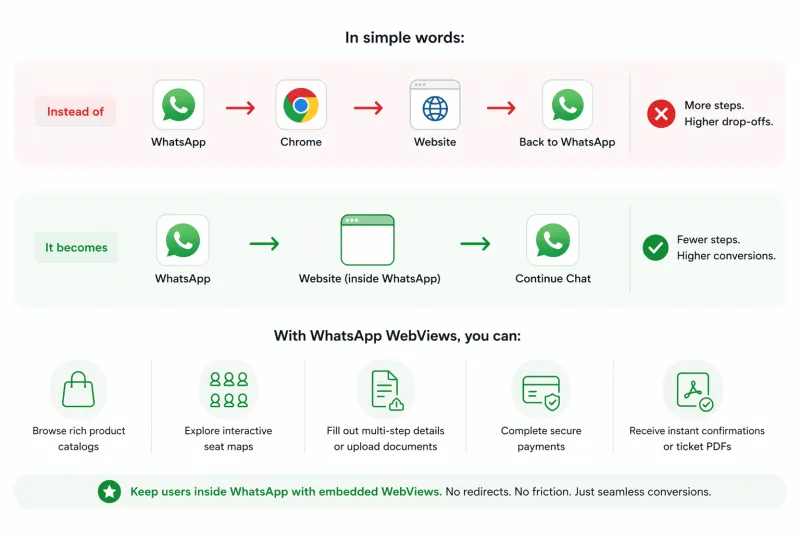
Instead of:
WhatsApp → Chrome → Website → Back to WhatsApp
WhatsApp → Chrome → Website → Back to WhatsApp
It becomes:
WhatsApp → Website (inside WhatsApp) → Continue Chat
WhatsApp → Website (inside WhatsApp) → Continue Chat
Basically, when a user taps your CTA, they don’t leave the chat.
The page loads right there inside WhatsApp without breaking the flow.
What You Can Actually Do With It
With WhatsApp Webviews, businesses can:
- Let users browse products or catalogs
- Collect form inputs or documents
- Enable bookings, registrations, or onboarding flows
- Complete payments and confirmations
All without leaving WhatsApp.
Because the moment you stop sending users outside, you stop giving them a reason to drop off.
Next, let’s see how WhatsApp WebView works.
Read About WhatsApp WebView + Magic Link: How to Turn Clicks Into Conversions
How WhatsApp Webviews Works?
At a high level, WhatsApp Webviews turn a simple message into an interactive web journey without leaving the chat.
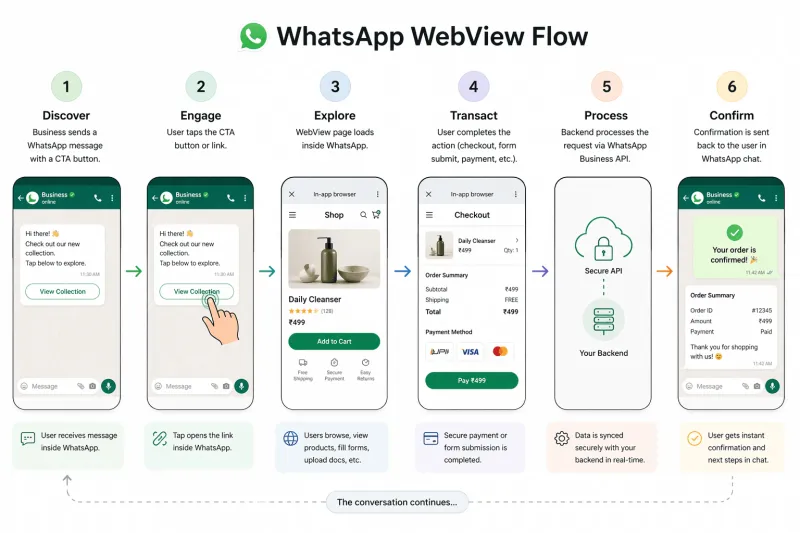
Here’s how the flow works in practice:
- Business sends a WhatsApp message
With a CTA button or link (e.g., Shop Now, Complete Booking, Verify Details). - User taps the CTA
Instead of opening Chrome or Safari, it triggers a Webview. - Web page opens inside WhatsApp
The experience loads instantly within the chat, no app switching. - User takes action
Browses products, fills forms, uploads documents, completes payment, etc. - Backend processes the action
The Webview communicates with your backend via APIs in real time. - Confirmation is sent in chat
Order confirmation, booking details, or next steps, delivered instantly on WhatsApp chat.
What Makes This Seamless
With WhatsApp Cloud API, you can pass context directly into the Webview, such as:
- User phone number (as session identifier)
- Cart details or tokens
- Booking IDs
- Order references
This means users don’t need to start from scratch.
They land on a pre-filled, context-aware experience which significantly reduces friction.
Next, let’s look at the benefits of WhatsApp Webviews.
Benefits of WhatsApp Webviews
The biggest shift with WhatsApp Webviews is simple: You remove the most fragile part of the funnel, which is the redirect.
And when that goes away, everything else improves.
What Changes for Your Business
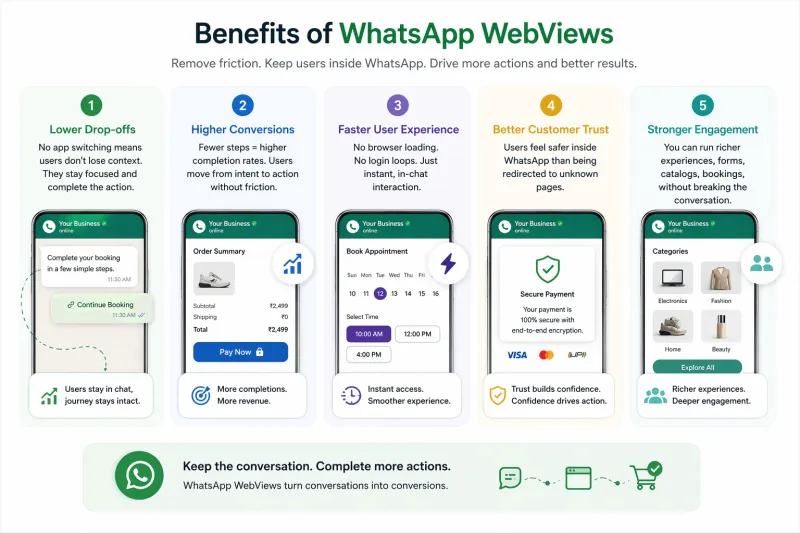
1. Lower Drop-offs
No app switching means users don’t lose context. They stay focused and complete the action.
No app switching means users don’t lose context. They stay focused and complete the action.
2. Higher Conversions
Fewer steps = higher completion rates. Users move from intent to action without friction.
Fewer steps = higher completion rates. Users move from intent to action without friction.
3. Faster User Experience
No browser loading. No login loops. Just instant, in-chat interactions.
No browser loading. No login loops. Just instant, in-chat interactions.
4. Better Customer Trust
Users feel safer inside WhatsApp than being redirected to unknown pages.
Users feel safer inside WhatsApp than being redirected to unknown pages.
5. Stronger Engagement
You can run richer experiences, forms, catalogs, bookings, without breaking the conversation.
You can run richer experiences, forms, catalogs, bookings, without breaking the conversation.
What This Enables (Practically)
With WhatsApp Webviews, you can:
- Run end-to-end journeys inside WhatsApp (checkout, onboarding, bookings)
- Collect structured data via forms instead of messy chat inputs
- Show dynamic content (products, calendars, personalized flows)
- Reduce dependency on external websites for conversions
Next, let’s look at real-world use cases of WhatsApp Webviews and how different industries are actually using them.
WhatsApp Webviews Use Cases
The best use cases for WhatsApp Webviews are simple: High intent + high friction workflows.
These are the journeys where users want to complete an action, but drop off because the process is broken.
Webviews fix that by keeping everything inside WhatsApp.
1. Appointment & Booking Flows
Industries like healthcare, salons, gyms, and restaurants rely heavily on bookings.
Problem:
Users tap a reminder → get redirected → log in → drop off.
Users tap a reminder → get redirected → log in → drop off.
With Webviews:
- Open booking page inside WhatsApp
- Pre-filled user context
- Confirm, reschedule, or pay instantly
Outcome: Faster confirmations. Fewer missed bookings.
2. Payments & Financial Flows
Used by banks, fintech, and insurance platforms.
Common use cases:
- Bill payments
- Policy updates
- Claims tracking
- Secure account actions
With Webviews:
- Users stay inside WhatsApp
- Secure flows (single-use links, expiry, etc.)
- Reduced confusion and higher trust
Outcome: Higher completion rates for critical actions.
3. Customer Support & Service Tickets
Support journeys often break at the worst moment.
Problem:
User clicks a ticket link → hits login → leaves.
User clicks a ticket link → hits login → leaves.
With Webviews:
- Open ticket inside WhatsApp
- Upload files, check status, confirm resolution
- Continue conversation without interruption
Outcome: Faster resolutions. Lower support drop-offs.
Industry-Wise Use Cases
E-commerce
Browse products → select variants → checkout
Impact: Fewer abandoned carts, higher conversions
Impact: Fewer abandoned carts, higher conversions
Travel & Tourism
Seat selection, bookings, check-ins
Impact: Faster bookings, smoother experience
Impact: Faster bookings, smoother experience
Healthcare
Appointments, reports, consultations
Impact: Better patient experience, fewer no-shows
Impact: Better patient experience, fewer no-shows
Education
Enrollments, quizzes, submissions
Impact: Higher engagement and completion rates
Impact: Higher engagement and completion rates
Finance
KYC, loan approvals, payments
Impact: Faster approvals, secure workflows
Impact: Faster approvals, secure workflows
Real Estate
Property browsing, virtual tours, scheduling visits
Impact: More inquiries, better lead quality
Impact: More inquiries, better lead quality
Logistics
Tracking, rescheduling, proof of delivery
Impact: Fewer support calls, better transparency
Impact: Fewer support calls, better transparency
Hospitality
Bookings, concierge, service requests
Impact: Higher guest satisfaction
Impact: Higher guest satisfaction
The Pattern You Should Notice
Every high-performing use case follows the same logic:
- Intent already exists (user clicked, replied, or showed interest)
- Friction kills it (redirects, logins, slow pages)
- Webviews remove that friction
And that’s where conversion lifts come from.
Next, let’s see if WhatsApp webviews is right for your business.
How to Evaluate if This Is Right for Your Business
Best fit when:
- Your users are mostly mobile-first
- Your flow requires login, verification, or context
- Your journey has multiple steps
- Your conversions are sensitive to drop-offs
Less useful when:
- Your use case is purely informational
- No login or validation is needed
- The flow is already one-step simple
- The experience depends on desktop-heavy features
Next, let’s look at a practical rollout plan to implement WhatsApp Webviews without overcomplicating your setup.
A Practical Rollout Plan
Don’t overbuild. Start small and test.
1. Pick One High-Friction Use Case
Start where drop-offs are obvious:
- Appointment confirmation
- Order tracking
- Support ticket review
- Payment reminders
2. Build a Simple MVP
Keep it tight:
- One message template
- One secure token/session flow
- One Webview page
- Basic fallback (in case it fails)
3. Run an A/B Test
Compare Webview vs current flow:
- Click-through rate
- Completion rate
- Time to complete
- Drop-offs after click
4. Expand Based on Results
If it works:
- Add more use cases
- Improve flows
- Layer analytics and personalization
Start with one journey.
Prove impact → then scale.
Prove impact → then scale.
Next, let’s break down how to technically integrate WhatsApp Webviews into your system.
How to Integrate WhatsApp Webviews
At a high level, integration is simple: WhatsApp handles the container. You control the experience inside it.
Step 1: Set Up WhatsApp Business API
You need a way to send messages and trigger Webviews.
- Get WhatsAppp Business API via YCloud
- Configure your business number, profile and message templates
- Set up a backend or bot to send/receive messages
Step 2: Build the Webview Page
This is the actual experience users will interact with.
- Create a mobile-first web page (HTML/JS, React, etc.)
- Design the flow (checkout, form, booking, etc.)
- Handle URL parameters or tokens to identify the user/session
Step 3: Trigger Webview from WhatsApp
This is your entry point.
- Add a CTA button or link in your message
- Point it to your Webview URL
- On click, it opens inside WhatsApp (not external browser)
Step 4: Pass User Context
Avoid making users start from scratch.
- Pass session tokens, IDs, or references
- Fetch user-specific data on load
- Keep the experience pre-filled and contextual
Step 5: Sync Actions with Your Backend
Everything inside Webview should reflect in your system.
- Track user actions (submit, pay, upload)
- Process via backend APIs
- Send real-time updates back on WhatsApp
Step 6: Optimize for WhatsApp UX
This is where most teams fail.
- Keep pages light and fast
- Design for single-screen, vertical usage
- Avoid heavy scripts or complex navigation
Step 7: Launch and Iterate
Don’t scale blindly.
- Start with one use case
- Measure completion and drop-offs
- Improve flow → then expand
What You Need (Checklist)
- WhatsApp Business API / Cloud API
- Mobile-optimized Webview page
- Backend for session + API handling
- Automation layer for confirmations
Once this is set up, you can run end-to-end flows inside WhatsApp.
Next, let’s look at common challenges teams face when implementing WhatsApp Webviews and how to avoid them.
Common Challenges in WhatsApp Webview Integration
Most issues aren’t about the idea, they’re about execution across devices, sessions, and constraints. Here’s what typically breaks and how to handle it:
1. Limited Control Over In-App Browser
You can’t customize how WhatsApp’s Webview behaves.
Fix:
Design flows that are self-contained inside the page. Don’t depend on WhatsApp UI or external navigation.
Design flows that are self-contained inside the page. Don’t depend on WhatsApp UI or external navigation.
2. Inconsistent Behavior Across Devices
Some users stay in Webview. Others get pushed to a full browser.
Fix:
Build flows that work in both cases. Keep it simple, and ensure users can resume if interrupted.
Build flows that work in both cases. Keep it simple, and ensure users can resume if interrupted.
3. Performance & Loading Issues
Heavy pages feel slower inside WhatsApp and increase drop-offs.
Fix:
Keep pages light, fast, and mobile-first. Optimize images, scripts, and test on slow networks.
Keep pages light, fast, and mobile-first. Optimize images, scripts, and test on slow networks.
4. Session & State Mismatches
Users may see empty data or broken flows if session handling fails.
Fix:
Use secure tokens, validate on load, and store progress server-side so users can resume anytime.
Use secure tokens, validate on load, and store progress server-side so users can resume anytime.
5. Compliance & Data Handling
You still handle user data outside WhatsApp’s core layer.
Fix:
Use HTTPS, limit sensitive data exposure, and align with GDPR/local compliance rules.
Use HTTPS, limit sensitive data exposure, and align with GDPR/local compliance rules.
6. Debugging & Visibility
Harder to trace issues across WhatsApp, Webview, and backend.
Fix:
Add event tracking + session IDs, and connect logs across systems for clear visibility.
Add event tracking + session IDs, and connect logs across systems for clear visibility.
Keep the flow simple.
Most failures happen when teams overcomplicate the first version.
Most failures happen when teams overcomplicate the first version.
Next, let’s look at best practices to get WhatsApp Webviews right from day one.
Best Practices for WhatsApp Webview Implementation
Keep it simple. Optimize for speed and continuity.
- Use responsive, mobile-first design
Design for a single vertical screen. No desktop-style layouts.
- Keep load time under 3 seconds
Slow pages increase drop-offs instantly.
- Avoid heavy popups or overlays
They break flow and feel clunky inside chat.
- Prefill user details wherever possible
Reduce typing. Use session data to load context.
- Send confirmation back to chat instantly
Close the loop inside WhatsApp (order, booking, status).
Next, let’s look at how you can actually drive 10X revenue using WhatsApp Webviews with YCloud.
Drive 10x Revenue with YCloud
With YCloud, turn WhatsApp into a conversion engine, not just a messaging channel.
- Webviews keep users inside WhatsApp → no redirects, no drop-offs
- Magic Links remove login friction → no OTPs, no delays
- Together = near one-tap conversion flow
With YCloud, you can:
- Launch end-to-end Webview journeys (checkout, booking, onboarding)
- Use secure Magic Links for frictionless login and instant user recognition
- Track click → action → revenue in one flow
Next, let’s wrap up with the final takeaway.
Final Takeaway
WhatsApp Webviews remove the biggest leak, and that is redirects.
Magic Links remove the second, which is logins.
What’s left is a straight path from click → action → conversion.
If your funnel breaks outside WhatsApp, bring it back inside and close the loop.
Frequently Asked Questions
Does every WhatsApp version support WebView?
Most current iOS and Android WhatsApp environments support in-app web experiences, but compatibility can vary by OS version and device state. Test on the device mix that matters to your audience.
Can payments work in WebView?
Often yes, but this depends on the payment provider, embedded browser behavior, and local compliance rules. Test the full payment flow before rollout rather than assuming parity with external browsers.
Do customers need to install anything extra?
No. They just need WhatsApp. The Webview opens automatically on tap, no downloads or setup.
How is Webview different from a regular link?
Regular links open outside WhatsApp.
Webviews keep users inside the chat, fewer steps, fewer drop-offs.
Webviews keep users inside the chat, fewer steps, fewer drop-offs.
Which accounts support Webviews?
Only WhatsApp Business API account.
Not available on the standard WhatsApp Business app.
Not available on the standard WhatsApp Business app.
What messages can trigger a Webview?
CTAs, buttons, and template messages with URLs.
Outside the 24-hour window, you’ll need an approved template.
Outside the 24-hour window, you’ll need an approved template.
Is Webview supported on all devices?
Mostly yes, but behavior can vary.
Some users may still be redirected to the default browser.
Some users may still be redirected to the default browser.
Can Webviews access camera or location?
Basic access (like file uploads) may work.
Advanced device features depend on device and permissions. Test before rollout.
Advanced device features depend on device and permissions. Test before rollout.
Do I need to change my templates?
Only for outbound (template) messages.
Within the 24-hour window, no changes are needed.
Within the 24-hour window, no changes are needed.
What’s the difference between WhatsApp Flows and Webviews?
Webviews = the underlying in-app browser.
Flows = Meta’s framework that uses Webviews to build structured experiences.
Flows = Meta’s framework that uses Webviews to build structured experiences.
Will Webviews work with my backend (Shopify, CRM, etc.)?
Yes. They’re built on standard web tech, so you can connect via APIs and sync data in real time.
Do I need extra setup to enable this?
Yes. You’ll need API access, a Webview page, and backend logic.
Platforms like YCloud can handle this end-to-end.
Platforms like YCloud can handle this end-to-end.
Related Articles

Make your business communications much easier!


Trusted by




