

How Multiple Agents Can Use One WhatsApp Number

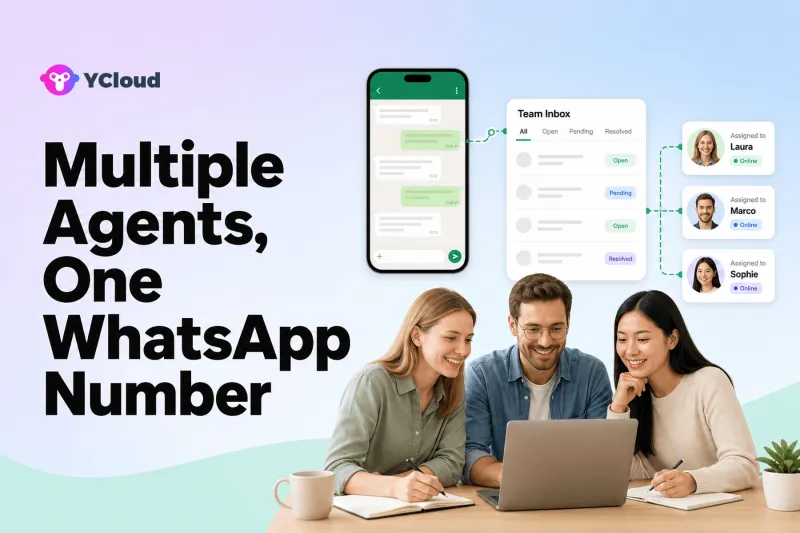
Multiple agents can use one WhatsApp business number when the number is connected to an official multi-user setup such as the WhatsApp Business Platform and a shared team inbox. Agents work through individual accounts with assignments, permissions and conversation context instead of sharing a phone, browser session or password.
This guide is for growing SMBs and support teams replacing shared devices, forwarded screenshots and informal ownership with a controlled team workflow. The important distinction is between many people viewing the same account and a real multi-agent operation. A real operation has individual identity, one owner per case, internal collaboration, auditable actions and a safe recovery path.
Turn a shared number into named accountability
The customer may see one WhatsApp number, but the business should see individual users, one active owner, clear states and a complete handoff history. The YCloud WhatsApp Business API page explains the official connection used for structured operations; the shared team Inbox is the layer that lets people collaborate without sharing a password or device.
Start by observing where today's shared-number process fails. Typical symptoms include two employees replying, no one answering after a shift change, internal discussion being copied into the customer chat, or an employee leaving with unresolved work. Each symptom should become a permission, assignment or recovery requirement for the new setup.
Configure one number for a real multi-agent team
Step 1. Confirm the number and deployment model
Document who owns the number and WABA, whether the Business App must remain in use, and whether an eligible coexistence path applies. Do not start migration without a rollback and business-continuity plan.
Step 2. Create individual user access
Give each teammate a named account and least-privilege role. Separate administrators, supervisors, agents and analysts rather than distributing a shared credential.
Step 3. Organize teams and queues
Group conversations by language, market, product or purpose only when that structure changes ownership or reporting. Keep a general intake queue for unmatched messages.
Step 4. Define assignment behavior
Choose round robin, manual claim, skills-based, availability-based or continuity rules. Specify what happens when an agent goes offline, misses a target or leaves the company.
Step 5. Use notes without leaking internal discussion
Provide a private collaboration space for context, mentions and follow-up instructions. Train agents to distinguish an internal note from a customer reply.
Step 6. Preserve conversation and customer context
Keep prior messages, profile details, tags and relevant records visible to the next agent. Avoid asking customers to repeat information already captured.
Step 7. Add automation and handoff carefully
Use acknowledgement and pre-routing to reduce triage, but transfer complex cases with a summary and collected fields. A supervisor should be able to intervene.
Step 8. Monitor team execution
Review backlog, unassigned chats, response and resolution time, reassignment, workload distribution and quality samples. Use data to adjust staffing and rules.
Team patterns that benefit from one shared number
- A retail team sharing one support number across shifts.
- A multilingual business routing customers to local-language agents.
- Sales and support using the same number with separate queues and handoffs.
- A supervisor monitoring unassigned or high-risk conversations.
- An SMB retaining one familiar customer-facing number while adding staff.
For each team pattern, specify who may claim a conversation, how another agent joins, what happens at shift end and how supervisors find work with no owner. Those operating details distinguish a shared Inbox from several people merely viewing the same message stream.
How YCloud supports shared-number teamwork
As a Meta official Premier-level BSP, YCloud combines official WhatsApp access with a team Inbox that documents assignment, notes, routing, AI assistance and human handoff. For multi-agent use, this means customers continue with one business identity while the company manages internal identity and responsibility.
YCloud Contact can preserve customer attributes and history when ownership changes. The AI Agent can collect context before assigning a person, and Journey can automate follow-up without relying on an individual employee. Developers can use API and Webhook examples to synchronize cases or agent-relevant records with external systems.
Test simultaneous work deliberately. Have two agents open the same conversation, transfer it across shifts, add a private note, revoke one user's access and recover an unresolved case. The result should prove that the platform protects ownership under normal staff changes, not only that several users can view the same inbox.
Multi-agent access and ownership checklist
- [ ] Number ownership is recorded
- [ ] Coexistence or migration is verified
- [ ] Every user is named
- [ ] Roles follow least privilege
- [ ] One-owner behavior is clear
- [ ] Offline reassignment is defined
- [ ] Internal notes are distinct
- [ ] Customer context follows handoff
- [ ] Unassigned queue is monitored
- [ ] Supervisor escalation exists
- [ ] Departing-user access is revoked
- [ ] Workload and quality are reviewed
Do not go live while a departing user, offline owner or unassigned queue can strand customer work. The What Is YCloud? guide helps owners distinguish the official channel from the multi-user operating layer they are evaluating.
Shared-number habits that undermine teamwork
- Sharing a password or device instead of issuing named access.
- Allowing two agents to reply because ownership is unclear.
- Creating too many queues with no monitored fallback.
- Sending internal notes to customers by mistake.
- Removing a user without transferring their active workload.
The risky boundaries are agent-to-agent and shift-to-shift. Measure how much context travels with a transfer, how quickly new ownership becomes visible and whether supervisors can find conversations that no individual currently claims.
Named access protects customers and the business
Every teammate should have a separate account with the least privilege needed for the role. Shared credentials make it difficult to investigate a mistaken reply, remove a departing employee or limit exports. Supervisors and administrators should have distinct permissions from frontline agents.
One number can serve service and sales, but outbound messages still need the applicable WhatsApp permission, template and messaging-window controls. Internal team access does not expand the customer's consent. Keep campaign eligibility separate from the ability to see a conversation.
Define retention and handover for notes, customer records and active cases. When a user leaves or a team changes, revoke access promptly, reassign open work and preserve the audit history required by the business. A multi-agent design is incomplete without offboarding.
A 30-day migration from shared devices
Week 1 — document ownership failures. Inventory users, devices, passwords, open chats and common duplicate-reply or missed-handoff incidents. Confirm who owns the number and WABA.
Week 2 — create named access. Build roles, teams, queues and one fallback. Assign a controlled set of conversations while the old process remains available for continuity.
Week 3 — test shifts and staff changes. Reassign cases, simulate absence, add internal notes, escalate to a supervisor and offboard a test user. Verify that customer context remains intact.
Week 4 — move the operating queue. Retire shared credentials, monitor unassigned and duplicate replies, and adjust workload rules from evidence. The support provider selection guide provides further questions about permissions and reporting.
Frequently asked questions
Can several employees use one WhatsApp Business App account?
The app supports limited device linking, but structured teams often need the Business Platform and a shared inbox for assignment, permissions, integrations and reporting. Evaluate the scale and governance required.
Will customers see different numbers for each agent?
Not when agents work behind one connected business number. Customers contact the same number while the platform manages internal ownership.
Can YCloud support multiple agents on one number?
YCloud's shared Inbox is built for team collaboration and documents assignments, notes, routing, AI assistance and human handoff around official WhatsApp access.
Can the WhatsApp Business App and API be used together?
Coexistence may be available for eligible accounts and setups. Confirm current eligibility, migration behavior and feature implications before changing a production number.
How do we prevent duplicate replies?
Use one active owner, clear queue states, collision awareness if available, reassignment rules and supervisor monitoring. Test simultaneous-agent behavior before launch.
One public identity needs many accountable users
Multiple agents can share one WhatsApp number safely when each person has named access and every conversation has visible ownership, preserved context and a transfer path. The objective is not simultaneous login; it is reliable teamwork behind a single customer-facing identity.
Frequently Asked Questions
Can several employees use one WhatsApp Business App account?
Will customers see different numbers for each agent?
Can YCloud support multiple agents on one number?
Can the WhatsApp Business App and API be used together?
How do we prevent duplicate replies?
Related Articles



Make your business communications much easier!


Trusted by




