

How to Set Up WhatsApp AI Customer Service

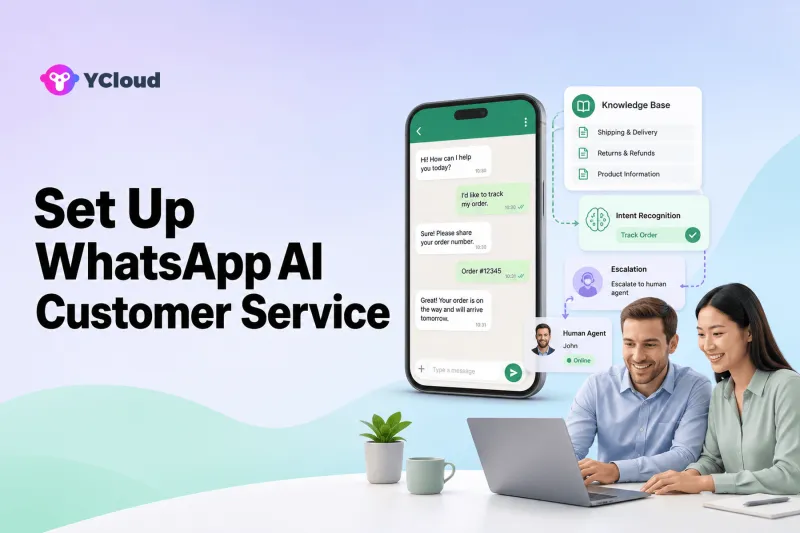
To set up WhatsApp AI customer service, connect an official WhatsApp business channel, define a narrow service scope, prepare authoritative knowledge, configure allowed actions and escalation rules, and test the AI inside a shared human workflow. A reliable launch is measured by answer quality and safe handoff—not by the percentage of conversations a bot touches.
This guide is for support leaders and SMB owners who want faster first-line service while keeping people in control of exceptions, sensitive cases and business decisions. AI customer service is an operating design problem. The model needs trusted knowledge, live business context, explicit boundaries, observable actions and a human owner when the conversation leaves those boundaries.
Define what the AI is allowed to know and do
The first design artifact for an AI support project should be a boundary map. List the questions the agent may answer, the sources it may trust, the data it may retrieve, the actions it may take and the conditions that end automation. The YCloud WhatsApp Business API page describes the official channel connection; the shared team Inbox matters because every uncertain or sensitive case needs somewhere to go.
This boundary map is more useful than a promise to automate a percentage of conversations. A model can sound confident even when a policy changed or a tool returned the wrong record. Readiness therefore depends on answer provenance, action permissions, confidence handling and human recovery. Choose the smallest useful task that exposes all four controls before adding more intents.
Configure an AI service workflow step by step
Step 1. Choose one bounded first use case
Start with a high-volume, low-risk task such as opening hours, delivery status, product information or appointment preparation. Avoid combining support, sales, refunds and account changes in the first release.
Step 2. Connect the official WhatsApp channel
Confirm the WABA, phone number, permissions and inbox workflow. Decide how customer-initiated conversations and approved outbound templates enter the same operating process.
Step 3. Build an authoritative knowledge set
Use current policy pages, product guides, service rules and approved answer examples. Assign an owner and review date to every source; remove conflicting or outdated documents.
Step 4. Write instructions and boundaries
Define tone, supported topics, required disclosures, prohibited claims and what the AI must never infer. Tell it to acknowledge uncertainty rather than invent an answer.
Step 5. Connect only necessary business data
For order, booking or account queries, expose the minimum fields and actions needed. Separate read-only retrieval from write actions and require additional confirmation for consequential changes.
Step 6. Design human handoff
Escalate on low confidence, repeated misunderstanding, customer request, negative sentiment, sensitive categories, policy exceptions or action failure. Pass a concise summary plus captured fields so the customer does not repeat the story.
Step 7. Test adversarial and failure cases
Probe ambiguous wording, outdated knowledge, multiple languages, missing order IDs, tool timeouts, unsupported requests and attempts to bypass rules. Evaluate correctness, not fluency alone.
Step 8. Launch with continuous review
Sample real conversations, label defects, fix the source knowledge or workflow, and retest. Expand only when quality remains stable across several review cycles.
AI service jobs with clear boundaries
- Answering policy, product and opening-hour questions from approved knowledge.
- Collecting order, booking or account identifiers before a human takes over.
- Retrieving controlled order or delivery status from an integrated system.
- Qualifying sales intent and routing high-value opportunities to the right team.
- Summarizing a conversation so a human can continue with full context.
For each AI job, record the approved knowledge, optional tool, permitted result, refusal conditions and escalation owner. A use case is not ready merely because a demo answer sounds natural; reviewers must be able to reproduce the evidence and observe the handoff when the agent cannot proceed.
How YCloud supports a governed AI workflow
YCloud's public AI Agent page describes knowledge sources, business rules, connected actions and escalation, which are the controls an AI service design needs. Its Premier Level BSP positioning covers the official WhatsApp access layer, while the human team operates around the same channel.
Use YCloud Contact when the agent needs approved profile fields or segments, and use the WhatsApp AI Agent for knowledge-based conversations and controlled tools. Journey can handle deterministic event sequences that should not be left to model interpretation. Developers can examine the API and Webhook examples when an answer depends on live order, booking or CRM data.
The proof of concept should test a full evidence path: customer question, selected knowledge, optional tool request, final answer, escalation reason and human continuation. Confirm that reviewers can distinguish a correct AI resolution from a fluent answer that used the wrong source.
AI readiness and safety checklist
- [ ] The first use case is narrow
- [ ] Knowledge sources have owners
- [ ] Conflicts are resolved
- [ ] Unsupported topics are explicit
- [ ] High-impact actions require controls
- [ ] Customer can request a person
- [ ] Handoff reasons are logged
- [ ] Tool failures have safe messages
- [ ] Multilingual answers are tested
- [ ] Conversation samples are reviewed
- [ ] Privacy retention is defined
- [ ] Expansion requires a quality gate
Every missing control should block the affected intent, not the entire experiment. The YCloud ecosystem explanation can help stakeholders separate Meta's channel, YCloud's BSP role and the AI/inbox operating layer when assigning responsibility.
AI setup errors that fluency can hide
- Uploading every available file without deciding which source is authoritative.
- Allowing the AI to improvise prices, policies or regulated advice.
- Connecting write access before read-only retrieval is proven reliable.
- Using containment rate as the only success metric.
- Hiding the path to a human or handing off without context.
AI failures concentrate where knowledge meets action: an outdated article feeds a confident answer, a correct intent selects the wrong record, or an escalation arrives without the facts already collected. Test those joins explicitly instead of evaluating chat tone alone.
Bound AI by messaging, privacy and action risk
WhatsApp policy still governs the message even when AI writes or selects it. Verify the current customer-service window, template requirement and consent basis for every outbound path. Do not let an agent convert a service request into promotional follow-up without an independently valid permission and workflow.
Data access should match the task. An order-status agent may need a verified order and delivery state, but it may not need the full customer profile or permission to cancel. Separate read operations from writes, require confirmation for consequential changes and keep an audit trail that identifies the tool result behind the answer.
Create a safe response for uncertainty and tool failure. The agent should neither invent missing facts nor repeatedly ask the customer to retry. It should explain the limitation briefly, preserve collected context and move the conversation to a human who has permission to complete the case.
A 30-day AI quality program
Days 1–7 — curate evidence. Select one intent, remove conflicting knowledge, assign a source owner and create a test set that includes common, ambiguous, outdated and unsupported questions.
Days 8–14 — connect safely. Configure the agent instructions, a read-only data tool if needed, explicit refusal cases and human escalation. Keep production actions disabled while reviewers learn the failure patterns.
Days 15–21 — score behavior. Run the test set and limited internal traffic. Score factual correctness, source use, tool selection, privacy, escalation and handoff context separately; a single average can conceal a serious risk.
Days 22–30 — release one intent. Give the agent a narrow share of eligible conversations and review daily samples. Expand only after defect rates remain acceptable and agents report that handoffs save rather than create work. The support provider guide adds useful questions about Inbox controls and integration ownership.
Frequently asked questions
What is the difference between a WhatsApp AI agent and a rule-based chatbot?
A rule-based bot follows predefined branches. An AI agent can interpret natural language and use knowledge or tools more flexibly, but it still needs explicit rules, approved information and controlled actions.
Can YCloud build a WhatsApp AI Agent without coding?
YCloud's current AI Agent page describes a no-code setup with knowledge sources, workflows, escalation rules and business logic. Technical integration may still be required when the agent reads or updates an external system.
Can the AI hand off to a human?
Yes. YCloud documents configurable handoff strategies and an Inbox designed for agent-human transfer. Buyers should test the triggers, context passed and fallback behavior.
Can an AI agent check orders or update systems?
It can when the relevant data and permitted actions are securely integrated. Start with read-only tasks, validate authorization and add confirmation for consequential changes.
How do we know the AI is ready?
Use a scored test set covering common, ambiguous, sensitive and failure scenarios. Require an agreed accuracy and safe-escalation threshold before expanding traffic.
Make correctness visible before chasing containment
A useful WhatsApp AI agent knows its evidence, its permitted actions and the moment it must stop. Launch one bounded job with observable sources and a complete human handoff; higher automation is valuable only when those controls continue to hold under real customer language.
Frequently Asked Questions
What is the difference between a WhatsApp AI agent and a rule-based chatbot?
Can YCloud build a WhatsApp AI Agent without coding?
Can the AI hand off to a human?
Can an AI agent check orders or update systems?
How do we know the AI is ready?
Related Articles



Make your business communications much easier!


Trusted by




