

WhatsApp Message Status Webhooks for Operations Teams

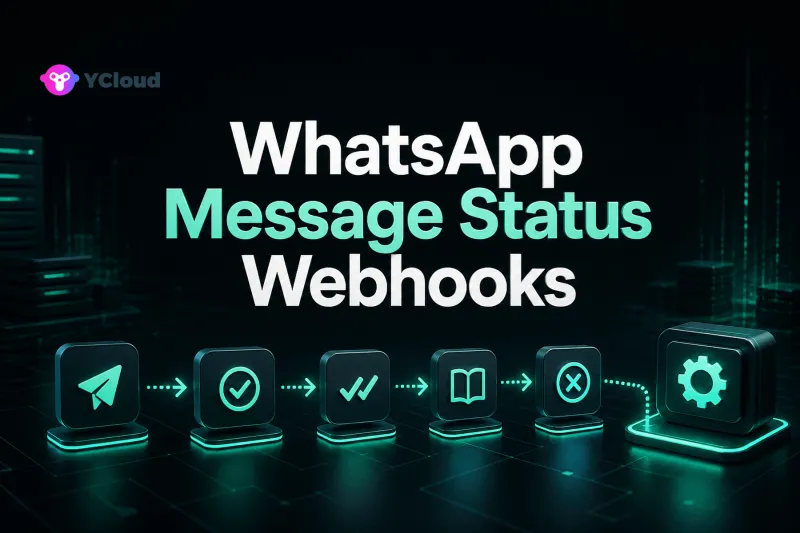
WhatsApp message-status webhooks turn outbound sends into an operational feedback loop: they show whether a request was accepted for processing, sent onward, delivered, read, or failed. Operations teams should use those events to manage exceptions and trends—not to promise that every customer will produce every status or that events will arrive in a fixed order.
What each layer contributes
Meta operates the WhatsApp Business Platform and its Cloud API infrastructure. Cloud API exposes programmatic messaging and webhook events, but it does not decide how your company assigns a support ticket, updates a CRM stage, or escalates a failed notification.
A BSP can provide onboarding, API access, billing, support, and a provider-specific webhook envelope. An operating platform can add shared inboxes, contacts, campaigns, routing, automations, and reporting. YCloud, for example, documents a whatsapp.message.updated event and offers Inbox, Contact, Campaign, Journey, and API/webhook capabilities. These layers work together, but they are not interchangeable.
This distinction matters during an incident. A failed business workflow might originate in the Meta platform, the provider transport, your webhook endpoint, a queue, a CRM connector, or an internal operating rule. A dashboard that labels all of these “WhatsApp failed” cannot guide an effective response.
Read the lifecycle as evidence, not a guarantee
YCloud's current message-sending guide describes an initial accepted state when an asynchronous send request enters processing. It then describes status observations such as sent, delivered, read, and failed through webhooks.
- Accepted means the API request was accepted for processing; it does not prove recipient delivery.
- Sent indicates progress through the WhatsApp delivery path, but it is not the same as device delivery.
- Delivered indicates delivery to the recipient's device according to the platform event.
- Read may be observed when read receipts are available; it is not universal because recipients can disable read receipts and other exceptions may apply.
- Failed means the message did not complete the relevant send path and should be paired with error details where supplied.
Do not turn this into a rigid state machine that only moves forward. YCloud's webhook examples state that notification order is not guaranteed and note that delivered and failed observations can occur in unexpected sequences, especially with multiple devices. Store every observation, its provider event time, and your receipt time. Derive an operational display state separately.
Build an operations-ready event record
The raw webhook should be preserved securely or referenced from protected object storage, but operators need a normalized record. Useful fields include:
- provider event ID and event type;
- YCloud or provider message ID and WhatsApp
wamidwhere present; - WABA and sending phone number;
- your stable
externalId, order ID, ticket ID, or campaign ID; - message category and template identifier where available;
- observed status, error code, and qualified error description;
- event time, receipt time, and processing time;
- current owner, retry decision, and resolution note.
YCloud documents externalId as a way to associate a message with an order or another business record and returns it in later status context. Use such a field consistently at send time. Retrofitting correlation after an incident is expensive and often ambiguous.
Avoid exposing full message bodies, phone numbers, access tokens, or webhook payloads in broad operations dashboards. Operators need enough context to act, while privacy and least-privilege controls should limit sensitive data.
Separate delivery metrics from business outcomes
Message events support several useful operational rates, but definitions must be explicit:
- accepted-to-sent rate;
- sent-to-delivered rate;
- delivered-to-read rate where read data is available;
- failure rate by error family, template, country, phone number, and campaign;
- time between acceptance and each later observation;
- messages with no later status after a chosen threshold;
- webhook processing lag and dead-letter volume.
None of these is revenue, ticket resolution, or customer satisfaction. Join status data to CRM, order, subscription, and support outcomes through stable identifiers. A campaign with a high delivery rate can still produce poor business value; a support notification can be valuable even if it is never marked read.
Do not compare unlike denominators. A read rate calculated from all accepted requests is not the same as reads divided by delivered messages. Exclude or separately label messages still within the observation window. Segment by message type and market because recipient behavior and use cases differ.
Create an actionable failure taxonomy
An operations queue should group failures by the next reasonable action, not simply by raw code.
- Request or content defects: invalid parameters, unavailable media, template-language mismatch, or other correctable inputs. Route to engineering or campaign owners.
- Recipient or delivery constraints: invalid or unavailable destination, inability to deliver, or recipient-side conditions. Suppress unsafe automatic retries and review contact quality.
- Policy, quality, or template issues: route to the owner responsible for templates, opt-in evidence, and messaging governance.
- Authentication or configuration: investigate credentials, WABA, phone-number, permission, and subscription setup.
- Transient dependency conditions: retry with bounded backoff when official guidance supports it.
- Unknown: retain evidence, correlate provider incidents, and escalate without inventing a cause.
Raw platform errors can change and may include nested Meta error details. Preserve the original code and provider trace reference, but show operators a qualified interpretation. Never rewrite an uncertain error as a definite customer cause.
Define playbooks by business criticality
Not every failed message deserves the same response. An authentication code, delivery alert, customer-service reply, and marketing campaign have different urgency and acceptable alternatives.
For time-sensitive transactional messages, define a short observation threshold, a safe retry rule, and an alternate channel where the customer has consented and the business supports it. For service conversations, create an agent task when a customer is awaiting a response. For marketing, stop repeated delivery attempts that could damage customer experience; investigate list quality, consent, templates, and campaign segmentation.
A retry must not become a second business transaction. Use idempotency keys and confirm uncertain outcomes before resending. A “failed” observation also does not automatically authorize another message under policy or consent rules.
Handle missing and contradictory status observations
A message that remains sent is not necessarily a webhook-system failure. YCloud documentation notes recipient connectivity, blocking, read-receipt settings, and undeliverable conditions as examples that can affect later observations. Set thresholds based on the workflow and use supported message-query endpoints for targeted reconciliation.
For contradictory observations, retain both events. Do not erase an earlier error or force timestamps into an artificial order. The operational projection can say “delivered observed; prior failure also recorded” and route unusual patterns for analysis. Finance or compliance decisions should use the authoritative fields and current provider documentation, not a dashboard convention.
Make the webhook pipeline operable
The public handler should validate the request, store it durably, and acknowledge quickly. Downstream processing belongs in a queue. Deduplicate on the stable event ID, update message observations idempotently, retry transient dependency failures with jitter, and move exhausted events into a controlled dead-letter workflow.
Monitor webhook receipt volume, duplicate rate, acknowledgement latency, queue age, processing errors, unknown event types, and reconciliation gaps. Overlay provider status-page incidents and internal deployments. A sudden zero in delivered events can mean customer behavior, provider behavior, a subscription problem, or your own consumer failure; cross-layer evidence narrows the cause.
Test the system with duplicated, delayed, reordered, malformed, and unknown-version payloads. Test that a replay cannot reopen a closed ticket, charge a customer twice, or launch a duplicate CRM automation.
Where YCloud can support the operating workflow
YCloud documents WhatsApp message-status webhooks and active message retrieval, and its operating products can connect messaging to shared Inbox, Contact, Campaign, Journey, and automation workflows. This can reduce the amount of operational UI a team builds itself. It does not remove the need to define metric denominators, business ownership, retention, incident response, or safe integration behavior.
An API-focused product team may want direct webhook delivery into its own event platform. A support or marketing team may value an integrated operating layer. Evaluate both the transport and the daily operating model. For broader criteria, see the WhatsApp API provider shortlist and the WhatsApp BSP selection guide.
Operations checklist
- Record provider event, message, WhatsApp, and business identifiers.
- Preserve observations instead of assuming ordered state transitions.
- Define delivery metrics with denominators and observation windows.
- Group errors by action while retaining original codes.
- Assign playbooks by message purpose and business criticality.
- Reconcile stale or missing states through supported read endpoints.
- Protect customer data and restrict replay permissions.
- Test duplicates, reordering, consumer outages, and uncertain retries.
Frequently asked questions
Is an accepted WhatsApp message already delivered?
No. In YCloud's documented asynchronous flow, accepted means the send request entered processing. A later delivery-status observation provides separate evidence.
Why might a read status never appear?
Read receipts are not always available; recipients can disable them, and other platform or device conditions may apply. Treat read rate as a qualified metric rather than complete ground truth.
Can operations teams assume webhook events arrive in order?
No. YCloud explicitly documents that message-status webhook order is not guaranteed. Store event and receipt timestamps and tolerate reordering.
Should every failed message be retried?
No. Retry only when the failure appears transient and the retry remains valid for the business purpose, policy, and customer context. Input, recipient, or policy failures often require a different action.
What should connect message status to a CRM or order?
Use stable message identifiers plus a business correlation field such as externalId. Avoid relying on phone number and timestamp matching alone.
Frequently Asked Questions
Is an accepted WhatsApp message already delivered?
Why might a read status never appear?
Can operations teams assume webhook events arrive in order?
Should every failed message be retried?
What should connect message status to a CRM or order?
Related Articles



Make your business communications much easier!


Trusted by




