Customer Support

English

New Feature Update: WhatsApp is Working on Scheduled Messages for iOS

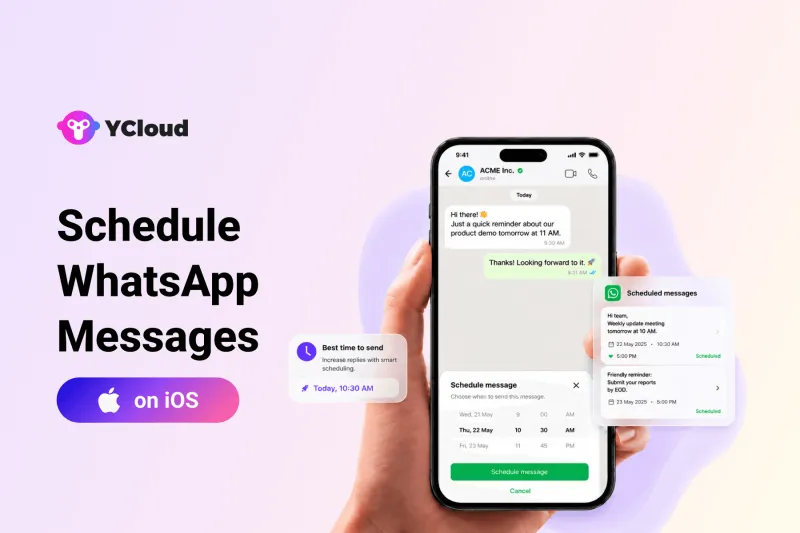
WhatsApp is now working on scheduled messages for iOS, a feature that will let users write a message in advance and choose when it should be delivered.
The feature is still under development, but it could make everyday communication more controlled, timely, and easier to manage.
In this article, we’ll explain what WhatsApp scheduled messages are, how they may work on iOS, where users can manage scheduled messages, and why this update matters for businesses.
Next, let’s look at what WhatsApp is actually building with scheduled messages on iOS.
What WhatsApp Is Building with Scheduled Messages on iOS
WhatsApp is developing a native message scheduling feature for iPhone users.
With this feature, users will be able to write a message, choose a specific date and time, and let WhatsApp send it automatically.
The feature is expected to work in both individual chats and group chats.
This can be useful for reminders, follow-ups, birthday messages, customer updates, and communication across different time zones.
The feature is not available to all users yet, as it is still under development.
Next, let’s look at how scheduled messages may work on WhatsApp for iOS.
How Scheduled Messages May Work on WhatsApp for iOS
WhatsApp scheduled messages are expected to work from the normal chat screen.
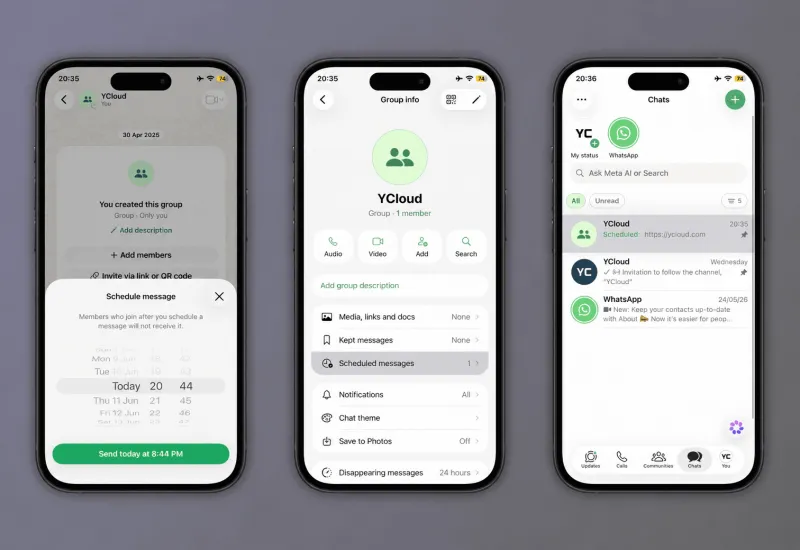
Users may need to type a message and then tap and hold the send button to access the scheduling option.
After that, they can choose the date and time when the message should be delivered.
Once scheduled, the message will be stored inside the chat until it is sent.
Users may also be able to review or delete scheduled messages before delivery.
Next, let’s look at the scheduling time window WhatsApp may offer for iOS users.
Scheduling Time Window on WhatsApp for iOS
WhatsApp may allow users to schedule messages starting from 10 minutes after the current time.
The maximum scheduling window is expected to be up to two weeks in advance.
This means users will not be able to schedule a message for immediate delivery or for a date too far in the future.
For businesses, this time window can be useful for short-term reminders, follow-ups, appointment updates, payment nudges, and time-zone-based communication.
Next, let’s look at how users may manage scheduled messages before they are sent.
How Users May Manage Scheduled Messages
WhatsApp is expected to add a dedicated section for scheduled messages inside chats.
This section may show all pending messages that are scheduled but not yet sent.
Users may be able to review these messages, check the delivery time, edit or delete them before they are sent.
If a scheduled message is deleted before delivery, the recipient will not be notified.
WhatsApp may also show scheduled messages in the chat list, making it easier to track which conversations already have messages planned.
Next, let’s look at how scheduled messages may work in WhatsApp group chats.
Scheduled Messages in WhatsApp Group Chats
WhatsApp is also expected to support scheduled messages in group chats.
This means users may be able to write a message in a group, schedule it for a later time, and have it delivered automatically.
However, the message may only be sent to members who are part of the group at the time the message is scheduled.
If someone joins the group later, they may not receive that scheduled message.
This helps keep the message connected to the original group context and avoids confusion for new members.
Next, let’s look at why scheduled messages can be useful for businesses.
When Will WhatsApp Scheduled Messages Be Available on iOS?
WhatsApp scheduled messages for iOS are still under development.
The feature is not available to all users yet and may first appear for selected beta users before a wider rollout.
WhatsApp has not confirmed an official release date.
For now, users may need to wait until the feature is tested, improved, and gradually made available in a future iOS update.
Next, let’s look at what businesses should keep in mind before using scheduled messages on WhatsApp.
How YCloud Helps Businesses Scale WhatsApp Marketing
Scheduled messages can help with simple one-time reminders and follow-ups.
But businesses often need more than basic scheduling.
They need automation, approved message templates, shared team access, customer segmentation, chatbot support, campaign tracking, and performance reporting.
With YCloud, businesses can send WhatsApp campaigns, automate customer journeys, manage conversations from a shared inbox, build AI-powered chatbots, and track message performance from one platform.
For teams that want to move beyond manual messaging, YCloud makes WhatsApp more structured, scalable, and easier to manage.

Next, let’s conclude the article with a short final takeaway.
Final Thoughts
WhatsApp scheduled messages for iOS could make everyday communication more planned and reliable.
Users may soon be able to write messages in advance, choose the delivery time, and manage pending messages before they are sent.
For businesses, this can help with simple follow-ups, reminders, and time-sensitive communication.
The feature is still under development, so it is not available to all users yet.
But once released, it could become a useful addition for teams that rely on WhatsApp for daily customer and business communication.
For businesses that need more than basic scheduling, YCloud helps turn WhatsApp into a scalable communication channel with automation, campaigns, shared inbox, AI chatbots, and performance tracking.
Frequently Asked Questions
Is WhatsApp scheduled messages available on iOS?
The feature is currently under development for iOS.
It is not available to all users yet and may first roll out to selected beta users before becoming widely available.
How will scheduled messages work on WhatsApp for iOS?
Users may be able to type a message, tap and hold the send button, and choose a date and time for delivery.
After scheduling, the message may remain pending inside the chat until it is sent.
Can users manage scheduled messages before they are sent?
Yes. WhatsApp is expected to add a dedicated section where users can view and manage scheduled messages.
Users may be able to review or delete scheduled messages before delivery.
Will the recipient know if a message was scheduled?
Based on the expected feature behavior, recipients may not be notified that a message was scheduled.
If a scheduled message is deleted before delivery, the recipient may not receive any notification.
Will scheduled messages work in WhatsApp group chats?
Yes. WhatsApp is expected to support scheduled messages in group chats.
However, the message may only be delivered to members who were part of the group when the message was scheduled.
How far in advance can users schedule WhatsApp messages?
WhatsApp may allow users to schedule messages from 10 minutes after the current time up to two weeks in advance.
Can scheduled messages replace WhatsApp API automation?
No. Scheduled messages are expected to be useful for basic one-time scheduling.
Businesses that need bulk messaging, automation, approved templates, customer segmentation, shared inbox, and analytics will still need a WhatsApp API platform.
Related Articles




Make your business communications much easier!


Trusted by




