Customer Support

English

New Feature Update: WhatsApp Rolls Out Group Voice & Video Calls on Web

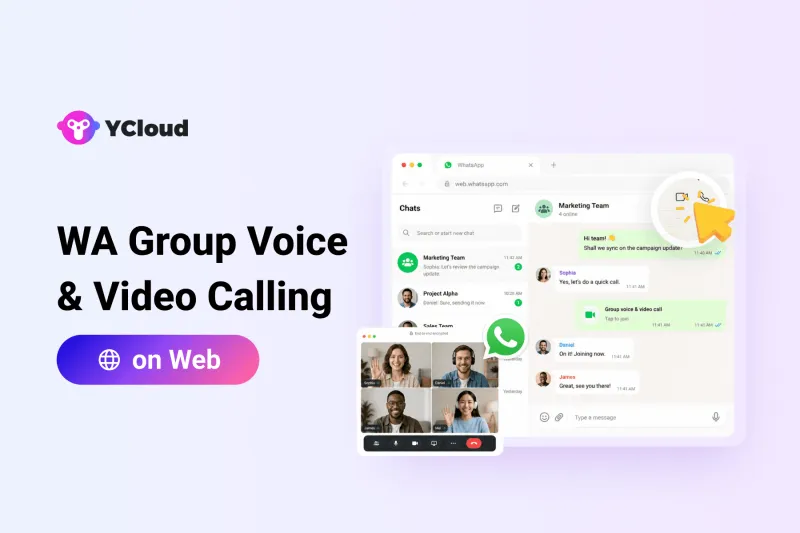
WhatsApp is making its Web experience more useful for teams.
The platform is rolling out group voice and video calls on WhatsApp Web, allowing select users to start group calls directly from their browser. Until now, WhatsApp group calls were mostly handled through mobile or desktop apps.
For businesses, this update solves a small but common workflow problem: switching devices just to join a WhatsApp group call. Teams that already use WhatsApp Web for customer conversations, internal coordination, sales follow-ups, or partner communication can now manage group calls from the same screen.
The feature is currently rolling out to some WhatsApp Web beta users and is expected to reach more users gradually.
In this article, we’ll break down what’s new, how WhatsApp group calling on Web works, who can access it, and why this update matters for business communication.
Next, let’s look at what exactly WhatsApp has introduced with this new Web calling update.
What’s New in This WhatsApp Web Update?
With this WhatsApp Web calling update, selected WhatsApp Web beta users can start group voice and video calls directly from a group conversation in the browser. They no longer need to switch to the mobile app or desktop app just to begin or join a group call.
The update brings WhatsApp Web closer to the mobile and desktop calling experience by adding support for:
- Group voice calls
- Group video calls
- Participant selection before starting a call
- Calls with up to 32 participants
- Call links for easier joining
- Screen sharing during video calls
For businesses, this makes WhatsApp Web more practical for quick team discussions, customer coordination, partner calls, and internal follow-ups where the conversation is already happening inside WhatsApp.
Next, let’s look at how users can start a group voice or video call on WhatsApp Web.
How to Start a Group Voice or Video Call on WhatsApp Web
Starting a group call on WhatsApp Web is expected to work directly from the group chat window.
- Users need to open a WhatsApp group on Web
- Check the top-right area of the chat for the voice or video call option.
If the call button is visible, the feature is already available for that account.
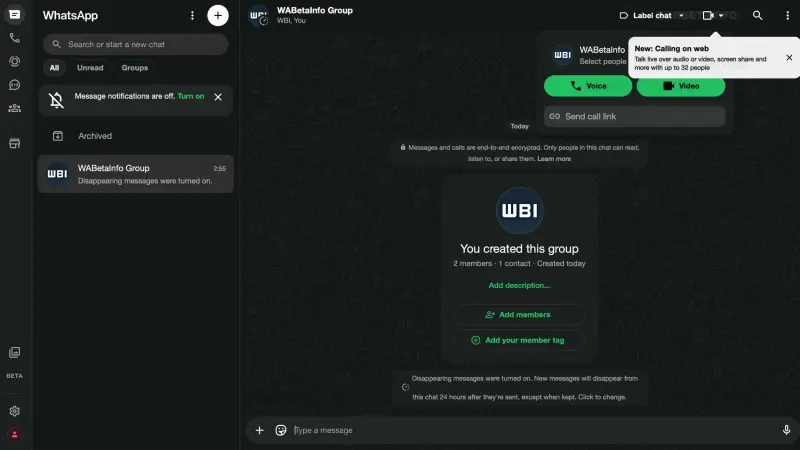
Once selected, users can choose whether they want to start a voice call or a video call.
They may also be able to select specific people from the group instead of calling every group member at once.
This is useful for businesses because not every group discussion needs the full team. A sales manager may only need to call two team members from a customer follow-up group, or a support lead may need a quick internal call with selected agents.
If the call option is not visible yet, it likely means the feature has not been rolled out to that account. Since WhatsApp is testing it with selected beta users, availability may expand gradually.
Next, let’s look at the key features included in WhatsApp group calling on Web.
Key Features of WhatsApp Group Calling on Web
WhatsApp web group calling update brings several calling features that make the Web experience more complete and useful for everyday communication.
Here are the key features included in this update:
Group Voice and Video Calls
Users can start both voice and video calls from WhatsApp Web group chats. This makes it easier to move from a text conversation to a live discussion without switching devices.
Selective Participant Calling
Users may be able to choose specific people from a group before starting the call. This is useful when the discussion is relevant only to a few members, not the entire group.
Up to 32 Participants
WhatsApp Web group calls support up to 32 participants for both voice and video calls. This matches the group calling limit already available on mobile and desktop.
Call Links
Users can create call links and share them with others to make joining easier. This can help teams coordinate planned discussions without manually calling every participant.
End-to-End Encryption
Group calls on WhatsApp Web are protected with end-to-end encryption. This means the call content remains private between the participants.
Screen Sharing During Video Calls
Screen sharing is available during group video calls on WhatsApp Web. This can be useful for showing documents, dashboards, presentations, or campaign plans directly from the browser.
Together, these features make WhatsApp Web more practical for teams that already use WhatsApp throughout the workday.
Next, let’s look at who can access WhatsApp group calling on Web and what users should expect from the rollout.
Availability: Who Can Use WhatsApp Group Calling on Web?
WhatsApp group voice and video calling on Web is currently rolling out to selected users in the WhatsApp Web beta program.
This means the feature may not be visible to every user right now. Some users may see the call option inside group chats, while others may need to wait until WhatsApp expands the rollout.
To check availability, users can open a group chat on WhatsApp Web and look for the voice or video call button at the top of the chat window. If the button is available, the feature is enabled for that account.
The update is especially useful for users who rely on WhatsApp Web as their primary workspace. This includes teams working from laptops, Windows users who prefer the browser version, and Linux users who do not have a dedicated WhatsApp desktop app.
Next, let’s look at what businesses should keep in mind before using WhatsApp group calls on Web.
How YCloud Helps Businesses Scale WhatsApp Marketing
WhatsApp Web updates like group calling make everyday communication easier. But for businesses handling customer conversations at scale, basic WhatsApp tools are often not enough.
Teams need more than messaging and calls. They need bulk WhatsApp messaging, automation, shared access, customer context, campaign tracking, chatbot support, CRM Integration and a reliable way to manage conversations across sales, marketing, and support.
That is where YCloud helps.
YCloud is an official WhatsApp Business Solution Provider that helps businesses use WhatsApp API for scalable customer communication. With YCloud, businesses can manage customer conversations, send approved message templates, automate workflows, build AI chatbots, run WhatsApp campaigns, and track performance from one platform.
For B2B teams, this means WhatsApp can move beyond manual follow-ups and become a structured communication channel for lead engagement, customer support, notifications, and retention.
As WhatsApp continues to add more features across Web, mobile, and desktop, businesses should also think beyond basic usage and build a more reliable WhatsApp communication system.

Next, let’s conclude the article with a short final takeaway.
Final Thoughts
WhatsApp’s rollout of group voice and video calls on Web is a useful step toward making the browser experience more complete.
For users, it reduces the need to switch between devices. For businesses, it makes quick discussions, customer coordination, and internal follow-ups easier when teams are already working from WhatsApp Web.
The feature is still rolling out gradually, so not every account may see it yet. But the direction is clear: WhatsApp is becoming more practical for everyday business communication across Web, mobile, and desktop.
For businesses that want to use WhatsApp beyond simple chats and calls, platforms like YCloud can help turn WhatsApp into a scalable channel for automation, customer engagement, marketing, and support.
Frequently Asked Questions
Is WhatsApp group voice and video calling available on Web?
WhatsApp is rolling out group voice and video calling on Web for selected users. The feature is currently available to some WhatsApp Web beta users and may expand gradually to more accounts.
How can I check if group calling is available on my WhatsApp Web?
Open a group chat on WhatsApp Web and check the top-right area of the chat window. If you see the voice or video call button, the feature is available for your account.
If you do not see the call option yet, your account may receive it in a future rollout.
Can I start both voice and video group calls on WhatsApp Web?
Yes. The update supports both group voice calls and group video calls directly from WhatsApp Web, depending on availability for your account.
How many people can join a WhatsApp Web group call?
WhatsApp Web group calls can support up to 32 participants. This applies to both voice and video calls.
Can I choose who joins the group call?
Yes. Users may be able to select specific participants from a group before starting the call. This is helpful when the discussion is relevant only to certain people in the group.
Are WhatsApp Web group calls end-to-end encrypted?
Yes. WhatsApp group calls on Web are protected with end-to-end encryption, which means only the participants in the call can access the conversation.
Does WhatsApp Web group video calling support screen sharing?
Yes. Screen sharing is available during group video calls on WhatsApp Web. This can help users present documents, slides, dashboards, or other work-related content directly from the browser.
Related Articles



Make your business communications much easier!


Trusted by




