

WhatsApp Free Entry Point Window Extended to 7 Days – Know What's Changed?

TL;DR – Key Takeaways
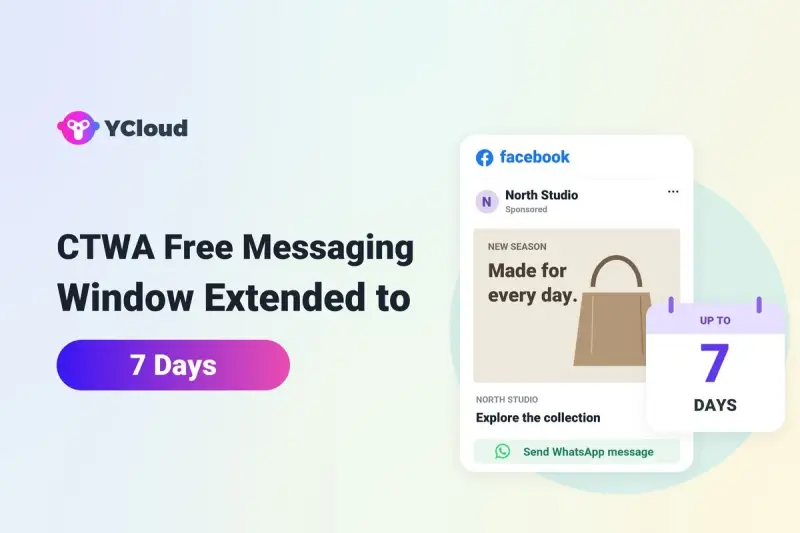
- Extended Free Messaging Window: Effective September 28, 2026, Meta extended the WhatsApp Free Entry Point (FEP) window from 72 hours to up to 7 days
- Eligibility: The window applies to qualifying Click-to-WhatsApp (CTWA) ad conversations initiated through WhatsApp on Android or iOS
- 24-Hour Reply Requirement: Businesses must respond within 24 hours of the customer’s message to activate the FEP window, which starts from the qualifying reply
- Free Message Types: Marketing, utility, authentication, and service messages incur no Meta messaging fees while the FEP window is active, but Meta Business Agent charges still apply
- 24-Hour Customer Service Rule: Regular replies are allowed only during an open 24-hour customer service window; approved templates are required once it closes, even if the FEP window remains active
What Is the WhatsApp Free Entry Point Window?
What Has Changed in Meta’s WhatsApp Free Entry Point Window?
Comparison | Previous Rule | New Rule |
| Free messaging window | 72 hours | Up to 7 days |
| Eligible conversations | Qualifying CTWA conversations | No change |
| Business reply requirement | Within 24 hours | No change |
| Eligible message categories | Marketing, Utility, Authentication, Service | No change |
| Meta messaging charges | Free during the 72-hour window | Free during the active FEP window, up to 7 days |
What’s the biggest change?
How Does the WhatsApp 7-Day Free Messaging Window Work?
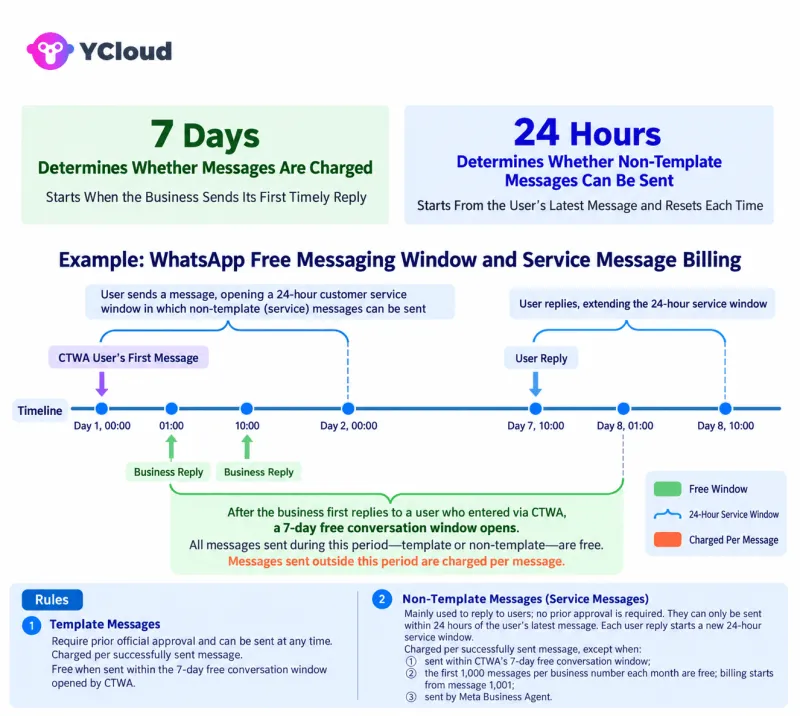
- Customer sends a message: A customer clicks your CTWA ad on Facebook or Instagram and starts a WhatsApp conversation using the Android or iOS app.
- The 24-hour window opens: The customer’s message starts the standard 24-hour customer service window.
- Business responds within 24 hours: Your team or chatbot sends a qualifying reply, activating the free messaging window.
- The 7-day countdown begins: The FEP window starts from the time of your first qualifying reply, not when the customer initially messaged you.
- The free window expires: Once the FEP window closes, standard WhatsApp Business API pricing rules apply.
Message Content | Sender | Message Type | Message Category | Charges Incurred |
| User messages from a CTWA ad: “Do you have this in white?” | User | – | – | – |
| Interactive media carousel message to showcase available colors for that product | Business | Template | Marketing | No charge. Opens FEP window |
| “Do you have this in size small?” | User | – | – | – |
| Customer service rep responds to user’s question | Business | Non-template | Service | No charge in open FEP window |
| Order confirmation | Business | Template | Utility | No charge in open FEP window |
Total charges | 0 charges |
WhatsApp 24-Hour Customer Service Window vs. 7-Day Free Entry Point Window
- 24-hour Customer Service Window: Opens whenever a customer sends a message and allows businesses to send regular replies and approved templates for 24 hours
- 7-day Free Entry Point Window: Opens after a qualifying business reply to an eligible CTWA lead and waives Meta messaging fees for eligible messages for up to 7 days
Customer Service Window | FEP Window | Allowed Messages | Meta Messaging Charges |
| Open | Open | Regular replies and approved templates | Free for eligible messages |
| Closed | Open | Approved templates only | Free for eligible templates |
| Open | Closed | Regular replies and approved templates | Standard pricing rules apply |
| Closed | Closed | Approved templates only | Standard pricing rules apply |
Important: Every new customer message resets the 24-hour customer service window, but it does not restart or extend the 7-day FEP window.
Which WhatsApp Messages Are Free During the 7-Day FEP Window?
Message Type | Example | Meta Messaging Charges |
| Marketing templates | Promotional offers, product recommendations, follow-ups | Free |
| Utility templates | Order confirmations, shipping updates, appointment reminders | Free |
| Authentication templates | OTPs and verification codes | Free |
| Service messages | Customer support replies and general inquiries | Free (within an open 24-hour customer service window) |
Important: Meta Business Agent messages remain chargeable even during the FEP window. Also, the free messaging benefit covers only Meta’s eligible messaging fees, not Click-to-WhatsApp ad spend, BSP fees, or platform subscription charges.
Who Qualifies for the WhatsApp 7-Day Free Entry Point Window?
- Eligible entry point: The customer must start a conversation through a Click-to-WhatsApp (CTWA) ad on Facebook or Instagram
- Mobile app requirement: The customer must send the message using WhatsApp on Android or iOS, not WhatsApp Web or Desktop
- Customer-initiated conversation: The customer must send the first message after clicking the ad
- Business reply within 24 hours: The business must respond within the customer service window to activate the FEP window
Important: Conversations started through regular website WhatsApp links, QR codes, or direct messages do not qualify for this benefit.
How Does the New 7-Day Window Affect WhatsApp Business API Pricing?
- Service messages are now chargeable: Businesses get 1,000 free service messages per phone number each month. After that, Meta charges per delivered message
- Utility templates are now chargeable: Utility templates sent within the 24-hour customer service window are no longer free by default
Learn more about the WhatsApp API Message Pricing Change Effective October 1, 2026 HERE
Example – How the New 7-Day Window Saves Messaging Costs
Previous 72-Hour Rule | New 7-Day Rule |
| Day 5 follow-up falls outside the free window | Day 5 follow-up can remain inside the free window |
| Standard marketing template charges apply | No Meta messaging fee if FEP is still active |
Why the Extended Free Messaging Window Matters for Businesses
- More time to convert leads: Follow up with potential customers who need extra time to compare products, review offers, or make purchasing decisions
- Lower messaging costs: Send eligible follow-up messages for up to 7 days without additional Meta messaging fees
- Flexible customer follow-ups: Share quotations, confirm appointments, and answer product inquiries without rushing conversations
- Better lead nurturing: Send relevant product details, reminders, and offers based on customer interests
- Support for longer sales cycles: Give B2B buyers more time to discuss proposals, confirm budgets, and get internal approvals
How to Make the Most of WhatsApp’s 7-Day Free Messaging Window
- Respond quickly to CTWA leads: Use chatbots, AI-Agents or automated replies to respond within 24 hours and activate the FEP window
- Prepare approved message templates: Keep marketing, utility, and authentication templates ready for follow-ups after the 24-hour customer service window closes
- Plan your follow-ups: Schedule messages based on where customers are in their buying journey rather than sending unnecessary reminders
- Personalize conversations: Share relevant product information, quotations, and offers based on each customer’s needs
- Track leads and conversions: Monitor customer responses, sales progress, and FEP expiry to avoid unexpected messaging charges
- Avoid excessive messaging: Just because eligible messages are free doesn’t mean customers should receive frequent or irrelevant follow-ups
Example – A Simple 7-Day WhatsApp Follow-Up Journey
Day | Action | Message Type |
| Day 1 | Respond to the customer’s inquiry and share product details | Regular reply |
| Day 2 | Follow up with additional information or a quotation | Approved template* |
| Day 3 | Answer questions if the customer responds | Regular reply |
| Day 5 | Check whether the customer needs help making a decision | Approved marketing template* |
| Day 6 | Send a relevant reminder or appointment confirmation | Approved template* |
| Day 7 | Review the conversation and plan the next step | No message required |
Remember: The FEP window lasts up to 7 days, so check whether it is still active before sending follow-ups. Meta messaging fees are waived only for eligible messages sent while the window remains open.
Common Mistakes Businesses Should Avoid With the 7-Day FEP Window
- Replying too late: Failing to respond within 24 hours of the customer’s initial message can prevent the free window from opening
- Sending regular messages after 24 hours: The 7-day FEP window doesn’t extend the 24-hour customer service window. Once it closes, approved templates are required
- Assuming all WhatsApp conversations qualify: Chats started through regular website links, QR codes, or direct messages don’t automatically qualify for FEP benefits
- Assuming 7 days are guaranteed: Meta states that the window can remain open for up to 7 days, so businesses should track its actual expiry
- Ignoring messaging restrictions: Marketing templates must still follow Meta’s messaging limits and WhatsApp Business policies, even during the free window
- Assuming everything is free: The FEP window waives eligible Meta messaging fees, but CTWA ad spend, platform charges, and Meta Business Agent fees may still apply
The takeaway: Respond on time, use the right message types, and monitor your FEP window to avoid missed opportunities and unexpected charges.
Manage WhatsApp Ad Leads and Follow-Ups With YCloud
- Shared Team Inbox: Manage customer conversations in one place and assign chats to the right team members
- Chatbot Automation: Automatically respond to incoming inquiries and handle common customer questions
- WhatsApp Campaigns: Send approved message templates for lead nurturing, reminders, and follow-ups
- AI Agents: Automate routine conversations and assist customers with relevant information
- Customer Segmentation: Organize contacts using tags and attributes for more relevant follow-ups
Wrapping Up!
Frequently Asked Questions
What is the WhatsApp Free Entry Point window?
Is WhatsApp’s free messaging window now 7 days instead of 72 hours?
Who qualifies for the WhatsApp 7-day free messaging window?
When does the WhatsApp 7-day free window start?
Can businesses send free WhatsApp messages after 24 hours?
What happens if a business replies after 24 hours?
Has WhatsApp’s 24-hour customer service window changed?
Do businesses need to activate the new 7-day free messaging window?
Does a chatbot or AI agent reply open the free entry point window?
Which WhatsApp messages are free during the 7-day FEP window?
Are marketing messages free during the WhatsApp 7-day window?
Does the 7-day FEP window apply to all WhatsApp conversations?
What happens after the WhatsApp Free Entry Point window expires?
Are Meta Business Agent messages free during the FEP window?
Related Articles

Make your business communications much easier!


Trusted by




