Customer Support

English

Official vs Unofficial WhatsApp Bulk Message Sender: What’s Better?


Let’s start with a real situation!
A growing online store wanted to announce a weekend sale on WhatsApp.
Instead of using the official WhatsApp Business API, the team picked an unofficial bulk sender that promised thousands of messages without template approval, business verification, or setup time.
It looked fast…!
It looked cheap...!
It looked simple…!
But within a few days, their WhatsApp number was banned…!
The problem was not just the campaign.
Their support chats stopped.
Order updates stopped.
Customer replies stopped.
A channel they used every day suddenly became unusable.
That is the real risk of choosing the wrong and unofficial WhatsApp bulk message sender.
In this guide, we’ll compare official vs unofficial WhatsApp bulk message senders, explain how both work, where the risks are, and which one is better for businesses that want to send messages safely at scale.
Next, let’s first understand what official and unofficial bulk WhatsApp senders actually mean.
What Are Official and Unofficial WhatsApp Bulk Message Senders?
There are two common ways businesses send bulk messages on WhatsApp:
- Official Tools
- Unofficial Tools
What Are Official WhatsApp Bulk Messaging Tools?
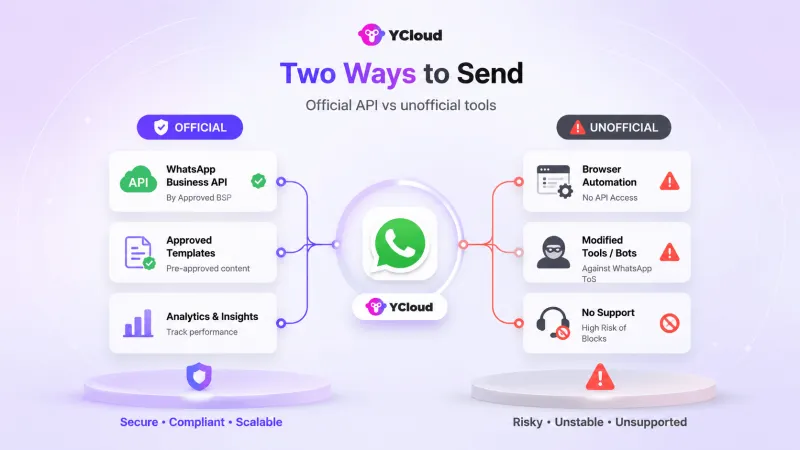
An official WhatsApp bulk message sender works through the WhatsApp Business API. It is provided through official WhatsApp Business Solution Providers like YCloud and is built for businesses that want to send messages safely, manage customer replies, use automation, and track campaign performance.
It follows WhatsApp’s policies, supports approved message templates, and is designed for long-term business communication.
What Are Unofficial WhatsApp Bulk Messaging Tools?
An unofficial WhatsApp bulk message sender is different. These tools usually use browser automation, modified WhatsApp apps, or unsupported methods to send mass messages.
They may look cheaper and faster at first, but they come with serious risks: number bans, poor delivery, data security issues, and no official support from WhatsApp.
So, the real difference is simple.
Official tools help you scale WhatsApp the right way. Unofficial tools may help you send faster today, but they can put your number, data, and customer trust at risk tomorrow.
Next, let’s compare official and unofficial WhatsApp bulk message senders side by side.
Official vs Unofficial WhatsApp Bulk Message Sender
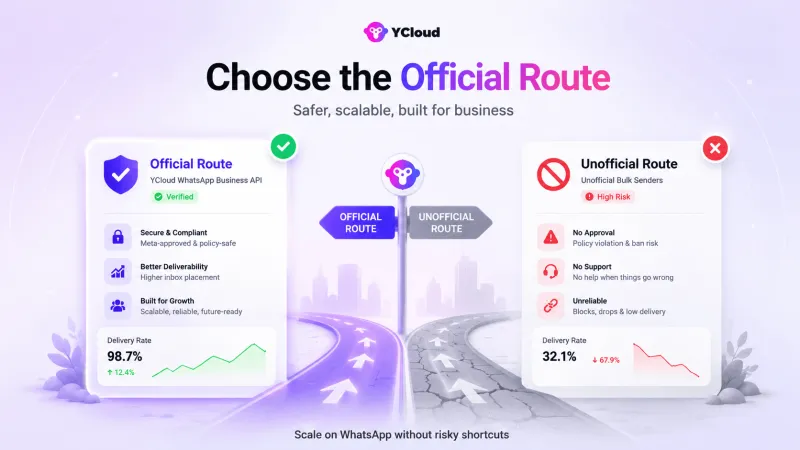
Both official and unofficial tools promise bulk WhatsApp messaging. But the way they work is completely different.
Here’s a quick comparison:
| Factor | Official WhatsApp Bulk Sender | Unofficial WhatsApp Bulk Sender |
| Approval | Works through official WhatsApp Business API | Not approved by WhatsApp |
| Compliance | Follows Meta’s messaging policies | Uses unsupported or risky methods |
| Account safety | Low risk when used properly | High risk of number blocks or bans |
| User consent | Built for opted-in messaging | Often used for cold or scraped lists |
| Templates | Supports approved message templates | Usually sends plain or unsupported messages |
| Automation | Supports chatbots, AI-Agents, flows, and triggers | Limited or unstable automation |
| Analytics | Tracks delivery, reads, replies, and failures | Little or no reliable tracking |
| Team inbox | Supports multi-agent workflows | Usually not built for teams |
| Integrations | Connects with CRMs, Shopify, Zapier, and more | Limited or no proper integrations |
| Data security | Uses official infrastructure and access controls | Higher risk of data misuse or leaks |
| Long-term use | Built for serious business communication | Risky for long-term brand use |
1. Compliance and Approval
Official Tools
Official WhatsApp bulk senders use the official WhatsApp Business API and work within Meta’s policies. Businesses can send approved templates, manage opt-ins, and communicate with customers in a safer way.
Unofficial Tools
Unofficial tools usually depend on browser automation, modified apps, or unsupported methods. They may look easy to start with, but they do not follow WhatsApp’s official process.
For a business, this matters because compliance is not just a technical issue. It protects your number, your customer data, and your brand reputation.
2. Risk of Number Ban
Official Tools
With an official WhatsApp API-based platform, the risk is much lower when you follow best practices, message opted-in users, and maintain good message quality.
Unofficial Tools
With unofficial senders, the risk is much higher. WhatsApp can flag or block numbers that send spam-like messages, use automation shortcuts, or bypass official systems.
This is one of the biggest reasons growing businesses avoid unofficial tools.
3. Security and Customer Data
Official Tools
Official platforms are built for business use. They offer safer access, better controls, and more reliable handling of customer conversations.
Unofficial Tools
Unofficial tools may ask for access to your WhatsApp Web, phone session, contact list, or customer data. That creates a serious data risk, especially if you handle orders, payments, support queries, or personal customer information.
4. Features and Control
Official Tools
Official WhatsApp bulk senders give you more than bulk sending.
With a platform like YCloud, businesses can use broadcasts, approved templates, automation, AI agents, shared inbox, segmentation, campaign analytics, and integrations with tools like Shopify, Zapier, and CRMs.
Unofficial Tools
Unofficial tools are mostly built for message blasting. They usually lack proper automation, team workflows, reliable analytics, and long-term scalability.
5. Delivery and reliability
Official Tools
Official API platforms are designed for scale. You can track what was sent, delivered, read, replied to, or failed.
Unofficial Tools
Unofficial tools are unpredictable. Campaigns can fail midway, delivery can drop, and there is often no clear report to understand what happened.
For a business campaign, that lack of visibility can be costly.
6. Cost vs long-term value
Unofficial tools may look cheaper at first.
But if your number gets banned, your support line stops, your customers cannot reach you, and your team loses an important communication channel.
Official tools may require proper setup, but they are safer, more reliable, and better for long-term growth.
Next, let’s look at the advantages of choosing an official WhatsApp BSP like YCloud.
Advantages of Choosing an Official BSP Like YCloud
Choosing an official WhatsApp Business Solution Provider like YCloud is not just about avoiding bans.
It helps your business send messages safely, manage customer conversations better, automate workflows, and track performance from one place.
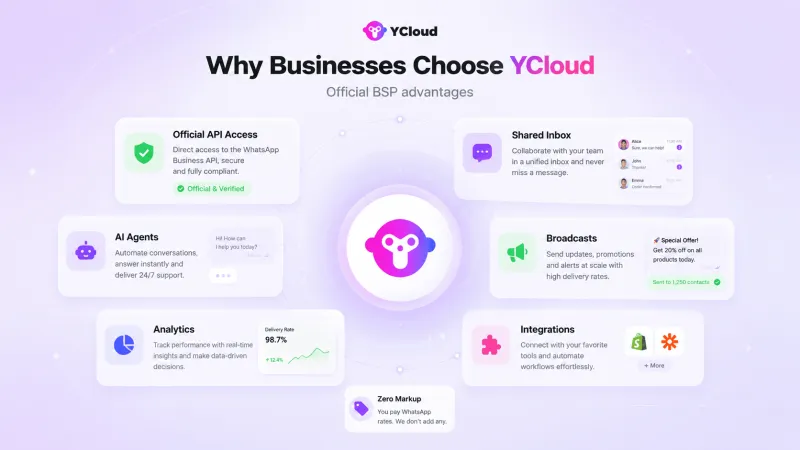
Here’s what you get with YCloud:
1. Official WhatsApp API Access
YCloud is built on the official WhatsApp Business API.
That means your business can send WhatsApp campaigns using approved templates, proper opt-ins, and Meta-compliant messaging practices.
No risky browser extensions. No modified WhatsApp apps. No unsafe shortcuts.
2. Safer Bulk Messaging
This helps reduce the risk of number bans, failed campaigns, poor delivery, and sudden account restrictions.
For businesses that depend on WhatsApp for sales, support, and updates, that stability matters.
3. Better Campaign Control
YCloud gives your team the tools to manage WhatsApp campaigns properly.
You can:
- Store and manage unlimited contacts
- Segment audiences
- Create message templates faster with AI
- Schedule broadcasts
- Track sent, delivered, read, failed, and bounced messages
- Understand campaign performance through reports
So instead of just sending messages, you know what actually happened after the campaign went live.
4. Automation, AI Agents, and Shared Inbox
YCloud also helps you manage replies after the campaign.
You can use AI-powered chatbots, Journey Builder, agent assignment, shared inbox, and automation workflows to handle FAQs, qualify leads, send reminders, and hand over chats to your sales or support team.
This makes WhatsApp useful for more than marketing. It becomes a proper channel for sales, support, and customer engagement.
5. Integrations and Retargeting
YCloud connects with tools like Shopify, Zapier, CRMs, and Meta Ads.
You can use WhatsApp engagement data to retarget users, recover abandoned carts, send order updates, and connect WhatsApp conversations with your existing business systems.
That is something unofficial bulk senders usually cannot support reliably.
6. Transparent Pricing and Free Plan
YCloud offers a free lifetime plan, zero markup on WhatsApp conversation charges, and unlimited contact storage.
You can check the pricing here: https://www.ycloud.com/pricing
You can also watch this quick video to understand 7 reasons to choose YCloud
In short, YCloud gives businesses a safer and more scalable way to send WhatsApp bulk messages without depending on risky unofficial tools.
Next, let’s wrap this up with a clear answer: which WhatsApp bulk message sender should your business choose?
Wrapping Up!
Unofficial WhatsApp bulk message senders may look quick and cheap, but they come with serious risks: number bans, poor delivery, weak security, and no official support.
Official WhatsApp bulk message senders are built for businesses that want to send messages safely, track campaigns, automate replies, and scale without shortcuts.
So, if WhatsApp is important for your sales, marketing, or support, the better choice is clear: use an official WhatsApp Business API platform like YCloud.
Frequently Asked Questions
Is it legal to use third-party bulk WhatsApp sender tools?
Only if the tool uses the official WhatsApp Business API.
Unofficial tools that use browser automation, modified apps, or WhatsApp Web hacks can violate WhatsApp’s policies and put your number at risk.
How do I know if a tool is an official WhatsApp API provider?
Check whether the platform is a WhatsApp Business Solution Provider or works through the official WhatsApp Business API.
You can also verify providers through Meta’s official partner directory.
Will WhatsApp ban my number if I send bulk messages?
Not if you use the official API correctly.
The risk starts when you use unofficial tools, scraped lists, spammy campaigns, or message users without opt-in.
What are WhatsApp conversation charges?
WhatsApp charges businesses based on message category and region.
With YCloud, you can use the official API and manage WhatsApp messaging costs transparently without hidden markup on WhatsApp conversation charges.
Can I use WhatsApp Business App with an unofficial bulk sender?
You can, but it is risky.
Even if your number is on the WhatsApp Business App, using unofficial bulk tools can still trigger spam checks or account restrictions.
Can I send personalized bulk WhatsApp messages using the official API?
Yes.
With YCloud, you can use customer names, order details, links, offers, and other dynamic fields to personalize messages at scale.
Can YCloud help me move from an unofficial tool?
Yes.
YCloud helps businesses move from risky unofficial tools or the WhatsApp Business App to the official WhatsApp Business API.
Is the official WhatsApp API more expensive?
It may look costlier than unofficial tools at first, but it is safer in the long run.
You get compliance, better delivery, automation, analytics, support, and lower risk of losing your business number.
Related Articles

Make your business communications much easier!


Trusted by




