Customer Support

English

How to Get WhatsApp API in Just 5 Minutes!

Getting WhatsApp API is not the same as downloading an app.
You need a WhatsApp Business Account, a business phone number, Meta approval, and a platform to send, receive, and manage messages.
That’s where the process can feel confusing for many businesses.
The good part is that there are two clear ways to get WhatsApp API: set it up directly through Meta or use a Business Solution Provider like YCloud for faster onboarding and ready-to-use tools.
Well… In this guide, we’ll cover how to get WhatsApp API, what requirements you need, pricing, common rejection reasons, and how to get started with YCloud.
First, let’s quickly summarize the key points.
TL;DR
- WhatsApp API is not a regular app. It is a business messaging API that lets you send, receive, and automate WhatsApp messages at scale.
- You need a few basics first: a WhatsApp Business Account, a business phone number, Meta approval, and a platform to manage conversations.
- There are two ways to get WhatsApp API: set it up directly through Meta or use a Business Solution Provider like YCloud.
- Meta self-serve works best if you have developers and want to handle the technical setup yourself.
- A BSP like YCloud is the best if you want faster onboarding and a ready-to-use solution with built-in features like a shared inbox, broadcasts, automation, an AI template generator, third-party apps and CRM integrations, and support from one platform.
- WhatsApp API is not completely free. You may pay Meta messaging charges and platform fees depending on the solution you choose.
Next, let’s understand what WhatsApp API actually is.
What Is WhatsApp API?
WhatsApp API is Meta’s business messaging solution for businesses that want to use WhatsApp at scale.
It is not a mobile app like WhatsApp or WhatsApp Business App. It is an API that lets businesses send, receive, and automate WhatsApp messages through a connected platform or custom setup.
With WhatsApp API, businesses can manage customer conversations, send approved message templates, automate replies, connect WhatsApp with CRMs or eCommerce tools, and support multiple agents from one number.
It is also commonly called WhatsApp Business API, WhatsApp Business Platform, or WABA.
Next, let’s look at the basic requirements you need before applying for WhatsApp API.
What Are The Requirements To Get WhatsApp API?
Before you apply for WhatsApp API, keep the basic requirements ready.
You will need:
- A Facebook Business Manager account with admin permissions
- A WhatsApp Business Account, also called WABA
- A phone number that can receive OTP by SMS or call
- A phone number that is not already linked on any WhatsApp or WhatsApp Business account
- A live, functioning business website or verified business presence
- A valid business email, preferably on your company domain
- A clear display name that matches your brand
- Your country's required tax ID (like a GST number for businesses based in India)
- Business documents for Meta verification, if required
- A platform or developer setup to send and manage messages
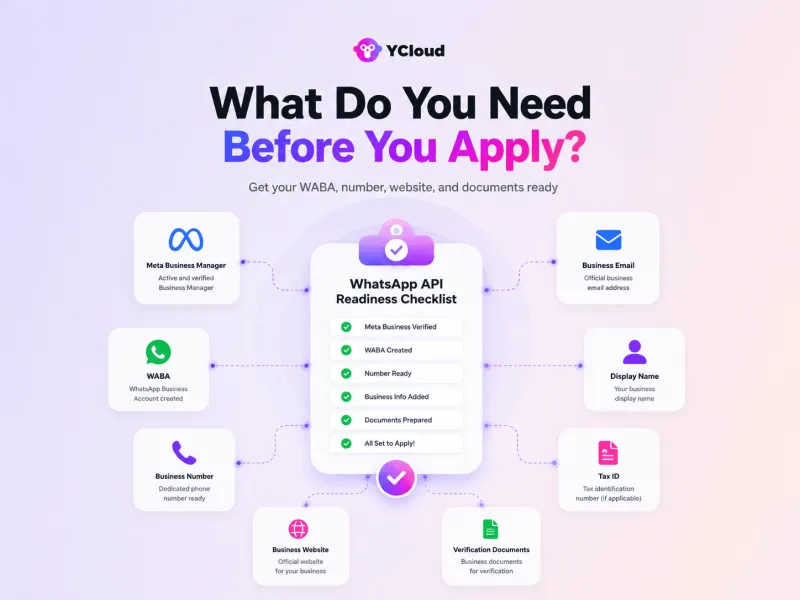
This step is important because most WhatsApp API delays happen due to mismatched business details, wrong phone number setup, unclear display names, or incomplete verification documents.
If you use a BSP like YCloud, the onboarding flow becomes easier because you get guided setup, phone number connection, template support, and platform access in one place.
Next, let’s look at how to get the WhatsApp API.
How to Get WhatsApp API
There are two main ways to get WhatsApp API:
- Set it up directly through Meta
- Use a Business Solution Provider like YCloud
Both methods give you access to WhatsApp API. The difference is how much technical work, setup support, and ready-to-use features you need.
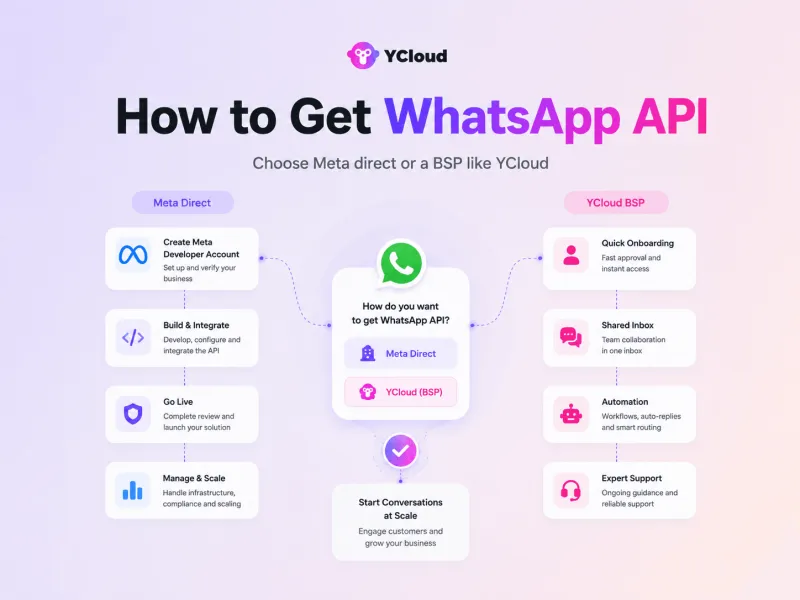
Let's talk about the pros and cons of each in detail.
1. How to Get WhatsApp API Directly Through Meta
This is the DIY route.
You create a Meta Developer account, set up a business app, add the WhatsApp product, connect your WhatsApp Business Account, verify your phone number, configure webhooks, create access tokens, and integrate the API with your own systems.
This method gives you more technical control, but it also needs developer support.
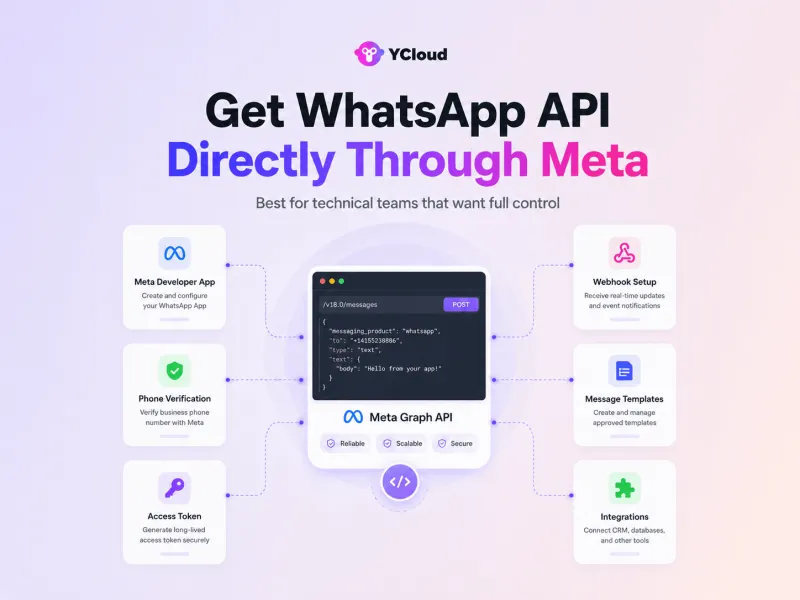
This route is suitable if:
- You have an in-house technical team
- You want full control over API setup
- You can manage tokens, webhooks, templates, and integrations
- You are ready to build your own inbox, automation, AI-Agents, and reporting setup
As you could see… this method requires technical knowledge and can be time-consuming, but it allows for more customization and control over your integration.
The limitation is simple: Meta gives you API access, not a complete business messaging platform.
What Are The Advantages of Getting WhatsApp API Directly Through Meta?
- Customization: With DIY integration, you have the freedom to customize the WhatsApp API according to your specific business needs. You can tailor the integration to match your branding, messaging style, and customer experience, providing a unique and personalized touch.
- Control: DIY integration gives you greater control over the functionality and behaviour of the WhatsApp API. You can fine-tune the features, settings, and automate workflows to align with your business goals and customer engagement strategies.
- Flexibility: By opting for DIY integration, you have the flexibility to adapt and scale your WhatsApp API integration as your business grows. You can easily make adjustments, add new features, and optimize the integration based on changing market trends and customer demands.
What Are The Disadvantages of Getting WhatsApp API Directly Through Meta?
- Technicality: DIY integration requires technical expertise and knowledge of coding languages like JavaScript, HTML, and CSS. This can be a challenge for businesses that don't have dedicated IT teams or developers with the required skills.
- Time-consuming: Unlike directly using a WhatsApp API solution from any BSP, DIY integration involves setting up everything from scratch. This can be time-consuming and may require constant updates and maintenance as WhatsApp releases new updates.
- Limited Customer Support: When opting for a DIY integration, you won't have access to immediate technical support from the WhatsApp team. You'll need to rely on your own resources or seek help from online communities if you encounter any issues.
- No Support for Indian Credit Cards: Businesses need to add their credit card to their WhatsApp account to use the WhatsApp API services directly from Meta. However, Indian credit cards are currently not accepted, making it difficult for businesses in India to set up a DIY integration.
So if you go directly through Meta, your team may need to build or connect tools for campaigns, shared inbox, automation, templates, analytics, AI-agents, and CRM workflows.
2. How to Get WhatsApp API Through a BSP Like YCloud
This is the easier and quicker route for most businesses!
The alternative to DIY integration is to sign up with a BSP (Business Solution Provider) like YCloud.
At YCloud, we’ll handle the entire setup process for you so that you can access ready-to-use solutions with advanced features like team inbox, WhatsApp AI-Agents, campaign and chat automation, team analytics, custom integrations with any third-party business tools you use and much more.
With YCloud, businesses can complete onboarding faster and start using WhatsApp for marketing, sales, support, and automation without building everything from scratch.
Book FREE Demo HERE
With YCloud, you can:
- Manage customer chats from a shared team inbox
- Send WhatsApp campaigns and broadcasts to unlimited saved and unsaved numbers
- Create and manage message templates
- Automate replies, follow-ups, customer journeys, and campaigns
- Use AI Agents for lead qualification and support
- Connect WhatsApp with CRM, eCommerce, and business tools
- Track campaign and conversation performance
- Get support for setup, templates, verification, and scaling
And much more...!
What Are The Advantages of Getting WhatsApp API Through a BSP Like YCloud?
- Done for You: With a WhatsApp business solution provider, the integration process is already taken care of. This means you don’t have to spend time and resources on building and maintaining an integration yourself. You can focus on your business while the provider handles all technical aspects.
- Payment Flexibility: Solution providers can manage billing with Meta on your behalf, and offer much more flexibility in terms of payment options. This way, you can easily manage your budget and have a more efficient billing process. You can pay via a wide range of payment gateways, including Stripe, Razorpay, Worldpay, and more, depending on what’s easiest for your business.
- Immediate Support: Solution providers often provide dedicated support teams that are available to help with any issues or questions you may have during the integration process. They also have connections with Meta’s support team that can help resolve any technical issues quickly and efficiently.
- Advanced Features: BSP’s like YCloud offer additional features and tools that make using WhatsApp for business even more effective. These may include automated messaging, in-depth analytics, advanced chatbots, and personalization options that can greatly enhance your customer communication strategy.
This route is best if you want faster setup, less technical work, and ready-to-use tools in one platform.
In simple terms, choose Meta self-serve if you have developers and want to build everything yourself.
Choose YCloud if you want a faster, simpler, and ready-to-use WhatsApp API solution.
Next, let’s look at why most of the businesses prefer using a BSP to get WhatsApp API.
Why Choose a BSP To Get WhatsApp API?
Getting WhatsApp API directly from Meta gives you access to the API.
But access alone is not enough.
You still need a platform to manage chats, send campaigns, create templates, build automation, connect tools, track performance, and handle support issues.
That is where a Business Solution Provider like YCloud helps.
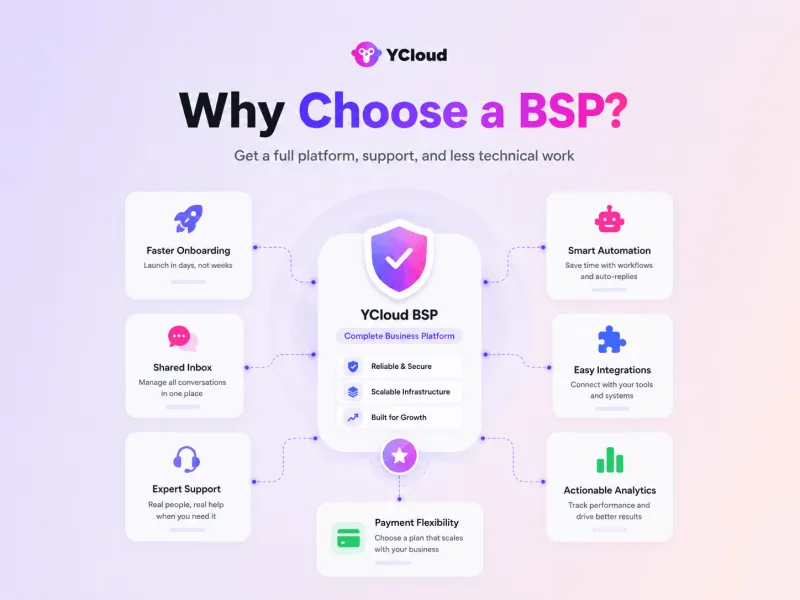
With YCloud, you get WhatsApp API access plus a ready-to-use platform for marketing, sales, support, and automation.
Here’s why businesses prefer the BSP route:
- Official WhatsApp Premier Partner (BSP): Guaranteed, secure access to the official WhatsApp API.
- Faster onboarding: Get guided setup without handling the full technical process yourself.
- Ready-to-use platform: Use shared inbox, broadcasts, AI-template generator, automation, AI Agents, reports, and integrations from one place.
- Less technical work: No need to build your own inbox, chatbot, campaign system, or reporting dashboard from scratch.
- Better support: Get help with setup, templates, verification, messaging issues, and scaling.
- Business integrations: Connect WhatsApp with your CRM, eCommerce platform, payment tools, and internal systems.
- Payment flexibility: Manage billing and platform usage more easily through the provider.
- Advanced features: Use AI Agents, automated journeys, campaign analytics, and team workflows without building everything manually.
In simple terms, Meta gives you the API.
A BSP like YCloud helps you actually use it for business growth.
Next, let’s look at how much WhatsApp API costs and what you need to pay for.
How Much Does WhatsApp API Cost?
WhatsApp API cost usually has two parts.
1. Meta messaging charges
Meta charges businesses based on the message category and the customer’s country.
The main message categories are:
- Marketing: offers, promotions, product updates, campaigns
- Utility: order updates, payment alerts, delivery updates
- Authentication: OTPs, login codes, verification messages
- Service: customer-initiated replies inside the service window
Pricing changes by country and message type, so the final cost depends on where your customers are located and what kind of messages you send.
For a detailed breakdown, read: WhatsApp API Pricing Explained2. Platform or BSP fees
If you use WhatsApp API from a Business Solution Provider like YCloud, you may also pay a platform fee for tools like shared inbox, broadcasts, automation, templates, AI Agents, integrations, analytics, and support.
YCloud keeps pricing transparent with no markup on WhatsApp messaging charges, so businesses can scale without unnecessary extra messaging costs.
To check plans and country-wise WhatsApp API pricing, visit: https://www.ycloud.com/pricing
Next, let’s see how to get started with YCloud.
How to Get YCloud?
Kindly click on the banner below to book a FREE DEMO and learn more about our product offering, features and pricing plans.
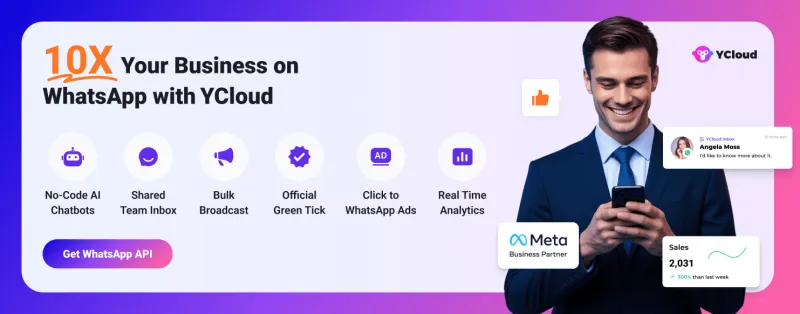
Built with AI at its core, YCloud is the ultimate WhatsApp marketing and automation solution, giving you everything you need in one powerful platform.
Now market, sell, support, and scale your business by 10X with YCloud!
Ready to try? Explore How to Get YCloud for FREE next!
How to Get YCloud for FREE?
It's Simple!
Subscribe to our FREE plan and get a free lifetime experience of YCloud with unlimited messaging API.
Book a FREE Demo and see how YCloud can power up your WhatsApp strategy!
🚀 Try YCloud today and experience how effortless WhatsApp automation can be when you have the right partner.
Wrapping Up!
Getting WhatsApp API is easier when you know the right path.
You can set it up directly through Meta if you have developers and want full technical control. Or you can use a Business Solution Provider like YCloud if you want faster onboarding, ready-to-use tools, automation, integrations, and support.
The best route depends on your team, technical resources, and how quickly you want to start using WhatsApp for business communication.
If you want to avoid technical complexity and go live faster, YCloud is the simpler way to get started with WhatsApp API.
Frequently Asked Questions
How can I get WhatsApp API for my business?
You can get WhatsApp API directly through Meta or through a Business Solution Provider like YCloud. Meta self-serve needs technical setup, while YCloud gives you faster onboarding and ready-to-use tools.
How can I get WhatsApp API without coding?
Use a BSP like YCloud. It helps you access WhatsApp API, manage messages, send campaigns, create templates, automate workflows, and connect business tools without building everything from scratch.
Is WhatsApp API free?
WhatsApp API access may be free, but messaging is not completely free. Businesses pay Meta messaging charges based on message category and country. BSP platform fees may also apply.
Do I need a new phone number for WhatsApp API?
You can use a new number or an existing business number. But the number must be eligible for API onboarding and should not be actively used on another WhatsApp setup unless supported through coexistence.
Can small businesses apply for WhatsApp API?
Yes. Small businesses can apply if they meet Meta’s requirements, have valid business details, and use WhatsApp responsibly with proper opt-ins and approved templates.
What is the difference between WhatsApp API and WhatsApp Cloud API?
WhatsApp Cloud API is the current cloud-hosted version of the WhatsApp Business Platform. Meta hosts it on its cloud servers, so businesses do not need to host the API themselves.
Can I get the WhatsApp Blue Tick during onboarding?
No, it is usually a separate process. First, set up WhatsApp API and complete business verification. Then eligible businesses can apply for the verified badge.
Can I use more than one number with WhatsApp API?
Yes. Businesses can add multiple phone numbers depending on their WhatsApp Business Account setup, limits, and business needs.
What happens if business verification is rejected?
You need to review the rejection reason, fix the mismatch or missing information, and resubmit the correct details or documents inside Meta Business Portfolio.
How long does WhatsApp API approval take?
It depends on the setup method and verification status. With a BSP like YCloud, onboarding can be faster because the setup is guided and most technical steps are handled through the platform.
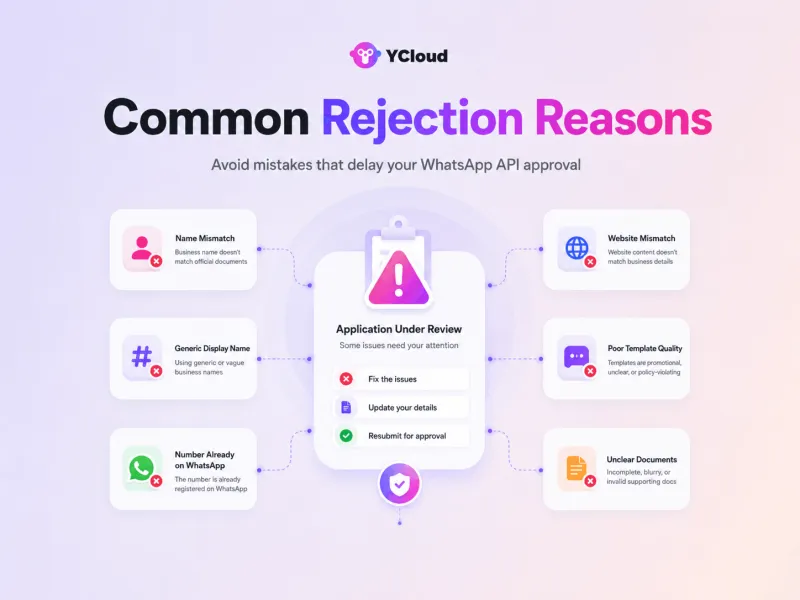
Why does WhatsApp API approval get rejected?
WhatsApp API approval may get rejected if your business name, website, phone number, documents, or message templates do not meet Meta’s requirements. Most rejections happen because business details are unclear, inconsistent, incomplete, or not policy-friendly.
What is a business name mismatch in WhatsApp API approval?
A business name mismatch happens when your legal business name does not match the name in your Meta Business Portfolio or uploaded documents.
To fix this, use the exact legal name shown on your business document, including suffixes like Pvt Ltd, LLC, LLP, Inc., or other registered terms.
Why can a WhatsApp display name get rejected?
A WhatsApp display name can get rejected if it is too generic or does not clearly represent your brand. Names like “Sales”, “Support”, “Offers”, or “Customer Care” may not be accepted.
To fix this, use your actual brand name or a clear brand variation that also appears on your website.
Why does my business website matter for WhatsApp API approval?
Meta may check whether your website clearly shows the same business name, brand identity, and business category. If the website does not match your submitted details, approval may be delayed or rejected.
To fix this, make sure your website has the correct brand name, business information, working pages, and relevant business details before submission.
Why do WhatsApp message templates get rejected?
WhatsApp message templates may get rejected if they are unclear, too promotional for the selected category, misleading, or look spammy.
To fix this, keep your templates clear, useful, category-aligned, and compliant with WhatsApp’s messaging policies.
What documents are required for WhatsApp Business verification?
You need clear business documents that show your business name, address, and registration details. Blurry, cropped, incomplete, or unclear files can delay verification.
To avoid rejection, upload clean and readable documents with all required business details visible.
Why is customer opt-in important for WhatsApp API?
Customer opt-in is important because businesses should only send WhatsApp messages to users who have agreed to receive them. This helps protect your account quality, delivery rate, and customer trust.
Why should I connect WhatsApp API with my CRM or eCommerce tools?
Connecting WhatsApp API with your CRM or eCommerce tools helps you automate customer journeys, track conversations, manage leads, recover carts, send updates, and measure campaign performance more effectively.
What should I monitor after WhatsApp API integration?
After integration, monitor campaign performance, message replies, clicks, customer responses, template quality, delivery health, and overall account quality. This helps you improve campaigns and avoid performance issues.
Related Articles

Make your business communications much easier!


Trusted by




