Поддержка клиентов

Русский

YCloud vs 360Dialog: Which WhatsApp API Platform Offers Better Value?

You’ve narrowed it down to YCloud and 360Dialog…!
Now you need to know what each platform will cost and what your team can do with it.
- What’s included, and which tools cost extra?
- Can your team manage campaigns, AI Agents and support without developers?
- How much work will connecting your existing systems involve?
Don’t worry!
This guide compares their features, pricing, integrations, AI capabilities and support, whether you’re choosing your first WhatsApp API platform or considering a switch from 360Dialog to YCloud.
First, here’s a quick summary of the key differences.
Comparison note: Published by YCloud, with sources checked in September 2026. YCloud subscription prices reflect annual billing unless stated otherwise.
Messaging fees, additional products and add-ons are identified separately.
Disclaimer: The references to software ratings, available features, and pricing were valid at the time of writing this article but could be subject to change in the future.TL;DR
- YCloud combines API access with business tools: Manage campaigns, AI Agents, automation, customer support and reporting in one platform. Custom integrations may still require developers.
- 360Dialog’s tools depend on your package: Regular focuses on API access, while Premium includes inbox, campaign sending, automation and measurement capabilities.
- Pricing scales differently: YCloud offers a free plan, with paid plans starting at US$39/month, billed annually, and multiple connected accounts included. 360Dialog starts at €49 per number per month.
- Both offer zero markup on Meta’s messaging fees: Messaging charges remain separate. Compare the complete cost of numbers, users, AI usage, additional tools and maintenance.
- Starting fresh? YCloud’s free plan lets you evaluate campaigns, AI and support workflows within its allowances. Business teams can manage routine changes without coding.
- Already using 360Dialog? Compare potential savings with migration effort. Eligible numbers and templates can transfer; contacts need importing, chat history needs exporting, and integrations may need updates. An existing setup that meets your needs may remain suitable.
Next, let’s look at what each platform offers your business.
YCloud vs 360Dialog: How Their Offerings Compare
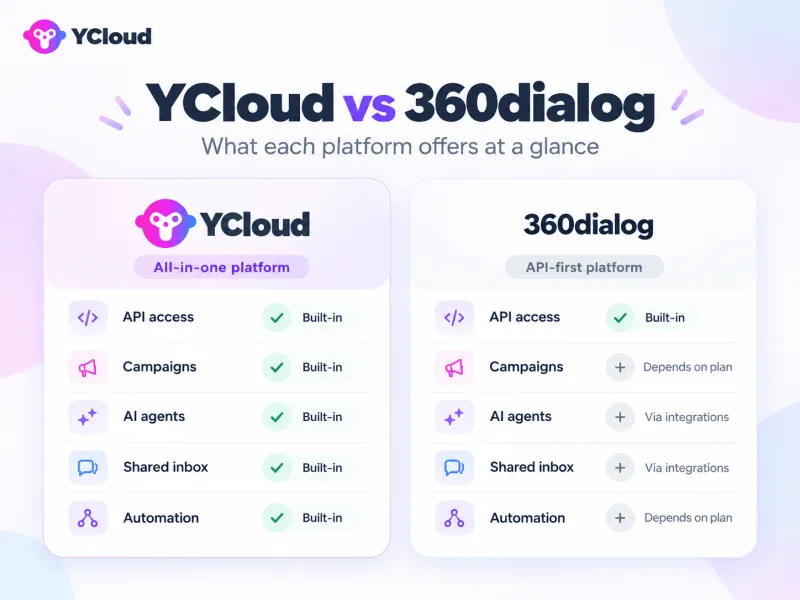
YCloud
- Free forever plan: Get started without a subscription fee or credit card.
- Shared team inbox: Manage customer conversations and team handovers.
- AI Agents: Answer questions and perform configured tasks using connected business systems.
- Visual automation: Build routine workflows without coding.
- Campaigns and analytics: Launch broadcasts and track performance.
- Developer access: Connect existing systems through APIs and webhooks.
User and usage allowances depend on your plan. Applicable messaging charges remain separate.
360Dialog
360Dialog’s Regular plan focuses on API access, with business tools depending on your selected package and integrations:
- Paid API plans: Start at €49 or $59 per number per month.
- Developer infrastructure: Connect WhatsApp to your applications through APIs and webhooks.
- AI integration: Connect your chosen AI solution.
- Additional business tools: Access tools through partner solutions or packages such as Premium, which lists inbox, sendout, automation and measurement add-ons.
Next, let’s compare the full feature list side by side.
YCloud vs 360Dialog: Complete Feature Comparison
Feature | 🏆 YCloud | 360Dialog |
WHATSAPP CORE | ||
| WhatsApp Business API | ✓ Full API access & Webhooks | ✓ Full API access & Webhooks |
| Template Messages | ✓ API & Built-in campaign tool | ✓ Via API |
| WhatsApp Flows | ✓ Via API | ✓ Via API |
| WhatsApp Calling | ✓ Voice & video calls | ✓ Voice & video calls |
| App Coexistence | ✓ Supported | ✓ Supported |
BUSINESS TOOLS | ||
| Shared Inbox | ✓ Built-in Advantage | ✗ Requires third-party |
| AI Chatbot | ✓ Included all plans Advantage | ✗ Requires integration |
| Visual Automation Builder | ✓ No-code workflows Advantage | ✗ API only |
| Team Collaboration | ✓ Multi-user, roles Advantage | ✗ Not included |
| Analytics Dashboard | ✓ Built-in Advantage | ✗ Requires integration |
PRICING & ONBOARDING | ||
| Free Plan | ✓ Forever free | ✗ Starts at €49/mo |
| Entry Price | ✓ $39 (Growth) | — €49/number/mo |
| Support | ✓ Email + Online chat | — Chat widget (SLA by tier) |
| Setup Time | ✓ 10 min self-service | ✓ 30 min self-service |
DEVELOPER EXPERIENCE | ||
| REST API | ✓ Full API access | ✓ Full API access |
| Webhooks | ✓ Real-time events | ✓ Real-time events |
| API Documentation | ✓ Comprehensive docs | ✓ Developer docs |
Plan and Availability Notes
- Pricing and allowances: YCloud Growth’s $39/month reflects annual billing. Its Free plan includes one user and limited AI credits; custom roles require Pro or Enterprise. Applicable Meta messaging charges remain separate on both platforms.
- 360Dialog packages: The business-tool exclusions above are not universal. Its current Premium plan lists inbox, sendout, automation and measurement add-ons; Marketplace solutions provide further options.
- Support and setup: Support channels, hours and response commitments vary by plan. The setup times are landing-page estimates; verification and integration work can extend the time needed to launch.
What Flows, Calling and Coexistence Require
- WhatsApp Flows: Configure the in-chat forms and screens. Experiences using live business data, such as appointment availability, need a backend connection.
- WhatsApp Calling: Enable calling on an eligible number and obtain customer permission before business-initiated calls. 360Dialog requires a SIP/WebRTC integration. The documentation reviewed confirms voice calling; the table’s video-calling claim needs separate confirmation.
- App coexistence: Eligible businesses can use the Business app and API on the same number. Check feature and synchronization restrictions before connecting; YCloud, for example, moves broadcasting from the app to its Campaign tools.
Next, let’s break down the subscriptions, messaging charges and additional costs behind this comparison.
Pricing: Compare the Complete Cost of Your WhatsApp Setup
Your WhatsApp budget includes the subscription, messaging and calling charges, additional tools and implementation. Start by checking how each platform charges as your team grows.
YCloud Plans and Included Allowances
YCloud’s paid prices below are USD monthly equivalents with annual billing. Each subscription includes a set number of users and connected accounts.
Included | Free | Growth | Pro | Enterprise |
Platform fee | $0 forever | $39/month | $89/month | $399/month |
Annual payment | $0 | $468 | $1,068 | $4,788 |
Users | 1 | 2 | 6 | 40 |
Connected accounts (channels) | 2 | 3 | 8 | 30 |
Generative AI credits | 500K | 5M | 20M | 100M |
Translation characters | 1K | 10K | 100K | 500K |
Chat storage | 6 months | 6 months | 6 months | Permanent |
Channels refer to connected WhatsApp Business API or Business app accounts. Confirm the renewal periods for AI and translation allowances when choosing your plan.
360Dialog Plans and Per-Number Pricing
360Dialog charges per WhatsApp number, per month. Its published pricing and documentation cover these options.
Plan or package | Monthly price in EUR | What it covers |
Regular | €49/number | API access, support and integration options. |
Premium | €99/number | Regular features, faster support, plus inbox, sendout, automation and measurement add-ons. |
High Throughput | €249/number | Premium subscription plus a network upgrade supporting up to 1,000 messages per second, subject to eligibility. |
Scale | €500/number | Premium features plus assessment, performance expertise, migration support, 360Pilot and higher throughput. |
Marketplace | €99/number | Number hosting and a messaging-tool package matched through a partner. |
Messaging and Calling Charges Are Separate
Both providers advertise zero markup on Meta’s messaging fees. These usage charges sit outside their subscriptions.
- Messages: Meta’s charges depend on the recipient’s market, message category and applicable volume tiers. Service messages and eligible utility responses are free.
- Marketing delivery: 360Dialog’s billing guide flags a 7% increase over Meta’s standard rates when marketing messages use the standard messaging endpoint instead of the Marketing Messages API. Check the sending route when estimating campaign costs.
- Calls: Customer-initiated calls have no Meta calling charge. Business-initiated calls are charged by destination and duration in six-second increments. Voice infrastructure and permission-request templates can create additional costs.
Add-Ons, Integrations and Ongoing Costs
YCloud publishes these add-on prices for paid plans; add-ons are unavailable on Free.
YCloud add-on | Published price |
| Additional user | $10/user/month |
| Additional connected account | $5/channel/month |
| Shopify integration | $5/store/month |
| Additional AI credits | $10/5M credits |
| Additional translation | $10/150K characters |
For either platform, include any paid CRM, automation service, AI model, custom integration, hosting and maintenance your setup requires.
Existing 360Dialog customers should also budget for migration and testing; new buyers should include initial configuration.
Example: Adding Numbers and Users
Consider a team starting with two users and three WhatsApp numbers.
This compares subscription costs using YCloud Growth and 360Dialog Regular’s published $59 USD per-number monthly rate.
Team setup | YCloud Growth | 360Dialog Regular |
2 users, 3 numbers | $39/month equivalent | 3 × $59 = $177/month, plus any team tools |
Add a fourth number | $39 + $5 = $44/month equivalent | 4 × $59 = $236/month, plus any team tools |
Then add a third user | $39 + $5 + $10 = $54/month equivalent | $236/month, plus applicable tool or seat charges |
Assumptions:
One YCloud channel per number; Growth’s base subscription is paid annually.
All example figures are USD, with no currency conversion.
Totals exclude taxes, Meta messaging and calling charges, additional usage, integrations and maintenance.
The 360Dialog figures cover API subscriptions; a complete inbox and AI setup depends on the tools selected.
Next, let’s compare the marketing, automation and commerce workflows your team can run on each platform.
Marketing, Automation and Commerce: What Can Your Team Run?
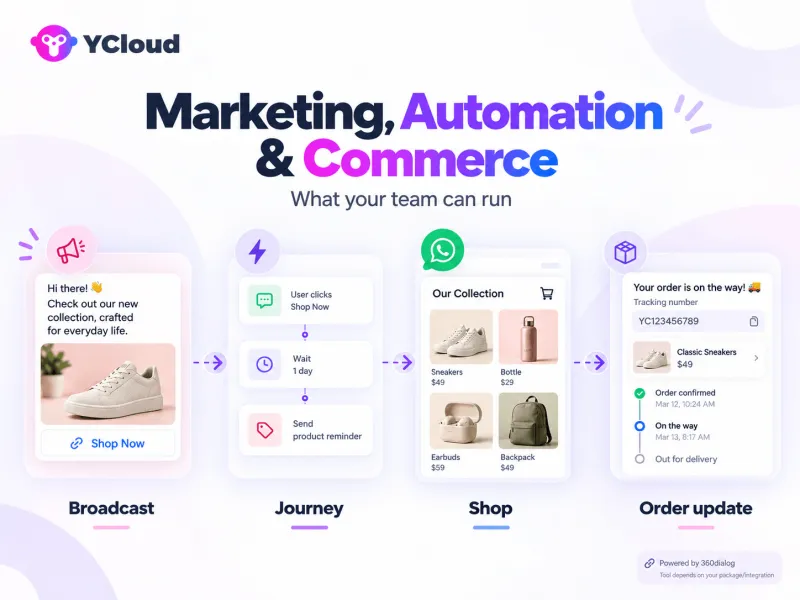
YCloud brings campaigns, customer data and automated journeys into one platform.
With 360Dialog, your team’s working tools depend on the selected package and connected applications.
Capability | YCloud | 360Dialog |
Broadcasts, segmentation, personalization and scheduling | Built in: Use Campaigns to select audiences, personalize template variables and schedule messages. Configure the recipients, content and sending time. | Package-dependent: Premium lists Sendout. For API-based campaigns, your connected tool or application manages audiences, personalization and scheduling. |
Visual workflows, triggers and drip campaigns | Built in: Journeys provides a visual builder with event triggers, conditions and delays. Configure the sequence and connect any required business data. | Package or integration: Premium lists Automation. Connected tools such as Make, n8n or Zapier provide another route for configuring triggers and follow-up sequences. |
Contacts, tags, consent and unsubscribe handling | Built in: Contact profiles, tags, custom attributes and an unsubscribe list. Record consent and configure opt-out handling; configured unsubscribe actions update the list automatically. | Package or integration: The hosted Inbox supports conversation tags. Configure customer records, consent tracking and send exclusions within your selected campaign tools or CRM. |
Click-to-WhatsApp ads and conversion tracking | Built-in tracking: CTWA tools support ad-level attribution and conversion reporting. Create ads on Meta and configure conversion events and connections. | Additional product: 360Pilot tracks ads, conversations and conversions. It is advertised through early access, with separate pricing or inclusion in Scale. Data connections require setup. |
Product catalogs, WhatsApp Shop and Shopify | Built-in Shop: Activate WhatsApp Shop and configure products and payment settings. Shopify workflows use a paid integration that connects store events and attributes. | API and connected solution: Supports catalog messages after connecting a Meta product catalog. Storefront management and Shopify workflows depend on the chosen commerce integration. |
Cart reminders, order updates and post-purchase follow-ups | Configure Journeys: Use available store events to trigger reminders, order notifications and feedback requests. Set message timing and conditions that stop unnecessary follow-ups. | Integration required: Connect store events to an automation platform or custom application. Configure the message sequences, customer details and stopping rules there. |
Lead capture through widgets, links and QR codes | Free tools: Generate WhatsApp links, QR codes and chat widgets through Growth Tools. Add the widget to your website and distribute the links or codes. | Setup required: Create message links and QR codes in WhatsApp Manager. Add website entry points through your website or a widget tool. |
Package Detail to Check:
360Dialog’s pricing lists Sendout and Automation without specifying every targeting, scheduling or workflow control. Confirm those capabilities in the package you are evaluating.
Next, let’s compare the AI options for answering customer questions and taking action in your business systems.
AI Agent Capabilities
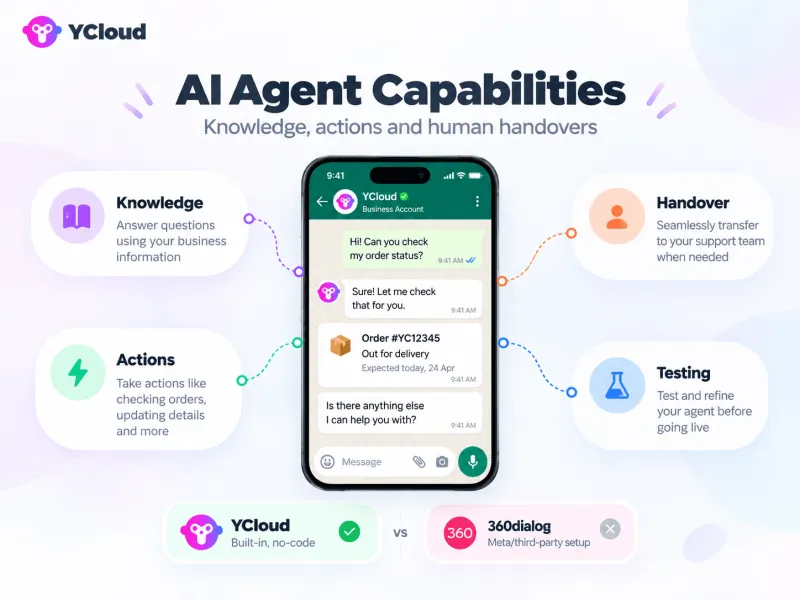
360Dialog supports Meta Business Agent through its Hub or APIs, currently in early access, alongside external AI integrations.
Capability | YCloud | 360Dialog |
Knowledge, product questions and sales conversations | Add documents, website pages and Q&A. Configure agent roles and instructions for product answers, recommendations and lead qualification. | Meta Business Agent uses business information, FAQs, files and websites. Configure skills for sales and qualification; external agents’ capabilities depend on the chosen tool. |
Actions in business systems | Configure AI Skills and data connectors to retrieve or update business information. Custom connections may require developers. | Configure Meta Business Agent’s connectors and tools to call business APIs, or implement equivalent connections in your external agent. |
Human handovers | Define escalation rules or add a handoff action within a Skill, selecting who should receive the conversation. | Configure handover to your human-support setup. Meta Business Agent stops responding during handover; 360Dialog currently documents loss of earlier context when control returns to the agent. |
Testing and knowledge maintenance | Preview Skills before activation, review unanswered questions through AI Suggestions and update FAQs. Website knowledge supports scheduled refreshes. | Test with selected numbers before wider release. Review conversation records and update knowledge, instructions and connectors as requirements change. |
AI usage costs | Plans include AI credits. Paid plans can purchase additional credits at $10 per 5M credits; applicable messaging charges remain separate. | Meta Business Agent has separate Meta usage billing. External AI solutions carry their own subscription or usage charges. |
For either platform: Order lookups, booking changes and CRM updates require connected systems, authenticated access and appropriate read/write permissions. Define which changes the agent can complete and which need human approval.
One Request, Two Ways to Configure It
A customer asks: “Can you move the installation for my order to Friday?”
- With YCloud: Configure an AI Skill to check the order, retrieve available slots, confirm the customer’s choice and update the booking through connected systems.
- With 360Dialog: Configure the same process through Meta Business Agent’s connectors and skills, or through your chosen external AI application.
Both require the relevant business connections.
YCloud lets your team manage the agent’s knowledge, Skills and handovers within its existing platform.
Next, let’s compare the shared inbox, team collaboration and analytics behind those customer conversations.
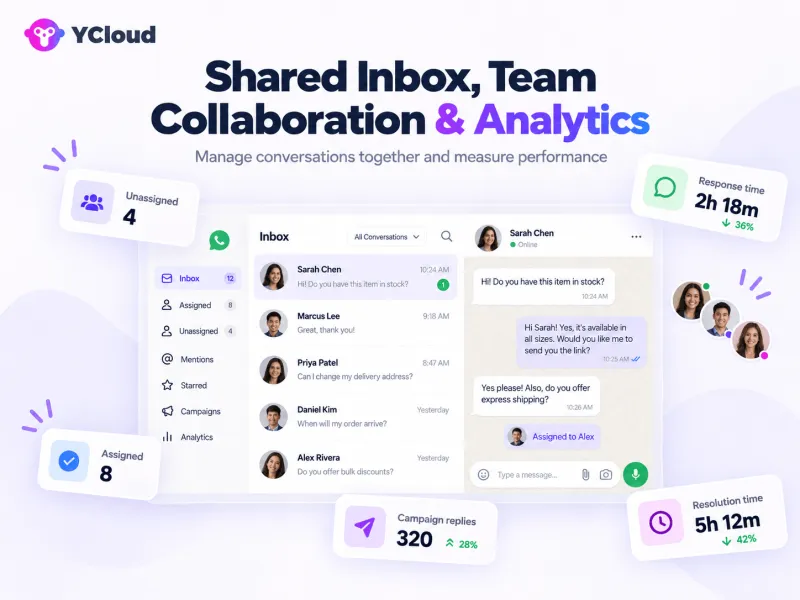
Shared Inbox, Team Collaboration and Analytics
360Dialog provides a hosted Inbox, with additional reporting available through APIs, 360Pilot and connected tools.
Managing Conversations as a Team
Capability | YCloud | 360Dialog |
Assignment, routing and ownership | Manual assignment and configurable automatic routing by availability, language, location and other conditions. | Named conversation owners and an unassigned queue. Advanced routing depends on the selected workflow or inbox integration. |
Customer context and notes | Customer profiles, tags and conversation history in chat. Teams can configure contact fields for notes. | Shared conversation history, tags and saved replies. Confirm internal-note and CRM-context support in your selected inbox. |
Team permissions | Standard roles, with custom permissions available on Pro and Enterprise. | Owner and Member roles in the Hub. Inbox assignment identifies responsibility; assigned chats remain visible to other inbox users. |
Translation and AI summaries | Built-in translation and conversation summaries, subject to applicable usage allowances. | Native support is not specified in the reviewed hosted Inbox documentation. Confirm availability or use a compatible AI/helpdesk integration. |
AI-to-human handovers | Configure escalation rules to transfer conversations to the appropriate team or agent. | Configure handovers from Meta Business Agent or an external AI tool to your human-support setup. |
Measuring Campaigns and Customer Service
Report or metric | YCloud | 360Dialog |
Delivery, reads and replies | Built-in Campaign reports show sent, delivered, failed, read and replied messages, with exports. | Hub Insights shows message totals, delivery and estimated costs. Template analytics provides reads and clicks; campaign reply reporting depends on the messaging tool or configured tracking. |
Campaign conversions | Campaign and CTWA reporting supports recorded conversions. Connect the relevant accounts and configure tracking events. | Template conversion analytics requires the relevant marketing setup. 360Pilot provides broader campaign and conversion analysis as a separate product or package inclusion. |
Revenue attribution | Connect purchase events and order values to campaign records; use connected commerce or CRM reporting where needed. | 360Pilot supports revenue and ROAS reporting when the relevant data sources are connected. |
Response times, resolution, workloads and CSAT | Built-in Inbox analytics covers average first-response and resolution times, conversation volumes and agent workloads. Satisfaction reporting requires customer feedback collection. | Equivalent support-performance reports are not detailed in the reviewed hosted Inbox guides. Confirm package coverage or connect a helpdesk with these reports. |
Check metric definitions:
YCloud counts campaign replies received within 24 hours of successful delivery.
Align reporting windows and attribution rules before comparing results across platforms.
Next, let’s look at the APIs, integrations and development work needed to connect either platform to your existing systems.
APIs and Integrations: How Much Development Is Required?
YCloud combines API access with built-in tools for business teams.
You can run campaigns and workflows within the platform, then use integrations to connect your CRM, store or internal systems. Custom connections still need configuration and, in some cases, development.
Capability | YCloud | 360Dialog |
REST APIs and webhooks | REST API with event notifications for incoming messages, delivery updates and other account activity. | Messaging API with incoming-message and status webhooks. Multi-webhook configuration lets several tools receive events from the same number. |
Documentation and examples | API reference, sample requests and responses, and code snippets in languages including Java, Python, PHP and JavaScript. | API documentation, integration guides and request, response and webhook examples. |
Testing options | Interactive “Try It” requests using your API key, plus webhook testing examples. Authenticated requests can affect live data. | Dedicated sandbox with one recipient and a limit of 200 messaging requests, including rejected requests. |
CRM, eCommerce and internal systems | Shopify integration is a paid add-on. Data connectors and API requests connect other systems for tasks such as order lookups and record updates. | Connect through compatible partner tools, automation platforms or custom API integrations. Configuration depends on the system and workflow. |
Automation platforms | Built-in Journeys support visual workflows and API actions. External tools such as n8n connect through HTTP requests and webhooks. | Native Zapier app, an n8n community node, and Make connections through HTTP and webhook modules. |
API-only use and multiple accounts | Use the API within your own application. API access includes the Free plan; connected WhatsApp account allowances depend on your plan. | Use the API within your application with per-number subscriptions. A separate Partner Platform supports businesses managing multiple client accounts. |
Additional communication channels | Also offers SMS, email and voice services, with separate availability and charges. | Primarily WhatsApp-focused. RCS endpoints are also documented; confirm commercial availability and activation requirements. |
Separate the initial connection from ongoing maintenance:
- Initial setup: Ready-made connectors need authorization and field mapping. Custom integrations may need developers to configure authentication, webhook handling, data transformations and end-to-end testing.
- Business updates: In YCloud, teams can adjust messages, timing and Journey conditions through the visual interface. With 360Dialog, this work happens in the selected package or connected automation tool.
- Technical maintenance: For either platform, assign responsibility for failed integrations, credential changes, API updates and any custom code or hosting.
Next, let’s compare the support, reliability and enterprise controls behind these connections.
Support, Reliability and Enterprise Controls
Compare the support and controls attached to your chosen plan, particularly if WhatsApp handles time-sensitive sales, support or notifications.
Requirement | YCloud | 360Dialog |
Support channels and hours | Email on Free; email and online support on Growth. Published plans list weekday coverage through Pro and 24/7 priority support on Enterprise. | Hub chat, email and WhatsApp support, with 24/7 human availability. Engineering capacity is limited on weekends. |
Response targets and escalation | The pricing page does not specify response times. Agree response targets and escalation contacts during procurement. | Hub-chat targets: under four hours on Regular and under 30 minutes on Premium. Email and WhatsApp receive an initial response within 24 hours. Eligible customers can escalate through their designated contact; resolution times are not guaranteed. |
Onboarding and migration | Assisted onboarding on Pro and Enterprise; a dedicated account manager is listed on Pro. YCloud also offers number-migration assistance. | Managed onboarding on Partner plans; a dedicated partner manager on Partner Premium. Scale includes dedicated migration support. |
User permissions | System roles across plans, with custom roles on Pro and Enterprise. | Hub Owner and Member roles. Owners control user administration and number migration. |
Chat retention | Six months on Free, Growth and Pro; permanent storage listed on Enterprise. | Confirm retention for the selected Inbox or connected CRM. The documented 30-day retention concerns temporary Meta Cloud API storage, which is a separate layer. |
Security documentation | Reports ISO 27001 certification, publishes security and privacy documentation, and provides a data processing agreement on request. | Publishes a data processing agreement and Cloud API security guidance. Its linked ISO 27001 documentation covers Meta’s Cloud API. |
Support-hours clarification: We offer support from Monday–Friday, 09:30–18:30 UTC+8 coverage through Pro along witth 24/7 email support.
Capacity and Incident Visibility
- Throughput: YCloud documents 80 requests per second for its direct-send API by default, rising to 1,000 for eligible upgraded numbers. 360Dialog documents 80 messages per second by default, with eligible paid upgrades supporting up to 1,000.
- Account limits: YCloud includes 2, 3, 8 or 30 connected WhatsApp accounts across Free, Growth, Pro and Enterprise, with paid add-ons available. 360Dialog licenses individual numbers and offers separate Partner plans. Meta’s business messaging limits apply to both.
- Monitoring: YCloud’s status page covers services including Inbox, AI Agents, APIs and webhooks. 360Dialog’s status page provides incident and maintenance updates. Subscribe to provider and Meta updates, and monitor delivery failures in your integration.
Next, let’s bring these differences together and identify where YCloud offers the strongest business value.
Why YCloud Is Worth Considering for Your Business
YCloud brings WhatsApp API access, campaigns, AI Agents, automation, a shared inbox and reporting into one platform. This gives business teams tools they can operate directly, alongside API access for developers building custom connections.
Here’s where that can make a practical difference:
- Test real workflows before choosing a paid plan. Use the free plan to evaluate customer conversations, campaigns and AI-to-human handovers within its allowances. No credit card is required; applicable WhatsApp messaging charges remain separate.
- Give business teams control over routine changes. Teams can update messages, audiences and visual workflows. Developers can focus on connecting your CRM, retrieving order data and configuring actions in internal systems.
- Potentially reduce subscriptions and maintenance. If YCloud replaces separate inbox, automation or AI tools, you may have fewer subscriptions and integrations to maintain. Compare the complete cost, including plan fees, usage, add-ons and implementation.
Building your first WhatsApp setup?
You can evaluate messaging, marketing and support together before deciding which deeper integrations your business needs.
Already using 360Dialog?
Review what you currently spend on API access, connected tools and maintenance. YCloud becomes worth considering when consolidating those functions offers enough operational value to justify migration and any workflow rebuilding.
An established 360Dialog integration may remain suitable if it already fits your systems, meets your team’s needs and is economical to maintain.
Explore YCloud’s free plan with a workflow your business actually needs.
Next, let’s look at getting started with YCloud if you’re setting up WhatsApp API for the first time.
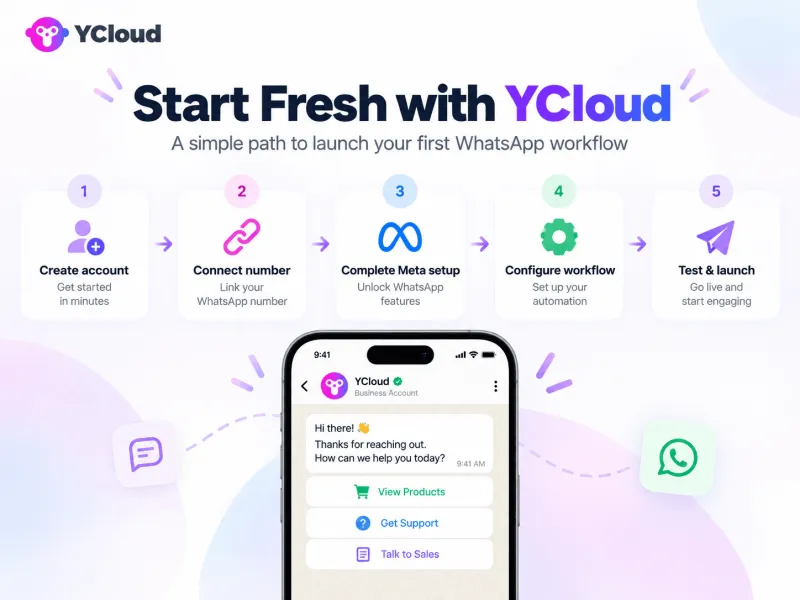
Starting Fresh? How to Get Set Up with YCloud
Start with one useful workflow, such as answering product enquiries or sending customer updates.
Create your account and choose a plan.
Start with YCloud’s Free plan, or choose a paid plan based on your required users, connected accounts, usage allowances and support.
Start with YCloud’s Free plan, or choose a paid plan based on your required users, connected accounts, usage allowances and support.
Choose how to connect your number.
Register a new number that can receive an SMS or voice verification code. Already using the WhatsApp Business App? Check eligibility for Business App coexistence to keep using the app alongside YCloud.
Register a new number that can receive an SMS or voice verification code. Already using the WhatsApp Business App? Check eligibility for Business App coexistence to keep using the app alongside YCloud.
Complete the account requirements.
Follow YCloud’s embedded Facebook signup to create or select your Meta Business Portfolio and WhatsApp Business Account. Provide accurate business details, set your display name, verify your number and complete any requested business verification. Use an administrator account when connecting an existing portfolio.
Follow YCloud’s embedded Facebook signup to create or select your Meta Business Portfolio and WhatsApp Business Account. Provide accurate business details, set your display name, verify your number and complete any requested business verification. Use an administrator account when connecting an existing portfolio.
Configure your first workflow.
Submit the necessary message templates for approval. Then set up your initial campaign, inbox assignment or AI Agent with business knowledge and human-handover rules. For campaigns, select contacts who have agreed to receive your messages.
Submit the necessary message templates for approval. Then set up your initial campaign, inbox assignment or AI Agent with business knowledge and human-handover rules. For campaigns, select contacts who have agreed to receive your messages.
Test before launching.
Use internal test contacts to check message delivery, personalization, links, incoming replies and routing. Test AI-to-human handovers too, then launch with a small audience.
Use internal test contacts to check message delivery, personalization, links, incoming replies and routing. Test AI-to-human handovers too, then launch with a small audience.
What Can You Start With for Free?
YCloud’s free-forever plan requires no credit card and includes:
- 1 user and 2 connected WhatsApp accounts.
- 500K generative AI credits and 1,000 translation characters.
- Six months of chat storage, system roles, documentation and email support.
- Access to campaigns, the shared inbox, automation, AI features, APIs and webhooks within the plan’s allowances.
Charges remain separate:
Applicable WhatsApp messaging and calling fees, other communication-channel usage, and paid subscriptions or add-ons.
Extras such as Shopify integration, additional users and AI credit top-ups require a paid plan. Custom integration work may also add costs.
Already using 360Dialog? Next, we’ll cover what to prepare before moving your existing setup to YCloud.
Already Using 360Dialog? What Moving to YCloud Involves
You can keep an eligible WhatsApp number when switching to YCloud.
Prepare the account transfer, customer records and connected workflows before scheduling the move.
Sign Up and Prepare
Create your YCloud account, then review your existing setup:
- Ownership and eligibility: Confirm administrator access to your Meta Business Portfolio and WhatsApp Business Account. Check verification status, number ownership and display-name approval.
- Connected tools: List your inbox, CRM, store, AI tools and automations, including any managed by a third-party provider.
- Responsibilities: Agree who handles the number transfer, data exports, integration changes and launch checks.
Migrate the Number
Follow YCloud’s number-migration guide. Its documented process uses a destination WhatsApp Business Account under the same Meta Business Portfolio. Settle outstanding 360Dialog invoices, disable the number’s two-step verification for migration and complete the requested number verification.
Asset | What happens during the move |
Number and business identity | Eligible migrations retain the number, approved display name, number quality rating and Official Business Account status. |
Message templates | Eligible approved templates can be copied. Check the destination account’s capacity and template status; missing or ineligible templates need recreation and approval. |
Contacts and consent records | Arrange a separate contact import. Preserve consent evidence and carry over unsubscribe records before restarting campaigns. |
Conversation history | Historical chats do not transfer through number migration. Export and retain records from your existing inbox or provider. |
Integrations and workflows | Update API connections and webhooks. Adapt existing external workflows and rebuild platform-specific campaigns, AI settings and routing where needed. |
Template eligibility and chat-history limitations are documented separately from the number transfer.
Go Live After Testing
- Test outgoing messages, incoming replies, template variables and delivery events.
- Check automation triggers, inbox assignment and AI-to-human handovers.
- Agree a switchover window with YCloud and your technical owner, including escalation contacts and a fallback plan.
- After successful migration, cancel the old 360Dialog number subscription as appropriate. Moving the number does not automatically stop subscription billing.
What determines the timeline?
Account readiness, template approvals, data exports, integration changes and testing. Confirm the schedule after reviewing this scope; completing the number transfer is only one part of getting your full setup operational.
Next, let’s bring the comparison together and decide which platform fits your business.
Final Verdict: Which Platform Fits Your Business?
YCloud is the stronger fit if your business wants API access alongside tools that marketing, sales and support teams can manage directly.
Its built-in campaigns, AI Agents, automation and shared inbox can reduce the need to assemble and maintain separate products. Developers can still handle deeper integrations.
360Dialog remains a practical option when its package and your existing integrations already meet your needs, particularly if your technical team can maintain them efficiently. For an established setup, weigh any operational benefits of switching against the work required to rebuild it.
Number count also matters. YCloud’s plans include multiple connected-account allowances, while 360Dialog’s direct plans charge per number. Compare the complete cost across your required numbers, users, AI usage, additional tools and maintenance. The lowest subscription price alone won’t settle that comparison.
Choose your next step:
- Starting fresh? Evaluate YCloud’s free plan with a real sales or support workflow. Applicable messaging charges remain separate.
- Already using 360Dialog? Discuss your migration with YCloud to confirm what transfers, what needs rebuilding and the transition schedule.
Next, we’ll answer the most common questions about pricing, capabilities and switching platforms.
Also Read:
Frequently Asked Questions
What is the main difference between YCloud and 360Dialog?
YCloud combines WhatsApp API access with built-in campaigns, AI Agents, automation, reporting and a shared inbox. With 360Dialog, the tools available depend on your package and integrations. Its Premium plan includes inbox, campaign sending, automation and measurement capabilities.
Which offers better value for my WhatsApp setup?
YCloud can offer better value when your team needs API access and business tools together. If your existing 360Dialog setup already meets your needs, weigh potential savings against migration and rebuilding costs. Compare the complete cost of numbers, users, tools and ongoing maintenance.
Do either of them add markup to Meta’s messaging fees?
NO! Both offer zero markup on Meta’s WhatsApp messaging fees. These charges remain separate from platform subscriptions. Calling, additional AI usage, paid integrations and other add-ons can still affect your total bill.
What can I access for free?
YCloud’s Free plan includes one user, two connected WhatsApp accounts, 500K AI credits, 1K translation characters and six months of chat storage. No credit card is required; applicable messaging charges remain separate.
360Dialog provides a testing sandbox limited to one recipient and 200 messaging requests. Production access requires a paid subscription.
Can I use YCloud solely for API access?
Yes. Developers can use YCloud’s REST APIs and webhooks with their existing applications. You can keep your own interface and workflows, while the included business tools remain available if your team needs them later.
Can non-technical teams manage campaigns and AI Agents?
Yes. YCloud lets business users configure campaigns, visual workflows and AI Agents without coding. Connecting custom systems or enabling agents to update business data may require technical help. Eligible 360Dialog accounts can also configure Meta Business Agent through its Hub, subject to availability and Meta’s requirements.
What inbox and automation capabilities are included?
YCloud includes its shared inbox, campaign tools, chatbot builder and Journeys across all plans, subject to user and usage allowances. 360Dialog’s Premium package includes Inbox, Sendout, Automation and Measurement. Check your selected package before budgeting for additional tools.
Do both support WhatsApp Flows, Calling and App coexistence?
Yes, with configuration and eligibility requirements. Flows need building and testing; business-initiated calls require customer permission; and coexistence applies to eligible WhatsApp Business App accounts. Confirm availability and compatibility for your number before planning to use these features together.
How does pricing change with multiple numbers?
YCloud includes two connected WhatsApp accounts on Free, three on Growth, eight on Pro and 30 on Enterprise. Additional accounts cost US$5 each per month on paid plans. 360Dialog charges per number, starting at €49 monthly on Regular. Applicable Meta messaging fees remain separate.
Can I retain my number when switching from 360Dialog to YCloud?
Yes, an eligible WhatsApp API number can migrate to YCloud. Before starting, confirm account ownership, administrator access and number-verification requirements. YCloud’s documented process creates the destination WhatsApp Business Account within the same Meta Business Portfolio.
What happens to templates, contacts and conversation history?
Eligible approved templates can transfer, subject to migration requirements. Import contacts separately and preserve consent and unsubscribe records. Conversation history does not transfer with the number, so export the records you need from your existing inbox before switching.
Will my existing integrations need changes?
Usually, yes. Update provider-specific API connections, credentials and webhook handling, then test messaging, delivery events and routing. Workflows tied to 360Dialog or a particular partner tool may need rebuilding or reconfiguring for YCloud.
How long does migration take, and what assistance is available?
Timing depends on account readiness, template checks, integration changes and testing. YCloud offers migration assistance; agree on the scope, transition schedule and responsibilities before switching production traffic. After a successful move, cancel any unneeded 360Dialog subscription, transferring the number does not automatically stop its billing.
Связанные статьи

Сделайте ваши бизнес-коммуникации намного проще


Доверенный




